Golygydd Mathemateg
Note
Cafodd y ddogfennaeth hon ei chyfieithu gan ddefnyddio cyfieithu peirianyddol gyda chymorth AI. Darperir cyfieithiadau 'fel y maent' heb unrhyw warant o'u cywirdeb. Fersiwn Saesneg y cynnwys hwn yw'r ffynhonnell swyddogol a thrylwyr.
Gallwch fewnosod hafaliadau a fformiwlâu mathemateg mewn profion, aseiniadau, trafodaethau a dyddlyfrau gan ddefnyddio'r golygydd mathemateg. Gallwch hefyd deipio fformiwlâu LaTeX mewn unrhyw olygydd testun cyfoethog lle mae'r golygydd mathemateg yn opsiwn. Mae'r golygydd mathemateg yn rhedeg ar unrhyw borwr a system weithredu, gan gynnwys ffonau clyfar a thabledi. Pan gaiff ei actifadu, mae MathJax yn rendro cod LaTeX a nodwyd yn y Golygydd Cynnwys ar draws ardaloedd Blackboard a gefnogir. Os nad yw MathJax wedi'i actifadu, bydd Wiris yn rendro fformiwlâu.
The math editor and typing LaTeX code are two different ways to add math formulas in the rich text editor. The math editor is a visual, point-and-click tool that lets you build a formula without writing any code. When activated, MathJax renders LaTeX code that you type as plain text into the rich text editor across supported areas of Blackboard LMS. Both methods render using MathJax, so you can choose whichever fits your workflow, such as pasting LaTeX code copied directly from an exam bank, textbook, or other source material. If MathJax is not activated, Wiris will render formulas.
Mae fformiwlâu mathemateg yn cael eu rendro ar ffurf delwedd PNG, sydd â meintiau ffeiliau sy'n fwy na thestun. Gall fformiwlâu mathemateg gymryd ychydig eiliadau i ymddangos cyn i'r ddelwedd ymddangos.
Mae cyflymderau cysylltiadau â'r rhyngrwyd a maint y cynnwys yn effeithio ar yr amser llwytho. Efallai y bydd rhai myfyrwyr yn ei chael yn anodd cyrchu cynnwys sy'n cynnwys llawer o ddelweddau fformiwla.
Dyma rai argymhellion i leihau meintiau delweddau fformiwlâu a'r amser llwytho:
Crëwch bob fformiwla ar wahân gan ddefnyddio naill ai'r golygydd mathemateg neu LaTeX.
Osgowch gynnwys disgrifiadau cwestiwn neu destun ychwanegol yn y golygydd mathemateg neu'r cod LaTeX. Yn lle hynny, defnyddiwch y golygydd testun cyfoethog i ysgrifennu unrhyw gwestiynau, cyfarwyddiadau, neu ddisgrifiadau testunol a defnyddiwch y golygydd mathemateg neu LaTeX i greu'r fformiwlâu mathemateg yn unig.
Er enghraifft, mae hyfforddwr yn ysgrifennu problem fathemateg am gyflymu mewn prawf. Er mwyn lleihau maint y ffeil gynnwys, mae'r hyfforddwr yn ysgrifennu'r disgrifiad o'r broblem a gwerthoedd newidiol yn uniongyrchol yn y golygydd testun cyfoethog fel testun plaen. Wedyn, mae'r hyfforddwr yn ysgrifennu'r fformiwla gyflymu gan ddefnyddio'r golygydd mathemateg.
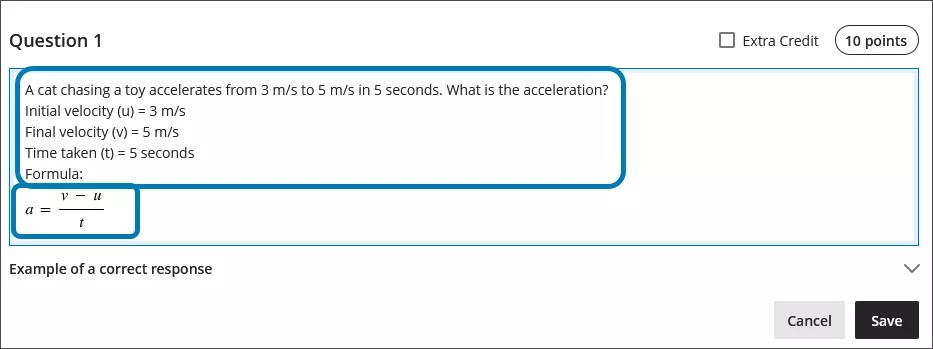
Defnyddio'r golygydd mathemateg
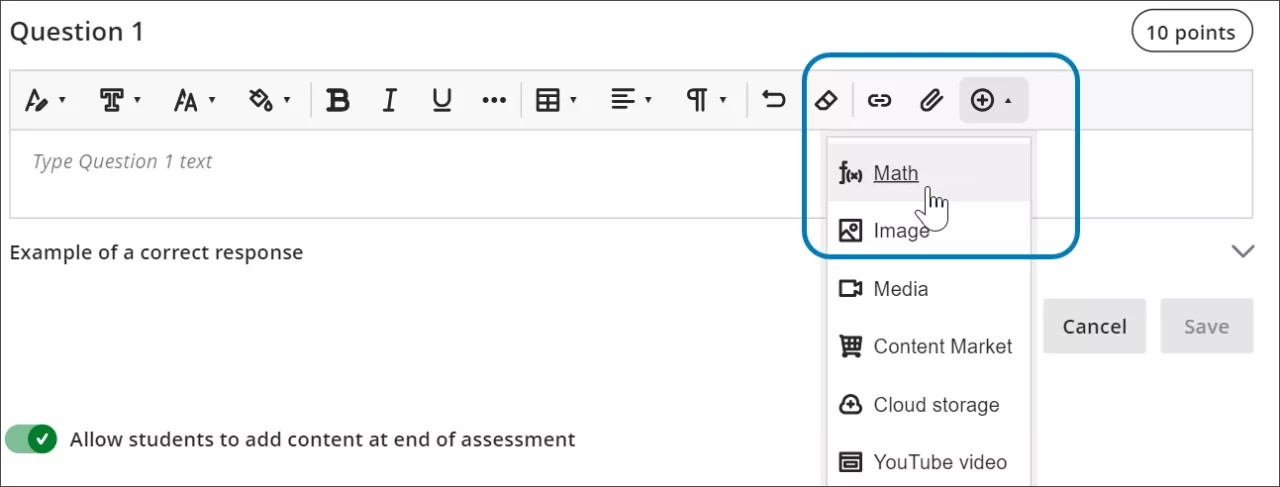
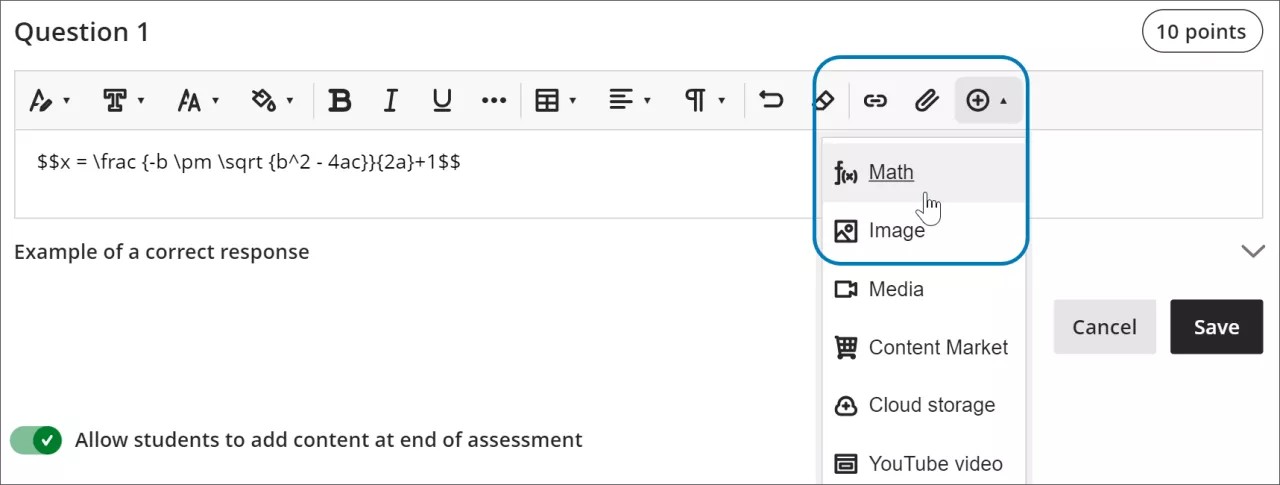
Access the math editor by selecting the + icon in the rich text editor. Select Math in the menu.
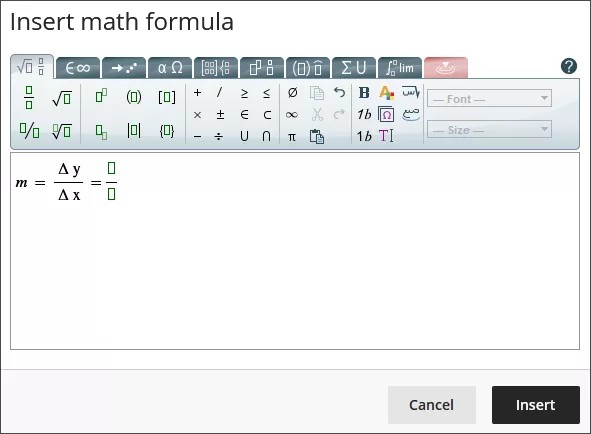
You can access many features in the math editor by selecting different tabs at the top.
Use your keyboard to enter numbers, letters, and symbols. Select the appropriate icon in the math editor to create complex formulas, such as creating a square root.
If you are using an option that changes the level of the text for your formula, such as subscript or a fraction, use the arrow keys on your keyboard to return to the default level. We recommend using the keyboard to navigate within a formula.
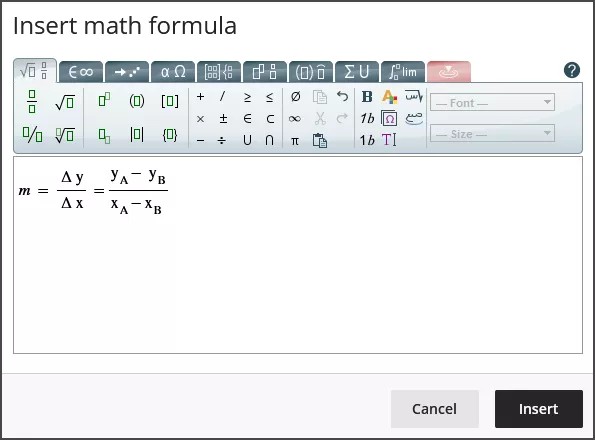
Some of the options for the building formulas in the math editor include:
Gweithrediadau sylfaenol: adio, tynnu, lluosi, rhaniad, gwreiddiau sgwâr, esbonwyr, ffracsiynau
Yr wyddor Roeg: alffa, beta, gama, ac eraill
Calcwlws Matrics
Integrynnau, deilliadau, a therfannau
Ffwythiannau trigonometrig: sin (sin), cosin (cos), tangiad (tan)
Arddulliau a meintiau ffont
Mae gwefan WIRIS yn darparu gwybodaeth fanwl am holl swyddogaethau'r golygydd mathemateg.
Defnyddio LaTeX yn y golygydd testun cyfoethog
Mae LaTeX yn feddalwedd sy'n gallu cael ei ddefnyddio i greu delwedd o fformiwla yn seiliedig ar gonfensiynau codio wedi'u hysgrifennu â thestun plaen. Gall golygydd testun cyfoethog Learn rendro codio LaTeX.
Enter a LaTeX formula by writing the specific code within delimiters in the rich text editor. MathJax supports the following delimiter options, depending on how you want the formula to display:
$$...$$or\[...\]for display equations, which appear centered on their own line, separated from the surrounding text. Display equations work well for complex expressions such as integrals, sums, and products.\(...\)for inline equations, which appear within a line of text alongside other content.
Using the delimiters that match your original source material makes it faster to copy LaTeX code from textbooks, exam banks, or other STEM materials into Blackboard LMS without needing to reformat the code.
Select Save to review how the formula displays as an image. You can go back into the rich text editor to edit the formula until it displays correctly. Some activities, such as tests and assignments, don’t allow students to save in the rich text editor and preview the rendered LaTeX formula. Students will have to check their submission afterwards to make sure that their formula rendered correctly.
Nid oes modd newid ymddangosiad y fformiwlâu, fel dangos fformiwlâu'n drwm neu newid maint y ffont, gan ddefnyddio'r golygydd testun cyfoethog. I newid arddulliau ffont neu feintiau'r fformiwla, gallwch ddewis unrhyw le o fewn y fformiwla yn y golygydd testun cyfoethog, wedyn dewiswch y golygydd mathemateg. Bydd yr holl newidiadau a wneir yn y golygydd mathemateg yn cael eu gwneud pan fyddwch yn cadw a byddant yn cael eu hychwanegu at y cod LaTeX.
select anywhere within the formula in the rich text editor.
select the math editor
All changes made in the math editor are applied when you save and added to the LaTeX code.
Example of a formula formatted in LaTeX
Nodyn
This example uses $$ delimiters for a display equation. You can also use \[...\] for a display equation or \(...\) for an inline equation instead, depending on how you want the formula to appear in your content.
Mae modd fformatio'r fformiwla gwadratig yn LaTeX.
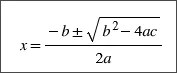
Enter $$ in the rich text editor.
$$
Next, enter the LaTeX code for the formula:
$$x = \frac {-b \pm \sqrt {b^2 - 4ac}}{2a}
Close your formula by entering $$ at the end.
$$x = \frac {-b \pm \sqrt {b^2 - 4ac}}{2a}$$
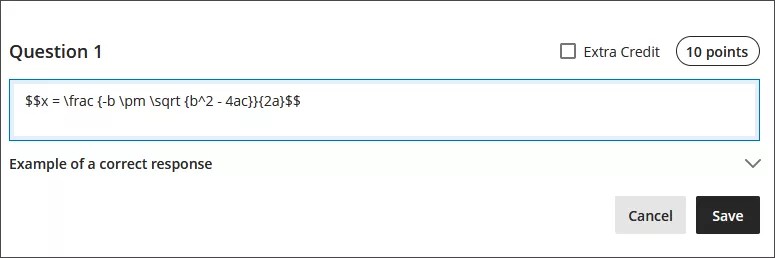
Select Save in the rich text editor. The math formula renders as a PNG image. Rendering the image may take a few seconds, depending on your internet connection and content size.

Select Edit in the rich text editor to go back to your LaTeX code.
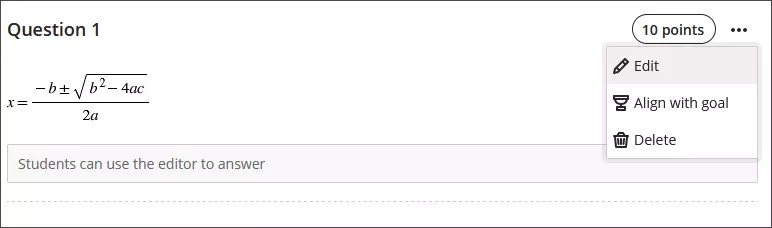
Edit your formula to overwrite your LaTeX code as plain text inside the rich text editor. For example, add a +1 to the end of the quadratic formula.
$$x = \frac {-b \pm \sqrt {b^2 - 4ac}}{2a}+1$$
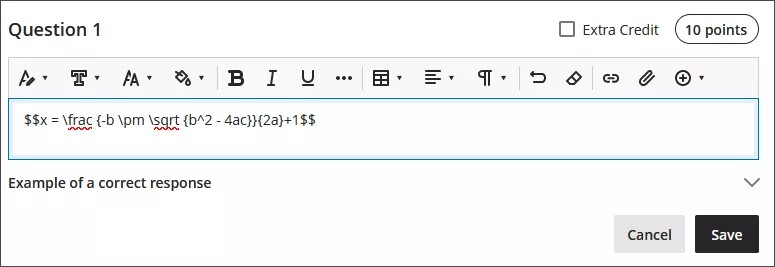
Select Save to render the formula as a new image.
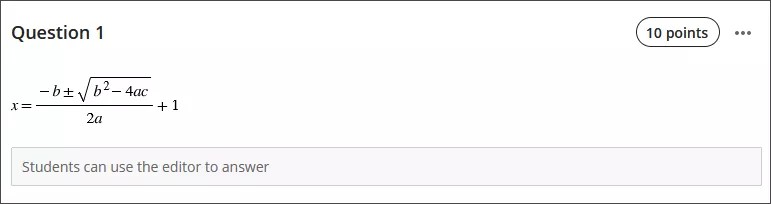
You can make further adjustments to the style of the formula. In the rich text editor, select anything inside the LaTeX code.
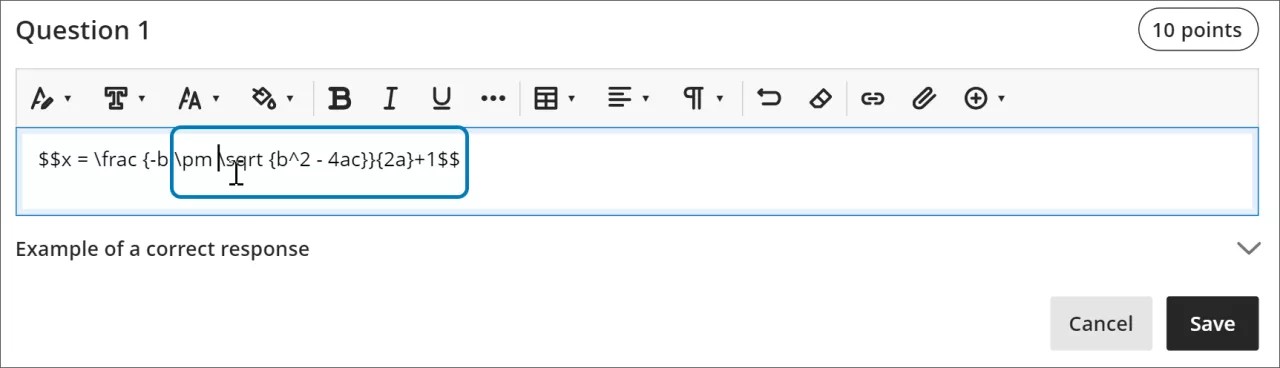
Open the math editor.
Apply the styles you want to the formula. For example, you can bold part of the formula and change the font size.
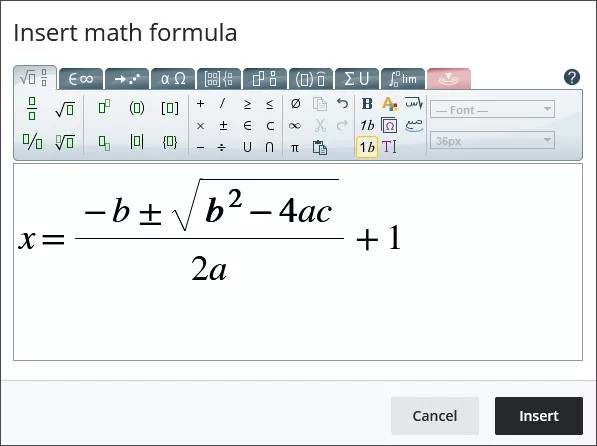
Select Save in the math editor. The LaTeX code for the quadratic formula with your style adjustments is now:
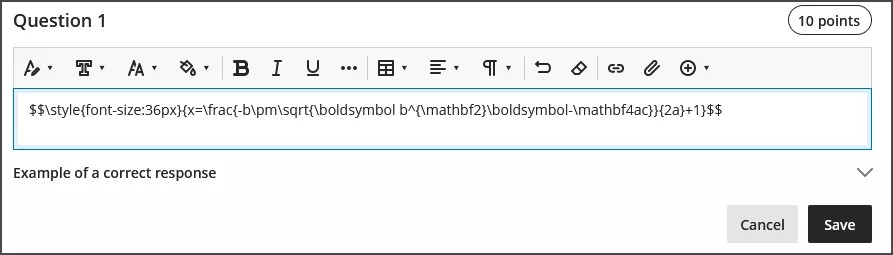
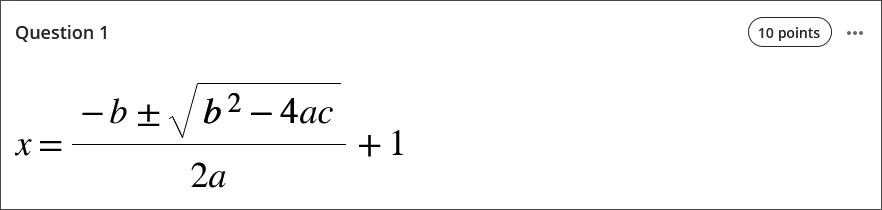
$$\style{font-size:36px}{x=\frac{-b\pm\sqrt{\boldsymbol b^{\mathbf2}\boldsymbol-\mathbf4ac}}{2a}+1}$$
Select Save in the rich text editor to render your adjusted formula as an image.
Nodweddion hygyrchedd
Mae delweddau fformiwla mathemateg o ansawdd uchel, felly gall defnyddwyr nesáu ati a bydd y ddelwedd yn dal i fod yn glir. Gallwch hefyd newid maint y ffont i helpu'ch myfyrwyr. Gall meintiau ffont mwy helpu eich myfyrwyr i weld manylion fformiwla â rhifau bach a symbolau.
Mae fformiwlâu yn hygyrch ar gyfer darllenyddion sgrin wrth i chi eu creu a phan fyddant yn cael eu rendro fel delweddau.
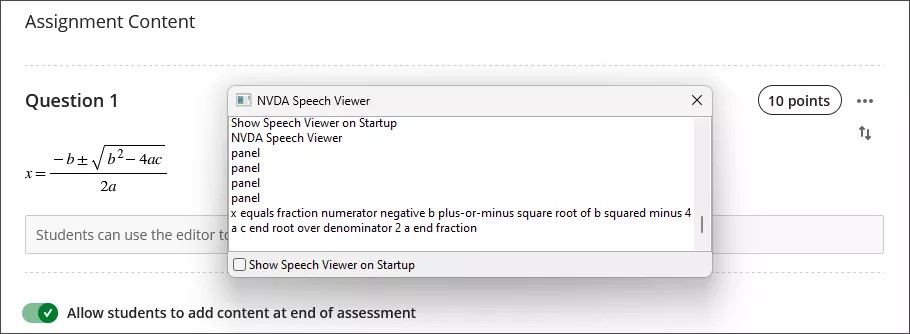
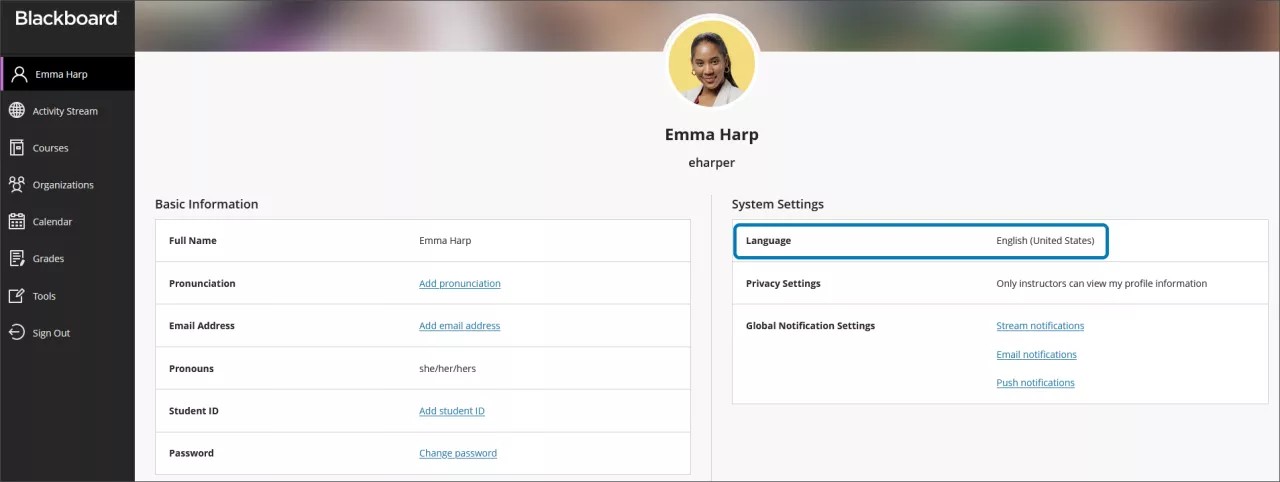
Mae testun amgen ar gyfer fformiwlâu mathemateg yn cael ei gynhyrchu'n awtomatig yn seiliedig ar eich gosodiad iaith yn eich proffil yn Learn. Mae darllenyddion sgrin yn dilyn gosodiadau eich dyfais leol, gan gynnwys iaith, cyflymder a llais. I gael profiad gwell gyda'ch darllenydd sgrin a thestun amgen, gwnewch yn siŵr bod eich gosodiad iaith yn Learn yn cyd-fynd â'r gosodiadau ar eich dyfais leol.
Nodyn
Os nad yw'r golygydd mathemateg na'r golygydd testun cyfoethog yn cefnogi iaith, bydd fformiwlâu yn cael eu darllen yn Saesneg.