将评分量规关联到评估
Note
本文档采用 AI 辅助机器翻译。译文仅供参考,不保证准确性;此内容的英文版为官方权威版本。
您也可以将现有评分量规关联到某个项目,除非您已为该项目评分。您仅可以为每个项目关联一个评分量规。在作业、讨论或日记页面上,选择设置图标以打开“设置”面板。在“其他工具”区域中,选择添加评分量规。
On the assignment, discussion, or journal page, select the Settings icon to open the Settings panel.
In Grading & Submissions section, select Add Rubric.
The Course Rubrics page opens.
Select the radio button next to the rubric you want to associate with the assessment.
Select Save & Close.
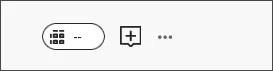
当您关联评分量规并查看学生的作业或测试提交时,成绩药丸将显示评分量规图标。
删除关联
您可以从已评分的评估中删除评分量规,成绩将会保留。成绩不再与评分量规关联,但现在显示为您手动添加的成绩。
To remove a rubric from an assessment, select the trash can icon in Assignment Settings.
观看关于关联评分量规的视频
以下解说视频以视觉和听觉的方式介绍了本页中包含的部分信息。如需视频中的详细描述,请在 Vimeo 上打开视频,导航至更多操作,然后选择打开文字转录。