小组作业
Note
本文档采用 AI 辅助机器翻译。译文仅供参考,不保证准确性;此内容的英文版为官方权威版本。
关于小组作业
重要
There are two versions of the Groups experience, the new Groups experience and the previous Groups experience. Your institution makes the decision for which version is configured. The new Groups experience becomes the default experience for all courses in January 2027.
协作学习与传统指导教学相比有许多优点。研究表明,当学生作为一个团队完成作业时,他们可培养积极的态度、更有效地解决问题并且体验到更大的成就感。
创建小组作业的方式与创建让学生单独完成的作业的方式几乎相同。成绩簿项会自动创建。
The versions of Groups that your Blackboard LMS administrator has configured determines whether you can create new group sets directly in Assignment Settings:
In the reimagined Groups experience, you can't create groups from the assignment settings, so create the group set on the Groups tab of the Course Content page first.
In the previous Groups experience, you can create groups while you set up the assignment.
如果享受优待的学生在小组中,则该小组中的所有学生都继承该项目的优待。例如,您创建一个组作业,并且一个组成员有到期日期优待。如果该组在到期日期后提交作业,则不会标记逾期。
对于具体的小组作业或小组测试,您可以为单个小组设置例外情况,仅能延长访问时间。目前,对于小组评估,不允许进行多次尝试。
如果您的机构已启用 Collaborate Ultra 并且您为作业启用了对话,则学生可以与其小组成员举行虚拟会议。
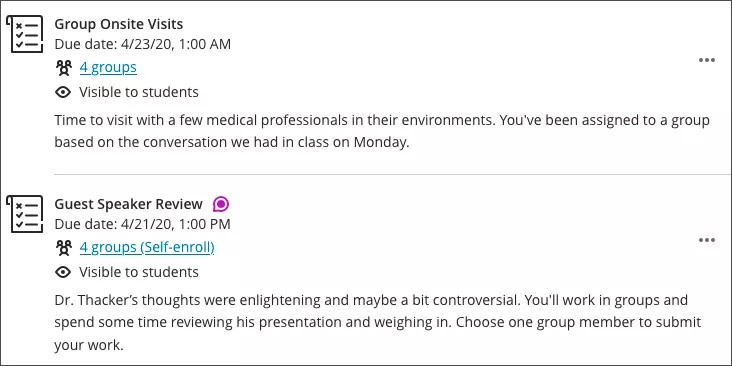
小组作业将显示在“课程资源”页面上
您可以查看您分配的小组数量并打开相应链接查看成员。如果您启用了小组对话,则系统会为新活动显示活动图标。
观看有关小组作业的视频
注意
This video shows the current default version of Groups. In January 2027, the new Groups experience becomes the default version in Blackboard LMS.
以下解说视频以视觉和听觉的方式介绍了本页中包含的部分信息。如需视频中的详细描述,请在 Vimeo 上打开视频,导航至更多操作,然后选择打开文字转录。