评分方案
Note
本文档采用 AI 辅助机器翻译。译文仅供参考,不保证准确性;此内容的英文版为官方权威版本。
使用评分方案
在您的课程中,成绩会在成绩簿和作业提交页面上显示。您可以通过评分方案选择以不同的方式显示成绩。方案代入对项目评出的分数,将这些分数与项目的满分进行比较,算出一个百分比。然后,此百分比将映射到分数范围内并显示为成绩,例如字母(A、B、C)或及格/不及格。
该模式将项目得分与该项目的总积分进行比较,从而得出百分比。该百分比随后会映射到一个分数范围,并以成绩形式显示,如字母(A、B、C)或通过/不通过。
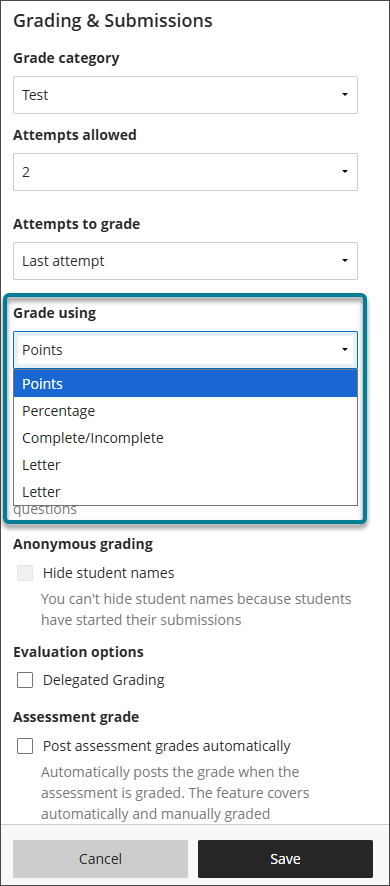
可用的默认评分方案包括:
分数
百分比
完成/未完成
字母
注意
与显示成绩不同,完成/未完成模式仅显示学生是否完成了评估。
课程中的所有默认和自定义评分架构都显示在新评分项目和现有评分项目的 评分方式菜单中。
注意
如果成绩输入无效,成绩将还原为先前的状态或值。
多个评分方案
每门课程最多可以有 100 个评分方案,让您可以灵活地为课程中的每个评估活动使用最合适的评分方案。
在成绩册中,选择设置图标以打开成绩册设置面板。
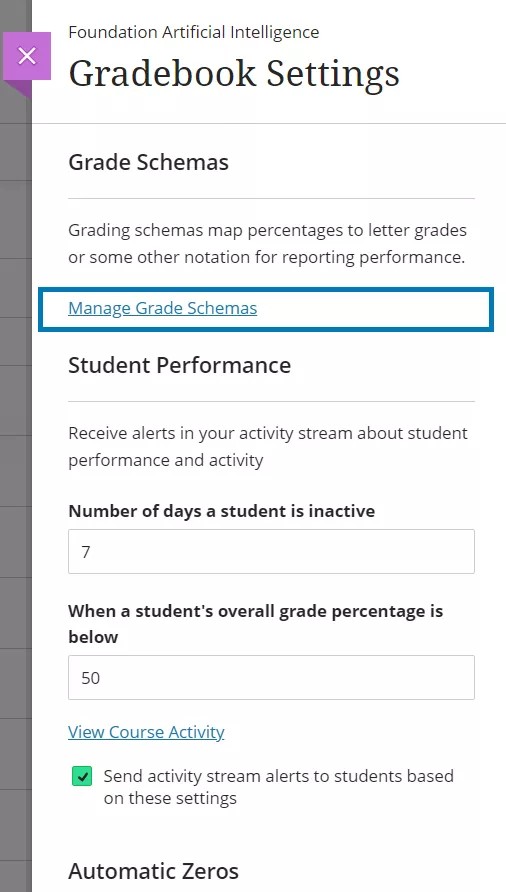
选择 以管理成绩方案 。
选择 以添加 。
输入你的模式名称。
在等级方案中选择你新创建的模式。
根据需要编辑您的模式。
要复制或删除模式,请选择“选项”菜单。您只能删除未使用的模式。
要插入行,请选择加号 (+)。
你可以通过选择分数范围来编辑成绩范围。从下到上垂直排列。你可以使最大值大于 100%。例如,如果学生成绩达到 100% 或以上,你可以给 A+。
所有行都有选项菜单。选择它以编辑或删除该行。该模式至少需要两行内存才能有效,而且你不能删除最后一行。
当您在编辑模式下添加或删除行或编辑值时,其余值会自动调整。这可确保模式中不存在数值空缺。
管理评分方案
在成绩簿中,选择设置。
在成绩簿设置面板中,选择管理成绩架构查看课程中可用的架构。
默认方案的名称和值由管理员定义,但您可以创建新的评分方案,可以自定义现有方案。
您可以重命名课程中的默认方案,并更改成绩范围。
关于模式的注意事项:
如果您进行更改,则更改仅适用于您所在的课程。
如果您的机构对默认评分方案进行了更改,更改不会反映在您的课程中。只有在更改后创建的新课程才会使用编辑后的方案。
Ultra 课程视图不支持在原始模式中创建的文本架构。转换课程时,文本方案会转换为分数方案。转换后,您可以根据需要创建和应用备用方案。
要复制或删除模式,请选择“选项”菜单。您只能删除未使用的模式。
复制项目和课程
如果您从您教授的其他课程中复制评估和活动,评估和活动会保留他们的评分方案。如果您复制整个课程,所有成绩方案都会包括在内,即使它们并不适合任何可评分项目。
成绩簿计算和评分方案
计算模式使用您为每个评估选择的评分方案,以分数、字母(A、B、C)或百分比显示成绩。该模式将项目获得的分数与该项目的总分进行比较,以获得百分比。该百分比会映射到多个分数范围,并显示一个等级,例如一个字母。
对于总成绩,学生的原始数字分数为 88,满分为 100。按照某个评分方案,87 到 90 之间的百分比相当于 B+,因此学生的分数 88 对应的结果是 B+。