Add an Incoming SAML Service Provider

SAML is an authentication standard used by many systems, including Blackboard, to authenticate a sign on request. The Inbound SAML Service requires setting up two adapters in Blackboard, the SAML SP Service Provider and the SAML Redirector Inbound Adapter that will then be connected to the Outgoing SAML Adapter.

The SAML SP Service Provider contains the configuration information needed to be able to process the SAML assertion sent from the configured Identity Provider to the UAS SAML Service Provider.

The SAML Redirector Inbound Adapter receives the SAML Assertion from the Identity Provider and directs it to the SAML SP Service Provider to be processed.

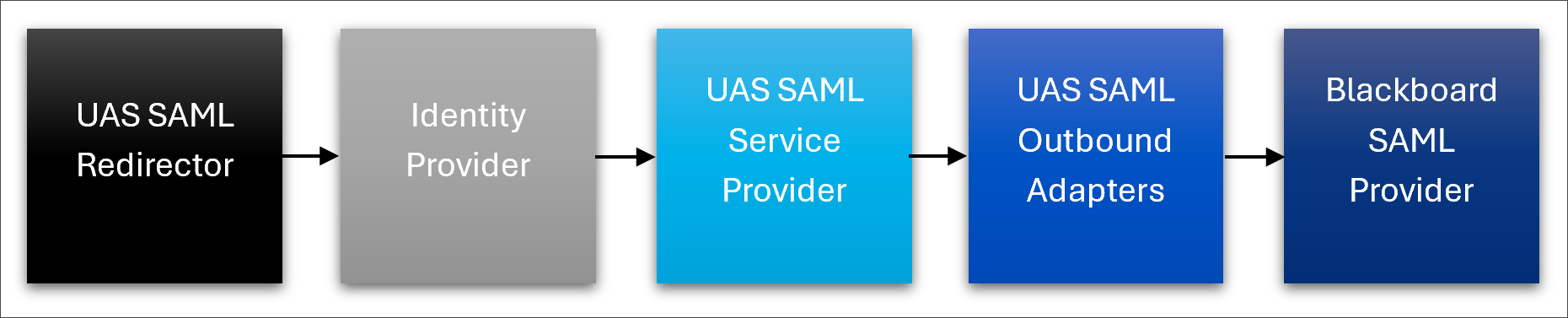
An example login flow using this service through UAS looks like the following:

blackboard-extensions-adminstrator-saml-service-flowchart.png

When configuring UAS to use the SAML Service, configure the UAS adapters in the following order.

UAS SAML Outbound Adapter

First configure the outgoing SAML adapter along with the Blackboard SAML Provider. Find the steps at Add the Outgoing SAML Adapter.

SAML Service

From the UAS Settings screen, select Add Authentication Adapter. Fill out the fields as follows:

Field

Description

Alias

This is a unique name for the adapter and is used in URLs. The alias will be stored as all lowercase letters and should not contain any special URL characters.

Enabled

This toggle determines whether the adapter is available for use.

Auth Type

SAML Service

Private Key

The x509 private key. The value will only be visible while you are creating the adapter. For more information about creating the private key, visit Generate Public and Private Keys.

Public Key

The x509 public key. This key will be shared with the SAML service provider through the generated data. For more information about creating the private key, visit Generate Public and Private Keys.

IDP Metadata

Enter the Metadata provided by your SAML Identity Provider.

Entity ID

Enter an Entity ID that uniquely identifies your service. This needs to match the value configured in your IDP.

Name ID Attribute

Enter the name of the attribute in the SAML Authentication Response that identifies the username. If no value is entered, the system will use the nameID provided in the response.

Name ID Attribute Expression

Enter the regular expression, if necessary, used to parse out the username attribute from a principal. If not provided, the system will use the nameID provided in the mapping directly.

Name ID Attribute Expression Match

Enter the regular expression group match number for the Name ID attribute Expression regular expression. If not provided, the system will use the first match (0 index).

Email Attribute

Enter the name of the attribute in the SAML Authentication response that identifies the user’s email.

Email Attribute Expression

Enter the regular expression used to parse out the email attribute from the value provided in the Email attribute. If not provided, the system will use the Email ID provided in the mapping directly.

Email Attribute Expression Match

Enter the regular expression group match number for the Email attribute Expression regular expression. If not provided, the system will use the first match (0 index).

Given Name Attribute

Enter the name of the attribute in the SAML Authentication response that identifies the user’s Given (First) Name.

Family Name Attribute

Enter the name of the attribute in the SAML Authentication response that identifies the user’s Family (Last) Name.

User Lookup Method

Select either Username or Batch UID. This setting determines how the user pairing in Blackboard will be performed. If Username is selected, Blackboard will search for a Username in the Blackboard Database that matches the value in the Name ID Attribute. If Batch UID is selected, Blackboard will search Batch UIDs for the value rather than Username.

Select Save to save your configuration.

SAML Redirect Inbound Adapter

From the UAS Settings screen, select Add Authentication Adapter. Fill out the fields as follows:

Field

Description

Alias

This is a unique name for the adapter and is used in URLs. The alias will be stored as all lowercase letters and should not contain any special URL characters.

Enabled

This toggle determines whether the adapter is available for use.

Auth Type

REDIRECTOR

Use Outbound Adapter

Select the authentication adapter which will be used for outbound authentication to the external system. If left blank, the system will use the outbound adapter configured as default.

Debug Enabled

This toggle determines whether debug statements are written to the logs for troubleshooting purposes.

Service

Secure this adapter with a SAML Service Provider adapter so that only users authenticated by the configured IDP can access this adapter. Typically, you will select the SAML Service Provider you configured in the preceding steps.

Generate Metadata

If you are performing the initial configuration, you will not be able to generate the metadata until the configuration has been saved.

Once you have saved the configuration, return to the UAS Settings screen and choose this configuration to edit it. Select the Generate Metadata button to generate the Service Provider Metadata. You can provide that metadata to the IDP to complete that configuration.

Select Save to save your configuration.

The URL for the configured adapter is https://{region}.extensions.blackboard.com/api/v2/authadapters/sites/{siteId}/auth/{alias}.