Encompass - 2025.8 Release Notes
March, 2026
U.S. - 16 March, Monday evening | Canada - 16 March, Monday evening | Australia - 17 March, Tuesday morning
Release Highlights & Benefits
New feature: Email campaign comparison in Email Reporting
Accessibility: Improvements across Scoreboards, Class Notes, Directory, Admin UI, and Forms
Bug fixes: Email Reporting, Email sending, Events, Forms, and Groups
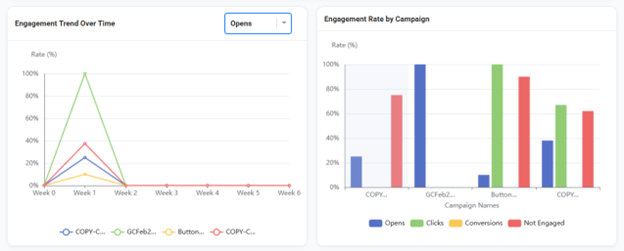
Feature spotlight: Email campaign comparison in Email Reporting
This release introduces Email Campaign Comparison to make that review faster by providing a high-level, side-by-side view of engagement across multiple campaigns, including key metrics and visual trend charts to help identify top performers, outliers, and engagement patterns more quickly. Admins can access this in Admin > Email > Email Reporting within the Recently Deployed Emails list, where they can select multiple campaigns and open the comparison view. For step by step instructions you can view the Support Center article here: Email Campaign Comparison
Accessibility updates
This release improves accessibility in core Encompass areas by:
Increasing text and visual contrast so content is easier to read
Making keyboard focus states more visible so admins can see where they are on the page
Improving screen reader labels so repeated controls are easier to understand
Adding indicators that don’t rely on color alone to show selection or status
Note: These updates apply to core Encompass functionality and platform-supported components. Accessibility results can vary based on client-authored page content and client-specific template design. For template-related concerns, contact your CSM or Support. For client-authored content issues, update the content or reach out to Support for assistance.
Improved labels and accessibility support for key controls in Forms and profiles
Improves how forms and profile-related controls are labeled for screen readers, including clearer identification of repeated controls so users can tell which control they are interacting with. This reduces confusion when navigating forms using assistive technologies.
Class Notes readability and screen reader clarity improvement
Improves Class Notes by increasing text and focus outline contrast and by adding more descriptive labels for repeated “Edit note” actions so screen reader users can identify which note they are editing before selecting it.
Scoreboards contrast, focus, and non-color indicator improvements
Improves Scoreboards by increasing contrast for key UI elements (focus outlines, progress visuals, goal text, navigation tabs, and icons) and adding indicators that do not rely on color alone to show selection or status. Also improves color picker control labeling so screen reader users can understand what each control does.
Directory contrast and focus visibility improvements
Improves Directory usability by increasing contrast in the date picker, making the “View details” focus state easier to see for keyboard users, and improving visibility of the default profile image in search results.
Resolution
Functional Area | Reference | Description |
|---|---|---|
Event Registration – Attendee list | 2268504 | Opt-out fields are now created as locked fields to prevent accidental changes and inconsistent setup. |
Email Marketing – Email sending
| 2619605 | Fixes an issue where prioritized segmented daily emails could experience significant delivery delays compared to their scheduled time, which made send timing less predictable for admins managing email schedules. |
Forms | 2692861 | Fixes an issue where browser saved address autofill could populate the City field with the State value or abbreviation. |
Groups | 2696920 | Fixes an issue where the RSS Feed/Subscribe option on Group Overview pages did not open a working feed. The action now opens a valid RSS XML feed in a new tab. |
Release Details
Schedule: The release is targeted for March, 16, 2026.
Approval: The contents of this release have been approved by the Product and Engineering teams.