Recipients
Accessing
From the Email menu, choose Email Reporting.
Fly Out Navigation
The flyout navigation is accessed through an icon of three parallel bars -
 located in the upper left on the email reporting landing page.
Flyout Navigation:
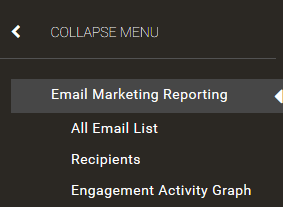
Select Recipients
Recipients Page
Will show:
Email Address
Name
Constituent ID
Encompass Member ID
The data reflects messages and activity since 1/1/2018.
Use the search option to find a specific individual using name, email address, Constituent ID, or Encompass Member ID.
Note
Admins must type in a minimum of two characters before their search will be conducted. All non-alphanumeric characters will be converted to spaces unless they are recognized as part of an email address or URL (i.e. gmail.com).
Clicking on an email address will move you to a new screen. You will see email metrics for the individual you're looking at as well as the specific messages you sent this individual.
When viewing a drill-down report, click the name of the individual you want to see metrics/information for.
The data reflects information for the specific site / GID you are in.