Roll-Up Report
When you click on the parent level message or the Segmented Campaign Name in Email Marketing Reporting, you will be moved to a roll-up report of metric information. The graphs are clickable so you can get detailed information.
The child messages or versions will be listed out under the graphs with metric information. Each email name is clickable so you can drill into reporting specific to that one message.
If a Segmented Campaign utilized prioritization, that will be indicated after the summary heading.
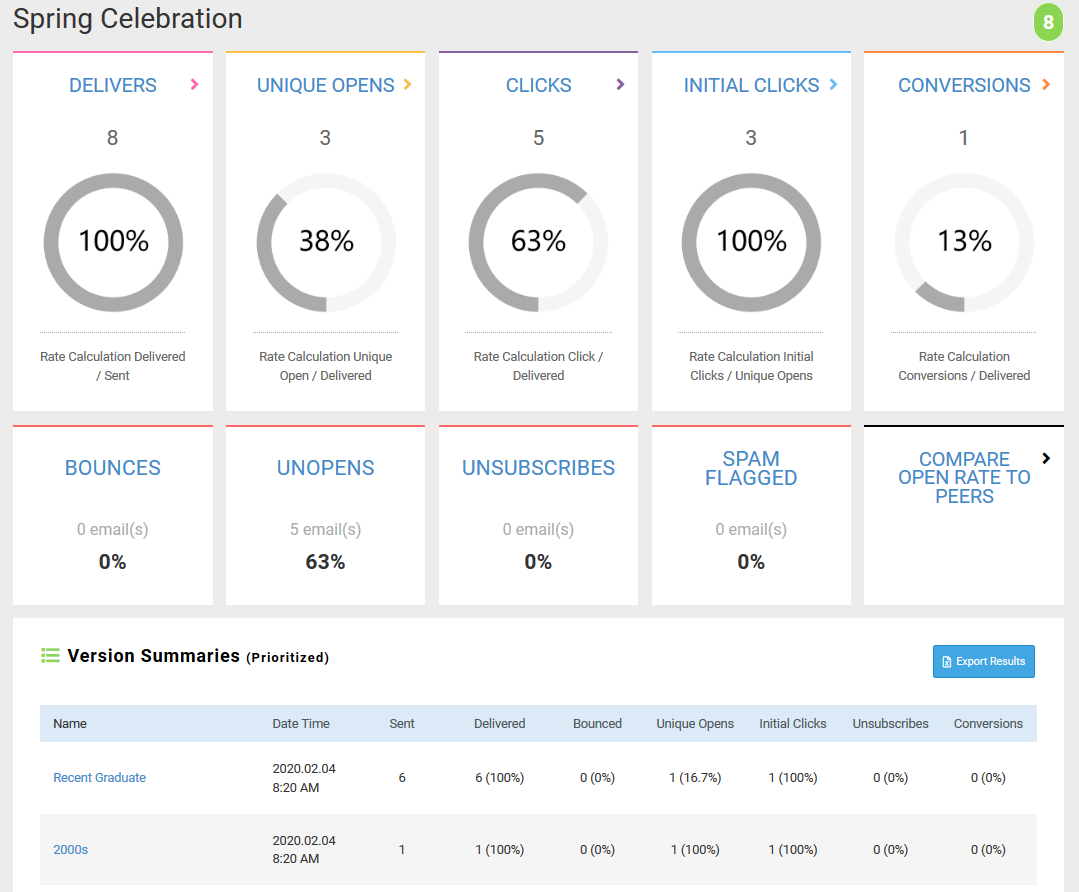
The chart below provides information on what you'll see when you click a graph.
Page | Contents | Recurring Summary Page |
Delivered | List of Delivered by Recipients | Individual instances will not display (i.e. de-duped) Displays the Last Delivery Date |
Unique Opens (includes both opens and unique opens) | List of Opens by Recipients | Individual instances will not display (i.e. de-duped) Displays the Last Open Date |
Clicks (includes unique clicks) | List of Links | Individual instances of the email will not display (grouped by email) Displays per email a summary of clicks for a specific link. If a link was clicked in different emails, the link will display for each email. |
Conversions | List of Conversion Activity by Recipient | Individual links for each occurrence of an email and their metrics If a link is clicked in multiple email occurrences, each email/link combination will display a separate row of metrics. |
Bounces | List of Bounced Events | Displays individual bounce events. These events can occur for any email message / recipient combination. |
Unopened | List of Recipients | List of recipients who haven't opened the email If multiple occurrences of the email remain unopened, each unopened occurrence will display separately. |
Unsubscribed | List of Unsubscribed Events | Individual Occurrences If one recipient unsubscribes from multiple email categories, each unsubscribe request is counted separately. |
Spam Flagged | List of Flagged as Spam Events | Displays individual spam mark events. These events can occur multiple times for recurring emails. In this event, multiple instances will display separately. |