Lernmodule
Note
Diese Dokumentation wurde mithilfe einer KI-gestützten maschinellen Übersetzung übersetzt. Die Übersetzungen werden „wie besehen“ bereitgestellt, ohne Gewähr für ihre Richtigkeit. Die englische Version dieses Inhalts ist die offizielle und maßgebliche Quelle.
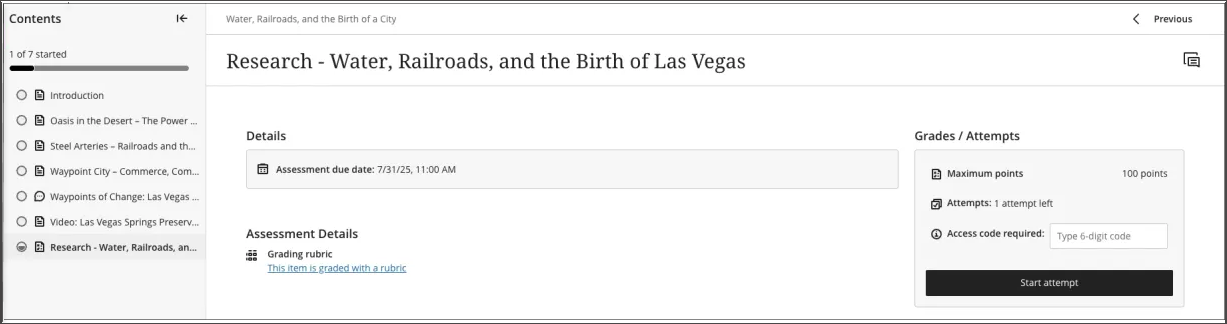
Ein Lernmodul ist ein Container für organisierte Sammlungen von Inhalten. Mit Modulen können Teilnehmer ohne Ablenkungen oder zusätzliche Klicks von einem Inhaltselement zum nächsten navigieren. In einem Lernmodul können Sie sich auf die Lektion oder die Begriffe konzentrieren, die Sie gerade lernen. Wenn Ihr Kurs mit einem Lehrbuch arbeitet, kann Ihr Kursleiter mithilfe von Modulen Inhalte gruppieren, um ein angemessenes Tempo einzuhalten.
Ein Lernmodul sieht auf der Seite „Kursinhalte“ ähnlich aus wie ein Ordner. Wählen Sie den Titel oder den Pfeil aus, um das Lernmodul zu öffnen und dessen Inhalt anzuzeigen.
Lernmodule können Folgendes umfassen:
Lesestoff und Dateien
Leistungsnachweise (Aufgaben und Tests)
Gruppenprojekte
Diskussions- und Tools für die Zusammenarbeit
Sie können alle sichtbaren Inhalte innerhalb des Lernmoduls anzeigen, einschließlich der Abgabetermine.
Navigieren in einem Lernmodul
Wenn Sie ein Lernmodul öffnen, wird ein reduzierbares Inhaltsverzeichnis in der Seitenleiste Ihres Bildschirms angezeigt. In diesem Bereich werden alle Inhaltselemente des Lernmoduls angezeigt und Sie können den Umfang und die Organisation der Inhalte schnell verstehen.
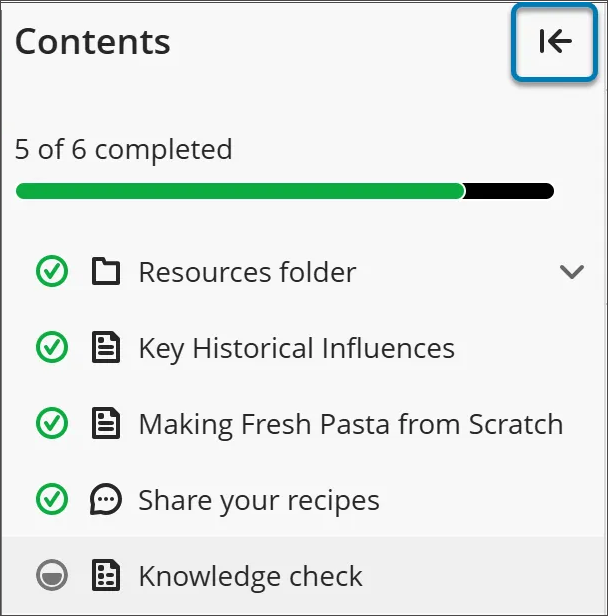
Wählen Sie ein beliebiges Element im Inhaltsverzeichnis aus, um es direkt zu öffnen (es sei denn, Ihr Kursleiter hat eine bestimmte Reihenfolge erzwungen).
Wenn Sie das Inhaltsverzeichnis ausblenden möchten, wählen Sie die Pfeilschaltfläche in der oberen Ecke des Inhaltsverzeichnisses aus.
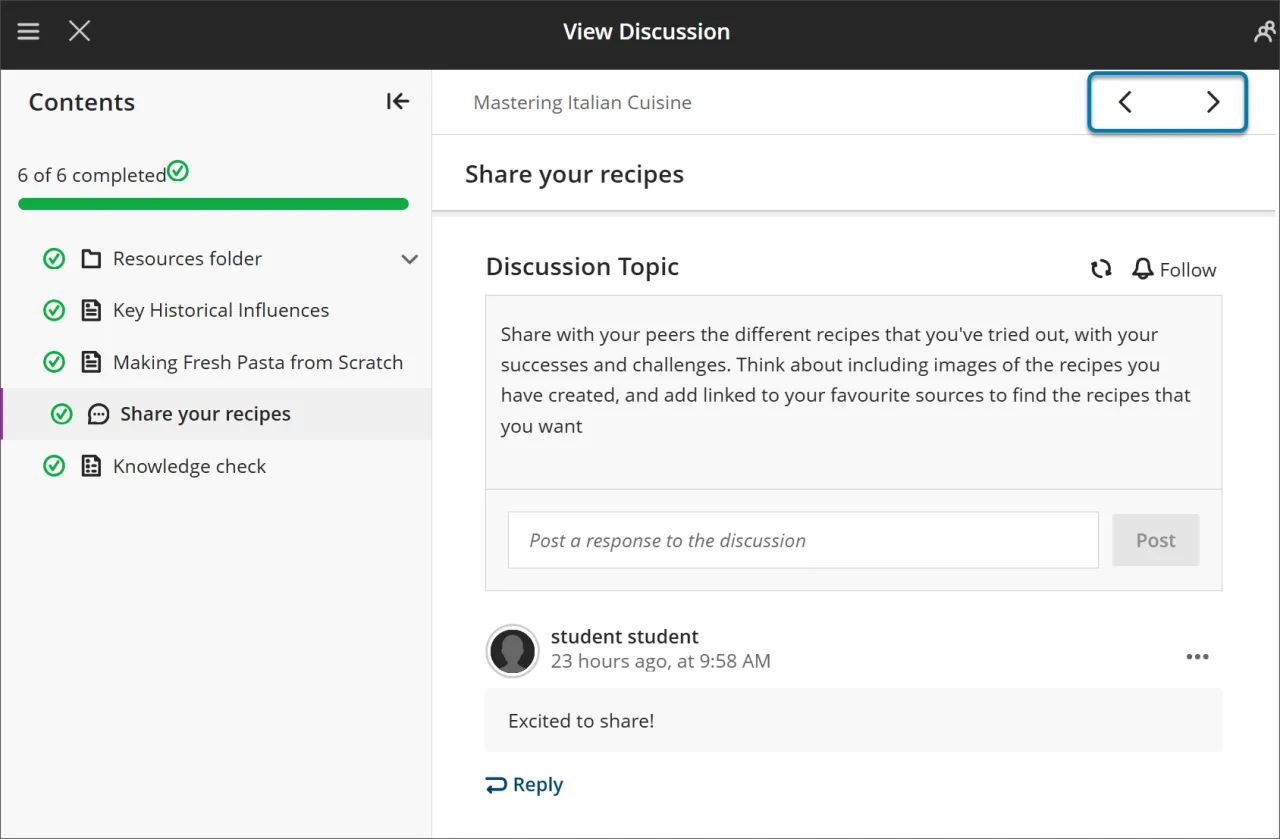
Verwenden Sie die Buttons Next und Predecessor oben rechts, um die Inhalte der Reihe nach durchzugehen. Wenn Ihr Kursleiter die erzwungene Sequenz aktiviert hat, stellen Sie möglicherweise fest, dass das nächste Element gesperrt ist.
Sie müssen bestimmte Bedingungen erfüllen, bevor „Weiter“ und der nächste Eintrag im Menü „Inhaltsverzeichnis“ verfügbar werden. Sie können immer noch alle zuvor freigeschalteten Elemente erneut aufrufen.
Erzwungene Sequenz
Wenn Ihr Kursleiter verlangt, dass Elemente im Lernmodul in einer bestimmten Reihenfolge abgeschlossen werden, wird eine Meldung angezeigt. Es können auch andere Bedingungen gelten, wie z. B. Zugriffsdaten oder Voraussetzungen.
Wenn das Lernmodul Ordner enthält, navigieren Sie auf die gleiche Weise wie andere Inhalte durch diese Ordner. Ihr Kursleiter verlangt möglicherweise, dass Sie Inhalte in einem Ordner vervollständigen, bevor Sie fortfahren.
Verfolgen Sie Ihren Fortschritt
Sie können ein Lernmodul verlassen, bevor Sie es abgeschlossen haben. Wenn Sie zurückkehren, werden neben den Inhalten Symbole angezeigt, die Ihren Fortschritt anzeigen, sodass Sie dort weitermachen können, wo Sie aufgehört haben.
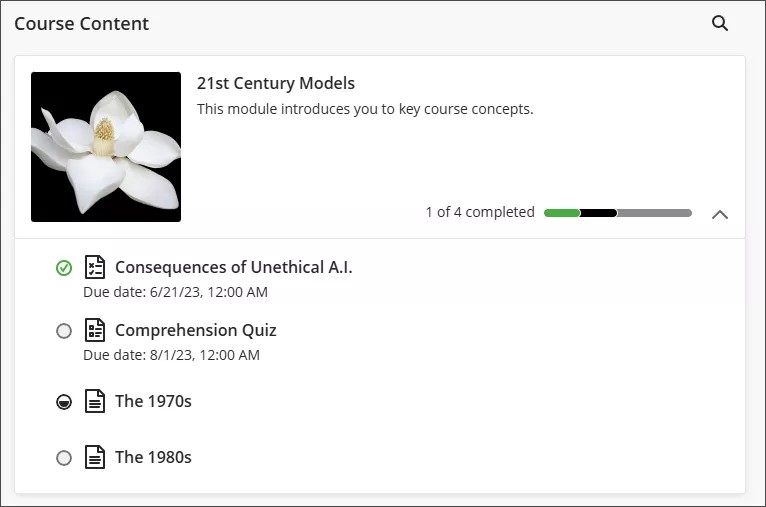
Es gibt vier Arten von Fortschrittssymbolen:
Ein grüner Kreis mit einem Häkchen bedeutet, dass der Inhalt vollständig ist.
Ein teilweise ausgefüllter grauer Kreis bedeutet, dass der Inhalt gerade bearbeitet wird.
Ein leerer Kreis bedeutet, dass du den Inhalt noch nicht gestartet hast.
Ein Schlosssymbol bedeutet, dass du die Voraussetzungen für den Zugriff auf den Inhalt noch nicht erfüllst.
Bewertungen in Lernmodulen
Wenn Sie eine Bewertung aus einem Lernmodul heraus öffnen, wird sie in einem ganzseitigen Bereich angezeigt. Dieses Layout bietet ein konsistentes und fokussiertes Erlebnis und hilft Ihnen, sich mit dem Material zu beschäftigen.