Need to get help?
Access this integrated Support Center and knowledge base directly from the Course Evaluations Manager Portal Home Page or via the web or direct link:
Via Course Evaluations..
You can access the ticket form on the CE home page. Look for Request Support.
Login to Course Evaluations
On the Home Page click "Request Support"
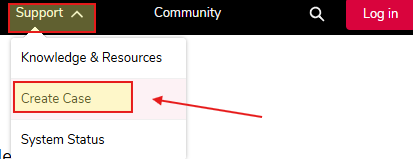
Once on the Support Home page click the 'Support' menu on the top-right and then
Click Create Case
Fill in the form, and be sure to select Blackboard Course Evaluations for the Product drop-down
Via the Web...
Click click the Support menu on the top-right
Click Create Case
Fill in the form, and be sure to select Blackboard Course Evaluations for the Product drop-down
Via direct link...
Create a support case via this form
Fill in the form, and be sure to select Blackboard Course Evaluations for the Product drop-down