Linking Preceptors to Sites on Rotation Administrations
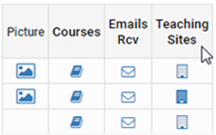
Faculty can be manually attached to sites in the Faculty list menu and also attached via the Faculty Site Import. The site icon on the list page turns a darker shade of clue of sites are selected. The Site List will also list the number of faculty associated with each site.
The Rotation Auto-check will only select individuals to be evaluated if they belong to the site being evaluated.

NOTE: The selection takes place as courses are added to the administration. If new site associations are added after courses are added the individuals will need to be selected for those sites on the administration manually. There is a feature to copy selections to all sites in Question Category Settings.
This feature works great when paired with question category role filtering. The combination of role and site filters narrows down the individuals who should be evaluated.