Notas de la versión 2026
Note
Este documento se ha traducido mediante traducción automática asistida por IA. Las traducciones se proporcionan «tal cual», sin garantía alguna respecto a su exactitud. La versión en inglés de este contenido es la fuente oficial y con valor normativo.
Ally 2.19.8 Release to production: September 28, 2026
Bug Fixes and Improvements
Fixed a bug in Blackboard integrations that caused some Documents not to be able to generate audio alternative formats.
Fixed a bug in Canvas integrations that caused Ally not to be able to correctly recognize images within Classic Quizzes which resulted in images with alt text being flagged as missing in the Course Report.
Implemented an accessibility improvement to the focus indicator applied to the Enable Future courses button within the Ally Configuration tool.
Fixed a bug in Canvas integrations that caused an error when attempting to fix any HTML issue from the Course Report.
Fixed an accessibility issue that caused insufficient contrast on the focus indicators for the enable and disable options within the Ally Configuration tool.
Fixed a bug with the Table Header Quick Fix that caused the selected option to disappear when Fix all occurrences was selected.
Fixed an accessibility issue within the Table Header Quick Fix to ensure that the Apply a table header selector is appropriately associated with its visible label.
Implemented an accessibility improvement to the Ally Terms of Use to ensure the Terms of Use text meets minimum color contrast requirements.
Fixed an issue in Blackboard where instructors using the Course Accessibility Report to fix issues in Documents were unexpectedly able to remove content incorrectly identified as links when embedding LTI Video links including Yuja, Echo360, Panopto, Kaltura and other third-party videos.
Fixed an issue in Canvas integration where custom CSS was conflicting with Ally CSS and prevented it from loading correctly causing an error when viewing the Instructor Feedback and/or Course Report Preview.
Ally 2.19.7 Release to production: September 17, 2026
Bug Fixes and Improvements
Updated the AI Alt Text Assistant to take advantage of several additional improvements in the underlying AWS Bedrock AI models. For more information, visit AI Alt Text Transparency Note.
Fixed a bug in the Institutional Report Directory Tab that sometimes caused the number of courses and items to show as ‘0’ until you refresh the report.
Fixed a bug in the Institutional Report that caused the label for the last month to not be visible.
Fixed a bug in Moodle integrations that sometimes prevented the instructor from updating an image description in the Ally Instructor Feedback.
Fixed a bug that caused a display issue in the Course Accessibility Report when file names exceeded a certain length.
Implemented several improvements to Ally’s underlying processing logic when handling large volumes of events.
Ally 2.19.6 Release to production: September 7, 2026
Bug Fixes and Improvements
Fixed an issue in Blackboard integrations where links without discernible text within the Title of a Document could not be fixed with the quick fix when using the Course Accessibility Report.
Fixed an issue in Blackboard integrations where alt text and decorative image values entered through the Ally Instructor Feedback or the Instructor Feedback via the Course Accessibility Report did not save back to the Image Block metadata as expected.
Fixed an issue in Canvas integrations that caused the Alternative Formats window to not scale correctly with the browser screen size when using the file preview.
Fixed an issue in Canvas integrations that created a role conflict when a user had both student and instructor permissions across multiple courses resulting in inconsistent Course Accessibility Report launch behavior.
Implemented improvements to Ally’s backend course sync processes when generating monthly reports.
Ally 2.19.5 Release to production: August 27, 2026
Bug Fixes and Improvements
Fixed an issue in the new Usage Report that prevented the department ID from filtering both the UI and the export when drilling into the Directory tab.
Fixed an issue in Blackboard integrations that prevented alternative text and decorative image settings marked in Ally from saving back to Blackboard Tests when using either the Instructor Feedback or Course Accessibility Report Instructor Feedback.
Fixed an issue in Blackboard integrations that prevented instructors from overwriting existing alternative text on an image when using the Course Accessibility Report.
Fixed an issue within Ally’s alternative format processing that sometimes stripped the first word after each bullet point when creating the HTML alternative formats from Word documents containing bulleted lists.
Fixed an issue in the Moodle 5 plugins that prevented Ally from flagging images lacking alternative text in the rich content if the image description was only entered as spaces.
Fixed an issue that caused Ally to incorrectly flag some Word documents with headings issues despite headings being present.
Fixed a minor issue within the Ally Instructor Feedback error messaging that shifted the close button for the Oops error modal to the bottom of the screen.
Implemented performance improvements for the D2L Brightspace course loading process to avoid timeouts while processing large volumes of courses.
Ally 2.19.4 Release to production: August 17, 2026
Nota
Reporting Bearer Token Reset: The reset of Ally Reporting API tokens was completed successfully on August 14th. Going forward, administrators should create a new token in the institutional report to restore connection in any external reporting tools.
Bug Fixes and Improvements
Fixed an issue in Blackboard Tests that caused the Ally score indicator to disappear from an image embedded within the text block when editing image alt text.
Fixed an issue with Canvas Course Export/Import and Copies where the associated Ally course copy processes (that carry over data such as alternative text, decorative images and library references) were failing in certain scenarios where a course file was deleted and replaced during the Canvas copy/import process.
Fixed an issue in the New Files Experience in Canvas that caused the Ally score indicators to disappear completely from the screen when scaled down to a small enough screen size.
Fixed an issue in Canvas File Preview within the New Files Experience that sometimes caused the Alternative Formats Icon to sporadically appear and disappear.
Fixed an issue in Canvas New Files Experience that caused the Alternative Formats modal to remove the Download Original File icon when scaled down to a small enough screen size.
Fixed an issue in Canvas that caused a delay in showing the Alternative Format icon when navigating from file to file.
Fixed an issue in Canvas that caused RTF files to be mistakenly recognized as Word documents and included in the Course Report and course score despite not being able to be opened or previewed.
Fixed an issue that caused Ally to report certain PPTX files as missing language when the language was set correctly in the document.
Fixed an issue with Ally’s broken link checking in the LMS that caused some valid links to be seen as broken depending on how those links were created in the WYSIWYG content.
Improved the accessibility and color contrast of the Ally Alternative Format indicator when using High Contrast Modes.
Improved Ally’s language validation checks on PDF documents to help minimize certain scenarios where the selected language in the PDF Quick Fix could not be saved.
Implemented performance improvements in Ally when interacting with the Moodle ally_filter plugin.
Lanzamiento de Ally 2.19.3 en producción: 7 de agosto de 2026
Complementos de Moodle 5.2
Como parte del apoyo continuo de Ally a Moodle, los complementos de Ally para Moodle 5.2 ya están disponibles. Puedes encontrar más información sobre la compatibilidad de Ally con Moodle en la documentación de configuración de Ally para Moodle.
Nota
Ally crea ramas para cada versión compatible de Moodle como parte de nuestra estrategia de complemento de código abierto, con el fin de permitir un desarrollo específico y la corrección de errores. Las versiones actuales de los complementos se encuentran en las ramas «ESTABLE» correspondientes de nuestro repositorio. Siempre se recomienda que los administradores utilicen las ramas estables para garantizar que no se introduzcan cambios nuevos no deseados al actualizar los complementos.
Correcciones de errores y mejoras
Se ha corregido un error en Moodle que provocaba que parte del contenido HTML no estuviera disponible cuando se seleccionaba la opción Excluir archivos sin usar en los complementos de Ally.
Lanzamiento de Ally 2.19.2 en producción: 30 de julio de 2026
Correcciones de errores y mejoras
Se ha mejorado la experiencia de «Comentarios del profesor» para los profesores de Blackboard, de modo que la vista previa del contenido muestre los bloques de contenido HTML como contenido visible, en lugar de limitarse a indicar «UNSAFE_HTML» cuando se utilice el Informe de accesibilidad del curso.
Se ha solucionado un problema que afectaba a los profesores de Blackboard: Ally no detectaba correctamente las imágenes insertadas sin descripción dentro de una tabla en el área «Documentos».
Se ha solucionado un problema en los flujos de trabajo de ayuda personalizados de Ally que impedía que las URL insertadas se resolvieran al hacer clic en ellas.
Se ha solucionado un problema en Blackboard que impedía al profesor aplicar un nuevo color de fuente al utilizar la solución rápida para los problemas de contraste resaltados en “Documentos”.
Se ha solucionado un problema en el flujo de trabajo de la función «Corrección rápida de PDF con OCR» que provocaba un error «ups» si el profesor aplicaba primero la corrección con OCR y, a continuación, desmarcaba la opción «Descargar en formato original».
Se ha solucionado un problema en el nuevo informe de uso de Ally que provocaba que las descargas se interrumpieran inesperadamente al seleccionar un intervalo de fechas más amplio. Ten en cuenta que, ahora que se ha publicado esta corrección, los administradores deben borrar la caché del navegador antes de intentar una nueva descarga.
Lanzamiento de Ally 2.19.1 en producción: 22 de julio de 2026
Correcciones de errores y mejoras
Se ha solucionado un problema que provocaba que la captura de pantalla de la nueva función de etiquetado automático de archivos PDF, en las opciones de configuración, apareciera distorsionada.
Se ha solucionado un problema con nuestra caché de datos de uso que impedía a algunos administradores ver datos históricos más antiguos en el informe de la nueva interfaz de usuario al filtrar por períodos de tiempo más largos.
Se ha solucionado un problema en Blackboard que se producía al insertar imágenes mediante una URL y que provocaba que el texto alternativo se eliminara de todas las imágenes idénticas, en lugar de solo de la imagen seleccionada.
Se ha solucionado un problema en Blackboard que impedía que el texto alternativo se guardara correctamente cuando se introducía en la sección «Comentarios del instructor» para imágenes insertadas mediante una URL.
Se ha actualizado el nombre de host de Canvas en los detalles de configuración de LTI de Ally para garantizar que se haga referencia a sso.canvaslms.com en todas las áreas pertinentes.
Se ha ampliado el tiempo de espera de la API de informes de Ally para evitar que se superen los límites de tiempo de espera con conjuntos de datos de clientes más grandes, lo que provocaba un error en la herramienta de informes.
Lanzamiento de Ally 2.19 en producción: 13 de julio de 2026
La solución rápida para el etiquetado de archivos PDF ya está disponible para los profesores.
A medida que seguimos ampliando las funciones de corrección de archivos PDF dentro de Ally Instructor Feedback, los profesores ya pueden etiquetar automáticamente los archivos PDF que no tienen etiquetas para aplicar etiquetas al documento y mejorar así la accesibilidad general para los alumnos. Esta función ya está disponible para todas las instituciones después de la fase inicial del programa de usuarios pioneros.
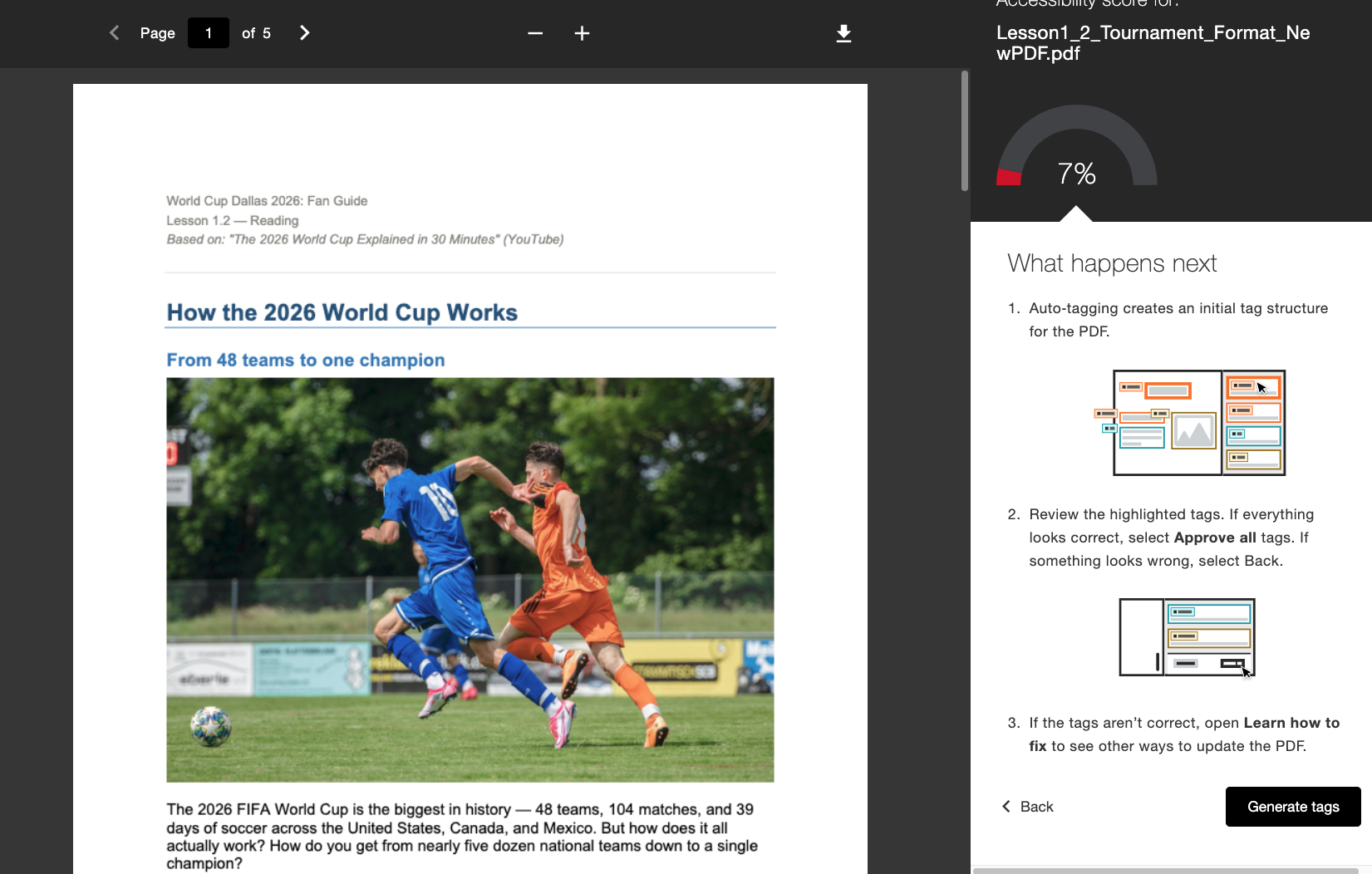
Cuando el administrador lo habilite, los profesores verán un nuevo flujo de trabajo «Generar etiquetas» integrado directamente en la sección «Comentarios del profesor». Los formadores mantienen el control tras generar las etiquetas, ya que pueden revisar la nueva estructura de etiquetas mientras se desplazan por el árbol de etiquetas situado en la parte derecha de la pantalla antes de decidir si aprueban las etiquetas aplicadas. Los profesores pueden utilizar el indicador de progreso situado en la parte inferior para ver cuántas etiquetas han aprobado antes de seleccionar Aprobar todo cuando estén satisfechos.
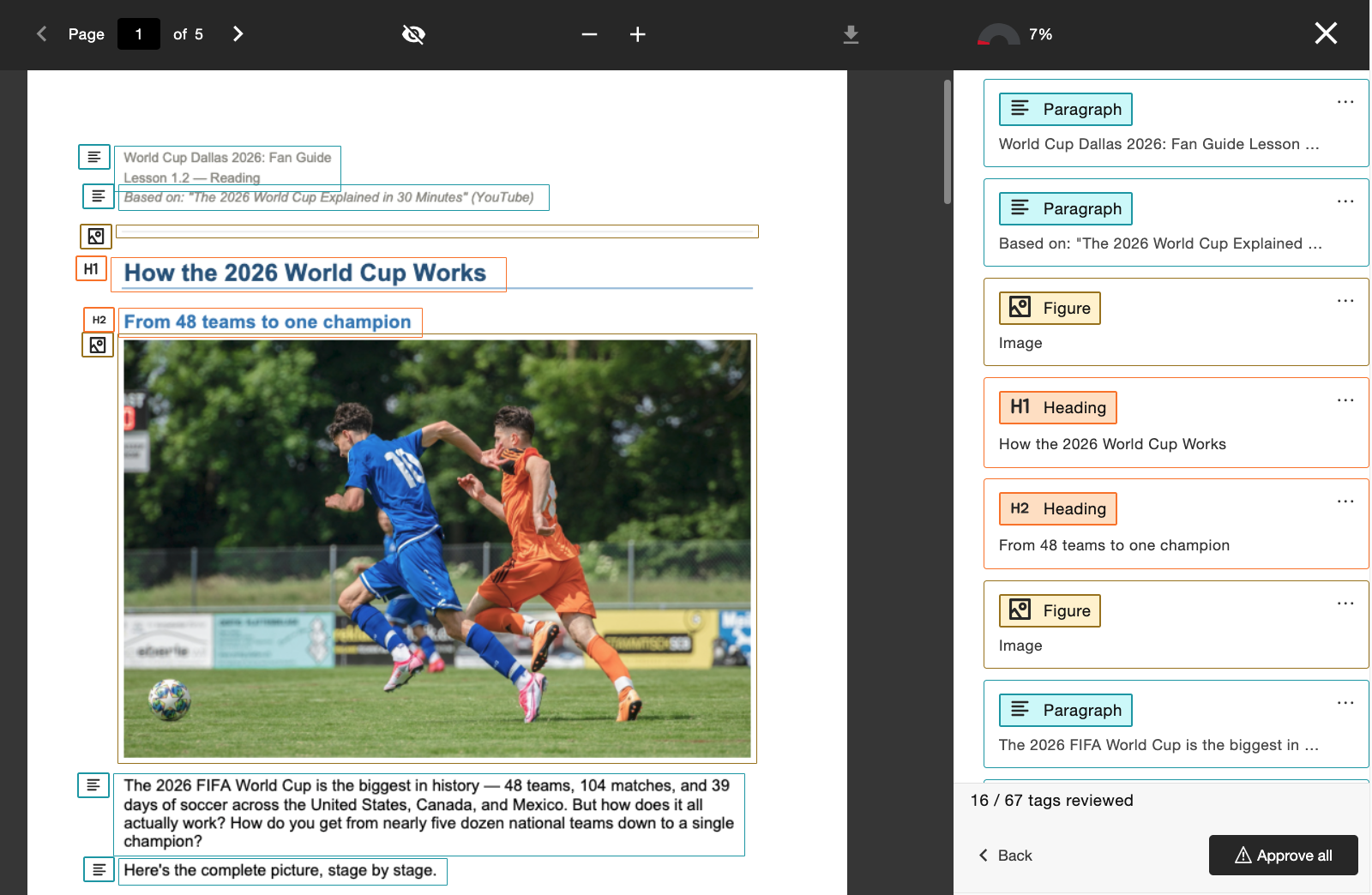
Los administradores pueden controlar el acceso a esta función a través de la herramienta de configuración de Ally, activándola o desactivándola según las preferencias de la institución.
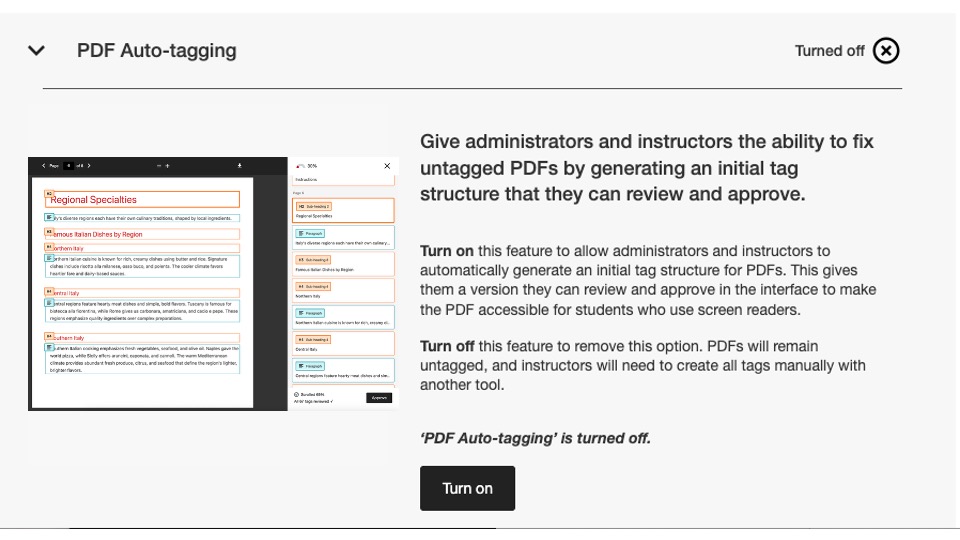
En esta versión, este indicador de configuración está desactivado de forma predeterminada. Los administradores deben habilitarlo para que los profesores puedan empezar a utilizarlo.
Para obtener más información sobre el nuevo informe de uso, consulta el tema del sitio de ayuda Opciones de corrección de PDF.
El nuevo informe de uso ya está disponible.
Como parte de nuestro compromiso constante por facilitar el acceso a los datos de Ally y ponerlos a disposición de los administradores, nos complace presentar la próxima versión del informe de uso de Ally, integrado directamente en la interfaz de usuario.
El informe de uso muestra detalles sobre cómo utilizan Ally tus alumnos y profesores, incluido el número de descargas de formatos alternativos y de correcciones realizadas por los profesores durante un periodo de tiempo determinado.
Este informe nuevo y mejorado ya está disponible directamente en el Informe institucional, sin necesidad de descargar un archivo de Excel, lo que permite obtener información de forma más fácil y rápida sobre la interacción de tu institución con Ally. Esto sustituye a la pestaña Uso de tu informe institucional y no requiere ningún paso adicional para activarse.
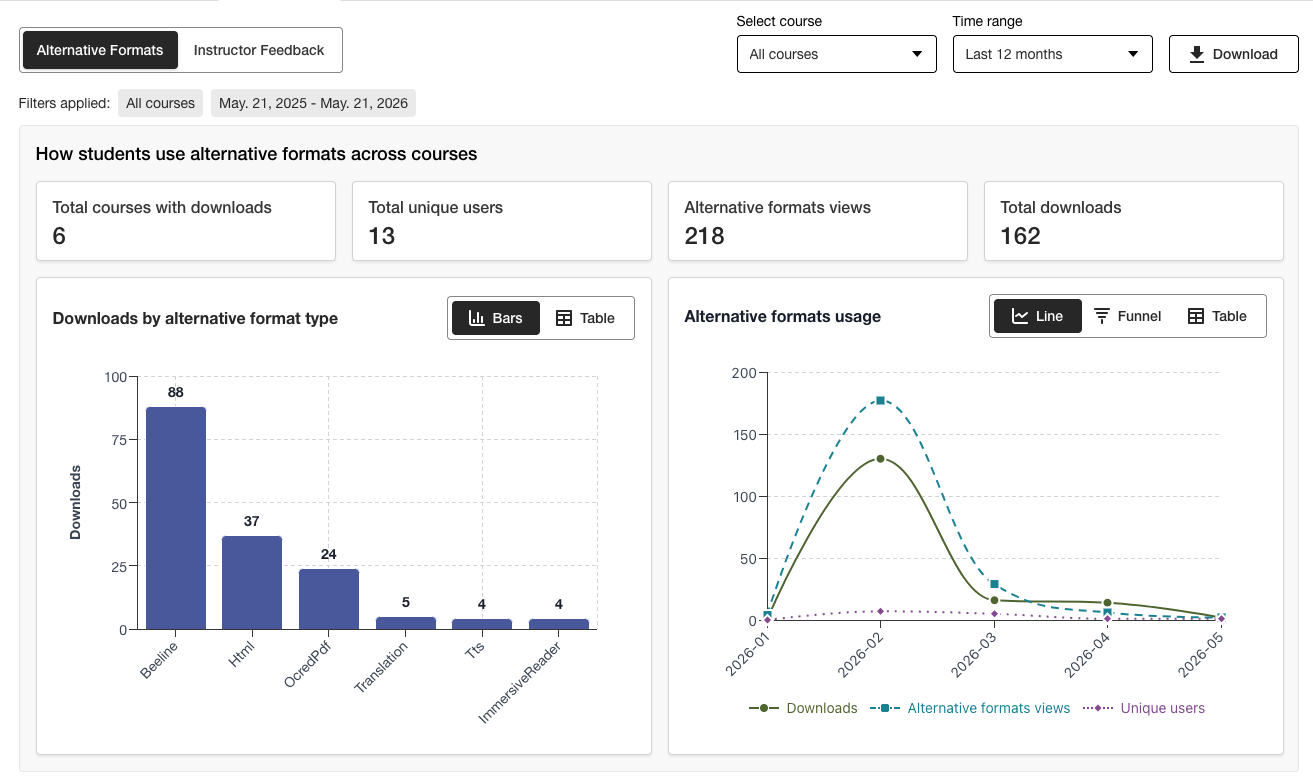
Los administradores pueden ver información importante de un solo vistazo y utilizar las nuevas opciones de filtrado y desgloses de gráficos para analizar los datos con mayor detalle fácilmente.
La versión en Excel sigue estando disponible para su descarga mediante la función «Descargar», para aquellos usuarios que prefieran acceder a los datos en otro formato.
Para obtener más información sobre el nuevo informe de uso, consulte los siguientes temas del sitio de ayuda:
Corrección de errores
Se ha corregido un error en las integraciones de Canvas por el que, al actualizar el título de un documento a través de Ally, se modificaba incorrectamente el estado de publicación del documento en el curso.
Lanzamiento de Ally 2.18.10 en producción: 2 de julio de 2026
Correcciones de errores y mejoras
Se ha corregido un error en la sección «Comentarios del profesor» que provocaba que las descripciones de las imágenes aplicadas anteriormente se conservaran incorrectamente cuando se sustituía una imagen existente por otra nueva para solucionar un problema de contraste.
Se ha corregido un error en el asistente de texto alternativo de IA que provocaba un error de tipo «Vaya» si el instructor añadía manualmente una nueva descripción tras hacer clic en «Generar descripción automáticamente».
Se ha corregido un error en la sección «Formatos alternativos» que provocaba que el formato de audio MP3 cambiara incorrectamente el idioma del contenido HTML.
Se ha corregido un error en la función «Corrección rápida» de idiomas del PDF que, en algunos casos, permitía a los profesores aplicar un idioma incorrecto a pesar de la comprobación de validación de idiomas de Ally.
Se ha corregido un error en las integraciones con Blackboard que provocaba que el título del archivo en los bloques de imagen se eliminara cuando el profesor solucionaba el problema de la falta de descripción de la imagen que se indicaba en el informe de accesibilidad del curso.
Se han implementado varias mejoras en la tecnología OCR subyacente de Ally para mejorar la calidad, la fidelidad y las tasas de conversión al procesar archivos PDF escaneados para obtener formatos alternativos y aplicar «Correcciones rápidas de PDF».
Lanzamiento de Ally 2.18.9 en producción: 22 de junio de 2026
Correcciones de errores y mejoras
Se ha corregido un error en Moodle por el que, en algunos casos, las imágenes incrustadas en una página no se mostraban en la vista previa de los comentarios del profesor al acceder desde el informe de accesibilidad del curso.
Se ha corregido un error en Canvas Pages que impedía que se aplicaran las correcciones en las descripciones de las imágenes tras sustituir una imagen de bajo contraste mediante la opción «Cargar archivo».
Se ha solucionado un problema de accesibilidad en Moodle para que los iconos indicadores de Ally puedan recibir el foco durante la navegación con el teclado.
Lanzamiento de Ally 2.18.8 en producción: 11 de junio de 2026
Correcciones de errores y mejoras
Se ha corregido un error en Moodle que provocaba que los usuarios vieran por error dos mensajes de información al pasar el cursor al utilizar los indicadores de Ally.
Se ha mejorado la redacción de las descripciones y los botones de la herramienta de configuración de Ally para que aparezcan como Activar y Desactivar.
Ally 2.18.7 Puesta en producción: 1 de junio de 2026
Corrección de errores y mejoras
Se ha corregido un error en Moodle que provocaba que el indicador de puntuación de accesibilidad se ocultara involuntariamente cuando se expandía el editor TinyMCE en la página.
Se ha corregido un error en Blackboard que provocaba que los niveles de encabezado dentro de los documentos (Ultra) no se transformaran correctamente en los formatos HTML alternativos resultantes.
Se ha corregido un error en los comentarios de los instructores que mostraba incorrectamente el mensaje "Problemas pendientes de resolver" después de conseguir que un contenido alcanzara el 100%.
Se ha corregido un error en Blackboard que provocaba que las imágenes marcadas como decorativas dentro del Documento se mostraran como un enlace en la vista previa de Comentarios del Instructor del informe de accesibilidad del curso.
Se ha corregido un error en los comentarios de los instructores que mostraba incorrectamente el enlace dos veces al intentar reparar el enlace roto.
Ally 2.18.6 Release to production: May 26, 2026
Bug Fixes and Improvements
Implemented several processing improvements to provide better handling of Canvas LMS Rate limits to minimize the number of times Ally hits these limits over the course of regular content processing.
Ally 2.18.5 Puesta en producción: 7 de mayo de 2026
Correcciones de errores y mejoras
Se ha corregido un problema de accesibilidad en Canvas por el que la opción **Formatos alternativos** del menú desplegable no respondía correctamente a las entradas de navegación del teclado.
Se ha corregido un error menor en las integraciones de Canvas que provocaba que el menú desplegable no se cerrara después de hacer clic en la opción Formatos alternativos.
Se ha corregido un error en el flujo de trabajo de corrección rápida de PDF de comentarios del instructor que provocaba que el botón «Reintentar» navegara al punto de inicio incorrecto dentro del panel de comentarios.
Mejora del tratamiento de los archivos UNSAFE_HTML en las integraciones de Blackboard para detectar y omitir por completo la puntuación de estos archivos y evitar la necesidad de eliminarlos de los informes como segundo paso.
Se ha corregido un error en las integraciones de Blackboard que provocaba que los archivos adjuntos se convirtieran incorrectamente en enlaces al solucionar problemas en Documentos desde el Informe de accesibilidad del curso.
Implementación de varias mejoras y optimizaciones de seguimiento en las colas de procesamiento en tiempo real de Ally en la región de Estados Unidos.
Ally 2.18.4 Puesta en producción: 30 de abril de 2026
Correcciones de errores y mejoras
Se ha corregido un error en Documentos de Blackboard que provocaba que Ally identificara incorrectamente los encabezados que se establecían en un nivel incorrecto e impedía que los instructores recibieran el 100% incluso después de solucionar todos los problemas.
Se han introducido mejoras en la detección de archivos UNSAFE_HTML en Blackboard para facilitar su eliminación de los procesos de evaluación de Ally.
Se ha corregido un problema de accesibilidad que impedía que el botón Descargar archivo original se mostrara en pantallas pequeñas.
Se ha corregido un problema con la comprobación de subtítulos de Vimeo de Ally que provocaba errores cuando se detectaba un vídeo de Vimeo en contenido enriquecido si la integración de Vimeo no estaba configurada en la configuración de Ally.
Ally 2.18.3 Puesta en producción: 20 de abril de 2026
Mejoras en el procesamiento de documentos
Como parte de nuestro compromiso continuo de mejorar la calidad y la fidelidad del contenido en el tratamiento de los comentarios de los instructores y los formatos alternativos de Ally, la versión 2.18.3 aporta mejoras críticas al proceso subyacente de conversión de documentos que impulsa estas funciones clave para el usuario.
La lógica de procesamiento de documentos de Ally se ha actualizado para ofrecer una conversión más inteligente, rápida y de mayor calidad cuando se trata de archivos cargados en el curso. Esto aporta varias mejoras a instructores y estudiantes, entre ellas:
Disminución de casos de falsos positivos de contraste que aparecen en las previsualizaciones de archivos de comentarios de los instructores.
Mejora de la gestión de formas en las presentaciones de PowerPoint, incluida la conversión de elementos como flechas dentro del documento.
Mejor reconocimiento del texto alternativo aplicado a los formularios tras la conversión a PDF.
Mejora del anuncio de imágenes decorativas en formatos alternativos, incluido el formato alternativo de audio.
Mejorar el reconocimiento de imágenes y aplicar las etiquetas Figure al convertir a PDF
Además de estas mejoras de cara al usuario, esta actualización también incluye la optimización de la infraestructura subyacente de Ally para ayudar a mejorar el rendimiento general y la velocidad de procesamiento del contenido a medida que se recibe del LMS.
Nota
Nuestros equipos seguirán analizando e identificando otras posibles mejoras o casos extremos que sea necesario abordar en el futuro.
Asistente de texto alternativo de IA mejorado
El Asistente AI Alt Text se ha actualizado para aprovechar varias mejoras adicionales en los modelos de IA subyacentes de AWS Bedrock, incluida la disminución del número de tiempos de espera al solicitar texto alternativo sugerido y un manejo mejorado para evitar alucinaciones al analizar imágenes específicas.
Como recordatorio, la nota actualizada sobre la transparencia del asistente de texto alternativo de IA puede consultarse aquí con información adicional sobre esta función: https://help.anthology.com/ally-lms/en/administrators/ai-alt-text-assistant.html
Correcciones de errores y mejoras
Se corrigió un error en los comentarios del instructor que provocaba que se aplicara un resaltado incorrecto en la vista previa cuando el PDF aún no tenía configurado el idioma correcto después de intentar aplicar la corrección.
Se ha corregido un error en los comentarios del instructor por el que al hacer clic en Intentar de nuevo cuando un PDF aún no tiene el idioma correcto configurado, no se devolvía al instructor al panel de selección de idioma.
Se ha corregido un error en Canvas que impedía al instructor abrir los comentarios del instructor en un PDF con OCR que también tenía un encabezado fijo.
Se ha corregido un problema de accesibilidad en el panel de comentarios del instructor que desplazaba el foco incorrectamente entre elementos al utilizar el botón Atrás.
Se ha corregido un problema de accesibilidad en la ventana modal Formatos alternativos que provocaba que el formato de archivo original no se descargara al navegar y seleccionar con el teclado.
Ally 2.18.2 Puesta en producción: 9 de abril de 2026
Correcciones de errores y mejoras
Se ha solucionado un problema en Blackboard por el que los indicadores de Ally no se mostraban en los archivos adjuntos de las instrucciones de las tareas.
Se ha corregido un error por el que, en algunos casos, al navegar por el panel de comentarios del instructor para contenido WYSIWYG, al hacer clic en los iconos Negrita o Cursiva en el editor de contenido enriquecido se activaba el botón Generar automáticamente para el Asistente de texto alternativo de IA.
Se ha corregido un error por el que, en algunos casos, la sustitución de una imagen con problemas de contraste por una imagen nueva mediante la carga de archivos de comentarios del instructor no actualizaba la vista previa del documento.
Se ha corregido un error en Canvas que impedía que los indicadores de Ally se mostraran correctamente en un curso de Canvas cuando Mostrar anuncios recientes en la página de inicio del curso estaba activado.
Ally 2.18.1 Puesta en producción: 2 de abril de 2026
Correcciones de errores y mejoras
Se han actualizado los plugins de Moodle para Moodle 4.5 y Moodle 5.0 para incluir correcciones de errores menores.
Se ha solucionado un problema con el asistente de texto alternativo de IA por el que, en algunos casos, los profesores recibían un mensaje de error al intentar sugerir texto alternativo debido a que el modelo principal no estaba disponible.
Ally 2.18 Puesta en producción: 26 de marzo de 2026
Ya está disponible la nueva función de administración de referencias de la biblioteca
Como parte de nuestro esfuerzo continuo por proporcionar niveles de control más detallados a los administradores que desean gestionar la experiencia de corrección de PDF para los instructores, hay disponible un nuevo indicador de función en las opciones de configuración de Ally que permite desactivar el flujo de trabajo de referencias de la biblioteca.
Ahora los administradores pueden desactivar la función Referencia de biblioteca para eliminar la posibilidad de que el instructor añada referencias de biblioteca a los PDF cuando el archivo original no esté disponible, mientras se resuelven diversos problemas específicos de los PDF. Esta capa adicional de control ayudará a alinear esta función con las preferencias y procesos institucionales y proporciona flexibilidad adicional a la hora de determinar la mejor forma de gestionar los PDF de corrección a escala.
Imagen 1: Indicador de nueva función en las opciones de configuración de Ally
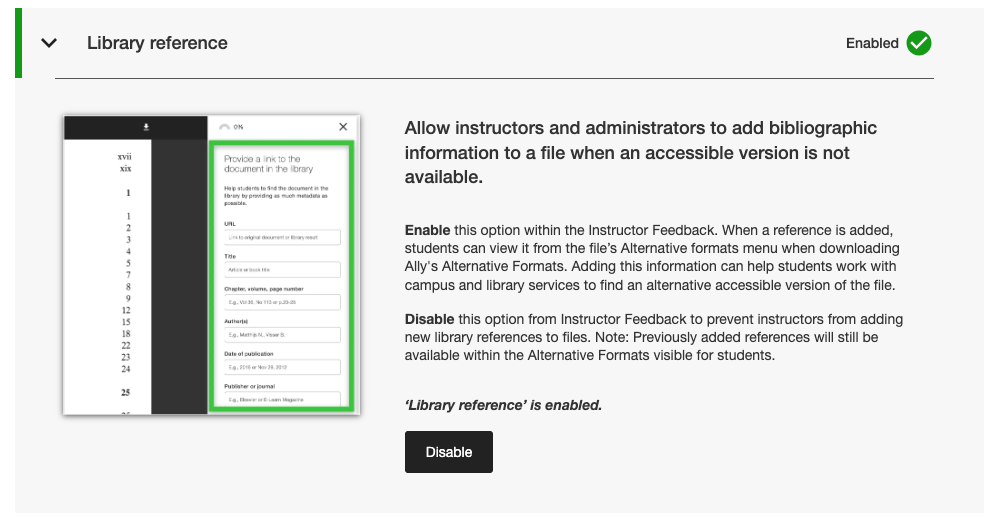
Los administradores pueden encontrar esta nueva función en la pestaña Características de la herramienta de Configuración de Ally, en Referencia de la biblioteca.
Nota
Las referencias de biblioteca seguirán habilitadas de forma predeterminada en esta versión. La desactivación de las referencias a bibliotecas con esta nueva opción no eliminará las referencias a bibliotecas añadidas anteriormente al contenido y solo impedirá que se añadan otras nuevas en el futuro.
Correcciones de errores y mejoras
Se ha corregido un error en Canvas que provocaba la desaparición de la columna de indicadores de Ally del área de nuevos archivos al cambiar el tamaño de la pantalla.
Se ha corregido un problema de accesibilidad en las integraciones de Canvas que impedía que se aplicara el enfoque correcto al utilizar un teclado para navegar por los indicadores de puntuación de accesibilidad de Ally dentro de las páginas de Canvas.
Se ha corregido un enlace web roto en la configuración de Ally para las condiciones de uso del asistente de texto alternativo de IA.
Migración de nuestros servicios de correo electrónico SMTP a la infraestructura de backend que gestiona los flujos de correo electrónico de ayuda personalizados.
Lanzamiento de Ally 2.17.5 en producción: 12 de marzo de 2026
Los archivos UNSAFE_HTML de Blackboard ya no se incluyen en los informes
Como parte de nuestro compromiso continuo con la eficiencia del profesor y la claridad en los informes, los informes de Ally ya no considerarán los archivos UNSAFE_HTML como parte del contenido del curso para las integraciones de Blackboard.
Imagen 1: Informe del curso con UNSAFE_HTML incluido para mostrar el comportamiento anterior.
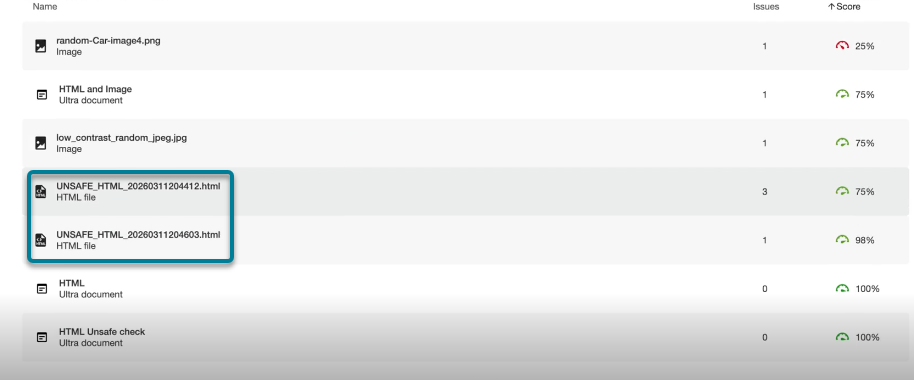
A partir de esta versión, los archivos UNSAFE_HTML creados automáticamente en la carpeta de contenido al utilizar fragmentos HTML dentro de un documento de Blackboard se filtrarán de los informes institucionales y del curso. Anteriormente, estos archivos aparecían en el informe, pero los profesores no podían solucionar los problemas identificados de falta de idioma y título, y a menudo recurrían a otras soluciones para eliminar estos archivos del curso y eliminarlos de los informes.
Nota
Este cambio eliminará todos los archivos UNSAFE_HTML actuales y anteriores. Dependiendo de la frecuencia con la que se utilizaron estos elementos de contenido en un curso, esto puede resultar en un ligero aumento o disminución de la puntuación del curso basado en la distribución de archivos, HTML y contenido WYSIWYG.
Como parte de una futura versión, intentaremos evitar por completo el procesamiento de estos archivos al incorporar un mecanismo de almacenamiento en caché para ayudar a mejorar el rendimiento general y el escaneado.
Correcciones de errores y mejoras
Se ha resuelto un problema en las integraciones de Blackboard que provocaba una discrepancia en la puntuación de las imágenes al comparar la puntuación de los comentarios del profesor de un documento con la puntuación del informe de accesibilidad del curso cuando las imágenes se establecían en Solo ver o Solo descargar. El Informe de accesibilidad del curso omitía incorrectamente el texto alternativo aplicado previamente y reducía la puntuación aunque aparecía como resuelto en los comentarios del profesor. Tenga en cuenta que esto se aplica a las imágenes en Ultra Documents como parte del curso y el Repositorio de objetos de aprendizaje.
Se ha corregido un problema en la corrección rápida de idioma que faltaba en PDF que permitía que se pudiera hacer clic en el botón Aplicar antes de que el profesor seleccionara un idioma.
Se ha mejorado el estilo de los enlaces de referencia de la biblioteca en la ventana de descarga de formatos alternativos para que los enlaces de referencia se muestren como enlaces en los que se puede hacer clic y evitar posibles problemas de contraste.
Ally 2.17.4 Lanzamiento en producción: 5 de marzo de 2026
La preselección de idioma ya está disponible para los PDF de idiomas que faltan de Solución rápida
Los profesores que corrijan PDF a los que les falten idiomas en la corrección rápida de los comentarios del instructor de Ally ahora pueden beneficiarse de la detección y preselección del idioma en el menú desplegable para evitar desplazamientos adicionales y ahorrar tiempo al corregir este problema tan común.
La detección de idioma integrada en Ally analizará el PDF para determinar el idioma adecuado siempre que sea posible. Si no se detecta ningún idioma, los profesores pueden seleccionar uno manualmente para aplicar la corrección y hacer que Ally guarde el cambio en el PDF como se esperaba.
Imagen 1: Corrección rápida de añadir idioma con inglés seleccionado

Ya están disponibles los complementos de Moodle 5.1
Como parte del soporte continuo de Ally a Moodle, están disponibles los complementos de Ally para Moodle 5.1. Encontrará más información sobre el soporte de Ally con Moodle en la Documentación de configuración de Ally para Moodle.
Nota
Ally crea ramas para cada versión compatible de Moodle como parte de nuestra estrategia de complementos de código abierto para permitir el desarrollo específico y la corrección de errores. Las versiones actuales de los complementos están en las correspondientes ramas STABLE de nuestro repositorio. Siempre se recomienda que los administradores utilicen las versiones estables para asegurarse de que no se introducen cambios no deseados cuando se actualizan los complementos.
Correcciones de errores y mejoras
Se ha solucionado un problema en Blackboard por el que los profesores que utilizaban el Informe de accesibilidad del curso para solucionar problemas en Documentos podían eliminar de forma inesperada contenido identificado incorrectamente como enlaces al incrustar bloques HTML, audio y/o vídeos de Video Studio.
Se ha corregido un problema para todas las integraciones de LMS en el informe institucional por el que el menú desplegable Exportar quedaba oculto en pantallas más pequeñas o en navegadores de menor tamaño.
Se ha corregido un problema para todas las integraciones LMS por el que la aplicación de una corrección rápida de enlaces rotos para contenido WYSIWYG que contenía varios enlaces rotos al mismo tiempo a veces daba lugar a un indicador de carga infinito.
Se han implementado varias mejoras en el frontend de la infraestructura de vista previa de comentarios del instructor en PDF para apoyar nuestro progreso continuo con funciones de corrección de PDF.
Se han implementado mejoras adicionales en las prácticas recomendadas para las solicitudes HTTP de integración con Canvas con el fin de garantizar el uso de cabeceras User-Agent.
Ally 2.17.3: lanzamiento en producción (30 de enero de 2026)
Corrección de errores y mejoras
Se ha corregido un problema en los comentarios del profesor de Ally para archivos PDF escaneados. Después de abrir "Aprender a corregir PDF", al hacer clic en Atrás no siempre se volvía a la vista de comentarios del profesor y, en algunos casos, era necesario hacer clic una segunda vez.
Ally 2.17.2: puesta en producción el 15 de enero de 2026
Corrección de errores y mejoras
Se corrigió un problema en el Informe institucional que ocultaba la opción Descargar CSV al exportar desde la pestaña Cursos cuando la búsqueda devolvía uno o ningún curso.
Se corrigió un error en el Informe de uso que provocaba que el botón Descargar informe de uso permaneciera deshabilitado después de descargar un informe y seleccionar un nuevo intervalo de fechas.
Se corrigió un problema de accesibilidad del teclado en el área Archivos de lienzo, que provocaba que se perdiera el foco al navegar hasta la puntuación de accesibilidad. Ahora el foco permanece visible mientras navega con el teclado.