Uso
Note
Este documento se ha traducido mediante traducción automática asistida por IA. Las traducciones se proporcionan «tal cual», sin garantía alguna respecto a su exactitud. La versión en inglés de este contenido es la fuente oficial y de referencia.
Cómo interpretar el Informe de uso de Ally
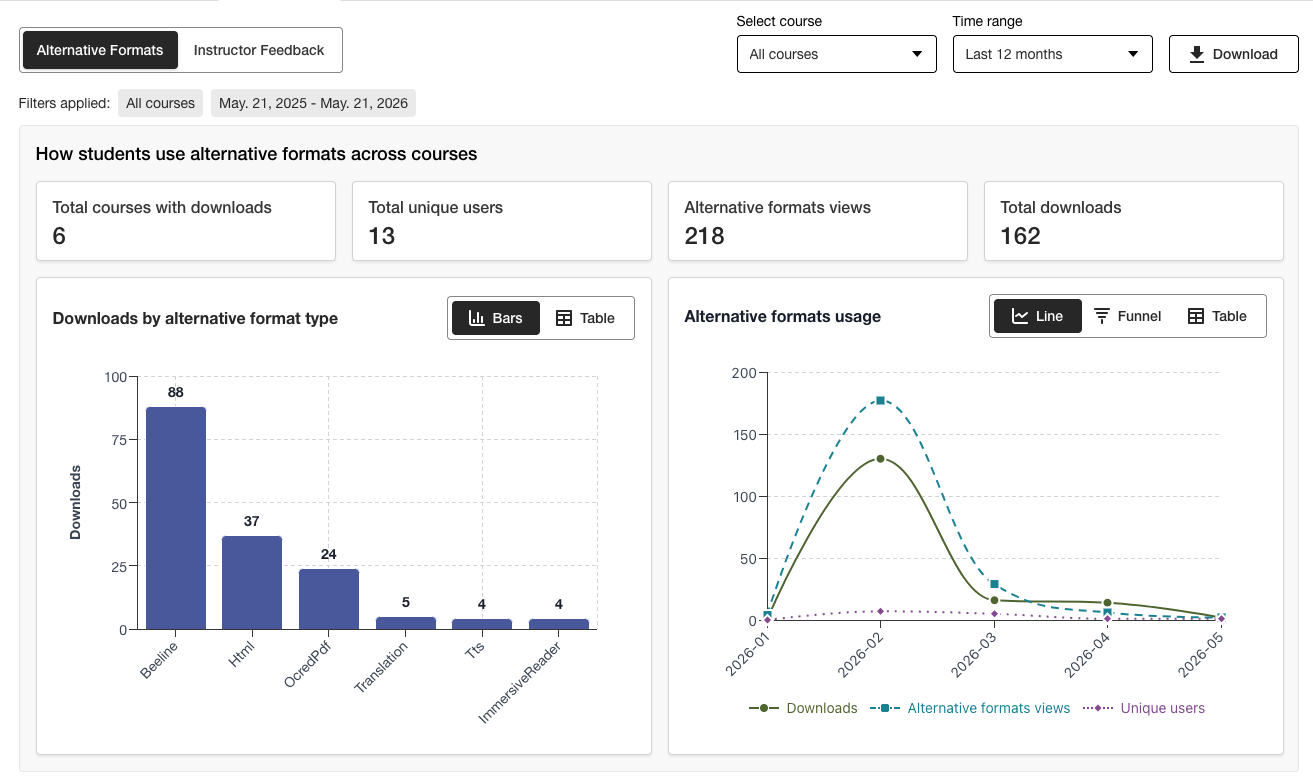
El Informe de uso contiene información sobre cómo utilizan Ally los estudiantes y los profesores. Descubra con qué frecuencia los estudiantes descargan un formato alternativo y los profesores solucionan problemas de accesibilidad.
Acceder al Informe de uso
En el Informe institucional de accesibilidad de Ally, seleccione la pestaña Uso.
Descargar un Informe de uso
El informe de descargas es una hoja de cálculo dividida en cinco hojas de trabajo. Cada hoja de trabajo contiene información relacionada con el rango de fechas que elige.
Lanzamientos de formatos alternativos
Uso semanal de formatos alternativos
Lanzamientos de comentarios para el profesor
Uso semanal de comentarios para el profesor
Datos
En el Informe institucional de accesibilidad de Ally, seleccione la pestaña Uso.
Elija un rango de fechas para el informe.
Selecciona el botón Descarga informe de uso.
Nota
Es posible que no pueda ver los datos cuando abra el informe por primera vez. El archivo descargado puede estar protegido. Habilite la edición para ver los datos.