Nutzung
Note
Diese Dokumentation wurde mithilfe einer KI-gestützten maschinellen Übersetzung übersetzt. Übersetzungen erfolgen unverbindlich und ohne Gewähr für ihre Richtigkeit oder Vollständigkeit. Die englische Fassung dieses Inhalts ist die offizielle und maßgebliche Quelle.
Den Nutzungsbericht Ally verstehen
Der Nutzungsbericht enthält detaillierte Informationen darüber, wie Ihre Teilnehmer und Lehrkräfte Ally nutzen. Erfahren Sie, wie oft Studierende ein alternatives Format herunterladen und Lehrende Probleme mit der Barrierefreiheit beheben.
Auf den Nutzungsbericht zugreifen
Wählen Sie im Barrierefreiheitsbericht der Einrichtung Ally die Registerkarte Nutzung aus.
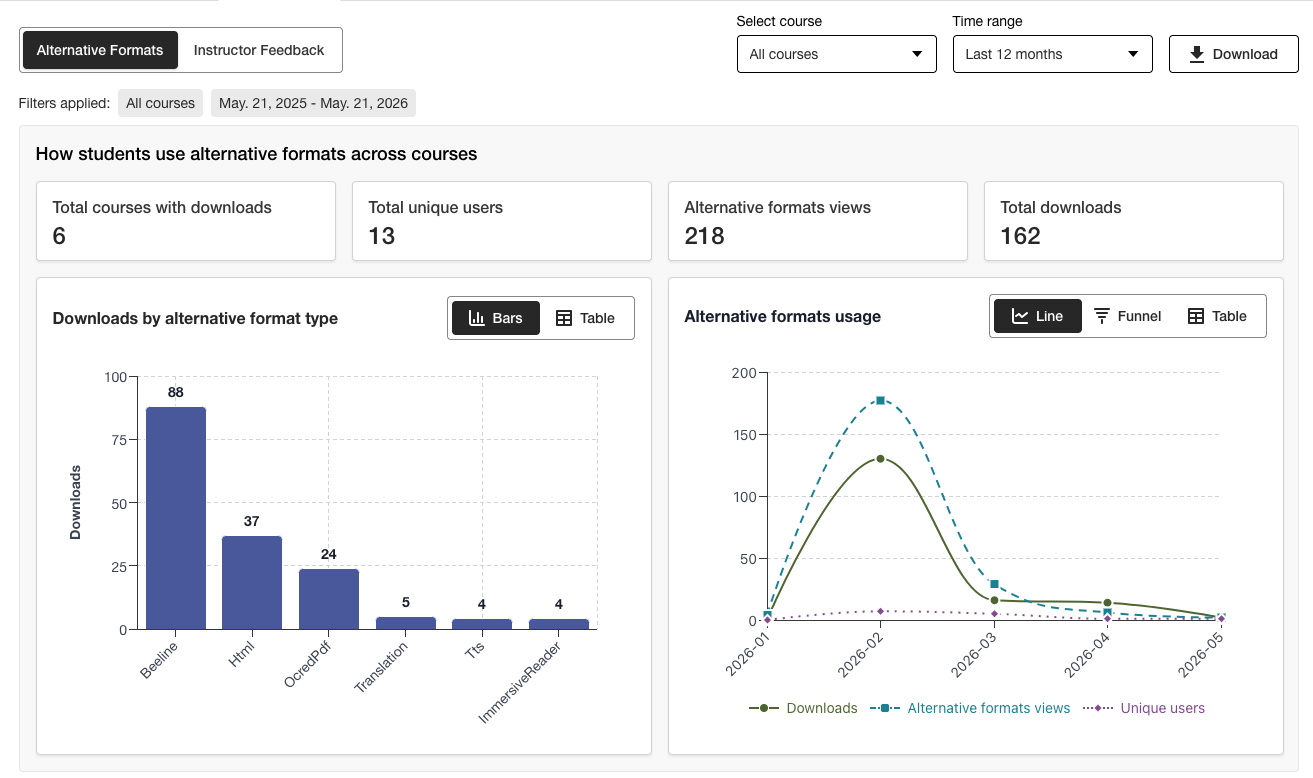
Nutzungsbericht herunterladen
Der Download-Bericht ist eine Tabellenkalkulation, die in fünf Arbeitsblätter unterteilt ist. Jedes Arbeitsblatt enthält Details zu einem von Ihnen ausgewählten Datumsbereich.
Einführung in alternative Formate
„Alternatives Format wöchentlich“
Feedback der Lehrkräfte starten
Wöchentliches Feedback des Kursleiters
Daten
Wählen Sie im Barrierefreiheitsbericht der Einrichtung Ally die Registerkarte Nutzung aus.
Wählen Sie einen Datumsbereich für den Bericht aus.
Wählen Sie die Schaltfläche Nutzungsbericht herunterladen aus.
Anmerkung
Beim ersten Öffnen des Berichts werden möglicherweise keine Daten angezeigt. Die heruntergeladene Datei ist möglicherweise geschützt. Aktivieren Sie die Bearbeitungsfunktion, um die Daten anzuzeigen.