ملاحظات الإصدار 2026
Note
تمت ترجمة هذه الوثيقة باستخدام الترجمة الآلية المدعومة بالذكاء الاصطناعي. تُقدَّم الترجمات «كما هي» على وضعها القائم دون أي ضمان بشأن دقتها. تُعد النسخة الإنجليزية من هذا المحتوى هي المصدر الرسمي والمعتمد.
Ally 2.19.8 Release to production: September 28, 2026
Bug Fixes and Improvements
Fixed a bug in Blackboard integrations that caused some Documents not to be able to generate audio alternative formats.
Fixed a bug in Canvas integrations that caused Ally not to be able to correctly recognize images within Classic Quizzes which resulted in images with alt text being flagged as missing in the Course Report.
Implemented an accessibility improvement to the focus indicator applied to the Enable Future courses button within the Ally Configuration tool.
Fixed a bug in Canvas integrations that caused an error when attempting to fix any HTML issue from the Course Report.
Fixed an accessibility issue that caused insufficient contrast on the focus indicators for the enable and disable options within the Ally Configuration tool.
Fixed a bug with the Table Header Quick Fix that caused the selected option to disappear when Fix all occurrences was selected.
Fixed an accessibility issue within the Table Header Quick Fix to ensure that the Apply a table header selector is appropriately associated with its visible label.
Implemented an accessibility improvement to the Ally Terms of Use to ensure the Terms of Use text meets minimum color contrast requirements.
Fixed an issue in Blackboard where instructors using the Course Accessibility Report to fix issues in Documents were unexpectedly able to remove content incorrectly identified as links when embedding LTI Video links including Yuja, Echo360, Panopto, Kaltura and other third-party videos.
Fixed an issue in Canvas integration where custom CSS was conflicting with Ally CSS and prevented it from loading correctly causing an error when viewing the Instructor Feedback and/or Course Report Preview.
Ally 2.19.7 Release to production: September 17, 2026
Bug Fixes and Improvements
Updated the AI Alt Text Assistant to take advantage of several additional improvements in the underlying AWS Bedrock AI models. For more information, visit AI Alt Text Transparency Note.
Fixed a bug in the Institutional Report Directory Tab that sometimes caused the number of courses and items to show as ‘0’ until you refresh the report.
Fixed a bug in the Institutional Report that caused the label for the last month to not be visible.
Fixed a bug in Moodle integrations that sometimes prevented the instructor from updating an image description in the Ally Instructor Feedback.
Fixed a bug that caused a display issue in the Course Accessibility Report when file names exceeded a certain length.
Implemented several improvements to Ally’s underlying processing logic when handling large volumes of events.
Ally 2.19.6 Release to production: September 7, 2026
Bug Fixes and Improvements
Fixed an issue in Blackboard integrations where links without discernible text within the Title of a Document could not be fixed with the quick fix when using the Course Accessibility Report.
Fixed an issue in Blackboard integrations where alt text and decorative image values entered through the Ally Instructor Feedback or the Instructor Feedback via the Course Accessibility Report did not save back to the Image Block metadata as expected.
Fixed an issue in Canvas integrations that caused the Alternative Formats window to not scale correctly with the browser screen size when using the file preview.
Fixed an issue in Canvas integrations that created a role conflict when a user had both student and instructor permissions across multiple courses resulting in inconsistent Course Accessibility Report launch behavior.
Implemented improvements to Ally’s backend course sync processes when generating monthly reports.
Ally 2.19.5 Release to production: August 27, 2026
Bug Fixes and Improvements
Fixed an issue in the new Usage Report that prevented the department ID from filtering both the UI and the export when drilling into the Directory tab.
Fixed an issue in Blackboard integrations that prevented alternative text and decorative image settings marked in Ally from saving back to Blackboard Tests when using either the Instructor Feedback or Course Accessibility Report Instructor Feedback.
Fixed an issue in Blackboard integrations that prevented instructors from overwriting existing alternative text on an image when using the Course Accessibility Report.
Fixed an issue within Ally’s alternative format processing that sometimes stripped the first word after each bullet point when creating the HTML alternative formats from Word documents containing bulleted lists.
Fixed an issue in the Moodle 5 plugins that prevented Ally from flagging images lacking alternative text in the rich content if the image description was only entered as spaces.
Fixed an issue that caused Ally to incorrectly flag some Word documents with headings issues despite headings being present.
Fixed a minor issue within the Ally Instructor Feedback error messaging that shifted the close button for the Oops error modal to the bottom of the screen.
Implemented performance improvements for the D2L Brightspace course loading process to avoid timeouts while processing large volumes of courses.
Ally 2.19.4 Release to production: August 17, 2026
ملاحظة
Reporting Bearer Token Reset: The reset of Ally Reporting API tokens was completed successfully on August 14th. Going forward, administrators should create a new token in the institutional report to restore connection in any external reporting tools.
Bug Fixes and Improvements
Fixed an issue in Blackboard Tests that caused the Ally score indicator to disappear from an image embedded within the text block when editing image alt text.
Fixed an issue with Canvas Course Export/Import and Copies where the associated Ally course copy processes (that carry over data such as alternative text, decorative images and library references) were failing in certain scenarios where a course file was deleted and replaced during the Canvas copy/import process.
Fixed an issue in the New Files Experience in Canvas that caused the Ally score indicators to disappear completely from the screen when scaled down to a small enough screen size.
Fixed an issue in Canvas File Preview within the New Files Experience that sometimes caused the Alternative Formats Icon to sporadically appear and disappear.
Fixed an issue in Canvas New Files Experience that caused the Alternative Formats modal to remove the Download Original File icon when scaled down to a small enough screen size.
Fixed an issue in Canvas that caused a delay in showing the Alternative Format icon when navigating from file to file.
Fixed an issue in Canvas that caused RTF files to be mistakenly recognized as Word documents and included in the Course Report and course score despite not being able to be opened or previewed.
Fixed an issue that caused Ally to report certain PPTX files as missing language when the language was set correctly in the document.
Fixed an issue with Ally’s broken link checking in the LMS that caused some valid links to be seen as broken depending on how those links were created in the WYSIWYG content.
Improved the accessibility and color contrast of the Ally Alternative Format indicator when using High Contrast Modes.
Improved Ally’s language validation checks on PDF documents to help minimize certain scenarios where the selected language in the PDF Quick Fix could not be saved.
Implemented performance improvements in Ally when interacting with the Moodle ally_filter plugin.
إصدار Ally 2.19.3 إلى بيئة الإنتاج: 7 أغسطس 2026
إضافات Moodle 5.2
في إطار الدعم المستمر الذي تقدمه Ally لـ Moodle، أصبحت المكوّنات الإضافية لـ Ally الخاصة بـ Moodle 5.2 متاحة الآن. يمكن الاطلاع على مزيد من التفاصيل حول دعم Ally لمنصة Moodle في وثائق تكوين Ally لـMoodle.
ملاحظة
تقوم Ally بإنشاء فروع لكل إصدار مدعوم من Moodle كجزء من استراتيجيتنا الخاصة بالمكونات الإضافية مفتوحة المصدر، وذلك بهدف تمكين التطوير الموجه وإصلاح الأخطاء. يمكن العثور على الإصدارات الحالية من المكوّنات الإضافية في الفروع «STABLE» المقابلة في المستودع الخاص بنا. يُنصح دائمًا بأن يستخدم المسؤولون الفروع المستقرة لضمان عدم إدخال أي تغييرات جديدة غير مقصودة عند تحديث المكونات الإضافية.
إصلاحات الأخطاء والتحسينات
تم إصلاح خطأ في Moodle تسبب في عدم توفر بعض محتويات HTML عند تحديد خيار استبعاد الملفات غير المستخدمة في إضافات Ally.
إصدار Ally 2.19.2 إلى بيئة الإنتاج: 30 يوليو 2026
إصلاحات الأخطاء والتحسينات
تم تحسين تجربة «ملاحظات المُدرّس» لمُدرّسي Blackboard بحيث تُظهر معاينة المحتوى كتل محتوى HTML كمحتوى قابل للعرض، بدلاً من الاكتفاء بعرض عبارة «UNSAFE_HTML» عند استخدام «تقرير إمكانية الوصول إلى المقرر الدراسي».
تم إصلاح مشكلة كانت تواجه مُدرّسي Blackboard، حيث لم يكن Ally يحدد بشكل صحيح الصور التي تم إدراجها دون وصف داخل جدول في قسم «المستندات».
تم إصلاح مشكلة في سير عمل المساعدة المخصص في Ally كانت تمنع تحويل عناوين URL المضمنة عند النقر عليها.
تم إصلاح مشكلة في Blackboard كانت تمنع المدرس من تطبيق لون خط جديد عند استخدام «الإصلاح السريع» لمشاكل التباين المحددة في قسم «المستندات».
تم إصلاح مشكلة في سير العمل في ميزة «الإصلاح السريع لملفات PDF باستخدام تقنية التعرف الضوئي على الحروف (OCR)»، والتي كانت تؤدي إلى ظهور خطأ «عفوًا» إذا قام المعلم أولاً بتطبيق إصلاح OCR ثم ألغى تحديد خيار «تنزيل التنسيق الأصلي».
تم إصلاح مشكلة في "تقرير استخدام Ally" الجديد كانت تتسبب في انتهاء مهلة التنزيل بشكل غير متوقع عند تحديد نطاق زمني أطول. يرجى ملاحظة أنه يتعين على المسؤولين مسح ذاكرة التخزين المؤقت للمتصفح الآن بعد إصدار هذا الإصلاح قبل محاولة التنزيل مرة أخرى.
إصدار Ally 2.19.1 إلى بيئة الإنتاج: 22 يوليو 2026
إصلاحات الأخطاء والتحسينات
تم إصلاح مشكلة كانت تتسبب في تشويه لقطة الشاشة الموجودة في علامة التبويب "الميزة الجديدة" الخاصة بـ"وضع العلامات التلقائي لملفات PDF" ضمن خيارات التكوين.
تم إصلاح مشكلة في ذاكرة التخزين المؤقتة لـ«بيانات الاستخدام» كانت تؤدي إلى عدم تمكن بعض المسؤولين من رؤية البيانات التاريخية الأقدم في تقرير واجهة المستخدم الجديدة عند تصفية نطاقات زمنية أطول.
تم إصلاح مشكلة في Blackboard كانت تحدث عند إدراج الصور باستخدام عنوان URL، مما أدى إلى إزالة النص البديل من جميع الصور المتطابقة بدلاً من إزالة النص البديل من الصورة المحددة فقط.
تم إصلاح مشكلة في Blackboard كانت تمنع حفظ النص البديل بشكل صحيح عند إدخاله في «ملاحظات المُحاضر» للصور التي يتم إدراجها باستخدام عنوان URL.
تم تحديث اسم مضيف Canvas ضمن تفاصيل تكوين LTI في Ally لضمان الإشارة إلى sso.canvaslms.com في جميع المواضع ذات الصلة.
تمت زيادة مدة الانتظار لواجهة برمجة التطبيقات Ally Reporting API لتجنب تجاوز حدود مدة الانتظار لمجموعات البيانات الكبيرة الخاصة بالعملاء، والتي كانت تتسبب في حدوث خطأ في أداة إعداد التقارير.
إصدار Ally 2.19 إلى بيئة الإنتاج: 13 يوليو 2026
يتوفر الآن "الحل السريع لوضع العلامات على ملفات PDF" للمدرسين
مع استمرارنا في توسيع نطاق إمكانيات معالجة ملفات PDF ضمن ميزة «ملاحظات المُدرِّس» في Ally، أصبح بإمكان المُدرِّسين الآن وضع علامات تلقائيًّا على ملفات PDF التي لا تحتوي على علامات، وذلك لتطبيق العلامات على المستند وتحسين إمكانية الوصول الإجمالية للطلاب. أصبحت هذه الميزة متاحة الآن لجميع المؤسسات بعد انتهاء المرحلة الأولية من «برنامج المستخدمين الأوائل».
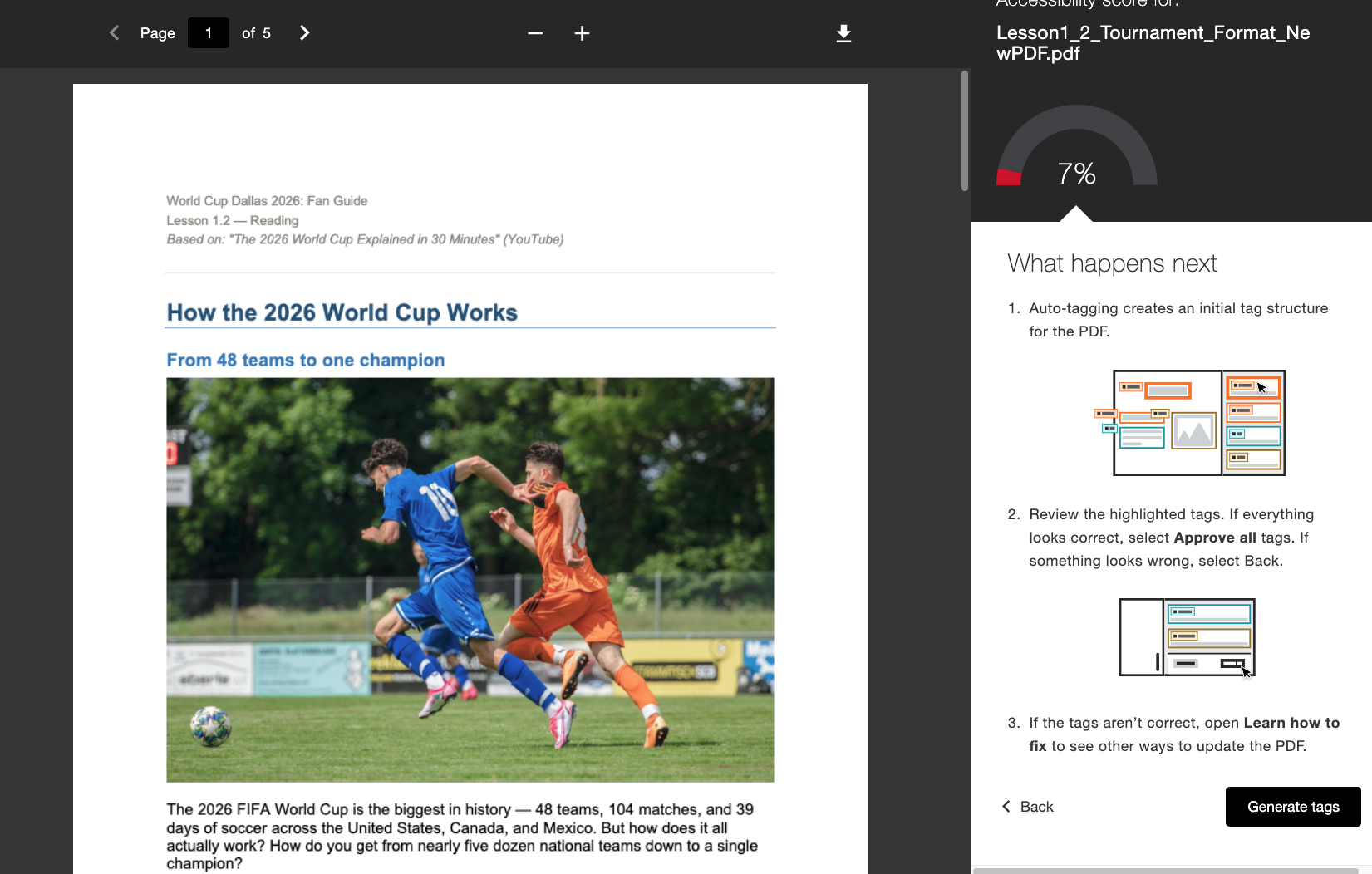
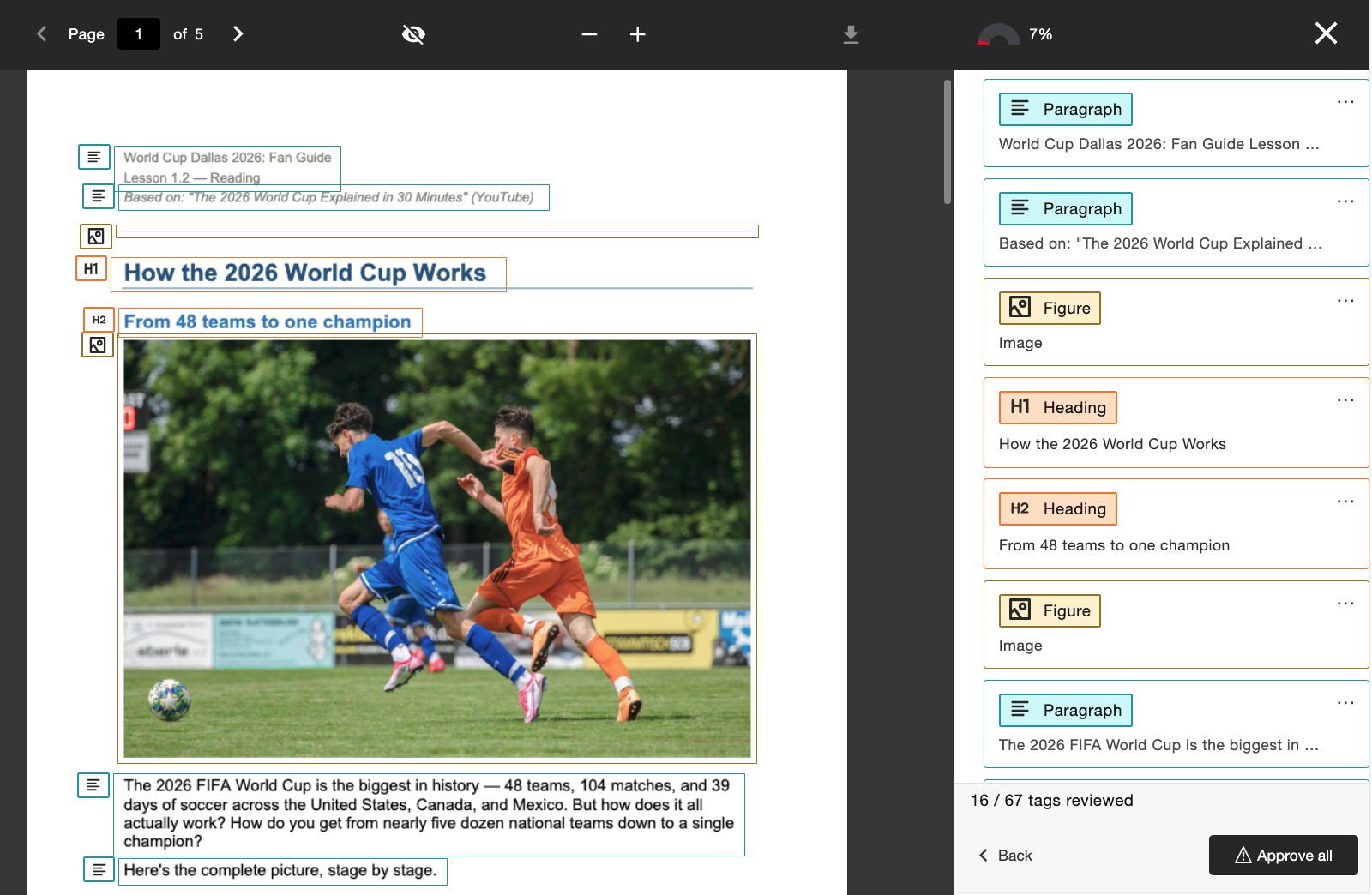
عندما يقوم المسؤول بتفعيل هذه الميزة، سيظهر للمدرسين سير عمل جديد بعنوان «إنشاء العلامات» مدمج مباشرةً في «ملاحظات المدرس». يحتفظ المدرسون بالسيطرة بعد إنشاء العلامات، حيث يمكنهم مراجعة هيكل العلامات الجديد أثناء التمرير عبر شجرة العلامات الموجودة على الجانب الأيمن من الشاشة قبل اتخاذ قرار بالموافقة على العلامات المقترحة. يستطيع المدرسون استخدام مؤشر التقدم في الأسفل لمعرفة عدد العلامات التي وافقوا عليها قبل اختيار الموافقة على الجميع عندما يكونون راضين.
يمكن للمسؤولين التحكم في الوصول إلى هذه الميزة من خلال أداة تهيئة Ally، وذلك عن طريق تفعيلها أو تعطيلها وفقًا لتفضيلات المؤسسة.
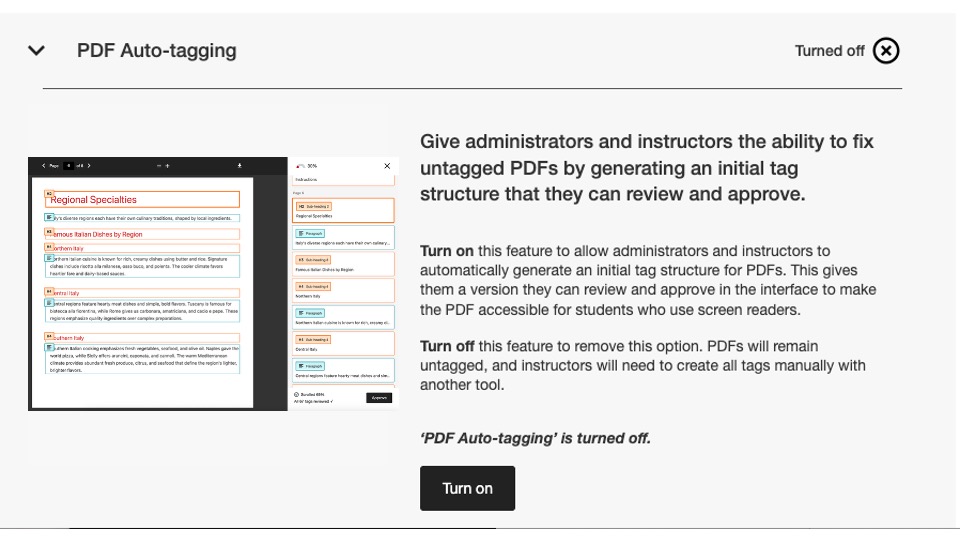
كجزء من هذا الإصدار، تم تعطيل علامة التكوين هذه بشكل افتراضي. يجب على المسؤولين تمكين هذه الميزة حتى يتمكن المحاضرون من البدء في استخدامها.
لمزيد من المعلومات حول تقرير الاستخدام الجديد، راجع موضوع موقع المساعدة خيارات تصحيح ملفات PDF.
يتوفر تقرير الاستخدام الجديد الآن
كجزء من تركيزنا المستمر على تسهيل الوصول إلى بيانات Ally وإتاحتها للمسؤولين، يسعدنا الإعلان عن إطلاق الإصدار التالي من "تقرير استخدام Ally" المدمج مباشرةً في واجهة المستخدم.
يعرض تقرير الاستخدام تفاصيل حول كيفية استخدام الطلاب والمعلمين لـ Ally، بما في ذلك عدد مرات تنزيل التنسيقات البديلة والتصحيحات التي يقوم بها المعلمون خلال فترة زمنية معينة.
هذا التقرير الجديد والمحسّن متاح الآن مباشرةً ضمن «التقرير المؤسسي» دون الحاجة إلى تنزيل ملف Excel، وذلك للمساعدة في توفير رؤى أسهل وأسرع حول تفاعل مؤسستكم مع Ally. يحل هذا محل علامة التبويب الاستخدام في تقرير مؤسستك، ولا يتطلب تفعيله أي خطوات إضافية.
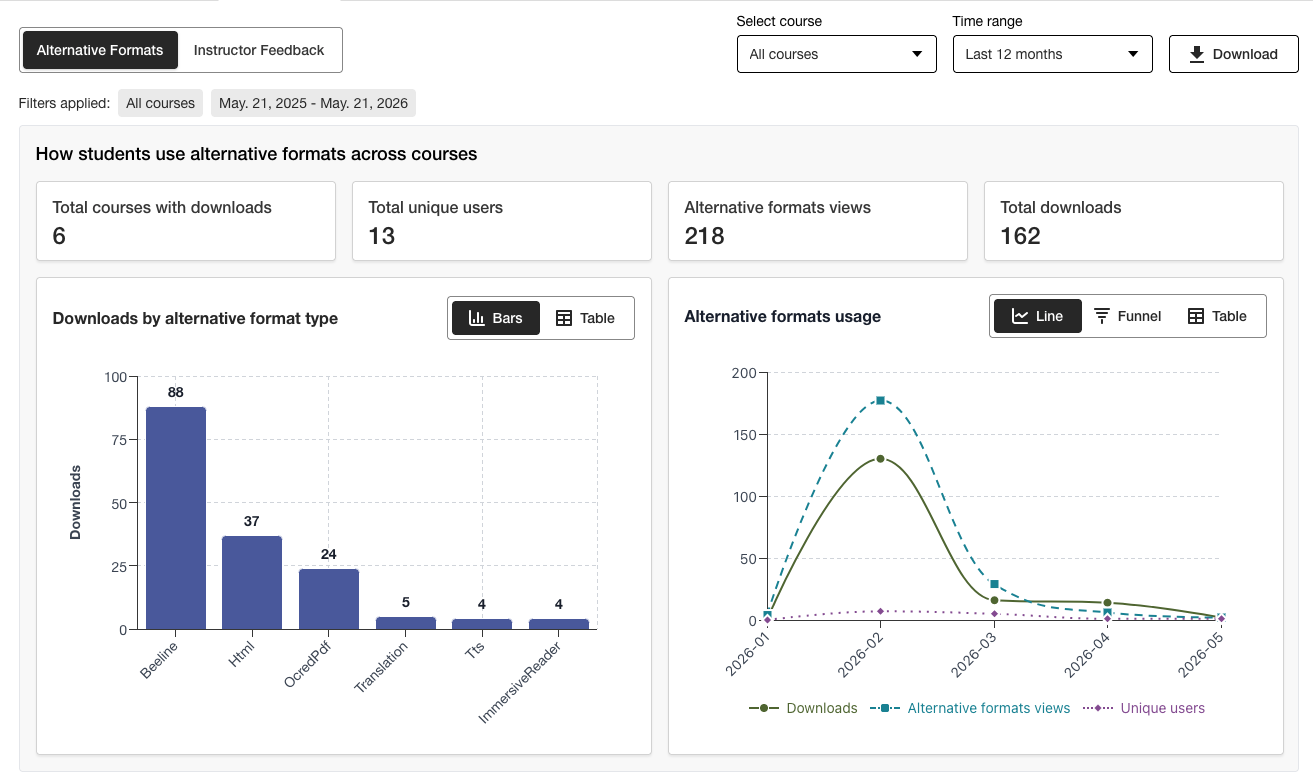
يمكن للمسؤولين الاطلاع على المعلومات المهمة في لمحة سريعة والاستفادة من خيارات التصفية الجديدة والتفصيل التفصيلي للرسوم البيانية للحصول بسهولة على رؤى أعمق حول البيانات.
لا يزال إصدار Excel متاحًا للتنزيل باستخدام ميزة «تنزيل» للمستخدمين الذين يفضلون الوصول إلى البيانات بتنسيق آخر.
لمزيد من المعلومات حول «تقرير الاستخدام» الجديد، يرجى الرجوع إلى الموضوعات التالية في موقع المساعدة:
تصحيحات الأخطاء
تم إصلاح خطأ في عمليات تكامل Canvas، حيث كان تحديث عنوان المستند عبر Ally يؤدي إلى تغيير حالة نشر المستند في المقرر الدراسي بشكل غير صحيح.
إصدار Ally 2.18.10 إلى بيئة الإنتاج: 2 يوليو 2026
إصلاحات الأخطاء والتحسينات
تم إصلاح خطأ في ميزة «ملاحظات المدرّس» كان يتسبب في انتقال أوصاف الصور المطبقة سابقًا بشكل غير صحيح عند استبدال صورة موجودة بصورة جديدة لحل مشكلة التباين.
تم إصلاح خطأ في «مساعد النص البديل للذكاء الاصطناعي» كان يتسبب في ظهور رسالة خطأ «Oops» إذا قام المدرّس بإضافة وصف جديد يدويًّا بعد النقر على «إنشاء وصف تلقائيًّا».
تم إصلاح خطأ في «التنسيقات البديلة» كان يتسبب في قيام تنسيق الصوت MP3 بتغيير لغة محتوى HTML بشكل غير صحيح.
تم إصلاح خطأ في ميزة «الإصلاح السريع» للغة ملفات PDF، والذي كان يسمح في بعض الحالات للمدرسين بتطبيق لغة غير صحيحة على الرغم من فحص التحقق من صحة اللغة الذي يقوم به Ally.
تم إصلاح خطأ في عمليات التكامل مع Blackboard كان يتسبب في إزالة "تعليق الملف" في كتل الصور عندما يقوم المُدرِّس بإصلاح مشكلة الوصف المفقود للصورة الواردة في "تقرير إمكانية الوصول إلى المقرر الدراسي".
تم تنفيذ العديد من التحسينات على تقنية التعرف الضوئي على الحروف (OCR) الأساسية في Ally بهدف تحسين الجودة والدقة ومعدلات التحويل عند معالجة ملفات PDF الممسوحة ضوئيًا لتحويلها إلى تنسيقات بديلة واستخدام ميزة «الإصلاحات السريعة لملفات PDF».
إصدار Ally 2.18.9 إلى بيئة الإنتاج: 22 يونيو 2026
إصلاحات الأخطاء والتحسينات
تم إصلاح خطأ في Moodle كان يؤدي في بعض الحالات إلى عدم ظهور الصور المضمنة في الصفحة في «معاينة ملاحظات المُدرِّس» عند فتحها من «تقرير إمكانية الوصول إلى المقرر الدراسي».
تم إصلاح خطأ في «صفحات Canvas» كان يمنع تطبيق تعديلات أوصاف الصور بعد استبدال صورة ذات تباين منخفض باستخدام خيار «تحميل ملف».
تم إصلاح مشكلة تتعلق بإمكانية الوصول في Moodle بحيث أصبحت أيقونات مؤشر Ally قابلة للتحديد أثناء التنقل.
إصدار Ally 2.18.8 إلى بيئة الإنتاج: 11 يونيو 2026
إصلاحات الأخطاء والتحسينات
تم إصلاح خلل في Moodle كان يتسبب في عرض رسالتين غير صحيحتين في تلميحات الأدوات للمستخدمين عند استخدام مؤشرات Ally.
تم تحسين الصياغة المستخدمة في أوصاف وأزرار أداة تكوين Ally بحيث تظهر على النحو التالي: تشغيل وإيقاف.
إصدار Ally 2.18.7 إلى بيئة الإنتاج: 1 يونيو 2026
إصلاح الأخطاء والتحسينات
تم إصلاح خطأ في Moodle كان يتسبب في إخفاء مؤشر درجة إمكانية الوصول عن غير قصد عند توسيع محرر TinyMCE على الصفحة.
تم إصلاح خطأ في Blackboard كان يتسبب في عدم تحويل مستويات العناوين داخل مستندات Ultra بشكل صحيح في التنسيقات البديلة لـ HTML الناتجة.
تم إصلاح خطأ في "ملاحظات المدرب" كان يؤدي إلى ظهور رسالة "المشكلات المتبقية التي يتعين حلها" بشكل غير صحيح بعد إكمال جزء من المحتوى بنسبة 100%.
تم إصلاح خطأ في Blackboard كان يتسبب في ظهور الصور المُصنَّفة على أنها زخرفية داخل المستند كرابط في معاينة "ملاحظات المُدرِّس" ضمن "تقرير إمكانية الوصول إلى المقرر الدراسي".
تم إصلاح خطأ في "ملاحظات المُدرِّس" كان يؤدي إلى ظهور الرابط مرتين عن طريق الخطأ عند محاولة إصلاح رابط معطل.
Ally 2.18.6 Release to production: May 26, 2026
Bug Fixes and Improvements
Implemented several processing improvements to provide better handling of Canvas LMS Rate limits to minimize the number of times Ally hits these limits over the course of regular content processing.
إصدار Ally 2.18.5 إلى الإنتاج: 7 مايو 2026
إصلاحات الأخطاء والتحسينات
تم إصلاح مشكلة تتعلق بإمكانية الوصول في Canvas حيث لم يستجب خيار "التنسيقات البديلة" في القائمة المنسدلة بشكل صحيح لمدخلات التنقل باستخدام لوحة المفاتيح.
تم إصلاح خطأ بسيط في تكامل Canvas تسبب في عدم إغلاق القائمة المنسدلة بعد النقر على خيار التنسيقات البديلة.
تم إصلاح الخلل في سير عمل ملاحظات المدرس بتنسيق PDF في الإصلاح السريع الذي تسبب في انتقال زر "حاول مرة أخرى" إلى نقطة البداية الخاطئة داخل لوحة الملاحظات.
معالجة محسّنة لملفات UNSAFE_HTML في عمليات تكامل Blackboard لاكتشاف هذه الملفات وتخطي تسجيلها بالكامل وتجنب الحاجة إلى إزالتها من التقارير كخطوة ثانية.
إصلاح الخلل الخاص بعمليات تكامل Blackboard الذي تسبب في تحويل مرفقات الملفات بشكل غير صحيح إلى روابط عند إصلاح المشكلات في المستندات من داخل تقرير إمكانية وصول Ally إلى المقرر الدراسي.
تنفيذ العديد من تحسينات المتابعة والتحسينات على قوائم انتظار المعالجة الفورية الخاصة بـ Ally في منطقة الولايات المتحدة.
إصدار Ally 2.18.4 للإنتاج: 30 أبريل 2026
إصلاحات الأخطاء والتحسينات
إصلاح الخلل في مستندات Blackboard الذي تسبب في قيام Ally بتحديد العناوين بشكل غير صحيح على مستوى خاطئ ومنع المدرسين من الحصول على 100% حتى بعد إصلاح جميع المشكلات.
تم تنفيذ تحسينات للكشف عن ملفات UNSAFE_HTML في Blackboard للسماح بإزالتها بسهولة من عمليات تسجيل Ally.
تم إصلاح مشكلة تتعلق بإمكانية الوصول كانت تمنع زر تنزيل الملف الأصلي من الظهور على الشاشات الأصغر حجماً.
تم إصلاح مشكلة في التحقق من التعليق التوضيحي لـ Vimeo في Ally التي كانت تتسبب في حدوث أخطاء عند اكتشاف فيديو Vimeo في المحتوى الغني إذا لم يتم إعداد تكامل Vimeo في تكوين Ally.
إصدار Ally 2.18.3 للإنتاج: 20 أبريل 2026
تحسينات معالجة المستندات
كجزء من التزامنا المستمر بالتحسين المستمر لجودة ودقة المحتوى في معالجة ملاحظات المدرس ومعالجة النص البديل في Ally، يجلب الإصدار 2.18.3 تحسينات مهمة على عملية تحويل المستندات الأساسية التي تشغل ميزات المستخدم الرئيسية هذه.
تمت ترقية منطق معالجة المستندات في Ally لتوفير تحويل أكثر ذكاءً وأسرع وأعلى جودة عند التعامل مع الملفات التي تم تحميلها في المقرر الدراسي. يجلب هذا العديد من التحسينات للمدرسين والطلاب، بما في ذلك:
انخفاض حالات مشكلات التباين الإيجابي الزائف التي تظهر في معاينات ملف ملاحظات المدرس
تحسين التعامل مع الأشكال داخل عروض PowerPoint التقديمية، بما في ذلك تحويل أشياء مثل الأسهم داخل المستند.
تحسين التعرّف على النص البديل المطبق على الأشكال بعد التحويل إلى PDF
تحسين الإعلان عن الصور الزخرفية ضمن التنسيقات البديلة، بما في ذلك التنسيق البديل الصوتي
تحسين التعرف على الصور وتطبيق علامات الشكل عند التحويل إلى PDF
بالإضافة إلى هذه التحسينات التي تواجه المستخدم، يتضمن هذا التحديث أيضًا تحسين البنية الأساسية لـ Ally للمساعدة في تحسين الأداء العام وسرعة معالجة المحتوى أثناء استلامه من نظام إدارة التعلم.
ملاحظة
ستستمر فرقنا في تحليل وتحديد التحسينات الإضافية المحتملة أو الحالات الحادة التي قد تحتاج إلى معالجة في المستقبل.
تم ترقية AI Alt Text Assistant
لقد تم تحديث مساعد النص البديل للذكاء الاصطناعي للاستفادة من العديد من التحسينات الإضافية في نماذج الذكاء الاصطناعي الأساسية في AWS Bedrock، بما في ذلك تقليل عدد مرات انتهاء المهلة عند طلب نص بديل مقترح وتحسين المعالجة لتجنب الهلوسة عند تحليل صور معينة.
وللتذكير، يمكن الاطلاع على مذكرة الشفافية المحدثة لمساعد النص البديل للذكاء الاصطناعي هنا مع تفاصيل إضافية حول هذه الميزة: https://help.anthology.com/ally-lms/en/administrators/ai-alt-text-assistant.html
إصلاحات الأخطاء والتحسينات
تم إصلاح خلل في ملاحظات المدرس تسبب في تطبيق تمييز غير صحيح في المعاينة عندما لا يتم تعيين اللغة الصحيحة في ملف PDF بعد محاولة تطبيق الإصلاح.
تم إصلاح خطأ في ملاحظات المدرس حيث لم يؤدِ النقر على المحاولة مرة أخرى عندما لا يتم تعيين اللغة الصحيحة في ملف PDF إلى إعادة المدرس إلى لوحة اختيار اللغة.
تم إصلاح الخلل في Canvas الذي كان يمنع المدرس من فتح ملاحظات المدرس على ملف PDF تم التعرف الضوئي على الحروف (OCR) الذي يحتوي أيضًا على عنوان ثابت.
تم إصلاح مشكلة تتعلق بإمكانية الوصول في لوحة ملاحظات المدرس التي أدت إلى تحويل التركيز بشكل غير صحيح بين العناصر عند استخدام زر رجوع.
تم إصلاح مشكلة إمكانية الوصول في النافذة المشروطة للتنسيقات البديلة التي تسببت في عدم تنزيل تنسيق الملف الأصلي عند التنقل والاختيار باستخدام لوحة المفاتيح.
إصدار Ally 2.18.2 للإنتاج: 9 أبريل 2026
إصلاحات الأخطاء والتحسينات
تم إصلاح مشكلة في Blackboard حيث لم تظهر مؤشرات Ally لمرفقات الملفات ضمن إرشادات الواجب.
تم إصلاح خطأ حيث في بعض الحالات أثناء التنقل في لوحة ملاحظات المدرس لمحتوى WYSIWYG، كان النقر على أيقونات غامق أو مائل في محرر المحتوى المنسق يؤدي إلى تنشيط زر الإنشاء التلقائي لمساعد النص البديل للذكاء الاصطناعي.
تم إصلاح خطأ في بعض الحالات حيث لم يؤدِ استبدال صورة بها مشكلات في التباين بصورة جديدة تمامًا عبر تحميل ملف ملاحظات المدرس إلى عدم تحديث معاينة المستند في بعض الحالات.
تم إصلاح الخلل في Canvas الذي كان يمنع مؤشرات Ally من الظهور بشكل صحيح في مخطط منهج Canvas عند تمكين إظهار الإعلانات الأخيرة على الصفحة الرئيسية للمقرر الدراسي.
إصدار Ally 2.18.1 للإنتاج: 2 أبريل 2026
إصلاح الأخطاء والتحسينات
تم تحديث إضافات Moodle لـ Moodle 4.5 و Moodle 5 لتضمين إصلاحات الأخطاء لمعالجة الأخطاء الطفيفة.
تم إصلاح مشكلة في "مساعد النص البديل للذكاء الاصطناعي" حيث كان يظهر للمدرسين في بعض الحالات رسالة خطأ عند محاولة اقتراح نص بديل بسبب عدم توفر النموذج الأساسي.
إصدار Ally 2.18 إلى الإنتاج: 26 مارس 2026
تتوفر الآن ميزة مسؤول المكتبة المرجعي الجديد
كجزء من جهودنا المستمرة لتوفير مستويات أكثر دقة من التحكم للمسؤولين الذين يتطلعون إلى إدارة تجربة معالجة ملفات PDF للمدرسين، تتوفر علامة ميزة جديدة في خيارات تكوين Ally تتيح إيقاف تشغيل سير عمل مرجع المكتبة.
يمكن للمسؤولين الآن إيقاف تشغيل ميزة مرجع المكتبة لإزالة قدرة المدرس على إضافة مراجع المكتبة إلى ملفات PDF عندما يكون الملف الأصلي غير متاح أثناء العمل على حل العديد من المشكلات الخاصة بملفات PDF. ستساعد هذه الطبقة الإضافية من التحكم على مواءمة هذه الميزة مع التفضيلات والعمليات المؤسسية، وتوفر مرونة إضافية عند تحديد أفضل طريقة لإدارة إصلاح ملفات PDF على نطاق واسع.
الصورة 1: علامة الميزة الجديدة ضمن خيارات تكوين Ally
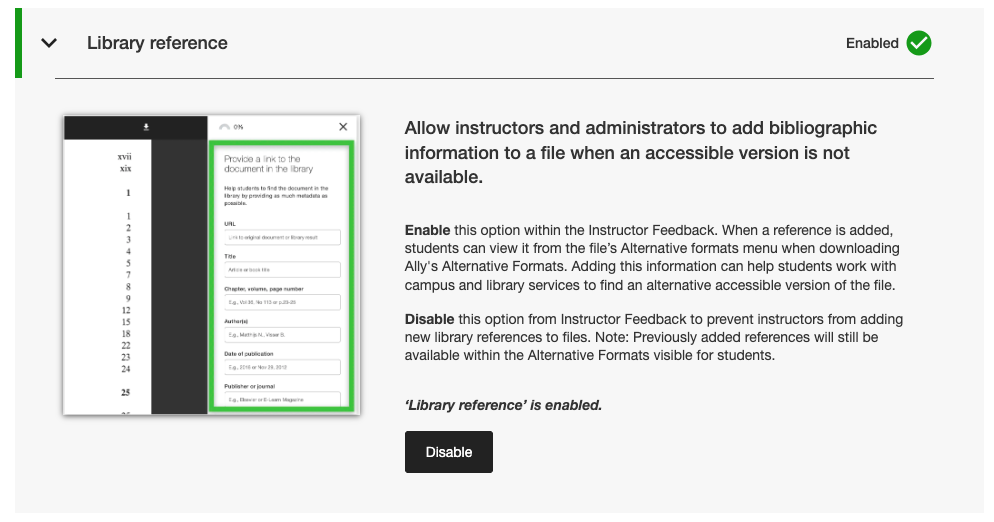
يمكن للمسؤولين العثور على علامة الميزة الجديدة هذه ضمن علامة التبويب الميزات في أداة تكوين Ally المدرجة ضمن مرجع المكتبة.
ملاحظة
ستظل مراجع المكتبة قيد التشغيل افتراضيًا مع هذا الإصدار. لن تؤدي إيقاف تشغيل مراجع المكتبة باستخدام علامة الميزة الجديدة هذه إلى إزالة مراجع المكتبة المضافة مسبقًا من المحتوى وسيمنع فقط إضافة مراجع جديدة من الآن فصاعدًا.
إصلاحات الأخطاء والتحسينات
تم إصلاح خطأ في Canvas تسبب في اختفاء عمود مؤشرات Ally من منطقة الملفات الجديدة عند تغيير حجم الشاشة.
تم إصلاح مشكلة تتعلق بإمكانية الوصول لذوي الاحتياجات الخاصة في عمليات تكامل Canvas والتي كانت تمنع تطبيق التركيز الصحيح عند استخدام لوحة المفاتيح للتنقل بين مؤشرات درجة إمكانية الوصول لذوي الاحتياجات الخاصة في صفحات Canvas.
تم إصلاح رابط الويب المعطل في إعدادات تكوين Ally لشروط استخدام مساعد النص البديل للذكاء الاصطناعي.
تم ترحيل خدمات البريد الإلكتروني SMTP الخاصة بنا إلى البنية التحتية الخلفية التي تتعامل مع تدفقات البريد الإلكتروني للمساعدة المخصصة.
إصدار Ally 2.17.5 إلى الإنتاج: 12 مارس 2026
لم تعد يتم تضمين ملفات Blackboard UNSAFE_HTML في التقارير.
كجزء من التزامنا المستمر بكفاءة المدرس والوضوح في إعداد التقارير، لن تعتبر تقارير Ally ملفات UNSAFE_HTML جزءًا من محتوى المقرر الدراسي لتكامل Blackboard.
الصورة 1: تقرير المقرر الدراسي مع تضمين HTML غير الآمن لإظهار السلوك السابق.
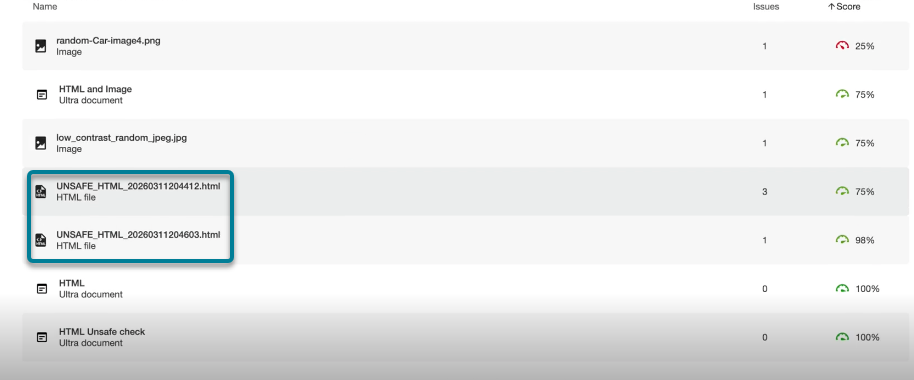
واعتبارًا من هذا الإصدار، ستتم تصفية ملفات UNSAFE_HTML التي يتم إنشاؤها تلقائيًا في مجلد المحتوى عند استخدام مقتطفات HTML داخل مستند Blackboard من تقارير المؤسسة والمقرر الدراسي. في السابق، كانت هذه الملفات تظهر في التقرير، ولكن لم يكن المدرسون قادرين على إصلاح مشكلات اللغة المحددة والعنوان المفقود، وغالبًا ما كانوا يلجأون إلى حلول أخرى لإزالة هذه الملفات من المقرر الدراسي لإزالتها من التقارير.
ملاحظة
سيؤدي هذا التغيير إلى إزالة جميع ملفات UNSAFE_HTML الحالية والسابقة من الاعتبار. استنادًا إلى عدد مرات استخدام عناصر المحتوى هذه في المقرر الدراسي، قد يؤدي ذلك إلى زيادة أو نقصان طفيف في درجة المقرر الدراسي استنادًا إلى توزيع الملفات ومحتوى HTML ومحرر WYSIWYG.
كجزء من الإصدار المستقبلي، سوف نتطلع إلى تجنب معالجة هذه الملفات بالكامل عند إعداد مقرر دراسي للمساعدة في تحسين الأداء العام وعمليات المسح الضوئي.
إصلاح الأخطاء والتحسينات
تم إصلاح مشكلة في عمليات تكامل Blackboard تسببت في حدوث تعارض في تسجيل درجات الصور عند مقارنة الدرجة الموجودة في ملاحظات المدرس الخاصة بالمستند بالدرجة الموجودة في تقرير إمكانية الوصول إلى المقرر الدراسي عند تعيين الصور إلى عرض فقط أو تنزيل فقط. كان تقرير إمكانية وصول ذوي الاحتياجات الخاصة إلى المقرر الدراسي يفتقد بشكل غير صحيح النص البديل المطبق مسبقًا ويقلل الدرجات على الرغم من ظهور ذلك على أنه ثابت في ملاحظات المدرس. لاحظ أن هذا ينطبق على الصور في Ultra Documents كجزء من المقرر الدراسي ومستودع كائن التعلّم.
تم إصلاح مشكلة في الإصلاح السريع للغة المفقودة في ملف PDF المفقود، والتي سمحت للزر تطبيق بأن يكون قابلاً للنقر قبل أن يختار المدرس لغة.
تم تحسين تصميم روابط المراجع للمكتبة في نافذة تنزيل التنسيقات البديلة بحيث تظهر روابط المراجع كروابط قابلة للنقر وتجنب مشاكل التباين المحتملة.
Ally 2.17.4 الإصدار للإنتاج: 5 مارس 2026
إعداد اللغة مسبقًا متاح الآن لإصلاح اللغة المفقودة في PDF بسرعة
يمكن الآن للمدرسين الذين يقومون بإصلاح ملفات PDF ذات اللغات المفقودة في الإصلاح السريع لملاحظات المدرس في Ally الاستفادة من اكتشاف اللغة وتحديدها مسبقًا في القائمة المنسدلة لتجنب التمرير الإضافي مع توفير الوقت عند إصلاح هذه المشكلة الشائعة.
ستعمل خاصية اكتشاف اللغة المدمجة في Ally على تحليل ملف PDF لتحديد اللغة المناسبة كلما أمكن. إذا لم يتم اكتشاف أي لغة، فلا يزال بإمكان المدرسين تحديد لغة واحدة يدويًا لتطبيق الإصلاح وجعل Ally يحفظ التغيير في ملف PDF كما هو متوقع.
الصورة 1: إضافة لغة الإصلاح السريع مع تحديد اللغة الإنجليزية

تتوفر الآن إضافات Moodle 5.1
كجزء من دعم Ally المستمر لـ Moodle، تتوفر مكونات Ally الإضافية لـ Moodle 5.1. يمكن العثور على تفاصيل إضافية حول دعم Ally لـ Moodle في وثائق تكوين Ally لـ Moodle.
ملاحظة
ينشئ Ally صفحات فرعية لكل إصدار Moodle مدعوم كجزء من استراتيجية المكون الإضافي مصدر مفتوح للسماح بالتطوير المستهدف وإصلاح الأخطاء. سيتم العثور على الإصدارات الحالية من المكونات الإضافية في الصفحات الفرعية المستقرة المقابلة في مستودعنا. يوصى دائمًا بأن يستخدم المسؤولون الصفحات الفرعية المستقرة لضمان عدم إدخال أي تغييرات جديدة غير مقصودة عند تحديث المكونات الإضافية.
إصلاح الأخطاء والتحسينات
تم إصلاح مشكلة في Blackboard حيث كان المدرسون الذين يستخدمون تقرير إمكانية الوصول للمقرر الدراسي لإصلاح المشكلات في المستندات قادرين بشكل غير متوقع على إزالة المحتوى الذي تم تحديده بشكل غير صحيح كروابط عند تضمين كتل HTML و/أو الصوت و/أو مقاطع فيديو HTML Studio.
تم إصلاح مشكلة في جميع عمليات تكامل نظام إدارة التعلم في التقرير المؤسسي حيث كانت القائمة المنسدلة «تصدير» مخفية على الشاشات الصغيرة و/أو أحجام المستعرض.
تم إصلاح مشكلة في جميع عمليات تكامل نظام إدارة التعلم حيث أدى تطبيق إصلاح سريع للرابط المقطوع لمحتوى WYSIWYG الذي يحتوي على عدة روابط مقطوعة في الوقت نفسه في بعض الأحيان إلى حدوث دوران تحميل لا نهائي.
تنفيذ العديد من التحسينات في الواجهة الأمامية للبنية الأساسية لمعاينة ملاحظات مدرس PDF لدعم تقدمنا المستمر في ميزات معالجة ملفات PDF.
تنفيذ تحسينات إضافية لأفضل الممارسات لطلبات HTTP لتكامل Canvas لضمان استخدام رؤوس وكيل المستخدم.
إصدار Ally 2.17.3 للإنتاج: 30 يناير 2026
إصلاح الأخطاء والتحسينات
تم إصلاح مشكلة في ملاحظات المدرّس في Ally لملفات PDF الممسوحة ضوئيًا. ففي السابق، بعد فتح "تعلم كيفية إصلاح ملفات PDF"، لم يكن النقر على Back يعيد المستخدمين دائمًا إلى عرض ملاحظات المدرّس، وأحيانًا كان يتطلب الأمر نقرة ثانية.
إصدار Ally 2.17.2 للإنتاج: 15 يناير 2026
إصلاح الأخطاء والتحسينات
تم إصلاح مشكلة في التقرير المؤسسي كانت تؤدي إلى إخفاء خيار تنزيل ملف CSV عند التصدير من علامة التبويب "المقررات الدراسية" إذا كانت نتائج البحث تُرجع مقررًا دراسيًا واحدًا أو أقل.
تم إصلاح خطأ في تقرير الاستخدام كان يؤدي إلى بقاء زر تنزيل تقرير الاستخدام معطّلًا بعد تنزيل التقرير وتحديد نطاق تاريخ جديد.
تمت معالجة مشكلة تتعلق بإمكانية الوصول عبر لوحة المفاتيح في منطقة ملفات Canvas، حيث كان التركيز يُفقد عند الانتقال إلى درجة إمكانية الوصول. يظل مؤشر التركيز مرئيًا الآن أثناء التنقل باستخدام لوحة المفاتيح.