Assigning and Assessing the Same Outcome
Use this process when you need to both assess an outcome at its own institutional hierarchy unit and assign it down to units below it, such as departments, programs, course subjects or course sections, then report on all of the data together.
In Outcomes, each outcome follows one path: you either conduct the assessment at the current unit level or assign the outcome down to one or more units below it. Some assessment plans call for both. For example, a program may want results from a program-level review committee and from selected course sections, combined into one report at the program level.
In this article:
A course subject is the course as listed in the catalog, such as MTH 101.
A course section is one offering of a course subject in a specific term, such as MTH 101, Section 1, in the Fall term of AY2025.
You can do this by creating three copies of the same outcome and linking them with related connections. It takes a few more steps than the usual workflow, and it gives you a combined report and a side-by-side comparison of both sources of data.
This process works at any institutional hierarchy unit, including institutions, divisions, departments, programs, course subjects and course sections.
How it works
You create the same outcome three times. Each copy has one role:
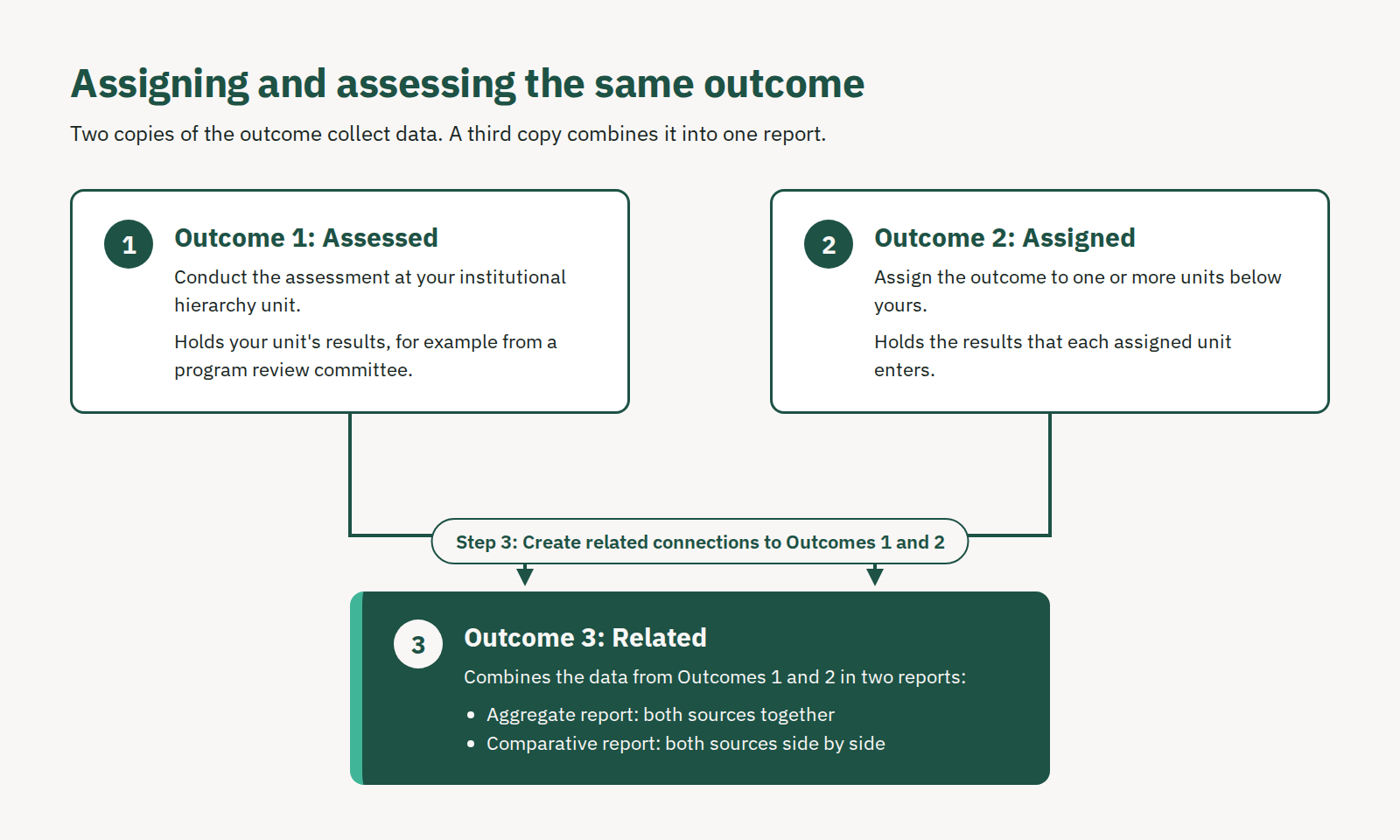
Outcome 1: Assessed. Conduct the assessment at your own institutional hierarchy unit. This outcome holds your unit's results, for example from a program review committee.
Outcome 2: Assigned. Assign the outcome to one or more units below yours. This outcome holds the results that each assigned unit enters.
Outcome 3: Related. Create related connections to Outcomes 1 and 2. This outcome combines their data in two reports:
The aggregate report shows both sources together.
The comparative report shows both sources side by side.
The first copy holds the data you collect at your own level, and the second holds the data from the units it is assigned to. The third copy relates to the first two, so its reports combine both sets of data.
Set up the Three Outcomes for Assigning & Assessing the Same Outcomes
Step 1: Conduct the assessment on the first outcome
This outcome holds the data collected at the current level, such as a program committee's review.
Navigate to your level in the institutional hierarchy.
Select the title of the first outcome.
Select the term in which you are conducting the assessment.
Under How will assessment be performed?, select Assessment.
Complete the Assessment Template to document your assessment method and artifacts.
When the assessment is complete, enter the data in the Results Template.
The outcome is now labeled Assessed.
Step 2: Assign the second outcome to units below it
This outcome collects the data from the units below it that assess it.
Return to your level in the organizational chart.
Select the title of the second outcome.
Select the same term.
Select Connection, then select Assign assessment to other unit(s).
In the Connections window, select the plus sign (+) next to each unit that will assess the outcome. To reach a unit further down the organizational chart, select the arrow to the left of a unit's name to expand it.
Confirm the selected units appear in the Assigned Units/Courses list.
Select Save.
The outcome is now assigned to the units you selected and is labeled Assigned. Each assigned unit then finds the outcome on its Pending Connections tab, completes the assessment and enters results. See Creating Assigned Connections
Step 3: Relate the first two outcomes to the third
This outcome combines the data from the first two into one report.
Return to your level in the organizational chart.
Select the title of the third outcome.
Select the same term.
Select Connection, then select the option to relate this outcome to other outcomes.
In the Connections window, select Add next to the assessed outcome and next to the assigned outcome.
Scroll down to the Preview window and confirm both outcomes are listed.
Select Submit.
The outcome is now labeled Related, and its reports show data from both sources.
View the Combined Reports
Open the third (related) outcome to see two reports:
Report | Where to find it | What it shows |
|---|---|---|
Aggregate report | Top-right corner of the outcome | Program-level and course-level results combined into one set of data |
Comparative report | Under the Related Connections heading | Each source side by side: the program-level assessment next to the combined course-level results |
All three outcomes stay on the outcome list at your level. The first and second outcomes keep their own data, and the third outcome reports on both.
Best Practices
With three copies of the same outcome, it is important to know which one you are working in. This matters most if your institution sends Outcomes data to Planning, because you want the correct outcome to appear there.
Keep the same order in every unit. Reorder the outcomes so the combined (related) outcome is always in the same spot, such as last in the list. If several programs use this process, a shared rule makes the combined outcome easy to find.
Add a letter to the outcome identifier. Mark the first two copies by their role and keep the original identifier for the combined outcome:
Outcome role | Suggested identifier |
|---|---|
Program-level assessment (Assessed) | PLO 1-P |
Course-level assessment (Assigned) | PLO 1-C |
Combined report (Related) | PLO 1 |
Keeping the original identifier on the combined outcome makes it stand out from the other two, and it reads cleanly when it is pulled into Planning.
Example
A Law program is assessing its program learning outcome PLO 1: Quantitative Reasoning. Its assessment plan calls for two sources of data:
A program committee randomly samples capstone projects and assesses them against PLO 1.
Course sections of selected upper-level course subjects, such as LAW 483, assess PLO 1 in their coursework.
The program wants both sets of data in one report. Here is how it sets up the three outcomes:
Outcome | Action taken | Label in Outcomes | Data it holds |
|---|---|---|---|
PLO 1 (first copy) | Conduct Assessment | Assessed | Committee review of capstone projects |
PLO 1 (second copy) | Assigned Connections to LAW 483 | Assigned | Course-level results from LAW 483 course sections |
PLO 1 (third copy) | Related Connections to the first two | Related | Aggregate and comparative reports of both |
The same approach works for institutional learning outcomes or any other outcome that needs both kinds of data.