Create a Certificate Template in Adobe Acrobat
Course Catalog certificates must be created in PDF format. The best tool for creating certificates that will work in Course Catalog is Adobe Acrobat Pro.
Important
Do not use an encrypted PDF as a template. Encrypted PDFs will not be released as certificates.
Create your certificate
Design your certificate in a program that will export it as a PDF. Leave spaces where you want information to be filled in by Course Catalog.
Open the certificate in Adobe Acrobat Pro.
Select the Prepare Form icon from the Tools menu. If the Prepare Form is not present on the Tools menu, type Prepare in the Search tools box. Select Prepare Form from the options that appear.
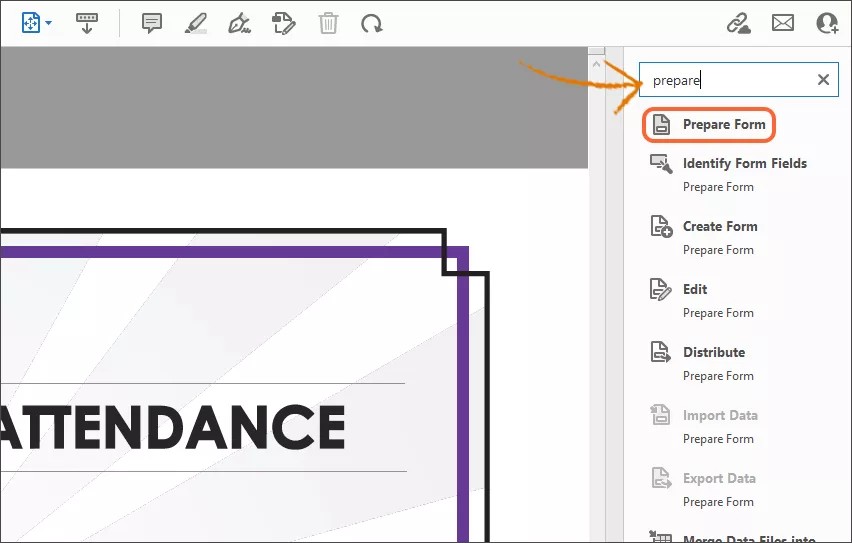
Select Start in the Prepare Form window.
Delete any unwanted fields detected by Acrobat.
Select the Add a Text field icon in the toolbar.

Add the field to the appropriate place on your certificate.
Select All Properties to set the properties for the field.
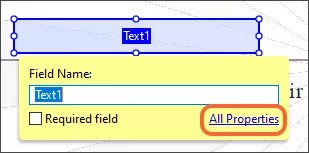
Fill out the properties.
General: add a name for your field. This name will be used to map the field to a user, course attribute, or a piece of generated data (the possibilities are listed below).
Appearance: choose either Times New Roman or Helvetica as your font; those are the two that have been tested with Course Catalog.
Options: type the default text or value that will appear on your certificate as a placeholder.
Select Close.
Add additional text fields for every field you want placed on your certificate.
Save your certificate after you are finished adding fields. Make sure there are no spaces in the filename.
You are now ready to add your template to Course Catalog.
Attributes and Mappings
User Field Mapping List
// Full mappings that can be used:
User.
"name.title"
"name.family"
"name.middle"
"name.suffix"
"name.other"
"contact.email"
"contact.mobilePhone"
"contact.homePhone"
"contact.businessFax"
"contact.businessPhone"
"contact.webPage"
"address.street1"
"address.street2"
"address.city"
"address.state"
"address.country"
"address.zipCode"
"job.title"
"job.company"
"job.department"
"studentId"
"userName"
Course Field Mapping List
// Full mappings that can be used:
Course.
"name"
"courseID"
"dataSourceId"
"description
"parentID"
"hasChildren"
"locale.id"
"availability.available"
"availability.duration.start"
"availability.duration.daysOfUse"
"availability.duration.type"
"availability.duration.end"
"enrollment.accessCode"
"enrollment.end"
"enrollment.start"
"enrollment.type"
"Instructor"
"Grader"
Generated Data Mapping List
// Full mappings that can be used:
Generated.
"generationDate" - the date and time (in the UTC time zone) when the certificate was generated
"expirationDate" - the date and time (in the UTC time zone) when the certificate will expire