Institutional Hierarchy
Blackboard's Institutional Hierarchy (IH) is a flexible, node-based model that represents the organizational structure of your institution. Each node reflects a distinct unit—such as college, school, or department—and nodes are arranged in parent child relationships to mirror how your institution is structured. We recommend giving each node a unique, meaningful name and avoiding nodes that represent delivery modalities.
This page gives an overview of Institutional Hierarchy (IH) and its uses. For information on creating and managing nodes to build out your hierarchy, visit Create and Manage Nodes in Institutional Hierarchy.
Uses for Institutional Hierarchy
You can take advantage of Institutional Hierarchy in Blackboard to:
Delegate administrative responsibilities within Blackboard. Assign users to nodes with roles at each level to allow localized management of tasks like course setup, enrollment, and reporting without granting full system access. After you create node associations, you can pair the node administrator to that node with a specific set of privileges based on either a default or custom system role. The node administrator then has some degree of managerial privilege over users or courses and organizations within that role.
Manage access to licensed tools within Blackboard. Set different policies for Blackboard tools by department and restrict LTI tools from departments where they aren't appropriate. You have the ability to support multiple deployments of the same LTI tool in Blackboard. This gives you to broader control over third-party app licensing and course delivery. You can also support a consortia or multi-site organization with an LTI tool deployment.
Organize and manage reusable objects in the Learning Object Repository. Objects from the Learning Object Repository can be centrally managed by node, providing institutions with the ability to sync changes across thousands of courses and lock down institutional materials. This ability ensures consistency and up-to-date information across all courses.
Manage visibility in Blackboard LMS: Course Catalog. Restrict Blackboard Course Catalog offerings to specific nodes to manage learner access. Once a node is assigned, these offerings are only visible to users within the matching node. You can also manage your branding through nodes. Users assigned to a specific node will see the banner, logo, and colors for Course Catalog that are associated with that node.
Report on the accessibility of courses by University, College, School, and Department using Blackboard Ally. Gain clear insight into how your institution is performing and progressing on course content accessibility. Track improvements over time, identify problem areas, and uncover opportunities to drive meaningful accessibility initiatives.
Report on Outcomes as it relates to Programs and Subjects with Outcomes for Blackboard. Report learning outcomes in a way that reflects how learning actually happens—courses roll up into subjects over time, and subjects contribute evidence across programs or Institutional Hierarchy units. Leveraging these curricular structures, Outcomes delivers aligned, longitudinal reporting that strengthens accountability, accreditation readiness, and continuous improvement.
Provide role-based access to reporting in Blackboard Illuminate. Role-based access allows a specific role to see only the aggregated data for courses or users within their defined role. For example, a department head can see course data for courses within their specific department (node), or a Dean of a School of Engineering can see student data for students within that school (node).
Give developers the ability to write their own queries in Blackboard Illuminate Institutional Hierarchy is also available for your internal developers to write their own queries or to connect to your organization’s own reporting tools. Even for built-in reports, you can do segmentation and comparison to customize your reports.
You may not take advantage of all of these uses of Institutional Hierarchy. Use only what gives value to your institution. While some institutions currently use nodes for reporting segmentation, our long-term goal is to better support those reporting needs without relying on Institutional Hierarchy. This will allow the hierarchy to remain focused on what it was designed for: accurately representing your organizational structure rather than your curricular or physical structure.
Example of one Institutional Hierarchy model
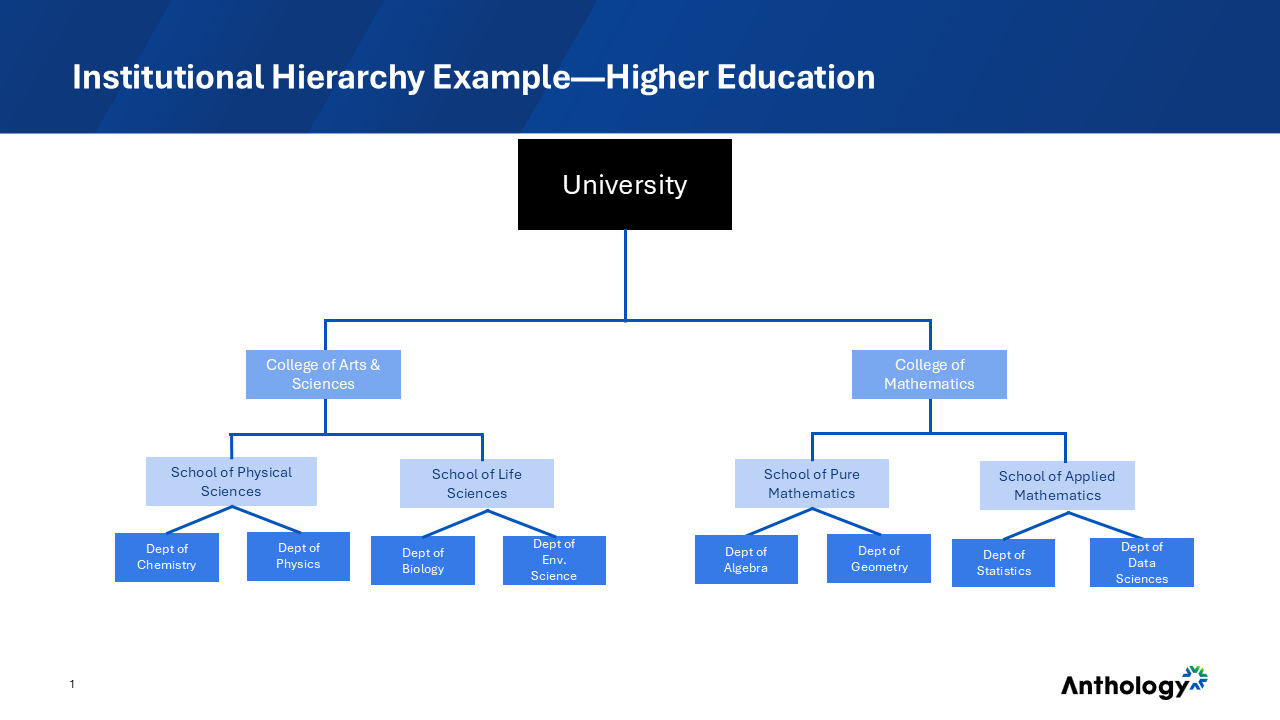
Examples of Institutional Hierarchy structures by market
Different institutions will have different needs for their Institutional Hierarchies. See the following examples for what an institutional hierarchy might look like in your market.
Higher Education | K-12 | Business & Government |
|---|---|---|
|
|
|
Best practices and advice for building your hierarchy
The following suggestions can help you get started building your hierarchy.
Plan ahead. It's helpful to plan and even draw out your intended structure by hand before creating nodes in the system.
Budget appropriate time. According to clients, the process of setting up Institutional Hierarchy takes about four to six hours.
Reach out. Blackboard has professional services to support configuration if you have questions or get stuck. Contact Blackboard's product support team or your account team.
In building our your hierarchy, we recommend the following order:
Academic structure. Begin with building out your academic structure and associating courses to that structure. This allows for tool management and departmental reporting.
Administrators and managers. Establish appropriate administrator assignments in all branches. This allows for delegated management and delegated access to reporting.
Things to consider as you build your hierarchy:
Avoid adding curricular structures such as Programs and Subjects. Institutional Hierarchy shouldn't replace using the Programs and Subjects functionality built into Blackboard.
Avoid adding locations as part of your hierarchy.
If you have two nodes with the exact same name, you might be creating too much complexity.
While setting up the institutional hierarchy may seem daunting, remember you don’t have to create everything at once. Focus on what brings value to your institution.