ORIGINAL View Discussion Grades
Your instructor may count discussion participation as part of your grade. After you've posted your thoughts and your instructor has graded your contributions, your grades appear in different areas of Blackboard.
View discussion grades
If you participate in a graded discussion, you can view your grade in My Grades. The discussion grade row may contain a symbol to indicate its status. For example, an exclamation mark means your contribution still needs grading. Or, if your post has been graded, the grade appears.
On the course menu, select Tools > My Grades.
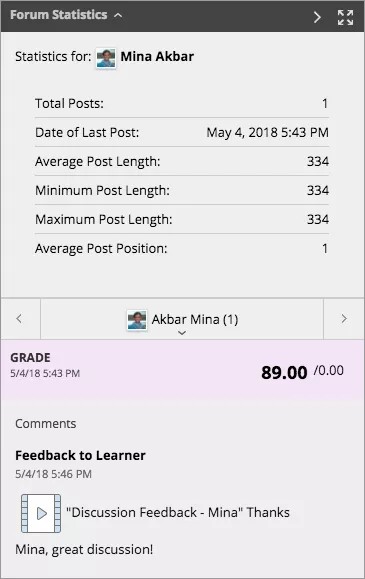
On the My Grades page, select the link to see the post's grade. You can also view:
Forum Statistics: Expand this section to view information about your posts, such as Total Posts, Date of Last Post, Average Post Length, and Average Post Position.
Grade: This section provides information about your grade and any feedback from your instructor. If your instructor used a rubric for grading, select View Rubric to display detailed grading information.