Blackboard Outcomes
Some Blackboard courses include Outcomes—also called learning outcomes, skills, or competencies. Outcomes help you understand what you are expected to learn in a course and how your completed work contributes to mastery in those areas.
When Outcomes are enabled, Blackboard brings outcome information together in one place so you can track your own progress over time. You can see how graded work in your course aligns to outcomes and how your performance contributes to your overall mastery. Outcomes are designed to support transparency and reflection. They give you insight into your learning, not just your grades.
Your outcomes information is private and secure. You can only view your own outcome progress. Other students’ results are not visible to you.
Access Outcomes in your course
Open your course.
Select the Gradebook tab.
Select the Outcomes sub-tab.
Understanding the Outcomes view
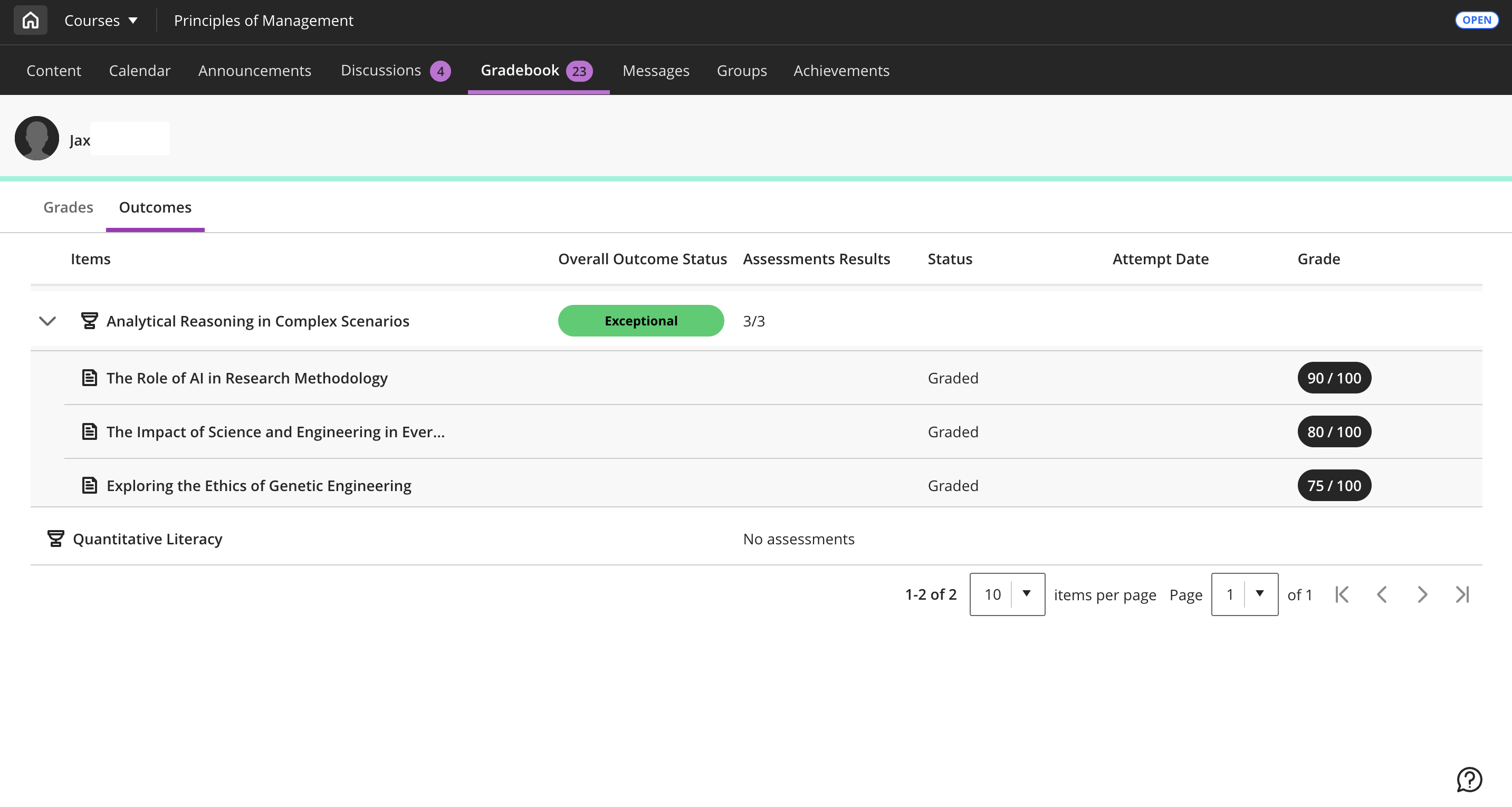
Outcome (row name): The learning outcome/skill/competency being measured in the course.
Overall outcome status: A summary of your current mastery for that outcome. This status is based on the performance scale your institution uses.
Assessment results: Shows how many graded items (assessments) are aligned to the outcome, and how many of those you’ve completed. Select the outcome row to expand it and view the aligned assessments.
Status: The status for each aligned assessment (as shown in your course/gradebook).
Attempt date: Date for your submitted attempt (when attempts are available).
Grade: The grade recorded for the item.
If an outcome has no aligned assessments, the Outcomes view indicates that there are no assessments available for that outcome.
How Mastery is Calculated
Mastery for Outcomes is calculated using a dynamic, flexible approach that reflects student performance across multiple assessments aligned to a specific learning outcome. Rather than applying a one-size-fits-all model, the system supports custom mastery scales—allowing institutions to define achievement thresholds per assignment or outcome. A weighted median is used to calculate each student's mastery level.
Here’s how it works:
Student results are aggregated across all assessments aligned to a particular outcome.
Each assessment is weighted proportionally based on its maximum score.
A weighted median is calculated using normalized result categories (for example, Exceeds, Meets, and others).This mastery score is then aligned to your institution’s custom scale, dynamically applying a status (for example, “Met,” “Not Met”) and color-coded indicators based on defined thresholds.
This approach ensures that outcome measurement is accurate, consistent, and adaptable—supporting instructional goals and providing faculty and students with reliable, actionable insights.
Tips and troubleshooting
If you don’t have an Outcomes sub-tab in Gradebook, Outcomes might not be enabled in your course.
If you have outcomes listed but no aligned assessments, it might indicate that your instructor hasn’t aligned graded work to those outcomes (or alignments aren’t available yet).
If you have questions about what an outcome means for your course, contact your instructor.