Notas de versão 2026
Note
Esta documentação foi traduzida utilizando tradução automática assistida por IA. As traduções são fornecidas "no estado em que se encontram", sem qualquer garantia quanto à sua precisão. A versão em inglês deste conteúdo é a fonte oficial e de referência.
Ally 2.19.8 Release to production: September 28, 2026
Bug Fixes and Improvements
Fixed a bug in Blackboard integrations that caused some Documents not to be able to generate audio alternative formats.
Fixed a bug in Canvas integrations that caused Ally not to be able to correctly recognize images within Classic Quizzes which resulted in images with alt text being flagged as missing in the Course Report.
Implemented an accessibility improvement to the focus indicator applied to the Enable Future courses button within the Ally Configuration tool.
Fixed a bug in Canvas integrations that caused an error when attempting to fix any HTML issue from the Course Report.
Fixed an accessibility issue that caused insufficient contrast on the focus indicators for the enable and disable options within the Ally Configuration tool.
Fixed a bug with the Table Header Quick Fix that caused the selected option to disappear when Fix all occurrences was selected.
Fixed an accessibility issue within the Table Header Quick Fix to ensure that the Apply a table header selector is appropriately associated with its visible label.
Implemented an accessibility improvement to the Ally Terms of Use to ensure the Terms of Use text meets minimum color contrast requirements.
Fixed an issue in Blackboard where instructors using the Course Accessibility Report to fix issues in Documents were unexpectedly able to remove content incorrectly identified as links when embedding LTI Video links including Yuja, Echo360, Panopto, Kaltura and other third-party videos.
Fixed an issue in Canvas integration where custom CSS was conflicting with Ally CSS and prevented it from loading correctly causing an error when viewing the Instructor Feedback and/or Course Report Preview.
Ally 2.19.7 Release to production: September 17, 2026
Bug Fixes and Improvements
Updated the AI Alt Text Assistant to take advantage of several additional improvements in the underlying AWS Bedrock AI models. For more information, visit AI Alt Text Transparency Note.
Fixed a bug in the Institutional Report Directory Tab that sometimes caused the number of courses and items to show as ‘0’ until you refresh the report.
Fixed a bug in the Institutional Report that caused the label for the last month to not be visible.
Fixed a bug in Moodle integrations that sometimes prevented the instructor from updating an image description in the Ally Instructor Feedback.
Fixed a bug that caused a display issue in the Course Accessibility Report when file names exceeded a certain length.
Implemented several improvements to Ally’s underlying processing logic when handling large volumes of events.
Ally 2.19.6 Release to production: September 7, 2026
Bug Fixes and Improvements
Fixed an issue in Blackboard integrations where links without discernible text within the Title of a Document could not be fixed with the quick fix when using the Course Accessibility Report.
Fixed an issue in Blackboard integrations where alt text and decorative image values entered through the Ally Instructor Feedback or the Instructor Feedback via the Course Accessibility Report did not save back to the Image Block metadata as expected.
Fixed an issue in Canvas integrations that caused the Alternative Formats window to not scale correctly with the browser screen size when using the file preview.
Fixed an issue in Canvas integrations that created a role conflict when a user had both student and instructor permissions across multiple courses resulting in inconsistent Course Accessibility Report launch behavior.
Implemented improvements to Ally’s backend course sync processes when generating monthly reports.
Ally 2.19.5 Release to production: August 27, 2026
Bug Fixes and Improvements
Fixed an issue in the new Usage Report that prevented the department ID from filtering both the UI and the export when drilling into the Directory tab.
Fixed an issue in Blackboard integrations that prevented alternative text and decorative image settings marked in Ally from saving back to Blackboard Tests when using either the Instructor Feedback or Course Accessibility Report Instructor Feedback.
Fixed an issue in Blackboard integrations that prevented instructors from overwriting existing alternative text on an image when using the Course Accessibility Report.
Fixed an issue within Ally’s alternative format processing that sometimes stripped the first word after each bullet point when creating the HTML alternative formats from Word documents containing bulleted lists.
Fixed an issue in the Moodle 5 plugins that prevented Ally from flagging images lacking alternative text in the rich content if the image description was only entered as spaces.
Fixed an issue that caused Ally to incorrectly flag some Word documents with headings issues despite headings being present.
Fixed a minor issue within the Ally Instructor Feedback error messaging that shifted the close button for the Oops error modal to the bottom of the screen.
Implemented performance improvements for the D2L Brightspace course loading process to avoid timeouts while processing large volumes of courses.
Ally 2.19.4 Release to production: August 17, 2026
Nota
Reporting Bearer Token Reset: The reset of Ally Reporting API tokens was completed successfully on August 14th. Going forward, administrators should create a new token in the institutional report to restore connection in any external reporting tools.
Bug Fixes and Improvements
Fixed an issue in Blackboard Tests that caused the Ally score indicator to disappear from an image embedded within the text block when editing image alt text.
Fixed an issue with Canvas Course Export/Import and Copies where the associated Ally course copy processes (that carry over data such as alternative text, decorative images and library references) were failing in certain scenarios where a course file was deleted and replaced during the Canvas copy/import process.
Fixed an issue in the New Files Experience in Canvas that caused the Ally score indicators to disappear completely from the screen when scaled down to a small enough screen size.
Fixed an issue in Canvas File Preview within the New Files Experience that sometimes caused the Alternative Formats Icon to sporadically appear and disappear.
Fixed an issue in Canvas New Files Experience that caused the Alternative Formats modal to remove the Download Original File icon when scaled down to a small enough screen size.
Fixed an issue in Canvas that caused a delay in showing the Alternative Format icon when navigating from file to file.
Fixed an issue in Canvas that caused RTF files to be mistakenly recognized as Word documents and included in the Course Report and course score despite not being able to be opened or previewed.
Fixed an issue that caused Ally to report certain PPTX files as missing language when the language was set correctly in the document.
Fixed an issue with Ally’s broken link checking in the LMS that caused some valid links to be seen as broken depending on how those links were created in the WYSIWYG content.
Improved the accessibility and color contrast of the Ally Alternative Format indicator when using High Contrast Modes.
Improved Ally’s language validation checks on PDF documents to help minimize certain scenarios where the selected language in the PDF Quick Fix could not be saved.
Implemented performance improvements in Ally when interacting with the Moodle ally_filter plugin.
Ally 2.19.3 Lançamento em produção: 7 de agosto de 2026
Plug-ins do Moodle 5.2
Como parte do apoio contínuo da Ally ao Moodle, os plug-ins do Ally para o Moodle 5.2 já estão disponíveis. Mais detalhes sobre o suporte do Ally ao Moodle podem ser encontrados na documentação de configuração do Ally para Moodle.
Nota
A Ally cria ramificações para cada versão compatível do Moodle como parte de nossa estratégia de plug-ins de código aberto, a fim de permitir um desenvolvimento direcionado e a correção de bugs. As versões atuais dos plug-ins podem ser encontradas nas ramificações STABLE correspondentes em nosso repositório. É sempre recomendável que os administradores utilizem os ramos estáveis para garantir que nenhuma nova alteração indesejada seja introduzida quando os plugins forem atualizados.
Correções de bugs e melhorias
Corrigimos um erro no Moodle que fazia com que parte do conteúdo HTML ficasse indisponível quando a opção Excluir arquivos não utilizados nos plug-ins do Ally era selecionada.
Ally 2.19.2 Lançamento em produção: 30 de julho de 2026
Correções de bugs e melhorias
Melhoramos a experiência do “Feedback do instrutor” para os instrutores do Blackboard, de modo que a visualização prévia do conteúdo exiba os blocos de conteúdo HTML como conteúdo visível, em vez de apenas indicar “UNSAFE_HTML” ao utilizar o Relatório de Acessibilidade do Curso.
Corrigimos um problema para os professores do Blackboard em que imagens inseridas sem descrição dentro de uma tabela na seção “Documentos” não estavam sendo identificadas corretamente pelo Ally.
Corrigimos um problema nos fluxos de trabalho de ajuda personalizados do Ally que impedia que os URLs inseridos fossem resolvidos ao serem clicados.
Corrigimos um problema no Blackboard que impedia o professor de aplicar uma nova cor de fonte ao usar a correção rápida para problemas de contraste destacados na seção “Documentos”.
Corrigimos um problema no fluxo de trabalho do recurso “Correção rápida de PDF com OCR” que resultava em um erro “oops” caso o instrutor aplicasse primeiro a correção por OCR e, em seguida, desmarcasse a opção “Baixar no formato original”.
Corrigimos um problema no novo Relatório de Uso do Ally que fazia com que os downloads expirassem inesperadamente ao selecionar um intervalo de datas mais longo. Observe que os administradores devem limpar o cache do navegador agora que essa correção foi lançada antes de tentar fazer um novo download.
Ally 2.19.1 Lançamento em produção: 22 de julho de 2026
Correções de bugs e melhorias
Corrigimos um problema que fazia com que a captura de tela no novo sinalizador de recurso para “Marcação automática de PDF”, nas opções de configuração, aparecesse distorcida.
Corrigimos um problema no cache de Dados de Uso que fazia com que alguns administradores não conseguissem visualizar dados históricos mais antigos no relatório da nova interface do usuário ao filtrar por períodos mais longos.
Corrigimos um problema no Blackboard que ocorria ao inserir imagens por meio de uma URL, o qual fazia com que o texto alternativo fosse removido de todas as imagens idênticas, em vez de apenas da imagem selecionada.
Corrigimos um problema no Blackboard que impedia que o texto alternativo fosse salvo corretamente quando inserido no “Feedback do instrutor” para imagens inseridas por meio de um URL.
Atualizamos o nome do servidor do Canvas nos detalhes de configuração do LTI do Ally para garantir que estejamos indicando sso.canvaslms.com em todas as áreas pertinentes.
Implementamos um tempo limite maior para a API de relatórios do Ally, a fim de evitar que conjuntos de dados maiores dos clientes excedessem os limites de tempo, o que causava um erro na ferramenta de relatórios.
Ally 2.19 Lançamento em produção: 13 de julho de 2026
A solução rápida para marcação de PDFs já está disponível para professores
À medida que continuamos a expandir os recursos de correção de PDFs no Ally Instructor Feedback, os professores agora podem marcar automaticamente PDFs sem marcação para aplicar tags ao documento e melhorar a acessibilidade geral para os alunos. Esse recurso agora está disponível para todas as instituições após a fase inicial do Programa de Adotantes Pioneiros.
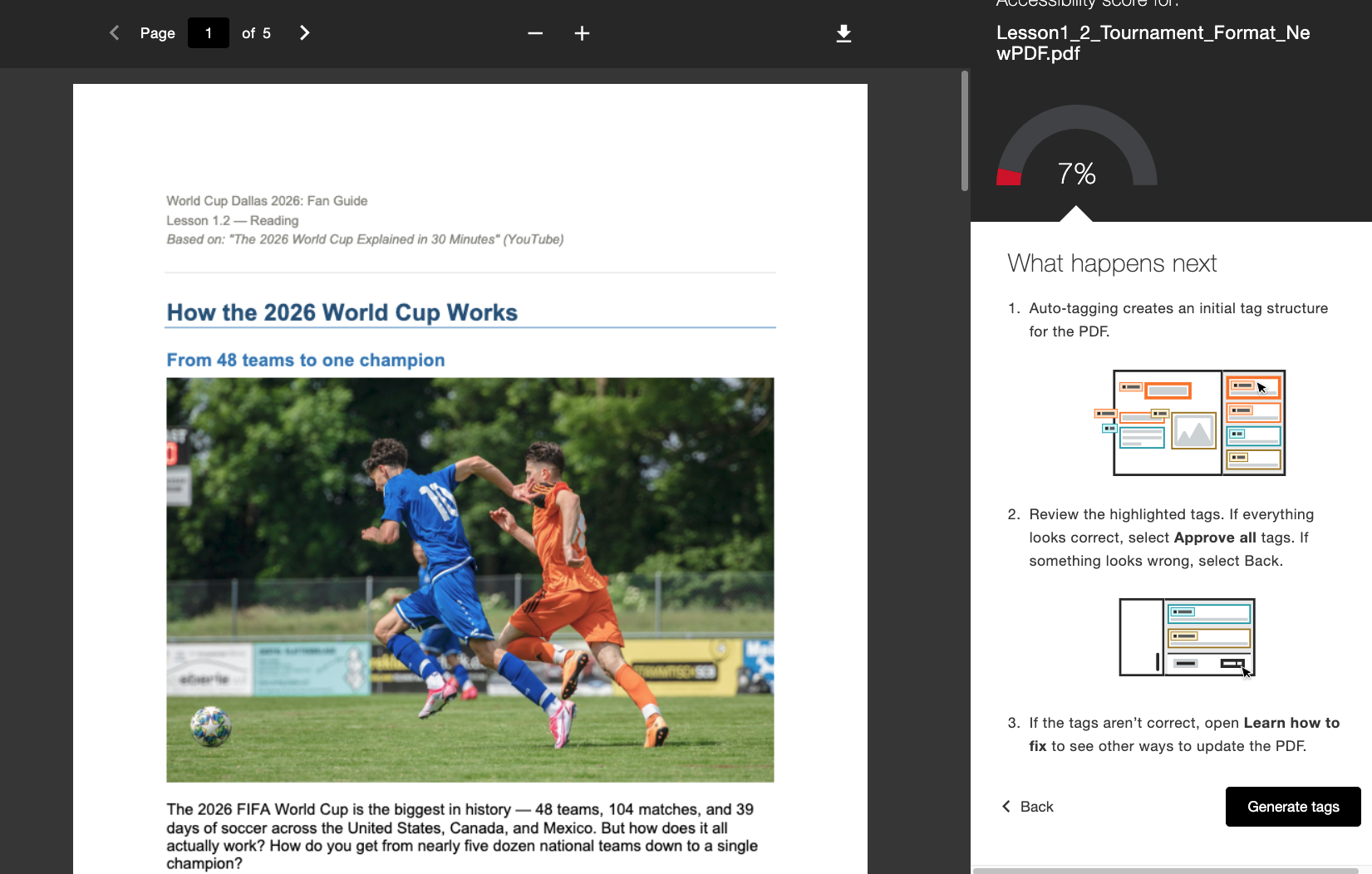
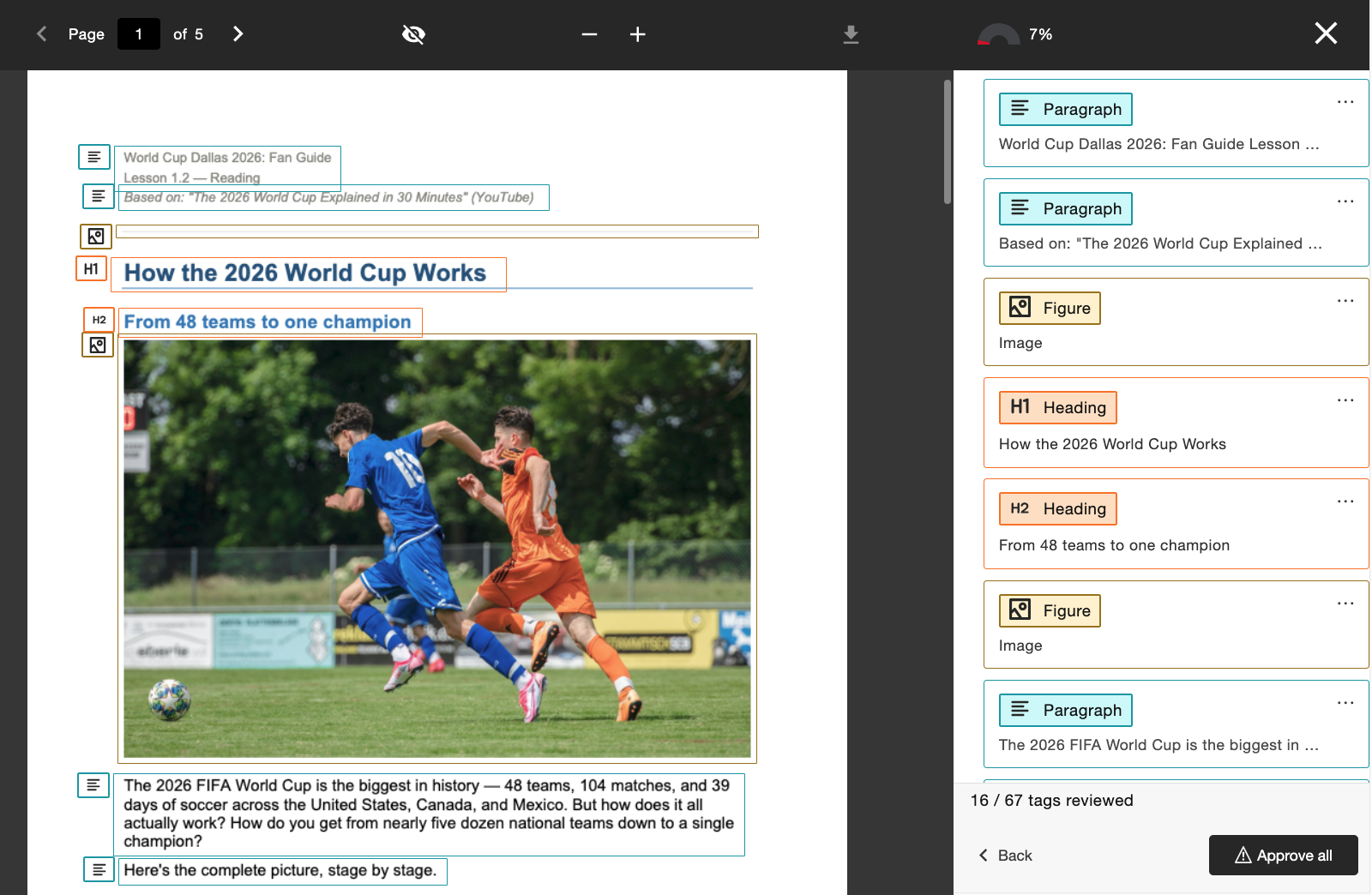
Quando ativado pelo administrador, os instrutores verão um novo fluxo de trabalho "Gerar tags" integrado diretamente ao "Feedback do instrutor". Os instrutores mantêm o controle após gerarem as tags, podendo revisar a nova estrutura das tags enquanto percorrem a árvore de tags no lado direito da tela, antes de decidirem aprovar as tags aplicadas. Os instrutores podem usar o indicador de progresso na parte inferior para ver quantas tags já aprovaram antes de selecionar Aprovar tudo quando estiverem satisfeitos.
Os administradores podem controlar o acesso a esse recurso por meio da ferramenta de configuração do Ally, ativando-o ou desativando-o de acordo com as preferências da instituição.
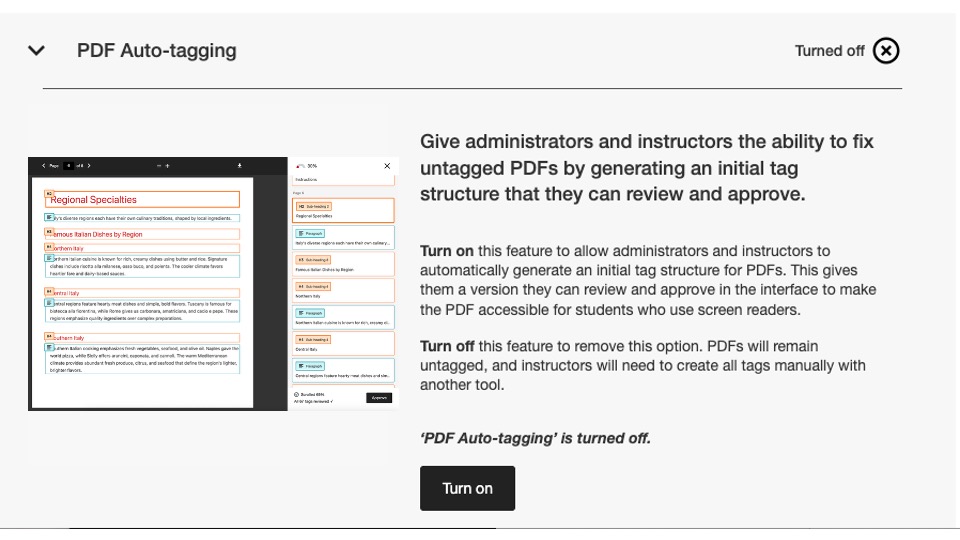
Como parte desta versão, esse sinalizador de configuração está desativado por padrão. Os administradores precisam ativá-lo para que os instrutores possam começar a usá-lo.
Para obter mais informações sobre o novo Relatório de Uso, consulte o tópico Opções de Correção de PDF no site de ajuda.
Novo relatório de uso já está disponível.
Como parte de nosso compromisso contínuo em tornar os dados do Ally facilmente acessíveis e disponíveis para os administradores, temos o prazer de lançar a próxima versão do Relatório de uso do Ally, integrada diretamente à interface do usuário.
O relatório de uso mostra detalhes sobre como seus alunos e professores estão utilizando o Ally, incluindo quantos downloads de formatos alternativos e correções feitas pelos professores estão ocorrendo em um determinado período.
Este relatório novo e aprimorado já está disponível diretamente no Relatório institucional, sem a necessidade de baixar um arquivo do Excel, para ajudar a fornecer informações de maneira mais fácil e rápida sobre o envolvimento de sua instituição com o Ally. Isso substitui a guia Uso no seu Relatório Institucional e não requer nenhuma etapa adicional para ser ativado.
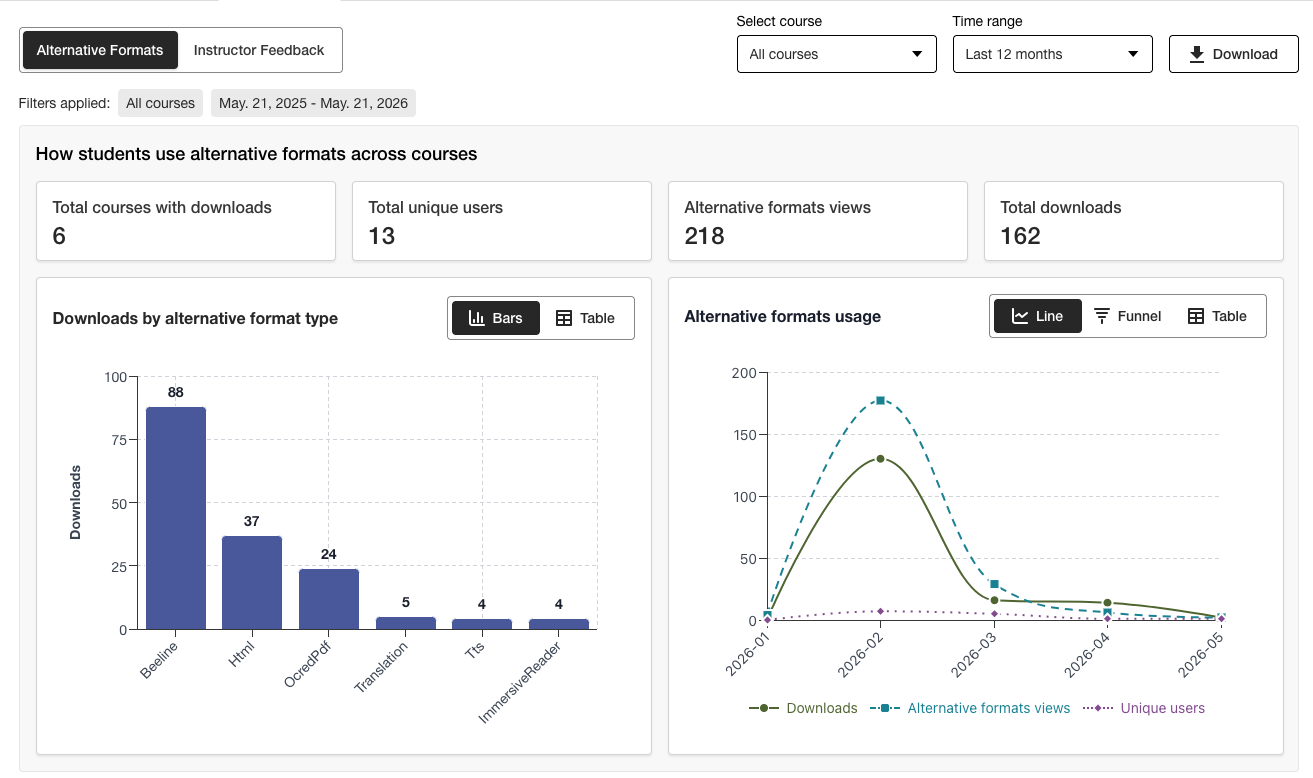
Os administradores podem visualizar rapidamente informações importantes e usar as novas opções de filtragem e detalhamento de gráficos para obter facilmente uma compreensão mais aprofundada dos dados.
A versão em Excel ainda está disponível para download por meio do recurso "Download" para os usuários que preferirem acessar os dados em outro formato.
Para obter mais informações sobre o novo Relatório de uso, consulte os seguintes tópicos do site de ajuda:
Correções de bugs
Corrigimos um erro nas integrações do Canvas em que a atualização do título de um documento por meio do Ally alterava incorretamente o status de publicação do documento no curso.
Ally 2.18.10 Lançamento em produção: 2 de julho de 2026
Correções de bugs e melhorias
Corrigimos um erro no Comentários do instrutor que fazia com que as descrições de imagens aplicadas anteriormente fossem transferidas incorretamente quando uma imagem existente era substituída por uma nova para corrigir um problema de contraste.
Corrigimos um bug no Assistente de Texto Alternativo de IA que causava um erro “Oops” caso o instrutor adicionasse manualmente uma nova descrição após clicar em “Gerar descrição automaticamente”.
Corrigimos um erro na seção "Formatos alternativos" que fazia com que o formato de áudio MP3 alterasse incorretamente o idioma do conteúdo HTML.
Corrigimos um erro na função “Correção Rápida” de idioma do PDF que, em alguns casos, permitia que os instrutores aplicassem um idioma incorreto, apesar da verificação de validade do idioma do Ally.
Corrigimos um erro nas integrações com o Blackboard que fazia com que a legenda do arquivo nos blocos de imagem fosse removida quando o professor corrigia o problema da descrição ausente da imagem, conforme indicado no Relatório de Acessibilidade do Curso.
Implementamos várias melhorias na tecnologia de OCR subjacente do Ally para aprimorar a qualidade, a fidelidade e as taxas de conversão no processamento de PDFs digitalizados em formatos alternativos e no recurso “Correções rápidas de PDF”.
Ally 2.18.9 Lançamento em produção: 22 de junho de 2026
Correções de bugs e melhorias
Corrigimos um erro no Moodle em que, em alguns casos, as imagens incorporadas a uma página não eram exibidas na visualização do feedback do instrutor ao acessá-la a partir do Relatório de Acessibilidade do Curso.
Corrigimos um erro nas Páginas do Canvas que impedia que as correções nas descrições das imagens fossem aplicadas após a substituição de uma imagem de baixo contraste por meio da opção “Carregar arquivo”.
Corrigimos um problema de acessibilidade no Moodle para permitir que os ícones indicadores do Ally recebam foco durante a navegação.
Ally 2.18.8 Lançamento em produção: 11 de junho de 2026
Correções de bugs e melhorias
Corrigimos um erro no Moodle que fazia com que os usuários visualizassem incorretamente duas mensagens de dica de ferramenta ao usar os indicadores do Ally.
O texto foi aprimorado nas descrições e nos botões da ferramenta de configuração do Ally para que apareçam como Ativar e Desativar.
Ally 2.18.7 Lançamento para produção: June 1, 2026
Correções de erros e aprimoramentos
Corrigimos um erro no Moodle que fazia com que o indicador de pontuação de acessibilidade fosse ocultado acidentalmente quando o editor TinyMCE era expandido na página.
Corrigimos um erro no Blackboard que fazia com que os níveis de título nos documentos (Ultra) não fossem convertidos corretamente nos formatos HTML alternativos resultantes.
Corrigimos um erro no Feedback do instrutor que exibia incorretamente a mensagem "Problemas restantes a resolver" após um conteúdo atingir 100%.
Corrigimos um erro no Blackboard que fazia com que as imagens marcadas como decorativas no documento fossem exibidas como um link na visualização do Relatório de Acessibilidade do Curso – Feedback do Instrutor.
Corrigimos um erro no Feedback do Instrutor que exibia o link incorretamente duas vezes quando tentávamos corrigir o link quebrado.
Ally 2.18.6 Release to production: May 26, 2026
Bug Fixes and Improvements
Implemented several processing improvements to provide better handling of Canvas LMS Rate limits to minimize the number of times Ally hits these limits over the course of regular content processing.
Ally 2.18.5 Lançamento para produção: 7 de maio de 2026
Correções de bugs e melhorias
Foi corrigido um problema de acessibilidade no Canvas em que a opção Formatos alternativos no menu suspenso não respondia corretamente às entradas de navegação do teclado.
Correção de um pequeno erro nas integrações do Canvas que fazia com que o menu suspenso não fosse fechado após clicar na opção Formatos alternativos.
Correção de um bug no fluxo de trabalho de correção rápida do PDF de feedback do instrutor que fazia com que o botão "Tentar novamente" navegasse para o ponto inicial errado no painel de feedback.
Tratamento aprimorado dos arquivos UNSAFE_HTML nas integrações do Blackboard para detectar e ignorar totalmente a pontuação desses arquivos e evitar a necessidade de removê-los dos relatórios como uma segunda etapa.
Foi corrigido um erro nas integrações do Blackboard que fazia com que anexos de arquivos fossem convertidos incorretamente em links ao corrigir problemas em documentos no Relatório de acessibilidade do curso.
Implementou várias melhorias e otimizações de monitoramento nas filas de processamento em tempo real da Ally na região dos EUA.
Lançamento do Ally 2.18.4 para produção: 30 de abril de 2026
Correções de bugs e melhorias
Corrigido um bug no Blackboard Documents que fazia com que o Ally identificasse incorretamente os cabeçalhos definidos no nível errado e impedia que os instrutores recebessem 100% mesmo depois de corrigirem todos os problemas.
Implementou melhorias na detecção de arquivos UNSAFE_HTML no Blackboard para facilitar a remoção do processamento de pontuação do Ally.
Foi corrigido um problema de acessibilidade que impedia a exibição do botão de download do arquivo original em telas menores.
Foi corrigido um problema com a verificação de legendas do Vimeo do Ally que causava erros quando um vídeo do Vimeo era detectado em conteúdo avançado se a integração do Vimeo não estivesse configurada na configuração do Ally.
Ally 2.18.3 Lançamento para produção: 20 de abril de 2026
Melhorias no processamento de documentos
Como parte de nosso compromisso contínuo de aprimorar continuamente a qualidade e a fidelidade do conteúdo no processamento de Feedback do instrutor e de Formato alternativo do Ally, a versão 2.18.3 traz melhorias e aprimoramentos críticos para o processo de conversão de documentos subjacente que alimenta esses principais recursos do usuário.
A lógica de processamento de documentos do Ally foi atualizada para oferecer uma conversão mais inteligente, mais rápida e de maior qualidade ao lidar com arquivos carregados no curso. Isso traz vários aprimoramentos para instrutores e alunos, incluindo:
Reduzindo casos de problemas de contraste falso positivo que aparecem nas visualizações de arquivos de feedback do instrutor
Manuseio aprimorado de formas em apresentações do PowerPoint, incluindo a conversão de itens como setas no documento.
Reconhecimento aprimorado de texto alternativo aplicado a formas após a conversão para PDF
Suporte aprimorado para imagens decorativas em formatos alternativos, incluindo formatos alternativos de áudio
Reconhecimento aprimorado de imagens e aplicação de tags de figura ao converter em PDF
Além dessas melhorias voltadas para o usuário, esta atualização também inclui a otimização da infraestrutura subjacente do Ally para ajudar a melhorar o desempenho geral e a velocidade de processamento do conteúdo à medida que ele é recebido do LMS.
Nota
Nossas equipes continuarão analisando e identificando possíveis melhorias adicionais ou casos extremos que talvez precisem ser abordados no futuro.
Assistente de Texto Alternativo de IA Atualizado
O AI Alt Text Assistant foi atualizado para aproveitar vários aprimoramentos adicionais nos modelos subjacentes do AWS Bedrock AI, incluindo a redução do número de tempos limite ao solicitar texto alternativo sugerido e o aprimoramento do tratamento para evitar alucinações ao analisar imagens específicas.
Como lembrete, a Nota sobre Transparência atualizada do AI Alt Text Assistant pode ser visualizada aqui com detalhes adicionais sobre esse recurso: https://help.anthology.com/ally-lms/en/administrators/ai-alt-text-assistant.html
Correções de bugs e melhorias
Um erro no Feedback do instrutor foi corrigido que fazia com que o destaque incorreto fosse aplicado na visualização quando o PDF ainda não tinha o idioma correto definido após a tentativa de aplicar a correção.
Foi corrigido um bug no Feedback do instrutor em que clicar em Tentar novamente quando um PDF ainda não tinha o idioma correto definido não levava o instrutor de volta ao painel de seleção de idioma.
Foi corrigido um bug no Canvas que impedia que o instrutor abrisse o Feedback do instrutor em um PDF com OCR que também tinha um cabeçalho fixo.
Correção de um problema de acessibilidade no painel Feedback do instrutor que mudava incorretamente o foco entre os elementos ao usar o botão Voltar.
Um problema de acessibilidade foi corrigido na janela modal de formatos alternativos que fazia com que o formato do arquivo original não fosse baixado ao navegar e selecionar com um teclado.
Ally 2.18.2 Lançamento para produção: 9 de abril de 2026
Correções de bugs e melhorias
Foi corrigido um problema no Blackboard em que os indicadores do Ally não eram exibidos para anexos de arquivo nas instruções do exercício.
Foi corrigido um bug em que, em alguns casos, ao navegar no painel de comentários do instrutor para conteúdo WYSIWYG, clicar nos ícones Negrito ou Itálico no editor de conteúdo avançado ativava o botão Gerar automaticamente do AI Alt Text Assistant.
Foi corrigido um erro que fazia com que, em alguns casos, a substituição de uma imagem com problemas de contraste por uma nova imagem por meio do upload do arquivo de comentários do instrutor não atualizasse a visualização do documento.
Foi corrigido um erro no Canvas que impedia que os indicadores do Ally fossem exibidos corretamente em um programa de estudos do Canvas quando Mostrar anúncios recentes na página inicial do curso estava ativado.
Ally 2.18.1 Lançamento para produção: 2 de abril de 2026
Correções de bugs e melhorias
Atualização dos plug-ins do Moodle para Moodle 4.5 e Moodle 5 para incluir backports de correção de bugs para resolver pequenos bugs.
Foi corrigido um problema com o AI Alt Text Assistant em que, em alguns casos, os instrutores recebiam uma mensagem de erro ao tentar sugerir um texto alternativo porque o modelo primário não estava disponível.
Ally 2.18 Lançamento para produção: 26 de março de 2026
O novo sinalizador do recurso de administração de referência da biblioteca já está disponível
Como parte de nosso esforço contínuo para fornecer níveis mais granulares de controle para os administradores que desejam gerenciar a experiência de correção de PDF para os instrutores, um novo sinalizador de recurso está disponível nas opções de configuração do Ally, permitindo que o fluxo de trabalho de referências da biblioteca seja desativado.
Os administradores agora podem desativar o recurso Library Reference para remover a capacidade do instrutor de adicionar Library References a PDFs quando o arquivo original não estiver disponível, enquanto trabalham com vários problemas específicos de PDF. Essa camada adicional de controle ajudará a alinhar esse recurso com as preferências e os processos institucionais e proporcionará mais flexibilidade ao determinar a melhor forma de gerenciar a correção de PDFs em escala.
Imagem 1: Sinalizador de novo recurso nas opções de configuração do Ally
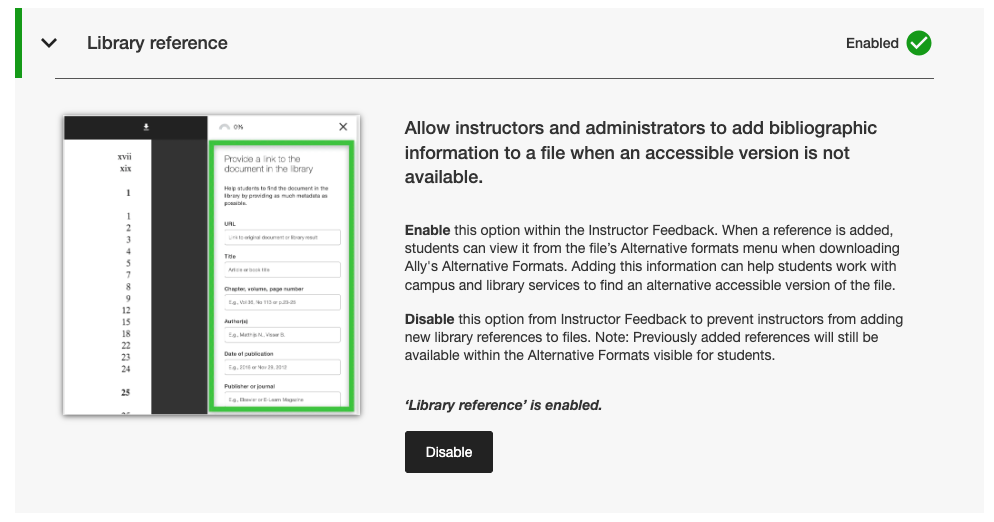
Os administradores podem encontrar esse novo sinalizador de recurso na guia Recursos da ferramenta Configuração do Ally, listada em Referência da biblioteca.
Nota
As Referências da biblioteca permanecerão ativadas por padrão com esta versão. A desativação das Referências de biblioteca com esse novo sinalizador de recurso não removerá do conteúdo as Referências de biblioteca adicionadas anteriormente e apenas impedirá que novas sejam adicionadas no futuro.
Correções de bugs e melhorias
Foi corrigido um erro no Canvas que fazia com que a coluna de indicadores do Ally desaparecesse da área Novos arquivos quando a tela era redimensionada.
Foi corrigido um problema de acessibilidade nas integrações do Canvas que impedia que o foco correto fosse aplicado ao usar um teclado para navegar pelos indicadores de pontuação de acessibilidade do Ally nas páginas do Canvas.
Foi corrigido um link da Web quebrado nas definições de configuração do Ally para os Termos de uso do Assistente de texto alternativo de IA.
Migração de nossos serviços de e-mail SMTP para a infraestrutura de back-end que lida com fluxos de e-mail de ajuda personalizados.
Ally 2.17.5 Lançamento para produção: 12 de março de 2026
Os arquivos UNSAFE_HTML da Blackboard não são mais incluídos nos relatórios
Como parte de nosso compromisso contínuo com a eficiência e a clareza dos relatórios do instrutor, os relatórios do Ally não considerarão mais os arquivos UNSAFE_HTML como parte do conteúdo do curso para integrações do Blackboard.
Imagem 1: Relatório do curso com UNSAFE_HTML incluído para mostrar o comportamento anterior.
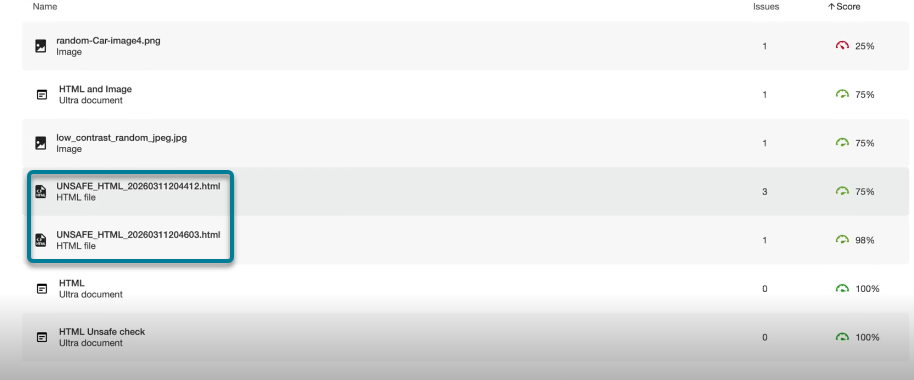
A partir desta versão, os arquivos UNSAFE_HTML criados automaticamente na pasta de conteúdo ao usar trechos de HTML em um documento do Blackboard serão filtrados dos relatórios da instituição e do curso. Anteriormente, esses arquivos eram exibidos no relatório, mas os instrutores não conseguiam corrigir os problemas identificados de idioma e título ausentes e, muitas vezes, recorriam a outras soluções alternativas para remover esses arquivos do curso e removê-los dos relatórios.
Nota
Essa alteração removerá da consideração todos os arquivos UNSAFE_HTML atuais e anteriores. Dependendo da frequência com que esses itens de conteúdo foram usados em um curso, isso pode resultar em um ligeiro aumento ou diminuição na pontuação do curso com base na distribuição de arquivos, HTML e conteúdo WYSIWYG.
Como parte de uma versão futura, procuraremos evitar o processamento completo desses arquivos ao integrar um curso para ajudar a melhorar o desempenho geral e a digitalização.
Correções de bugs e melhorias
Foi corrigido um problema nas integrações do Blackboard que causava uma discrepância com a pontuação das imagens ao comparar a pontuação nos comentários do instrutor de um documento com a pontuação no Relatório de acessibilidade do curso quando as imagens eram definidas como Somente visualização ou Somente download. O Relatório de acessibilidade do curso estava incorretamente deixando de fora o texto alternativo aplicado anteriormente e diminuindo a pontuação, apesar de isso ser mostrado como corrigido nos comentários do instrutor. Observe que isso se aplica às imagens nos Documentos Ultra como parte do conteúdo do curso e do Repositório de objetos de aprendizagem.
Foi corrigido um problema na Correção Rápida de Idioma Ausente em PDF que permitia que o botão Aplicar fosse clicável antes que o instrutor selecionasse um idioma.
Aprimoramos o estilo dos links de referência da biblioteca na janela de download de formatos alternativos para que os links de referência sejam exibidos como links clicáveis e evitem possíveis problemas de contraste.
Lançamento do Ally 2.17.4 para produção: 5 de março de 2026
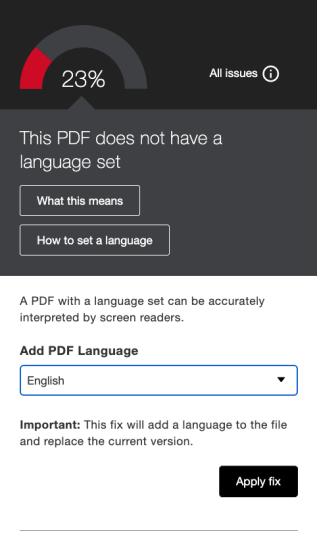
A pré-seleção de idioma agora está disponível para o PDF de idioma ausente: Correção rápida
Os instrutores que corrigem PDFs com idiomas ausentes na correção rápida do Ally Instructor Feedback agora podem se beneficiar do fato de o idioma ser detectado e pré-selecionado no menu suspenso para evitar rolagem adicional e economizar tempo ao corrigir esse problema comum.
A detecção de idioma integrada do Ally analisará o PDF para determinar o idioma apropriado sempre que possível. Se nenhum idioma for detectado, os instrutores ainda poderão selecionar um manualmente para aplicar a correção e fazer com que o Ally salve a alteração no PDF conforme esperado.
Imagem 1: Correção Rápida de Adicionar Idioma com o inglês selecionado
Os plug-ins do Moodle 5.1 já estão disponíveis
Como parte do suporte contínuo do Ally ao Moodle, os plug-ins do Ally para o Moodle 5.1 estão disponíveis. Detalhes adicionais sobre o suporte do Ally para o Moodle podem ser encontrados na Documentação de configuração do Ally para Moodle.
Nota
O Ally cria ramificações para cada versão do Moodle compatível como parte de nossa estratégia de plug-in de código aberto para permitir o desenvolvimento direcionado e a correção de bugs. As versões atuais dos plug-ins podem ser encontradas nas ramificações STABLE correspondentes em nosso repositório. É sempre recomendável que os administradores usem as ramificações estáveis para garantir que nenhuma nova alteração não intencional seja introduzida quando os plug-ins forem atualizados.
Correções de bugs e melhorias
Foi corrigido um problema no Blackboard em que os instrutores que usavam o Relatório de Acessibilidade do Curso para corrigir problemas em Documentos conseguiam, inesperadamente, remover o conteúdo identificado incorretamente como links ao incorporar blocos HTML, áudio e/ou vídeos do Video Studio.
Foi corrigido um problema em todas as integrações de LMS no Relatório Institucional em que o menu suspenso Exportar ficava oculto em telas menores e/ou tamanhos de navegador.
Correção de um problema em todas as integrações de LMS em que a aplicação de uma correção rápida de link quebrado para conteúdo WYSIWYG contendo vários links quebrados ao mesmo tempo às vezes resultava em um indicador de carregamento infinito.
Implementamos várias melhorias de front-end na infraestrutura do Instructor Feedback Preview de PDF para dar suporte ao nosso avanço contínuo com os recursos de correção de PDF.
Implementou melhorias adicionais de Práticas recomendadas para solicitações HTTP de integração do Canvas para garantir o uso dos cabeçalhos User-Agent.
Ally 2.17.3 Liberação para produção: 30 de janeiro de 2026
Correções de bugs e melhorias
Correção de um problema no Feedback do instrutor do Ally para arquivos PDF digitalizados em que (após abrir "Saiba como corrigir PDFs") clicar em Voltar nem sempre retornava os usuários à visualização do Feedback do instrutor e, às vezes, exigia um segundo clique.
Ally 2.17.2 Liberação para produção: 15 de janeiro de 2026
Correções de bugs e melhorias
Foi corrigido um problema no Relatório da instituição em que a opção Baixar CSV ficava oculta ao exportar da guia Cursos se a pesquisa retornasse um ou nenhum curso.
Foi corrigido um erro no Relatório de uso em que o botão Baixar relatório de uso permanecia desativado após o download de um relatório e a seleção de um novo intervalo de datas.
Foi corrigido um problema de acessibilidade do teclado na área Arquivos do Canvas, onde o foco era perdido ao navegar para a pontuação de acessibilidade. O foco agora permanece visível durante a navegação pelo teclado.