Note di rilascio 2026
Note
La presente documentazione è stata tradotta tramite traduzione automatica assistita dall'intelligenza artificiale. Le traduzioni sono fornite "così come sono", senza alcuna garanzia circa la loro accuratezza. La versione inglese di questo contenuto costituisce la fonte ufficiale e facente fede.
Ally 2.19.8 Release to production: September 28, 2026
Bug Fixes and Improvements
Fixed a bug in Blackboard integrations that caused some Documents not to be able to generate audio alternative formats.
Fixed a bug in Canvas integrations that caused Ally not to be able to correctly recognize images within Classic Quizzes which resulted in images with alt text being flagged as missing in the Course Report.
Implemented an accessibility improvement to the focus indicator applied to the Enable Future courses button within the Ally Configuration tool.
Fixed a bug in Canvas integrations that caused an error when attempting to fix any HTML issue from the Course Report.
Fixed an accessibility issue that caused insufficient contrast on the focus indicators for the enable and disable options within the Ally Configuration tool.
Fixed a bug with the Table Header Quick Fix that caused the selected option to disappear when Fix all occurrences was selected.
Fixed an accessibility issue within the Table Header Quick Fix to ensure that the Apply a table header selector is appropriately associated with its visible label.
Implemented an accessibility improvement to the Ally Terms of Use to ensure the Terms of Use text meets minimum color contrast requirements.
Fixed an issue in Blackboard where instructors using the Course Accessibility Report to fix issues in Documents were unexpectedly able to remove content incorrectly identified as links when embedding LTI Video links including Yuja, Echo360, Panopto, Kaltura and other third-party videos.
Fixed an issue in Canvas integration where custom CSS was conflicting with Ally CSS and prevented it from loading correctly causing an error when viewing the Instructor Feedback and/or Course Report Preview.
Ally 2.19.7 Release to production: September 17, 2026
Bug Fixes and Improvements
Updated the AI Alt Text Assistant to take advantage of several additional improvements in the underlying AWS Bedrock AI models. For more information, visit AI Alt Text Transparency Note.
Fixed a bug in the Institutional Report Directory Tab that sometimes caused the number of courses and items to show as ‘0’ until you refresh the report.
Fixed a bug in the Institutional Report that caused the label for the last month to not be visible.
Fixed a bug in Moodle integrations that sometimes prevented the instructor from updating an image description in the Ally Instructor Feedback.
Fixed a bug that caused a display issue in the Course Accessibility Report when file names exceeded a certain length.
Implemented several improvements to Ally’s underlying processing logic when handling large volumes of events.
Ally 2.19.6 Release to production: September 7, 2026
Bug Fixes and Improvements
Fixed an issue in Blackboard integrations where links without discernible text within the Title of a Document could not be fixed with the quick fix when using the Course Accessibility Report.
Fixed an issue in Blackboard integrations where alt text and decorative image values entered through the Ally Instructor Feedback or the Instructor Feedback via the Course Accessibility Report did not save back to the Image Block metadata as expected.
Fixed an issue in Canvas integrations that caused the Alternative Formats window to not scale correctly with the browser screen size when using the file preview.
Fixed an issue in Canvas integrations that created a role conflict when a user had both student and instructor permissions across multiple courses resulting in inconsistent Course Accessibility Report launch behavior.
Implemented improvements to Ally’s backend course sync processes when generating monthly reports.
Ally 2.19.5 Release to production: August 27, 2026
Bug Fixes and Improvements
Fixed an issue in the new Usage Report that prevented the department ID from filtering both the UI and the export when drilling into the Directory tab.
Fixed an issue in Blackboard integrations that prevented alternative text and decorative image settings marked in Ally from saving back to Blackboard Tests when using either the Instructor Feedback or Course Accessibility Report Instructor Feedback.
Fixed an issue in Blackboard integrations that prevented instructors from overwriting existing alternative text on an image when using the Course Accessibility Report.
Fixed an issue within Ally’s alternative format processing that sometimes stripped the first word after each bullet point when creating the HTML alternative formats from Word documents containing bulleted lists.
Fixed an issue in the Moodle 5 plugins that prevented Ally from flagging images lacking alternative text in the rich content if the image description was only entered as spaces.
Fixed an issue that caused Ally to incorrectly flag some Word documents with headings issues despite headings being present.
Fixed a minor issue within the Ally Instructor Feedback error messaging that shifted the close button for the Oops error modal to the bottom of the screen.
Implemented performance improvements for the D2L Brightspace course loading process to avoid timeouts while processing large volumes of courses.
Ally 2.19.4 Release to production: August 17, 2026
Nota
Reporting Bearer Token Reset: The reset of Ally Reporting API tokens was completed successfully on August 14th. Going forward, administrators should create a new token in the institutional report to restore connection in any external reporting tools.
Bug Fixes and Improvements
Fixed an issue in Blackboard Tests that caused the Ally score indicator to disappear from an image embedded within the text block when editing image alt text.
Fixed an issue with Canvas Course Export/Import and Copies where the associated Ally course copy processes (that carry over data such as alternative text, decorative images and library references) were failing in certain scenarios where a course file was deleted and replaced during the Canvas copy/import process.
Fixed an issue in the New Files Experience in Canvas that caused the Ally score indicators to disappear completely from the screen when scaled down to a small enough screen size.
Fixed an issue in Canvas File Preview within the New Files Experience that sometimes caused the Alternative Formats Icon to sporadically appear and disappear.
Fixed an issue in Canvas New Files Experience that caused the Alternative Formats modal to remove the Download Original File icon when scaled down to a small enough screen size.
Fixed an issue in Canvas that caused a delay in showing the Alternative Format icon when navigating from file to file.
Fixed an issue in Canvas that caused RTF files to be mistakenly recognized as Word documents and included in the Course Report and course score despite not being able to be opened or previewed.
Fixed an issue that caused Ally to report certain PPTX files as missing language when the language was set correctly in the document.
Fixed an issue with Ally’s broken link checking in the LMS that caused some valid links to be seen as broken depending on how those links were created in the WYSIWYG content.
Improved the accessibility and color contrast of the Ally Alternative Format indicator when using High Contrast Modes.
Improved Ally’s language validation checks on PDF documents to help minimize certain scenarios where the selected language in the PDF Quick Fix could not be saved.
Implemented performance improvements in Ally when interacting with the Moodle ally_filter plugin.
Ally 2.19.3 – Rilascio in produzione: 7 agosto 2026
Plugin per Moodle 5.2
Nell’ambito del continuo supporto offerto da Ally a Moodle, sono ora disponibili i plugin di Ally per Moodle 5.2. Ulteriori dettagli sul supporto di Ally per Moodle sono disponibili nella documentazione sulla configurazione di Ally per Moodle.
Nota
Ally crea rami per ogni versione supportata di Moodle come parte della nostra strategia per i plugin open source, al fine di consentire uno sviluppo mirato e la correzione dei bug. Le versioni correnti dei plug-in sono disponibili nei rispettivi rami STABLE del nostro repository. Si raccomanda sempre agli amministratori di utilizzare i rami stabili per garantire che, durante l'aggiornamento dei plug-in, non vengano introdotte nuove modifiche indesiderate.
Correzioni di bug e miglioramenti
È stato risolto un bug in Moodle che impediva la visualizzazione di alcuni contenuti HTML quando era selezionata l'opzione Escludi file inutilizzati nei plugin di Ally.
Ally 2.19.2 – Rilascio in produzione: 30 luglio 2026
Correzioni di bug e miglioramenti
È stata migliorata l'esperienza di "Feedback del docente" per i docenti che utilizzano Blackboard, in modo che l'anteprima dei contenuti mostri i blocchi di contenuto HTML come contenuti visualizzabili, anziché indicare semplicemente "HTML_NON_SICURO" quando si utilizza il Rapporto sull'accessibilità del corso.
È stato risolto un problema riscontrato dai docenti che utilizzano Blackboard, per cui le immagini inserite senza descrizione all’interno di una tabella nella sezione "Documenti" non venivano segnalate correttamente da Ally.
È stato risolto un problema nei flussi di lavoro personalizzati della guida di Ally che impediva la risoluzione degli URL immessi quando venivano cliccati.
È stato risolto un problema in Blackboard che impediva al docente di applicare un nuovo colore al carattere quando utilizzava la correzione rapida per i problemi di contrasto evidenziati nella sezione "Documenti".
È stato risolto un problema nel flusso di lavoro della funzione "Correzione rapida OCR PDF" che causava un errore "Oops" se il docente applicava prima la correzione OCR e poi deselezionava l'opzione "Scarica in formato originale".
È stato risolto un problema nel nuovo rapporto sull'utilizzo di Ally che causava un timeout imprevisto dei download quando si selezionava un intervallo di date più lungo. Si prega di notare che, ora che questa correzione è stata rilasciata, gli amministratori dovrebbero svuotare la cache del browser prima di provare a effettuare un nuovo download.
Ally 2.19.1 – Rilascio in produzione: 22 luglio 2026
Correzioni di bug e miglioramenti
È stato risolto un problema che causava la distorsione dello screenshot presente nel flag della nuova funzionalità "Etichettatura automatica dei PDF" all'interno delle opzioni di configurazione.
È stato risolto un problema relativo alla cache dei dati di utilizzo che impediva ad alcuni amministratori di visualizzare i dati storici più vecchi nel report della nuova interfaccia utente quando si applicavano filtri su periodi di tempo più lunghi.
È stato risolto un problema in Blackboard che si verificava quando si inserivano immagini tramite URL: il testo alternativo veniva rimosso da tutte le immagini identiche anziché solo dall'immagine selezionata.
È stato risolto un problema in Blackboard che impediva il corretto salvataggio del testo alternativo quando veniva inserito nella sezione "Feedback del docente" per le immagini inserite tramite URL.
Abbiamo aggiornato il nome host di Canvas nei dettagli di configurazione LTI di Ally per assicurarci che in tutte le sezioni pertinenti sia indicato sso.canvaslms.com.
È stato aumentato il timeout dell'API di reporting di Ally per evitare il superamento dei limiti di timeout in caso di set di dati client di grandi dimensioni, che causavano un errore nello strumento di reporting.
Ally 2.19 – Rilascio in produzione: 13 luglio 2026
È ora disponibile per i docenti una soluzione rapida per l'aggiunta di tag ai PDF.
Man mano che continuiamo ad ampliare le funzionalità di correzione dei file PDF all'interno di Ally Instructor Feedback, i docenti possono ora applicare automaticamente i tag ai file PDF senza tag, migliorando così l'accessibilità complessiva per gli studenti. Questa funzionalità è ora disponibile per tutte le istituzioni al termine della fase iniziale del programma "Early Adopter".
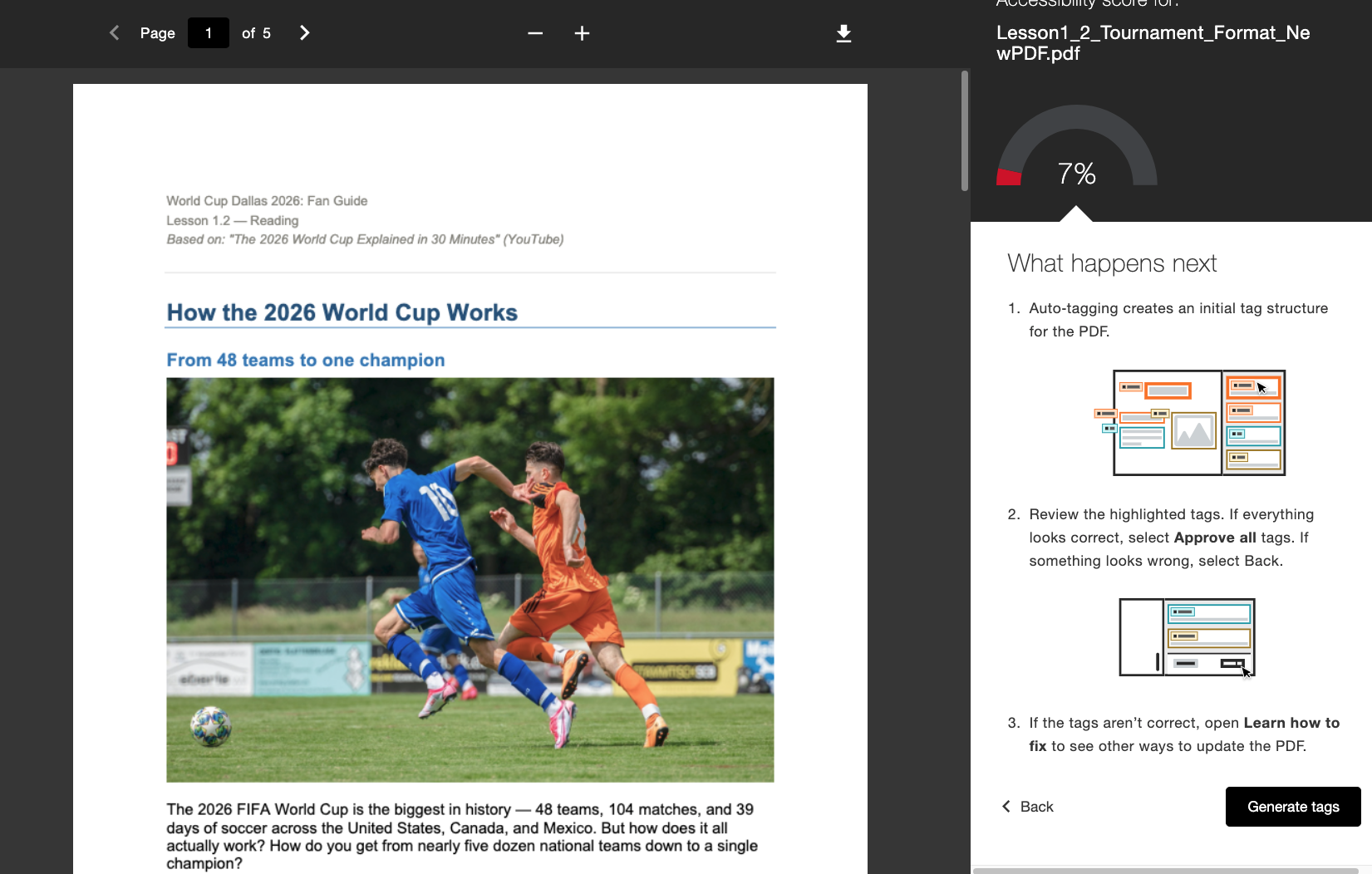
Se abilitato dall'amministratore, i docenti vedranno un nuovo flusso di lavoro "Genera tag" integrato direttamente nella sezione "Feedback del docente". Dopo aver generato i tag, i docenti mantengono il controllo e hanno la possibilità di esaminare la nuova struttura dei tag scorrendo l'albero dei tag sul lato destro dello schermo prima di decidere se approvare i tag applicati. I docenti possono utilizzare l'indicatore di avanzamento in basso per vedere quanti tag hanno approvato prima di selezionare Approva tutto quando sono soddisfatti.
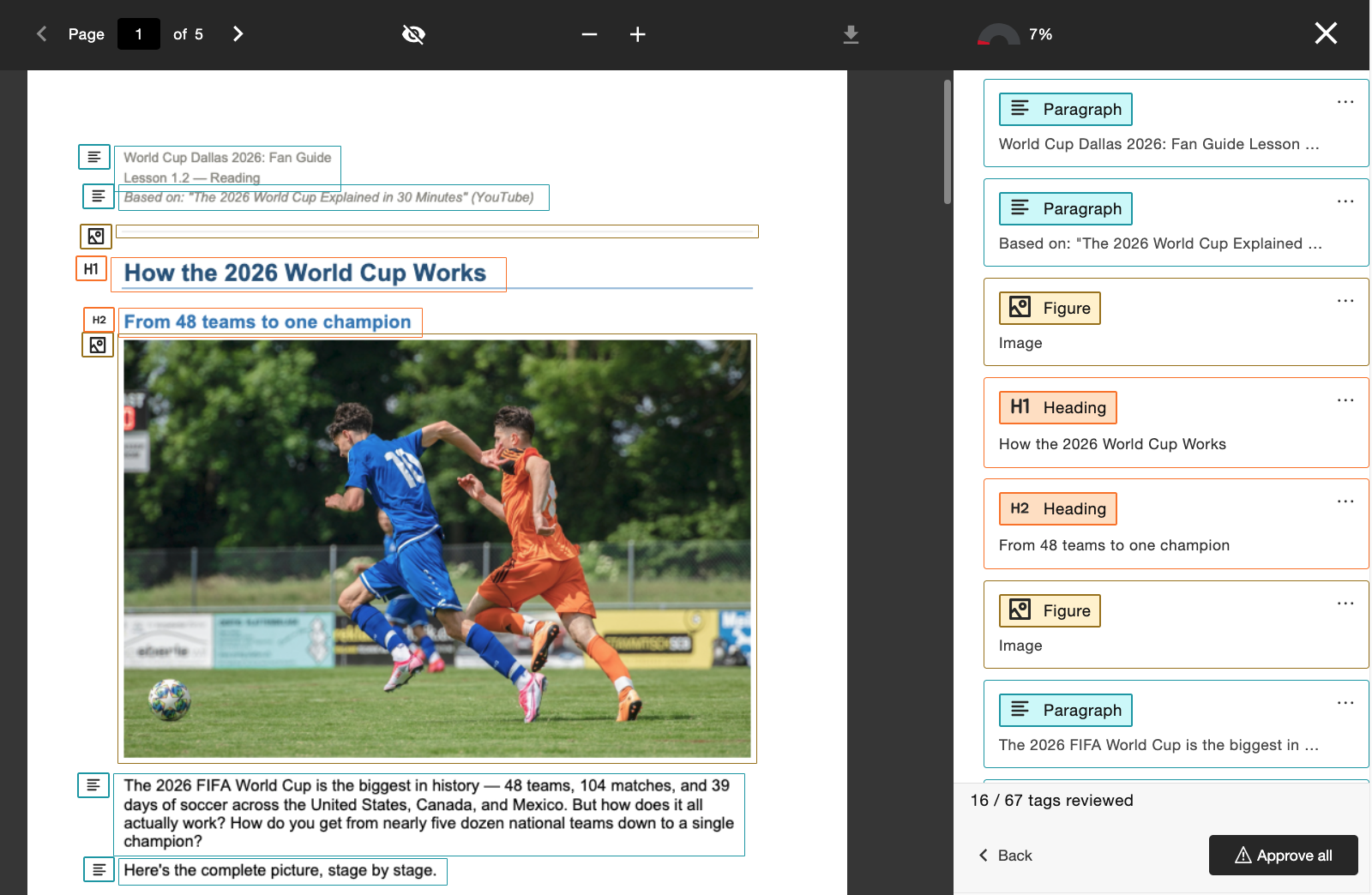
Gli amministratori possono gestire l'accesso a questa funzionalità tramite lo strumento di configurazione di Ally, attivandola o disattivandola a seconda delle preferenze dell'istituzione.
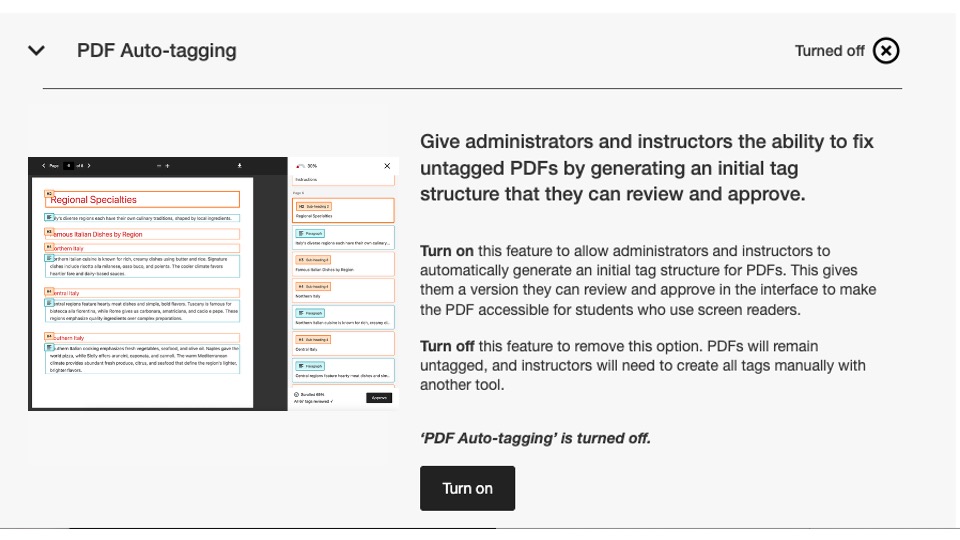
In questa versione, questo contrassegno di configurazione è disattivato per impostazione predefinita. Gli amministratori devono attivarlo affinché i docenti possano iniziare a utilizzarlo.
Per ulteriori informazioni sul nuovo rapporto sull'utilizzo, consultare l'argomento del sito di assistenza Opzioni di correzione dei file PDF.
È ora disponibile il nuovo rapporto sull'utilizzo
Nel nostro impegno costante volto a rendere i dati di Ally facilmente accessibili e disponibili agli amministratori, siamo lieti di annunciare il rilascio della nuova versione del Rapporto sull’utilizzo di Ally, integrato direttamente nell’interfaccia utente.
Il rapporto sull'utilizzo fornisce dettagli su come i tuoi studenti e docenti utilizzano Ally, incluso il numero di download di formati alternativi e di correzioni apportate dai docenti in un determinato periodo di tempo.
Questo nuovo report migliorato è ora disponibile direttamente all’interno del Report istituzionale, senza la necessità di scaricare un file Excel, per consentire un’analisi più semplice e rapida del coinvolgimento della vostra istituzione con Ally. Questa funzione sostituisce la scheda Utilizzo nel Rapporto istituzionale e non richiede alcuna operazione aggiuntiva per essere attivata.
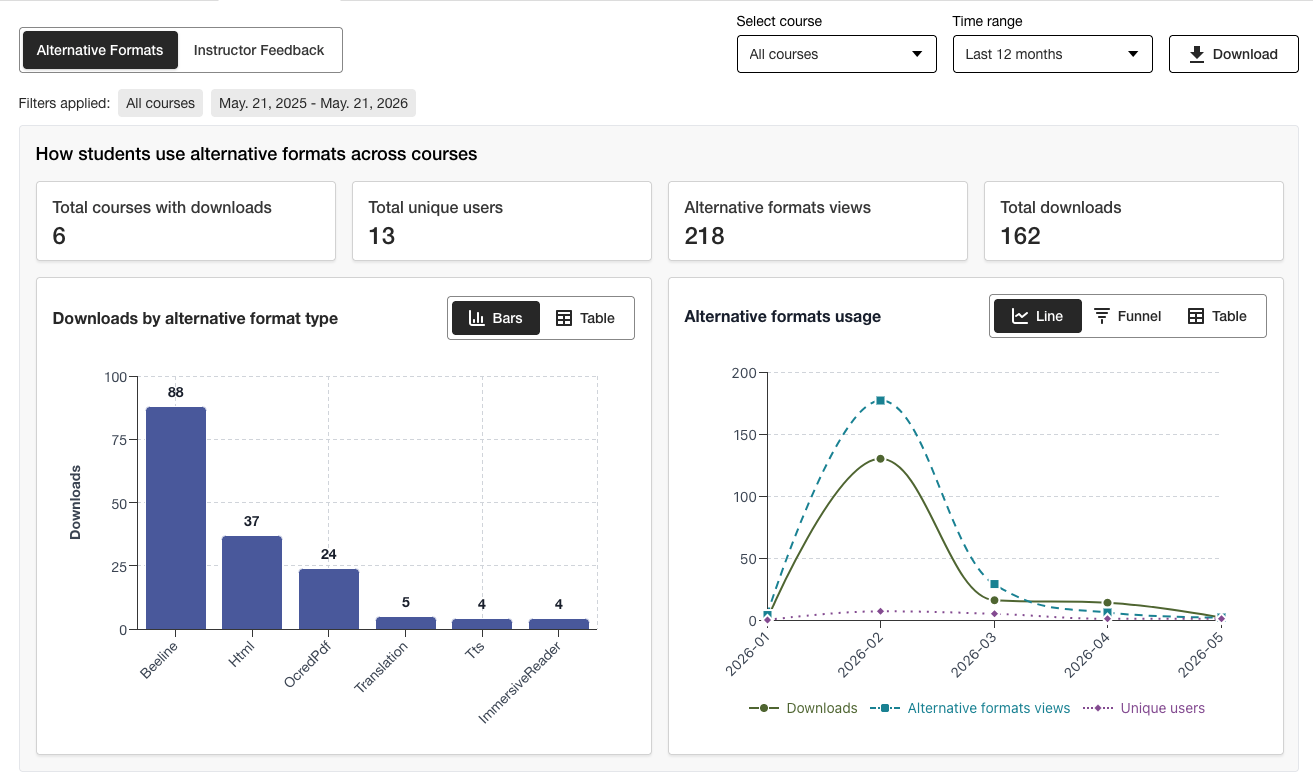
Gli amministratori possono visualizzare le informazioni importanti a colpo d'occhio e utilizzare le nuove opzioni di filtraggio e l'analisi approfondita dei grafici per ottenere facilmente una visione più dettagliata dei dati.
La versione Excel è ancora disponibile per il download tramite la funzione "Scarica" per gli utenti che preferiscono accedere ai dati in un altro formato.
Per ulteriori informazioni sul nuovo rapporto di utilizzo, consultare i seguenti argomenti del sito di assistenza:
Correzione di bug
È stato risolto un bug nelle integrazioni con Canvas per cui l'aggiornamento del titolo di un documento tramite Ally modificava in modo errato lo stato di pubblicazione del documento nel corso.
Ally 2.18.10 – Rilascio in produzione: 2 luglio 2026
Correzioni di bug e miglioramenti
È stato risolto un errore nella sezione “Feedback dell’istruttore” che causava il trasferimento errato delle descrizioni delle immagini applicate in precedenza quando un’immagine esistente veniva sostituita con una nuova per risolvere un problema di contrasto.
È stato risolto un bug in AI Alt Text Assistant che causava un errore "Oops" se il docente aggiungeva manualmente una nuova descrizione dopo aver fatto clic su "Genera automaticamente la descrizione".
È stato risolto un bug nella sezione "Formati alternativi" che causava una modifica errata della lingua dei contenuti HTML da parte del formato audio MP3.
È stato risolto un bug nella funzione “Correzione rapida” per la lingua dei PDF che, in alcuni casi, consentiva ai docenti di applicare una lingua errata nonostante il controllo di validità della lingua effettuato da Ally.
È stato risolto un bug nelle integrazioni con Blackboard che causava la rimozione della descrizione del file nei blocchi "Immagine" quando il docente correggeva il problema della descrizione dell'immagine mancante segnalato nel Rapporto sull'accessibilità del corso.
Sono stati apportati diversi miglioramenti alla tecnologia OCR su cui si basa Ally, al fine di migliorare la qualità, la fedeltà e i tassi di conversione durante l’elaborazione dei PDF scansionati per la conversione in formati alternativi e per le correzioni rapide dei PDF.
Ally 2.18.9 – Rilascio in produzione: 22 giugno 2026
Correzioni di bug e miglioramenti
È stato risolto un bug in Moodle per cui, in alcuni casi, le immagini incorporate in una pagina non venivano visualizzate nell'anteprima del feedback dell'istruttore quando si accedeva dal report sull'accessibilità del corso.
È stato risolto un bug in Canvas Pages che impediva l'applicazione delle correzioni alle descrizioni delle immagini dopo la sostituzione di un'immagine a basso contrasto tramite l'opzione "Carica file".
È stato risolto un problema di accessibilità in Moodle per consentire la selezione delle icone dell'indicatore di Ally durante la navigazione.
Ally 2.18.8 – Rilascio in produzione: 11 giugno 2026
Correzioni di bug e miglioramenti
È stato risolto un bug in Moodle che causava la visualizzazione errata di due messaggi di suggerimento da parte degli utenti durante l'utilizzo degli indicatori di Ally.
È stata migliorata la formulazione delle descrizioni e dei pulsanti dello strumento di configurazione di Ally, che ora appaiono come Attiva e Disattiva.
Ally 2.18.7 - Rilascio in produzione: 1 giugno 2026
Correzioni di Bug e miglioramenti
È stato risolto un bug in Moodle che causava la scomparsa involontaria dell'indicatore del punteggio di accessibilità quando l'editor TinyMCE era aperto nella pagina.
È stato risolto un bug in Blackboard che impediva la corretta conversione dei livelli di intestazione all'interno dei documenti (Ultra) nei formati alternativi HTML risultanti.
È stato risolto un errore nel Feedback del docente che mostrava erroneamente il messaggio «Problemi rimanenti da risolvere» dopo aver portato un contenuto al 100%.
È stato risolto un errore in Blackboard che faceva sì che le immagini contrassegnate come decorative all'interno del documento venissero visualizzate come link nell'anteprima del "Feedback del docente" del Rapporto sull'accessibilità del corso.
È stato risolto un errore nella sezione "Feedback del docente" che causava la visualizzazione errata del link due volte quando si tentava di correggere il link non funzionante.
Ally 2.18.6 Release to production: May 26, 2026
Bug Fixes and Improvements
Implemented several processing improvements to provide better handling of Canvas LMS Rate limits to minimize the number of times Ally hits these limits over the course of regular content processing.
Ally 2.18.5 Rilascio in produzione: 7 maggio 2026
Correzioni di bug e miglioramenti
È stato risolto un problema di accessibilità in Canvas, dove l'opzione Formati alternativi nel menu a discesa non rispondeva correttamente agli input di navigazione da tastiera.
Corretto un bug minore nelle integrazioni Canvas che causava la mancata chiusura del menu a discesa dopo aver fatto clic sull'opzione Formati alternativi.
È stato risolto un bug nel flusso di lavoro di PDF Quick Fix per Feedback dell'istruttore che causava la navigazione del pulsante "Riprova" verso il punto di partenza errato all'interno del pannello di feedback.
Gestione migliorata dei file UNSAFE_HTML nelle integrazioni con Blackboard per rilevare e saltare completamente l'attribuzione del punteggio a questi file ed evitare di doverli rimuovere dai report come secondo passaggio.
È stato risolto un bug per le integrazioni di Blackboard che causava la conversione errata degli allegati dei file in link quando si risolvevano i problemi nei documenti dal rapporto sull'accessibilità del corso.
Ha implementato diversi miglioramenti e ottimizzazioni di follow-up alle code di elaborazione in tempo reale di Ally nella regione degli Stati Uniti.
Ally 2.18.4 Rilascio in produzione: 30 aprile 2026
Correzioni di bug e miglioramenti
È stato risolto un bug in Blackboard Documents che causava l'identificazione errata da parte di Ally delle intestazioni impostate al livello sbagliato e impediva agli istruttori di raggiungere il 100% anche dopo aver risolto tutti i problemi.
Sono stati apportati miglioramenti al rilevamento dei file UNSAFE_HTML in Blackboard per consentire una rimozione più facile dai processi di punteggio di Ally.
È stato risolto un problema di accessibilità che impediva di visualizzare il pulsante Scarica il file originale sugli schermi più piccoli.
È stato risolto un problema con il controllo delle didascalie Vimeo di Ally che causava errori quando un video Vimeo veniva rilevato nel contenuto avanzato se l'integrazione Vimeo non era stata impostata nella configurazione di Ally.
Rilascio in produzione di Ally 2.18.3: 20 aprile 2026
Miglioramenti nell'elaborazione dei documenti
Nell'ambito del nostro costante impegno a migliorare continuamente la qualità e la fedeltà dei contenuti all'interno del Feedback Istruttori e dell'elaborazione dei formati alternativi di Ally, la versione 2.18.3 apporta miglioramenti critici al processo di conversione dei documenti che alimenta queste funzioni chiave per gli utenti.
La logica di elaborazione dei documenti di Ally è stata aggiornata per fornire una conversione più intelligente, più veloce e di qualità superiore per quanto riguarda i file caricati nel corso. Ciò comporta diversi miglioramenti per docenti e studenti, tra cui:
Sono diminuiti i casi di falsi positivi per contrasto che compaiono nelle anteprime dei file di feedback del docente.
Gestione migliorata delle forme nelle presentazioni PowerPoint, compresa la conversione di elementi come le frecce all'interno del documento.
Migliorato il riconoscimento del testo alternativo applicato ai moduli dopo la conversione in PDF.
Miglioramento dell'annuncio delle immagini decorative nei formati alternativi, incluso il formato alternativo audio.
Miglioramento del riconoscimento delle immagini e dell'applicazione dei tag delle figure durante la conversione in PDF.
Oltre a questi miglioramenti rivolti all'utente, questo aggiornamento include anche l'ottimizzazione dell'infrastruttura sottostante di Ally per contribuire a migliorare le prestazioni generali e la velocità di elaborazione dei contenuti ricevuti dal LMS.
Nota
I nostri team continueranno ad analizzare e identificare ulteriori possibili miglioramenti o casi limite che potrebbero essere affrontati in futuro.
Assistente AI per il Testo Alternativo aggiornato
L'assistente AI Alt Text è stato aggiornato per sfruttare diversi miglioramenti aggiuntivi nei modelli AI AWS Bedrock sottostanti, tra cui la riduzione del numero di timeout quando si richiede un testo alternativo suggerito e una gestione migliorata per evitare allucinazioni quando si analizzano immagini specifiche.
Come promemoria, la nota aggiornata sulla trasparenza dell'assistente AI per il testo alternativo può essere visualizzata qui con ulteriori dettagli su questa funzione: https://help.anthology.com/ally-lms/en/administrators/ai-alt-text-assistant.html
Correzioni di bug e miglioramenti
È stato risolto un bug nel Feedback docente che causava l'applicazione di un'evidenziazione errata nell'anteprima quando il PDF non aveva ancora impostato la lingua corretta dopo il tentativo di applicare la correzione.
È stato risolto un bug nel Feedback dell'istruttore per cui, facendo clic su Riprova quando un PDF non è ancora impostato nella lingua corretta, l'istruttore non tornava al pannello di selezione della lingua.
Corretto un bug in Canvas che impediva all'istruttore di aprire il Feedback dell'istruttore su un PDF OCR che aveva anche un titolo fisso.
È stato risolto un problema di accessibilità nel pannello Feedback istruttore che spostava erroneamente lo stato attivo tra gli elementi quando si utilizzava il pulsante Indietro.
È stato risolto un problema di accessibilità nella finestra modale Formati alternativi che causava il mancato download del formato File originale durante la navigazione e la selezione con la tastiera.
Ally 2.18.2 Rilascio in produzione: 9 aprile 2026
Correzioni di bug e miglioramenti
È stato risolto un problema in Blackboard a causa del quale gli indicatori di Ally non venivano visualizzati per gli allegati di file nelle istruzioni per l'assegnazione.
È stato risolto un bug per cui in alcuni casi, mentre si navigava nel pannello Feedback dell'istruttore per i contenuti WYSIWYG, facendo clic sulle icone Grassetto o Corsivo nell'editor di contenuti avanzato si attivava il pulsante Generazione automatica per l'Assistente testo alternativo AI.
È stato risolto un problema a causa del quale, in alcuni casi, la sostituzione di un'immagine con problemi di contrasto con una nuova immagine tramite il caricamento di file di Feedback istruttore non aggiornava l'anteprima del documento.
È stato risolto un bug in Canvas che impediva la corretta visualizzazione degli indicatori Ally in un Syllabus di Canvas quando era abilitato Mostra annunci recenti sulla pagina iniziale del corso.
Rilascio in produzione di Ally 2.18.1: 2 aprile 2026
Correzioni di bug e miglioramenti
Aggiornamento dei plugin Moodle per Moodle 4.5 e Moodle 5 per includere il backport di correzioni di bug minori.
È stato risolto un problema con l'assistente AI per il testo alternativo: in alcuni casi gli istruttori ricevevano un messaggio di errore quando cercavano di suggerire un testo alternativo a causa dell'indisponibilità del modello primario.
Ally 2.18 Rilascio in produzione: 26 marzo 2026
È ora disponibile il nuovo flag per le funzioni amministrative di riferimento della libreria.
Nell'ambito del nostro costante impegno a fornire livelli di controllo più granulari agli amministratori che desiderano gestire l'esperienza di correzione dei PDF per gli istruttori, è disponibile un nuovo flag di funzionalità nelle opzioni di configurazione di Ally che consente di disattivare il flusso di lavoro di riferimento della libreria.
Gli amministratori possono ora disattivare la funzione Riferimento alla libreria per rimuovere la possibilità per l'istruttore di aggiungere riferimenti alla libreria ai PDF quando il file originale non è disponibile, mentre si lavora su vari problemi specifici dei PDF. Questo ulteriore livello di controllo aiuterà ad allineare questa funzione alle preferenze e ai processi istituzionali e fornirà una maggiore flessibilità nel determinare il modo migliore per gestire i PDF su scala.
Immagine 1: Attiva/disattiva nuova funzionalità nelle opzioni di configurazione di Ally
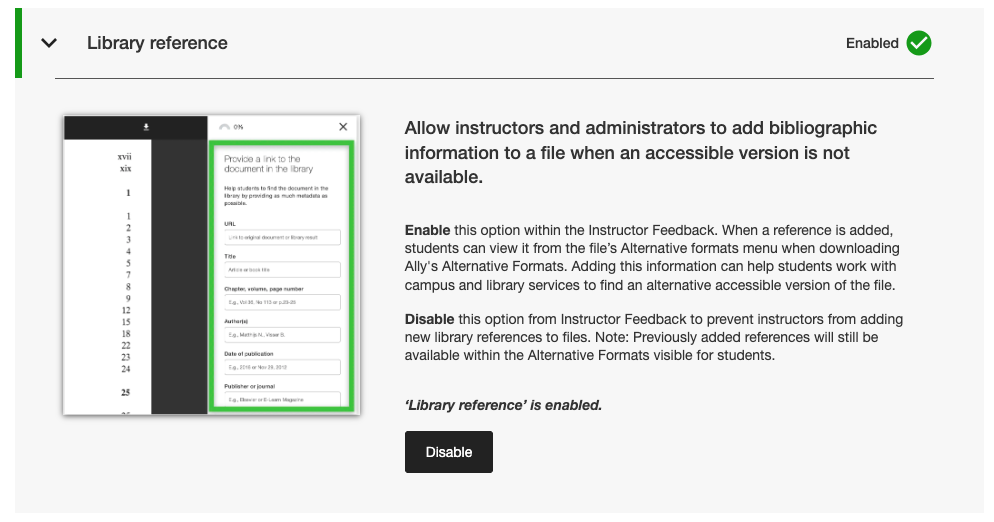
Gli amministratori possono trovare questo nuovo flag di funzionalità nella scheda Funzionalità dello strumento Ally Configuration, elencata sotto Riferimento alla libreria.
Nota
I riferimenti alle librerie rimarranno attivi per impostazione predefinita con questa versione. La disattivazione dei riferimenti alle biblioteche con questo nuovo flag di funzionalità non rimuoverà i riferimenti alle biblioteche aggiunti in precedenza dai contenuti e impedirà solo l'aggiunta di nuovi riferimenti in futuro.
Correzioni di bug e miglioramenti
È stato risolto un bug in Canvas che causava la scomparsa della colonna degli indicatori Ally dall'area Nuovi file quando lo schermo veniva ridimensionato.
È stato risolto un problema di accessibilità nelle integrazioni di Canvas che impediva l'applicazione del focus corretto quando si utilizzava la tastiera per navigare tra gli indicatori del punteggio di accessibilità di Ally all'interno delle pagine di Canvas.
È stato corretto un collegamento web non funzionante nelle impostazioni di configurazione di Ally per le condizioni d'uso dell'assistente AI per testo alternativo.
Migrazione dei nostri servizi di posta elettronica SMTP nell'infrastruttura di backend che gestisce i flussi di e-mail di aiuto personalizzate.
Ally 2.17.5 Rilascio in produzione: 12 marzo 2026
I file UNSAFE_HTML di Blackboard non sono più inclusi nei report.
Nell'ambito del nostro impegno costante per l'efficienza degli istruttori e la chiarezza dei rapporti, i report Ally non considereranno più i file UNSAFE_HTML come parte del contenuto del corso per le integrazioni con Blackboard.
Immagine 1: Rapporto sul corso con UNSAFE_HTML incluso per mostrare il comportamento precedente.
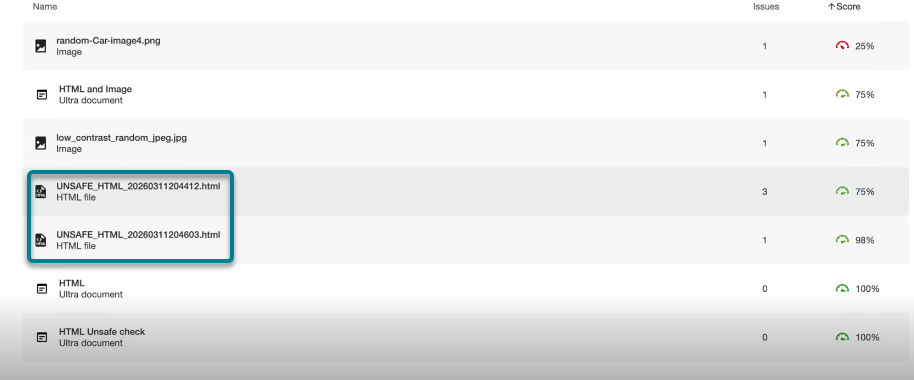
A partire da questa versione, i file UNSAFE_HTML creati automaticamente nella cartella dei contenuti quando si utilizzano gli snippet HTML all'interno di un documento Blackboard saranno filtrati dai report dell'istituto e dei corsi. In precedenza, questi file venivano visualizzati nel report, ma gli istruttori non erano in grado di risolvere i problemi identificati relativi a lingua e titolo mancanti e spesso ricorrevano ad altre soluzioni per rimuovere questi file dal corso per eliminarli dai report.
Nota
Questa modifica rimuoverà tutti i file UNSAFE_HTML attuali e passati dalla considerazione. A seconda della frequenza con cui questi contenuti sono stati utilizzati in un corso, ciò può comportare un leggero aumento o una diminuzione del punteggio del corso in base alla distribuzione di file, HTML e contenuti WYSIWYG.
In una versione futura, cercheremo di evitare del tutto l'elaborazione di questi file durante l'avvio di un corso per migliorare le prestazioni generali e la scansione.
Correzioni di bug e miglioramenti
È stato risolto un problema nelle integrazioni di Blackboard che causava una discrepanza nel punteggio delle immagini quando si confrontava il punteggio nel feedback dell'istruttore di un documento con il punteggio nel Rapporto sull'accessibilità del corso quando le immagini erano impostate su Solo visualizzazione o Solo download. Il Rapporto sull'accessibilità del corso mancava erroneamente il testo alternativo applicato in precedenza e abbassava il punteggio, nonostante fosse indicato come risolto nel feedback dell'istruttore. Questo vale per le immagini presenti in Ultra Documents come parte del corso e dell'oggetto didattico Repository.
È stato risolto un problema nella Correzione rapida Lingua mancante nel PDF che consentiva di fare clic sul pulsante Applica prima che l'istruttore selezionasse una lingua.
È stato migliorato lo stile dei collegamenti di riferimento della libreria nella finestra di download dei formati alternativi, in modo che i collegamenti di riferimento vengano visualizzati come collegamenti cliccabili ed evitino potenziali problemi di contrasto.
Rilascio in produzione di Ally 2.17.4: 5 marzo 2026
La preselezione della lingua è ora disponibile per la correzione rapida PDF della lingua mancante.
Gli istruttori che correggono PDF con lingue mancanti nel feedback rapido Ally Instructor possono ora beneficiare del rilevamento e della preselezione della lingua nell'elenco a discesa, per evitare un ulteriore scorrimento e risparmiare tempo nella risoluzione di questo problema comune.
Il rilevamento della lingua integrato in Ally analizza il PDF per determinare la lingua appropriata, ove possibile. Se non viene rilevata alcuna lingua, gli istruttori possono comunque selezionarne una manualmente per applicare la correzione e fare in modo che Ally salvi la modifica apportata al PDF come previsto.
Immagine 1: Correzione rapida per l'aggiunta della lingua con Inglese selezionato

I plugin di Moodle 5.1 sono ora disponibili
Nell'ambito del continuo supporto di Ally a Moodle, sono disponibili i plugin di Ally per Moodle 5.1. Ulteriori dettagli sul supporto di Ally per Moodle sono disponibili nella Documentazione di configurazione di Ally per Moodle.
Nota
Ally crea rami per ogni versione di Moodle supportata come parte della nostra strategia di plugin open source, per consentire uno sviluppo mirato e la correzione dei bug. Le versioni attuali dei plug-in si trovano nei corrispondenti rami STABLE del nostro repository. Si consiglia sempre agli amministratori di utilizzare i rami stabili per garantire che non vengano introdotte nuove modifiche indesiderate quando i plug-in vengono aggiornati.
Correzioni di bug e miglioramenti
È stato risolto un problema in Blackboard a causa del quale gli istruttori che utilizzavano il Rapporto sull'accessibilità del corso per risolvere i problemi nei Documenti erano inaspettatamente in grado di rimuovere il contenuto erroneamente identificato come collegamenti quando incorporavano blocchi HTML, audio e/o video di Video Studio.
È stato risolto un problema per tutte le integrazioni LMS nel Rapporto istituzionale, a causa del quale il menu a discesa Esportazione era nascosto sugli schermi più piccoli e/o per determinate dimensioni del browser.
È stato risolto un problema per tutte le integrazioni LMS, a causa del quale l'applicazione di una correzione rapida dei link interrotti per i contenuti WYSIWYG contenenti contemporaneamente più link interrotti a volte provocava un caricamento infinito dell'indicatore di caricamento.
Sono stati implementati diversi miglioramenti nel frontend dell'infrastruttura di anteprima del feedback degli insegnanti in PDF per supportare il continuo avanzamento delle funzioni di correzione dei PDF.
Implementati ulteriori miglioramenti delle best practice per le richieste HTTP di integrazione di Canvas per garantire l'uso delle intestazioni User-Agent.
Ally 2.17.3 Rilascio in produzione: 30 gennaio 2026
Correzioni di bug e miglioramenti
È stato risolto un problema nel Feedback dell'istruttore di Ally per i file PDF scansionati, a causa del quale (dopo aver aperto "Impara a correggere i PDF") fare clic su Indietro non sempre riportava gli utenti alla visualizzazione del Feedback dell'istruttore e talvolta richiedeva un secondo clic.
Ally 2.17.2 Rilascio in produzione: 15 gennaio 2026
Correzioni di bug e miglioramenti
È stato risolto un problema nel Rapporto istituzionale in cui l'opzione Scarica CSV era nascosta quando si esportava dalla scheda Corsi se la ricerca restituiva uno o nessun corso.
È stato risolto un problema nel Rapporto di utilizzo in cui il pulsante Scarica rapporto di utilizzo rimaneva disattivato dopo aver scaricato un rapporto e selezionato un nuovo intervallo di date.
È stato risolto un problema di accessibilità da tastiera nell'area File su Canvas, in cui si perdeva il focus quando si navigava verso il punteggio di accessibilità. Il focus rimane ora visibile durante la navigazione tramite tastiera.