Utilizzo
Note
Questa documentazione è stata tradotta utilizzando una traduzione automatica assistita dall'intelligenza artificiale. Le traduzioni sono fornite "così come sono", senza alcuna garanzia circa la loro accuratezza. La versione inglese di questo contenuto costituisce la fonte ufficiale e di riferimento.
Come interpretare il rapporto sull'utilizzo di Ally
Il rapporto sull'utilizzo mostra i dettagli relativi alle modalità di utilizzo di Ally da parte dei tuoi studenti e dei docenti. Scopri con quale frequenza gli studenti scaricano un formato alternativo e con quale frequenza i docenti risolvono i problemi di accessibilità.
Accedi al rapporto di utilizzo
Nel rapporto sull'accessibilità istituzionale Ally, selezionare la scheda Uso.
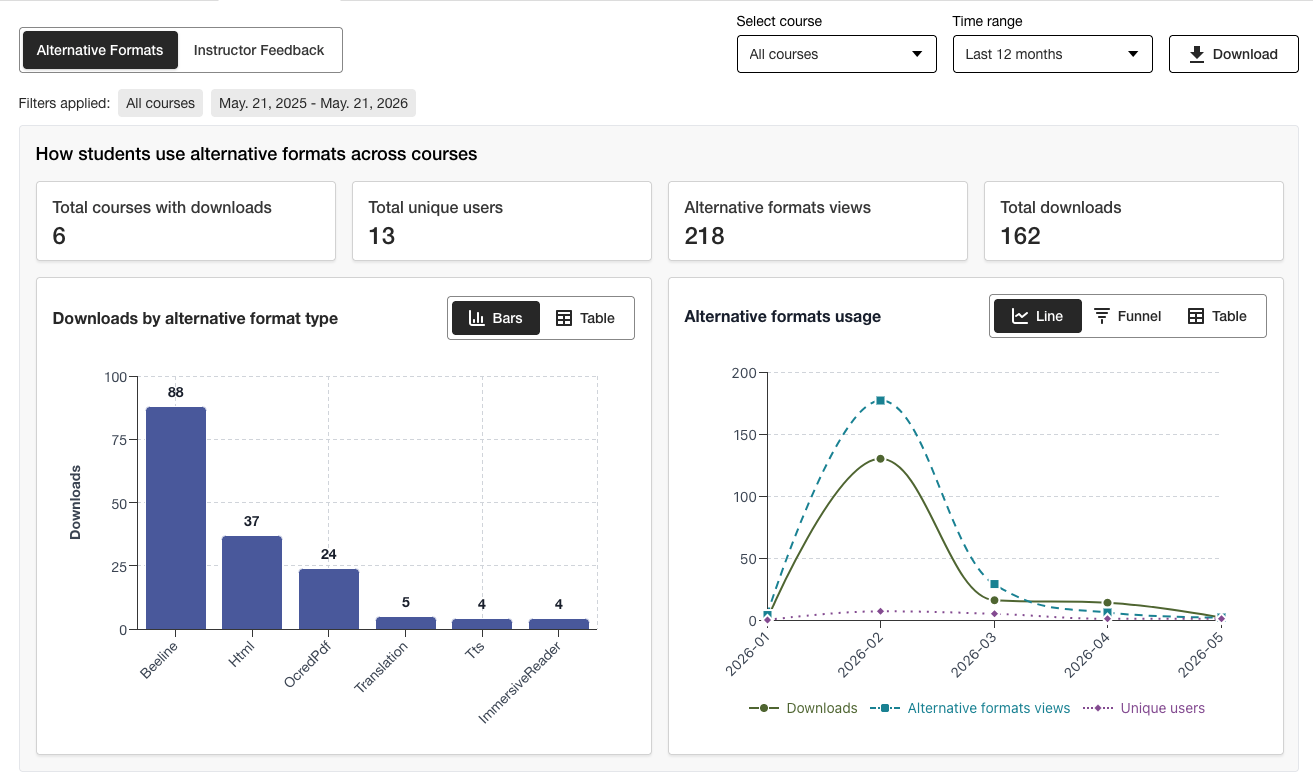
Scarica un rapporto sull'utilizzo.
Il report sui download è un foglio di calcolo suddiviso in cinque fogli di lavoro. Ogni foglio di lavoro contiene informazioni relative all'intervallo di date scelto.
Avvio di formati alternativi
Alternative format weekly
Avvio del feedback degli istruttori
Feedback settimanale dell'insegnante
Dati
Nel rapporto sull'accessibilità istituzionale Ally, selezionare la scheda Uso.
Scegli un intervallo di date per il report.
Selezionare il pulsante Scarica report di utilizzo.
Nota
È possibile che all'apertura iniziale del report i dati non siano visibili. Il file scaricato potrebbe essere protetto. Abilita la modifica per visualizzare i dati.