Notes de mise à jour 2026
Note
Cette documentation a été traduite à l'aide d'un outil de traduction automatique assisté par l'IA. Les traductions sont fournies « telles quelles », sans aucune garantie quant à leur exactitude. La version anglaise de ce contenu fait office de source officielle et fait autorité.
Ally 2.19.8 Release to production: September 28, 2026
Bug Fixes and Improvements
Fixed a bug in Blackboard integrations that caused some Documents not to be able to generate audio alternative formats.
Fixed a bug in Canvas integrations that caused Ally not to be able to correctly recognize images within Classic Quizzes which resulted in images with alt text being flagged as missing in the Course Report.
Implemented an accessibility improvement to the focus indicator applied to the Enable Future courses button within the Ally Configuration tool.
Fixed a bug in Canvas integrations that caused an error when attempting to fix any HTML issue from the Course Report.
Fixed an accessibility issue that caused insufficient contrast on the focus indicators for the enable and disable options within the Ally Configuration tool.
Fixed a bug with the Table Header Quick Fix that caused the selected option to disappear when Fix all occurrences was selected.
Fixed an accessibility issue within the Table Header Quick Fix to ensure that the Apply a table header selector is appropriately associated with its visible label.
Implemented an accessibility improvement to the Ally Terms of Use to ensure the Terms of Use text meets minimum color contrast requirements.
Fixed an issue in Blackboard where instructors using the Course Accessibility Report to fix issues in Documents were unexpectedly able to remove content incorrectly identified as links when embedding LTI Video links including Yuja, Echo360, Panopto, Kaltura and other third-party videos.
Fixed an issue in Canvas integration where custom CSS was conflicting with Ally CSS and prevented it from loading correctly causing an error when viewing the Instructor Feedback and/or Course Report Preview.
Ally 2.19.7 Release to production: September 17, 2026
Bug Fixes and Improvements
Updated the AI Alt Text Assistant to take advantage of several additional improvements in the underlying AWS Bedrock AI models. For more information, visit AI Alt Text Transparency Note.
Fixed a bug in the Institutional Report Directory Tab that sometimes caused the number of courses and items to show as ‘0’ until you refresh the report.
Fixed a bug in the Institutional Report that caused the label for the last month to not be visible.
Fixed a bug in Moodle integrations that sometimes prevented the instructor from updating an image description in the Ally Instructor Feedback.
Fixed a bug that caused a display issue in the Course Accessibility Report when file names exceeded a certain length.
Implemented several improvements to Ally’s underlying processing logic when handling large volumes of events.
Ally 2.19.6 Release to production: September 7, 2026
Bug Fixes and Improvements
Fixed an issue in Blackboard integrations where links without discernible text within the Title of a Document could not be fixed with the quick fix when using the Course Accessibility Report.
Fixed an issue in Blackboard integrations where alt text and decorative image values entered through the Ally Instructor Feedback or the Instructor Feedback via the Course Accessibility Report did not save back to the Image Block metadata as expected.
Fixed an issue in Canvas integrations that caused the Alternative Formats window to not scale correctly with the browser screen size when using the file preview.
Fixed an issue in Canvas integrations that created a role conflict when a user had both student and instructor permissions across multiple courses resulting in inconsistent Course Accessibility Report launch behavior.
Implemented improvements to Ally’s backend course sync processes when generating monthly reports.
Ally 2.19.5 Release to production: August 27, 2026
Bug Fixes and Improvements
Fixed an issue in the new Usage Report that prevented the department ID from filtering both the UI and the export when drilling into the Directory tab.
Fixed an issue in Blackboard integrations that prevented alternative text and decorative image settings marked in Ally from saving back to Blackboard Tests when using either the Instructor Feedback or Course Accessibility Report Instructor Feedback.
Fixed an issue in Blackboard integrations that prevented instructors from overwriting existing alternative text on an image when using the Course Accessibility Report.
Fixed an issue within Ally’s alternative format processing that sometimes stripped the first word after each bullet point when creating the HTML alternative formats from Word documents containing bulleted lists.
Fixed an issue in the Moodle 5 plugins that prevented Ally from flagging images lacking alternative text in the rich content if the image description was only entered as spaces.
Fixed an issue that caused Ally to incorrectly flag some Word documents with headings issues despite headings being present.
Fixed a minor issue within the Ally Instructor Feedback error messaging that shifted the close button for the Oops error modal to the bottom of the screen.
Implemented performance improvements for the D2L Brightspace course loading process to avoid timeouts while processing large volumes of courses.
Ally 2.19.4 Release to production: August 17, 2026
Note
Reporting Bearer Token Reset: The reset of Ally Reporting API tokens was completed successfully on August 14th. Going forward, administrators should create a new token in the institutional report to restore connection in any external reporting tools.
Bug Fixes and Improvements
Fixed an issue in Blackboard Tests that caused the Ally score indicator to disappear from an image embedded within the text block when editing image alt text.
Fixed an issue with Canvas Course Export/Import and Copies where the associated Ally course copy processes (that carry over data such as alternative text, decorative images and library references) were failing in certain scenarios where a course file was deleted and replaced during the Canvas copy/import process.
Fixed an issue in the New Files Experience in Canvas that caused the Ally score indicators to disappear completely from the screen when scaled down to a small enough screen size.
Fixed an issue in Canvas File Preview within the New Files Experience that sometimes caused the Alternative Formats Icon to sporadically appear and disappear.
Fixed an issue in Canvas New Files Experience that caused the Alternative Formats modal to remove the Download Original File icon when scaled down to a small enough screen size.
Fixed an issue in Canvas that caused a delay in showing the Alternative Format icon when navigating from file to file.
Fixed an issue in Canvas that caused RTF files to be mistakenly recognized as Word documents and included in the Course Report and course score despite not being able to be opened or previewed.
Fixed an issue that caused Ally to report certain PPTX files as missing language when the language was set correctly in the document.
Fixed an issue with Ally’s broken link checking in the LMS that caused some valid links to be seen as broken depending on how those links were created in the WYSIWYG content.
Improved the accessibility and color contrast of the Ally Alternative Format indicator when using High Contrast Modes.
Improved Ally’s language validation checks on PDF documents to help minimize certain scenarios where the selected language in the PDF Quick Fix could not be saved.
Implemented performance improvements in Ally when interacting with the Moodle ally_filter plugin.
Ally 2.19.3 Mise en production : 7 août 2026
Plugins Moodle 5.2
Dans le cadre du soutien continu apporté par Ally à Moodle, les plugins Ally pour Moodle 5.2 sont désormais disponibles. Vous trouverez plus d'informations sur la prise en charge de Moodle par Ally dans la documentation relative à la configuration d'Ally pour Moodle.
Note
Ally crée des branches pour chaque version prise en charge de Moodle dans le cadre de notre stratégie de plugins open source afin de permettre un développement ciblé et la correction des bogues. Les versions actuelles des plugins se trouvent dans les branches STABLE correspondantes de notre dépôt. Il est toujours recommandé aux administrateurs d’utiliser les branches stables afin de s’assurer qu’aucune nouvelle modification imprévue ne soit introduite lors de la mise à jour des extensions.
Corrections de bogues et améliorations
Correction d'un bug dans Moodle qui empêchait l'affichage de certains contenus HTML lorsque l'option Exclure les fichiers inutilisés des plugins Ally était sélectionnée.
Ally 2.19.2 Mise en production : 30 juillet 2026
Corrections de bogues et améliorations
Amélioration de l'expérience de retour d'information pour les enseignants utilisant Blackboard, afin que l'aperçu du contenu affiche les blocs de contenu HTML comme du contenu visible, au lieu d'indiquer simplement « UNSAFE_HTML » lors de l'utilisation du rapport d'accessibilité du cours.
Correction d'un problème rencontré par les enseignants utilisant Blackboard : les images insérées sans description dans un tableau de la section « Documents » n'étaient pas signalées correctement par Ally.
Correction d'un problème dans les flux de travail d'aide personnalisés d'Ally qui empêchait les URL intégrées de s'ouvrir lorsqu'on cliquait dessus.
Correction d'un problème dans Blackboard qui empêchait l'enseignant d'appliquer une nouvelle couleur de police lorsqu'il utilisait la solution rapide pour résoudre les problèmes de contraste mis en évidence dans la section « Document ».
Correction d'un problème de flux de travail dans la fonction « Correction rapide PDF par OCR » qui provoquait une erreur « Oups » lorsque l'enseignant appliquait d'abord la correction par OCR, puis désélectionnait l'option « Télécharger au format d'origine ».
Correction d'un problème dans le nouveau rapport d'utilisation d'Ally qui provoquait un délai d'expiration inattendu des téléchargements lors de la sélection d'une période plus longue. Veuillez noter que les administrateurs doivent vider le cache du navigateur maintenant que ce correctif a été publié, avant de tenter un nouveau téléchargement.
Ally 2.19.1 Mise en production : 22 juillet 2026
Corrections de bogues et améliorations
Correction d'un problème qui entraînait une déformation de la capture d'écran dans le drapeau de nouvelle fonctionnalité « Marquage automatique des PDF » au sein des options de configuration.
Nous avons corrigé un problème lié à notre cache de données d'utilisation qui empêchait certains administrateurs de consulter les données historiques plus anciennes dans le rapport de la nouvelle interface utilisateur lorsqu'ils filtraient des périodes plus longues.
Correction d'un problème survenant dans Blackboard lors de l'insertion d'images à l'aide d'une URL, qui entraînait la suppression du texte alternatif de toutes les images identiques au lieu de ne concerner que l'image sélectionnée.
Correction d'un problème dans Blackboard qui empêchait l'enregistrement correct du texte alternatif lorsqu'il était saisi dans la section « Commentaires de l'enseignant » pour les images insérées via une URL.
Nous avons mis à jour le nom d'hôte de Canvas dans les détails de configuration LTI d'Ally afin de nous assurer que sso.canvaslms.com est correctement indiqué dans toutes les sections concernées.
Nous avons augmenté le délai d'attente de l'API Ally Reporting afin d'éviter de dépasser les limites de délai d'attente pour les ensembles de données clients volumineux, ce qui provoquait une erreur dans l'outil de reporting.
Ally 2.19 Mise en production : 13 juillet 2026
Une solution rapide pour ajouter des balises aux fichiers PDF est désormais disponible pour les enseignants.
Dans le cadre de l'élargissement continu des fonctionnalités de mise en conformité des fichiers PDF au sein de l'outil « Ally Instructor Feedback », les enseignants peuvent désormais utiliser la fonction « Balises automatiques » pour les fichiers PDF non balisés afin d'y ajouter des balises et d'améliorer ainsi l'accessibilité globale pour les étudiants. Cette fonctionnalité est désormais accessible à tous les établissements à l’issue de la phase initiale du programme « Early Adopter ».
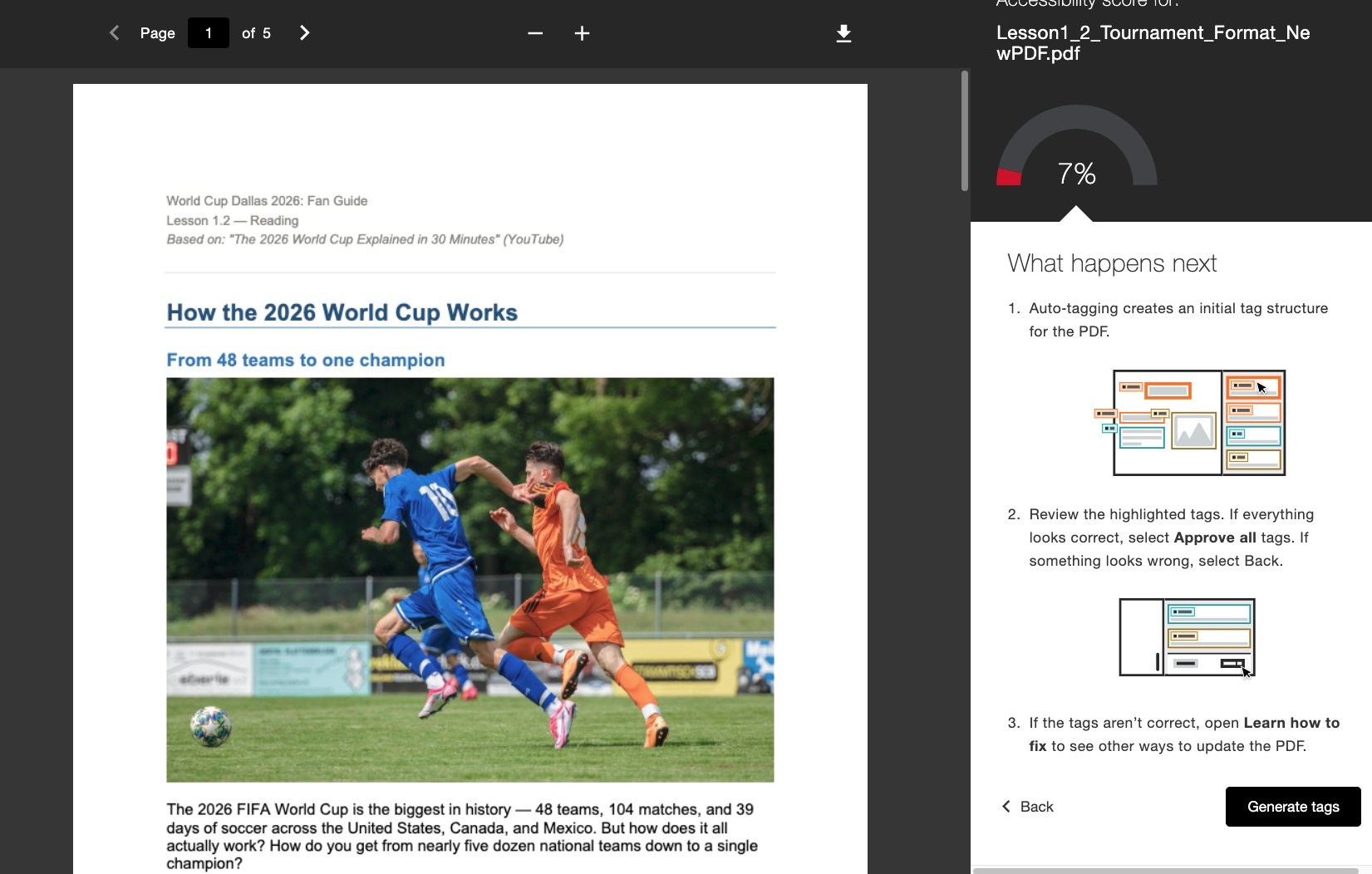
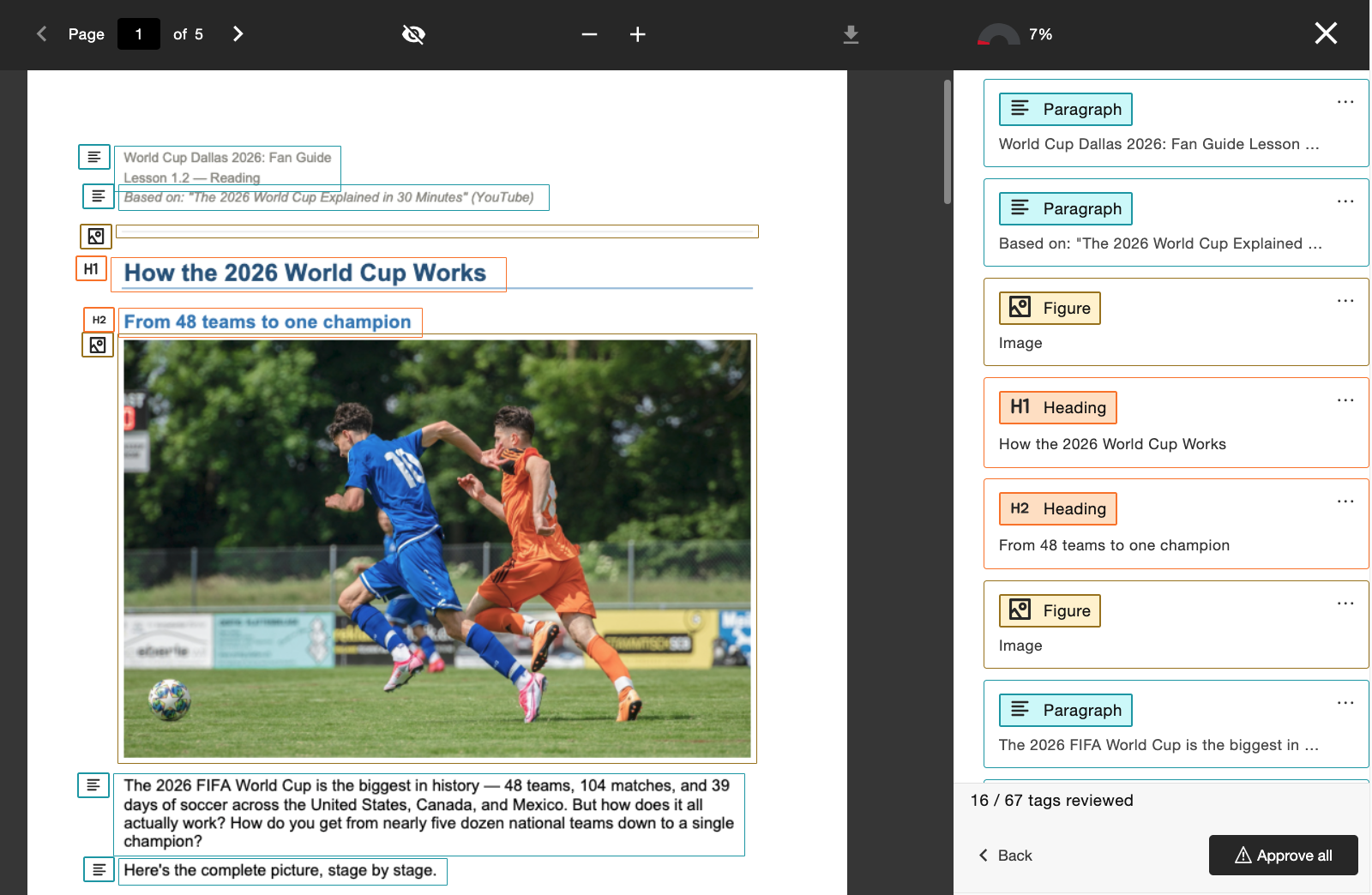
Lorsque cette fonctionnalité est activée par l'administrateur, les enseignants verront apparaître un nouveau flux de travail « Générer des balises » directement intégré à la rubrique « Commentaires de l'enseignant ». Les formateurs conservent le contrôle après avoir généré des balises : ils peuvent examiner la nouvelle structure des balises en faisant défiler l'arborescence des balises située à droite de l'écran avant de décider d'approuver les balises appliquées. Les formateurs peuvent utiliser l'indicateur de progression situé en bas de la page pour voir combien de balises ils ont déjà validées avant de sélectionner Tout valider lorsqu'ils sont satisfaits.
Les administrateurs peuvent contrôler l'accès à cette fonctionnalité via l'outil de configuration Ally, en l'activant ou en la désactivant selon les préférences de l'établissement.
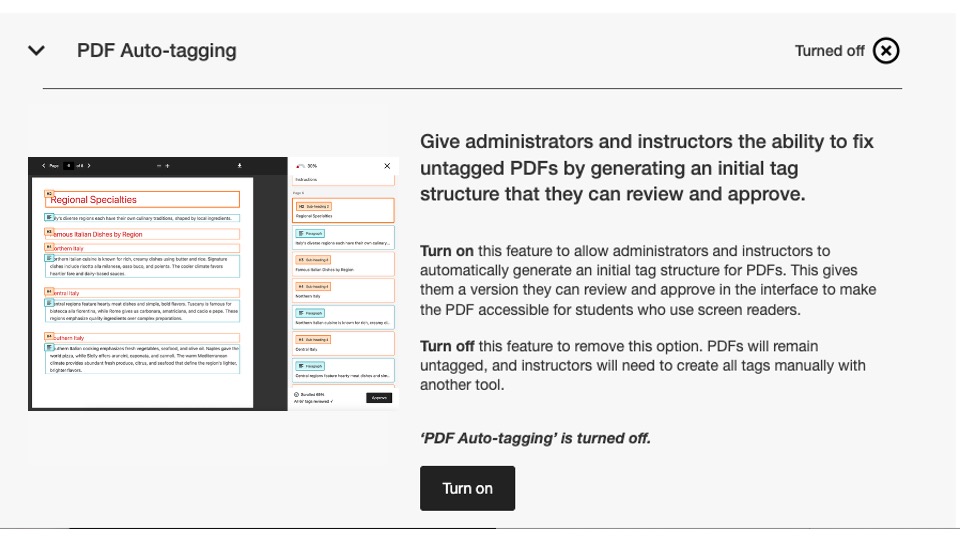
Dans le cadre de cette version, ce paramètre de configuration est désactivé par défaut. Les administrateurs doivent l'activer pour que les formateurs puissent commencer à l'utiliser.
Pour plus d'informations sur le nouveau rapport d'utilisation, consultez la rubrique Options de correction des fichiers PDF du site d'aide.
Un nouveau rapport d'utilisation est désormais disponible.
Dans le cadre de nos efforts constants visant à rendre les données Ally facilement accessibles et disponibles pour les administrateurs, nous sommes ravis de lancer la nouvelle version du rapport d'utilisation d'Ally, directement intégrée à l'interface utilisateur.
Le rapport d'utilisation fournit des informations détaillées sur la manière dont vos étudiants et vos enseignants utilisent Ally, notamment le nombre de téléchargements de formats alternatifs et de corrections apportées par les enseignants pendant une période donnée.
Ce nouveau rapport amélioré est désormais disponible directement dans le Rapport institutionnel, sans qu'il soit nécessaire de télécharger un fichier Excel, afin de vous permettre d'obtenir plus facilement et plus rapidement des informations sur l'utilisation d'Ally par votre établissement. Cette fonctionnalité remplace l'onglet Utilisation de votre rapport institutionnel et ne nécessite aucune étape supplémentaire pour être activée.
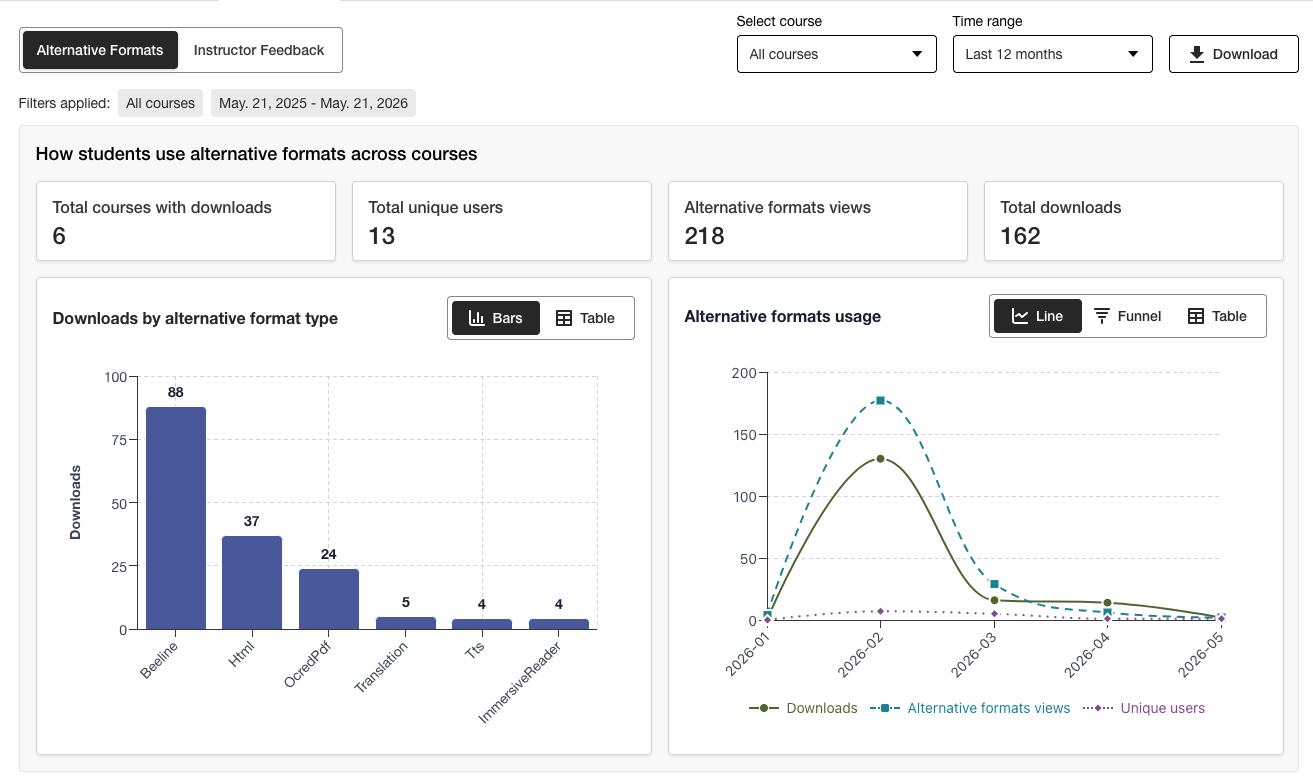
Les administrateurs peuvent consulter en un coup d’œil les informations importantes et utiliser les nouvelles options de filtrage ainsi que l’analyse approfondie des graphiques pour obtenir facilement une meilleure compréhension des données.
La version Excel peut toujours être téléchargée via la fonction « Télécharger » pour les utilisateurs qui préfèrent accéder aux données dans un autre format.
Pour plus d’informations sur le nouveau rapport d’utilisation, consultez les rubriques suivantes du site d’aide :
Corrections de bogues
Correction d'un bug dans les intégrations Canvas : la mise à jour du titre d'un document via Ally modifiait par erreur le statut de publication du document dans le cours.
Ally 2.18.10 Mise en production : 2 juillet 2026
Corrections de bogues et améliorations
Correction d'un bug dans la section « Commentaires de l'instructeur » qui entraînait la reprise erronée des descriptions d'images précédemment appliquées lorsqu'une image existante était remplacée par une nouvelle afin de corriger un problème de contraste.
Correction d'un bug dans l'assistant de texte alternatif IA qui provoquait une erreur « Oups » lorsque le formateur ajoutait manuellement une nouvelle description après avoir cliqué sur « Générer automatiquement la description ».
Correction d'un bug dans la section « Formats alternatifs » qui entraînait une modification erronée de la langue du contenu HTML en format audio MP3.
Correction d'un bug dans la fonction « Correction rapide » des fichiers PDF qui, dans certains cas, permettait aux enseignants d'appliquer une langue incorrecte malgré le contrôle de validation de la langue effectué par Ally.
Correction d'un bug dans les intégrations Blackboard qui entraînait la suppression de la légende des fichiers dans les blocs « Image » lorsque l'enseignant corrigeait le problème lié à l'absence de description d'image signalé dans le rapport d'accessibilité du cours.
Plusieurs améliorations ont été apportées à la technologie OCR sous-jacente d’Ally afin d’optimiser la qualité, la fidélité et les taux de conversion lors du traitement des fichiers PDF numérisés en vue de leur conversion vers d’autres formats et de l’application des « correctifs rapides PDF ».
Ally 2.18.9 Mise en production : 22 juin 2026
Corrections de bogues et améliorations
Correction d'un bug dans Moodle : dans certains cas, les images intégrées à une page ne s'affichaient pas dans l'aperçu des commentaires de l'enseignant lorsqu'on y accédait depuis le rapport d'accessibilité du cours.
Correction d'un bug dans les pages Canvas qui empêchait l'application des modifications apportées aux descriptions d'images après le remplacement d'une image à faible contraste à l'aide de l'option « Téléverser un fichier ».
Correction d'un problème d'accessibilité dans Moodle afin que les icônes indicatrices d'Ally puissent être sélectionnées lors de la navigation.
Ally 2.18.8 Mise en production : 11 juin 2026
Corrections de bogues et améliorations
Correction d'un bogue dans Moodle qui entraînait l'affichage erroné de deux infobulles pour les utilisateurs lors de l'utilisation des indicateurs Ally.
La formulation des descriptions et des boutons de l'outil de configuration d'Ally a été améliorée afin d'afficher Activer et Désactiver.
Ally 2.18.7 Mise en production: 1 juin 2026
Corrections de bugs et améliorations
Correction d'un bug dans Moodle qui entraînait le masquage involontaire de l'indicateur de score d'accessibilité lorsque l'éditeur TinyMCE était déployé sur la page.
Correction d'un bug dans Blackboard qui empêchait la conversion correcte des niveaux de titre dans les Documents (Ultra) vers les Formats HTML alternatifs générés.
Correction d'un bug dans la section « Commentaires du formateur » qui affichait à tort le message « Problèmes restants à résoudre » après avoir atteint 100% pour un élément de contenu.
Correction d'un bug dans Blackboard qui faisait que les images marquées comme décoratives dans le Document s'affichaient sous forme de lien dans l'aperçu des commentaires de l'enseignant du rapport sur l'accessibilité du cours.
Correction d'un bug dans la section « Commentaires de l'instructeur » qui affichait à tort le lien à deux reprises lorsque l'on tentait de réparer un lien défectueux.
Ally 2.18.6 Release to production: May 26, 2026
Bug Fixes and Improvements
Implemented several processing improvements to provide better handling of Canvas LMS Rate limits to minimize the number of times Ally hits these limits over the course of regular content processing.
Ally 2.18.5 Mise en production : 7 mai 2026
Corrections de bogues et améliorations
Correction d'un problème d'accessibilité dans Canvas où l'option Formats alternatifs du menu déroulant ne répondait pas correctement aux entrées de navigation au clavier.
Correction d'un bug mineur dans les intégrations Canvas qui faisait que le menu déroulant ne se fermait pas après avoir cliqué sur l'option Formats alternatifs.
Correction d'un bug dans le flux de travail de la correction rapide du feedback de l'instructeur au format PDF qui faisait que le bouton « Réessayer » accédait au mauvais point de départ dans le panneau de feedback.
Amélioration de la gestion des fichiers UNSAFE_HTML dans les intégrations Blackboard afin de détecter et d'ignorer complètement la notation de ces fichiers et d'éviter de devoir les supprimer des rapports dans un deuxième temps.
Correction d'un bogue pour les intégrations Blackboard qui provoquait la conversion incorrecte des pièces jointes en liens lors de la résolution de problèmes dans les documents à partir du rapport d’accessibilité du cours.
Mise en œuvre de plusieurs améliorations et optimisations des files d'attente de traitement en temps réel d'Ally dans la région des États-Unis.
Ally 2.18.4 Mise en production : 30 avril 2026
Corrections de bogues et améliorations
Correction d’un bogue dans Blackboard Documents qui faisait qu’Ally identifiait incorrectement les en-têtes placés au mauvais niveau et empêchait les enseignants de recevoir 100 % même après avoir résolu tous les problèmes.
Amélioration de la détection des fichiers UNSAFE_HTML dans Blackboard afin de faciliter leur exclusion des processus de notation d'Ally.
Correction d'un problème d'accessibilité qui empêchait le bouton de téléchargement du fichier d'origine de s'afficher sur les petits écrans.
Correction d'un problème avec la vérification des légendes Vimeo d'Ally qui provoquait des erreurs lorsqu'une vidéo Vimeo était détectée dans un contenu enrichi si l'intégration Vimeo n'était pas configurée dans la configuration d'Ally.
Ally 2.18.3 Mise en production : 20 avril 2026
Amélioration du traitement des documents
Dans le cadre de notre engagement continu à améliorer la qualité et la fidélité du contenu dans le traitement des retours des instructeurs et des formats alternatifs d'Ally, la version 2.18.3 apporte des améliorations cruciales au processus de conversion des documents sous-jacent qui alimente ces fonctionnalités clés pour l'utilisateur.
La logique de traitement des documents d'Ally a été améliorée pour permettre une conversion plus intelligente, plus rapide et de meilleure qualité des fichiers chargés dans le cours. Cette nouvelle version apporte plusieurs améliorations aux enseignants et aux étudiants :
Réduction des faux positifs dans les aperçus de fichiers des commentaires de l’instructeur.
Amélioration de la gestion des formes dans les présentations PowerPoint, y compris la conversion d'éléments tels que les flèches dans le document.
Amélioration de la reconnaissance du texte alternatif appliqué aux formulaires après conversion en PDF
Amélioration de l’annonce des images décoratives dans les alternatives, y compris l’alternative audio
Amélioration de la reconnaissance d'images et de l'application des balises Figure lors de la conversion en PDF
En plus de ces améliorations pour l'utilisateur, cette mise à jour comprend également l'optimisation de l'infrastructure sous-jacente d'Ally afin d'améliorer les performances générales et la vitesse de traitement du contenu lorsqu'il est reçu du LMS.
Note
Nos équipes continueront à analyser et identifier d'autres améliorations possibles ou des cas particuliers qui pourraient devoir être traités à l'avenir.
AI Alt Text Assistant amélioré
L'assistant de texte alternatif IA a été mis à jour pour tirer parti de plusieurs améliorations supplémentaires apportées aux modèles d'IA sous-jacents d'AWS Bedrock, notamment la réduction du nombre de délais d'attente lors de la demande d'un texte alternatif suggéré et l'amélioration de la gestion pour éviter les hallucinations lors de l'analyse d'images spécifiques.
Pour rappel, la note sur la transparence de l'assistant IA de texte alternatif mise à jour peut être consultée ici avec des détails supplémentaires sur cette fonctionnalité : https://help.anthology.com/ally-lms/en/administrators/ai-alt-text-assistant.html
Corrections de bogues et améliorations
Correction d'un bug dans les retours d'information de l'instructeur qui provoquait l'application d'un surlignage incorrect dans l'aperçu lorsque le PDF n'avait toujours pas la langue correcte après avoir essayé d'appliquer la correction.
Correction d'un bug dans le feedback de l'instructeur où le fait de cliquer sur Réessayer lorsqu'un PDF n'avait toujours pas la bonne langue définie ne ramenait pas l'instructeur au panneau de sélection de la langue.
Correction d'un bug dans Canvas qui empêchait l'instructeur d'ouvrir les commentaires de l'instructeur sur un PDF OCRé qui avait également un titre fixe.
Correction d'un problème d'accessibilité dans le panneau Feedback de l'instructeur qui déplaçait incorrectement le focus entre les éléments lors de l'utilisation du bouton Retour.
Correction d'un problème d'accessibilité dans la fenêtre modale « Formats alternatifs » qui empêchait le téléchargement du format « Fichier original » lors de la navigation et de la sélection à l'aide d'un clavier.
Ally 2.18.2 Mise en production : 9 avril 2026
Corrections de bogues et améliorations
Correction d'un problème dans Blackboard où les indicateurs Ally ne s'affichaient pas pour les pièces jointes dans les consignes de devoir.
Correction d'un bogue qui, dans certains cas, lors de la navigation dans le panneau Feedback instructeur pour le contenu WYSIWYG, le fait de cliquer sur les icônes Gras ou Italique dans l'éditeur de contenu riche activait le bouton Générer automatiquement pour l'assistant de texte alternatif IA.
Correction d'un bug où, dans certains cas, le remplacement d'une image présentant des problèmes de contraste par une toute nouvelle image via le téléchargement de fichiers du commentaire de l'instructeur ne mettait pas à jour l'aperçu du document.
Correction d'un bogue dans Canvas qui empêchait les indicateurs Ally de s'afficher correctement sur un programme Canvas lorsque l'option Afficher les annonces récentes sur la page d'accueil du cours était activée.
Ally 2.18.1 Mise en production : 2 avril 2026
Corrections de bogues et améliorations
Mise à jour des plugins Moodle pour Moodle 4.5 et Moodle 5 afin d'inclure des corrections de bogues mineurs.
Correction d'un problème avec l'assistant de texte alternatif d'IA qui, dans certains cas, affichait un message d'erreur lorsque les instructeurs tentaient de suggérer un texte alternatif parce que le modèle principal n'était pas disponible.
Ally 2.18 Mise en production : 26 mars 2026
Nouveau drapeau de référence pour l'administration de la bibliothèque désormais disponible
Dans le cadre de nos efforts continus pour fournir des niveaux de contrôle plus granulaires aux administrateurs qui cherchent à gérer l'expérience de correction PDF pour les enseignants, un nouvel indicateur de fonctionnalité est disponible dans les options de configuration Ally, qui permet de désactiver le flux de travail de la référence de la bibliothèque.
Les administrateurs peuvent désormais désactiver la fonctionnalité de référence de la bibliothèque afin d'empêcher le formateur d'ajouter des références de bibliothèque aux PDF lorsque le fichier d'origine n'est pas disponible, tout en travaillant sur divers problèmes spécifiques aux PDF. Ce niveau de contrôle supplémentaire permettra d'aligner cette fonctionnalité sur les préférences et les processus institutionnels et offrira une plus grande flexibilité pour déterminer la meilleure façon de gérer l’épinglage des PDF à grande échelle.
Image 1 : Drapeau de la nouvelle fonctionnalité dans les options de configuration d’Ally
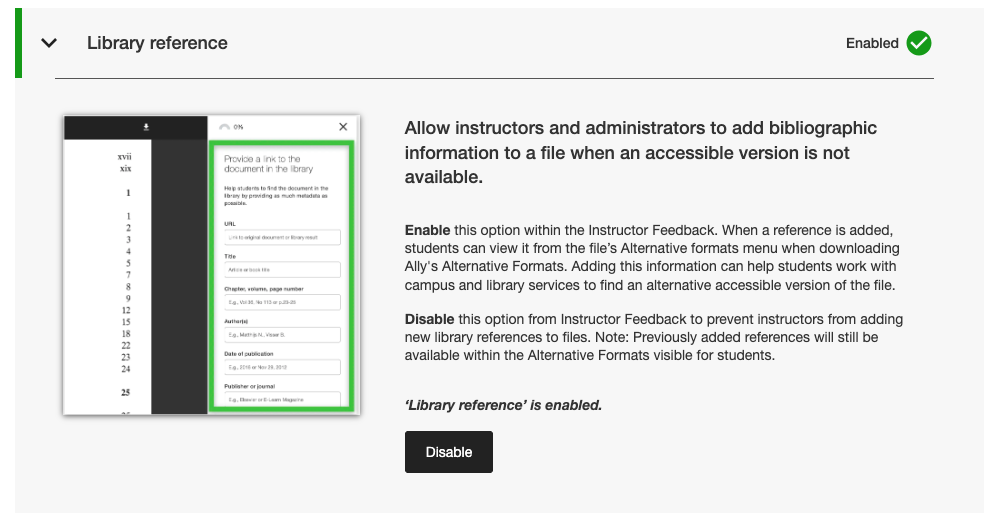
Les administrateurs peuvent trouver ce nouvel indicateur de fonctionnalité dans l'onglet Fonctionnalités de l'outil de configuration Ally, sous Référence à la bibliothèque.
Note
Les références aux bibliothèques resteront activées par défaut dans cette version. La désactivation des références de bibliothèque à l'aide de ce nouvel indicateur de fonctionnalité ne supprimera pas les références de bibliothèque précédemment ajoutées au contenu et empêchera uniquement l'ajout de nouvelles références à l'avenir.
Corrections de bogues et améliorations
Correction d'un bug dans Canvas qui provoquait la disparition de la colonne des indicateurs Ally de la zone des nouveaux fichiers lorsque l'écran était redimensionné.
Correction d'un problème d'accessibilité dans les intégrations Canvas qui empêchait l'application d'un focus correct lors de l'utilisation d'un clavier pour naviguer dans les indicateurs de score d'accessibilité d'Ally dans les pages Canvas.
Correction d’un lien web rompu dans les paramètres de configuration d’Ally pour les conditions d’utilisation de l’assistant de texte alternatif IA.
Migration de nos services de messagerie SMTP pour l'infrastructure backend qui gère les flux d'emails d'aide personnalisés.
Ally 2.17.5 Mise en production : 12 mars 2026
Les fichiers UNSAFE_HTML de Blackboard ne sont plus inclus dans les rapports
Dans le cadre de notre engagement permanent en faveur de l'efficacité des instructeurs et de la clarté des rapports, les rapports Ally ne considéreront plus les fichiers UNSAFE_HTML comme faisant partie du contenu du cours pour les intégrations Blackboard.
Image 1 : Rapport de cours avec UNSAFE_HTML inclus pour montrer le comportement antérieur.
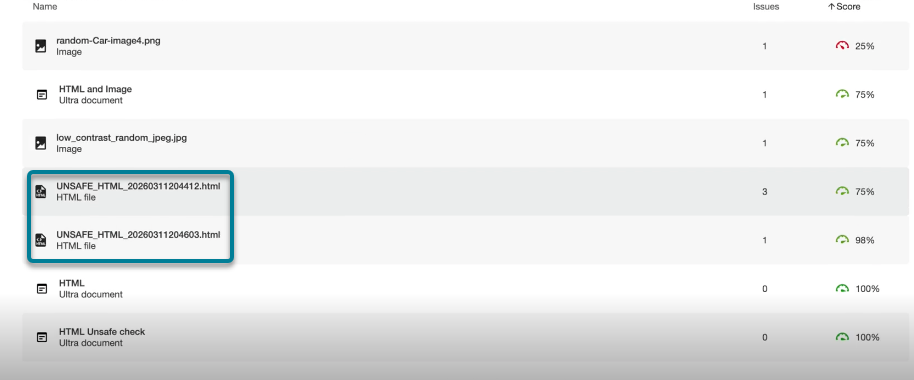
À partir de cette version, les fichiers UNSAFE_HTML créés automatiquement dans le dossier de contenu lors de l'utilisation d'extraits HTML dans un document Blackboard seront filtrés dans les rapports sur les établissements et les cours. Auparavant, ces fichiers apparaissaient dans le rapport, mais les instructeurs n’étaient pas en mesure de résoudre les problèmes liés à l’absence de langue et de titre et se tournaient souvent vers d’autres solutions pour supprimer ces fichiers du cours afin de les faire disparaître des rapports.
Note
Cette modification supprimera tous les fichiers UNSAFE_HTML actuels et précédents. Selon la fréquence d'utilisation de ces éléments de contenu dans un cours, il peut en résulter une légère augmentation ou diminution du score du cours en fonction de la distribution des fichiers, du HTML et du contenu WYSIWYG.
Dans le cadre d'une prochaine version, nous chercherons à éviter complètement le traitement de ces fichiers lors de l'intégration d'un cours afin d'améliorer les performances générales et l'analyse.
Corrections de bogues et améliorations
Correction d'un problème dans les intégrations Blackboard qui entraînait une divergence dans la notation des images lors de la comparaison de la note dans le retour de l'instructeur d'un document avec la note dans le rapport d'accessibilité du cours lorsque les images étaient définies sur Afficher seulement ou Télécharger seulement. Le rapport d'accessibilité du cours omettait incorrectement le texte alternatif précédemment appliqué et abaissait le score bien que cela soit indiqué comme corrigé dans les commentaires de l'instructeur. Remarque : cela s'applique aux images contenues dans les documents Ultra, qui font partie du cours, et au dépôt d'objets d'apprentissage.
Correction d'un problème dans le PDF Missing Language Quick Fix qui permettait au bouton Appliquer d'être cliquable avant que l'instructeur ne sélectionne une langue.
Amélioration du style des liens de référence de la bibliothèque dans la fenêtre de téléchargement des formats alternatifs afin que les liens de référence apparaissent comme des liens cliquables et qu'il n'y ait pas de problèmes de contraste.
Ally 2.17.4 Mise en production : 5 mars 2026
La présélection des langues est désormais disponible pour les langues manquantes dans PDF Quick Fix.
Les formateurs qui corrigent des PDF dont la langue est manquante dans la solution rapide Ally Instructor Feedback peuvent désormais bénéficier de la détection et de la présélection de la langue dans le menu déroulant afin d'éviter un défilement supplémentaire et de gagner du temps lors de la correction de ce problème courant.
La détection de langue intégrée d'Ally analyse le PDF pour déterminer la langue appropriée dans la mesure du possible. Si aucune langue n'est détectée, les formateurs peuvent toujours en sélectionner une manuellement pour appliquer la correction et faire en sorte qu'Ally enregistre la modification dans le PDF comme prévu.
Image 1 : Ajouter une correction rapide de langue avec l'anglais sélectionné

Les plugins Moodle 5.1 sont désormais disponibles
Dans le cadre du soutien continu d'Ally à Moodle, les plug-ins Ally pour Moodle 5.1 sont disponibles. Des détails supplémentaires sur la prise en charge de Moodle par Ally sont disponibles dans la documentation de configuration d'Ally Moodle.
Note
Ally crée des branchements pour chaque version de Moodle prise en charge dans le cadre de notre stratégie de plug-in open source afin de permettre un développement ciblé et la correction des bugs. Les versions actuelles des plugins se trouvent dans les branches STABLE correspondantes de notre dépôt. Il est toujours recommandé aux administrateurs d'utiliser les branches stables afin de s'assurer qu'aucune nouvelle modification involontaire n'est introduite lors de la mise à jour des plugins.
Corrections de bogues et améliorations
Correction d'un problème dans Blackboard où les formateurs utilisant le rapport d'accessibilité du cours pour résoudre des problèmes dans les documents ne pouvaient pas supprimer le contenu incorrectement identifié comme des liens lors de l'intégration de blocs HTML, d'audio et/ou de vidéos Video Studio.
Correction d'un problème pour toutes les intégrations LMS dans le rapport d'établissement où le menu déroulant d'exportation était masqué sur les petits écrans et/ou dans des fenêtres de navigateur de petite taille.
Correction d’un problème pour toutes les intégrations LMS où l’application d’une correction rapide de lien cassé à un contenu WYSIWYG contenant plusieurs liens cassés en même temps entraînait parfois un indicateur de chargement infini.
Mise en œuvre de plusieurs améliorations frontales de l'infrastructure de prévisualisation des commentaires de l'instructeur sur les PDF afin de soutenir nos progrès continus en matière de fonctionnalités de remédiation des PDF.
Amélioration des meilleures pratiques pour les requêtes HTTP d'intégration de Canvas afin d'assurer l'utilisation des en-têtes User-Agent.
Ally 2.17.3 — Mise en production : 30 janvier 2026
Corrections de bogues et améliorations
Correction d’un problème dans les commentaires de l’instructeur Ally pour les fichiers PDF numérisés : après avoir ouvert « Apprendre à réparer les PDF », le clic sur Retour ne ramenait pas toujours les utilisateurs vers la vue des commentaires de l’instructeur et nécessitait parfois un deuxième clic.
Ally 2.17.2 — Mise en production : 15 janvier 2026
Corrections de bogues et améliorations
Correction d’un problème dans le rapport institutionnel : l’option Télécharger CSV était masquée lors de l’exportation depuis l’onglet Cours lorsque la recherche ne renvoyait qu’un seul cours ou aucun.
Correction d’un bug dans le rapport d’utilisation : le bouton Télécharger le rapport d’utilisation restait désactivé après le téléchargement d’un rapport et la sélection d’une nouvelle plage de dates.
Correction d’un problème d’accessibilité au clavier dans la zone des fichiers Canvas : le focus se perdait lors de la navigation vers le score d’accessibilité. Le focus reste désormais visible lorsque vous naviguez au clavier.