Versionsinformation för 2026
Note
Denna dokumentation har översatts med hjälp av AI-stödd maskinöversättning. Översättningarna tillhandahålls ”i befintligt skick” utan någon garanti för deras riktighet. Den engelska versionen av detta innehåll är den officiella och giltiga källan.
Ally 2.20 Release to production: October 12, 2026
PDF Image Alt Text Quick Fixes
As part of our continued focus towards bringing more PDF remediation options to instructors, the ability to add alternative text directly to images in PDFs is now available to help further streamline faculty workflows.
Notera
This feature update is available in Blackboard LMS, Canvas, D2L Brightspace and Moodle LMS integrations.
Instructors
Turned on by default with this release, instructors now have the option to manually add alternative text to images in PDFs within the Ally Instructor Feedback workflow. After adding alternative text Ally will automatically upload a new version directly to the course while overwriting the old file.
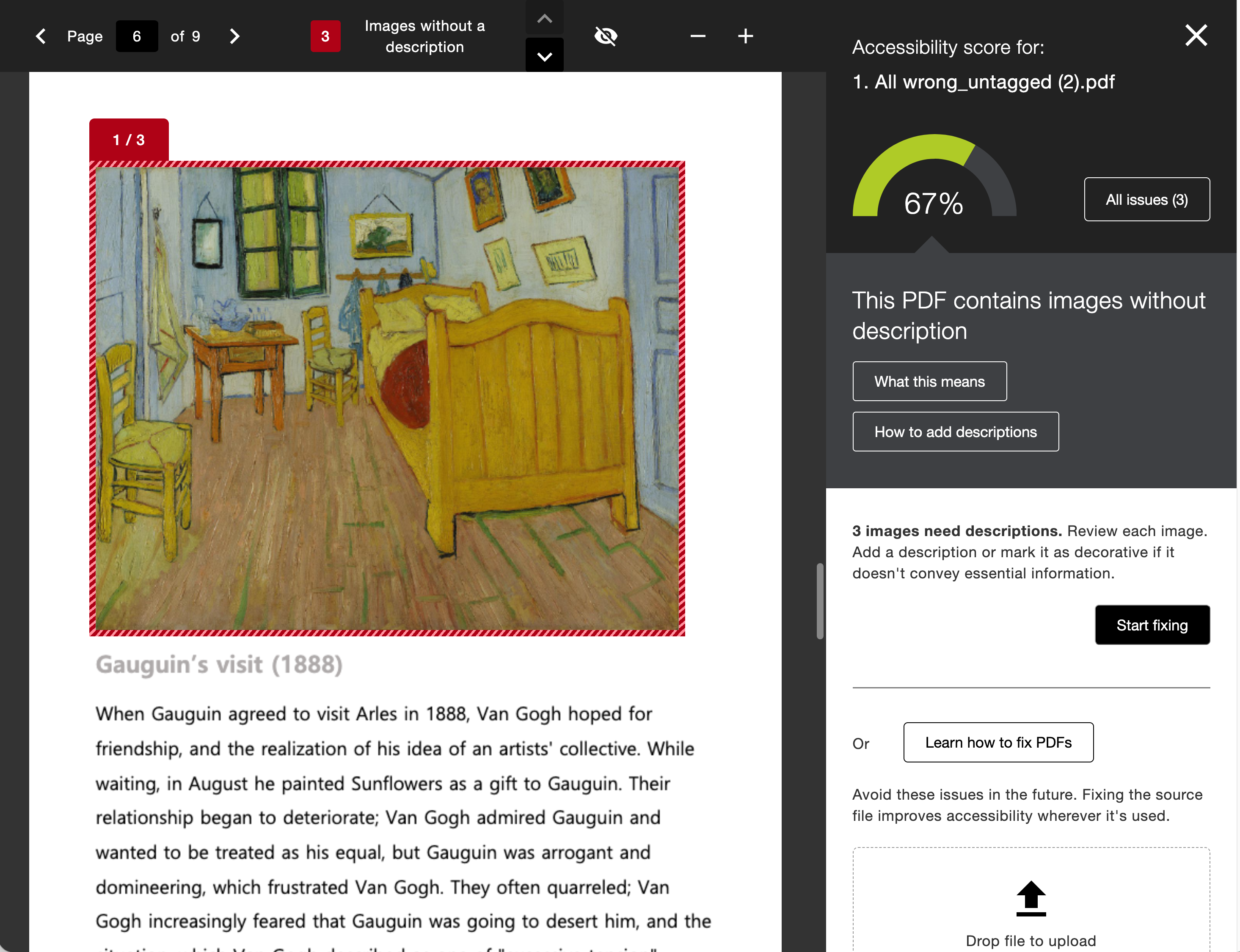
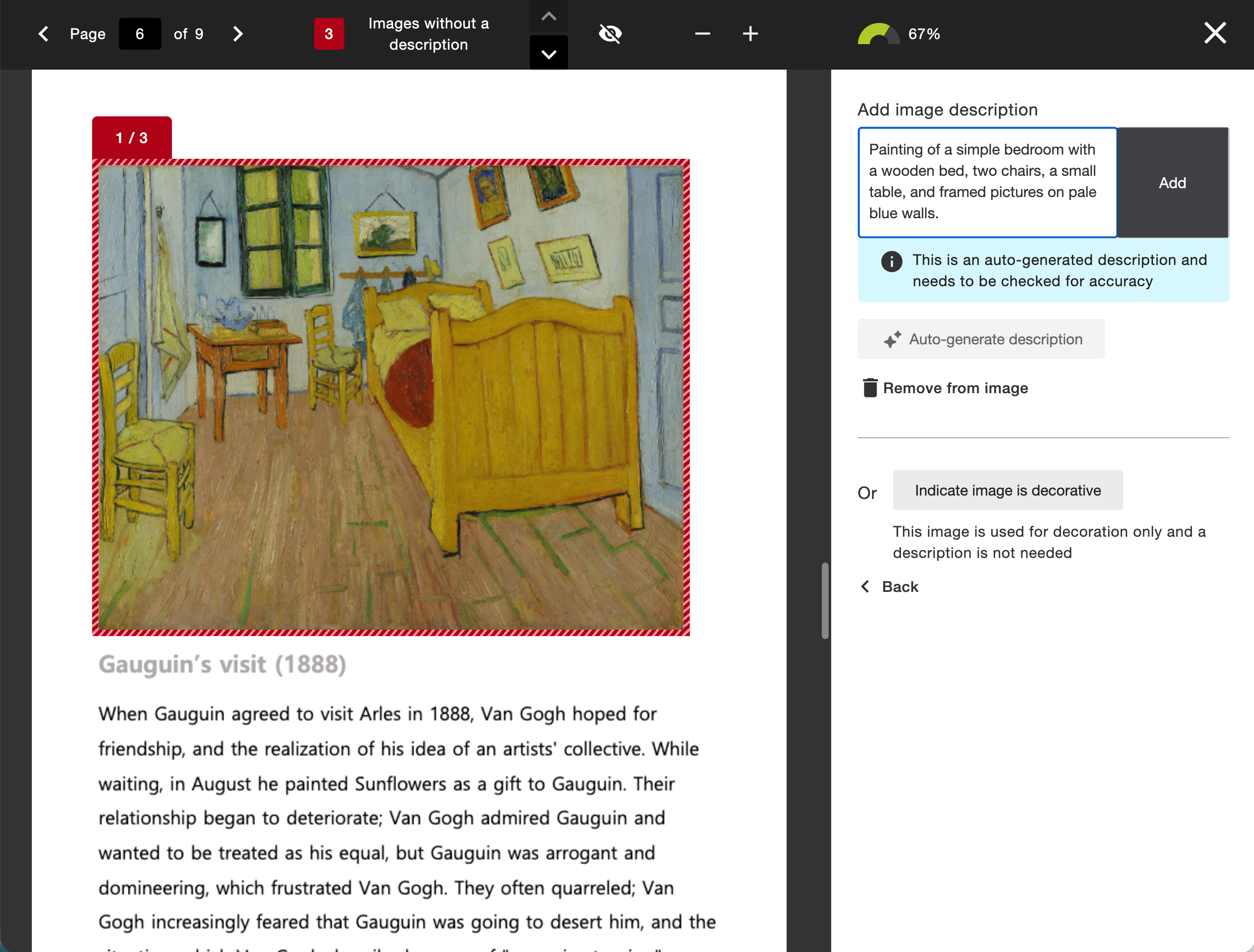
We’ve also added Ally’s AI Alt Text Assistant to this workflow as an option to further empower instructors that are looking for more starting points. If your administrator has turned on the AI Alt Text Assistant option, instructors can also generate suggested alternative descriptions for images embedded in the PDF.
Just like images embedded in WYSIWYG content, the AI Alt Text Assistant also considers the context of the surrounding content in the PDF as part of the initial prompt to power even more detailed descriptions.
Notera
The AI Alt Text Assistant must be turned on by the administrator to use the suggestion feature in this workflow. This feature is off by default. As a reminder, alternative descriptions are not applied automatically. Each suggestion requires the instructor’s review and approval.
Administrators
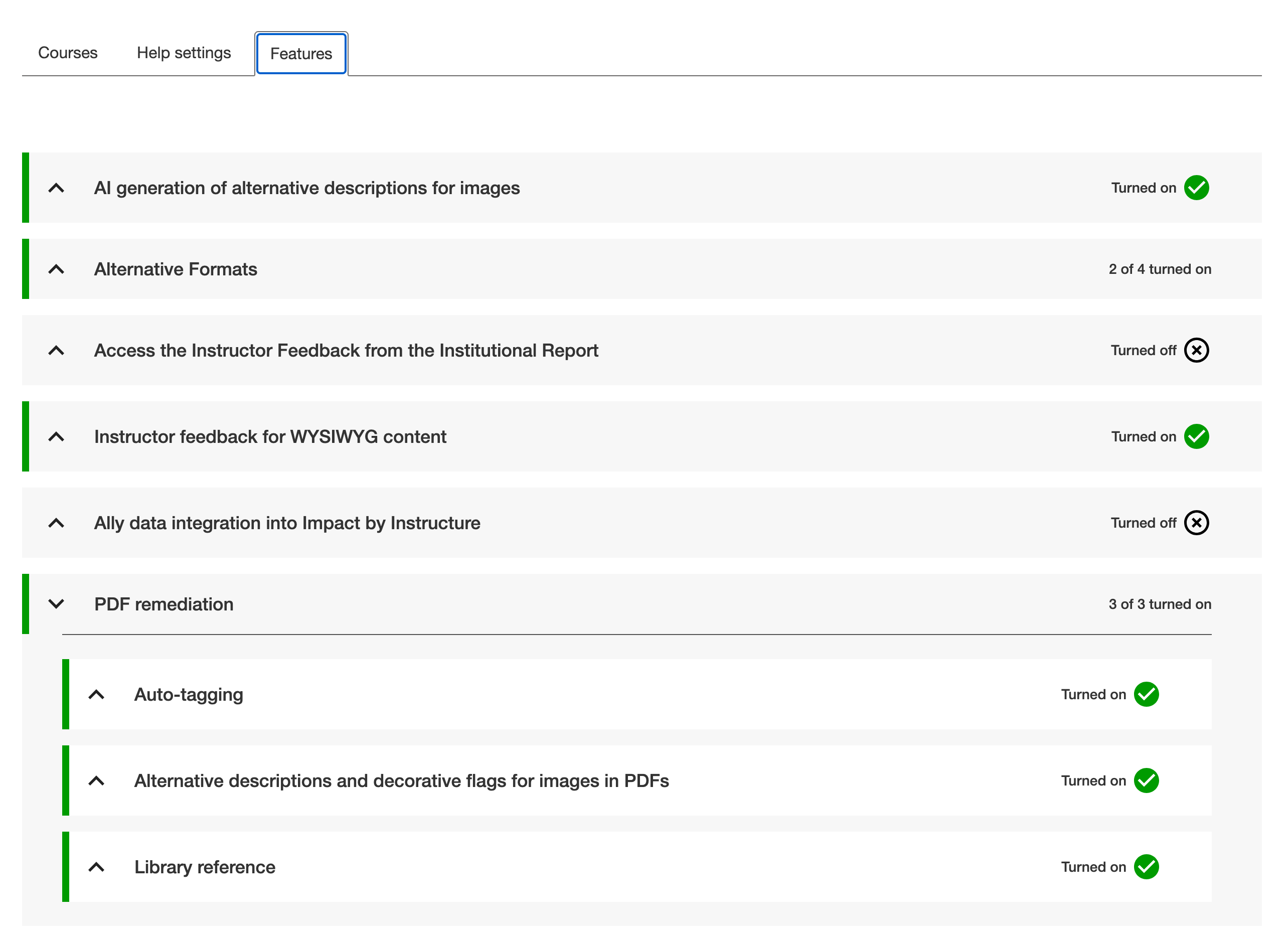
Ally administrators can control each component of this feature at any time from the Ally Configuration settings. This feature takes advantage of two feature flag configuration options in the Ally Configuration tool.
Administrators have the option to turn off the entire alternative text workflow for instructors. When PDF Alt Text is turned on, you can also decide to only provide standard manual alternative text or add the AI powered suggestions of the AI Alt Text Assistant.
The AI Alt Text Assistant feature flag acts as a global setting across content types, so if you already have this turned on for WYSIWYG content, you do not have to take any additional action.
AI Transparency Note, Terms of Use, and Principles
We recommend reviewing the documents linked below (including the updated Transparency Note) as you consider using Ally’s AI Alt Text Assistant in PDF content or rich content. Refer to AI Alt Text Assistant for more information.
Refreshed Configuration Tool Options
The Configuration Tool Features tab has been reorganized by feature type to allow for easy locating and setting based on institutional preferences.
Administrators still have full control over what features are available to instructors when using a more streamlined and organized interface.
Blackboard LMS New Content Editor (Early Access) Improvements
As part of this release, we’ve also included quite a few improvements to the Ally integration within the New Content Editor for Blackboard LMS Documents, including:
Improved how Ally interacts with the Hierarchy within the content block (including Title, Header, Sub header, Paragraph)
Improved how Ally handles images with alternative text and/or those set as decorative within the content block
Fixed an issue that was incorrectly impacting the size of a individual image within a content block
Fixed an issue that prevented consistently identifying broken links in a content block
Fixed an issue that caused broken links removed via the Ally Instructor Feedback Quick Fix to not be accurately reflected in the resulting content in the content block
Fixed an issue in the Instructor Feedback that caused the Quick Fix field to display the previously fixed broken link instead of the current highlighted broken link
Fixed an issue in the Instructor Feedback that sometimes resulted in the “Apply Fix” process getting stuck when fixing a broken link
Fixed an issue in the Instructor Feedback that sometimes caused a previously removed broken link to reappear if it was removed directly in the content editor itself
Improved how text with contrast issues is highlighted and fixed within the Instructor Feedback
Fixed an issue in the Instructor Feedback that caused all content to be set as a header when fixing/changing the heading style for an item in the Quick Fix
Fixed an issue that caused some images without description to not be recognized or listed in the Course Accessibility Report.
Fixed an issue that caused Ally indicators to be visible while in edit mode
Fixed an issue that prevented contrast and broken link issues from being highlighted correctly when found inside a table
Fixed an issue that caused certain images to disappear after fixing an image specific issue from within the Course Accessibility Report
Fixed an issue that prevented the last table in a document from being fixed from within the Course Accessibility Report when multiple tables are present
Fixed an issue that caused parts of the highlighted text in the Instructor Feedback to be hidden instead of remaining visible
Notera
Please note the above improvements are specific to the new Content Editor in Blackboard LMS only.
Additional Bug Fixes and Improvements
Fixed an accessibility issue that caused contrast issues on the focus indicator within the Instructor Feedback
Fixed an accessibility issue within the PDF Auto Tagging workflow that prevented the focus indicator from moving to the Learn More button as expected
Fixed an accessibility issue when navigating the Institutional Report with a keyboard that caused the tooltip under the Total Courses pie chart to disappear unexpectedly.
Implemented an accessibility improvement in the Instructor Course report to ensure that each Start button is easily distinguishable when using a screen reader
Fixed an accessibility issue in the Instructor Feedback to ensure the zoom in/ zoom out actions are announced to a screen reader when activated
Fixed an accessibility issue in the Instructor Feedback to ensure the view/hide toggle actions are announced to a screen reader when unselected
Fixed an accessibility issue in the Instructor Feedback PDF title Quick Fix to ensure clearing the input when using the clear button is announced to a screen reader
Fixed an accessibility issue in the Instructor Course Report content list to ensure a proper focus indicator is applied while navigating with a keyboard
Fixed an accessibility issue in the Instructor Course Report to ensure the overall content count is announced to a screen reader
Fixed an issue for D2L Brightspace integrations that caused some departments to disappear from the Directory tab within the Institutional Report when using custom org units
Fixed an issue for Canvas and D2L Brightspace integrations that resulted in missing token integration errors because of an invalid cookie being cached and subsequently rejected by the LMS and requiring reauthorization
Fixed an issue in Moodle that sometimes caused the Alternative Formats download window to display the wrong text for the filename when files were embedded in rich content
Ally 2.19.8 Release to production: September 28, 2026
Bug Fixes and Improvements
Fixed a bug in Blackboard integrations that caused some Documents not to be able to generate audio alternative formats.
Fixed a bug in Canvas integrations that caused Ally not to be able to correctly recognize images within Classic Quizzes which resulted in images with alt text being flagged as missing in the Course Report.
Implemented an accessibility improvement to the focus indicator applied to the Enable Future courses button within the Ally Configuration tool.
Fixed a bug in Canvas integrations that caused an error when attempting to fix any HTML issue from the Course Report.
Fixed an accessibility issue that caused insufficient contrast on the focus indicators for the enable and disable options within the Ally Configuration tool.
Fixed a bug with the Table Header Quick Fix that caused the selected option to disappear when Fix all occurrences was selected.
Fixed an accessibility issue within the Table Header Quick Fix to ensure that the Apply a table header selector is appropriately associated with its visible label.
Implemented an accessibility improvement to the Ally Terms of Use to ensure the Terms of Use text meets minimum color contrast requirements.
Fixed an issue in Blackboard where instructors using the Course Accessibility Report to fix issues in Documents were unexpectedly able to remove content incorrectly identified as links when embedding LTI Video links including Yuja, Echo360, Panopto, Kaltura and other third-party videos.
Fixed an issue in Canvas integration where custom CSS was conflicting with Ally CSS and prevented it from loading correctly causing an error when viewing the Instructor Feedback and/or Course Report Preview.
Ally 2.19.7 Release to production: September 17, 2026
Bug Fixes and Improvements
Updated the AI Alt Text Assistant to take advantage of several additional improvements in the underlying AWS Bedrock AI models. For more information, visit AI Alt Text Transparency Note.
Fixed a bug in the Institutional Report Directory Tab that sometimes caused the number of courses and items to show as ‘0’ until you refresh the report.
Fixed a bug in the Institutional Report that caused the label for the last month to not be visible.
Fixed a bug in Moodle integrations that sometimes prevented the instructor from updating an image description in the Ally Instructor Feedback.
Fixed a bug that caused a display issue in the Course Accessibility Report when file names exceeded a certain length.
Implemented several improvements to Ally’s underlying processing logic when handling large volumes of events.
Ally 2.19.6 Release to production: September 7, 2026
Bug Fixes and Improvements
Fixed an issue in Blackboard integrations where links without discernible text within the Title of a Document could not be fixed with the quick fix when using the Course Accessibility Report.
Fixed an issue in Blackboard integrations where alt text and decorative image values entered through the Ally Instructor Feedback or the Instructor Feedback via the Course Accessibility Report did not save back to the Image Block metadata as expected.
Fixed an issue in Canvas integrations that caused the Alternative Formats window to not scale correctly with the browser screen size when using the file preview.
Fixed an issue in Canvas integrations that created a role conflict when a user had both student and instructor permissions across multiple courses resulting in inconsistent Course Accessibility Report launch behavior.
Implemented improvements to Ally’s backend course sync processes when generating monthly reports.
Ally 2.19.5 Release to production: August 27, 2026
Bug Fixes and Improvements
Fixed an issue in the new Usage Report that prevented the department ID from filtering both the UI and the export when drilling into the Directory tab.
Fixed an issue in Blackboard integrations that prevented alternative text and decorative image settings marked in Ally from saving back to Blackboard Tests when using either the Instructor Feedback or Course Accessibility Report Instructor Feedback.
Fixed an issue in Blackboard integrations that prevented instructors from overwriting existing alternative text on an image when using the Course Accessibility Report.
Fixed an issue within Ally’s alternative format processing that sometimes stripped the first word after each bullet point when creating the HTML alternative formats from Word documents containing bulleted lists.
Fixed an issue in the Moodle 5 plugins that prevented Ally from flagging images lacking alternative text in the rich content if the image description was only entered as spaces.
Fixed an issue that caused Ally to incorrectly flag some Word documents with headings issues despite headings being present.
Fixed a minor issue within the Ally Instructor Feedback error messaging that shifted the close button for the Oops error modal to the bottom of the screen.
Implemented performance improvements for the D2L Brightspace course loading process to avoid timeouts while processing large volumes of courses.
Ally 2.19.4 Release to production: August 17, 2026
Notera
Reporting Bearer Token Reset: The reset of Ally Reporting API tokens was completed successfully on August 14th. Going forward, administrators should create a new token in the institutional report to restore connection in any external reporting tools.
Bug Fixes and Improvements
Fixed an issue in Blackboard Tests that caused the Ally score indicator to disappear from an image embedded within the text block when editing image alt text.
Fixed an issue with Canvas Course Export/Import and Copies where the associated Ally course copy processes (that carry over data such as alternative text, decorative images and library references) were failing in certain scenarios where a course file was deleted and replaced during the Canvas copy/import process.
Fixed an issue in the New Files Experience in Canvas that caused the Ally score indicators to disappear completely from the screen when scaled down to a small enough screen size.
Fixed an issue in Canvas File Preview within the New Files Experience that sometimes caused the Alternative Formats Icon to sporadically appear and disappear.
Fixed an issue in Canvas New Files Experience that caused the Alternative Formats modal to remove the Download Original File icon when scaled down to a small enough screen size.
Fixed an issue in Canvas that caused a delay in showing the Alternative Format icon when navigating from file to file.
Fixed an issue in Canvas that caused RTF files to be mistakenly recognized as Word documents and included in the Course Report and course score despite not being able to be opened or previewed.
Fixed an issue that caused Ally to report certain PPTX files as missing language when the language was set correctly in the document.
Fixed an issue with Ally’s broken link checking in the LMS that caused some valid links to be seen as broken depending on how those links were created in the WYSIWYG content.
Improved the accessibility and color contrast of the Ally Alternative Format indicator when using High Contrast Modes.
Improved Ally’s language validation checks on PDF documents to help minimize certain scenarios where the selected language in the PDF Quick Fix could not be saved.
Implemented performance improvements in Ally when interacting with the Moodle ally_filter plugin.
Ally 2.19.3 – Produktionslansering: 7 augusti 2026
Moodle 5.2-plugin
Som en del av Allys fortsatta stöd för Moodle finns nu Allys tillägg för Moodle 5.2 tillgängligt. Mer information om Allys stöd för Moodle finns i dokumentationen om hur du konfigurerar Ally i Moodle.
Notera
Ally skapar grenar för varje Moodle-version som stöds som en del av vår strategi för tillägg med öppen källkod, för att möjliggöra målinriktad utveckling och felkorrigering. De senaste versionerna av tilläggen finns i motsvarande STABLE-grenar i vårt arkiv. Administratörer rekommenderas alltid att använda de stabila grenarna för att säkerställa att inga nya oavsiktliga ändringar införs när tillägg uppdateras.
Bugglösningar och förbättringar
Ett fel i Moodle har åtgärdats som gjorde att visst HTML-innehåll inte var tillgängligt när alternativet Uteslut oanvända filer i Ally för Moodle var valt.
Ally 2.19.2 – Produktionslansering: 30 juli 2026
Bugglösningar och förbättringar
Vi har förbättrat funktionen ”Instruktörsfeedback” för Blackboard-lärare så att förhandsgranskningen av innehållet visar HTML-innehållsblock som synligt innehåll, i stället för att bara visa ”UNSAFE_HTML” när kursens tillgänglighetsrapport används.
Ett problem har åtgärdats för Blackboard-lärare där bilder som infogats utan beskrivning i en tabell i Dokument inte markerades korrekt av Ally.
Ett problem i Allys anpassade hjälparbetsflöden har åtgärdats, vilket tidigare förhindrade att infogade webbadresser öppnades när man klickade på dem.
Ett problem i Blackboard har åtgärdats som hindrade läraren från att använda en ny teckenfärg när snabbkorrigeringen för markerade kontrastproblem användes i Dokument.
Ett problem i arbetsflödet för snabbkorrigeringen av OCR-PDF-filer har åtgärdats. Problemet ledde till ett ”oops”-fel om läraren först tillämpade OCR-korrigeringen och sedan avmarkerade alternativet ”Hämta i originalformat”.
Ett problem i den nya rapporten om Ally-användning har åtgärdats. Problemet innebar att nedladdningar oväntat avbröts på grund av tidsgräns när man valde ett längre tidsintervall. Observera att administratörer bör rensa webbläsarens cache nu när den här korrigeringen har släppts innan de försöker ladda ned filen på nytt.
Ally 2.19.1 – Produktionslansering: 22 juli 2026
Bugglösningar och förbättringar
Ett problem har åtgärdats som gjorde att skärmdumpen i den nya funktionsflaggan för automatisk taggning av PDF-filer i konfigurationsinställningarna visades förvrängd.
Vi har åtgärdat ett problem med vår cache för användningsdata som gjorde att vissa administratörer inte kunde se äldre historiska data i rapporten i det nya användargränssnittet när de filtrerade efter längre tidsperioder.
Ett problem i Blackboard har åtgärdats. När bilder infogades via en URL togs tidigare alternativtexten bort från alla identiska bilder i stället för endast den markerade bilden.
Ett problem i Blackboard har åtgärdats som hindrade att alternativtext sparades korrekt när den angavs i ”Instruktörens feedback” för bilder som infogats via en URL.
Vi har uppdaterat Canvas-värdnamnet i Ally:s LTI-konfigurationsuppgifter för att säkerställa att vi hänvisar till sso.canvaslms.com på alla relevanta ställen.
Vi har infört en längre tidsgräns för Ally Reporting API för att undvika tidsgränsöverskridanden vid större klientdatauppsättningar, vilket tidigare orsakade ett fel i rapporteringsverktyget.
Ally 2.19 – Produktionslansering: 13 juli 2026
Snabbkorrigering för PDF-taggning är nu tillgänglig för lärare
Allt eftersom vi fortsätter att utöka funktionerna för PDF-anpassning i Ally Instructor Feedback kan lärare nu automatiskt tagga omärkta PDF-filer för att lägga till taggar i dokumentet och förbättra den övergripande tillgängligheten för studenterna. Denna funktion är nu tillgänglig för alla institutioner efter det inledande tidiga användarprogrammet.
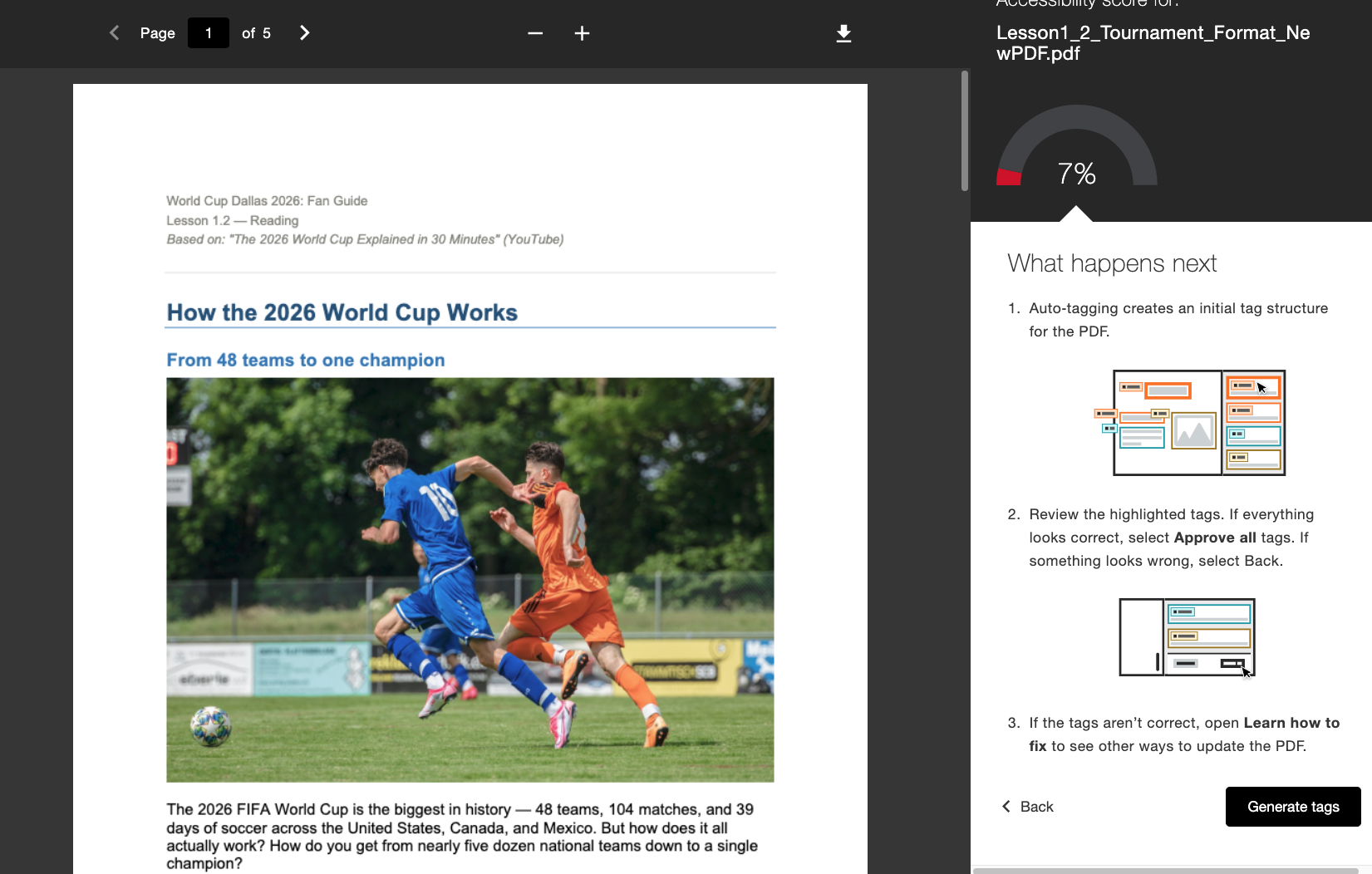
När administratören har aktiverat funktionen kommer lärarna att se ett nytt arbetsflöde för att skapa taggar, direkt inbäddat i lärarfeedbacken. Lärarna behåller kontrollen efter att ha skapat taggar och kan granska den nya taggstrukturen genom att bläddra igenom taggträdet till höger på skärmen innan de beslutar sig för att godkänna de tillämpade taggarna. Lärare kan använda framstegsindikatorn längst ner för att se hur många taggar de har godkänt innan de väljer Godkänn alla när de är nöjda.
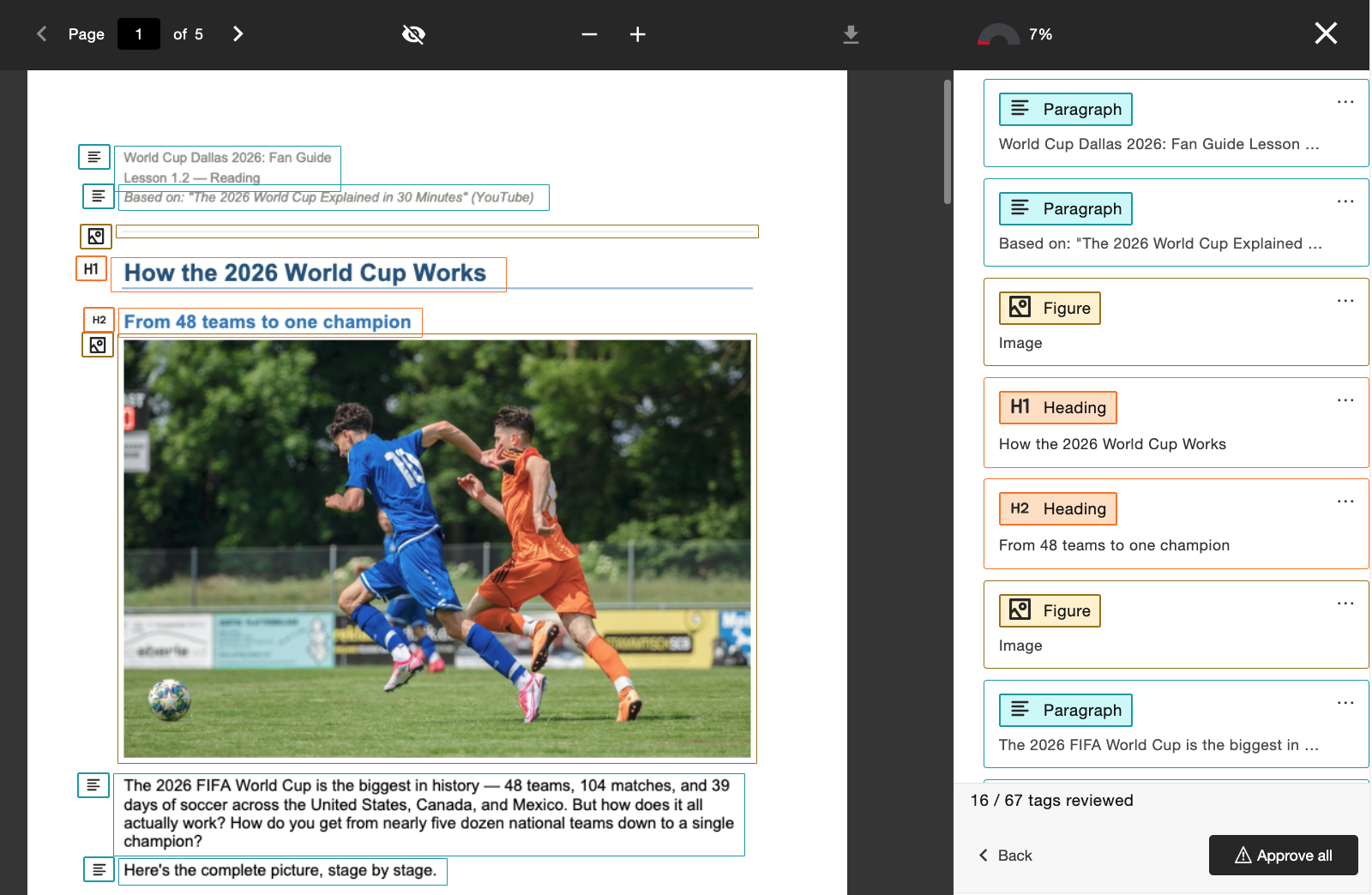
Administratörer kan styra åtkomsten till den här funktionen via Ally Configuration Tool genom att aktivera eller inaktivera den beroende på institutionens inställningar.
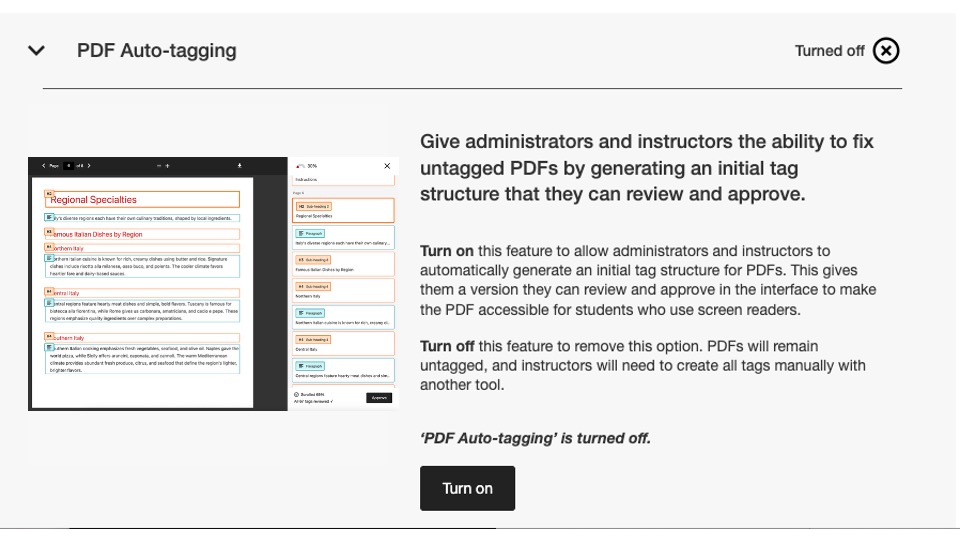
I den här versionen är den här konfigurationsflaggan inaktiverad som standard. Administratörerna måste aktivera funktionen så att lärarna kan börja använda den.
För mer information om den nya användningsrapporten, se avsnittet Alternativ för PDF-korrigering på hjälpsidan.
Ny användningsrapport är nu tillgänglig
Som ett led i vårt fortsatta arbete med att göra Ally-data lättillgängliga för administratörer är vi glada att kunna lansera nästa version av Ally-användningsrapporten, som är direkt integrerad i användargränssnittet.
Användningsrapporten visar detaljerad information om hur dina studenter och lärare använder Ally, bland annat hur många nedladdningar av alternativa format de gör och hur många korrigeringar som lärarna gör under en viss tidsperiod.
Denna nya och förbättrade rapport finns nu tillgänglig direkt i institutionsrapporten, utan att du behöver ladda ner en Excel-fil, vilket gör det enklare och snabbare att få en överblick över din institutions användning av Ally. Detta ersätter fliken Användning i din institutionsrapport och kräver inga ytterligare åtgärder för att aktiveras.
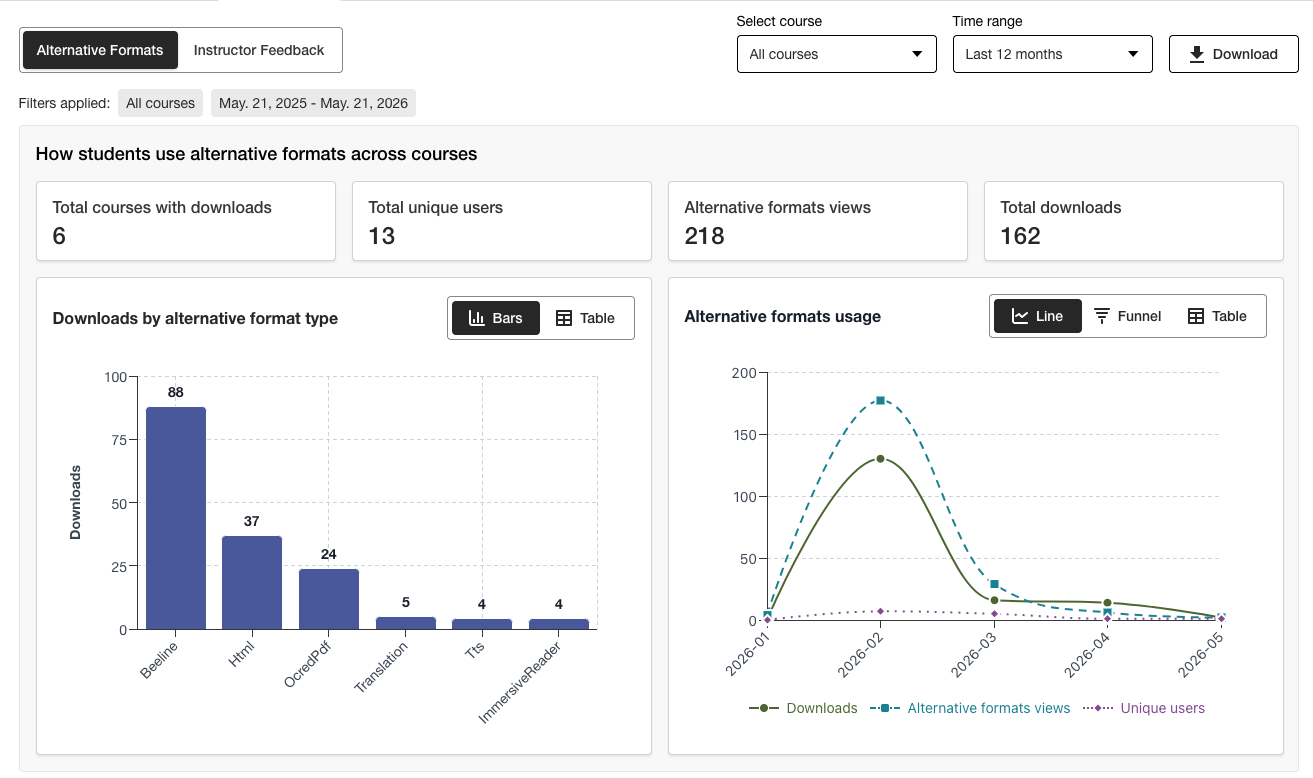
Administratörer kan få en snabb överblick över viktig information och använda de nya filtreringsalternativen och detaljerade diagrammen för att enkelt få en djupare inblick i data.
Excel-versionen finns fortfarande tillgänglig för nedladdning via nedladdningsfunktionen för användare som föredrar att få tillgång till data i ett annat format.
Mer information om den nya användningsrapporten finns i följande avsnitt på hjälpsidan:
Felrättningar
Ett fel i Canvas-integrationerna har åtgärdats. Felet innebar att dokumentets publiceringsstatus i kursen ändrades felaktigt när dokumentets titel uppdaterades via Ally.
Ally 2.18.10 – Produktionslansering: 2 juli 2026
Bugglösningar och förbättringar
Ett fel i funktionen ”Instruktörens feedback” har åtgärdats. Felet innebar att bildbeskrivningar som tidigare hade tilldelats felaktigt överfördes när en befintlig bild ersattes med en ny bild för att åtgärda ett kontrastproblem.
Ett fel i AI Alt Text Assistant har åtgärdats. Felet ledde till att felmeddelandet ”Hoppsan” visades om läraren manuellt lade till en ny beskrivning efter att ha klickat på ”Skapa beskrivning automatiskt”.
Ett fel i ”Alternativa format” har åtgärdats som gjorde att MP3-ljudformatet felaktigt ändrade språket i HTML-innehållet.
Ett fel i PDF-funktionen ”Quick Fix” har åtgärdats. Felet gjorde att lärare i vissa fall kunde ange fel språk trots Allys språkvalidering.
Ett fel i Blackboard-integrationerna har åtgärdats. Felet innebar att bildtexten i bildblocken togs bort när läraren åtgärdade problemet med saknade bildbeskrivningar enligt kursens tillgänglighetsrapport.
Genomfört flera förbättringar av den underliggande OCR-tekniken i Ally för att höja kvaliteten, noggrannheten och konverteringsgraden vid bearbetning av skannade PDF-filer till alternativa format och vid användning av PDF-snabbkorrigeringar.
Ally 2.18.9 – Produktionslansering: 22 juni 2026
Bugglösningar och förbättringar
Ett fel i Moodle har åtgärdats där bilder som var inbäddade på en sida i vissa fall inte visades i förhandsgranskningen av lärarens feedback när man öppnade den från rapporten om tillgänglighet i kursen.
Ett fel i Canvas Pages har åtgärdats som hindrade att korrigeringar av bildbeskrivningar tillämpades efter att en bild med låg kontrast hade ersatts med alternativet ”Ladda upp fil”.
Ett tillgänglighetsproblem i Moodle har åtgärdats så att Ally-indikatorikoner nu kan fokuseras under navigering.
Ally 2.18.8 – Produktionslansering: 11 juni 2026
Bugglösningar och förbättringar
Ett fel i Moodle har åtgärdats som gjorde att användarna felaktigt såg två verktygstipsmeddelanden när de använde Ally-indikatorer.
Formuleringarna i beskrivningarna och på knapparna i Ally Configuration Tool har förbättrats så att de nu visas som Aktivera och Inaktivera.
Ally 2.18.7 Produktionslansering: 1 juni 2026
Felkorrigeringar och förbättringar
Ett fel i Moodle har åtgärdats som gjorde att indikatorn för tillgänglighetsbetyg av misstag doldes när TinyMCE-redigeraren var utfälld på sidan.
Ett fel i Blackboard har åtgärdats som gjorde att rubriknivåerna i (Ultra) Documents inte omvandlades korrekt i de resulterande alternativa HTML-formaten.
Ett fel i lärarfeedbacken har åtgärdats, där meddelandet "Problem kvar att lösa" felaktigt visades efter att ett innehållsstycke hade nått 100 %.
Ett fel i Blackboard har åtgärdats som gjorde att bilder som markerats som dekorativa i dokumentet visades som en länk i förhandsgranskningen av lärarfeedback i kursens tillgänglighetsrapport.
Ett fel i funktionen "Lärarens Feedback" har åtgärdats. Felet innebar att länken felaktigt visades två gånger när vi försökte åtgärda den trasiga länken.
Ally 2.18.6 Release to production: May 26, 2026
Bug Fixes and Improvements
Implemented several processing improvements to provide better handling of Canvas LMS Rate limits to minimize the number of times Ally hits these limits over the course of regular content processing.
Ally 2.18.5 Release till produktion: 7 maj 2026
Bugglösningar och förbättringar
Åtgärdade ett tillgänglighetsproblem i Canvas där alternativet Alternativa format i rullgardinsmenyn inte reagerade korrekt på inmatningar från tangentbordsnavigering.
Åtgärdat en mindre bugg i Canvas-integreringar som gjorde att rullgardinsmenyn inte stängdes efter att man klickat på alternativet Alternativa format.
Åtgärdat en bugg i arbetsflödet för snabbkorrigeringen Instructor Feedback PDF som gjorde att knappen ”Försök igen” navigerade till fel startpunkt i feedbackpanelen.
Förbättrad hantering av UNSAFE_HTML-filer i Blackboard-integrationer för att upptäcka och helt hoppa över poängsättning av dessa filer och undvika att behöva ta bort dem från rapporterna som ett andra steg.
Åtgärdade en bugg för Blackboard-integreringar som gjorde att filbilagor felaktigt konverterades till länkar när man åtgärdade problem i dokument från kurstillgänglighetsrapporten.
Genomförde flera uppföljningsförbättringar och optimeringar av Allys köer för realtidsbearbetning i USA-regionen.
Ally 2.18.4 Release till produktion: 30 april 2026
Bugglösningar och förbättringar
Korrigerade en bugg i Blackboard Documents som gjorde att Ally felaktigt identifierade rubriker på fel nivå och hindrade lärare från att få 100 % även efter att alla problem åtgärdats.
Implementerade förbättringar för att upptäcka UNSAFE_HTML-filer i Blackboard så att de lättare kan tas bort från Allys poängsättningsprocesser.
Åtgärdade ett tillgänglighetsproblem som gjorde att knappen för Ladda ned originalfil inte visades på mindre skärmar.
Åtgärdade ett problem med Allys kontroll av Vimeo-undertexter som orsakade fel när en Vimeo-video upptäcktes i rikt innehåll om Vimeo-integreringen inte var konfigurerad i Ally-konfigurationen.
Ally 2.18.3 Release till produktion: 20 april 2026
Förbättringar i dokumenthantering
Som en del av vårt pågående åtagande att kontinuerligt förbättra kvaliteten och troheten hos innehållet i Allys lärarfeedback och bearbetning av alternativa format, ger version 2.18.3 kritiska förbättringar och förbättringar av den underliggande dokumentkonverteringsprocessen som driver dessa viktiga användarfunktioner.
Allys logik för dokumentbearbetning har uppgraderats för att ge smartare, snabbare och mer högkvalitativ konvertering vid hantering av filer som laddas upp i kursen. Detta innebär flera förbättringar för instruktörer och studenter, bland annat:
Minskade fall av falskt positiva kontrastproblem som visas i filförhandsvisningarna för Feedback från lärare
Förbättrad hantering av former i PowerPoint-presentationer, inklusive konvertering av t.ex. pilar i dokumentet
Förbättrad igenkänning av alternativ text som används i formulär efter konvertering till PDF
Förbättrad annonsering av dekorativa bilder i alternativa format, inklusive det alternativa ljudformatet.
Förbättrad bildigenkänning och tillämpning av Figure-taggar vid konvertering till PDF
Utöver dessa förbättringar för användaren innehåller den här uppdateringen även optimering av Allys underliggande infrastruktur för att förbättra den allmänna prestandan och hastigheten för bearbetning av innehåll när det tas emot från LMS.
Notera
Våra team kommer att fortsätta analysera och identifiera ytterligare möjliga förbättringar eller specialfall som kan behöva åtgärdas i framtiden.
Uppgraderad AI-alttextassistent
AI Alt Text Assistant har uppdaterats för att dra nytta av flera ytterligare förbättringar i de underliggande AWS Bedrock AI-modellerna, inklusive minskat antal timeouts vid begäran om föreslagen alt-text och förbättrad hantering för att undvika hallucinationer vid analys av specifika bilder.
Som en påminnelse kan den uppdaterade Transparency Note för AI Alt Text Assistant ses här med ytterligare information om den här funktionen: https://help.anthology.com/ally-lms/en/administrators/ai-alt-text-assistant.html
Bugglösningar och förbättringar
Åtgärdat en bugg i Instructor Feedback som gjorde att felaktig markering tillämpades i förhandsgranskningen när PDF-filen fortfarande inte hade rätt språkinställning efter att ha försökt tillämpa korrigeringen.
Åtgärdade ett fel i Instruktörsåterkopplingen där klick på Försök igen när en PDF fortfarande inte hade rätt språkinställning inte tog instruktören tillbaka till språkvalspanelen.
Åtgärdat en bugg i Canvas som hindrade läraren från att öppna feedback för instruktör på en OCR-behandlad PDF som också hade en fast titel.
Åtgärdade ett tillgänglighetsproblem i panelen Instructor Feedback som felaktigt flyttade fokus mellan element när du använde Tillbaka-knappen.
Åtgärdade ett tillgänglighetsproblem i modalfönstret Alternativa format som gjorde att formatet Ursprunglig fil inte hämtades när du navigerade och valde med ett tangentbord.
Ally 2.18.2 Release till produktion: 9 april 2026
Bugglösningar och förbättringar
Åtgärdade ett problem i Blackboard där Ally-indikatorer inte visades för filbilagor i uppgiftsanvisningar.
Åtgärdade en bugg där man i vissa fall, när man navigerade i panelen Instructor Feedback för WYSIWYG-innehåll, klickade på ikonerna Fet eller Kursiv i redigeraren för avancerat innehåll för att aktivera knappen Autogenerera för AI Alt Text Assistant.
Åtgärdade en bugg som i vissa fall gjorde att dokumentförhandsgranskningen inte uppdaterades när en bild med kontrastproblem ersattes med en helt ny bild via filuppladdningen för feedback från handledare.
Åtgärdade en bugg i Canvas som förhindrade att Ally-indikatorerna visades korrekt i en Canvas Syllabus när Visa de senaste meddelandena på kursens startsida var aktiverat.
Ally 2.18.1 Produktionsrelease: 2 april 2026
Bugglösningar och förbättringar
Uppdaterade Moodle-plugins för Moodle 4.5 och Moodle 5 för att inkludera backporterade buggfixar för att åtgärda mindre buggar.
Åtgärdade ett problem med AI Alt Text Assistant där instruktörer i vissa fall fick ett felmeddelande när de försökte föreslå alternativtext eftersom den primära modellen inte var tillgänglig.
Ally 2.18-versionen släpps i produktion: 26 mars 2026
Ny flagga för biblioteksreferensadministratörsfunktion nu tillgänglig
Som en del av vårt fortsatta arbete med att tillhandahålla mer detaljerade kontrollnivåer för administratörer som vill hantera PDF-saneringsupplevelsen för instruktörer finns en ny funktionsflagga tillgänglig i Ally-konfigurationsalternativen som gör det möjligt att stänga av arbetsflödet för biblioteksreferenser.
Administratörer kan nu stänga av funktionen Biblioteksreferens för att ta bort lärares möjlighet att lägga till biblioteksreferenser i PDF-filer när originalfilen inte är tillgänglig, samtidigt som de arbetar med olika PDF-specifika problem. Detta ytterligare kontrollskikt hjälper till att anpassa funktionen till institutionella preferenser och processer och ger ytterligare flexibilitet när man bestämmer hur man bäst hanterar korrigering av PDF-filer i stor skala.
Bild 1: Flagga för nya funktioner i konfigurationsalternativen för Ally
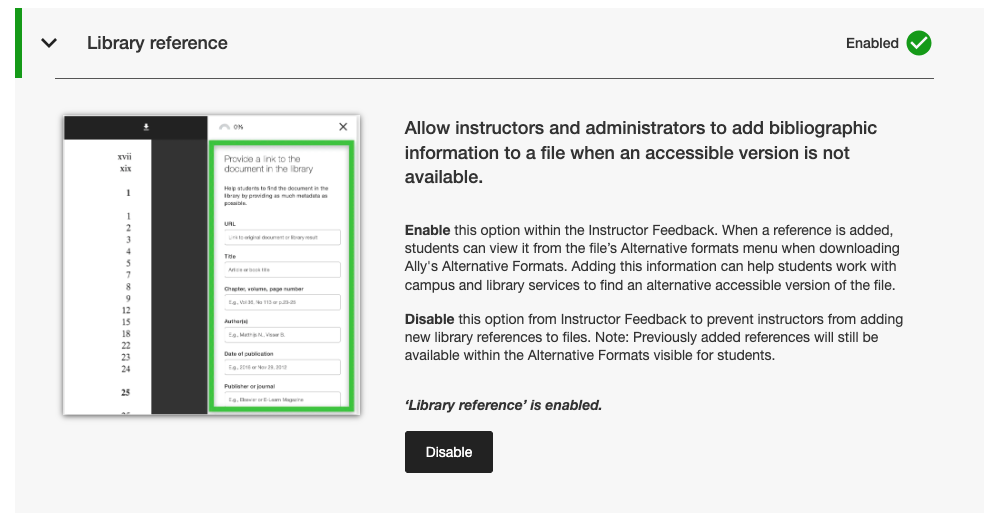
Administratörer kan hitta den här nya funktionsflaggan under fliken Funktioner i verktyget Ally-konfiguration som listas under Biblioteksreferens.
Notera
Biblioteksreferenser förblir aktiverade som standard i den här versionen. Om du stänger av biblioteksreferenser med den här nya funktionsflaggan tas tidigare tillagda biblioteksreferenser inte bort från innehåll, utan det förhindrar bara att nya läggs till framöver.
Bugglösningar och förbättringar
Åtgärdade en bugg i Canvas som gjorde att kolumnen Ally-indikatorer försvann från området Nya filer när fönstret ändrade storlek.
Åtgärdade ett tillgänglighetsproblem i Canvas-integrationer som förhindrade att korrekt fokus tillämpades när man använde ett tangentbord för att navigera i Ally-indikatorerna för tillgänglighetspoäng på Canvas Pages.
Åtgärdat en trasig webblänk i inställningarna för Ally-konfigurationen för användarvillkoren för AI Alt Text Assistant.
Migrerade våra SMTP e-posttjänster för backend-infrastrukturen som hanterar e-postflöden för anpassad hjälp.
Ally 2.17.5 Release till produktion: 12 mars 2026
Blackboard UNSAFE_HTML-filer ingår inte längre i rapporterna.
Som en del av vårt pågående arbete med att göra rapporteringen mer effektiv och tydlig för instruktörer kommer Ally-rapporterna inte längre att betrakta UNSAFE_HTML-filer som en del av kursinnehållet för Blackboard-integrationer.
Bild 1: Kursrapport med UNSAFE_HTML ingår för att visa tidigare beteende.
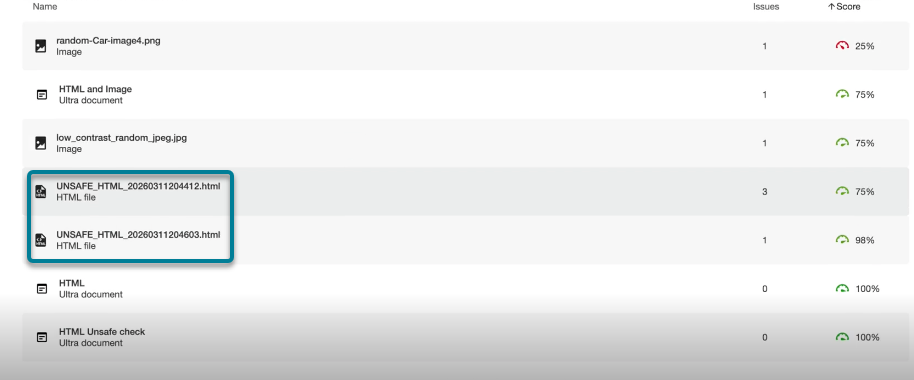
Från och med den här versionen filtreras UNSAFE_HTML-filer som automatiskt skapas i innehållsmappen när du använder HTML-snippets i ett Blackboard-dokument bort från lärosätes- och kursrapporterna. Tidigare visades dessa filer i rapporten, men lärarna kunde inte åtgärda de identifierade problemen med att språk och titel saknades och fick ofta ta till andra lösningar för att ta bort dessa filer från kursen för att få bort dem från rapporterna.
Notera
Denna ändring kommer att ta bort alla nuvarande och tidigare UNSAFE_HTML-filer från beaktande. Beroende på hur ofta dessa innehållsobjekt används i en kurs kan detta leda till en liten ökning eller minskning av kurspoängen baserat på fördelningen av filer, HTML- och WYSIWYG-innehåll.
Som en del av en framtida version kommer vi att försöka undvika att bearbeta dessa filer helt när vi startar en kurs för att förbättra den allmänna prestandan och skanningen.
Bugglösningar och förbättringar
Åtgärdade ett problem i Blackboard-integreringar som orsakade en avvikelse i poängsättningen för bilder när poängen i Instruktörens återkoppling för ett dokument jämfördes med poängen i Kurstillgänglighetsrapporten när bilderna var inställda på Visa endast eller Hämta endast. Kursens tillgänglighetsrapport saknade felaktigt tidigare tillämpad alternativ text och sänkte poängen trots att detta visades som åtgärdat i instruktörens återkoppling. Observera att detta gäller bilder i Ultra-dokument som ingår i kursen och i innehållssamlingen.
Åtgärdade ett problem i PDF Missing Language Quick Fix som gjorde det möjligt att klicka på knappen Använd innan läraren valde ett språk.
Vi har förbättrat utformningen av referenslänkarna i biblioteket i nedladdningsfönstret för alternativa format så att referenslänkarna visas som klickbara länkar och potentiella kontrastproblem undviks.
Ally 2.17.4 Släpp till produktion: 5 mars 2026
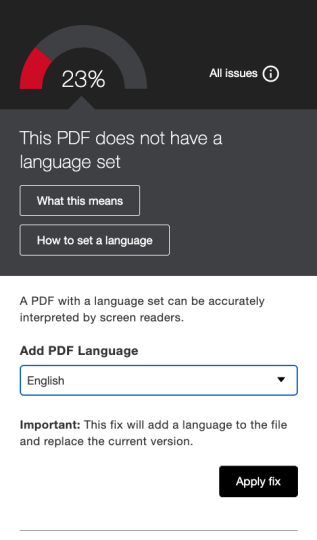
Förval av språk är nu tillgängligt för PDF-snabblösningen för saknade språk
Instruktörer som åtgärdar PDF-filer med saknade språk i snabbkorrigeringen för Ally Instructor Feedback kan nu dra nytta av att språket identifieras och väljs i förväg i rullgardinsmenyn, vilket gör att man slipper skrolla och sparar tid när man åtgärdar detta vanliga problem.
Allys inbyggda språkdetektering analyserar PDF-filen för att fastställa ett lämpligt språk där det är möjligt. Om inget språk upptäcks kan lärarna ändå välja ett manuellt för att tillämpa åtgärden och få Ally att spara ändringen i PDF-filen som förväntat.
Bild 1: Lägg till språk Snabbkorrigering med engelska valt
Moodle 5.1 Plugins är nu tillgängliga
Som en del av Allys löpande stöd för Moodle finns nu Ally-plugin för Moodle 5.1 tillgängligt. Ytterligare information om Allys stöd för Moodle finns i Dokumentation om Allys Moodle-konfiguration.
Notera
Ally skapar en gren för varje Moodle-version som stöds som en del av vår plugin-strategi med öppen källkod för att möjliggöra riktad utveckling och buggfixning. Aktuella versioner av insticksprogrammen finns i motsvarande STABLE-grenar i vårt arkiv. Administratörer rekommenderas alltid att använda de stabila förgreningarna för att säkerställa att inga nya oavsiktliga ändringar införs när plugin-program uppdateras.
Bugglösningar och förbättringar
Åtgärdade ett problem i Blackboard där lärare som använde kursens tillgänglighetsrapport för att åtgärda problem i dokument oväntat kunde ta bort innehåll som felaktigt identifierades som länkar när de bäddade in HTML-block, ljud och/eller Video Studio-videor.
Åtgärdat ett problem för alla LMS-integreringar i institutionsrapporten där rullgardinsmenyn Export var dold på mindre skärmar och/eller webbläsarstorlekar.
Åtgärdade ett problem för alla LMS-integrationer där tillämpning av en snabbkorrigering av en bruten länk för WYSIWYG-innehåll som innehåller flera brutna länkar samtidigt ibland resulterade i en oändlig laddningsindikator.
Implementerade flera frontend-förbättringar i infrastrukturen för förhandsgranskning av återkoppling från PDF Instructor för att stödja våra fortsatta framsteg med PDF-korrigeringsfunktioner.
Implementerade ytterligare bästa praxis-förbättringar för HTTP-förfrågningar om Canvas-integration för att säkerställa användningen av User-Agent Headers.
Ally 2.17.3 Release till produktion: 30 januari 2026
Bugglösningar och förbättringar
Åtgärdade ett problem i Allys Instructor Feedback för skannade PDF-filer där (efter att ha öppnat ”Lär dig att åtgärda PDF-filer”) klick på Tillbaka inte alltid återförde användarna till Instructor Feedback-vyn och ibland krävde ett andra klick.
Ally 2.17.2 Release till produktion: 15 januari 2026
Bugglösningar och förbättringar
Åtgärdade ett problem i lärosätesrapporten där alternativet Ladda ned CSV var dolt vid export från fliken Kurser om sökningen gav en eller färre kurser.
Åtgärdade en bugg i användningsrapporten där knappen Hämta användningsrapport förblev inaktiverad efter att en rapport hade hämtats och ett nytt datumintervall hade valts.
Åtgärdade ett problem med tangentbordstillgänglighet i Canvas Files-området där fokus förlorades när man navigerade till tillgänglighetsresultatet. Fokus förblir nu synligt vid tangentbordsnavigering.