Användning
Note
Denna dokumentation har översatts med hjälp av AI-stödd maskinöversättning. Översättningarna tillhandahålls ”i befintligt skick” utan någon garanti för deras korrekthet. Den engelska versionen av detta innehåll är den officiella och giltiga källan.
Förstå användningsrapporten för Ally
Användningsrapporten visar detaljer om hur dina elever och lärare använder Ally. Ta reda på hur ofta studenterna laddar ned ett alternativt format och hur lärarna åtgärdar tillgänglighetsproblem.
Öppna användningsrapporten
I Ally Rapport om institutionell tillgänglighet väljer du fliken Usage.
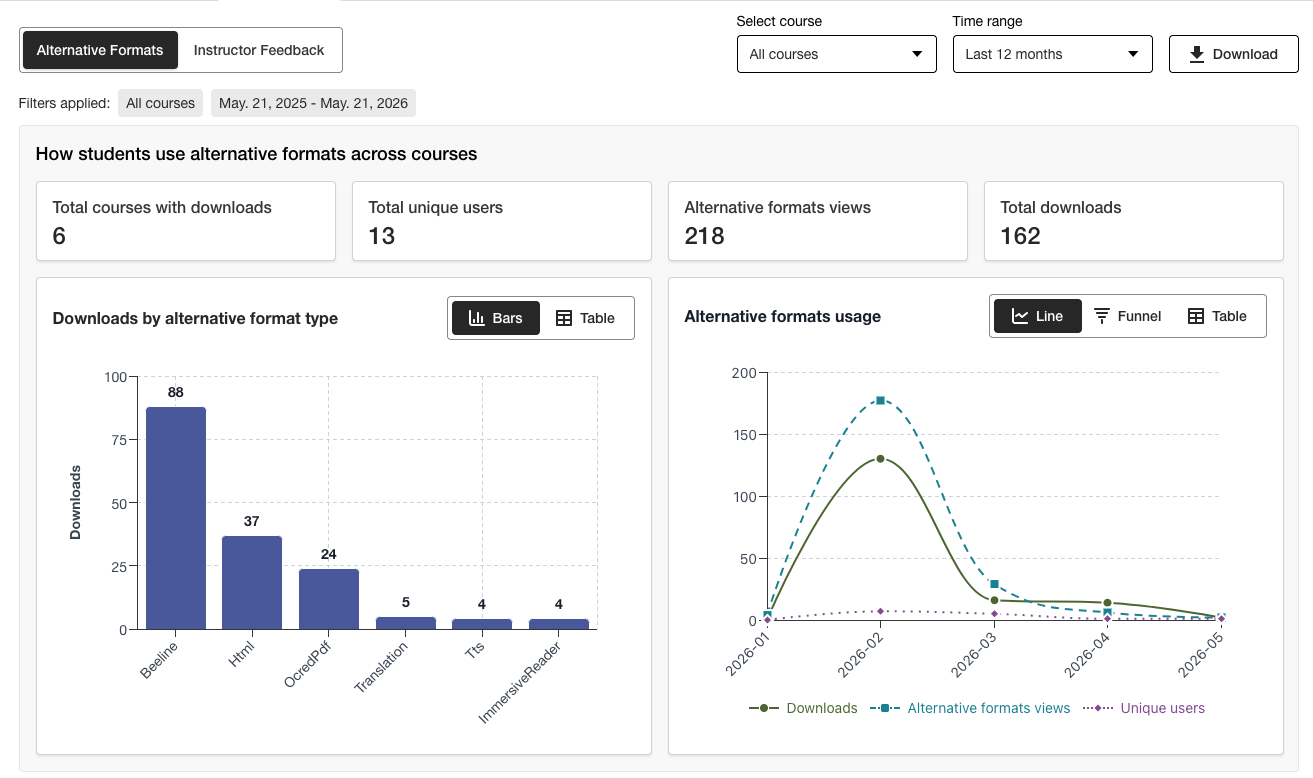
Hämta en användningsrapport
Nedladdningsrapporten är ett kalkylblad som är uppdelat i fem kalkylblad. Varje kalkylblad innehåller uppgifter som är relaterade till det datumintervall du väljer.
Lanserar alternativa format
Veckotidningen i alternativt format
Lansering av lärarfeedback
Veckovis feedback från läraren
Data
I Ally Rapport om institutionell tillgänglighet väljer du fliken Usage.
Välj ett datumintervall för rapporten.
Välj knappen Ladda ned användningsrapport.
Notera
Det kan hända att du inte ser några data när du öppnar rapporten för första gången. Den nedladdade filen kan vara skyddad. Aktivera redigering för att se tilldelningarna.