2026 Sürüm Notları
Note
Bu belge, yapay zeka destekli makine çevirisi kullanılarak çevrilmiştir. Çeviriler, doğruluğu konusunda herhangi bir garanti olmaksızın “olduğu gibi” sunulmaktadır. Bu içeriğin İngilizce sürümü resmi ve geçerli kaynaktır.
Ally 2.19.8 Release to production: September 28, 2026
Bug Fixes and Improvements
Fixed a bug in Blackboard integrations that caused some Documents not to be able to generate audio alternative formats.
Fixed a bug in Canvas integrations that caused Ally not to be able to correctly recognize images within Classic Quizzes which resulted in images with alt text being flagged as missing in the Course Report.
Implemented an accessibility improvement to the focus indicator applied to the Enable Future courses button within the Ally Configuration tool.
Fixed a bug in Canvas integrations that caused an error when attempting to fix any HTML issue from the Course Report.
Fixed an accessibility issue that caused insufficient contrast on the focus indicators for the enable and disable options within the Ally Configuration tool.
Fixed a bug with the Table Header Quick Fix that caused the selected option to disappear when Fix all occurrences was selected.
Fixed an accessibility issue within the Table Header Quick Fix to ensure that the Apply a table header selector is appropriately associated with its visible label.
Implemented an accessibility improvement to the Ally Terms of Use to ensure the Terms of Use text meets minimum color contrast requirements.
Fixed an issue in Blackboard where instructors using the Course Accessibility Report to fix issues in Documents were unexpectedly able to remove content incorrectly identified as links when embedding LTI Video links including Yuja, Echo360, Panopto, Kaltura and other third-party videos.
Fixed an issue in Canvas integration where custom CSS was conflicting with Ally CSS and prevented it from loading correctly causing an error when viewing the Instructor Feedback and/or Course Report Preview.
Ally 2.19.7 Release to production: September 17, 2026
Bug Fixes and Improvements
Updated the AI Alt Text Assistant to take advantage of several additional improvements in the underlying AWS Bedrock AI models. For more information, visit AI Alt Text Transparency Note.
Fixed a bug in the Institutional Report Directory Tab that sometimes caused the number of courses and items to show as ‘0’ until you refresh the report.
Fixed a bug in the Institutional Report that caused the label for the last month to not be visible.
Fixed a bug in Moodle integrations that sometimes prevented the instructor from updating an image description in the Ally Instructor Feedback.
Fixed a bug that caused a display issue in the Course Accessibility Report when file names exceeded a certain length.
Implemented several improvements to Ally’s underlying processing logic when handling large volumes of events.
Ally 2.19.6 Release to production: September 7, 2026
Bug Fixes and Improvements
Fixed an issue in Blackboard integrations where links without discernible text within the Title of a Document could not be fixed with the quick fix when using the Course Accessibility Report.
Fixed an issue in Blackboard integrations where alt text and decorative image values entered through the Ally Instructor Feedback or the Instructor Feedback via the Course Accessibility Report did not save back to the Image Block metadata as expected.
Fixed an issue in Canvas integrations that caused the Alternative Formats window to not scale correctly with the browser screen size when using the file preview.
Fixed an issue in Canvas integrations that created a role conflict when a user had both student and instructor permissions across multiple courses resulting in inconsistent Course Accessibility Report launch behavior.
Implemented improvements to Ally’s backend course sync processes when generating monthly reports.
Ally 2.19.5 Release to production: August 27, 2026
Bug Fixes and Improvements
Fixed an issue in the new Usage Report that prevented the department ID from filtering both the UI and the export when drilling into the Directory tab.
Fixed an issue in Blackboard integrations that prevented alternative text and decorative image settings marked in Ally from saving back to Blackboard Tests when using either the Instructor Feedback or Course Accessibility Report Instructor Feedback.
Fixed an issue in Blackboard integrations that prevented instructors from overwriting existing alternative text on an image when using the Course Accessibility Report.
Fixed an issue within Ally’s alternative format processing that sometimes stripped the first word after each bullet point when creating the HTML alternative formats from Word documents containing bulleted lists.
Fixed an issue in the Moodle 5 plugins that prevented Ally from flagging images lacking alternative text in the rich content if the image description was only entered as spaces.
Fixed an issue that caused Ally to incorrectly flag some Word documents with headings issues despite headings being present.
Fixed a minor issue within the Ally Instructor Feedback error messaging that shifted the close button for the Oops error modal to the bottom of the screen.
Implemented performance improvements for the D2L Brightspace course loading process to avoid timeouts while processing large volumes of courses.
Ally 2.19.4 Release to production: August 17, 2026
Not
Reporting Bearer Token Reset: The reset of Ally Reporting API tokens was completed successfully on August 14th. Going forward, administrators should create a new token in the institutional report to restore connection in any external reporting tools.
Bug Fixes and Improvements
Fixed an issue in Blackboard Tests that caused the Ally score indicator to disappear from an image embedded within the text block when editing image alt text.
Fixed an issue with Canvas Course Export/Import and Copies where the associated Ally course copy processes (that carry over data such as alternative text, decorative images and library references) were failing in certain scenarios where a course file was deleted and replaced during the Canvas copy/import process.
Fixed an issue in the New Files Experience in Canvas that caused the Ally score indicators to disappear completely from the screen when scaled down to a small enough screen size.
Fixed an issue in Canvas File Preview within the New Files Experience that sometimes caused the Alternative Formats Icon to sporadically appear and disappear.
Fixed an issue in Canvas New Files Experience that caused the Alternative Formats modal to remove the Download Original File icon when scaled down to a small enough screen size.
Fixed an issue in Canvas that caused a delay in showing the Alternative Format icon when navigating from file to file.
Fixed an issue in Canvas that caused RTF files to be mistakenly recognized as Word documents and included in the Course Report and course score despite not being able to be opened or previewed.
Fixed an issue that caused Ally to report certain PPTX files as missing language when the language was set correctly in the document.
Fixed an issue with Ally’s broken link checking in the LMS that caused some valid links to be seen as broken depending on how those links were created in the WYSIWYG content.
Improved the accessibility and color contrast of the Ally Alternative Format indicator when using High Contrast Modes.
Improved Ally’s language validation checks on PDF documents to help minimize certain scenarios where the selected language in the PDF Quick Fix could not be saved.
Implemented performance improvements in Ally when interacting with the Moodle ally_filter plugin.
Ally 2.19.3 Üretim ortamına geçiş tarihi: 7 Ağustos 2026
Moodle 5.2 Eklentileri
Ally’nin Moodle’a yönelik sürekli desteğinin bir parçası olarak, Moodle 5.2 için Ally eklentileri kullanıma sunulmuştur. Ally'nin Moodle'a sağladığı destekle ilgili daha fazla ayrıntı, Ally Moodle Yapılandırma Belgeleri'nde bulunabilir.
Not
Ally, hedef odaklı geliştirme ve hata düzeltme çalışmalarına olanak sağlamak amacıyla açık kaynaklı eklenti stratejimizin bir parçası olarak, desteklenen her Moodle sürümü için ayrı dallar oluşturur. Eklentilerin güncel sürümleri, depomuzdaki ilgili KARARLI dallarında bulunabilir. Eklentiler güncellendiğinde istenmeyen yeni değişikliklerin ortaya çıkmaması için yöneticilerin her zaman kararlı dalları kullanmaları tavsiye edilir.
Hata Düzeltmeleri ve iyileştirmeler
Ally eklentilerinde Kullanılmayan dosyaları hariç tut seçeneği seçildiğinde bazı HTML içeriklerinin erişilemez olmasına neden olan bir hata Moodle'da düzeltildi.
Ally 2.19.2 Sürümünün üretim ortamına geçirilme tarihi: 30 Temmuz 2026
Hata Düzeltmeleri ve iyileştirmeler
Blackboard öğretim görevlileri için Öğretim Görevlisi Geri Bildirimi deneyimi iyileştirilerek, Ders Erişilebilirlik Raporu kullanılırken içerik önizlemesinde HTML içerik bloklarının sadece “UNSAFE_HTML” ibaresi yerine görüntülenebilir içerik olarak gösterilmesi sağlandı.
Blackboard öğretim görevlileri için, “Belgeler” bölümündeki bir tablonun içine açıklama olmadan eklenen resimlerin Ally tarafından doğru şekilde işaretlenmemesi sorunu giderildi.
Ally’nin özel yardım iş akışlarında, eklenen URL’lerin tıklandığında açılmamasına neden olan bir sorun düzeltildi.
Blackboard’da, “Belgeler” bölümünde vurgulanan kontrast sorunları için hızlı düzeltme özelliğini kullanırken öğretim üyesinin yeni bir yazı tipi rengi uygulamasını engelleyen bir sorun düzeltildi.
OCR PDF Hızlı Düzeltme özelliğinde, eğitmenin önce OCR düzeltmesini uyguladıktan sonra “Orijinal Biçimi İndir” seçeneğinin işaretini kaldırması durumunda “oops” hatasına yol açan bir iş akışı sorunu giderildi.
Yeni Ally Kullanım Raporu'nda, daha uzun bir tarih aralığı seçildiğinde indirme işlemlerinin beklenmedik bir şekilde zaman aşımına uğramasına neden olan bir sorun giderildi. Bu düzeltme yayınlandığına göre, lütfen yöneticilerin yeni bir indirme denemesi yapmadan önce tarayıcı önbelleğini temizlemeleri gerektiğini unutmayın.
Ally 2.19.1 Sürümünün üretim ortamına geçirilme tarihi: 22 Temmuz 2026
Hata Düzeltmeleri ve iyileştirmeler
Yapılandırma seçeneklerindeki “PDF’lere Otomatik Etiketleme” adlı yeni özellik bayrağında ekran görüntüsünün bozuk görünmesine neden olan bir sorun giderildi.
Kullanım Verileri önbelleğimizle ilgili bir sorun giderildi; bu sorun, bazı yöneticilerin daha uzun zaman aralıklarını filtrelerken yeni kullanıcı arayüzü raporunda eski geçmiş verileri görememesine neden oluyordu.
Blackboard’da, bir URL kullanılarak resim eklendiğinde, yalnızca seçilen resim yerine aynı resimlerin tümünden alternatif metnin kaldırılmasına neden olan bir sorun giderildi.
Blackboard’da, URL kullanılarak eklenen görseller için “Öğretim Üyesi Geri Bildirimi” bölümüne girilen alternatif metnin doğru şekilde kaydedilmesini engelleyen bir sorun giderildi.
Ally’nin LTI yapılandırma ayrıntıları içindeki Canvas ana bilgisayar adını güncelledik; böylece ilgili tüm alanlarda sso.canvaslms.com adresine başvurulmasını sağladık.
Raporlama aracında hataya neden olan büyük istemci veri kümeleri için zaman aşımı sınırlarının aşılmasını önlemek amacıyla Ally Raporlama API’sinde zaman aşımı süresi uzatıldı.
Ally 2.19 Sürümünün üretim ortamına geçirilme tarihi: 13 Temmuz 2026
Öğretim Görevlileri için PDF Etiketleme Hızlı Düzeltme Özelliği Artık Kullanılabilir
Ally Öğretim Üyesi Geri Bildirimi içindeki PDF düzeltme özelliklerini genişletmeye devam ederken, öğretim üyeleri artık etiketlenmemiş PDF’lere otomatik olarak etiket ekleyerek belgeye etiketler uygulayabilir ve öğrenciler için genel erişilebilirliği artırabilir. İlk Erken Benimseme Programı’nın ardından bu özellik artık tüm kurumların kullanımına sunulmuştur.
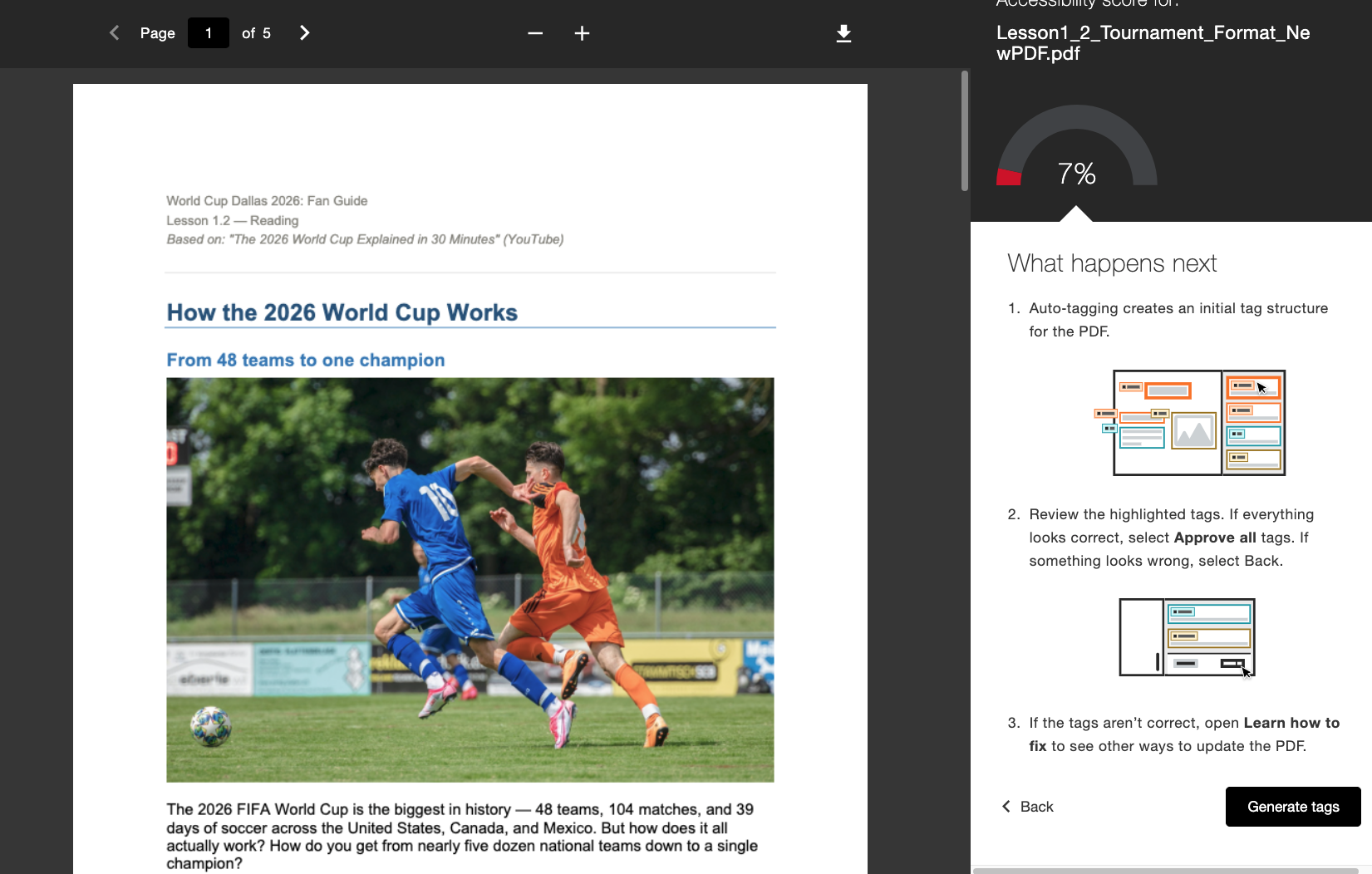
Yönetici tarafından etkinleştirildiğinde, eğitmenler “Etiket Oluştur” adlı yeni bir iş akışını doğrudan “Eğitmen Geri Bildirimi” bölümünde göreceklerdir. Eğitmenler, etiketleri oluşturduktan sonra da kontrolü elinde tutar; uygulanan etiketleri onaylamaya karar vermeden önce ekranın sağ tarafındaki etiket ağacında gezinerek yeni etiket yapısını inceleyebilirler. Eğitmenler, memnun kaldıklarında Hepsini onayla seçeneğini belirlemeden önce, alt kısımdaki ilerleme göstergesini kullanarak kaç tane etiketi onayladıklarını görebilirler.
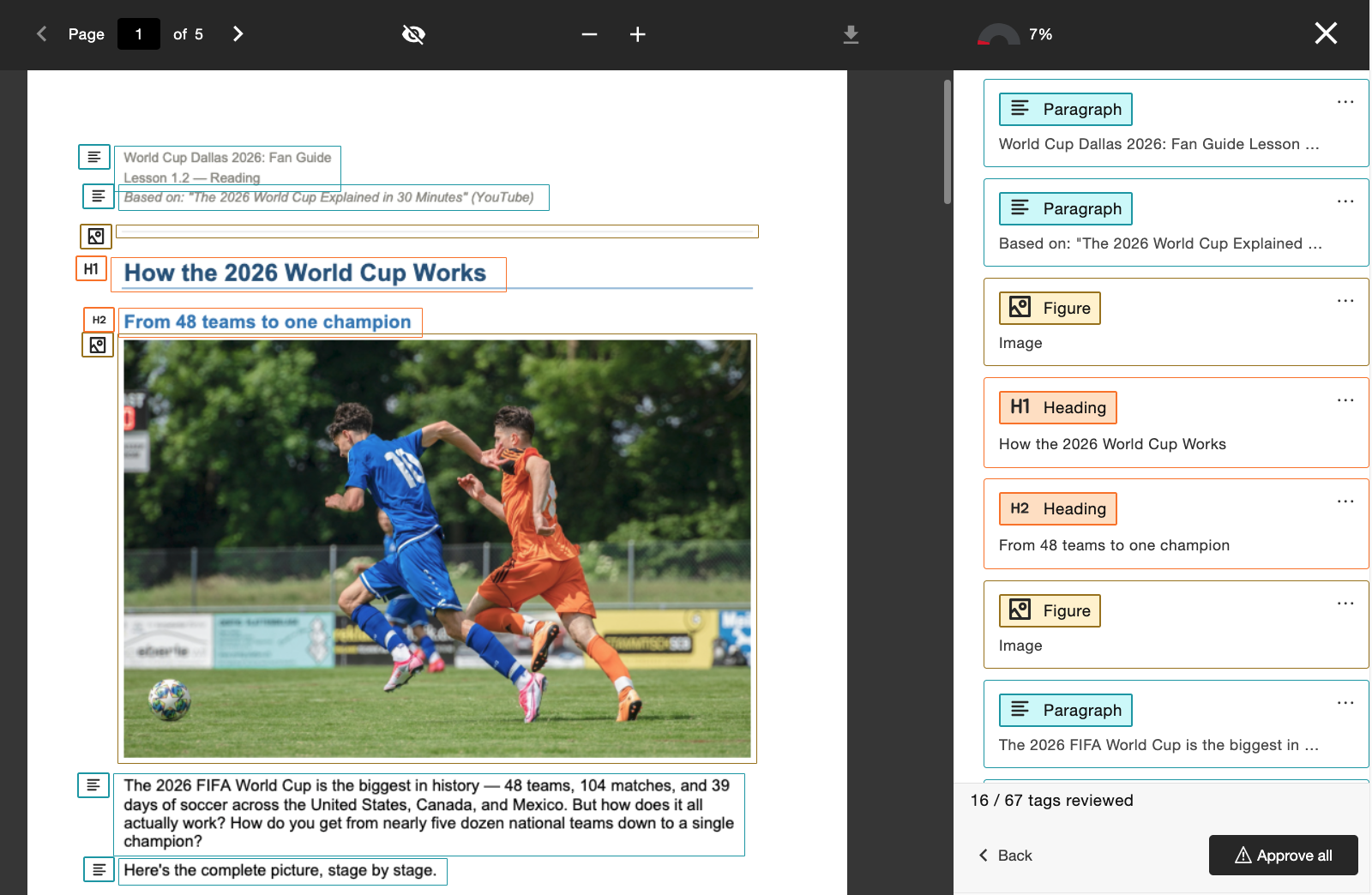
Yöneticiler, kurumun tercihine göre bu özelliği etkinleştirip devre dışı bırakarak Ally Yapılandırma aracı aracılığıyla bu özelliğe erişimi kontrol edebilir.
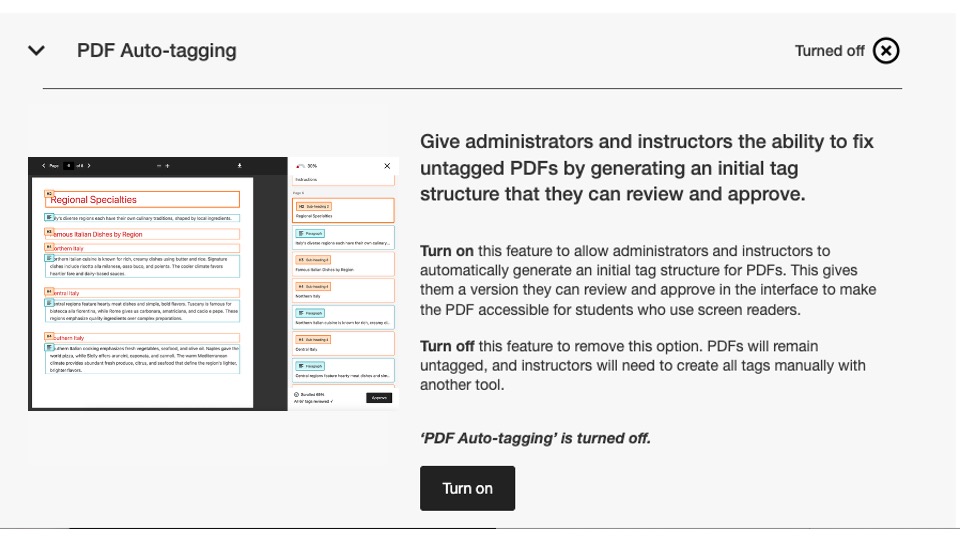
Bu sürüm kapsamında bu yapılandırma bayrağı varsayılan olarak devre dışı bırakılmıştır. Öğretim elemanlarının bu özelliği kullanmaya başlayabilmesi için yöneticilerin bunu etkinleştirmesi gerekir.
Yeni Kullanım Raporu hakkında daha fazla bilgi için, yardım sitesindeki PDF Düzeltme Seçenekleri konusuna bakın.
Yeni Kullanım Raporu artık kullanıma açık.
Ally verilerini yöneticiler için kolayca erişilebilir ve kullanılabilir hale getirmeye yönelik sürekli çabalarımızın bir parçası olarak, kullanıcı arayüzüne doğrudan entegre edilmiş Ally Kullanım Raporu’nun bir sonraki sürümünü yayınlamaktan büyük heyecan duyuyoruz.
Kullanım raporu, öğrencilerinizin ve öğretim görevlilerinizin Ally’yi nasıl kullandıklarına dair ayrıntıları gösterir; buna, belirli bir zaman aralığında kaç adet alternatif format indirildiği ve kaç adet öğretim görevlisi düzeltmesi yapıldığı da dahildir.
Kurumunuzun Ally ile olan etkileşimine ilişkin daha kolay ve hızlı içgörüler elde etmenize yardımcı olmak amacıyla, bu yeni ve geliştirilmiş rapor artık bir Excel dosyası indirmenize gerek kalmadan doğrudan Kurumsal Rapor içinden erişilebilir durumdadır. Bu, Kurumsal Raporunuzdaki Kullanım sekmesinin yerini alır ve etkinleştirilmesi için herhangi bir ek adım gerektirmez.
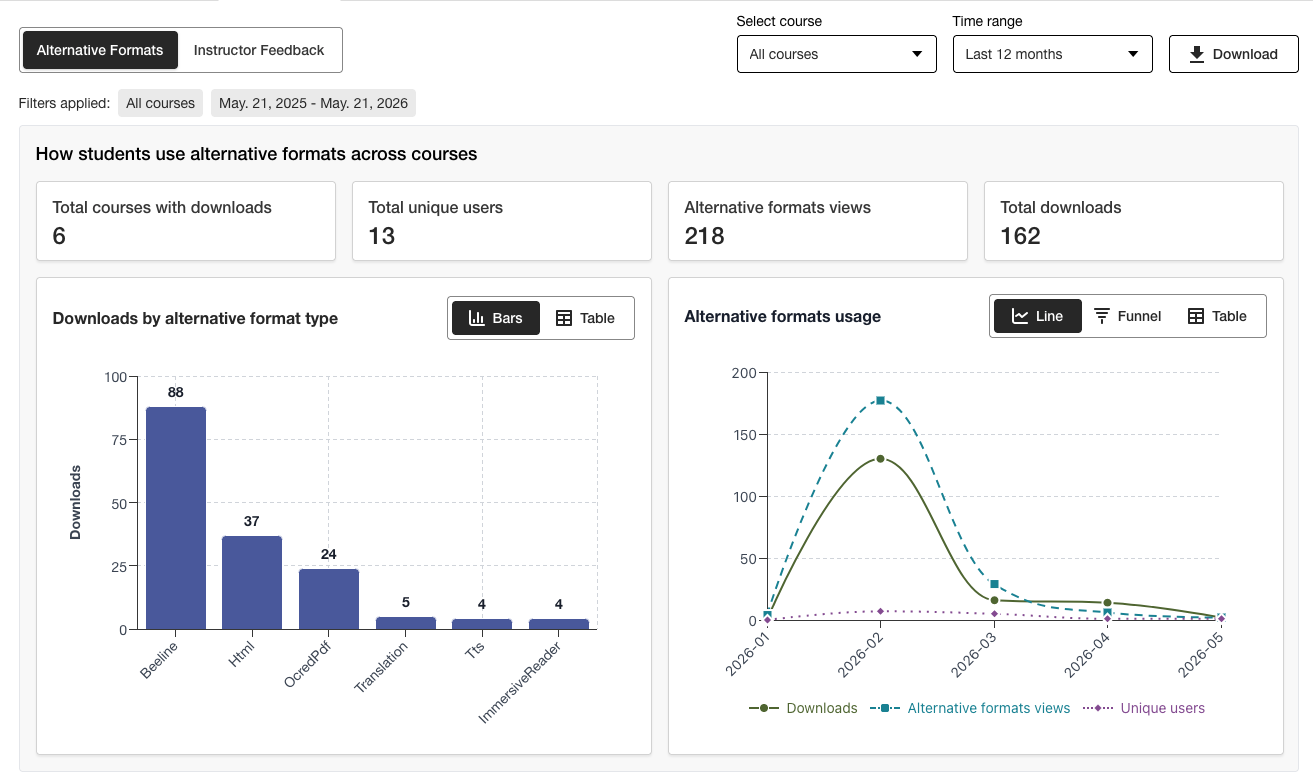
Yöneticiler, önemli bilgileri bir bakışta görebilir ve yeni filtreleme seçeneklerini ve grafik detaylandırma özelliklerini kullanarak veriler hakkında daha derinlemesine içgörüler elde edebilir.
Verilere başka bir biçimde erişmeyi tercih eden kullanıcılar için Excel sürümü, “İndir” özelliği kullanılarak hâlâ indirilebilir.
Yeni Kullanım Raporu hakkında daha fazla bilgi için, aşağıdaki yardım sitesi başlıklarına bakın:
Hata düzeltmeleri
Canvas entegrasyonlarında, Ally aracılığıyla bir belgenin başlığının güncellenmesi sonucunda belgenin kurs içindeki yayınlanma durumunun hatalı bir şekilde değişmesine neden olan bir hata düzeltildi.
Ally 2.18.10 Sürümünün üretim ortamına geçirilme tarihi: 2 Temmuz 2026
Hata Düzeltmeleri ve iyileştirmeler
Kontrast sorununu gidermek amacıyla mevcut bir görselin yeni bir görselle değiştirilmesi durumunda, daha önce eklenmiş görsel açıklamalarının yanlış bir şekilde aktarılmasına neden olan bir hata, “Eğitmen Geri Bildirimi” bölümünde düzeltildi.
AI Alt Text Assistant’ta, eğitmen “Açıklamayı Otomatik Oluştur” seçeneğine tıkladıktan sonra manuel olarak yeni bir açıklama eklediğinde “Oops” hatasına neden olan bir hata düzeltildi.
“Alternatif Biçimler” bölümünde, MP3 ses biçiminin HTML içeriğinin dilini yanlışlıkla değiştirmesine neden olan bir hata düzeltildi.
PDF biçimindeki “Hızlı Düzeltme” özelliğinde, bazı durumlarda öğretim görevlilerinin Ally’nin dil doğrulama denetimine rağmen yanlış bir dil uygulanmasına izin vermesine olanak tanıyan bir hata düzeltildi.
Blackboard entegrasyonlarında, eğitmenin Kurs Erişilebilirlik Raporundaki eksik resim açıklaması sorununu giderdiğinde Resim bloklarındaki Dosya Başlığı’nın silinmesine neden olan bir hata düzeltildi.
Taranmış PDF’leri alternatif biçimlere dönüştürürken ve PDF Hızlı Düzeltmeleri uygularken kaliteyi, doğruluğu ve dönüştürme oranlarını iyileştirmek amacıyla Ally’nin temel OCR teknolojisinde çeşitli iyileştirmeler gerçekleştirildi.
Ally 2.18.9 Sürümünün üretim ortamına geçirilme tarihi: 22 Haziran 2026
Hata Düzeltmeleri ve iyileştirmeler
Moodle’da, Kurs Erişilebilirlik Raporu’ndan açıldığında bazı durumlarda sayfaya gömülü resimlerin Öğretim Görevlisi Geri Bildirim Önizlemesi’nde görüntülenmemesine neden olan bir hata düzeltildi.
Canvas Sayfaları'nda, düşük kontrastlı bir görüntünün “Dosya Yükleme” seçeneği kullanılarak değiştirilmesinden sonra görüntü açıklamalarındaki düzeltmelerin uygulanmamasına neden olan bir hata giderildi.
Moodle'daki bir erişilebilirlik sorunu düzeltildi; artık gezinme sırasında Ally gösterge simgelerine odaklanılabiliyor.
Ally 2.18.8 Sürümünün üretim ortamına geçirilme tarihi: 11 Haziran 2026
Hata Düzeltmeleri ve iyileştirmeler
Moodle’da, kullanıcıların Ally göstergelerini kullanırken yanlışlıkla iki araç ipucu mesajı görmelerine neden olan bir hata düzeltildi.
Yapılandırma aracındaki açıklamalar ve düğmelerdeki ifadeler, Etkinleştir ve Devre Dışı Bırak şeklinde gösterilecek şekilde iyileştirildi.
Ally 2.18.7 sürümünün yayın tarihi: 1 Haziran 2026
Hata Düzeltmeleri ve iyileştirmeler
Moodle'da, sayfada TinyMCE düzenleyicisi açıldığında erişilebilirlik puanı göstergesinin istemeden gizlenmesine neden olan bir hata düzeltildi.
Blackboard'da, (Ultra) Belgeler içindeki başlık düzeylerinin ortaya çıkan HTML Alternatif Biçimlerinde doğru şekilde dönüştürülmemesine neden olan bir hata düzeltildi.
Eğitmen Geri Bildirimi bölümünde, bir içerik %100’e ulaştıktan sonra yanlışlıkla “Çözülmesi gereken kalan sorunlar” mesajının gösterilmesine neden olan bir hata düzeltildi.
Blackboard'da, Belge içinde "dekoratif" olarak işaretlenen resimlerin, Ders Erişilebilirlik Raporunun "Eğitmen Geri Bildirimi" ön izlemesinde bağlantı olarak gösterilmesine neden olan bir hata düzeltildi.
Eğitmen Geri Bildirimi'nde, bozuk bir bağlantıyı düzeltmeye çalıştığımızda bağlantının yanlışlıkla iki kez görüntülenmesine neden olan bir hata düzeltildi.
Ally 2.18.6 Release to production: May 26, 2026
Bug Fixes and Improvements
Implemented several processing improvements to provide better handling of Canvas LMS Rate limits to minimize the number of times Ally hits these limits over the course of regular content processing.
Ally 2.18.5 Üretim sürümü: 7 Mayıs 2026
Hata Düzeltmeleri ve iyileştirmeler
Canvas'ta, açılır menüdeki Alternatif Biçimler seçeneğinin klavye gezinme girdilerine doğru yanıt vermemesine neden olan bir erişilebilirlik sorunu düzeltildi.
Canvas entegrasyonlarında Alternatif Biçimler seçeneğine tıklandıktan sonra açılır menünün kapanmamasına neden olan küçük bir hata düzeltildi.
Eğitmen Geri Bildirimi PDF Hızlı Düzeltme iş akışında "Tekrar Dene" düğmesinin Geri Bildirim Paneli içinde yanlış başlangıç noktasına gitmesine neden olan bir hata düzeltildi.
Blackboard entegrasyonlarındaki UNSAFE_HTML dosyalarının işlenmesi, bu dosyaların puanlamasını tamamen algılayıp atlamak ve ikinci bir adım olarak raporlardan kaldırma ihtiyacını ortadan kaldırmak için iyileştirildi.
Blackboard entegrasyonlarında, Kurs Erişilebilirlik Raporu içinden Belgelerdeki sorunları düzeltirken Dosya Eklerinin yanlışlıkla bağlantılara dönüştürülmesine neden olan bir hata düzeltildi.
Ally'nin ABD bölgesindeki gerçek zamanlı işlem kuyruklarında çeşitli izleme iyileştirmeleri ve optimizasyonları uygulandı.
Ally 2.18.4 Üretim sürümü: 30 Nisan 2026
Hata Düzeltmeleri ve iyileştirmeler
Blackboard Belgeleri'nde Ally'ın başlıkların yanlış düzeyde ayarlandığını yanlış tanımlamasına neden olan ve tüm sorunları düzelttikten sonra bile eğitmenlerin %100 puan almasını engelleyen bir hata düzeltildi.
Blackboard'daki UNSAFE_HTML dosyalarının algılanmasına yönelik iyileştirmeler uygulanarak Ally'ın puanlama süreçlerinden daha kolay kaldırılması sağlandı.
Küçük ekranlarda Orijinal Dosyayı İndir düğmesinin görünmesini engelleyen bir erişilebilirlik sorunu düzeltildi.
Ally Yapılandırması'nda Vimeo entegrasyonu ayarlanmamışsa zengin içerikte bir Vimeo videosu algılandığında hatalara neden olan Ally'ın Vimeo altyazı denetimiyle ilgili bir sorun düzeltildi.
Ally 2.18.3 Üretim sürümü: 20 Nisan 2026
Belge işleme iyileştirmeleri
Ally'nin Eğitmen Geri Bildirimi ve Alternatif Format işleme süreçlerindeki içeriğin kalitesini ve aslına uygunluğunu sürekli olarak iyileştirme taahhüdümüzün bir parçası olarak, 2.18.3 sürümü bu temel kullanıcı özelliklerine güç veren temel belge dönüştürme sürecine kritik iyileştirmeler ve geliştirmeler getiriyor.
Ally'ın belge işleme mantığı, kursa yüklenen dosyalarla çalışırken daha akıllı, daha hızlı ve daha yüksek kaliteli dönüştürme sağlamak için yükseltildi. Bu, eğitmenler ve öğrenciler için aşağıdakiler de dahil olmak üzere çeşitli iyileştirmeler getiriyor:
Eğitmen Geri Bildirim Dosyası Önizlemelerinde görünen yanlış pozitif kontrast sorunları vakalarında azalma
PowerPoint sunumlarındaki şekillerin iyileştirilmiş kullanımı, belge içindeki oklar gibi şeylerin dönüştürülmesi de dahil olmak üzere.
PDF'ye dönüştürüldükten sonra şekillere uygulanan alternatif metinlerin tanınması iyileştirildi.
Sesli alternatif format dahil olmak üzere alternatif biçimlerde dekoratif görsellerin daha iyi duyurulması
PDF'ye dönüştürme sırasında görüntü tanıma ve Şekil etiketlerini uygulama iyileştirildi
Bu güncelleme, kullanıcıya yönelik bu iyileştirmelere ek olarak, LMS'den alınan içeriğin işlenmesinde genel performansı ve hızı artırmaya yardımcı olmak için Ally'nin temel altyapısının optimizasyonunu da içerir.
Not
Ekiplerimiz, gelecekte ele alınması gerekebilecek ek olası iyileştirmeleri veya uç durumları analiz etmeye ve belirlemeye devam edecektir.
Yükseltilmiş Yapay Zekâ Alternatif Metin Asistanı
Yapay Zeka Alt Metin Yardımcısı, önerilen alternatif metni isterken zaman aşımlarının sayısını azaltmak ve belirli görüntüleri analiz ederken halüsinasyonları önlemek için iyileştirilmiş işleme dahil olmak üzere, temel AWS Bedrock AI modellerindeki birkaç ek iyileştirmeden yararlanmak üzere güncellendi.
Hatırlatma olarak, güncellenmiş AI Alt Metin Yardımcısı Şeffaflık Notu, bu özellik hakkında ek ayrıntılarla birlikte burada görüntülenebilir: https://help.anthology.com/ally-lms/en/administrators/ai-alt-text-assistant.html
Hata Düzeltmeleri ve iyileştirmeler
Eğitmen Geri Bildiriminde, düzeltmeyi uygulamaya çalıştıktan sonra PDF’nin hâlâ doğru dil ayarına sahip olmaması durumunda önizlemede yanlış vurgulamanın uygulanmasına neden olan bir hata düzeltildi.
Eğitmen Geri Bildirimi’nde, bir PDF’de hâlâ doğru dil ayarı yoksa Tekrar Dene seçeneğine tıklamanın eğitmeni dil seçim paneline geri götürmemesine neden olan bir hata düzeltildi.
Canvas'ta, eğitmenin sabit bir başlığa sahip OCR'lenmiş bir PDF üzerinde Eğitmen Geri Bildirimini açmasını engelleyen bir hata düzeltildi.
Eğitmen Geri Bildirimi panelinde Geri düğmesi kullanıldığında odağın yanlışlıkla öğeler arasında kaydırılmasına neden olan bir erişilebilirlik sorunu düzeltildi.
Alternatif Biçimler modal penceresinde klavye ile gezinirken ve seçim yaparken Orijinal Dosya biçiminin indirilememesine neden olan bir erişilebilirlik sorunu düzeltildi.
Ally 2.18.2 Üretim sürümü: 9 Nisan 2026
Hata Düzeltmeleri ve iyileştirmeler
Blackboard'da, Ally göstergelerinin Ödev talimatları içindeki dosya ekleri için görüntülenmemesine neden olan bir sorun düzeltildi.
WYSIWYG içeriği için Eğitmen Geri Bildirimi panelinde gezinirken bazı durumlarda zengin içerik düzenleyicisindeki Kalın veya İtalik simgelerine tıklamanın AI Alt Metin Yardımcısı için Otomatik oluştur düğmesini etkinleştirmesine neden olan bir hata düzeltildi.
Bazı durumlarda kontrast sorunları olan bir görüntünün Eğitmen Geri Bildirimi dosya yüklemesi yoluyla yepyeni bir görüntüyle değiştirilmesinin belge önizlemesini güncellememesine neden olan bir hata düzeltildi.
Canvas'ta Kurs ana sayfasında son duyuruları göster etkinleştirildiğinde Ally göstergelerinin Canvas Syllabus'ta doğru şekilde gösterilmesini engelleyen bir hata düzeltildi.
Ally 2.18.1 Üretim sürümü: 2 Nisan 2026
Hata Düzeltmeleri ve İyileştirmeler
Moodle 4.5 ve Moodle 5 için Moodle eklentileri, küçük hataları gidermek için hata düzeltme arka plan raporlarını içerecek şekilde güncellendi.
Yapay Zeka Alt Metin Asistanı ile ilgili olarak, bazı durumlarda eğitmenlerin alternatif metin önermeye çalışırken birincil modelin kullanılamaması nedeniyle bir hata mesajı almasına neden olan bir sorun düzeltildi.
Ally 2.18 Üretime geçişi: 26 Mart 2026
Yeni Kütüphane Referans Yöneticisi özellik bayrağı artık kullanılabilir.
Eğitmenler için PDF düzeltme deneyimini yönetmek isteyen yöneticilere daha ayrıntılı kontrol düzeyleri sağlamaya yönelik devam eden çabalarımızın bir parçası olarak, Ally Yapılandırma seçeneklerinde Kütüphane Referansı iş akışını kapatmaya olanak tanıyan yeni bir özellik bayrağı mevcuttur.
Yöneticiler artık PDF'ye özgü çeşitli sorunlar üzerinde çalışırken orijinal dosya kullanılamadığında eğitmenin PDF'lere Kütüphane Referansları ekleme özelliğini kaldırmak için Kütüphane Referansı özelliğini kapatabilir. Bu ek kontrol katmanı, bu özelliğin kurumsal tercihler ve süreçlerle uyumlu hale getirilmesine yardımcı olacak ve sabitleme PDF'lerinin geniş ölçekte en iyi nasıl yönetileceğini belirlerken ek esneklik sağlayacaktır.
Şekil 1: Ally Yapılandırma Seçeneklerindeki Yeni Özellik İşareti
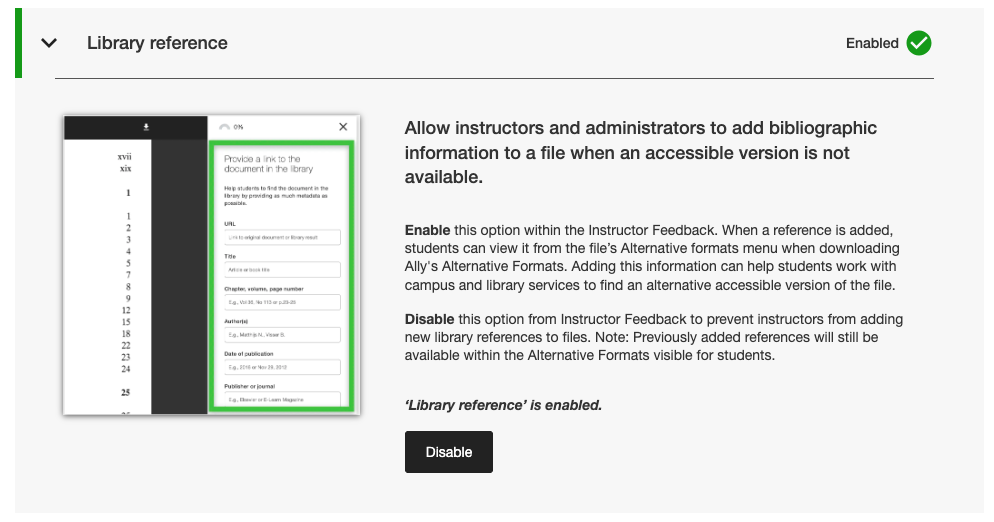
Yöneticiler bu yeni özellik işaretini Ally Yapılandırma aracındaki Özellikler sekmesinde, Kütüphane referansı altında listelenmiş olarak bulabilirler.
Not
Kütüphane Referansları bu sürümle birlikte varsayılan olarak açık kalacaktır. Bu yeni özellik bayrağı ile Kütüphane Referanslarının kapatılması, daha önce eklenen Kütüphane Referanslarını içerikten kaldırmayacak ve yalnızca ileride yenilerinin eklenmesini önleyecektir.
Hata Düzeltmeleri ve iyileştirmeler
Canvas'ta ekran yeniden boyutlandırıldığında Ally göstergeleri sütununun Yeni Dosyalar alanından kaybolmasına neden olan bir hata düzeltildi.
Canvas entegrasyonlarında, Canvas Sayfaları içindeki Ally erişilebilirlik puanı göstergelerinde gezinmek için klavye kullanıldığında doğru odağın uygulanmasını engelleyen bir erişilebilirlik sorunu düzeltildi.
Ally Yapılandırma ayarlarındaki AI Alt Metin Yardımcısı Kullanım Koşulları bozuk web bağlantısı düzeltildi.
Özel yardım e-posta akışlarını işleyen arka uç altyapısı için SMTP e-posta hizmetlerimizi taşıdık.
Ally 2.17.5 Üretim sürümü: 12 Mart 2026
Blackboard UNSAFE_HTML dosyaları artık raporlara dahil edilmiyor
Eğitmen verimliliğine ve raporlamada netliğe yönelik süregelen taahhüdümüzün bir parçası olarak, Ally raporları artık Blackboard entegrasyonları için UNSAFE_HTML dosyalarını kurs içeriğinin bir parçası olarak değerlendirmeyecektir.
Resim 1: Geçmiş davranışları göstermek için UNSAFE_HTML eklenmiş Kurs Raporu.
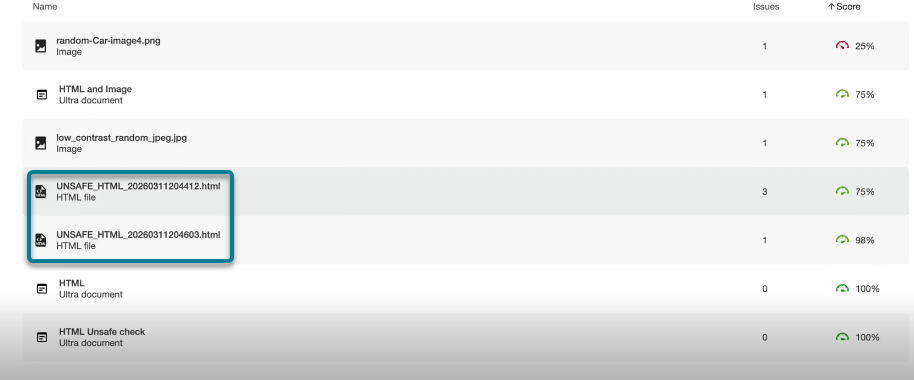
Bu sürümden itibaren, bir Blackboard Belgesi içinde HTML parçacıkları kullanıldığında içerik klasöründe otomatik olarak oluşturulan UNSAFE_HTML dosyaları kurum ve kurs raporlarından filtrelenecektir. Önceden, bu dosyalar raporda gösteriliyordu ancak eğitmenler eksik dil ve başlık için belirlenen sorunları düzeltemiyordu ve genellikle bu dosyaları raporlardan kaldırmak için kurstan kaldırmak gibi başka geçici çözümlere başvuruyorlardı.
Not
Bu değişiklik, mevcut ve geçmiş tüm UNSAFE_HTML dosyalarını değerlendirmeden kaldıracaktır. Bu içerik öğelerinin bir kursta ne sıklıkla kullanıldığına bağlı olarak, bu durum dosyaların, HTML ve WYSIWYG içeriğinin dağılımına bağlı olarak kurs puanında hafif bir artış veya düşüşe neden olabilir.
Gelecekteki bir sürümün parçası olarak, genel performansı ve taramayı iyileştirmeye yardımcı olmak için bir kurs açılırken bu dosyaların işlenmesini tamamen önlemeye çalışacağız.
Hata Düzeltmeleri ve İyileştirmeler
Blackboard entegrasyonlarında, görüntüler Yalnızca Görüntüle veya Yalnızca İndir olarak ayarlandığında, Eğitmen geri bildirimindeki belgenin puanı ile Kurs Erişilebilirlik Raporundaki puanı karşılaştırıldığında görüntüler için puanlamada tutarsızlığa neden olan bir sorun düzeltildi. Kurs Erişilebilirlik Raporu, daha önce uygulanan alternatif metni yanlışlıkla gözden kaçırıyor ve Eğitmen geri bildiriminde düzeltilmiş olarak gösterilmesine rağmen puanı düşürüyordu. Bu durumun kursun bir parçası olarak Ultra Belgeler'deki ve Öğrenim Nesnesi Deposu'ndaki görüntüler için geçerli olduğunu unutmayın.
PDF Eksik Dil Hızlı Düzeltme'de eğitmen bir dil seçmeden önce Uygula düğmesinin tıklanabilir olmasına izin veren bir sorun düzeltildi.
Referans bağlantılarının tıklanabilir bağlantılar olarak gösterilmesi ve olası kontrast sorunlarının önlenmesi için Alternatif Biçimler indirme penceresindeki Kütüphane Referans bağlantılarının stilinde iyileştirmeler yapıldı.
Ally 2.17.4 Üretim sürümü: 5 Mart 2026
Dil Ön Seçimi artık eksik Dil PDF Hızlı Düzeltmesi için kullanılabilir
Ally Eğitmen Geri Bildirimi Hızlı düzeltmesinde eksik dillere sahip PDF'leri düzelten eğitmenler, bu yaygın sorunu düzeltirken zamandan tasarruf etmek ve ek kaydırmayı önlemek için artık dilin algılanmasından ve açılır menüde önceden seçilmesinden yararlanabilirler.
Ally'ın yerleşik dil algılama özelliği PDF'yi analiz ederek mümkün olduğunda uygun dili belirler. Herhangi bir dil algılanmazsa eğitmenler düzeltmeyi uygulamak için manuel olarak bir dil seçebilir ve Ally'ın değişikliği beklendiği gibi PDF'ye kaydetmesini sağlayabilir.
Resim 1: İngilizce seçiliyken Dil Ekleme Hızlı Düzeltme işlemi

Moodle 5.1 eklentileri artık kullanılabilir
Ally'nin Moodle için devam eden desteğinin bir parçası olarak, Moodle 5.1 için Ally eklentileri mevcuttur. Ally'ın Moodle desteğiyle ilgili ek ayrıntılar Ally Moodle Yapılandırma Belgelerinde bulunabilir.
Not
Ally, açık kaynak eklenti stratejimizin bir parçası olarak, hedeflenen geliştirme ve hata düzeltmelerine izin vermek için desteklenen her Moodle sürümü için dallar oluşturur. Eklentilerin güncel sürümleri depomuzdaki ilgili STABLE dallarında bulunacaktır. Eklentiler güncellendiğinde istenmeyen yeni değişikliklerin yapılmadığından emin olmak için yöneticilerin her zaman kararlı dalları kullanmaları önerilir.
Hata Düzeltmeleri ve İyileştirmeler
Blackboard'da, Belgelerdeki sorunları düzeltmek için Kurs Erişilebilirlik Raporu'nu kullanan eğitmenlerin HTML blokları, ses ve/veya Video Studio videoları yerleştirirken beklenmedik bir şekilde bağlantı olarak yanlış tanımlanan içeriği kaldırabilmesine neden olan bir sorun düzeltildi.
Kurumsal Rapor'daki tüm LMS entegrasyonları için Dışa Aktar açılır menüsünün daha küçük ekranlarda ve/veya tarayıcı boyutlarında gizlenmesine neden olan bir sorun düzeltildi.
Tüm LMS entegrasyonları için, aynı anda birden fazla bozuk bağlantı içeren WYSIWYG içeriğine bozuk bağlantı hızlı düzeltmesi uygulamanın bazen sonsuz yükleme döndürücüsüyle sonuçlanmasına neden olan bir sorun düzeltildi.
PDF düzeltme özellikleriyle devam eden gelişimimizi desteklemek için PDF Eğitmen Geri Bildirim Önizleme altyapısında çeşitli ön uç iyileştirmeleri uygulandı.
Canvas entegrasyonunda, User-Agent üstbilgilerinin kullanılmasını sağlamak amacıyla HTTP istekleri için ek en iyi uygulama iyileştirmeleri uygulandı.
Ally 2.17.3 Üretime geçiş: 30 Ocak 2026
Hata Düzeltmeleri ve İyileştirmeler
Ally'nin taranmış PDF dosyaları için Eğitmen Geri Bildirimi'nde ("PDF'leri nasıl düzelteceğinizi öğrenin"i açtıktan sonra) Geri'ye tıklamanın kullanıcıları her zaman Eğitmen Geri Bildirimi görünümüne döndürmemesi ve bazen ikinci bir tıklama gerektirmesi sorunu giderildi.
Ally 2.17.2 Üretime geçiş: 15 Ocak 2026
Hata Düzeltmeleri ve İyileştirmeler
Kurumsal Raporda, arama bir veya daha az kurs döndürdüğünde Kurslar sekmesinden dışa aktarırken CSV İndir seçeneğinin gizlenmesine neden olan bir sorun düzeltildi.
Kullanım Raporunda, bir rapor indirildikten ve yeni bir tarih aralığı seçildikten sonra Kullanım raporunu indir düğmesinin devre dışı kalmasına neden olan bir hata düzeltildi.
Tuval Dosyaları alanında erişilebilirlik puanına giderken odağın kaybolmasına neden olan bir klavye erişilebilirliği sorunu düzeltildi. Odak artık klavye ile gezinme sırasında görünür kalıyor.