Kullanım
Note
Bu belge, yapay zeka destekli makine çevirisi kullanılarak çevrilmiştir. Çeviriler, doğruluğuna ilişkin herhangi bir garanti olmaksızın "olduğu gibi" sunulmaktadır. Bu içeriğin İngilizce sürümü resmi ve geçerli kaynaktır.
Ally Kullanım Raporunu Anlama
Kullanım raporu, öğrencilerinizin ve eğitmenlerinizin Ally’ı nasıl kullandıklarına ilişkin ayrıntıları gösterir. Öğrencilerin alternatif formatları ne sıklıkta indirdiğini ve öğretim görevlilerinin erişilebilirlik sorunlarını ne sıklıkta giderdiğini öğrenin.
Kullanım raporuna erişin
Ally Kurumsal erişilebilirlik raporundan Kullanım sekmesini seçin.
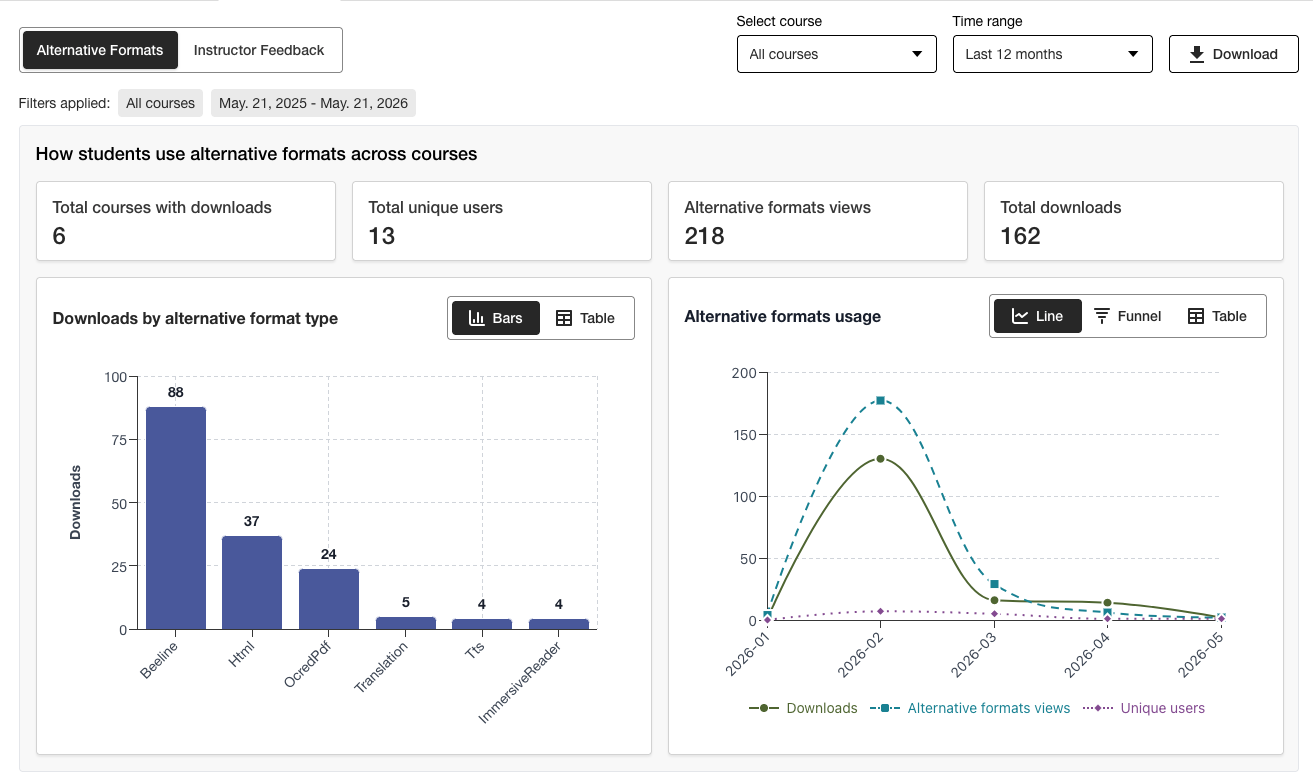
Kullanım Raporunu İndir
İndirme raporu, beş çalışma sayfasına bölünmüş bir elektronik tablodur. Her çalışma sayfası, seçtiğiniz tarih aralığına ilişkin ayrıntılar içerir.
Alternatif Biçim Lansmanları
Alternatif Format Haftalığı
Eğitmen Geri Bildirimi Başladı
Haftalık Öğretim Görevlisi Geri Bildirimi
Veri
Ally Kurumsal erişilebilirlik raporundan Kullanım sekmesini seçin.
Rapor için bir tarih aralığı seçin.
İndir seçeneğini belirleyin.
Not
Raporu ilk açtığınızda verileri göremeyebilirsiniz. İndirilen dosya korunuyor olabilir. Verileri görmek için düzenlemeyi etkinleştirin.