2026 versjonsmerknader
Note
Denne dokumentasjonen er oversatt ved hjelp av AI-støttet maskinoversettelse. Oversettelsene leveres «som de er», uten garanti for nøyaktighet. Den engelske versjonen av dette innholdet er den offisielle og gyldige kilden.
Ally 2.19.8 Release to production: September 28, 2026
Bug Fixes and Improvements
Fixed a bug in Blackboard integrations that caused some Documents not to be able to generate audio alternative formats.
Fixed a bug in Canvas integrations that caused Ally not to be able to correctly recognize images within Classic Quizzes which resulted in images with alt text being flagged as missing in the Course Report.
Implemented an accessibility improvement to the focus indicator applied to the Enable Future courses button within the Ally Configuration tool.
Fixed a bug in Canvas integrations that caused an error when attempting to fix any HTML issue from the Course Report.
Fixed an accessibility issue that caused insufficient contrast on the focus indicators for the enable and disable options within the Ally Configuration tool.
Fixed a bug with the Table Header Quick Fix that caused the selected option to disappear when Fix all occurrences was selected.
Fixed an accessibility issue within the Table Header Quick Fix to ensure that the Apply a table header selector is appropriately associated with its visible label.
Implemented an accessibility improvement to the Ally Terms of Use to ensure the Terms of Use text meets minimum color contrast requirements.
Fixed an issue in Blackboard where instructors using the Course Accessibility Report to fix issues in Documents were unexpectedly able to remove content incorrectly identified as links when embedding LTI Video links including Yuja, Echo360, Panopto, Kaltura and other third-party videos.
Fixed an issue in Canvas integration where custom CSS was conflicting with Ally CSS and prevented it from loading correctly causing an error when viewing the Instructor Feedback and/or Course Report Preview.
Ally 2.19.7 Release to production: September 17, 2026
Bug Fixes and Improvements
Updated the AI Alt Text Assistant to take advantage of several additional improvements in the underlying AWS Bedrock AI models. For more information, visit AI Alt Text Transparency Note.
Fixed a bug in the Institutional Report Directory Tab that sometimes caused the number of courses and items to show as ‘0’ until you refresh the report.
Fixed a bug in the Institutional Report that caused the label for the last month to not be visible.
Fixed a bug in Moodle integrations that sometimes prevented the instructor from updating an image description in the Ally Instructor Feedback.
Fixed a bug that caused a display issue in the Course Accessibility Report when file names exceeded a certain length.
Implemented several improvements to Ally’s underlying processing logic when handling large volumes of events.
Ally 2.19.6 Release to production: September 7, 2026
Bug Fixes and Improvements
Fixed an issue in Blackboard integrations where links without discernible text within the Title of a Document could not be fixed with the quick fix when using the Course Accessibility Report.
Fixed an issue in Blackboard integrations where alt text and decorative image values entered through the Ally Instructor Feedback or the Instructor Feedback via the Course Accessibility Report did not save back to the Image Block metadata as expected.
Fixed an issue in Canvas integrations that caused the Alternative Formats window to not scale correctly with the browser screen size when using the file preview.
Fixed an issue in Canvas integrations that created a role conflict when a user had both student and instructor permissions across multiple courses resulting in inconsistent Course Accessibility Report launch behavior.
Implemented improvements to Ally’s backend course sync processes when generating monthly reports.
Ally 2.19.5 Release to production: August 27, 2026
Bug Fixes and Improvements
Fixed an issue in the new Usage Report that prevented the department ID from filtering both the UI and the export when drilling into the Directory tab.
Fixed an issue in Blackboard integrations that prevented alternative text and decorative image settings marked in Ally from saving back to Blackboard Tests when using either the Instructor Feedback or Course Accessibility Report Instructor Feedback.
Fixed an issue in Blackboard integrations that prevented instructors from overwriting existing alternative text on an image when using the Course Accessibility Report.
Fixed an issue within Ally’s alternative format processing that sometimes stripped the first word after each bullet point when creating the HTML alternative formats from Word documents containing bulleted lists.
Fixed an issue in the Moodle 5 plugins that prevented Ally from flagging images lacking alternative text in the rich content if the image description was only entered as spaces.
Fixed an issue that caused Ally to incorrectly flag some Word documents with headings issues despite headings being present.
Fixed a minor issue within the Ally Instructor Feedback error messaging that shifted the close button for the Oops error modal to the bottom of the screen.
Implemented performance improvements for the D2L Brightspace course loading process to avoid timeouts while processing large volumes of courses.
Ally 2.19.4 Release to production: August 17, 2026
Notat
Reporting Bearer Token Reset: The reset of Ally Reporting API tokens was completed successfully on August 14th. Going forward, administrators should create a new token in the institutional report to restore connection in any external reporting tools.
Bug Fixes and Improvements
Fixed an issue in Blackboard Tests that caused the Ally score indicator to disappear from an image embedded within the text block when editing image alt text.
Fixed an issue with Canvas Course Export/Import and Copies where the associated Ally course copy processes (that carry over data such as alternative text, decorative images and library references) were failing in certain scenarios where a course file was deleted and replaced during the Canvas copy/import process.
Fixed an issue in the New Files Experience in Canvas that caused the Ally score indicators to disappear completely from the screen when scaled down to a small enough screen size.
Fixed an issue in Canvas File Preview within the New Files Experience that sometimes caused the Alternative Formats Icon to sporadically appear and disappear.
Fixed an issue in Canvas New Files Experience that caused the Alternative Formats modal to remove the Download Original File icon when scaled down to a small enough screen size.
Fixed an issue in Canvas that caused a delay in showing the Alternative Format icon when navigating from file to file.
Fixed an issue in Canvas that caused RTF files to be mistakenly recognized as Word documents and included in the Course Report and course score despite not being able to be opened or previewed.
Fixed an issue that caused Ally to report certain PPTX files as missing language when the language was set correctly in the document.
Fixed an issue with Ally’s broken link checking in the LMS that caused some valid links to be seen as broken depending on how those links were created in the WYSIWYG content.
Improved the accessibility and color contrast of the Ally Alternative Format indicator when using High Contrast Modes.
Improved Ally’s language validation checks on PDF documents to help minimize certain scenarios where the selected language in the PDF Quick Fix could not be saved.
Implemented performance improvements in Ally when interacting with the Moodle ally_filter plugin.
Ally 2.19.3 Produksjonslansering: 7. august 2026
Moodle 5.2-plugin
Som en del av Allys løpende støtte til Moodle er Ally-pluginene for Moodle 5.2 nå tilgjengelige. Du finner mer informasjon om Allys støtte for Moodle i dokumentasjonen om konfigurasjon av Ally i Moodle.
Notat
Ally oppretter grener for hver støttet Moodle-versjon som en del av vår strategi for åpen kildekode-plugin, for å muliggjøre målrettet utvikling og feilretting. De nåværende versjonene av plugin-modulene finnes i de tilknyttede STABLE-grenene i depotet vårt. Det anbefales alltid at administratorer bruker de stabile grenene for å sikre at det ikke innføres nye, utilsiktede endringer når programtillegg oppdateres.
Feilrettinger og forbedringer
Det er rettet en feil i Moodle som førte til at noe HTML-innhold ikke var tilgjengelig når alternativet Ekskluder ubrukte filer i Ally-pluginene var valgt.
Ally 2.19.2 Produksjonslansering: 30. juli 2026
Feilrettinger og forbedringer
Vi har forbedret opplevelsen av «Instructor Feedback» for Blackboard-lærere, slik at forhåndsvisningen av innholdet nå viser HTML-innholdsblokker som synlig innhold, i stedet for bare å vise «UNSAFE_HTML» når man bruker tilgjengelighetsrapporten for kurset.
Det er løst et problem for Blackboard-instruktører der bilder som ble satt inn uten beskrivelse i en tabell i «Dokumenter», ikke ble merket riktig av Ally.
Vi har løst et problem i Allys tilpassede hjelpearbeidsflyter som førte til at innlimte nettadresser ikke ble åpnet når man klikket på dem.
Det er løst et problem i Blackboard som hindret underviseren i å bruke en ny skriftfarge når han eller hun benyttet hurtigreparasjonen for uthevede kontrastproblemer i «Dokumenter».
Et problem er løst i arbeidsflyten i «OCR PDF Quick Fix»-funksjonen som førte til en «oops»-feil dersom læreren først brukte OCR-rettelsen og deretter fjernet merket for «Last ned i originalformat».
Vi har løst et problem i den nye rapporten om bruk av Ally som førte til at nedlastinger uventet ble avbrutt når man valgte et lengre datointervall. Vær oppmerksom på at administratorer bør tømme nettleserens buffer nå som denne feilrettingen er utgitt, før de prøver å laste ned filen på nytt.
Ally 2.19.1 Produksjonslansering: 22. juli 2026
Feilrettinger og forbedringer
Vi har løst et problem som førte til at skjermbildet i det nye funksjonsflagget for automatisk merking av PDF-filer i konfigurasjonsinnstillingene ble forvrengt.
Vi har løst et problem med hurtigbufferen for bruksdata som førte til at enkelte administratorer ikke kunne se eldre historiske data i rapporten i det nye brukergrensesnittet når de filtrerte etter lengre tidsperioder.
Det er løst et problem i Blackboard der bilder ble satt inn via en URL, noe som førte til at alternativteksten ble fjernet fra alle identiske bilder i stedet for bare det valgte bildet.
Det er løst et problem i Blackboard som førte til at alternativ tekst ikke ble lagret riktig når den ble lagt inn i «Instruktørens tilbakemelding» for bilder som var lagt inn via en URL.
Vi har oppdatert Canvas-vertsnavnet i Allys LTI-konfigurasjonsdetaljer for å sikre at vi henviser til sso.canvaslms.com på alle relevante steder.
Vi har innført en lengre tidsavbruddstid for Ally Reporting API for å unngå at tidsavbruddsgrensene overskrides ved større klientdatasett, noe som førte til en feil i rapporteringsverktøyet.
Ally 2.19 Produksjonslansering: 13. juli 2026
«PDF-taggingshurtigreparasjon» er nå tilgjengelig for lærere
Etter hvert som vi fortsetter å utvide funksjonene for tilpasning av PDF-filer i Ally Instructor Feedback, kan undervisere nå bruke funksjonen «Automatisk tagging» på umerkede PDF-filer for å legge til tagger i dokumentet og forbedre den generelle tilgjengeligheten for studentene. Denne funksjonen er nå tilgjengelig for alle institusjoner etter den innledende fasen av Early Adopter-programmet.
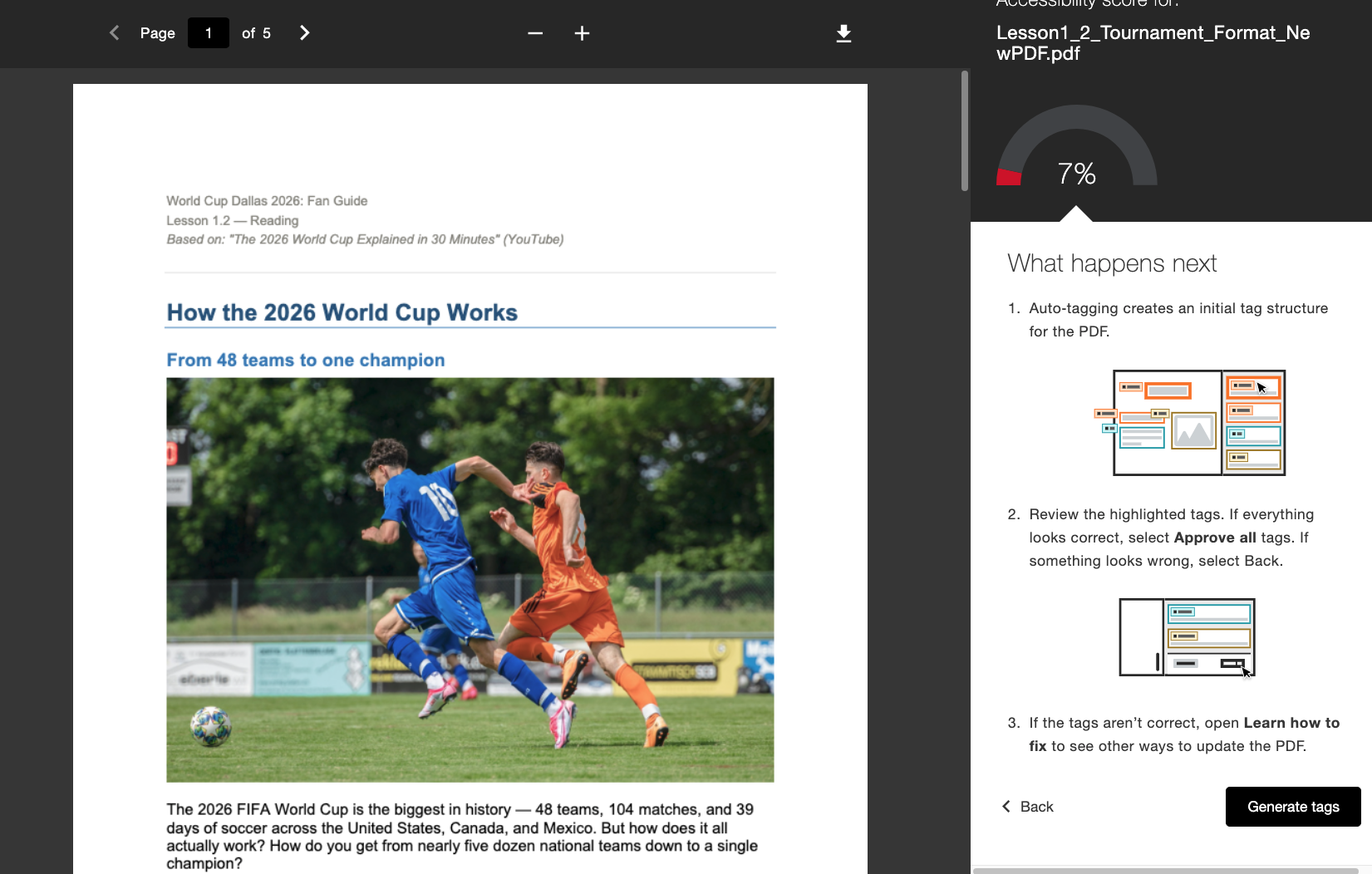
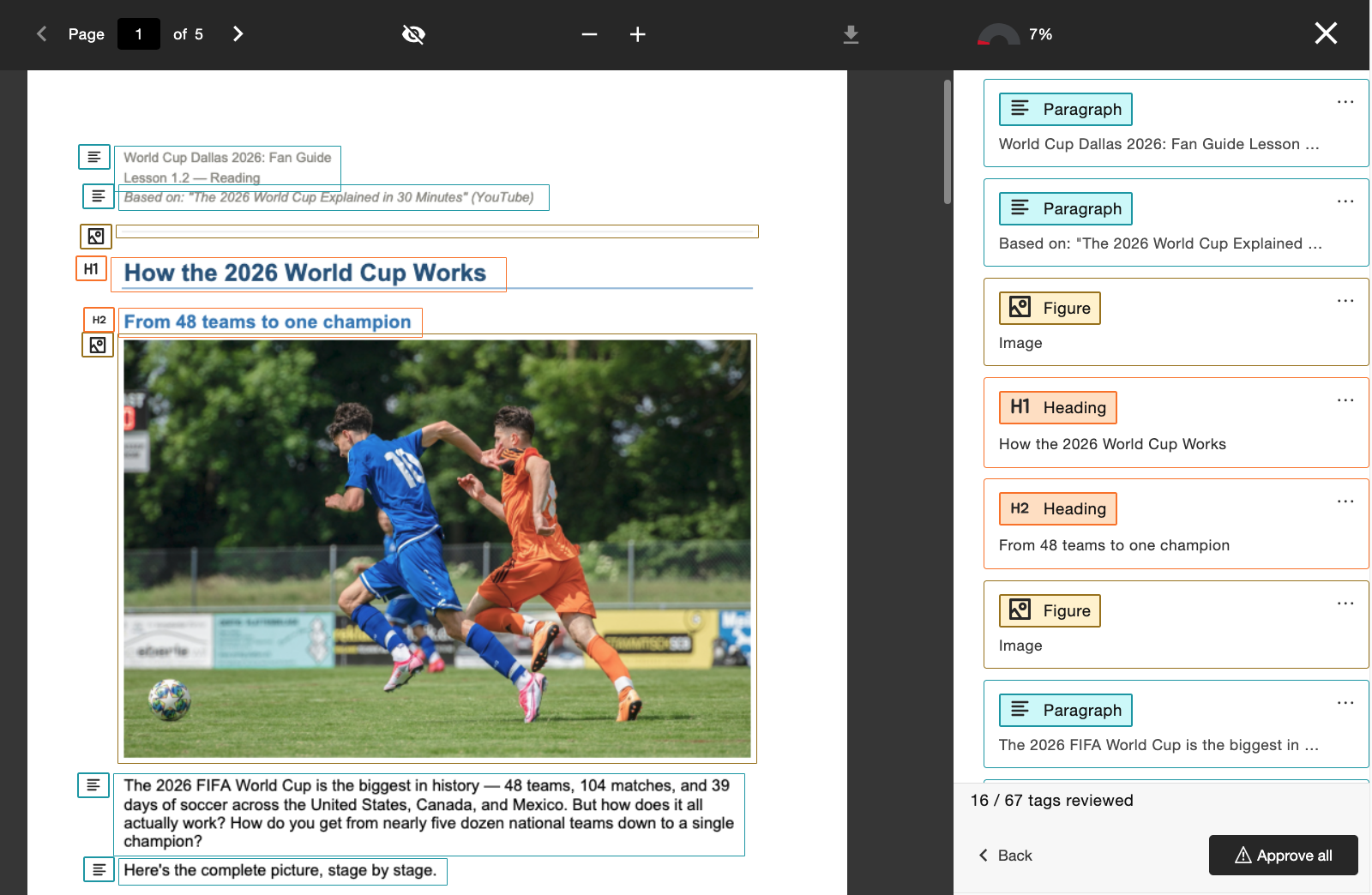
Når administratoren har aktivert denne funksjonen, vil lærerne se en ny arbeidsflyt for «Generer tagger» som er direkte integrert i «Tilbakemelding fra lærer». Lærerne beholder kontrollen etter at de har opprettet tagger, og kan se gjennom den nye taggstrukturen mens de blar gjennom taggtreet på høyre side av skjermen, før de bestemmer seg for å godkjenne de brukte taggene. Lærere kan bruke fremdriftsindikatoren nederst til å se hvor mange merkelapper de har godkjent, før de velger Godkjenn alle når de er fornøyde.
Administratorer kan styre tilgangen til denne funksjonen via Ally Configuration Tool ved å slå den på eller av, avhengig av institusjonens preferanser.
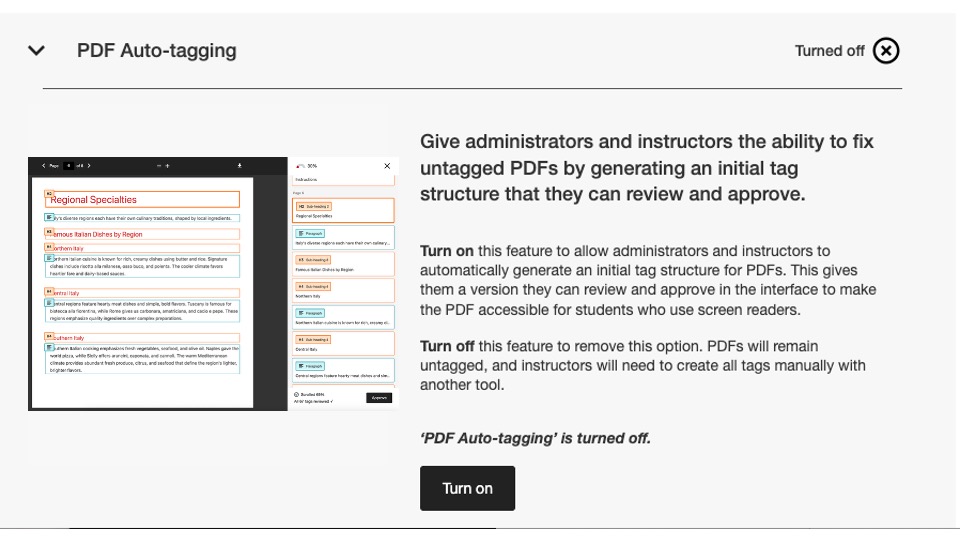
I denne utgaven er dette konfigurasjonsflagget deaktivert som standard. Administratorer må aktivere funksjonen før instruktører kan begynne å bruke den.
Hvis du vil ha mer informasjon om den nye bruksrapporten, kan du se hjelpesiden Alternativer for PDF-korrigering.
Ny bruksrapport er nå tilgjengelig.
Som en del av vårt kontinuerlige arbeid med å gjøre Ally-data lett tilgjengelige for administratorer, er vi glade for å kunne lansere den neste versjonen av Ally-bruksrapporten, som nå er integrert direkte i brukergrensesnittet.
Brukerrapporten viser detaljer om hvordan studentene og lærerne bruker Ally, blant annet hvor mange nedlastinger av alternative formater og hvor mange rettelser fra lærerne som forekommer i løpet av en gitt tidsperiode.
Denne nye og forbedrede rapporten er nå tilgjengelig direkte i institusjonsrapporten, uten at du trenger å laste ned en Excel-fil, noe som gir deg enklere og raskere innsikt i institusjonens bruk av Ally. Dette erstatter fanen Bruk i institusjonsrapporten din, og det kreves ingen ekstra trinn for å aktivere den.
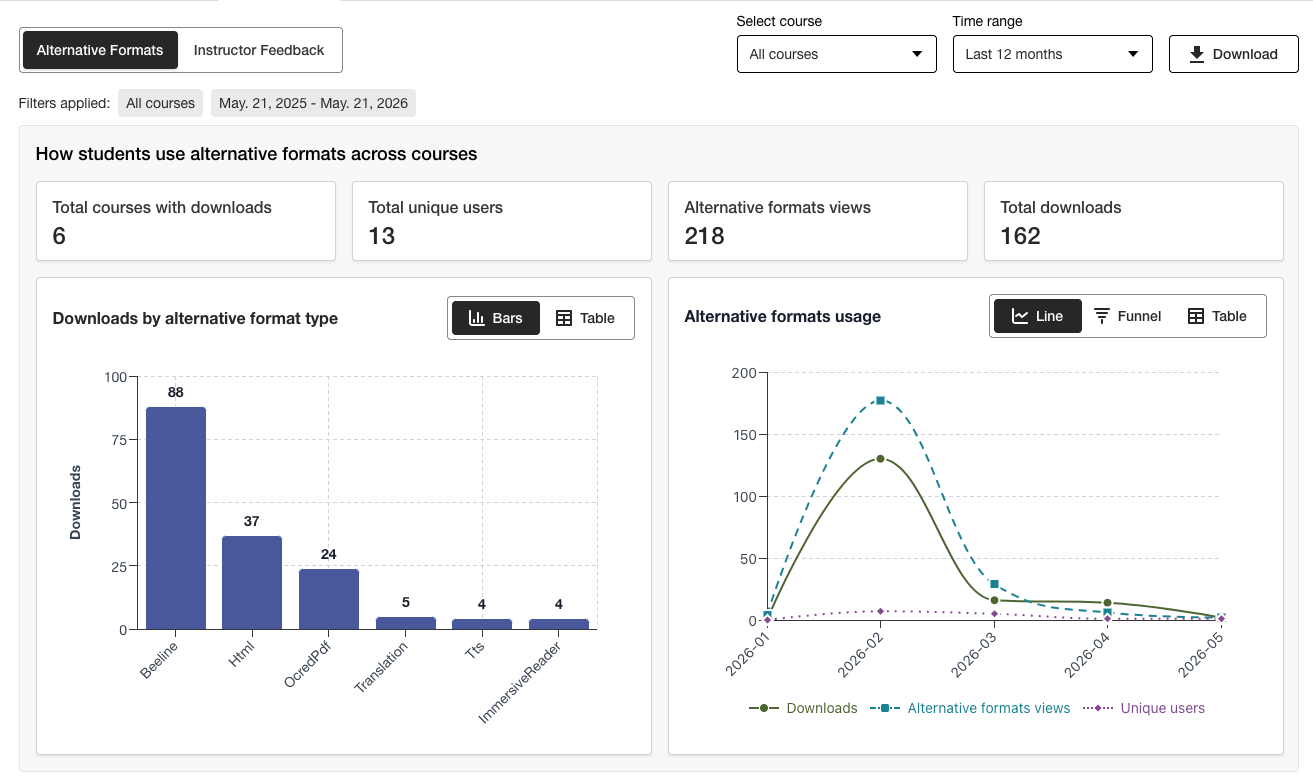
Administratorer kan se viktig informasjon på et øyeblikk og bruke de nye filtreringsalternativene og detaljert diagramanalyse for enkelt å få dypere innsikt i dataene.
Excel-versjonen kan fortsatt lastes ned via nedlastingsfunksjonen for brukere som foretrekker å få tilgang til dataene i et annet format.
Hvis du vil ha mer informasjon om den nye bruksrapporten, kan du se følgende emner på hjelpesiden:
Feilrettinger
Det er rettet en feil i Canvas-integrasjonene der oppdatering av et dokuments tittel via Ally feilaktig endret dokumentets publiseringsstatus i kurset.
Ally 2.18.10 Produksjonslansering: 2. juli 2026
Feilrettinger og forbedringer
Vi har rettet en feil i «Tilbakemelding til instruktør» som førte til at tidligere angitte bildetekster feilaktig ble overført når et eksisterende bilde ble erstattet med et nytt for å løse et kontrastproblem.
Det er rettet en feil i AI Alt Text Assistant som førte til en «Oops»-feilmelding hvis instruktøren manuelt la til en ny beskrivelse etter å ha klikket på «Autogenerer beskrivelse».
Det er rettet en feil i «Alternative formater» som førte til at MP3-lydformatet feilaktig endret språket i HTML-innholdet.
Det er rettet en feil i PDF-funksjonen «Hurtigreparasjon» som i enkelte tilfeller gjorde at undervisere kunne velge feil språk til tross for Allys språkvalidering.
En feil ble rettet i Blackboard-integrasjonene som førte til at filbeskrivelsen i bildeblokker ble fjernet når læreren løste problemet med manglende bildebeskrivelser fra tilgjengelighetsrapporten for emnet.
Vi har gjort flere forbedringer i den underliggende OCR-teknologien i Ally for å øke kvaliteten, nøyaktigheten og konverteringsgraden ved behandling av skannede PDF-filer til alternative formater og ved bruk av PDF-hurtigreparasjoner.
Ally 2.18.9 Produksjonslansering: 22. juni 2026
Feilrettinger og forbedringer
Det er rettet en feil i Moodle der bilder som var innebygd i en side, i enkelte tilfeller ikke ble vist i forhåndsvisningen av lærerens tilbakemelding når man åpnet den fra rapporten om tilgjengelighet i kurset.
Det er rettet en feil i Canvas Pages som førte til at endringer i alt-tekst ikke ble lagret etter at et bilde med lav kontrast ble erstattet ved hjelp av alternativet «Filopplasting».
Vi har løst et tilgjengelighetsproblem i Moodle, slik at Ally-indikatorikonene nå kan få fokus under navigering.
Ally 2.18.8 Produksjonslansering: 11. juni 2026
Feilrettinger og forbedringer
Det er rettet en feil i Moodle som førte til at brukere feilaktig fikk vist to verktøytipsmeldinger når de brukte Ally-indikatorer.
Formuleringene i beskrivelsene og på knappene i verktøyet «Ally-konfigurasjon» er forbedret, slik at de nå vises som Slå på og Slå av.
Ally 2.18.7 lansert i produksjon 1. juni 2026
Feilrettinger og forbedringer
Det er rettet en feil i Moodle som gjorde at indikatoren for tilgjengelighetspoeng utilsiktet ble skjult når TinyMCE-redigereren var utvidet på siden.
Det er rettet en feil i Blackboard som førte til at overskriftsnivåer i (Ultra)-dokumenter ikke ble korrekt konvertert i de genererte alternative HTML-formatene.
Det er rettet en feil i «Tilbakemelding fra instruktør» som feilaktig viste meldingen «Gjenstående problemer som må løses» etter at et innholdselement var fullført (100 %).
Det er rettet en feil i Blackboard som førte til at bilder merket som dekorative i dokumentet ble vist som lenker i forhåndsvisningen av «Tilbakemelding fra instruktør» i Kurstilgjengelighetsrapporten.
Vi har rettet en feil i «Tilbakemelding fra instruktør» som førte til at lenken ble vist to ganger når vi prøvde å reparere den ødelagte lenken.
Ally 2.18.6 Release to production: May 26, 2026
Bug Fixes and Improvements
Implemented several processing improvements to provide better handling of Canvas LMS Rate limits to minimize the number of times Ally hits these limits over the course of regular content processing.
Ally 2.18.5 Produksjonslansering: 7. mai 2026
Feilrettinger og forbedringer
Løste et tilgjengelighetsproblem i Canvas der alternativet Alternative formater i rullegardinmenyen ikke reagerte korrekt på tastaturnavigering.
Rettet en mindre feil i Canvas-integrasjoner som gjorde at rullegardinmenyen ikke ble lukket etter at du hadde klikket på alternativet Alternative formater.
Rettet en feil i arbeidsflyten for hurtigretting av PDF med instruktørtilbakemelding, som førte til at «Prøv igjen»-knappen navigerte til feil startpunkt i tilbakemeldingspanelet.
Forbedret håndtering av UNSAFE_HTML-filer i Blackboard-integrasjoner, slik at disse filene kan oppdages og hoppes over i poengberegningen, og du slipper å fjerne dem fra rapporter i neste trinn.
Rettet en feil for Blackboard-integrasjoner som førte til at filvedlegg feilaktig ble konvertert til lenker når du løste problemer i Dokumenter fra rapporten for kurstilgjengelighet.
Implementerte flere oppfølgingsforbedringer og optimaliseringer av Allys sanntidsbehandlingskøer i USA.
Ally 2.18.4 utgivelse til produksjon: 30. april 2026
Feilrettinger og forbedringer
Fikset en feil i Blackboard Documents som førte til at Ally feilaktig identifiserte overskrifter som var satt på feil nivå, og som hindret undervisere i å få 100 % selv etter at alle problemer var løst.
Implementerte forbedringer i oppdagelsen av UNSAFE_HTML-filer i Blackboard for å gjøre det enklere å fjerne dem fra Allys poengberegningsprosesser.
Løste et tilgjengelighetsproblem som gjorde at knappen for nedlasting av den opprinnelige filen ikke ble vist på mindre skjermer.
Løste et problem med Allys Vimeo-sjekk av bildetekst som forårsaket feil når en Vimeo-video ble oppdaget i rikt innhold hvis Vimeo-integreringen ikke var konfigurert i Ally-konfigurasjonen.
Ally 2.18.3 Utgivelse til produksjon: 20. april 2026
Forbedringer i dokumentbehandling
Som en del av vårt kontinuerlige arbeid med å forbedre kvaliteten og påliteligheten til innholdet i Allys Instructor Feedback og prosesseringen av Alternative Format, inneholder versjon 2.18.3 viktige forbedringer av den underliggende dokumentkonverteringsprosessen som driver disse viktige brukerfunksjonene.
Allys logikk for dokumentbehandling har blitt oppgradert for å gi smartere, raskere og bedre kvalitet på konverteringen av filer som lastes opp i emnet. Dette innebærer flere forbedringer for lærere og studenter, blant annet
Færre tilfeller av falske positive kontrastproblemer som vises i forhåndsvisningen av filer i tilbakemelding til instruktør
Forbedret håndtering av figurer i PowerPoint-presentasjoner, inkludert konvertering av ting som piler i dokumentet
Forbedret gjenkjenning av alternativ tekst som brukes på figurer etter konvertering til PDF
Forbedret annonsering av dekorative bilder i alternative formater, inkludert det alternative lydformatet
Forbedret bildegjenkjenning og bruk av Figure-tagger ved konvertering til PDF
I tillegg til disse brukerrettede forbedringene omfatter denne oppdateringen også optimalisering av Allys underliggende infrastruktur for å forbedre den generelle ytelsen og hastigheten på behandlingen av innhold som mottas fra LMS.
Notat
Teamene våre vil fortsette å analysere og identifisere ytterligere mulige forbedringer eller grensetilfeller som det kan være behov for å ta tak i i framtiden.
Oppgradert AI-assistent for alternativ tekst
AI Alt Text Assistant har blitt oppdatert for å dra nytte av flere forbedringer i de underliggende AWS Bedrock AI-modellene, blant annet færre tidsavbrudd når du ber om forslag til alternativ tekst, og forbedret håndtering for å unngå hallusinasjoner når du analyserer bestemte bilder.
Som en påminnelse kan du se det oppdaterte transparensnotatet for AI Alt Text Assistant med ytterligere informasjon om denne funksjonen her: https://help.anthology.com/ally-lms/en/administrators/ai-alt-text-assistant.html
Feilrettinger og forbedringer
Rettet en feil i Tilbakemelding til instruktør som førte til at feil utheving ble brukt i forhåndsvisningen når PDF-filen fortsatt ikke hadde riktig språkinnstilling etter at du hadde forsøkt å bruke rettelsen.
Rettet en feil i tilbakemeldingen til instruktøren som gjorde at instruktøren ikke kom tilbake til språkvalgspanelet ved å klikke på Prøv på nytt når en PDF-fil fremdeles ikke hadde riktig språkinnstilling.
Rettet en feil i Canvas som hindret læreren i å åpne Instruktørtilbakemelding på en OCR-pdf som også hadde en fast tittel.
Løste et tilgjengelighetsproblem i panelet Tilbakemelding til instruktør, som feilaktig flyttet fokus mellom elementer når du brukte Tilbake-knappen.
Løste et tilgjengelighetsproblem i modalvinduet Alternative formater, som førte til at det opprinnelige filformatet ikke ble lastet ned når du navigerte og valgte med tastaturet.
Ally 2.18.2 Utgivelse til produksjon: 9. april 2026
Feilrettinger og forbedringer
Løste et problem i Blackboard der Ally-indikatorer ikke ble vist for filvedlegg i oppgaveinstruksjoner.
Rettet en feil der det i noen tilfeller kunne forekomme at det å klikke på ikonene for fet eller kursiv skrift i redigeringsprogrammet for rikt innhold aktiverte Autogenerering-knappen for AI-assistenten for alt-tekst mens du navigerte i panelet Tilbakemelding fra underviser for WYSIWYG-innhold.
Rettet en feil som gjorde at forhåndsvisningen av dokumentet i noen tilfeller ikke ble oppdatert hvis du erstattet et bilde med kontrastproblemer med et helt nytt bilde via filopplastingen i Tilbakemelding til underviser.
Rettet en feil i Canvas som gjorde at Ally-indikatorene ikke ble vist riktig i en Canvas-side når Vis nylige kunngjøringer på kursets startside var aktivert.
Ally 2.18.1 Utgivelse til produksjon: 2. april 2026
Feilrettinger og forbedringer
Oppdaterte Moodle-programtillegg for Moodle 4.5 og Moodle 5 for å inkludere feilrettingsbackporter for å løse mindre feil.
Løste et problem med AI Alt Text Assistant, der instruktører i noen tilfeller fikk en feilmelding når de forsøkte å foreslå alternativ tekst fordi primærmodellen ikke var tilgjengelig.
Ally 2.18 Utgivelse til produksjon: 26. mars 2026
Nytt flagg for referanseadministratorfunksjonen for biblioteket er nå tilgjengelig
Som en del av vårt kontinuerlige arbeid med å gi administratorer som ønsker å administrere PDF-utbedringsopplevelsen for undervisere, mer detaljert kontroll, er det nå mulig å slå av arbeidsflyten for biblioteksreferanser ved hjelp av et nytt flagg i konfigurasjonsalternativene for Ally.
Administratorer kan nå slå av funksjonen Biblioteksreferanse for å fjerne lærerens mulighet til å legge til biblioteksreferanser i PDF-filer når originalfilen ikke er tilgjengelig, mens de jobber med ulike PDF-spesifikke problemer. Dette ekstra kontrollnivået vil bidra til å tilpasse denne funksjonen til institusjonelle preferanser og prosesser, og gi ekstra fleksibilitet når det gjelder å avgjøre hvordan man best kan håndtere fastsatte PDF-er i stor skala.
Bilde 1: Flagg for ny funksjon i konfigurasjonsalternativene for Ally
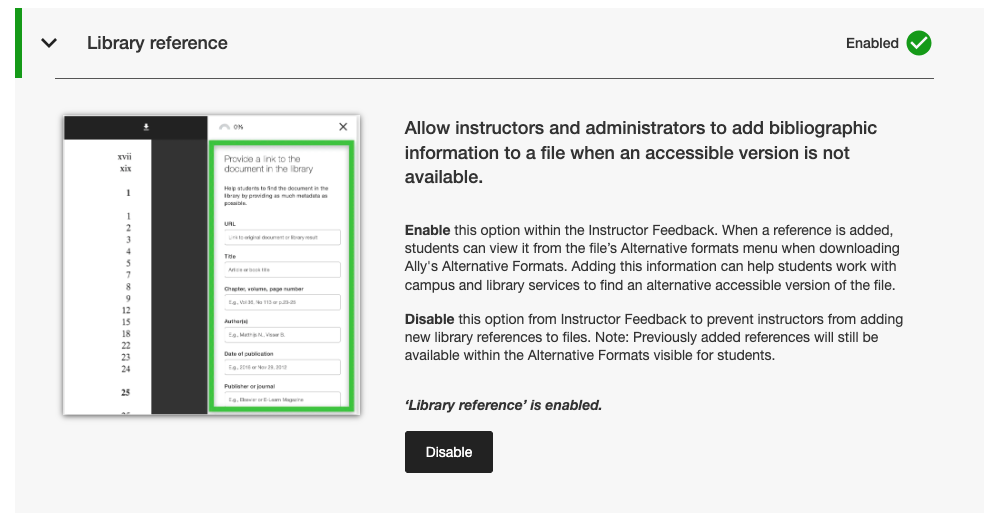
Administratorer finner dette nye funksjonsflagget på fanen Funksjoner i Ally-konfigurasjonsverktøyet under Biblioteksreferanse.
Notat
Bibliotekreferanser vil fortsatt være slått på som standard i denne versjonen. Hvis du slår av biblioteksreferanser med dette nye funksjonsflagget, fjernes ikke tidligere tilføyde biblioteksreferanser fra innholdet, og det vil bare forhindre at nye blir lagt til i fremtiden.
Feilrettinger og forbedringer
Rettet en feil i Canvas som førte til at Ally-indikatorkolonnen forsvant fra området Nye filer når skjermstørrelsen ble endret.
Løste et tilgjengelighetsproblem i Canvas-integrasjoner som forhindret at riktig fokus ble brukt når du brukte tastaturet til å navigere i Ally-tilgjengelighetsindikatorene på Canvas-sidene.
Fikset en ødelagt nettlenke i Ally-konfigurasjonsinnstillingene for vilkår for bruk for AI Alt Text Assistant.
Migrerte SMTP-e-posttjenestene våre for backend-infrastrukturen som håndterer tilpassede e-postflyter for hjelp.
Ally 2.17.5 Utgivelse til produksjon: 12. mars 2026
Blackboard UNSAFE_HTML-filer er ikke lenger inkludert i rapporter.
Som en del av vår kontinuerlige satsing på effektivitet og klarhet i rapporteringen, vil Ally-rapportene ikke lenger vurdere UNSAFE_HTML-filer som en del av kursinnholdet for Blackboard-integrasjoner.
Bilde 1: Emnerapport med UNSAFE_HTML inkludert for å vise tidligere atferd.
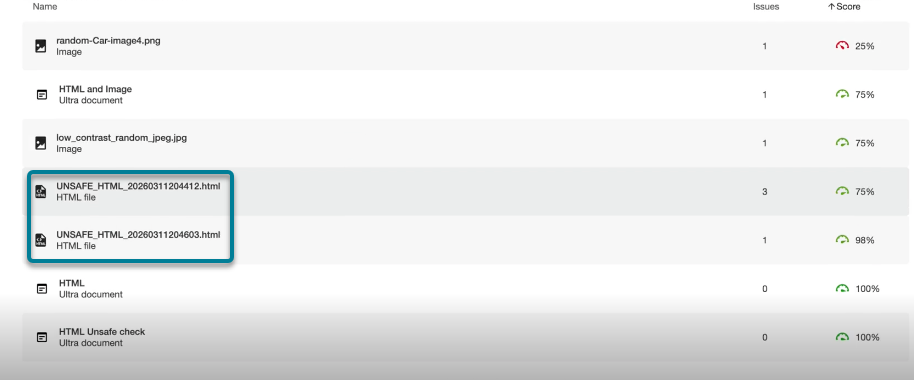
Fra og med denne versjonen filtreres UNSAFE_HTML-filer som automatisk opprettes i innholdsmappen når du bruker HTML-kodebiter i et Blackboard-dokument, ut av institusjons- og emnerapportene. Tidligere ble disse filene vist i rapporten, men underviserne klarte ikke å løse de identifiserte problemene med manglende språk og tittel, og måtte ofte ty til andre løsninger for å fjerne disse filene fra emnet for å få dem ut av rapportene.
Notat
Denne endringen vil fjerne alle nåværende og tidligere UNSAFE_HTML-filer fra vurderingen. Avhengig av hvor ofte disse innholdselementene ble brukt i et emne, kan dette føre til en liten økning eller reduksjon i emnepoengene basert på fordelingen av filer, HTML- og WYSIWYG-innhold.
I en fremtidig versjon vil vi forsøke å unngå å behandle disse filene fullstendig når et kurs åpnes for å forbedre generell ytelse og skanning.
Feilrettinger og forbedringer
Løste et problem i Blackboard-integrasjoner som førte til uoverensstemmelse med poengsummen for bilder når man sammenlignet poengsummen i tilbakemelding fra instruktør om et dokument med poengsummen i kurstilgjengelighetsrapporten når bilder var satt til Se eller Bare nedlasting. Tilgjengelighetsrapporten for emnet manglet feilaktig tidligere brukt alternativ tekst og senket poengsummen til tross for at dette ble vist som rettet i tilbakemeldingen fra læreren. Merk at dette gjelder for bilder i Ultra Documents som en del av emnet og Learning Object Repository.
Løste et problem i PDF Missing Language Quick Fix som gjorde det mulig å klikke på Bruk-knappen før læreren valgte et språk.
Forbedret utformingen av bibliotekets referanselenker i nedlastingsvinduet for alternative formater, slik at referanselenkene vises som klikkbare lenker og unngår potensielle kontrastproblemer.
Ally 2.17.4 Utgivelse til produksjon: 5. mars 2026
Forhåndsvalg av språk er nå tilgjengelig for PDF Quick Fix for manglende språk.
Instruktører som fikser PDF-filer med manglende språk i Ally Instructor Feedback Quick Fix, kan nå dra nytte av at språket oppdages og forhåndsvelges i rullegardinmenyen, slik at de unngår ekstra skrolling og sparer tid når de fikser dette vanlige problemet.
Allys innebygde språkgjenkjenning analyserer PDF-filen for å finne riktig språk der det er mulig. Hvis det ikke blir oppdaget noe språk, kan læreren likevel velge et språk manuelt for å bruke utbedringen og få Ally til å lagre endringen i PDF-filen som forventet.
Bilde 1: Legg til språk med engelsk valgt

Moodle 5.1-tillegg er nå tilgjengelig
Som en del av Allys løpende støtte for Moodle er Ally-pluginmodulene for Moodle 5.1 tilgjengelige. Du finner mer informasjon om Allys støtte for Moodle i Dokumentasjon for Ally Moodle-konfigurasjon.
Notat
Ally oppretter grener for hver Moodle-versjon som støttes, som en del av vår strategi for åpen kildekode-plugin, for å muliggjøre målrettet utvikling og feilretting. Gjeldende versjoner av programtilleggene finner du i de tilsvarende STABLE-grenene i depotet vårt. Det anbefales alltid at administratorer bruker de stabile grenene for å sikre at ingen nye utilsiktede endringer blir introdusert når programtillegg oppdateres.
Feilrettinger og forbedringer
Løste et problem i Blackboard der undervisere som brukte emnetilgjengelighetsrapporten til å løse problemer i Dokumenter, uventet kunne fjerne innhold som feilaktig ble identifisert som lenker når de la inn HTML-blokker, lyd og/eller Video Studio-videoer.
Løste et problem for alle LMS-integrasjoner i institusjonsrapporten, der rullegardinmenyen for eksport var skjult på mindre skjermer og/eller nettlesere.
Løste et problem for alle LMS-integrasjoner, der bruk av en hurtigreparasjon for ødelagte lenker for WYSIWYG-innhold som inneholder flere ødelagte lenker samtidig, noen ganger resulterte i en uendelig lasting av lastesymbolet.
Implementerte flere frontend-forbedringer i infrastrukturen for forhåndsvisning av PDF-tilbakemelding fra instruktør for å støtte vår fortsatte fremgang med funksjoner for PDF-utbedring.
Implementerte ytterligere forbedringer av beste praksis for HTTP-forespørsler for Canvas-integrasjon for å sikre bruk av User-Agent-headers.
Ally 2.17.3 Utgivelse til produksjon: 30. januar 2026
Feilrettinger og forbedringer
Løste et problem i Allys instruktørtilbakemelding for skannede PDF-filer der (etter å ha åpnet «Lær hvordan du fikser PDF-filer») klikk på Tilbake ikke alltid førte brukerne tilbake til visningen for instruktørtilbakemelding, og noen ganger krevde et nytt klikk.
Ally 2.17.2 Utgivelse til produksjon: 15. januar 2026
Feilrettinger og forbedringer
Løste et problem i institusjonsrapporten der alternativet Last ned CSV var skjult ved eksport fra fanen Emner når søket returnerte ett eller færre emner.
Løste en feil i bruksrapporten der knappen Last ned bruksrapport forble deaktivert etter nedlasting av en rapport og valg av et nytt datointervall.
Løste et problem med tastaturtilgjengelighet i Canvas Files-området der fokuset gikk tapt ved navigering til tilgjengelighetspoengsummen. Fokus forblir nå synlig under navigering med tastatur.