Understanding and Explaining Alternative Formats
Alternative formats help ensure that course materials are accessible to disabled students while also giving all learners greater flexibility in how they access and engage with content. Students can choose the format that best meets their needs, whether that means listening to content, reading on a mobile device, accessing materials offline, or customizing their reading experience.
A crucial component of promoting student adoption of alternative formats is to explain what alternative formats are and where to access them. Learn more about the student experience with Ally in the Student section of the help site.
What is Ally?
Ally lets you access your course materials in a format that works better for you, no matter what format your instructor originally uploaded. For example, if a reading assignment is posted as a PDF, you can convert it to an audio file and listen instead of reading. These formats are available to everyone, directly inside your learning management system (LMS).
What alternative formats are available?
The alternative formats created depend on the original content. If you can’t find an option to download alternative formats, Ally isn’t turned on for that content or the file is not a supported content type.
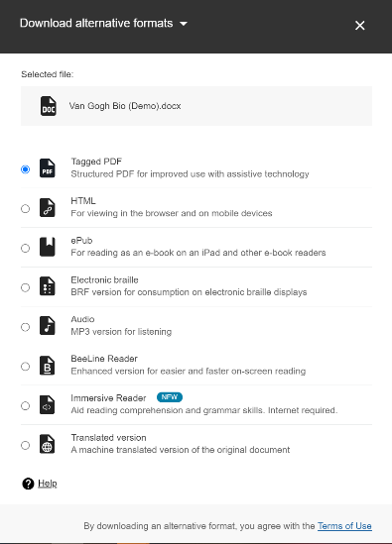
In general, the following alternative formats are available:
Audio
HTML
ePub
Electronic Braille (BRF)
BeeLine Reader
Immersive Reader
Tagged PDF
OCR PDF
Translated Version
How and where can I access alternative formats?
To access alternative formats, select the alternative format icon next to your course content, then select which alternative format best suits your needs. The icon may look slightly different depending on your learning management system, but it is typically represented by a downward-pointing arrow (download) icon.
The alternative formats available depend on the original content. If you can’t find an option to download alternative formats, Ally isn’t turned on for that content or the file is not a supported content type.