2026 Release Notes
Ally 2.20.1 Release to production: October 15, 2026
Bug Fixes and Improvements
Fixed an issue within the PDF Alt Text Instructor Feedback workflow that sometimes caused poorly tagged PDFs, including some specific PDFs created from Microsoft PowerPoint, to show an error when attempting to add alternative text or mark images as decorative.
Ally 2.20 Release to production: October 12, 2026
PDF Image Alt Text Quick Fixes
As part of our continued focus towards bringing more PDF remediation options to instructors, the ability to add alternative text directly to images in PDFs is now available to help further streamline faculty workflows.
Note
This feature update is available in Blackboard LMS, Canvas, D2L Brightspace and Moodle LMS integrations.
Instructors
Turned on by default with this release, instructors now have the option to manually add alternative text to images in PDFs within the Ally Instructor Feedback workflow. After adding alternative text Ally will automatically upload a new version directly to the course while overwriting the old file.
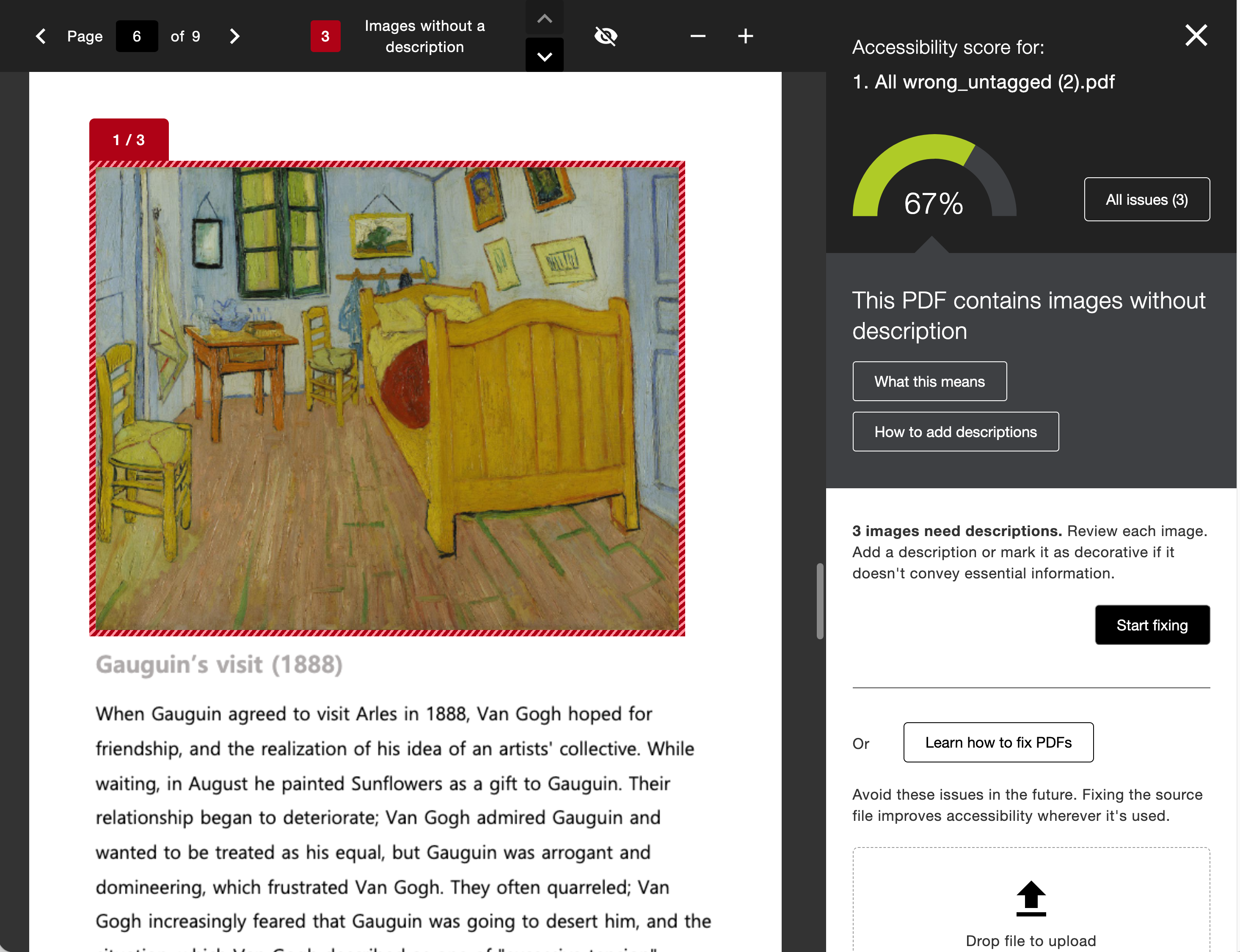
We’ve also added Ally’s AI Alt Text Assistant to this workflow as an option to further empower instructors that are looking for more starting points. If your administrator has turned on the AI Alt Text Assistant option, instructors can also generate suggested alternative descriptions for images embedded in the PDF.
Just like images embedded in WYSIWYG content, the AI Alt Text Assistant also considers the context of the surrounding content in the PDF as part of the initial prompt to power even more detailed descriptions.
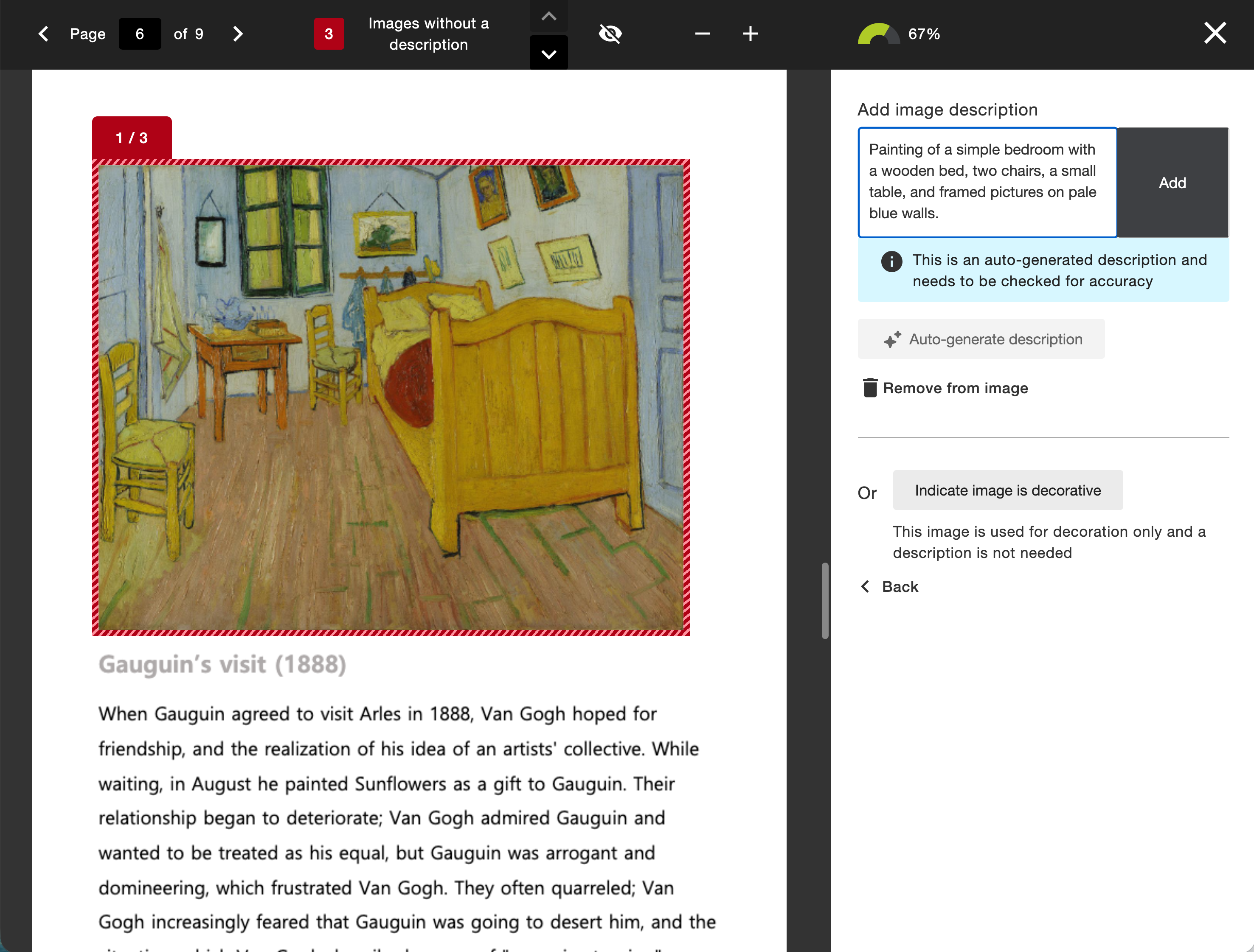
Note
The AI Alt Text Assistant must be turned on by the administrator to use the suggestion feature in this workflow. This feature is off by default. As a reminder, alternative descriptions are not applied automatically. Each suggestion requires the instructor’s review and approval.
Administrators
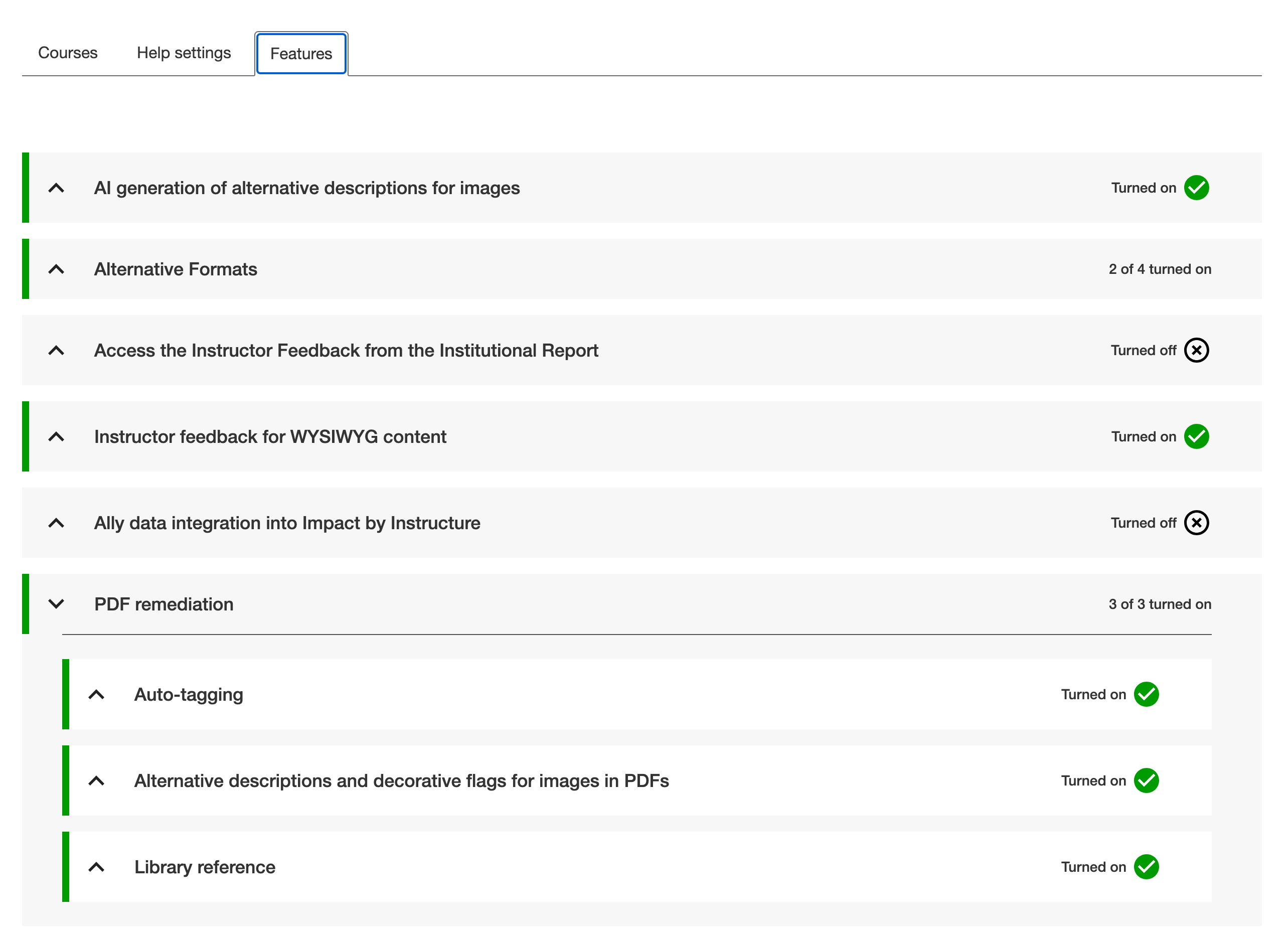
Ally administrators can control each component of this feature at any time from the Ally Configuration settings. This feature takes advantage of two feature flag configuration options in the Ally Configuration tool.
Administrators have the option to turn off the entire alternative text workflow for instructors. When PDF Alt Text is turned on, you can also decide to only provide standard manual alternative text or add the AI powered suggestions of the AI Alt Text Assistant.
The AI Alt Text Assistant feature flag acts as a global setting across content types, so if you already have this turned on for WYSIWYG content, you do not have to take any additional action.
AI Transparency Note, Terms of Use, and Principles
We recommend reviewing the documents linked below (including the updated Transparency Note) as you consider using Ally’s AI Alt Text Assistant in PDF content or rich content. Refer to AI Alt Text Assistant for more information.
Refreshed Configuration Tool Options
The Configuration Tool Features tab has been reorganized by feature type to allow for easy locating and setting based on institutional preferences.
Administrators still have full control over what features are available to instructors when using a more streamlined and organized interface.
Blackboard LMS New Content Editor (Early Access) Improvements
As part of this release, we’ve also included quite a few improvements to the Ally integration within the New Content Editor for Blackboard LMS Documents, including:
Improved how Ally interacts with the Hierarchy within the content block (including Title, Header, Sub header, Paragraph)
Improved how Ally handles images with alternative text and/or those set as decorative within the content block
Fixed an issue that was incorrectly impacting the size of a individual image within a content block
Fixed an issue that prevented consistently identifying broken links in a content block
Fixed an issue that caused broken links removed via the Ally Instructor Feedback Quick Fix to not be accurately reflected in the resulting content in the content block
Fixed an issue in the Instructor Feedback that caused the Quick Fix field to display the previously fixed broken link instead of the current highlighted broken link
Fixed an issue in the Instructor Feedback that sometimes resulted in the “Apply Fix” process getting stuck when fixing a broken link
Fixed an issue in the Instructor Feedback that sometimes caused a previously removed broken link to reappear if it was removed directly in the content editor itself
Improved how text with contrast issues is highlighted and fixed within the Instructor Feedback
Fixed an issue in the Instructor Feedback that caused all content to be set as a header when fixing/changing the heading style for an item in the Quick Fix
Fixed an issue that caused some images without description to not be recognized or listed in the Course Accessibility Report.
Fixed an issue that caused Ally indicators to be visible while in edit mode
Fixed an issue that prevented contrast and broken link issues from being highlighted correctly when found inside a table
Fixed an issue that caused certain images to disappear after fixing an image specific issue from within the Course Accessibility Report
Fixed an issue that prevented the last table in a document from being fixed from within the Course Accessibility Report when multiple tables are present
Fixed an issue that caused parts of the highlighted text in the Instructor Feedback to be hidden instead of remaining visible
Note
Please note the above improvements are specific to the new Content Editor in Blackboard LMS only.
Additional Bug Fixes and Improvements
Fixed an accessibility issue that caused contrast issues on the focus indicator within the Instructor Feedback
Fixed an accessibility issue within the PDF Auto Tagging workflow that prevented the focus indicator from moving to the Learn More button as expected
Fixed an accessibility issue when navigating the Institutional Report with a keyboard that caused the tooltip under the Total Courses pie chart to disappear unexpectedly.
Implemented an accessibility improvement in the Instructor Course report to ensure that each Start button is easily distinguishable when using a screen reader
Fixed an accessibility issue in the Instructor Feedback to ensure the zoom in/ zoom out actions are announced to a screen reader when activated
Fixed an accessibility issue in the Instructor Feedback to ensure the view/hide toggle actions are announced to a screen reader when unselected
Fixed an accessibility issue in the Instructor Feedback PDF title Quick Fix to ensure clearing the input when using the clear button is announced to a screen reader
Fixed an accessibility issue in the Instructor Course Report content list to ensure a proper focus indicator is applied while navigating with a keyboard
Fixed an accessibility issue in the Instructor Course Report to ensure the overall content count is announced to a screen reader
Fixed an issue for D2L Brightspace integrations that caused some departments to disappear from the Directory tab within the Institutional Report when using custom org units
Fixed an issue for Canvas and D2L Brightspace integrations that resulted in missing token integration errors because of an invalid cookie being cached and subsequently rejected by the LMS and requiring reauthorization
Fixed an issue in Moodle that sometimes caused the Alternative Formats download window to display the wrong text for the filename when files were embedded in rich content
Ally 2.19.8 Release to production: September 28, 2026
Bug Fixes and Improvements
Fixed a bug in Blackboard integrations that caused some Documents not to be able to generate audio alternative formats.
Fixed a bug in Canvas integrations that caused Ally not to be able to correctly recognize images within Classic Quizzes which resulted in images with alt text being flagged as missing in the Course Report.
Implemented an accessibility improvement to the focus indicator applied to the Enable Future courses button within the Ally Configuration tool.
Fixed a bug in Canvas integrations that caused an error when attempting to fix any HTML issue from the Course Report.
Fixed an accessibility issue that caused insufficient contrast on the focus indicators for the enable and disable options within the Ally Configuration tool.
Fixed a bug with the Table Header Quick Fix that caused the selected option to disappear when Fix all occurrences was selected.
Fixed an accessibility issue within the Table Header Quick Fix to ensure that the Apply a table header selector is appropriately associated with its visible label.
Implemented an accessibility improvement to the Ally Terms of Use to ensure the Terms of Use text meets minimum color contrast requirements.
Fixed an issue in Blackboard where instructors using the Course Accessibility Report to fix issues in Documents were unexpectedly able to remove content incorrectly identified as links when embedding LTI Video links including Yuja, Echo360, Panopto, Kaltura and other third-party videos.
Fixed an issue in Canvas integration where custom CSS was conflicting with Ally CSS and prevented it from loading correctly causing an error when viewing the Instructor Feedback and/or Course Report Preview.
Ally 2.19.7 Release to production: September 17, 2026
Bug Fixes and Improvements
Updated the AI Alt Text Assistant to take advantage of several additional improvements in the underlying AWS Bedrock AI models. For more information, visit AI Alt Text Transparency Note.
Fixed a bug in the Institutional Report Directory Tab that sometimes caused the number of courses and items to show as ‘0’ until you refresh the report.
Fixed a bug in the Institutional Report that caused the label for the last month to not be visible.
Fixed a bug in Moodle integrations that sometimes prevented the instructor from updating an image description in the Ally Instructor Feedback.
Fixed a bug that caused a display issue in the Course Accessibility Report when file names exceeded a certain length.
Implemented several improvements to Ally’s underlying processing logic when handling large volumes of events.
Ally 2.19.6 Release to production: September 7, 2026
Bug Fixes and Improvements
Fixed an issue in Blackboard integrations where links without discernible text within the Title of a Document could not be fixed with the quick fix when using the Course Accessibility Report.
Fixed an issue in Blackboard integrations where alt text and decorative image values entered through the Ally Instructor Feedback or the Instructor Feedback via the Course Accessibility Report did not save back to the Image Block metadata as expected.
Fixed an issue in Canvas integrations that caused the Alternative Formats window to not scale correctly with the browser screen size when using the file preview.
Fixed an issue in Canvas integrations that created a role conflict when a user had both student and instructor permissions across multiple courses resulting in inconsistent Course Accessibility Report launch behavior.
Implemented improvements to Ally’s backend course sync processes when generating monthly reports.
Ally 2.19.5 Release to production: August 27, 2026
Bug Fixes and Improvements
Fixed an issue in the new Usage Report that prevented the department ID from filtering both the UI and the export when drilling into the Directory tab.
Fixed an issue in Blackboard integrations that prevented alternative text and decorative image settings marked in Ally from saving back to Blackboard Tests when using either the Instructor Feedback or Course Accessibility Report Instructor Feedback.
Fixed an issue in Blackboard integrations that prevented instructors from overwriting existing alternative text on an image when using the Course Accessibility Report.
Fixed an issue within Ally’s alternative format processing that sometimes stripped the first word after each bullet point when creating the HTML alternative formats from Word documents containing bulleted lists.
Fixed an issue in the Moodle 5 plugins that prevented Ally from flagging images lacking alternative text in the rich content if the image description was only entered as spaces.
Fixed an issue that caused Ally to incorrectly flag some Word documents with headings issues despite headings being present.
Fixed a minor issue within the Ally Instructor Feedback error messaging that shifted the close button for the Oops error modal to the bottom of the screen.
Implemented performance improvements for the D2L Brightspace course loading process to avoid timeouts while processing large volumes of courses.
Ally 2.19.4 Release to production: August 17, 2026
Note
Reporting Bearer Token Reset: The reset of Ally Reporting API tokens was completed successfully on August 14th. Going forward, administrators should create a new token in the institutional report to restore connection in any external reporting tools.
Bug Fixes and Improvements
Fixed an issue in Blackboard Tests that caused the Ally score indicator to disappear from an image embedded within the text block when editing image alt text.
Fixed an issue with Canvas Course Export/Import and Copies where the associated Ally course copy processes (that carry over data such as alternative text, decorative images and library references) were failing in certain scenarios where a course file was deleted and replaced during the Canvas copy/import process.
Fixed an issue in the New Files Experience in Canvas that caused the Ally score indicators to disappear completely from the screen when scaled down to a small enough screen size.
Fixed an issue in Canvas File Preview within the New Files Experience that sometimes caused the Alternative Formats Icon to sporadically appear and disappear.
Fixed an issue in Canvas New Files Experience that caused the Alternative Formats modal to remove the Download Original File icon when scaled down to a small enough screen size.
Fixed an issue in Canvas that caused a delay in showing the Alternative Format icon when navigating from file to file.
Fixed an issue in Canvas that caused RTF files to be mistakenly recognized as Word documents and included in the Course Report and course score despite not being able to be opened or previewed.
Fixed an issue that caused Ally to report certain PPTX files as missing language when the language was set correctly in the document.
Fixed an issue with Ally’s broken link checking in the LMS that caused some valid links to be seen as broken depending on how those links were created in the WYSIWYG content.
Improved the accessibility and color contrast of the Ally Alternative Format indicator when using High Contrast Modes.
Improved Ally’s language validation checks on PDF documents to help minimize certain scenarios where the selected language in the PDF Quick Fix could not be saved.
Implemented performance improvements in Ally when interacting with the Moodle ally_filter plugin.
Ally 2.19.3 Release to production: August 7, 2026
Moodle 5.2 Plugins
As part of Ally’s ongoing support for Moodle, the Ally plugins for Moodle 5.2 are available. Additional details about Ally’s support for Moodle can be found within the Ally Moodle Configuration Documentation.
Note
Ally creates branches for each supported Moodle version as part of our open-source plugin strategy to allow for targeted development and bug fixing. Current versions of the plugins will be found in the corresponding STABLE branches in our repository. It is always recommended that admins use the stable branches to ensure no new unintended changes are introduced when plugins are updated.
Bug Fixes and Improvements
Fixed a bug in Moodle that caused some HTML content to be unavailable when the option to Exclude unused files in the Ally plugins was selected.
Ally 2.19.2 Release to production: July 30, 2026
Bug Fixes and Improvements
Improved the Instructor Feedback experience for Blackboard instructors to allow the content preview to show HTML content blocks as viewable content instead of just saying “UNSAFE_HTML” when using the Course Accessibility Report.
Fixed an issue for Blackboard instructors where images that were inserted without a description inside of a table within Documents were not being flagged correctly by Ally.
Fixed an issue within Ally’s custom help workflows that prevented inserted URLs from resolving when clicked.
Fixed an issue in Blackboard that prevented the instructor from applying a new font color when using the quick fix for highlighted contrast issues within Documents.
Fixed a workflow issue in the OCR PDF Quick fix that resulted in an oops error if the instructor first applied the OCR fix and then unselected Download Original Format.
Fixed an issue in the new Ally Usage Report that caused downloads to timeout unexpectedly when selecting a longer date range. Please note that admins should clear the browser cache now that this fix has been released before attempting a new download.
Ally 2.19.1 Release to production: July 22, 2026
Bug Fixes and Improvements
Fixed an issue that caused the screenshot in the new feature flag for Auto Tagging PDFs within the Configuration options to be distorted.
Fixed an issue with our Usage Data cache that resulted in some administrators being unable to see older historical data in the new UI report when filtering longer time periods.
Fixed an issue in Blackboard when images are inserted using a URL that caused alternative text to be removed from all identical images instead of just the selected image.
Fixed an issue in Blackboard that prevented alternative text from being saved correctly when entered in the Instructor Feedback for images inserted using a URL.
Updated the Canvas Hostname within Ally’s LTI configuration details to ensure we are referencing sso.canvaslms.com in all applicable areas.
Implemented an increased timeout for the Ally Reporting API to avoid exceeding the timeout limits for larger client data sets that caused an error in the reporting tool.
Ally 2.19 Release to production: July 13, 2026
PDF Tagging Quick Fix Now Available for Instructors
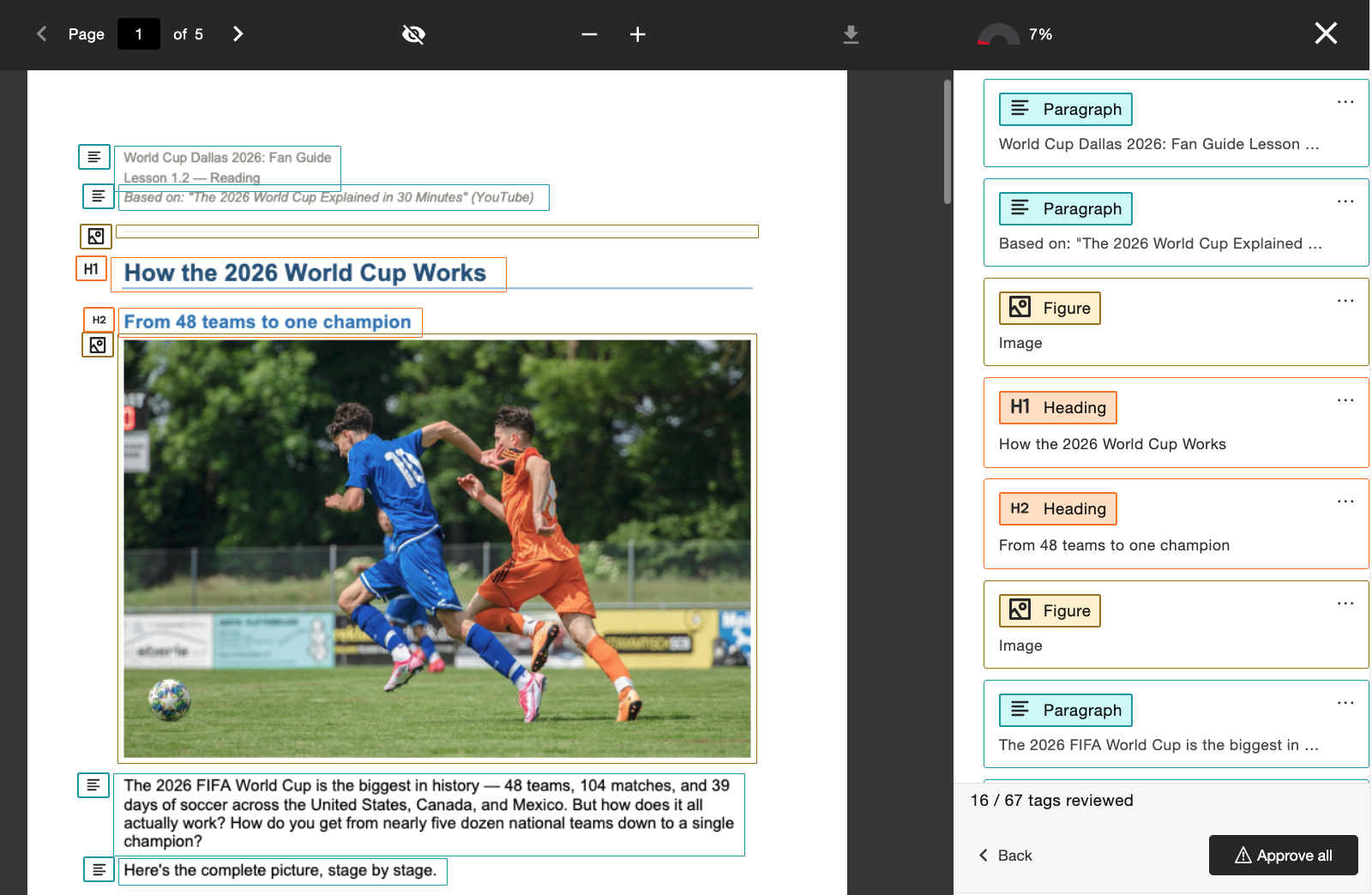
As we continue to expand PDF remediation capabilities within the Ally Instructor Feedback, instructors can now Auto-tag untagged PDFs to apply tags to the document and improve the overall accessibility for students. This feature is now available to all institutions after the initial Early Adopter Program.
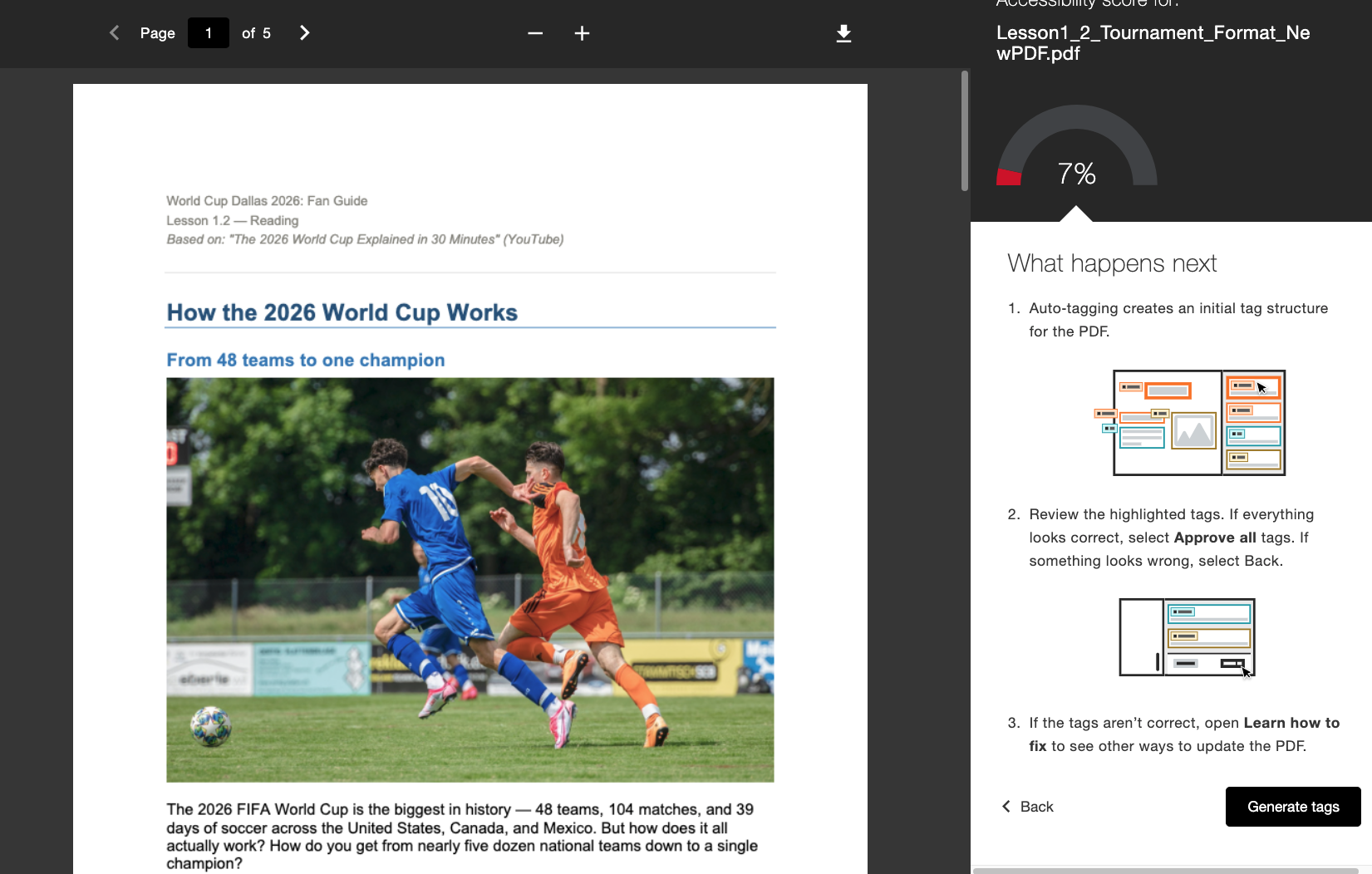
When enabled by the Administrator, instructors will see a new Generate Tags workflow directly embedded in the Instructor Feedback. Instructors remain in control after generating tags with the ability to review the new tag structure while scrolling through the tag tree on the right side of the screen before deciding to approve the applied tags. Instructors can use the progress indicator at the bottom to see how many tags they have approved before selecting Approve all when they are satisfied.
Administrators can control access to this feature through the Ally Configuration tool by turning it on or off depending on institutional preference.
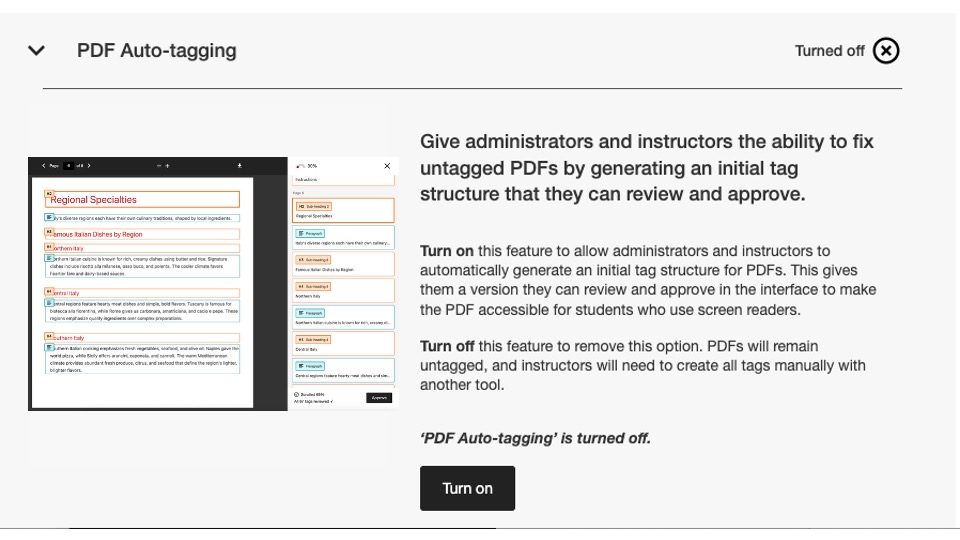
As part of this release, this configuration flag is turned off by default. Admins must turn it on for instructors to start using it.
For more information on the new Usage Report, refer to the help site topic PDF Remediation Options.
New Usage Report Now Available
As part of our continued focus on making Ally data easily accessible and available to administrators, we are excited to release the next version of the Ally Usage Report built directly into the user interface.
The usage report shows details about how your students and instructors are using Ally including how many alternative format downloads and instructor fixes are happening within a given time period.
This new and improved report is now available directly within the Institutional Report without requiring the need to download an excel file to help provide easier and faster insights into your institutions’ engagement with Ally. This replaces Usage tab in your Institutional Report and does not require any additional steps to enable.
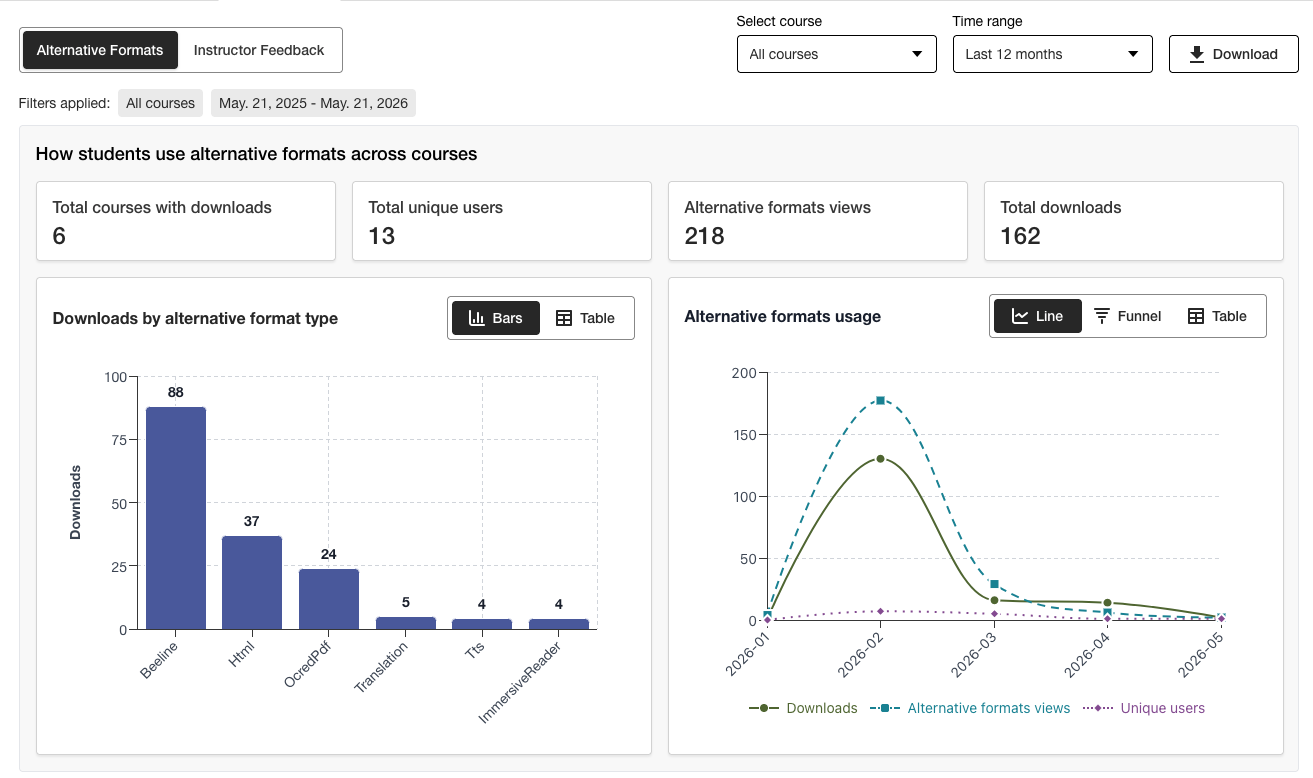
Admins can view important information at a glance and utilize the new filtering options and chart drill downs to easily get deeper insights into the data.
The Excel version is still available for downloading using the Download feature for users who prefer to access the data in another format.
For more information on the new Usage Report, refer to the following help site topics:
Bug Fixes
Fixed a bug in Canvas integrations where updating a document title through Ally incorrectly changed the document’s published status in the course.
Ally 2.18.10 Release to production: July 2, 2026
Bug Fixes and Improvements
Fixed a bug in the Instructor Feedback that caused previously applied image descriptions to incorrectly carry over when an existing image was replaced by a new image to fix a contrast issue.
Fixed a bug in the AI Alt Text Assistant that caused an “Oops” error if the instructor manually added a new description after clicking Autogenerate Description.
Fixed a bug in the Alternative Formats that caused the MP3 Audio format to incorrectly change the language of HTML content.
Fixed a bug in the PDF language Quick Fix that in some cases allowed instructors to apply an incorrect language despite Ally’s language validation check.
Fixed a bug in Blackboard integrations that caused the File Caption in Image blocks to be removed when the instructor fixed the missing image description issue from the Course Accessibility Report.
Implemented several improvements in Ally’s underlying OCR technology to improve quality, fidelity and conversion rates when processing scanned PDFs for alternative formats and PDF Quick Fixes.
Ally 2.18.9 Release to production: June 22, 2026
Bug Fixes and Improvements
Fixed a bug in Moodle where in some cases images embedded in a page were not shown in the Instructor Feedback Preview when launching from the Course Accessibility Report.
Fixed a bug in Canvas Pages that prevented image description fixes from being applied after replacing a low contrast image with the File Upload option.
Fixed an accessibility issue in Moodle to make Ally indicator icons focusable during navigation.
Ally 2.18.8 Release to production: June 11, 2026
Bug Fixes and Improvements
Fixed a bug in Moodle that caused users to incorrectly see two tooltip messages when using Ally indicators.
Improved the wording within the Ally Configuration tool descriptions and buttons to show as Turn on and Turn off.
Ally 2.18.7 Release to production: June 1, 2026
Bug Fixes and Improvements
Fixed a bug in Moodle that caused the accessibility score indicator to be unintentionally hidden when the TinyMCE editor is expanded on the page.
Fixed a bug in Blackboard that caused heading levels within (Ultra) Documents to not be correctly transformed in the resulting HTML Alternative Formats.
Fixed a bug in the Instructor Feedback that incorrectly showed the “Remaining issues to resolve” message after getting a piece of content to 100%.
Fixed a bug in Blackboard that caused images marked as decorative within the Document to be shown as a link in the Course Accessibility Report Instructor Feedback preview.
Fixed a bug in the Instructor Feedback that incorrectly showed the link twice when we try to fix the broken link.
Ally 2.18.6 Release to production: May 26, 2026
Bug Fixes and Improvements
Implemented several processing improvements to provide better handling of Canvas LMS Rate limits to minimize the number of times Ally hits these limits over the course of regular content processing.
Ally 2.18.5 Release to production: May 7, 2026
Bug Fixes and Improvements
Fixed an accessibility issue in Canvas where the Alternative Formats option in the dropdown menu did not respond correctly to keyboard navigation inputs.
Fixed a minor bug in Canvas integrations that caused the drop-down menu not to close after clicking the Alternative Formats option.
Fixed a bug in the Instructor Feedback PDF Quick Fix workflow that caused the “Try Again” button to navigate to the wrong starting point within the Feedback Panel.
Improved handling for UNSAFE_HTML files in Blackboard integrations to detect and skip scoring of these files entirely and avoid the need to remove them from the reports as a second step.
Fixed a bug for Blackboard integrations that caused File Attachments to be incorrectly converted to links when fixing issues in Documents from within the Course Accessibility Report.
Implemented several follow-up improvements and optimizations to Ally’s real-time processing queues in the US region.
Ally 2.18.4 Release to production: April 30, 2026
Bug Fixes and Improvements
Fixed a bug in Blackboard Documents that caused Ally to incorrectly identify headings being set at the wrong level and prevented instructors from receiving 100% even after fixing all issues.
Implemented improvements to the detection of UNSAFE_HTML files in Blackboard to allow for easier removal from Ally’s scoring processes.
Fixed an accessibility issue that prevented the button for Download Original File from showing on smaller screens.
Fixed an issue with Ally’s Vimeo caption check that caused errors when a Vimeo video was detected in rich content if the Vimeo integration was not setup in Ally Configuration.
Ally 2.18.3 Release to production: April 20, 2026
Document Processing Improvements
As part of our ongoing commitment to continuously improve quality and fidelity of content within Ally’s Instructor Feedback and Alternative Format processing, the 2.18.3 release brings critical improvements and enhancements to the underlying document conversion process that powers these key user features.
Ally’s document processing logic has been upgraded to provide smarter, faster, and higher quality conversion when dealing with files uploaded into the course. This brings several improvements to instructors and students, including:
Decreased cases of false positive contrast issues that appear in the Instructor Feedback File Previews
Improved handling of shapes within PowerPoint presentations, including conversion of things like arrows within the document
Improved recognition of alternative text applied to shapes after converting to PDF
Improved announcement of decorative images within alternative formats, including the audio alternative format
Improved recognition of images and application of Figure tags when converting to PDF
In addition to these user facing improvements, this update also includes optimization of Ally’s underlying infrastructure to help improve general performance and speed of processing content as it is received from the LMS.
Note
Our teams will continue to analyze and identify additional possible improvements or edge cases that may need to be addressed in the future.
Upgraded AI Alt Text Assistant
The AI Alt Text Assistant has been updated to take advantage of several additional improvements in the underlying AWS Bedrock AI models, including decreasing the number of timeouts when requesting suggested alternative text and improved handling to avoid hallucinations when analyzing specific images.
As a reminder, the updated AI Alt Text Assistant Transparency Note can be viewed here with additional details about this feature: https://help.anthology.com/ally-lms/en/administrators/ai-alt-text-assistant.html
Bug Fixes and Improvements
Fixed a bug in the Instructor Feedback that caused incorrect highlighting to be applied in the preview when the PDF still doesn’t have the correct language set after attempting to apply the fix.
Fixed a bug in the Instructor Feedback where clicking Try Again when a PDF still doesn’t have the correct language set did not take the instructor back to the language selection panel.
Fixed a bug in Canvas that prevented the instructor from opening the Instructor Feedback on an OCRed PDF that also had a fixed title.
Fixed an accessibility issue in the Instructor Feedback panel that incorrectly shifted focus between elements when using the Back button.
Fixed an accessibility issue in the Alternative Formats modal window that caused the Original File format to not be downloaded when navigating and selecting with a keyboard.
Ally 2.18.2 Release to production: April 9, 2026
Bug Fixes and Improvements
Fixed an issue in Blackboard where Ally indicators did not show for file attachments within Assignment instructions.
Fixed a bug where in some cases while navigating the Instructor Feedback panel for WYSIWYG content, clicking the Bold or Italic icons in the rich content editor would activate the Auto-generate button for the AI Alt Text Assistant.
Fixed a bug where in some cases replacing an image with contrast issues with a brand-new image via the Instructor Feedback file upload did not update the document preview.
Fixed a bug in Canvas that prevented the Ally indicators from showing correctly on a Canvas Syllabus when Show recent announcements on Course home page was enabled.
Ally 2.18.1 Release to production: April 2, 2026
Bug Fixes and Improvements
Updated Moodle plugins for Moodle 4.5 and Moodle 5 to include bugfix backports to address minor bugs.
Fixed an issue with the AI Alt Text Assistant where in some cases instructors were presented with an error message when attempting to suggest alternative text due to the primary model being unavailable.
Ally 2.18 Release to production: March 26, 2026
New Library Reference Admin Feature Flag Now Available
As part of our continued effort to provide more granular levels of control for administrators looking to manage the PDF remediation experience for Instructors, a new feature flag is available in the Ally Configuration options that allows the Library Reference workflow to be turned off.
Administrators can now turn off the Library Reference feature to remove the instructor's ability to add Library References to PDFs when the original file is unavailable while working through various PDF-specific issues. This additional layer of control will help align this feature with institutional preferences and processes and provides additional flexibility when determining how best to manage fixing PDFs at scale.
Image 1: New Feature Flag within the Ally Configuration Options
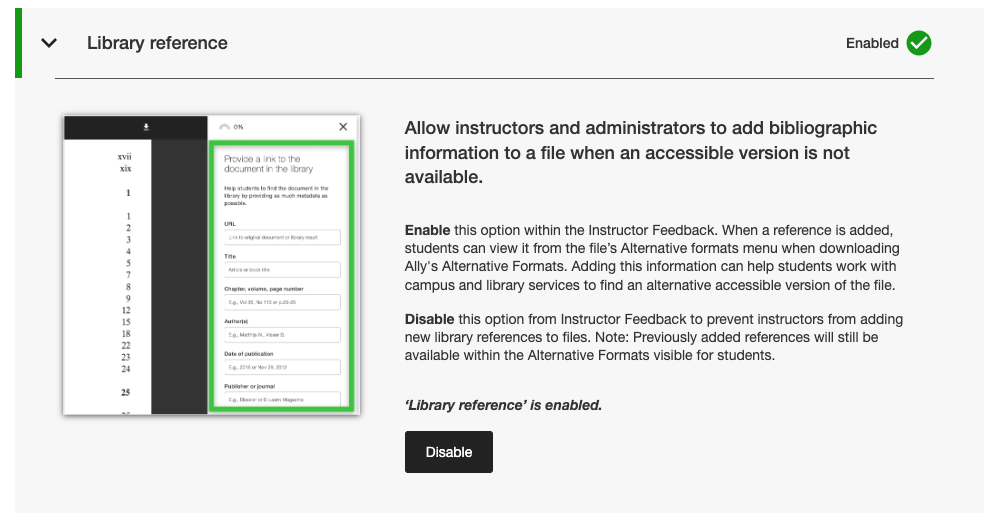
Administrators can find this new feature flag within the Features tab in the Ally Configuration tool listed under Library reference.
Note
Library References will remain turned on by default with this release. Turning off Library References with this new feature flag will not remove previously added Library References from content and will only prevent new ones being added going forward.
Bug Fixes and Improvements
Fixed a bug in Canvas that caused the Ally indicators column to disappear from the New Files area when the screen was resized.
Fixed an accessibility issue in Canvas integrations that prevented correct focus from being applied when using a keyboard to navigate Ally accessibility score indicators within Canvas Pages.
Fixed a broken web link in the Ally Configuration settings for the AI Alt Text Assistant Terms of Use.
Migrated our SMTP Email services for the backend infrastructure that handles custom help email flows.
Ally 2.17.5 Release to production: March 12, 2026
Blackboard UNSAFE_HTML Files No Longer Included in Reports
As part of our ongoing commitment to instructor efficiency and clarity in reporting, the Ally reports will no longer consider UNSAFE_HTML files as part of the course content for Blackboard integrations.
Image 1: Course Report with UNSAFE_HTML included to show past behavior.
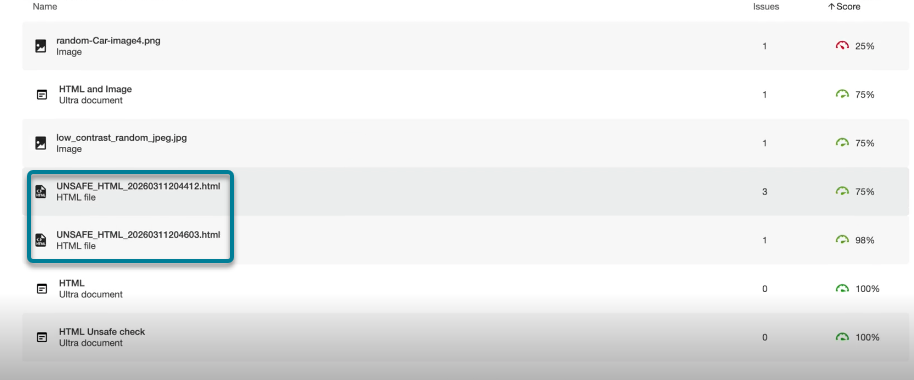
As of this release, UNSAFE_HTML files automatically created in the content folder when using HTML snippets inside a Blackboard Document will be filtered out of the Institutional and Course reports. Previously, these files would show in the report but instructors were not able to fix the identified issues for missing language and title and often turned to other workarounds to remove these files from the course to remove them from the reports.
Note
This change will remove all current and past UNSAFE_HTML files from consideration. Depending on how often these content items were used in a course, this may result in a slight increase or decrease in the course score based on the distribution of files, HTML and WYSIWYG content.
As part of a future release, we will look to avoid processing these files entirely when onboarding a course to help improve general performance and scanning.
Bug Fixes and Improvements
Fixed an issue in Blackboard integrations that caused a discrepancy with scoring for images when comparing the score within the Instructor Feedback of a Document to the score in the Course Accessibility Report when images were set to View Only or Download Only. The Course Accessibility Report was incorrectly missing previously applied alternative text and lowering the score despite this showing as fixed in the Instructor Feedback. Note this applies to images in Ultra Documents as part of the course and the Learning Object Repository.
Fixed an issue in the PDF Missing Language Quick Fix that allowed the Apply button to be clickable before the instructor selected a language.
Improved the styling on the Library Reference links in the Alternative Formats download window so that reference links show as clickable links and avoid potential contrast issues.
Ally 2.17.4 Release to production: March 5, 2026
Language Preselection is now available for missing Language PDF Quick Fix
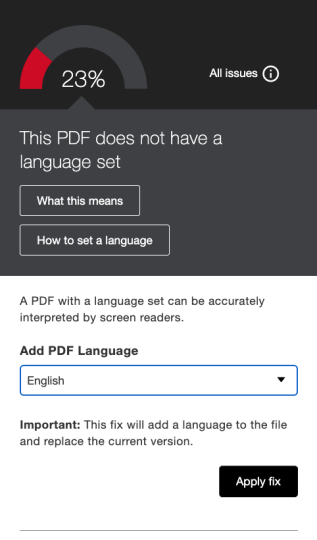
Instructors fixing PDFs with missing languages in the Ally Instructor Feedback Quick fix can now benefit from the language being detected and preselected in the drop down to avoid additional scrolling while saving time when fixing this common issue.
Ally’s built-in language detection will analyze the PDF to determine the appropriate language where possible. If no language is detected, instructors can still select one manually to apply the fix and have Ally save the change to the PDF as expected.
Image 1: Add Language Quick Fix with English selected
Moodle 5.1 Plugins are now available
As part of Ally’s ongoing support for Moodle, the Ally plugins for Moodle 5.1 are available. Additional details about Ally’s support for Moodle can be found within the Ally Moodle Configuration Documentation.
Note
Ally creates branches for each supported Moodle version as part of our open-source plugin strategy to allow for targeted development and bug fixing. Current versions of the plugins will be found in the corresponding STABLE branches in our repository. It is always recommended that admins use the stable branches to ensure no new unintended changes are introduced when plugins are updated.
Bug Fixes and Improvements
Fixed an issue in Blackboard where instructors using the Course Accessibility Report to fix issues in Documents were unexpectedly able to remove content incorrectly identified as links when embedding HTML blocks, audio and/or Video Studio videos.
Fixed an issue for all LMS integrations in the Institutional Report where the Export dropdown was hidden on smaller screens and/or browser sizes.
Fixed an issue for all LMS integrations where applying a broken link quick fix for WYSIWYG content containing multiple broken links at the same time sometimes resulted in an infinite loading spinner.
Implemented several frontend improvements to the PDF Instructor Feedback Preview infrastructure to support our continued advancement with PDF remediation features.
Implemented additional best practice improvements for Canvas integration HTTP requests to ensure the use of User-Agent Headers.
Ally 2.17.3 Release to production: January 30, 2026
Bug Fixes and Improvements
Fixed an issue in Ally’s Instructor Feedback for scanned PDF files where (after opening “Learn how to fix PDFs”) clicking Back didn’t always return users to the Instructor Feedback view and sometimes required a second click.
Ally 2.17.2 Release to production: January 15, 2026
Bug Fixes and Improvements
Fixed an issue in the Institutional Report where the Download CSV option was hidden when exporting from the Courses tab if the search returned one or fewer courses.
Fixed a bug in the Usage Report where the Download usage report button stayed disabled after downloading a report and selecting a new date range.
Fixed a keyboard accessibility issue in the Canvas Files area where focus was lost when navigating to the accessibility score. Focus now remains visible during keyboard navigation.