Bb Annotate
You can use BB Annotate for inline grading in your courses. Bb Annotate offers a more robust feature set to provide customizable feedback to students. Features include a sidebar summary view, freehand drawing tools, various color selections, and much more.
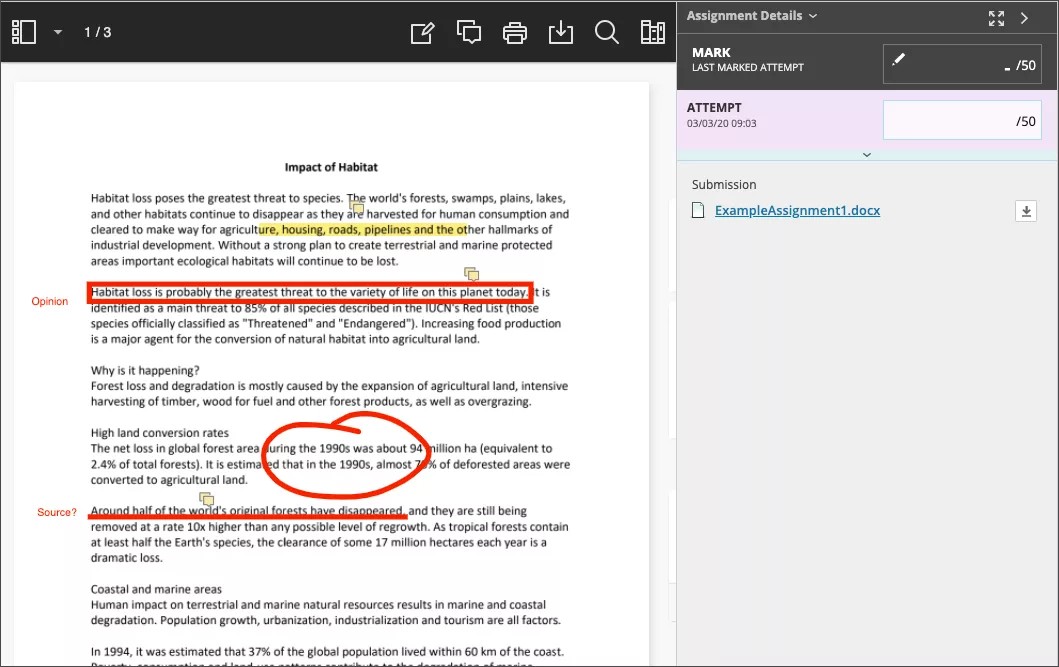
BB Annotate grading workflow
On the Assignment Submission page, supported file types open in the browser. You can view and annotate these document types in the browser:
Microsoft® Word (DOC, DOCX)
Microsoft® PowerPoint®(PPT, PPTX)
Microsoft® Excel®(XLS, XLSX)
OpenOffice® Documents (ODS, ODT, ODP)
Digital Images (JPEG, JPG, PNG, TIF, TIFF, TGA, BMP, HEIC)
Source code (Java, PY, C, CPP, etc)
Medical Images (DICOM, DICM, DCM)
PDF
PSD
RTF
TXT
WPD
Note
Office Suite Macros, such as Visual Basic, aren't supported.
Annotation sessions expire after one hour. You'll receive a warning message before your session expires. Your completed annotations, feedback, and files are saved on the page. When you return, you can resume working.
Note
Animated gifs display only the first frame in the pdf viewer for annotation purposes. Download the submission to view the animated gif.
Original formatting and embedded images are preserved. If a student submitted an unsupported file, you're prompted to download it. Assignment submissions created through the editor aren't compatible with inline grading.
Menu options from left to right

Important
As part of the responsive design, the menu display changes based on the screen size. On medium and small screens, the Document View settings display the page number you're viewing. Annotation tools are stacked under the View Annotation Tools icon. On small screens, the Content Library is hidden.
Sidebar: View Thumbnail, Outline, or Annotation views of the submission.
Pages: Use the arrows to jump to different pages in the submission.
Pan: Move the submission on the page.
Zoom and Fit: Zoom in and out of the submission or adjust the view to fit the page, fit the width, or select the best fit.
Annotation tools: Select each tool to view the tool properties.
Tip
Your selection for each tool is saved between submissions.
Drawing, Brush, and Eraser: Draw freehand on the submission with various colors, thickness, and opacity. Select the eraser to remove annotations. You can erase parts of a freehand drawing with the eraser or select the Delete icon to delete the whole drawing.
Image or Stamp: Choose a preloaded stamp or create your own customized stamp or image to add to the submission.
Undo: Undo or revert the last thing you did.
Redo: Repeat the last thing you did.
Text: Add text directly on the submission. You can move, edit, and change the text and select the font, size, alignment, and color of the text.
Shapes: Choose Line, Arrow, Rectangle, Ellipse, Polygon, and Polyline. Each shape has its own settings to change the color, width, opacity, and more.
Comment: Provide feedback in comments. Your comments appear in a panel next to the submission. You can make your comments anonymous by selecting the Anonymous button. You only have the option to make anonymous comments if your institution has turned them on.
Note
Students can access the annotated files but won't be able to add annotations in their submissions.
Print or Download: Print or download the submission with the annotations.
Warning
A known issue with some browsers' built-in PDF viewer may not display all your annotations. Please view annotated PDFs in a native PDF viewer such as Adobe Acrobat.
Search: Search the submission for specific text.
Content Library: Create a bank of reusable comments. You can add, edit, delete, and search comments in the library. You can also add a comment directly to the submission page from the menu. Select the plus sign to add a new comment to the Content Library. You can Place comment, Copy to Clipboard, Edit, or Delete content from the library. Type keywords or phrases to search for saved comments.<
Note
The Content Library is only available in SaaS environments.
Highlighter: Select specific portions of the submission to highlight. As you highlight text on the submission, an additional menu opens. You can highlight, strikethrough, underline, squiggle, or comment on the highlighted section.
Watch a video about Annotate in Blackboard
The following narrated video provides a visual and auditory representation of some of the information included on this page. For a detailed description of what is portrayed in the video, open the video on Vimeo.