Releaseopmerkingen 2026
Note
Deze documentatie is vertaald met behulp van AI-ondersteunde machinevertaling. Vertalingen worden geleverd 'zoals ze zijn', zonder garantie van de juistheid ervan. De Engelse versie van deze inhoud is de officiële en leidende versie.
Ally 2.19.8 Release to production: September 28, 2026
Bug Fixes and Improvements
Fixed a bug in Blackboard integrations that caused some Documents not to be able to generate audio alternative formats.
Fixed a bug in Canvas integrations that caused Ally not to be able to correctly recognize images within Classic Quizzes which resulted in images with alt text being flagged as missing in the Course Report.
Implemented an accessibility improvement to the focus indicator applied to the Enable Future courses button within the Ally Configuration tool.
Fixed a bug in Canvas integrations that caused an error when attempting to fix any HTML issue from the Course Report.
Fixed an accessibility issue that caused insufficient contrast on the focus indicators for the enable and disable options within the Ally Configuration tool.
Fixed a bug with the Table Header Quick Fix that caused the selected option to disappear when Fix all occurrences was selected.
Fixed an accessibility issue within the Table Header Quick Fix to ensure that the Apply a table header selector is appropriately associated with its visible label.
Implemented an accessibility improvement to the Ally Terms of Use to ensure the Terms of Use text meets minimum color contrast requirements.
Fixed an issue in Blackboard where instructors using the Course Accessibility Report to fix issues in Documents were unexpectedly able to remove content incorrectly identified as links when embedding LTI Video links including Yuja, Echo360, Panopto, Kaltura and other third-party videos.
Fixed an issue in Canvas integration where custom CSS was conflicting with Ally CSS and prevented it from loading correctly causing an error when viewing the Instructor Feedback and/or Course Report Preview.
Ally 2.19.7 Release to production: September 17, 2026
Bug Fixes and Improvements
Updated the AI Alt Text Assistant to take advantage of several additional improvements in the underlying AWS Bedrock AI models. For more information, visit AI Alt Text Transparency Note.
Fixed a bug in the Institutional Report Directory Tab that sometimes caused the number of courses and items to show as ‘0’ until you refresh the report.
Fixed a bug in the Institutional Report that caused the label for the last month to not be visible.
Fixed a bug in Moodle integrations that sometimes prevented the instructor from updating an image description in the Ally Instructor Feedback.
Fixed a bug that caused a display issue in the Course Accessibility Report when file names exceeded a certain length.
Implemented several improvements to Ally’s underlying processing logic when handling large volumes of events.
Ally 2.19.6 Release to production: September 7, 2026
Bug Fixes and Improvements
Fixed an issue in Blackboard integrations where links without discernible text within the Title of a Document could not be fixed with the quick fix when using the Course Accessibility Report.
Fixed an issue in Blackboard integrations where alt text and decorative image values entered through the Ally Instructor Feedback or the Instructor Feedback via the Course Accessibility Report did not save back to the Image Block metadata as expected.
Fixed an issue in Canvas integrations that caused the Alternative Formats window to not scale correctly with the browser screen size when using the file preview.
Fixed an issue in Canvas integrations that created a role conflict when a user had both student and instructor permissions across multiple courses resulting in inconsistent Course Accessibility Report launch behavior.
Implemented improvements to Ally’s backend course sync processes when generating monthly reports.
Ally 2.19.5 Release to production: August 27, 2026
Bug Fixes and Improvements
Fixed an issue in the new Usage Report that prevented the department ID from filtering both the UI and the export when drilling into the Directory tab.
Fixed an issue in Blackboard integrations that prevented alternative text and decorative image settings marked in Ally from saving back to Blackboard Tests when using either the Instructor Feedback or Course Accessibility Report Instructor Feedback.
Fixed an issue in Blackboard integrations that prevented instructors from overwriting existing alternative text on an image when using the Course Accessibility Report.
Fixed an issue within Ally’s alternative format processing that sometimes stripped the first word after each bullet point when creating the HTML alternative formats from Word documents containing bulleted lists.
Fixed an issue in the Moodle 5 plugins that prevented Ally from flagging images lacking alternative text in the rich content if the image description was only entered as spaces.
Fixed an issue that caused Ally to incorrectly flag some Word documents with headings issues despite headings being present.
Fixed a minor issue within the Ally Instructor Feedback error messaging that shifted the close button for the Oops error modal to the bottom of the screen.
Implemented performance improvements for the D2L Brightspace course loading process to avoid timeouts while processing large volumes of courses.
Ally 2.19.4 Release to production: August 17, 2026
Opmerking
Reporting Bearer Token Reset: The reset of Ally Reporting API tokens was completed successfully on August 14th. Going forward, administrators should create a new token in the institutional report to restore connection in any external reporting tools.
Bug Fixes and Improvements
Fixed an issue in Blackboard Tests that caused the Ally score indicator to disappear from an image embedded within the text block when editing image alt text.
Fixed an issue with Canvas Course Export/Import and Copies where the associated Ally course copy processes (that carry over data such as alternative text, decorative images and library references) were failing in certain scenarios where a course file was deleted and replaced during the Canvas copy/import process.
Fixed an issue in the New Files Experience in Canvas that caused the Ally score indicators to disappear completely from the screen when scaled down to a small enough screen size.
Fixed an issue in Canvas File Preview within the New Files Experience that sometimes caused the Alternative Formats Icon to sporadically appear and disappear.
Fixed an issue in Canvas New Files Experience that caused the Alternative Formats modal to remove the Download Original File icon when scaled down to a small enough screen size.
Fixed an issue in Canvas that caused a delay in showing the Alternative Format icon when navigating from file to file.
Fixed an issue in Canvas that caused RTF files to be mistakenly recognized as Word documents and included in the Course Report and course score despite not being able to be opened or previewed.
Fixed an issue that caused Ally to report certain PPTX files as missing language when the language was set correctly in the document.
Fixed an issue with Ally’s broken link checking in the LMS that caused some valid links to be seen as broken depending on how those links were created in the WYSIWYG content.
Improved the accessibility and color contrast of the Ally Alternative Format indicator when using High Contrast Modes.
Improved Ally’s language validation checks on PDF documents to help minimize certain scenarios where the selected language in the PDF Quick Fix could not be saved.
Implemented performance improvements in Ally when interacting with the Moodle ally_filter plugin.
Ally 2.19.3 In productie genomen: 7 augustus 2026
Moodle 5.2-plug-ins
Als onderdeel van de voortdurende ondersteuning van Moodle door Ally zijn de Ally-plug-ins voor Moodle 5.2 nu beschikbaar. Meer informatie over de ondersteuning van Ally voor Moodle is te vinden in de documentatie over het configureren van Ally voor Moodle.
Opmerking
Ally maakt branches aan voor elke ondersteunde Moodle-versie als onderdeel van onze open-source plug-instrategie om gerichte ontwikkeling en het verhelpen van bugs mogelijk te maken. De huidige versies van de plug-ins zijn te vinden in de bijbehorende STABLE-branches in onze repository. Het wordt beheerders altijd aangeraden om de stabiele takken te gebruiken, om te voorkomen dat er bij het bijwerken van plug-ins onbedoelde wijzigingen worden doorgevoerd.
Verholpen bugs en verbeteringen
Er is een fout in Moodle verholpen waardoor bepaalde HTML-inhoud niet beschikbaar was wanneer de optie Ongebruikte bestanden uitsluiten in de Ally-plug-in was geselecteerd.
Ally 2.19.2 In productie genomen: 30 juli 2026
Verholpen bugs en verbeteringen
De ervaring met de feedbackfunctie voor docenten in Blackboard is verbeterd, zodat in het inhoudsvoorbeeld HTML-inhoudsblokken nu als zichtbare inhoud worden weergegeven, in plaats van dat er alleen ‘UNSAFE_HTML’ wordt weergegeven bij het gebruik van het toegankelijkheidsrapport van de cursus.
Er is een probleem opgelost voor Blackboard-docenten waarbij afbeeldingen die zonder beschrijving in een tabel binnen 'Documenten' waren ingevoegd, niet correct door Ally werden gemarkeerd.
Er is een probleem opgelost in de aangepaste hulpworkflows van Ally waardoor ingevoegde URL’s niet werden omgezet wanneer erop werd geklikt.
Er is een probleem in Blackboard verholpen waardoor de docent geen nieuwe lettertypekleur kon toepassen bij het gebruik van de snelle oplossing voor gemarkeerde contrastproblemen in 'Documenten'.
Er is een probleem met de workflow in de OCR PDF-snelcorrectie verholpen dat leidde tot een ‘oops’-foutmelding wanneer de docent eerst de OCR-correctie toepaste en vervolgens de optie ‘Download origineel formaat’ uitschakelde.
Er is een probleem opgelost in het nieuwe Ally-gebruiksrapport, waardoor het downloaden onverwacht afbrak bij het selecteren van een langere periode. Houd er rekening mee dat beheerders, nu deze oplossing is uitgebracht, de browsercache moeten wissen voordat ze een nieuwe download proberen.
Ally 2.19.1 In productie genomen: 22 juli 2026
Verholpen bugs en verbeteringen
Er is een probleem verholpen waardoor de schermafbeelding in de nieuwe functievlag voor het automatisch taggen van PDF’s binnen de configuratieopties vervormd werd weergegeven.
Er is een probleem opgelost met onze cache voor gebruiksgegevens, waardoor sommige beheerders bij het filteren op langere tijdsperioden geen oudere historische gegevens konden zien in het rapport van de nieuwe gebruikersinterface.
Er is een probleem in Blackboard verholpen waarbij bij het invoegen van afbeeldingen via een URL de alternatieve tekst uit alle identieke afbeeldingen werd verwijderd in plaats van alleen uit de geselecteerde afbeelding.
Er is een probleem in Blackboard verholpen waardoor alternatieve tekst niet correct werd opgeslagen wanneer deze werd ingevoerd in de feedback van de docent voor afbeeldingen die via een URL waren ingevoegd.
De Canvas-hostnaam in de LTI-configuratiegegevens van Ally is bijgewerkt om ervoor te zorgen dat we op alle relevante plaatsen naar sso.canvaslms.com verwijzen.
Er is een langere time-out ingesteld voor de Ally Reporting API om te voorkomen dat de time-outlimieten worden overschreden bij grotere klantdatasets, wat tot een fout in de rapportagetool leidde.
Ally 2.19 In productie genomen: 13 juli 2026
Snelle oplossing voor het toevoegen van tags aan PDF-bestanden nu beschikbaar voor instructeurs
Nu we de mogelijkheden voor het aanpassen van PDF-bestanden binnen Ally Instructor Feedback verder uitbreiden, kunnen docenten nu niet-getagde PDF-bestanden automatisch taggen om tags aan het document toe te voegen en zo de algehele toegankelijkheid voor studenten te verbeteren. Deze functie is nu beschikbaar voor alle instellingen na afloop van het eerste Early Adopter-programma.
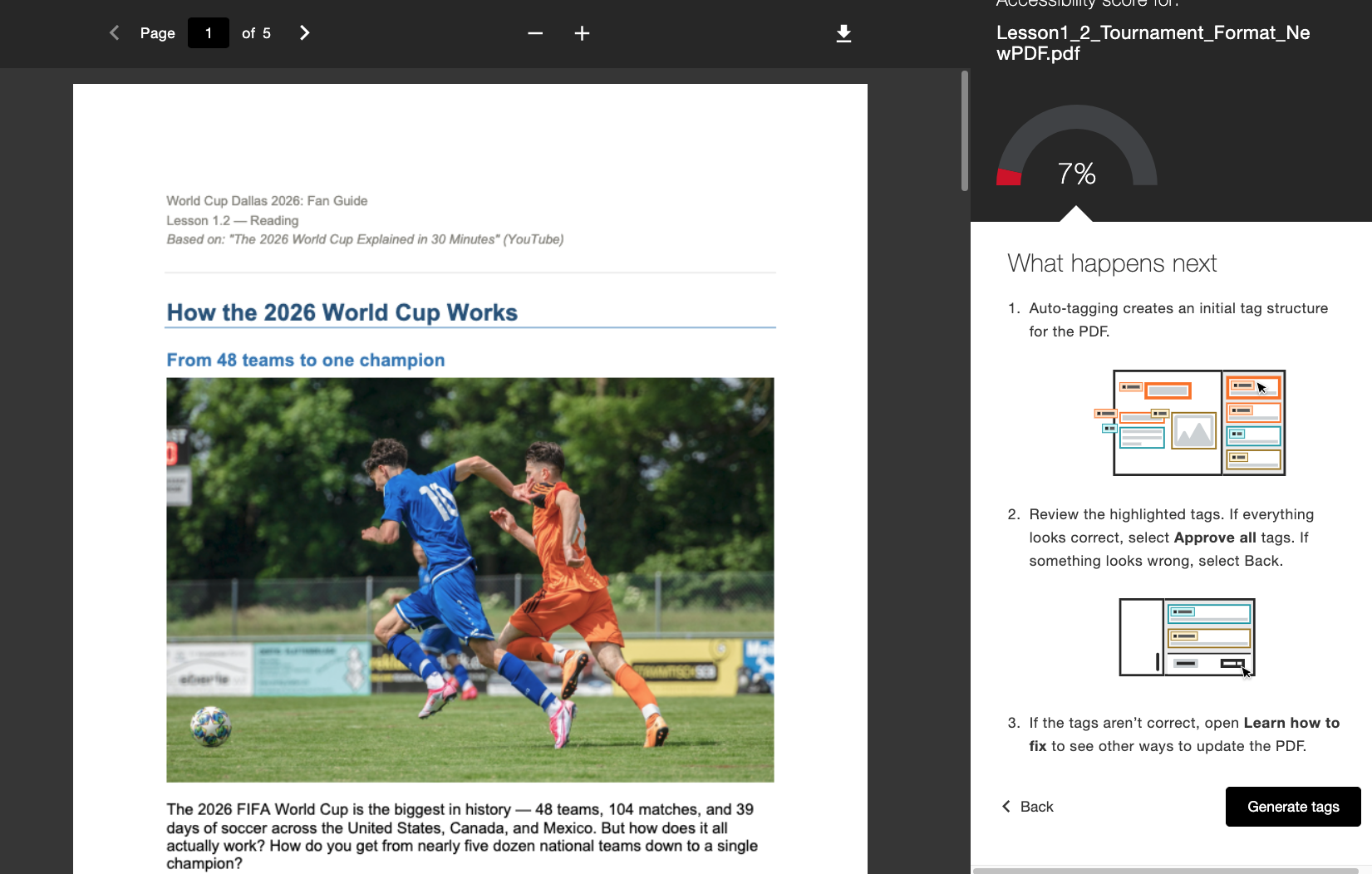
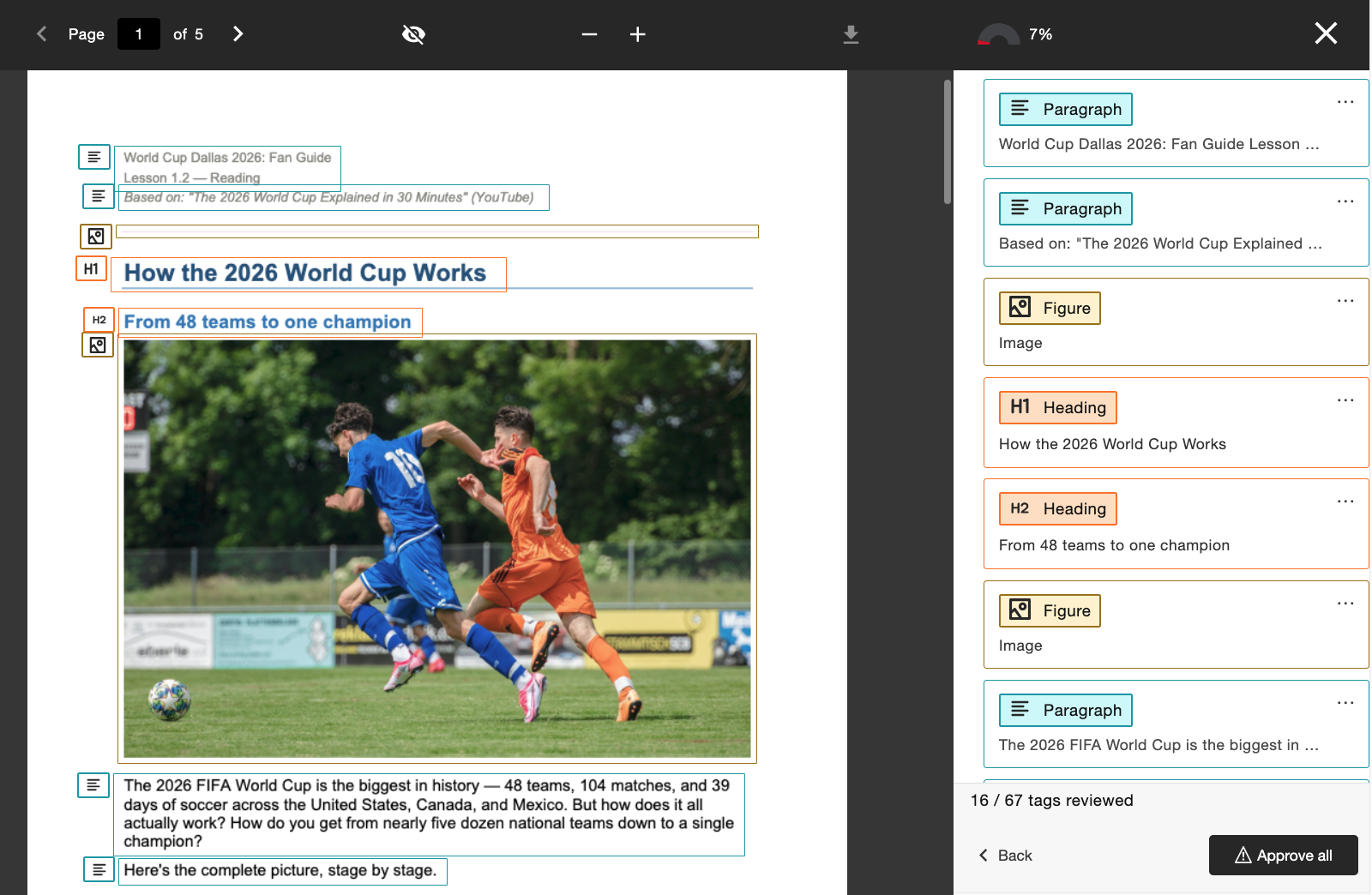
Wanneer deze functie is ingeschakeld door de beheerder, zien docenten een nieuwe workflow ‘Tags genereren’ die rechtstreeks is geïntegreerd in de feedback voor docenten. Docenten behouden de controle na het aanmaken van tags: ze kunnen de nieuwe tagstructuur bekijken terwijl ze door de tagboom aan de rechterkant van het scherm scrollen, voordat ze besluiten de toegepaste tags goed te keuren. Docenten kunnen de voortgangsindicator onderaan gebruiken om te zien hoeveel tags ze al hebben goedgekeurd, voordat ze Alles goedkeuren selecteren als ze tevreden zijn.
Beheerders kunnen de toegang tot deze functie regelen via de Ally-configuratietool door deze in of uit te schakelen, afhankelijk van de voorkeur van de instelling.
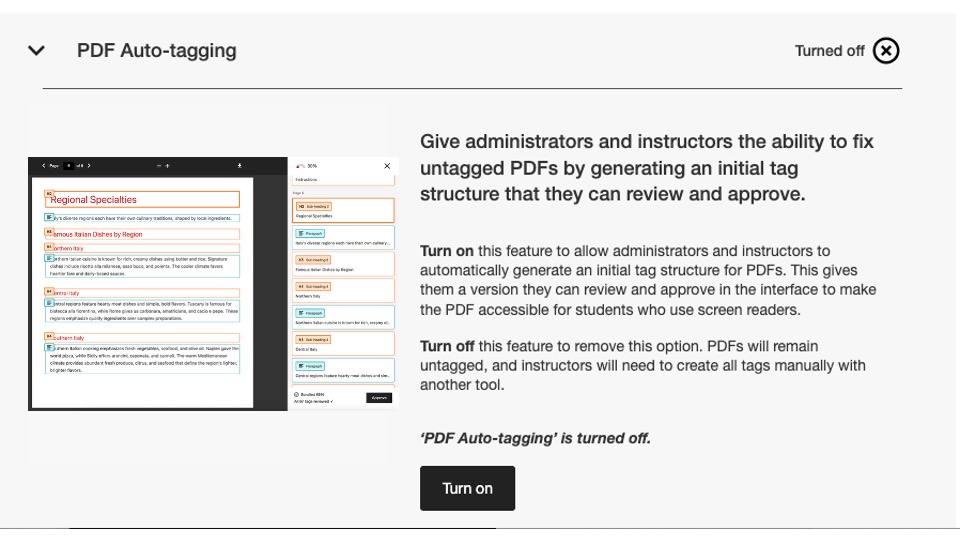
Als onderdeel van deze release is deze configuratieoptie standaard uitgeschakeld. Beheerders moeten deze functie inschakelen voordat docenten er gebruik van kunnen maken.
Raadpleeg het Help-artikel Opties voor het herstellen van PDF-bestanden voor meer informatie over het nieuwe gebruiksrapport.
Nieuw gebruiksrapport nu beschikbaar
In het kader van onze voortdurende inspanningen om Ally-gegevens gemakkelijk toegankelijk en beschikbaar te maken voor beheerders, zijn we verheugd de volgende versie van het Ally-gebruiksrapport te lanceren, dat rechtstreeks in de gebruikersinterface is geïntegreerd.
Het gebruiksrapport geeft gedetailleerde informatie weer over hoe uw studenten en docenten Ally gebruiken, waaronder het aantal downloads van alternatieve indelingen en het aantal aanpassingen door docenten binnen een bepaalde periode.
Dit nieuwe en verbeterde rapport is nu rechtstreeks beschikbaar in het institutionele rapport, zonder dat u een Excel-bestand hoeft te downloaden, zodat u gemakkelijker en sneller inzicht krijgt in de betrokkenheid van uw instelling bij Ally. Dit vervangt het tabblad Gebruik in uw instellingsrapport en er zijn geen extra stappen nodig om dit in te schakelen.
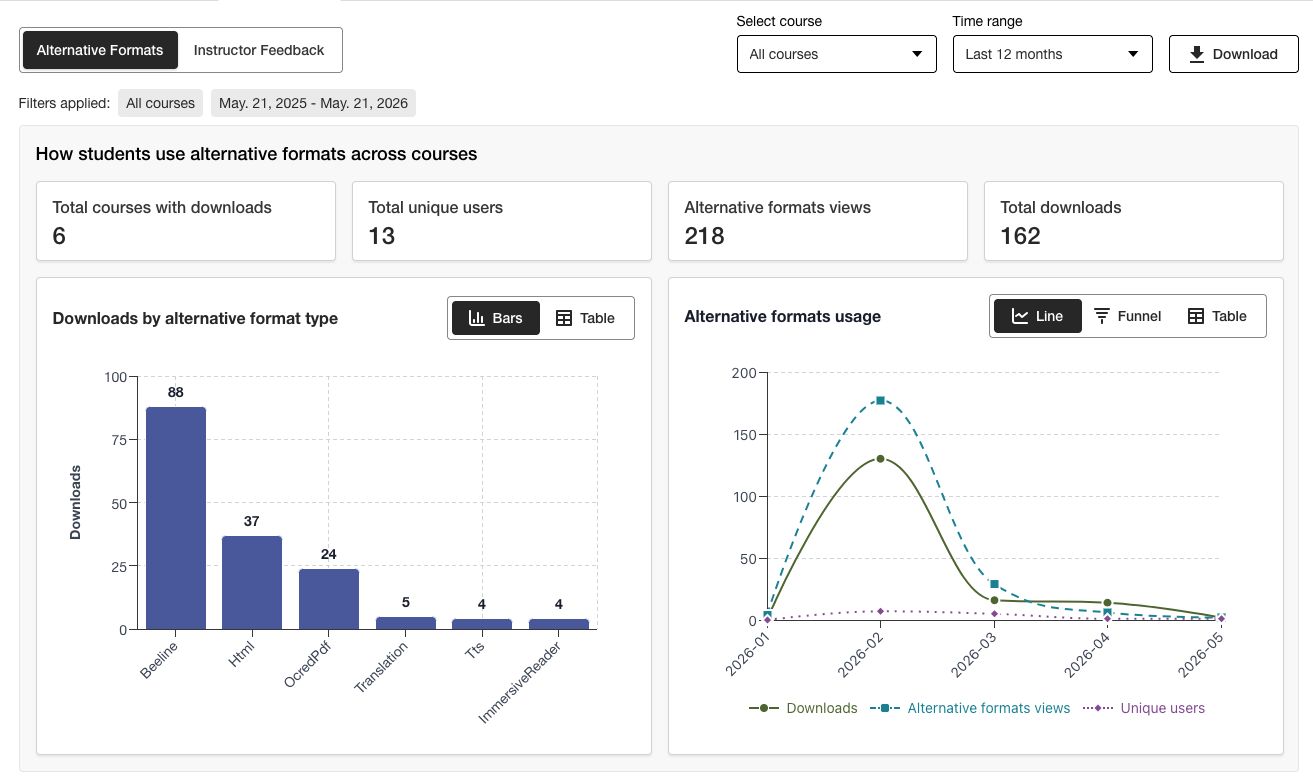
Beheerders kunnen belangrijke informatie in één oogopslag bekijken en gebruikmaken van de nieuwe filteropties en gedetailleerde grafieken om eenvoudig diepere inzichten in de gegevens te verkrijgen.
De Excel-versie kan nog steeds worden gedownload via de downloadfunctie voor gebruikers die de gegevens liever in een andere indeling willen raadplegen.
Raadpleeg de volgende onderwerpen op de Help-site voor meer informatie over het nieuwe gebruiksrapport:
Verholpen bugs
Er is een fout verholpen in de Canvas-integraties, waardoor het bijwerken van de titel van een document via Ally ten onrechte de publicatiestatus van het document in de cursus wijzigde.
Ally 2.18.10 In productie genomen: 2 juli 2026
Verholpen bugs en verbeteringen
Er is een probleem opgelost in de feedback van de docent waarbij eerder toegepaste afbeeldingsbeschrijvingen ten onrechte werden overgenomen wanneer een bestaande afbeelding werd vervangen door een nieuwe afbeelding om een contrastprobleem op te lossen.
Er is een fout verholpen in de AI Alt Text Assistant die een ‘Oeps’-foutmelding veroorzaakte wanneer de docent handmatig een nieuwe beschrijving toevoegde nadat hij op ‘Beschrijving automatisch genereren’ had geklikt.
Er is een fout verholpen in 'Alternatieve formaten', waardoor het MP3-audioformaat de taal van HTML-inhoud ten onrechte wijzigde.
Er is een fout verholpen in de Snelle oplossing voor de PDF-taal, waardoor docenten in sommige gevallen een onjuiste taal konden toepassen, ondanks de taalvalidatiecontrole van Ally.
Er is een fout verholpen in de Blackboard-integraties waardoor het bestandsbijschrift in afbeeldingsblokken werd verwijderd wanneer de docent het probleem met de ontbrekende afbeeldingsbeschrijving uit het toegankelijkheidsrapport van de cursus had verholpen.
Er zijn diverse verbeteringen doorgevoerd in de onderliggende OCR-technologie van Ally om de kwaliteit, nauwkeurigheid en conversiepercentages te verbeteren bij het verwerken van gescande PDF's voor alternatieve bestandsindelingen en PDF Quick Fixes.
Ally 2.18.9 In productie genomen: 22 juni 2026
Verholpen bugs en verbeteringen
Er is een fout in Moodle verholpen waardoor in sommige gevallen afbeeldingen die in een pagina waren ingesloten, niet werden weergegeven in het voorbeeld van de feedback van de docent wanneer dit werd geopend vanuit het toegankelijkheidsrapport van de cursus.
Er is een fout verholpen in Canvas Pages waardoor aanpassingen aan de afbeeldingsbeschrijving niet werden toegepast nadat een afbeelding met laag contrast was vervangen via de optie 'Bestand uploaden'.
Een toegankelijkheidsprobleem in Moodle is verholpen, zodat de Ally-indicatorpictogrammen tijdens het navigeren kunnen worden geselecteerd.
Ally 2.18.8 In productie genomen: 11 juni 2026
Verholpen bugs en verbeteringen
Er is een fout in Moodle verholpen waardoor gebruikers ten onrechte twee tooltipberichten te zien kregen bij het gebruik van Ally-indicatoren.
De tekst in de beschrijvingen en op de knoppen van de tool ‘Ally Configuration’ is aangepast, zodat deze nu worden weergegeven als Inschakelen en Uitschakelen.
Ally 2.18.7 In productie genomen: 1 juni 2026
Bugfixes en verbeteringen
Er is een fout in Moodle verholpen waardoor de indicator voor de toegankelijkheidsscore onbedoeld werd verborgen wanneer de TinyMCE-editor op de pagina werd uitgevouwen.
Er is een fout in Blackboard verholpen waardoor kopniveaus in (Ultra-)documenten niet correct werden omgezet in de resulterende HTML-alternatieve indelingen.
Er is een fout verholpen in de Feedback voor docenten, waardoor ten onrechte het bericht 'Nog op te lossen problemen' werd weergegeven nadat een stukje lesmateriaal voor 100 was voltooid.
Er is een fout in Blackboard verholpen waardoor afbeeldingen die in het Document als decoratief waren gemarkeerd, in het voorbeeld van de Feedback van de docent in het toegankelijkheidsrapport van de cursus als een link werden weergegeven.
Er is een fout verholpen in de Feedback voor docenten, waardoor de link ten onrechte twee keer werd weergegeven wanneer we probeerden de defecte link te herstellen.
Ally 2.18.6 Release to production: May 26, 2026
Bug Fixes and Improvements
Implemented several processing improvements to provide better handling of Canvas LMS Rate limits to minimize the number of times Ally hits these limits over the course of regular content processing.
Ally 2.18.5 Release voor productie: 7 mei 2026
Verholpen bugs en verbeteringen
Toegankelijkheidsprobleem opgelost in Canvas waarbij de optie Alternatieve indelingen in het vervolgkeuzemenu niet correct reageerde op invoer via toetsenbordnavigatie.
Een kleine fout in Canvas-integraties verholpen, waardoor het vervolgkeuzemenu niet werd gesloten na het klikken op de optie Alternatieve indelingen.
Bug opgelost in de Instructor Feedback PDF Quick Fix-workflow die ervoor zorgde dat de knop 'Opnieuw proberen' naar het verkeerde startpunt in het feedbackpaneel navigeerde.
Verbeterde afhandeling voor UNSAFE_HTML-bestanden in Blackboard-integraties om de score van deze bestanden te detecteren en volledig over te slaan, zodat ze niet als tweede stap uit de rapporten hoeven te worden verwijderd.
Bug opgelost voor Blackboard-integraties die ervoor zorgden dat bestandsbijlagen onjuist werden omgezet naar links bij het oplossen van problemen in documenten vanuit het Cursus-toegankelijkheidsrapport.
Implementeerde verschillende verbeteringen en optimalisaties voor de realtime verwerkingswachtrijen van Ally in de regio US.
Ally 2.18.4 Vrijgave voor productie: 30 april 2026
Verholpen bugs en verbeteringen
Er is een bug opgelost in Blackboard Documenten waardoor Ally ten onrechte koppen op het verkeerde niveau instelde en docenten geen 100% score kregen, zelfs niet nadat alle problemen waren opgelost.
Verbeteringen geïmplementeerd in de detectie van UNSAFE_HTML-bestanden in Blackboard, zodat ze eenvoudiger kunnen worden verwijderd uit de scoreprocessen van Ally.
Toegankelijkheidsprobleem opgelost waardoor de knop voor Origineel bestand downloaden niet werd weergegeven op kleinere schermen.
Probleem opgelost met Ally's controle van Vimeo-ondertiteling die fouten veroorzaakte wanneer een Vimeo-video werd gedetecteerd in rijke inhoud als de Vimeo-integratie niet was ingesteld in de Ally-configuratie.
Ally 2.18.3 Vrijgave voor productie: 20 april 2026
Verbeteringen in documentverwerking
Als onderdeel van onze voortdurende inzet om de kwaliteit en getrouwheid van de inhoud binnen Ally's Instructor Feedback en verwerking van alternatieve indelingen voortdurend te verbeteren, brengt de release 2.18.3 belangrijke verbeteringen en uitbreidingen aan in het onderliggende documentconversieproces dat deze belangrijke gebruikersfuncties aanstuurt.
De logica voor documentverwerking van Ally is geüpgraded om slimmere, snellere en kwalitatief betere conversie te bieden bij het verwerken van bestanden die zijn geüpload naar de cursus. Dit brengt verschillende verbeteringen voor docenten en studenten met zich mee, waaronder:
Minder gevallen van vals-positieve problemen met contrast die verschijnen in de voorbeeldbestanden van feedback van instructeurs
Verbeterde omgang met vormen binnen PowerPoint-presentaties, inclusief conversie van zaken als pijlen binnen het document.
Verbeterde herkenning van alternatieve tekst toegepast op vormen na conversie naar PDF
Verbeterde aankondiging van decoratieve afbeeldingen binnen alternatieve indelingen, inclusief de alternatieve indeling voor audio
Verbeterde afbeeldingsherkenning en toepassing van figure-tags bij het converteren naar PDF
Naast deze gebruikersverbeteringen bevat deze update ook een optimalisatie van de onderliggende infrastructuur van Ally om de algemene prestaties en de snelheid van het verwerken van inhoud te helpen verbeteren wanneer deze vanuit het LMS wordt ontvangen.
Opmerking
Onze teams zullen doorgaan met het analyseren en identificeren van aanvullende mogelijke verbeteringen of randgevallen die mogelijk in de toekomst moeten worden aangepakt.
Verbeterde AI Alt-tekstassistent
De AI Alt Text Assistant is bijgewerkt om gebruik te maken van een aantal extra verbeteringen in de onderliggende AWS Bedrock AI-modellen, waaronder het verminderen van het aantal time-outs bij het opvragen van voorgestelde alternatieve tekst en verbeterde afhandeling om hallucinaties te voorkomen bij het analyseren van specifieke afbeeldingen.
Ter herinnering, de bijgewerkte Transparency Note voor AI Alt Text Assistant kan hier bekeken worden met extra details over deze functie: https://help.anthology.com/ally-lms/en/administrators/ai-alt-text-assistant.html
Verholpen bugs en verbeteringen
Bug opgelost in de instructeursfeedback die ervoor zorgde dat onjuiste markering werd toegepast in het voorbeeld wanneer de PDF nog steeds niet de juiste taal bevat nadat is geprobeerd de correctie toe te passen.
Een bug in de feedback van de docent verholpen waarbij de docent niet terugging naar het taalselectiepaneel als hij op Probeer opnieuw klikte terwijl een pdf nog steeds niet de juiste taal bevatte.
Bug opgelost in Canvas waardoor de docent de feedback van de docent niet kon openen op een OCR-verwerkte PDF die ook een vaste titel had.
Toegankelijkheidsprobleem opgelost in het feedbackpaneel voor instructeurs waarbij de focus ten onrechte verschoof tussen elementen bij gebruik van de knop Terug.
Toegankelijkheidsprobleem opgelost in het modale venster Alternatieve indelingen, waardoor de indeling Oorspronkelijk bestand niet werd gedownload bij navigeren en selecteren met een toetsenbord.
Ally 2.18.2 Release voor productie: 9 april 2026
Verholpen bugs en verbeteringen
Probleem opgelost in Blackboard waarbij Ally-indicatoren niet werden weergegeven voor bestandsbijlagen in opdrachtinstructies.
Fout verholpen waarbij in sommige gevallen tijdens het navigeren door het paneel Feedback voor docenten voor WYSIWYG-inhoud het klikken op de pictogrammen voor vet of cursief in de rich content editor de knop Automatisch genereren voor de AI Alt Text Assistant activeerde.
Bug verholpen waarbij in sommige gevallen het vervangen van een afbeelding met contrastproblemen door een nieuwe afbeelding via de bestandsupload van feedback van de cursusleider de documentvoorvertoning niet bijwerkte.
Er is een bug opgelost in Canvas waardoor de Ally-indicatoren niet correct werden weergegeven op een Canvas-syllabus wanneer Toon recente aankondigingen op de startpagina van de cursus was ingeschakeld.
Ally 2.18.1 Vrijgave voor productie: 2 april 2026
Verholpen bugs en verbeteringen
Moodle-plugins voor Moodle 4.5 en Moodle 5 zijn bijgewerkt met backports van bugfixes voor kleine bugs.
Probleem opgelost met de AI Alt Text Assistant waarbij in sommige gevallen instructeurs een foutmelding kregen wanneer ze alternatieve tekst probeerden voor te stellen omdat het primaire model niet beschikbaar was.
Ally 2.18 Release voor productie: 26 maart 2026
Nieuwe vlag voor bibliotheekreferentiebeheer is nu beschikbaar
Als onderdeel van onze voortdurende inspanningen om meer fijnmazige controleniveaus te bieden voor beheerders die de PDF-reparatie-ervaring voor docenten willen beheren, is er een nieuwe vlag beschikbaar in de Ally-configuratieopties waarmee de Bibliotheekreferentie-workflow kan worden uitgeschakeld.
Beheerders kunnen nu de functie Bibliotheekverwijzingen uitschakelen om de docent de mogelijkheid te ontnemen om bibliotheekverwijzingen aan PDF's toe te voegen wanneer het oorspronkelijke bestand niet beschikbaar is tijdens het werken aan verschillende PDF-specifieke problemen. Deze extra controlelaag helpt bij het afstemmen van deze functie op institutionele voorkeuren en processen en biedt extra flexibiliteit bij het bepalen hoe PDF's het beste op grote schaal kunnen worden beheerd.
Afbeelding 1: Nieuwe functievlag in de Ally-configuratieopties
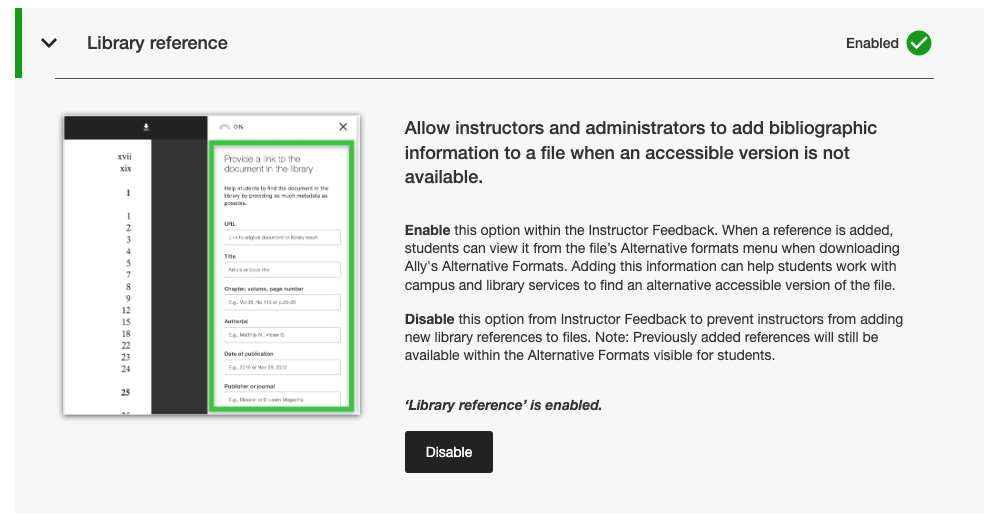
Beheerders kunnen deze nieuwe vlag vinden op het tabblad Functies in de Ally Configuration tool onder Bibliotheekreferentie.
Opmerking
Bibliotheekverwijzingen blijven standaard ingeschakeld in deze release. Het uitschakelen van bibliotheekreferenties met deze nieuwe vlag verwijdert eerder toegevoegde bibliotheekreferenties niet uit de inhoud en voorkomt alleen dat er nieuwe worden toegevoegd.
Verholpen bugs en verbeteringen
Bug opgelost in Canvas waardoor de kolom met Ally-indicatoren verdween uit de sectie Nieuwe bestanden wanneer het scherm werd verkleind.
Toegankelijkheidsprobleem opgelost in Canvas-integraties waardoor de juiste focus niet werd toegepast bij gebruik van een toetsenbord om te navigeren naar Ally-toegankelijkheidsscore-indicatoren binnen Canvas-pagina's.
Een kapotte weblink in de Ally-configuratie-instellingen voor de gebruiksvoorwaarden van de AI Alt Text Assistant is opgelost.
We hebben onze SMTP-e-mailservices gemigreerd voor de back-endinfrastructuur die aangepaste hulp-e-mailstromen afhandelt.
Ally 2.17.5 Release voor productie: 12 maart 2026
Blackboard UNSAFE_HTML-bestanden niet langer opgenomen in rapporten
Als onderdeel van onze voortdurende toewijding aan doceerefficiëntie en duidelijkheid in de rapportage, zullen de Ally-rapporten UNSAFE_HTML-bestanden niet langer beschouwen als onderdeel van de cursusinhoud voor Blackboard-integraties.
Afbeelding 1: Cursusrapport met UNSAFE_HTML om gedrag uit het verleden weer te geven.
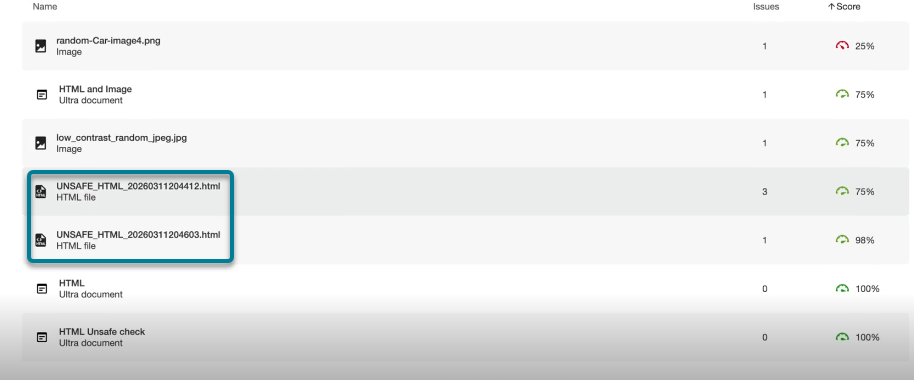
Vanaf deze release worden UNSAFE_HTML-bestanden die automatisch worden gemaakt in de inhoudsmap bij het gebruik van HTML-snippets in een Blackboard-document gefilterd uit de beheer- en cursusrapporten. Voorheen werden deze bestanden wel weergegeven in het rapport, maar docenten konden de problemen met ontbrekende taal en titel niet oplossen. Vaak gebruikten ze andere oplossingen om deze bestanden uit de cursus te verwijderen om ze uit de rapporten te verwijderen.
Opmerking
Met deze wijziging worden alle huidige en eerdere UNSAFE_HTML-bestanden verwijderd. Afhankelijk van hoe vaak deze inhoudsitems werden gebruikt in een cursus, kan dit resulteren in een lichte stijging of daling van de cursusscore op basis van de distributie van bestanden, HTML en WYSIWYG-inhoud.
Als onderdeel van een toekomstige release zullen we proberen om het verwerken van deze bestanden volledig te vermijden bij het onboarden van een cursus om de algehele prestaties en het scannen te verbeteren.
Verholpen bugs en verbeteringen
Probleem opgelost in Blackboard-integraties die een discrepantie veroorzaakten met de scores voor afbeeldingen bij het vergelijken van de score in de feedback van de docent van een document met de score in het toegankelijkheidsrapport van de cursus als afbeeldingen waren ingesteld op Alleen bekijken of Alleen downloaden. Het Toegankelijkheidsrapport van de cursus miste onterecht eerder toegepaste alternatieve tekst en verlaagde de score, ondanks dat dit als opgelost werd weergegeven in de feedback van de docent. Let op dat dit geldt voor afbeeldingen in Ultra-documenten als onderdeel van de cursus en de opslagplaats voor leerobjecten.
Probleem opgelost in de PDF Missing Language Quick Fix waardoor de knop Toepassen klikbaar was voordat de docent een taal had geselecteerd.
De opmaak van de referentielinks in de bibliotheek in het downloadvenster Alternatieve indelingen is verbeterd, zodat referentielinks worden weergegeven als aanklikbare links en mogelijke contrastproblemen worden voorkomen.
Ally 2.17.4 Release voor productie: 5 maart 2026
De taalvoorselectie is nu beschikbaar voor de Snelle oplossing voor ontbrekende taal voor PDF's.
Docenten die PDF's herstellen met ontbrekende talen in de Ally Instructor Feedback-sneloplossing kunnen nu profiteren van het feit dat de taal wordt gedetecteerd en vooraf wordt geselecteerd in de vervolgkeuzelijst om extra scrollen te voorkomen en tijd te besparen bij het herstellen van dit veelvoorkomende probleem.
De ingebouwde taaldetectie van Ally analyseert de PDF om waar mogelijk de juiste taal te bepalen. Als er geen taal wordt gedetecteerd, kunnen docenten nog steeds handmatig een taal selecteren om de correctie toe te passen en Ally de wijziging in de PDF te laten opslaan zoals verwacht.
Afbeelding 1: Quick Fix voor taal toevoegen met Engels geselecteerd

Moodle 5.1-plug-ins zijn nu beschikbaar
Als onderdeel van de voortdurende ondersteuning van Ally voor Moodle zijn de Ally-plug-ins voor Moodle 5.1 beschikbaar. Aanvullende details over de ondersteuning van Ally voor Moodle kunnen gevonden worden in de Ally Moodle-configuratiedocumentatie.
Opmerking
Ally maakt vertakkingen voor elke ondersteunde Moodle-versie als onderdeel van onze open-source plug-instrategie om gerichte ontwikkeling en het oplossen van bugs mogelijk te maken. Huidige versies van de plug-ins vind je in de corresponderende STABIELE vertakkingen in onze repository. Het wordt altijd aangeraden dat beheerders de stabiele vertakkingen gebruiken om er zeker van te zijn dat er geen nieuwe onbedoelde veranderingen worden geïntroduceerd wanneer plugins worden bijgewerkt.
Verholpen bugs en verbeteringen
Probleem opgelost in Blackboard waarbij docenten die het Cursustoegankelijkheidsrapport gebruikten om problemen in Documenten op te lossen, onverwacht inhoud konden verwijderen die ten onrechte als links werd geïdentificeerd bij het insluiten van HTML-blokken, audio en/of Video Studio-video's.
Probleem opgelost voor alle LMS-integraties in het Instellingenrapport waarbij de vervolgkeuzelijst Exporteren verborgen was op kleinere schermen en/of browserformaten.
Probleem opgelost voor alle LMS-integraties waarbij het toepassen van een snelle oplossing voor gebroken links voor WYSIWYG-inhoud met meerdere gebroken links tegelijkertijd soms resulteerde in een oneindig ladende spinner.
Diverse frontend-verbeteringen geïmplementeerd in de infrastructuur voor de preview van PDF-instructeursfeedback ter ondersteuning van onze voortdurende verbetering van PDF-reparatiefuncties.
Extra best practice-verbeteringen geïmplementeerd voor HTTP-verzoeken voor Canvas-integratie om het gebruik van User-Agent-headers te garanderen.
Ally 2.17.3 Release naar productie: 30 januari 2026
Verholpen bugs en verbeteringen
Probleem opgelost in Ally's Instructor Feedback voor gescande PDF-bestanden: nadat je "Leren hoe je PDF's herstelt" had geopend, bracht een klik op Terug je niet altijd terug naar de Instructor Feedback-weergave en was soms een tweede klik nodig.
Ally 2.17.2 Release naar productie: 15 januari 2026
Verholpen bugs en verbeteringen
Een probleem in het instellingrapport is opgelost waarbij de optie CSV downloaden verborgen was bij het exporteren vanaf het tabblad Cursussen als de zoekopdracht één of geen cursussen opleverde.
Er is een bug in het gebruiksrapport opgelost waarbij de knop Gebruiksrapport downloaden uitgeschakeld bleef nadat je een rapport had gedownload en vervolgens een nieuw datumbereik selecteerde.
Toegankelijkheidsprobleem met het toetsenbord opgelost in het Canvas-bestandengebied, waarbij de focus verloren ging tijdens het navigeren naar de toegankelijkheidsscore. Focus blijft nu zichtbaar wanneer je met het toetsenbord navigeert.