Gebruik
Note
Deze documentatie is vertaald met behulp van AI-ondersteunde machinevertaling. Vertalingen worden geleverd 'zoals ze zijn', zonder garantie van de juistheid ervan. De Engelse versie van deze inhoud is de officiële en gezaghebbende bron.
Het gebruiksrapport Ally begrijpen
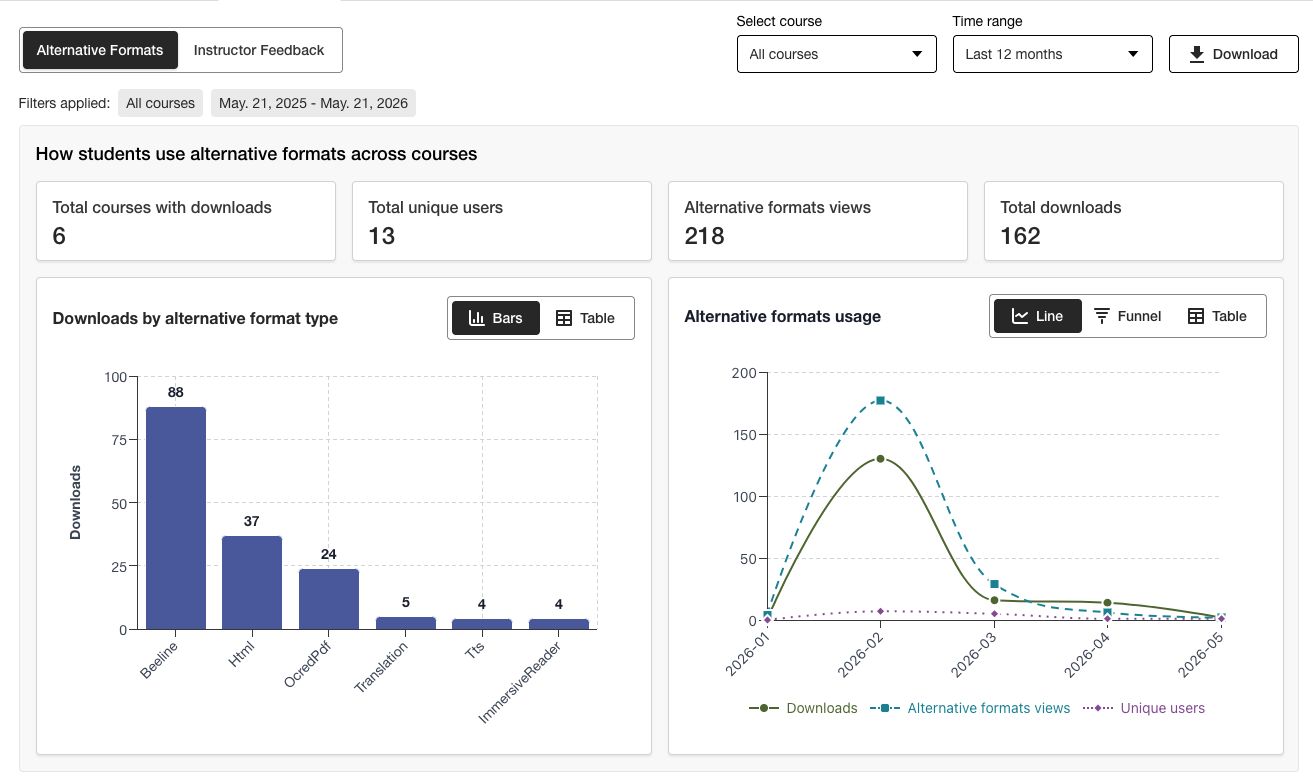
Het gebruiksrapport geeft details weer over hoe uw studenten en docenten Ally gebruiken. Ontdek hoe vaak studenten een alternatief formaat downloaden en hoe docenten toegankelijkheidsproblemen oplossen.
Open het gebruiksrapport
Selecteer in het toegankelijkheidsrapport van Ally het tabblad Gebruik.
Een gebruiksrapport downloaden
Het downloadrapport is een spreadsheet die is onderverdeeld in vijf werkbladen. Elk werkblad bevat gegevens die betrekking hebben op een door jou geselecteerd datumbereik.
Alternatieve formaten starten
Wekelijks in een alternatief formaat
Start de feedbacksessies voor docenten
Wekelijkse feedback van de instructeur
Data
Selecteer in het toegankelijkheidsrapport van Ally het tabblad Gebruik.
Kies een datumbereik voor het rapport.
Selecteer de knop Gebruiksrapport downloaden.
Opmerking
Het kan zijn dat je geen gegevens ziet wanneer je het rapport voor het eerst opent. Het gedownloade bestand kan beveiligd zijn. Schakel de bewerkingsmodus in om de gegevens te bekijken.