2022 - Product Releases
Encompass Maintenance: Internal API Support
Please note the maintenance for the environments is scheduled as follows:
U.S.= 21st November Monday Evening | Canada= 21st November Monday Evening | Australia= 22nd November, Tuesday Morning
-------------------------------------------------------------------------------------i
Internal API Support Maintenance
Anthology Encompass will undergo minor maintenance at 9 PM EST to provide additional API data for our internal support team.
Encompass Maintenance: Data Security Update
Please note the Encompass Maintenance window for the U.S., Canada, and Australia is scheduled as follows:
U.S. and Canada = 13th November, Sunday from 9 PM to 11 PM (EST) |Australia = 14th November, Monday from 1 PM to 3 PM (AEDT)
Maintenance Notice
All the U.S., Canadian, and Australian environments are scheduled for maintenance during the 2 hours window for a data security update.
Encompass Release Notes -November 2nd, 2022
Please note the product releases for the environments are scheduled as follows:
Australia= 2nd November, Wednesday Morning | U.S.= 3rd November Thursday Morning | Canada= 3rd November Thursday Morning
-------------------------------------------------------------------------------------
Product Enhancements
Email Reporting
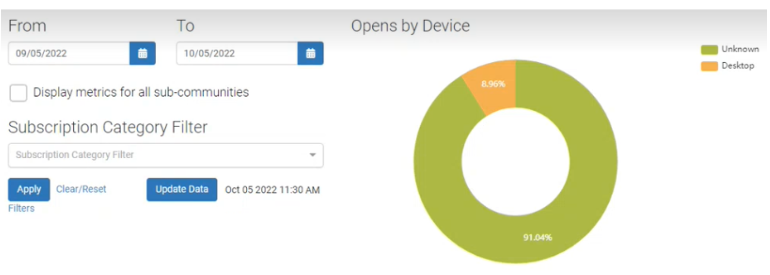
On the Dashboard Reporting pages, added the Update Data button to allow users to pull fresh data onto the pages based on their needs. Also, added the Date and Time field next to the Update Data button, which displays the date and time of the updated data when users click the Update Data button.
Online Giving
Mastercard Standards for Recurring Payment Notification: Membership Auto-Renewals
To meet the previously announced Mastercard standards for recurring payments, we have set up a new recurring payment reminder email for membership auto-renewals. The reminder email is sent 7 days before the scheduled payment date.
The following are the system updates:
The system sends the reminder email 7 days before the scheduled auto-renewal date.
Selection of the Auto-renewal option activates the reminder email, which is sent to the primary email address collected on the form.
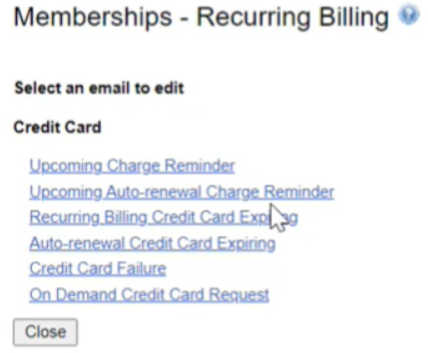
The Auto-renewal reminder email can be edited in the Recurring Billing area in the form properties.
 |
Resolution
Functional Area | Reference | Description |
Foundation | NA | Publish to Facebook link was not allowing users to publish their page to Facebook after making a donation. Now, the users can publish their page to Facebook. The users can enable the following options for Facebook publishing:
|
Email Marketing | NA | When fields were deleted from a constituent information form by selecting the option 'This will only remove it from this form, not from the system’ (Soft delete), the system was not recognizing the fields in the queries related to the segments making the segments invalid. Now, when a field is deleted using the soft delete option, the associated segments are not affected. 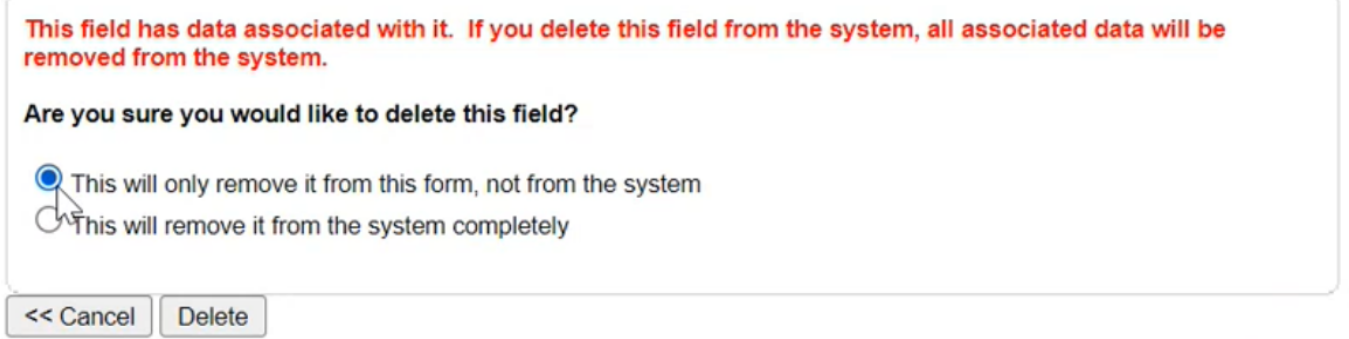 |
Foundation | NA | Found that the expanding and collapsing actions were not controllable by keyboard on the Lightning Giving form. Updated the system and now, the users can perform the actions by clicking the spacebar on a keyboard. |
Online Giving | NA | Post an Authorized.net transaction completion, Authorized.net sends a message to Encompass with a transaction ID. These transaction IDs were not set in the Encompass Database for record keeping and reporting. Now, the system records the transaction IDs. The data is used in reports. |
Encompass Release Notes: October 10th, 2022(64.5.0)
Please note the product releases for the environments are scheduled as follows:
U.S. = 10th October, Monday Evening | Canadian = 10th October, Monday Evening
| Australia = 11th October Tuesday Morning
-------------------------------------------------------------------------------------
Product Enhancements
Email Reporting
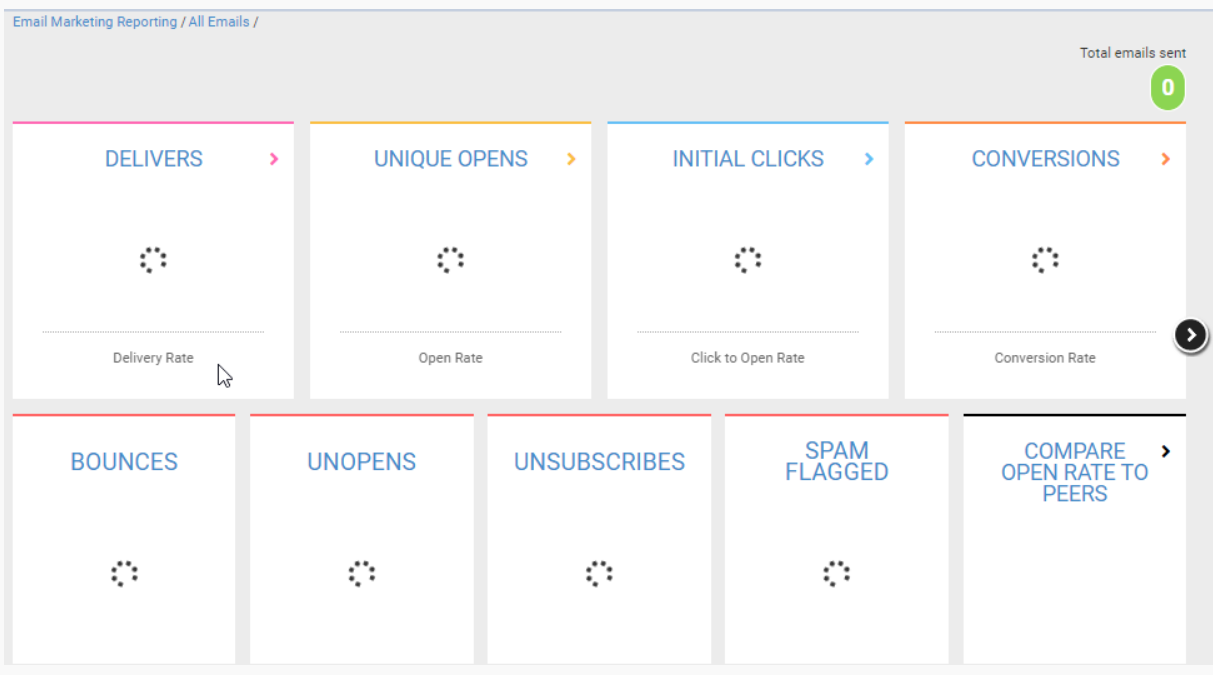
When loading a page, the system sometimes displayed a blank screen making the users unsure about the system loading the data. To keep the users informed about the system's activity, added a progress/status indicator, which is displayed until the page is opened.
 |
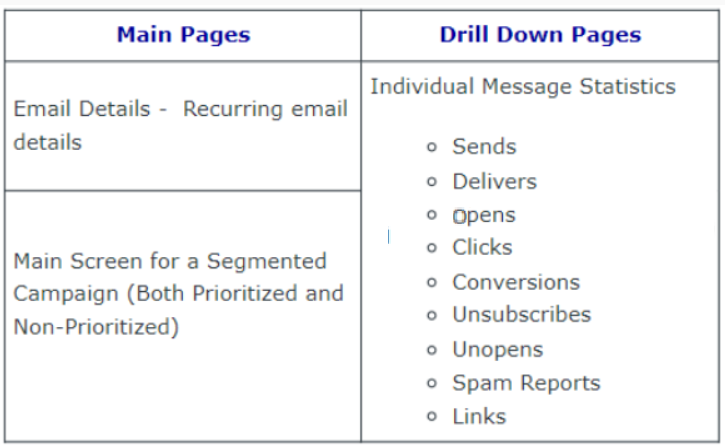
The following table shows the main and drill down pages where the progress/status indicator is added.
 |
Online Giving
Implemented Stripe's API calls for the connected accounts feature. Now, there is no need for the system to use 'refresh tokens' during every transaction, the API key is used only when the account is first connected, which increases the capacity for a higher rate of transactions.
This enhancement has been made for the primary gateway, secondary gateway, and all form types.
Online Giving
When donor roll data was imported using a .csv file, the data was not reflecting in real time. To view the data, the admins had to manually clear the cache using the Diagnostics menu, or re-login after importing the data. Also, when a donor roll data file is uploaded in one system, the updated data was not reflecting in a different system having the same donor roll module until the cache is cleared manually in the first system.
Updated the system to automatically clear cache when the submit button is pressed to import the data.
Online Giving
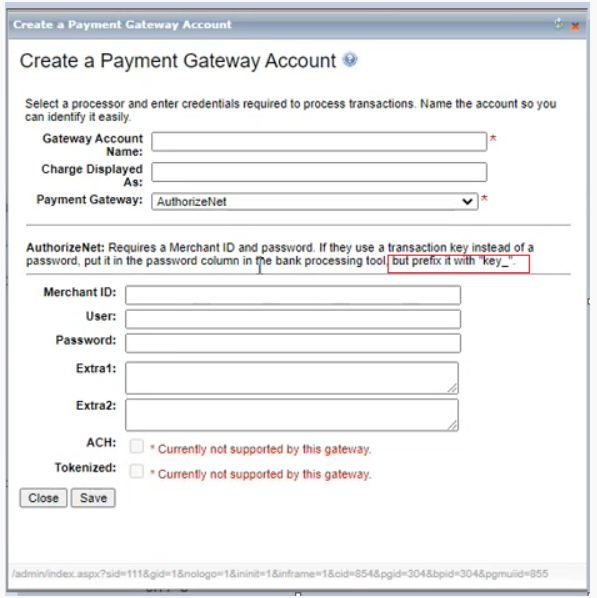
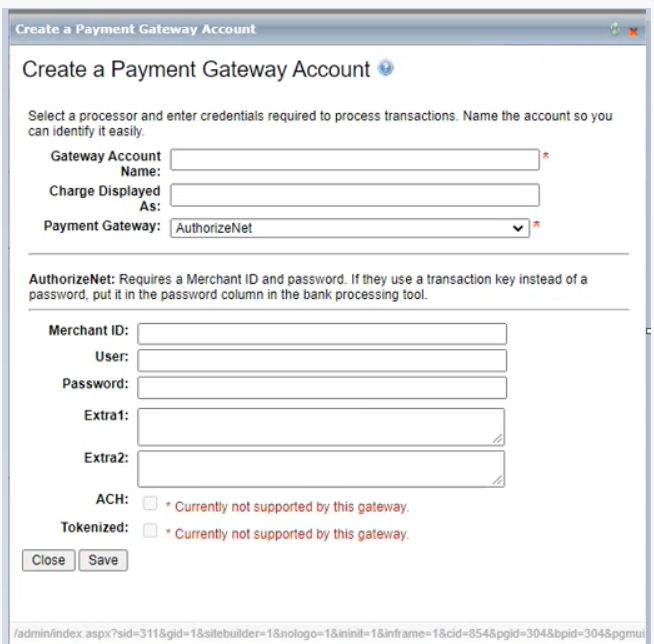
In the Create Payment Gateway Account form, the instruction incorrectly stated adding the prefix "key_" to the password.
Updated the instruction:
Old
 |
Updated
 |
Resolution
Functional Area | Reference | Description |
Email Marketing | 208317 | Note: This bug fix was removed from production on October 12th due to an issue in production. We will be working to correct the issue and determine a time to reintroduce the fix to production in the future. Constituents deleted from a sub-community but still included in a CSV of IDs that contained their IDs were still being sent campaigns. These constituent IDs should have been excluded when the CSV of IDs was used as an audience for a Campaign. Updated the system for all the campaign types to exclude the deleted sub-community member IDs during send. In the Exceptions file, introduced a column Record Not Found where the deleted sub-community member IDs are marked as True. Post sends, the users can export this file by clicking the Export Exceptions option from the Gear menu in the History tab. Note: The system does not show an error when uploading a .csv file containing deleted member IDs of a sub-community in a campaign. |
Foundation | 215499 | Changes to the sitemap pages, settings, and sort order were not updating immediately. The changes reflected when the cache was cleared. |
Foundation | NA | On the system profile page, updated the accordion menu expand and collapse attributes to enable accessibility in accordance with WCAG (Web Content Accessibility Guidelines). |
Foundation | NA | Now, the screen readers can read accordion menu functionality on forms, including heading, label, and open/close action. |
Giving | 215902 | Added Email ID to the information that is passed during the Authorize.net payment transactions. Now, the following information is passed: Customer ID/Member ID, Description, Email ID, and Customer IP. |
Anthology Encompass Release Notes: October 10th, 2022(64.5.0)
Please note the product releases for the environments are scheduled as follows:
U.S. = 10th October, Monday Evening | Canadian = 10th October, Monday Evening
| Australia = 11th August Tuesday Morning
-------------------------------------------------------------------------------------
Product Enhancements
Email Reporting
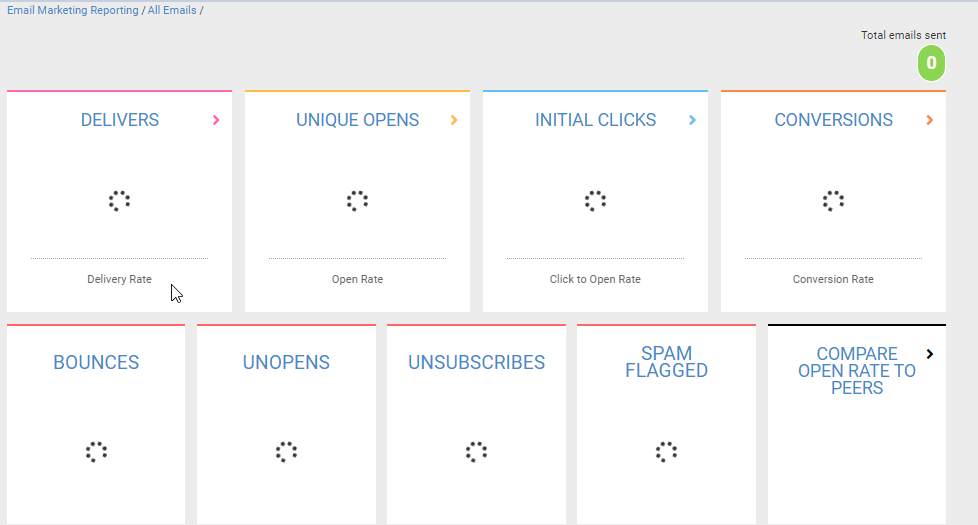
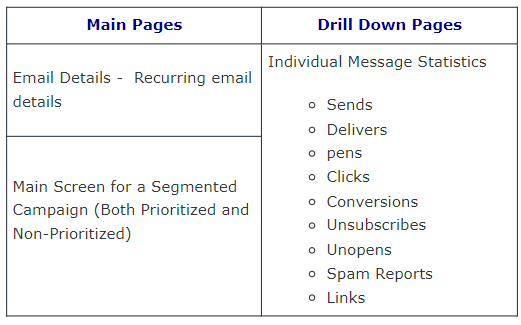
When loading a page, the system sometimes displayed a blank screen making the users unsure about the system loading the data. To keep the users informed about the system's activity, added a progress/status indicator, which is displayed until the page is opened.
 |
The following table shows the main and drill down pages where the progress/status indicator is added.
 |
Online Giving
Implemented Stripe's API calls for the connected accounts feature. Now, there is no need for the system to use 'refresh tokens' during every transaction, the API key is used only when the account is first connected, which increases the capacity for a higher rate of transactions.
This enhancement has been made for the primary gateway, secondary gateway, and all form types.
Online Giving
When donor roll data was imported using a .csv file, the data was not reflecting in real time. To view the data, the admins had to manually clear the cache using the Diagnostics menu, or re-login after importing the data. Also, when a donor roll data file is uploaded in one system, the updated data was not reflecting in a different system having the same donor roll module until the cache is cleared manually in the first system.
Updated the system to automatically clear cache when the submit button is pressed to import the data.
Online Giving
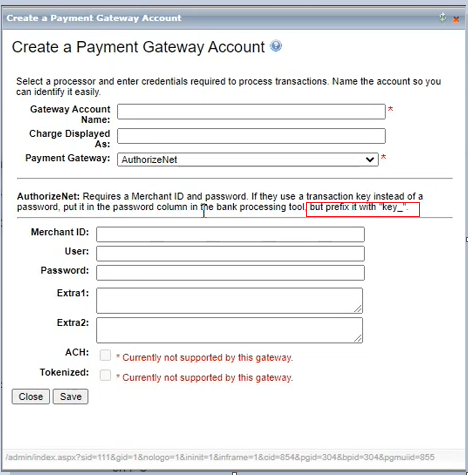
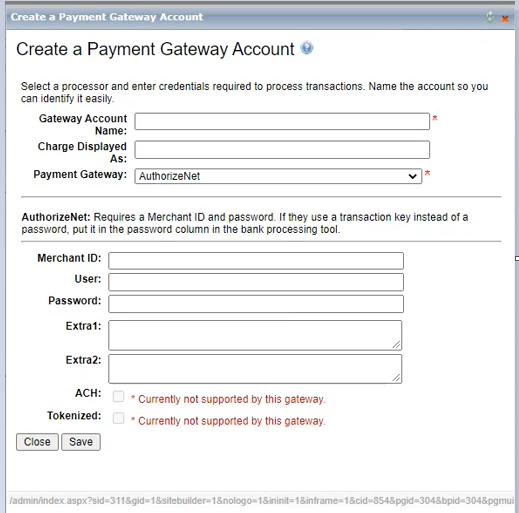
In the Create Payment Gateway Account form, the instruction incorrectly stated adding the prefix "key_" to the password.
Updated the instruction:
Old
 |
Updated
 |
Resolution
Functional Area | Reference | Description |
Email Marketing | 208317 | Constituents deleted from a sub-community but still included in a CSV of IDs that contained their IDs were still being sent campaigns. These constituent IDs should have been excluded when the CSV of IDs was used as an audience for a Campaign. Updated the system for all the campaign types to exclude the deleted sub-community member IDs during send. In the Exceptions file, introduced a column Record Not Found where the deleted sub-community member IDs are marked as True. Post send, the users can export this file by clicking the Export Exceptions option from the Gear menu in the History tab. Note: The system does not show an error when uploading a .csv file containing deleted member IDs of a sub-community in a campaign. |
Foundation | 215499 | Changes to the sitemap pages, settings, and sort order were not updating immediately. The changes reflected when the cache was cleared. |
Foundation | NA | On the system profile page, updated the accordion menu expand and collapse attributes to enable accessibility in accordance with WCAG (Web Content Accessibility Guidelines). |
Foundation | NA | Now, the screen readers can read accordion menu functionality on forms, including heading, label, and open/close action. |
Giving | 215902 | Added Email ID to the information that is passed during the Authorize.net payment transactions. Now, the following information is passed: Customer ID/Member ID, Description, Email ID, and Customer IP. |
Anthology Encompass Maintenance - September 20th 2022 (64.4.3)
Please note the product releases for the environments are scheduled as follows:Canadian = 20th September, Tuesday Evening | U.S. = 20th September, Tuesday Evening
| Australian = 21st September, Wednesday Morning
Online Giving
Mastercard Standards for Recurring Payment Notification for Membership
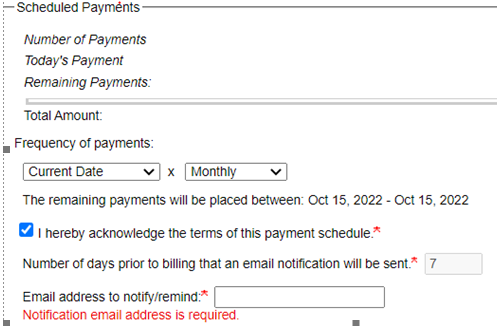
In compliance with the new Mastercard standards for recurring payments that the notification must be sent to the customers 7 days prior to the scheduled payment date, made the following updates to the system:
Updated the system to send notifications 7 days prior to the charge as a standard for new scheduled payments. Previously set reminders will stay as they are.
Made the Email address to notify/remind field as a required field.
Click to know more about the New Mastercard Standards for Merchants Utilizing Recurring Payments.
Release Notes: August 9th 2022
Please note the product releases for the environments are scheduled as follows:
U.S. = 9th August, Tuesday Evening | Canadian = 9th August, Tuesday Evening
| Australia = 10th August Wednesday Morning
-------------------------------------------------------------------------------------
Product Enhancements
Email Marketing
During converting the general email campaigns to segmented campaigns, when a user selects the Convert to Segmented Campaign option, and then, on the Campaign Details form, clicks the Cancel button, a general campaign was still converting to a segmented campaign with an undefined name. The Cancel button in the Global Campaign Details form was not performing the cancelation.
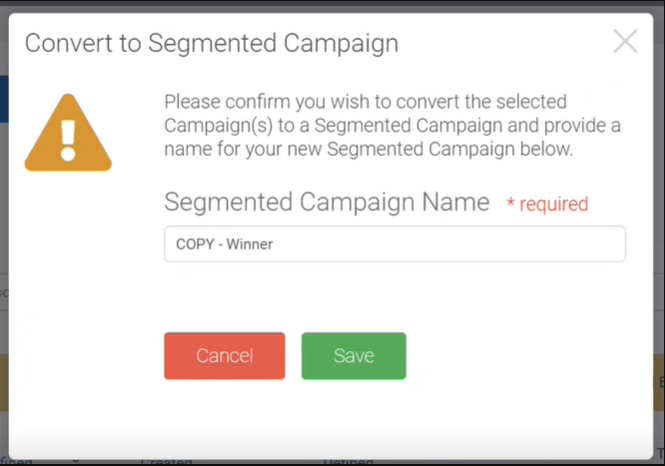
To confirm if a user wants to continue converting the campaign after the Convert to Segmented Campaign option is selected and to ensure that the required campaign name information is entered, a modal is added before the Global Campaign Details form opens. The modal contains the Campaign Name required field, Close button, and Save button. When a user enters a campaign name and clicks Save, the campaign converts to the segmented campaign. When a user clicks Close, the converting is canceled and the user is returned to the Create Email Campaigns page.
Note: The Save button is clickable only when the segmented campaign name is entered and the entered number of characters is not more than 100.
 |
Email Marketing
Prioritized segmented campaigns were not getting released according to the set priority and to the intended audience. The option to schedule multiple future dates for each version of a prioritized segmented campaign was creating conflicts between the dates scheduled and the set priority.
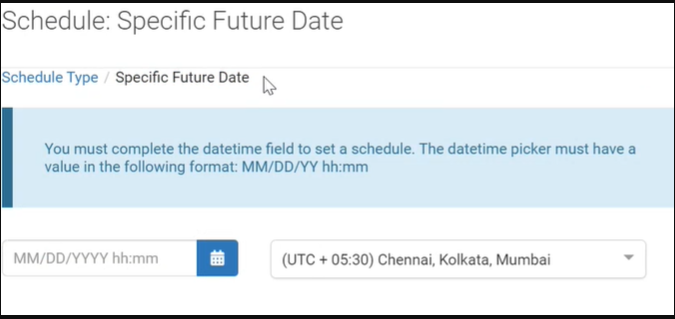
Streamlined the process by restricting the future date of release to a single selection and setting the priority for each prioritized version according to the scheduled date.
 |
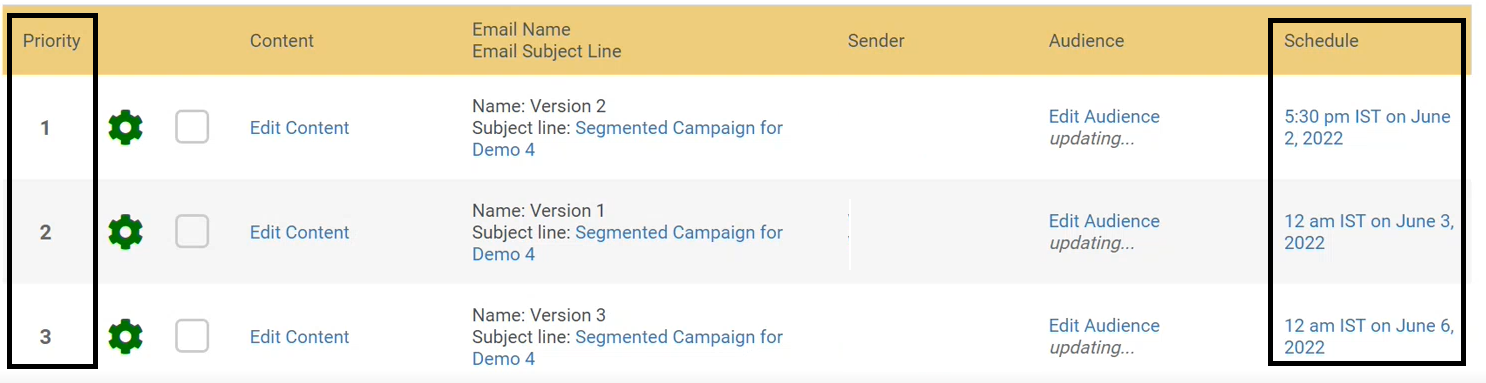
Users can create the required number of versions for the segmented campaign, schedule the date for each version, and then arrange the versions, earliest on the top, based on the priority of each version. Please note in the following image the dates are scheduled according to the highest to the lowest priority:
 |
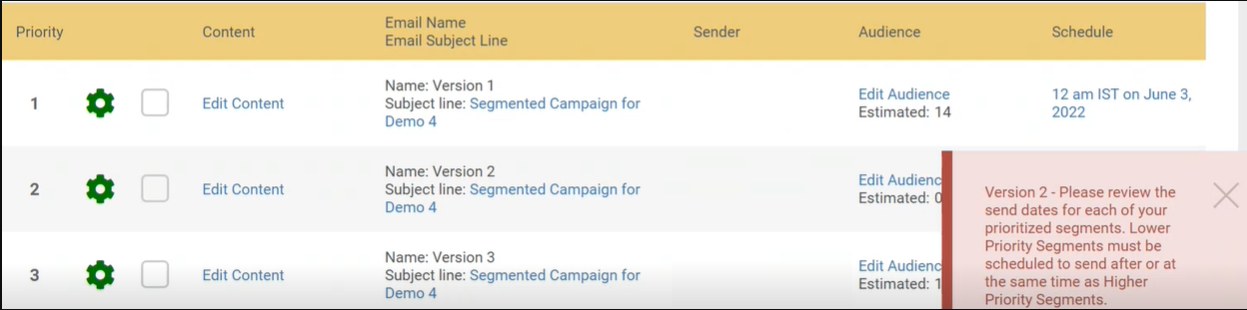
A validation message populates if the scheduled date is earlier for the lower priority version or later for the higher priority version as shown in the following image:
 |
Note: This change is not applicable to the General and A/B Campaigns.
Email Marketing
On the Create Email Campaign page, users can now sort records in ascending or descending order by clicking an arrow on a column header of the History tab. The arrow pointing upwards indicates ascending order and the arrow pointing downwards indicates descending order.
Note: If there are special characters or numbers in the text columns, they precede the alphabet (in ascending order).
The order of sorting is developed based on the associated value of each column. The text columns are sorted alphabetically, the column values having counts are sorted based on the lowest or highest counts, and the date columns are sorted based on the latest or earliest date.
Email Marketing
Added the default second level sorting functionality for all the tabs in the Email Home page. When any of the columns other than the Email name column is used for sorting, in ascending or descending order, the email names are sorted by default in ascending order with respect to the sorted column. This enhances user experience in browsing the sort results.
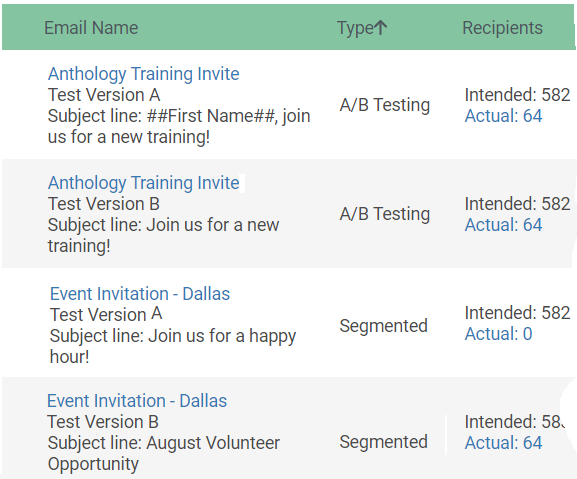
Example:
In the following table the data is sorted by the Type column. Note that the email names are displayed in ascending order with respect to the each type.
 |
Email Marketing
Added a feature to save an email as a new email template. On the Email Home page, users can click the Gear menu and select the option Save as New Template. A dialogue box populates where they can enter the name of the template and click Save. If the users don't want to save the new template the users can click Cancel.
Note: The campaigns that have no content and if the campaigns are of HTML type the Save as New Template option is not available.
Email Reporting
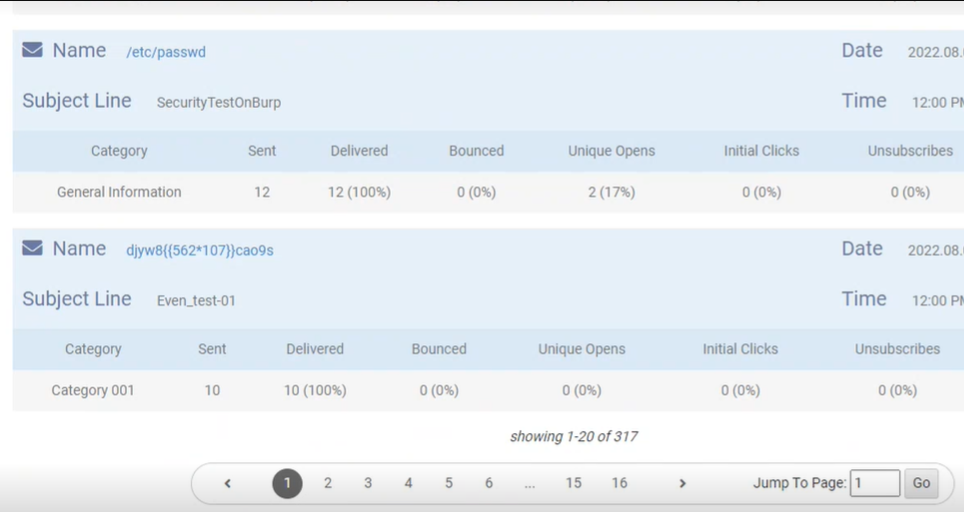
To ensure easy navigation across large number of pages added a text box to the pagination bar. Now, the users can enter the page number they wish to reach in the Jump To Page text box. This feature is available for all the report pages.
 |
Streamlined the email reporting metrics based on the analysis and customer feedback. Made the following changes:
For the users to see how the metrics are calculated added hover message displaying the formula. The user can now hover over any of the cards to see the formulae.
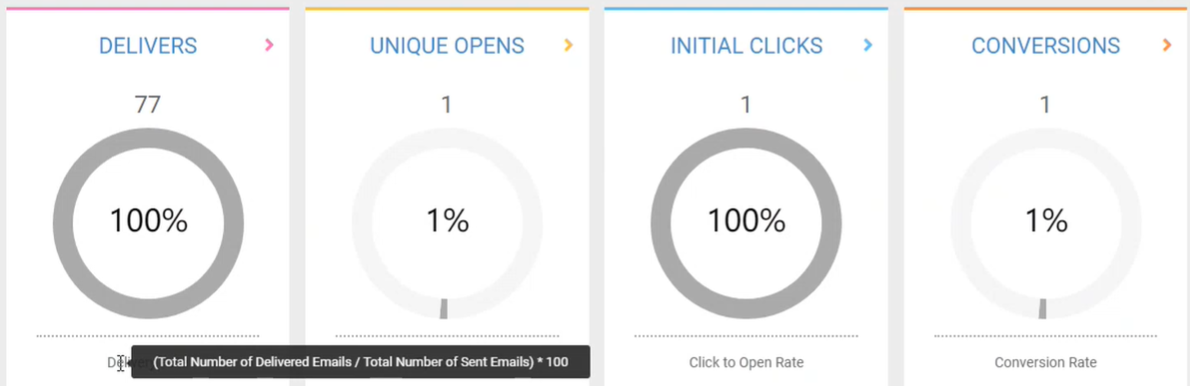 |
Deleted the Clicks card. The Clicks card was capturing multiple clicks depending on the number of links, based on the formula, the card was displaying more than 100% click rate. It was determined that a dedicated card is not required to capture this information. However, the number of clicks information can be found within Initial Clicks card.
Resolution
Functional Area | Reference | Description | ||||||
Email Marketing | 198437 | Users were not able to delete email records from the Block and Bounce lists in SendGrid. The emails were getting blocked even after marking a record as valid. | ||||||
Giving | 214863 | To enable the acceptance of the valid Discover credit cards, updated the software incorporating the new credit card industry eight-digit BIN standards. We expanded the Bin Ranges outside of the discover document BIN ranges to address failed discover card issues. The Discover BIN documentation can be found here: https://www.discoverglobalnetwork.com/resources/payments-providers/bin-ranges/ | ||||||
Foundation | NA | Expand/collapse categories on forms are now navigable via keyboard. The users can use Enter Key to expand and collapse the categories. | ||||||
Foundation | NA | When an error message appears on a form a screen reader will be able to identify that an error is present and notify the user. | ||||||
Foundation | NA | On the Membership forms, corrected the improper HTML which was affecting look and feel of the Membership level headers. | ||||||
Foundation | NA | On a guest registration step in events, screen readers can now identify the guest’s name to be deleted when the action is highlighting the guest delete/removal button. | ||||||
Foundation | NA | Some data exports were being exported in UTF-8 BOM format. Now, all exported data files generated by Encompass will be in UTF-8 format for consistency. | ||||||
Foundation | NA | The title for each event and activity can now be identified by a screen reader. | ||||||
Foundation | NA | Event listing calendar can now be navigated with keyboard actions and read by a screen reader. | ||||||
Giving | NA | As the previous Authorize.net integration was being deprecated, an API gateway integration upgrade was completed. | ||||||
Foundation | NA | The offline non-member merge process has been updated to treat the primary address as a group of fields rather than updating fields on an individual basis. Issue example: Apartment number in address line 2 was incorrectly kept after the merge even when address line 2 was not a part of the new address that did not utilize Apartment number.
Resolution: The offline non-member merge process is now updated to collect new primary address data as group of related fields rather than looking an individual fields to improve merge process accuracy. Want to know more about the Non-member record merging? https://support.imodules.com/hc/en-us/articles/218262488-Non-member-Record-Merging |
Release Notes: Hotfix - July 26th 2022 (64.2.3)
Please note the product releases for the environments are scheduled as follows:Canadian = 26th July, Tuesday Evening | U.S. = 26th July, Tuesday Evening
| Australian = 27th July, Wednesday Morning
Functional Area | Reference | Description |
Giving | 214001 | DCI (Diners Club International) was not being accepted. Identified DCI (Diners Club International) "card type" with the NelNet payment gateway integration. Now, the card is accepted. |
Release Notes: Hotfix - July 5th 2022 (64.2.2)
Please note the product releases for the environments are scheduled as follows:Canadian = 5th July, Tuesday Evening | U.S. = 5th July, Tuesday Evening
| Australian = 6th July, Wednesday Morning
Functional Area | Reference | Description |
Giving | 212611 | Updated global Discover Card IIN (BIN) ranges for the cards that were not being accepted. Now, the cards are accepted. |
Release Notes: Hotfix - June 21st 2022 (64.2.1)
Please note the product releases for the environments are scheduled as follows:Canadian = 21st June, Tuesday Evening | U.S. = 21st June, Tuesday Evening
| Australian = 22nd June, Wednesday Morning
-----------------------------------------------------------------------------------------------
Resolution
Functional Area | Reference | Description |
Giving | 191543 | Users were receiving authentication failed errors when trying to make payments using the Moneris API Integrated payment service. The issue was due to the different expiry date format YYMM instead of MMYY used by the Moneris service. Fixed the issue by updating the software according to the Moneris format YYMM and enhanced the software by adding logic for CVD(Card Verification Data) number, and AVS (Address Verification Service). Note: The transactions are processed even without the correct CVD number and valid address(AVS verifies the card holder’s address with the address in the records of the issuing bank). However, such transactions will be recorded as fraudulent. These features enable tracking fraudulent transactions when needed. |
Email Marketing | 210945 | On the History tab, the Constituent ID values were not populating in the excel file downloaded using the gear menu option Export Recipients. |
Release Notes: Hotfix - May 9th 2022 (64.0.8)
Please note the product releases for the environments are scheduled as follows:Canadian = 9th May, Monday Evening | U.S. = 9th May, Monday Evening
| Australian = 10th May, Tuesday Morning
-----------------------------------------------------------------------------------------------
Resolution
Functional Area | Reference | Description |
Giving | 209020 | To enable the acceptance of the valid Discover credit cards, updated the software incorporating the new credit card industry eight-digit BIN standards. |
Release Notes - May 31st 2022 (64.2.0)
Please note the product releases for the environments are scheduled as follows:U.S. = 31st May, Tuesday Evening | Canadian = 31st May, Tuesday Evening
| Australia = 1st June Wednesday Morning
-------------------------------------------------------------------------------------
Product Enhancements
Email Marketing
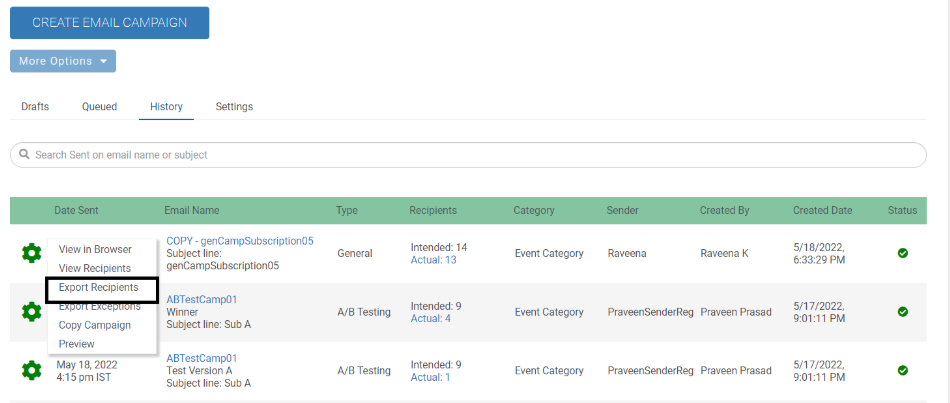
This option enables the users to export the recipient records of the messages that have been sent and moved to History. The exported file contains the following columns:
Member ID
Constituent ID
First Name
Last Name
Email
To access the option, click the Gear menu in the History tab.
 |
Email Marketing
When there was a deleted field associated with a segment or query, the recipients were not being filtered.
To ensure that emails are sent only to the intended recipients, inactivated segments that have a field deleted so that these segments are excluded from campaigns until these segments are fixed. If an existing, or a new segment has a deleted field, or if a segment is associated with a campaign set to a future date and a field is deleted during the segment creation date and set campaign date, such a segment is inactivated.
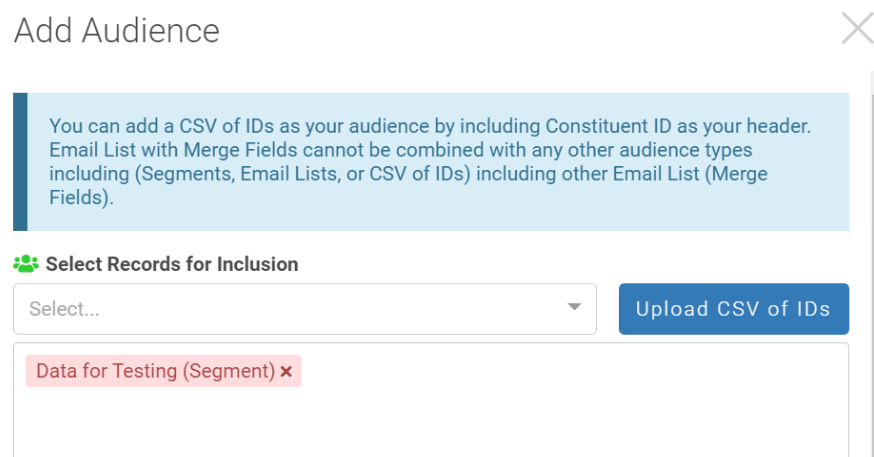
Inactive segment names are highlighted in red, and messages are added informing the users that the segments are inactive:
When a user attempts to add a .csv or send emails, the segment with a deleted field is highlighted in red indicating that the segment is inactive and the message, "Please Review the Audience for the Campaign. An associated segment is no longer valid.", is displayed.
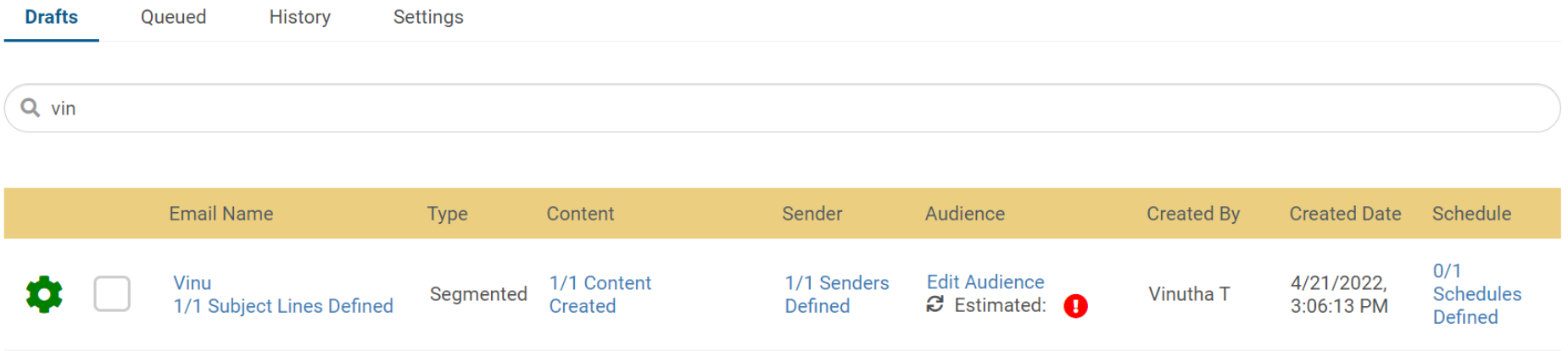
The Edit Audience link in the Drafts tab displays an alert icon and when hovered on the icon the message, "An associated segment is no longer valid.", is displayed.
Email Marketing
On the Create Email Campaign page, users can now sort records in ascending or descending order by clicking an arrow on a column header of the Draft and Queued tabs. The arrow pointing upwards indicates ascending order and the arrow pointing downwards indicates descending order.
Note: If there are special characters or numbers in the text columns, they precede the alphabet (in ascending order).
 |
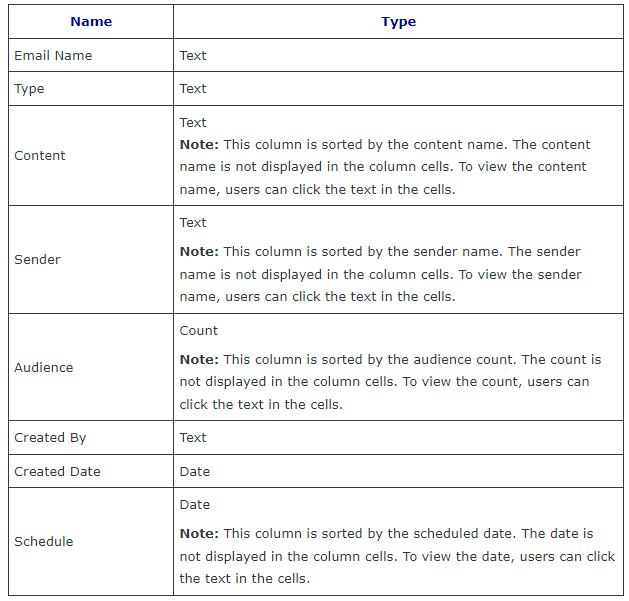
The order of sorting is developed based on the associated value of each column. The text columns are sorted alphabetically, the column values having counts are sorted based on the lowest or highest counts, and the date columns are sorted based on the latest or earliest date.
 |
Online Giving
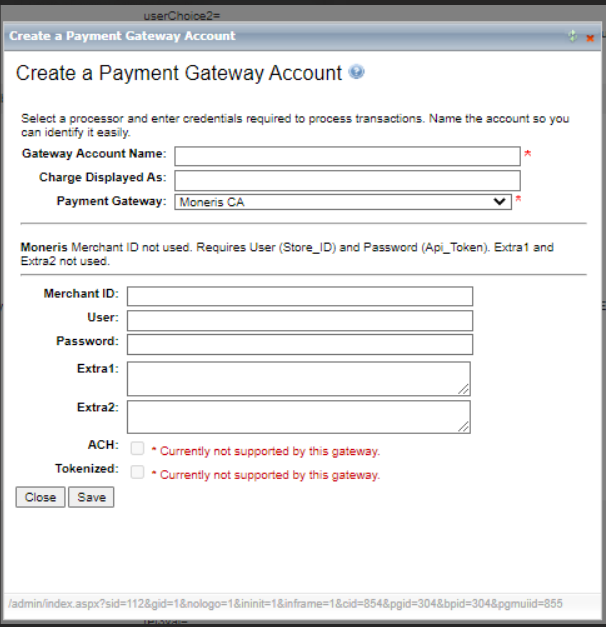
Adapted the Moneris payment gateway upgrade from Moneris Direct Post Configuration to Moneris API Integration. Moneris support recommended this feature for more convenient and secure transactions.
After the users obtain the required credentials from Moneris, the transactions are processed through the autogenerated API key in their Moneris accounts. To set up the gateway on Encompass, the users are required to enter the Store ID and the API key on the Create a Payment Gateway window.
 |
Email Reporting
On the Email Reporting Home page, the Open by Device Donut legend was overlapping.
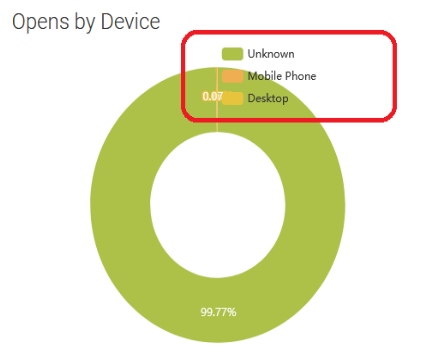 |
Updated the chart title and positioned the legend on the top-right of the chart.
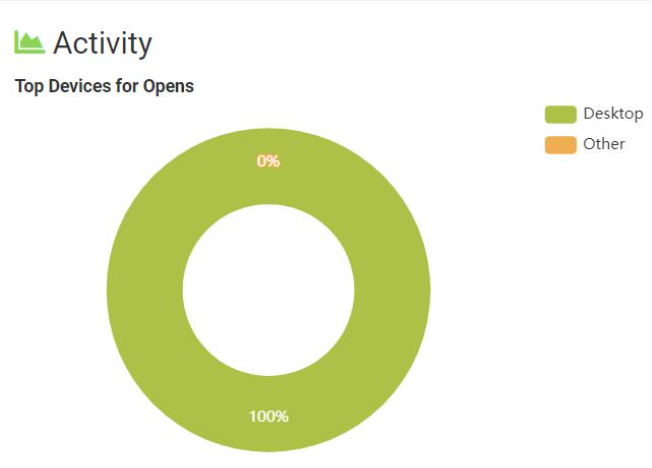 |
Resolution
Functional Area | Reference | Description |
Email Reporting | 191288 | When the registrations were done through tokenized links, the registration counts were not reflecting on the Conversions page. Even the other metrics Clicks, and Initial Clicks were not captured for the tokenized links. Now, the registration counts and all the related metrics are accurately captured. |
Foundation | 205696 | Creating email segment functionality was not working from the Attendee List option on the Events page gear menu. When the user clicked the Attendee List option, and then in the More Action menu, clicked Create Email Segment, the following success message appeared without the segment being created: "Your segment has been successfully created and is available as an audience in email marketing" . Now, the users can create email segments using the Attendee List option and view the newly created segment in the segment list. |
Email Marketing | NA | Prioritized segmented campaigns having larger audiences were experiencing processing and sending delays lasting for hours. Now, on average, the processing and sending time for the campaigns is reduced to around 10 minutes. |
Events | 207536 | In the optimized events reporting, activity names with more than 175 characters were not accepted and showed errors. Now, the activity names longer than 175 characters are accepted and no longer show errors. Note: For reporting purposes, the column header in the optimized event’s reports is truncated to 123 characters. |
Email Reporting | NA | Removed click activity drop down from the AB Testing Campaign. |
Release Notes: Hotfix - April 28th 2022 (64.0.7)
Please note the product releases for the environments are scheduled as follows:Canadian = 28th April, Thursday Evening | U.S. = 28th April, Thursday Evening
| Australian = 29th April, Friday Morning
-----------------------------------------------------------------------------------------------
Resolution
Functional Area | Reference | Description |
207932 | The images in the emails were not opening for the Microsoft Outlook web client recipients who were blocking unsecured image URLs having the HTTP (Hypertext Transfer Protocol) scheme. The development team updated the code to enable secured URLs having the HTTPS (Hypertext Transfer Protocol Secure) scheme. Now, the images are displayed correctly. |
Release Notes: Hotfix - April 19th 2022 (64.0.6)
Please note the product releases for the environments are scheduled as follows:Canadian = 19th April, Tuesday Evening | U.S. = 19th April, Tuesday Evening
| Australian = 20th April, Wednesday Morning
-----------------------------------------------------------------------------------------------
Resolution
Functional Area | Reference | Description |
Giving | 207191 | The Discover cards with Bank Identification Numbers (BIN) between 64400000 and 65999999 were not being accepted. Now, Encompass accepts all the Discover cards in the range 64400000-65999999. Note: This change has been made to address the new credit card industry eight-digit BIN standard. |
Release Notes: - April 18th 2022 (64.2.0)
Please note the product releases for the environments are scheduled as follows:Canadian = 18th April, Monday Evening | U.S. = 18th April, Monday Evening
| Australian = 19th April, Tuesday Morning
-----------------------------------------------------------------------------------------------
Resolution
Functional Area | Reference | Description |
Giving | NA | Users were unable to sort messages by clicking the column headers under All Tabs on Email Home. Now, the sort functionality is enabled. The arrow indicator next to the column headers indicates ascending or descending order. |
Release Notes: Hotfix - April 11th 2022 (64.0.5)
Please note the product releases for the environments are scheduled as follows:Canadian = 11th April, Monday Evening | U.S. = 11th April, Monday Evening
| Australian = 12th April, Tuesday Morning
-----------------------------------------------------------------------------------------------
Resolution
Functional Area | Reference | Description |
Giving | 206881 | When the Donor Roll offline transaction data file was imported, all the donor names were not displayed. Now, the donor names are displayed irrespective of the designation or custom data point filters applied in the configuration. |
Release Notes: Hotfix - April 5th 2022 (64.0.4)
Please note the product releases for the environments are scheduled as follows:Canadian = 6th April, Wednesday Morning | U.S. = 6th April, Wednesday Morning
| Australian = 7th April, Thursday Morning
-----------------------------------------------------------------------------------------------------------
Resolution
Functional Area | Reference | Description |
Giving | NA | Admin confirmation emails were not being delivered. |
Note: Donation transactions can continue to be available using the donation reconciliation report or giving transaction export. Administrators can also be added to the BCC option on member confirmation emails
Maintenance Notice: Email Reporting April 16, 2022
Please note the Encompass Maintenance window for the US environment is scheduled as follows:
U.S. = Saturday, April 16th12:00 AMET until 6:00 AM ET.
__________________________________________________________________________________________
Product Maintenance
Encompass Maintenance – Email Reporting (US only)
There will be a maintenance window on Saturday, April 16, starting at midnight ET and continuing until 6 a.m. ET for US-based clients ONLY. During this time, Email Reporting in the Encompass platform will be unavailable as a server upgrade is taking place to increase data capacity and improve the performance of email reporting.
Emails will continue to send*, and performance data will be collected and viewable after the maintenance window. API calls to the email database will return errors during the maintenance window. This will not impact other aspects of the Encompass platform.
You can find the maintenance-related updates at status.imodules.com.
*Note that any emails that include in A/B testing and scheduled to send between midnight ET and 6 a.m. ET will not be complete as these are dependent on email reporting data. These emails will fail. If you have A/B testing emails scheduled during the maintenance window, please adjust the send time for these communications.
Release Notes: Hotfix - April 4th 2022 (64.0.3)
Please note the product releases for the environments are scheduled as follows:Canadian = 4th April, Monday Evening | U.S. = 4th April, Monday Evening
|Australian = 5th April, Tuesday Morning
-----------------------------------------------------------------------------------------------------------
Product Enhancements
General Encompass
We have improved the overall performance of Payment workflows.
Release Notes: Hotfix - March 28th 2022 (64.0.2)
Please note the product releases for the environments are scheduled as follows:Australian = 29th March, Tuesday Morning | Canadian = 28th March, Monday Evening
| U.S. = 28th March, Monday Evening
-----------------------------------------------------------------------------------------------------------
Resolution
Functional Area | Reference | Description |
Scoreboards | 205631 | Newly created Donor Rolls were not getting configured, and the older Donor Rolls were not rendering in the Content module. |
Release Notes: Hotfix - March 23rd 2022 (64.0.1)
Please note the product releases for the environments are scheduled as follows:Australian = 24th March, Thursday Morning | Canadian = 23rd March, Wednesday Evening
| U.S. = 23rd March, Wednesday Evening
-----------------------------------------------------------------------------------------------------------
Resolution
Functional Area | Reference | Description |
Email Marketing | 205676 | Emails were failing if the email list contained a duplicate email address. |
Email Marketing | NA | Email Ids with a length longer than 50 characters were failing when sending emails. |
Release Note - March 21st 2022 (64.0.0)
Please note the product releases for the environments are scheduled as follows:Australian = 22nd March, Tuesday Morning | Canadian = 21st March, Monday Evening
| U.S. = 21st March, Monday Evening
-----------------------------------------------------------------------------------------------------------
Product Enhancements
Scoreboards
We have added a new feature in this release where the admin can set up Donor Roll based on a group of designations. This will help the admin determine who has donated to a specific Designation (or group of designations/collection).
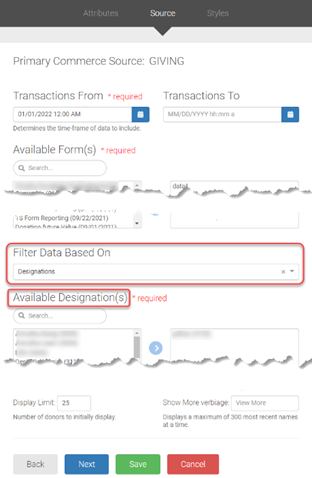
When creating a Donor Roll, you will get an option to select Designation from Filter Data Based On section under the Source tab. Selecting Designation will show Available Designation(s). Use the arrow buttons to move Designation(s) from the left to the right box. Only those in the right box are in use.
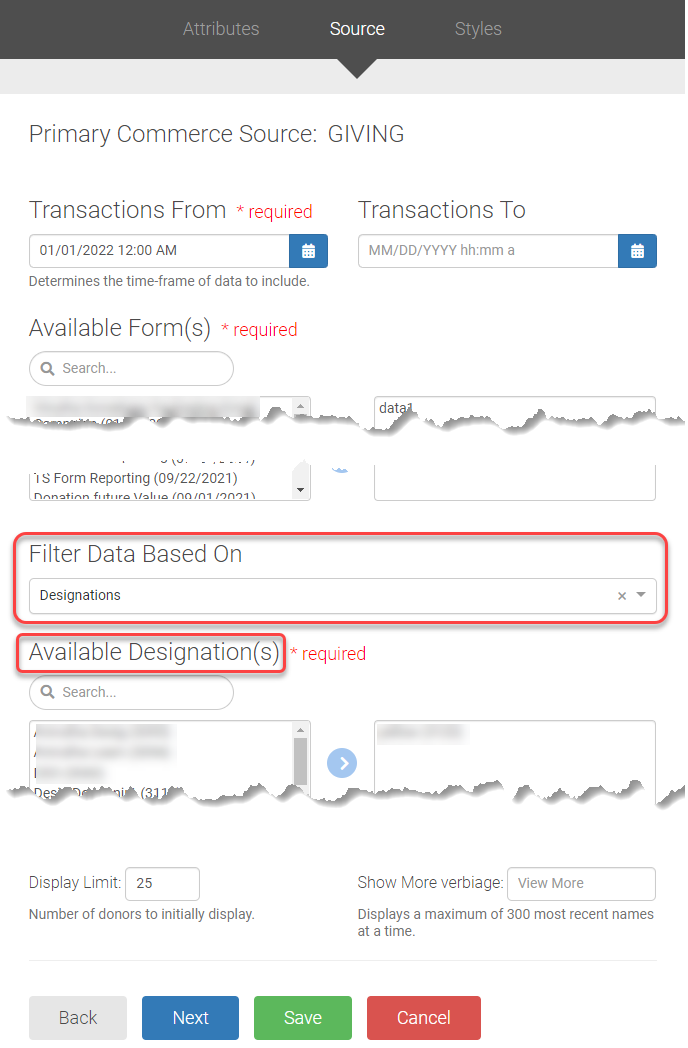 |
We have added a new feature in this release where the admin can set up Donor Roll based on Custom Data Point. The Custom Data Point can help you create more unique Donor Rolls. You can use the Custom Data Point to collect the data, which can help create different Donor Rolls.
When creating a Donor Roll, you will get an option to select Custom Data Point from Filter Data Based On section under the Source tab. Selecting Custom Data Point will show another field Custom Field from where you need to select the Data Point . Use the arrow buttons to move Available Field Value(s) from the left to the right box. Only those in the right box are in use.
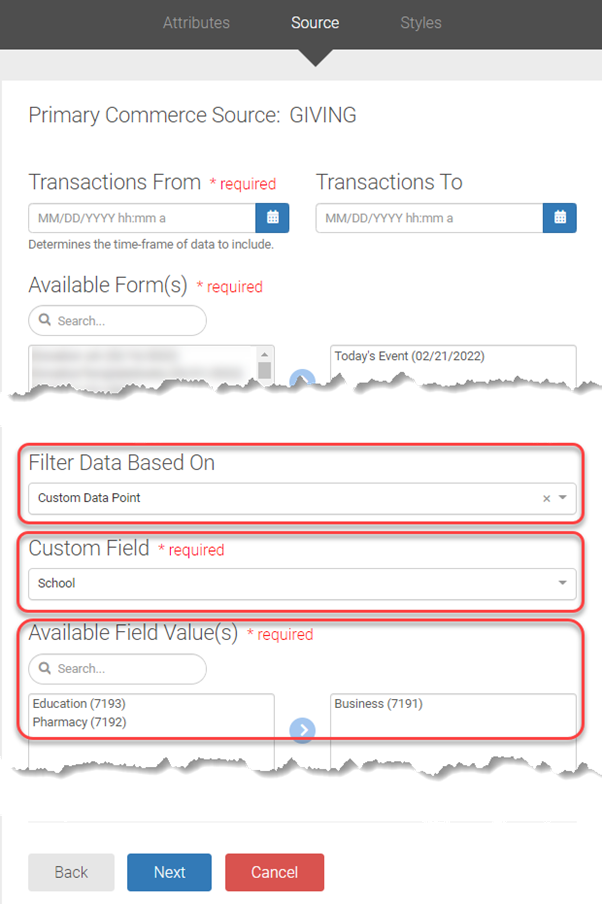 |
We have added two new columns in this release, Created By and Created Date, in the History grid.
After a user creates a General/Segmented/AB Testing Campaign, the user's name who has created the campaign with the campaign created date and time will be populated.
Note: The Created By column will show a blank value for the historical campaign as Encompass did not store any value for the past record prior to Jan 17th 2022 (63.8.0) release.

Resolution
Functional Area | Reference | Description |
Email Marketing\Audiences | NA | Search results were not appearing when users entered ( , [ , / , ? characters in the search screen for Email Lists and Segments. |
Email Marketing | 200073 | When editing the HTML in an HTML Email Campaign, the editor was not working. |
Email Marketing | 198124 200323 198092 | When sending A/B testing Campaign, version B of the HTML was appearing as blank. |
Email Marketing | 181762 | Any URL containing amp and %3b= were getting changed to & (ampersand) and ; (semicolon) respectively while sending an email, and the link was getting broken. |
Email Marketing | 202015 | Any URL containing an apostrophe (') in the A/B Testing, General, Segmented campaign for both in HTML and in Template was not encoding properly. |
Email Marketing | 194987 | Name and Description of Email Lists and Segments query was not synced to the email database (provided users checked "Update Original Query/Email Segment" box was checked.)
|
Email Reporting | 180814 | The calculation for Initial Clicks for the A/B Testing Campaign was incorrectly calculated. |
Payment Gateways | 194834 | For the Digital Wallet PayPal transaction, the Billing Name column in the Giving Transaction Export report was appearing as blank. |
CMS | 180687 | Non-logged-in members/logged-in members of Encompass were able to see the user's private data of the submitted forms (Standard, Membership, Donations, Campaigns, and Event forms). |
Release Note 63.9.0 - Release Date 21st March 2022
In an effort to continue to focus on the priority items from the Azure migration and in an abundance of caution, we have canceled the release for Monday, February 21.
The new release date is planned along with 63.4.0 on 21st March 2022
__________________________________________________________________________________________
Product Enhancements
Scoreboard
We have added a new feature in this release where the admin can set up Donor Roll based on a group of designations. This will help the admin determine who has donated to a specific Designation (or group of designations/collection).
When creating a Donor Roll, you will get an option to select Designation from Filter Data Based On section under the Source tab. Selecting Designation will show Available Designation(s). Use the arrow buttons to move Designation(s) from the left to the right box. Only those in the right box are in use.
Resolution
Functional Area | Reference | Description |
Email Marketing\Audiences | NA | Search results were not appearing when users entered ( , [ , / , ? characters in the search screen for Email Lists and Segments. |
Email Marketing | 200073 | When editing the HTML in an HTML Email Campaign, the editor was not working. |
Email Marketing | 198124 200323 198092 | When sending A/B testing Campaign, version B of the HTML was appearing as blank. |
Email Marketing | 181762 | Any URL containing amp and %3b= were getting changed to & (ampersand) and ; (semicolon) respectively while sending an email, and the link was getting broken. |
Email Reporting | 180814 | The calculation for Initial Clicks for the A/B Testing Campaign was incorrectly calculated. |
Payment Gateways | 194834 | For the Digital Wallet PayPal transaction, the Billing Name column in the Giving Transaction Export report was appearing as blank. |
CMS | 180687 | Non-logged-in members of Encompass were able to see the user's private data of the submitted forms (Standard, Membership, Donations, Campaigns, and Event forms). |
Maintenance Notice: US Azure Migration 11th Feb 2022
Please note the Encompass Maintenance window for the US environments are scheduled as follows:
U.S.= Friday, February 11 at 10 p.m. ET through Sunday, February 13 at 12 noon ET.
__________________________________________________________________________________________
Product Maintenance
Anthology Encompass will be migrated from a data center to the cloud as part of important maintenance of the platform. Encompass sites will not be available during this scheduled maintenance window, Encompass will be inaccessible to admins and end-users, and email delivery will be paused. All sites will be restored, and all Encompass operations, including email delivery, will resume immediately after the maintenance window.
FAQs
Why is this system migration necessary?
(Last updated on: 11th Jan 2022)
Anthology was informed by our third-party provider in mid-December that the data center we are currently using for Anthology Encompass is closing in May. Rather than moving to another data center (which would also require downtime), we will move to the cloud-based Microsoft Azure platform providing additional benefits and decreasing complexities.
How has Anthology prepared for this migration?
(Last updated on: 11th Jan 2022)
Our teams have put together a detailed migration plan based on a similar migration that we completed for servers based in Canada. We will use that information and experience to ensure we complete the migration of our US servers as quickly as possible.
What are the benefits of migrating to Microsoft Azure?
(Last updated on: 11th Jan 2022)
Simplified Data Privacy and Compliance: All backup data and disaster recovery environments will be hosted in Azure, making it easier for Anthology to maintain these functions. This will reduce the documentation that may be needed for institutional compliance processes.
Increased Availability: New levels of redundant infrastructure will increase system availability and reduce recovery time in the unlikely event of a disaster. Additionally, new cloud services will reduce system downtime during regular maintenance activities.
Increased Scalability: Cloud infrastructure will allow us to respond faster, allocating additional resources if there are changes in load on sites.
Why was the date of February 11 selected?
(Last updated on: 11th Jan 2022)
In selecting the migration date, we focused on identifying the least potential impact on our clients. Due to the closing of the current data center in May, there were limited options available given a large number of days of giving and events between March and May. We selected the weekend of February 11 in looking at the past annual activity of all institutions. We recognize there is no perfect time to undertake such a migration and understand that some of you may be impacted to a greater extent given events or activities already being planned. We are aware of the impact that any downtime for Encompass has on the work you do each and every day and we make every effort to minimize downtime for maintenance. We communicated the date as quickly as possible to ensure you have an opportunity to plan or adjust your engagement and solicitation strategies accordingly.
Will my site be down for a full two days?
(Last updated on: 21th Jan 2022)
The time frame we have provided is our maximum anticipated maintenance window. We wanted to ensure that you had the opportunity to plan for the outage in advance, without the need to communicate an extension, if needed. As soon as the data migration is complete, sites will be available while our teams complete testing. Once the testing is complete, we will communicate that the maintenance period is complete via status. To receive updates during the migration, please visit https://status.imodules.com and subscribe to alerts. You will receive notifications of key progress points during the migration, as well as a notification of completion of maintenance.
What are the steps being taken during the maintenance window?
(Last updated on: 11th Jan 2022)
Anthology will be migrating all database servers to the cloud. We are performing incremental transfers/copies of the databases but still have the "final" cutover that will be needed to "catch up" all "transactions". This cutover is the reason for the scheduled outage. We are following a similar migration plan as was used with the successful migration of our servers in Canada and have determined the maximum outage time based on the amount of data and the number of servers that are being migrated. The team will do everything possible to minimize the scheduled outage time. We will communicate through the status page as soon as the migration is complete and Encompass has been tested by our QA teams. During the testing period, sites may be available, but please wait for our communication that maintenance is complete before testing your site.
Is Anthology testing Encompass?
(Last updated on: 21th Jan 2022)
The Anthology team has planned for this migration across multiple teams, also taking into account the information gained from the migration of our Canadian servers to the Azure environment. We successfully completed the migration of our staging environments the weekend of January 14th and have made minor adjustments to the migration plan.
What are clients expected to do for this migration?
(Last updated on: 21th Jan 2022)
There are several things that you can do to help ensure limited impact following the migration.
Prior to the migration, please confirm that the new IP addresses have been added to the allowed list, if applicable (see below).
Following the migration, our team will be testing each payment gateway on our testing sites; however, we also ask you to test live payment gateways to verify that you are able to complete a transaction.
Our team will be testing sites as part of the maintenance window; however, every site is slightly different, given additional non-standard Encompass elements that may have been added by your institution or at your request. Therefore, we encourage you to briefly test key areas of your site following the successful migration. We will be providing a short testing checklist with more details to spot-check your site and ensure that your instance of Encompass is working as expected.
Note that any emails scheduled during the maintenance window will not send, and we encourage you to adjust those communications.
How can I stay notified of the progress of the migration while my site is down?
(Last updated on: 21th Jan 2022)
Please visit https://status.imodules.com and subscribe to alerts. You will receive updates of key progress during the maintenance period reflecting the status of progress, as well as notification of completion of the migration and postmortem notes providing additional details.
What are the IPs that clients should be adding to their allowed list (whitelist)?
(Last updated on: 2nd Feb 2022)
This should be completed prior to the weekend of February 11. If you are not currently whitelisting our existing system IPs this step is not needed and requires no action. If needed, this is an important action item that you as a client can complete now if your institution is currently including Encompass IP addresses as part of an allowed list of IP addresses. Note that these IPs may connect to client payment gateways. (These IPs are NOT used for email marketing.) Please maintain existing IP’s until after the conclusion of the migration. If you are unsure about whether you are currently using an allowed list of IP addresses, please forward this to your IT team for review.
20.65.14.24
20.65.14.25
20.65.14.26
20.65.14.27
20.65.14.28
20.65.14.29
20.65.14.30
20.65.14.31
(or cidr notation 20.65.14.24/29)
*20.122.181.2 (*only needs to be included if you utilize web services)
Legacy system IPs can be removed after the migration is complete and can be found in the Migration checklist (PDF).
Will the Migration have an impact on web services (Encompass API)?
(Last updated on: 12th Jan 2022)
Yes. The current IP for web services (the Encompass API) will be changing. The API will be down during the migration time. If you are using the Encompass web services API for data processing, this will need to be updated during or as soon as possible after the maintenance outage window. The domain name will not change.
New IP: 20.122.181.2
Web services domain: Api.imodules.com
(Last updated on: 9th Feb 2022)
Testing the API with the new IP address (20.122.181.2) can be done by using the following base URL:
For example, General Query (https://api.imodules.com/ws/21/generalquery.asmx) can be tested with the new IP address with https://api-az.imodules.com/ws/21/generalquery.asmx
The databases behind the temporary API endpoint are disabled. That means attempting to access information via the API for a site will result in the error message:
<Error Code="0" Description="An unhandled exception occurred while processing the request. Please contact support for more information."/>
This error message is directly from the API error handler and receiving this message means that communication got through to the API and there is not a network/firewall issue, which is the intent of use for the temporary API endpoint. If there is a network/firewall issue, customers will instead encounter the corresponding network/firewall error.
Please note: The API URL is not permanently changing to use a base of https://api-az.imodules.com/
This is a test URL to use for the migration, and this test URL will be disabled shortly after the migration.
API URL Certificate
Our team expects the certificate change would affect more integrations than the IP change. We plan on changing the certificate for the API after the migration and will provide test URLs with the certificate change in a couple weeks.
Will there be a change to the existing email marketing IPs?
(Last updated on: 11th Jan 2022)
No, there will not be a change to the existing Encompass marketing IPs. The emails that will be affected by the new IPs are system-generated emails, such as Encompass notifications and email confirmations.
Will this migration affect the scheduled exports and our daily import/data sync process?
(Last updated on: 11th Jan 2022)
Yes. All scheduled tasks, including scheduled data imports and exports, will be disabled at the start of the maintenance window. Once Anthology completes testing, scheduled tasks will be run manually and process anything waiting. Additionally, import files will be picked up on the following Monday morning, February 14, at 5:25 am CT and 7:25 am in the order they have been uploaded. If you are currently using the Auto-SFTP process for your import/data sync, action is required to confirm your SFTP access is not interrupted. You should update and confirm your SFTP Host / User credentials prior to continued imports as our IP will have changed to 20.96.25.122.
What is the new IP for automated SFTP imports?
(Last updated on: 8th Feb 2022)
The new IP for those clients using automated SFTP imports is 20.96.25.122 – this is a change and the previous IP will no longer be recognized following the migration.
The current SFTP domain “sftp.imodules.com” or “prodsftp.imodules.com“ is not changing.
Please note that following the migration you will need to accept the host key detail. If you have an automated SFTP import process set-up, you will need to make sure the configuration is set up to accept the host keys.
Hostkey information for US Prod
ECDSA/nistp384 host key 384 bits
MD5 fingerprint: 4a:26:34:ed:e3:40:90:0f:bf:f8:d3:52:9e:26:4e:a0
Bubble-Babble: xirev-borot-siryz-gyduv-rygiz-zicin-tytef-vykoc-tomyl-lugid-lexax
SHA-256 fingerprint: IJ9PlElF6Wcy36PgidKJNEYL0/GXOsgEn5rtHo++vmY
Testing the new IP can be done by using the following host URL:
ussftp.imodules.com
This URL is meant for testing, is not permanent, and will be disabled shortly after the migration.
What will be displayed while the site is down?
(Last updated on: 11th Jan 2022)
A page will be displayed that specifically refers to the maintenance window and informs visitors that the site will again be available by Sunday, February 13, at noon Eastern. The message will be “Our site is currently undergoing planned maintenance. Sites will be restored by Sunday, February 13 at 12 noon Eastern. Please return to the site after that time. We apologize for the inconvenience.” There is not an ability to customize this language as the page will be used across all Encompass sites.
What will happen to scheduled and recurring gifts that should be processed during the outage time?
(Last updated on: 11th Jan 2022)
Recurring payments are processed overnight on a daily basis. Any recurring payments scheduled for the 12th or 13th will be processed on the morning of February 14th when recurring payments are processed each day.
How will this impact email communications?
(Last updated on: 9th Feb 2022)
During the Migration, the Email Queues will be paused and any messages that are scheduled to send during the window will be picked up and processed after the move is completed. However, we recommend adjusting any messages currently scheduled during the maintenance window to send after the completion of maintenance. Any links in email content sent from Encompass will not function for the duration of the Encompass outage.
What client support will be offered related to the Azure migration?
(Last updated on: 11th Jan 2022)
In addition to our regular customer support hours and services offered for Encompass, we are offering extended support hours on Sunday, February 13 from 12 noon to 5 p.m. ET.
How can I get added to the email notification list when announcements regarding Encompass are distributed?
(Last updated on: 11th Jan 2022)
We encourage you to have an internal discussion on your campus to determine who should be considered as a primary contact to receive these communications. If updates are needed, you can work with your Customer Experience Manager to do so. If you are unsure of who your Anthology contact person is, please reach out to our customer support team. Given the impact of this migration, information is also being included in the Inspire newsletter, in addition to other communications being sent to identified individuals.
Release Notes: Hotfix - Jan 24th 2022 (63.8.1)
Please note the product releases for the environments are scheduled as follows:Australian = 25th Jan, Tuesday Morning | Canadian = 24th Jan, Monday Evening
| U.S. = 24th Jan, Monday Evening
-----------------------------------------------------------------------------------------------------------
Product Enhancements
In this hotfix, we have improved the overall performance of the email deliverability.
Resolution
Functional Area | Reference | Description |
\Scoreboards | 200066 | Leaderboard data was not generated when users created Leaderboard using Leaderboard Type as Custom Data Point. |
\Giving | 200189 | Users were getting an error ("Your designations must equal the total amount of your donation.") while donating if the Donation Amount value is zero. |
Release Note - Jan 17th 2022 (63.8.0)
Please note the product releases for the environments are scheduled as follows:Australian = 18th Jan, Tuesday Morning | Canadian = 17th Jan, Monday Evening
| U.S. = 17th Jan, Monday Evening
__________________________________________________________________________________________
Product Enhancements
Ambassador Challenge
The Designation Donation logic helps you identify the donation amount raised for a specific Designation across all the Initiatives. When donors make any donations to a Designation-based Challenge, the donated amount reflects in all the Challenges when the Challenges has the same Designations, the Start Date, Start Time, and the End Date and End Time range and with matching Time Zone. Refer to Creating Challenges to know more.
This Affiliation Donation logic helps you identify the donation amount raised for a specific Affiliation across all the Initiatives. When donors make any donations to an Affiliation-based Challenge, the donated amount reflects in all the Challenges when the Challenges has the same Affiliation, the Start Date, Start Time, and the End Date and End Time range and with matching Time Zone.
This Affiliation logic does not depend on the Initiative's Start Date and Start Time or End Date and End Time. When you have different Affiliation selected in Different Challenges, but the Affiliation value is similar to the Date and Time range with other Challenges, the amount gets reflected in all the Challenges that meet these criteria. If any requirements do not match, the Donated amount will get updated only on that specific Challenge and the Initiative Card.
Scoreboards
In this release, we are introducing Create from Template button under Scoreboard > Configure Module for all the Maps. Now you can save a template and reuse it. Refer to Scoreboard Maps to know more.
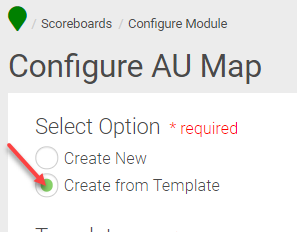
When you try to save the Map Template with a duplicate name, Encompass will not accept and throws up an error.

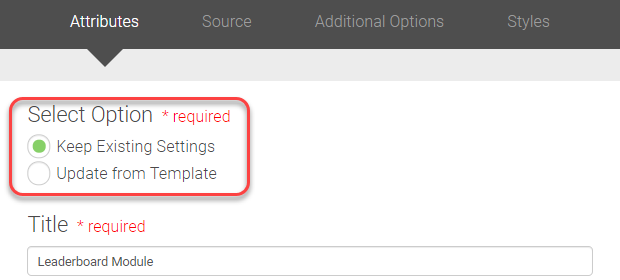
We have added two new options in this release, Keep Existing Settings and Update from Template radio button under Leaderboard > Configure Control > Attributes. When creating a New Leaderboard, keep the Keep Existing Settings radio button selected and continue the process. In the final step under the Style tab, you can find one additional button enabled for you, Save As Template. If you wish to save the Leaderboard settings and properties you have defined while creating the Leaderboard, you can click Save As Template. This keeps the Template, and you can use this Template in the future when you create another Leaderboard.
Next time you create a New Leaderboard, you can select the Update fromExisting radio button. This brings all the settings and properties of the earlier saved Template.
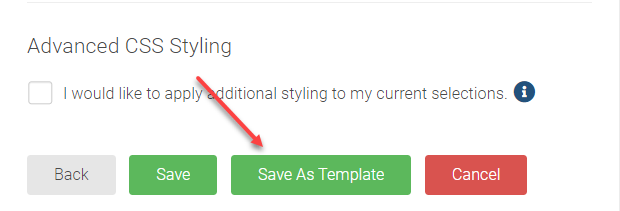
When you try to save the Leaderboard Template with a duplicate name, Encompass will not accept and throws up an error.

We have added two new options in this release, Keep Existing Settings and Update from Template radio button under Donor Roll > Configure Control > Attributes. When creating a New Donor Roll, keep the Keep Existing Settings radio button selected and continue the process. In the final step under the Style tab, you can find one additional button enabled for you, Save As Template. If you wish to save the Donor Roll settings and properties you have defined while creating the Donor Roll, you can click Save As Template. This keeps the Template, and you can use this Template in the future when you create another Donor Roll.
Next time you create a New Donor Roll, you can select Update fromExisting radio button. This brings all the settings and properties of the earlier saved Template.
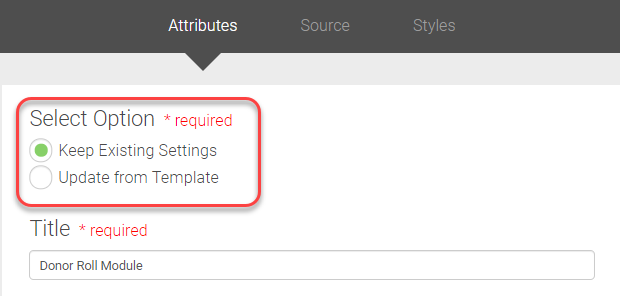 |
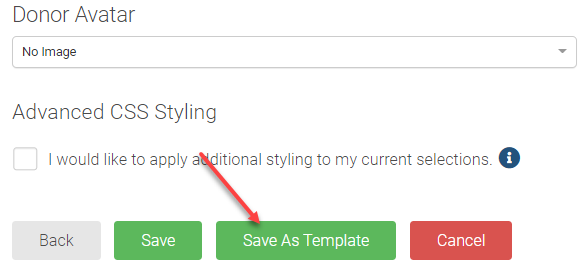
When you try to save the Donor Roll Template with a duplicate name, Encompass will not accept and throws up an error.

We have added two new options in this release, Keep Existing Settings and Update from Template radio button under Affiliation > Configure Control > Attributes. When creating a New Affiliation, keep the Keep Existing Settings radio button selected and continue the process. In the final step under the Style tab, you can find one additional button enabled for you, Save As Template. If you wish to save the Affiliation settings and properties you have defined while creating the Donor Roll, you can click Save As Template. This keeps the Template, and you can use this Template in the future when you create another Affiliation.
Next time you create a New Affiliation module, you can select Update fromExisting radio button. This brings all the settings and properties of the earlier saved Template.
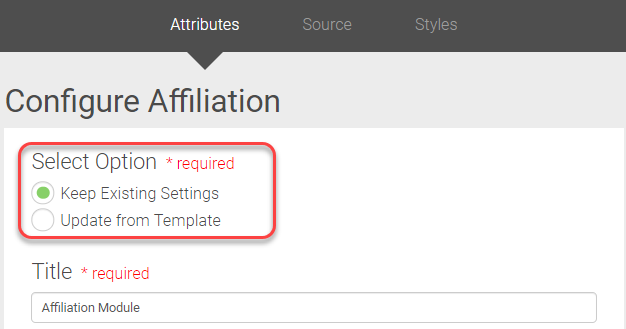
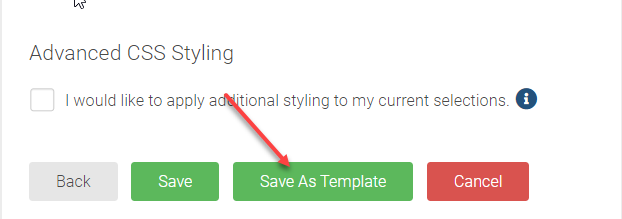
When you try to save the Affiliation Template with a duplicate name, Encompass will not accept and throws up an error.

Now you can delete multiple Designations at once. To delete multiple Designations, click the Delete under More Options; all selected designations with $0 attached will get deleted.
When deleting, if one or more Designations have $ amount attached, a warning message gets displayed to disable the Designations with $ value. You can choose to Disable the active Designations. This disables the active Designations and deletes the Designations with $0 attached. Chose Cancel to cancel the deletion event.
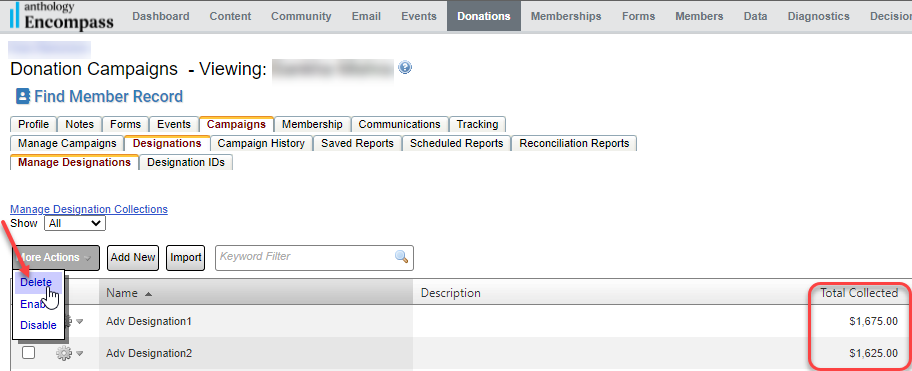
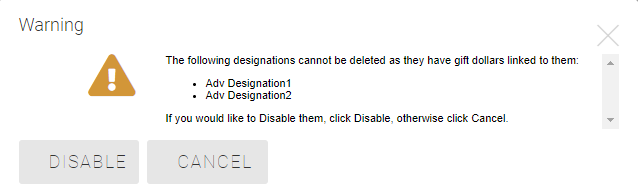
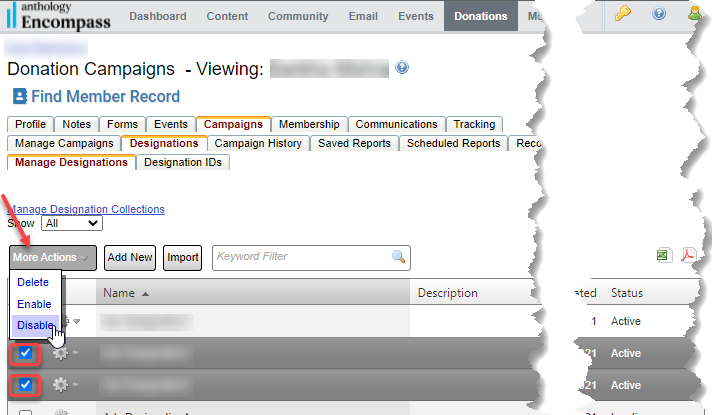
Now you have the options to Enable/Disable multiple Designations by selecting the check box next to the Designations. Selecting multiple Designations gives you additional options under the More Actions drop-down.
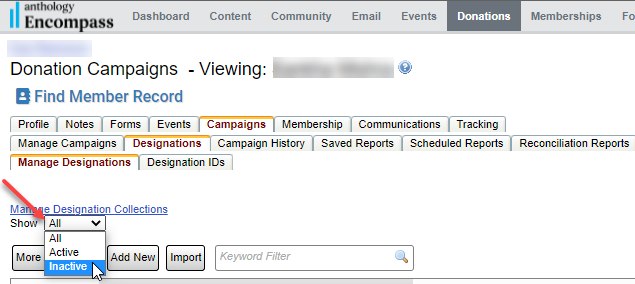
Now you can filter and show Active/Inactive Designations from the Designations grid.
We have added two new columns in this release, Created By and Created Date , in the Drafts and Queued grid.
After a user creates a General/Segmented/AB Testing Campaign, the user's name who has created the campaign with the campaign created date and time will be populated.
Note: The Created By column will show a blank value for the existing campaign as Encompass did not store any value for the past records.

Resolution
Functional Area | Reference | Description |
Email Marketing\Categories | NA | Email Categories - Opt-Out Report was not showing results when Show Opt-Out activity date was limited to a specific date. |
Email Marketing | 190211 190267 190406 195336 | Encompass was throwing an error when users were trying to enter a field token name/upload a merge list with a column name that starts with a number. |
Email Marketing | 192740 | Users were unable to export Email Exceptions Reports for the sent emails. |
Email Marketing | 184272 | Lorem Ipsum was getting pulled in dynamic Content/Newsfeed in emails when there was no Events/News. |
Email Marketing | 181348 | System Token Names were allowed to be used in the email merge list if users unknowingly used any predefined System Token value. The fix will allow email merge file list tokens to pull values only from the list. |
Email Marketing | 173275 | In Segmented Campaign, Export Exception report was generated even though there were no exceptions and the intended and actual users count were the same. |
Memberships | 191394 | Users were getting WSOD errors at the payment page when purchasing a Membership. |
Scoreboards | 184415 184400 | The sort icon in Leaderboards was rendering the HTML code instead of the symbol. |
Giving | 156909 | Users with Campaign Admins access were unable to add the Donor Roll field to the Donation Campaign. |
Giving | 181931 | Unable to edit the admin email address in the billing page when using Digital Wallet Stripe as the primary gateway. |
Giving | NA | Customers were unable to generate PDF Receipts for the successful payment transactions. |
Giving | 177481 | Donation Campaign transactions with Donors and matching Company names were not showing in the HEPdata portal. |
Giving | NA | Constituents were getting errors making payments when only one designation was selected and tried to enter the amount in the Designation Amount box before the Donation amount box. |
Giving | NA | Payment type parameters were not persistent in the URL QS. |
Release Notes: Hotfix - Jan 5th 2022 (63.5.8)
Please note the product releases for the environments are scheduled as follows:Australian = 6th Jan, Thursday Morning | Canadian = 5th Jan, Tuesday Evening
| U.S. = 5th Jan, Tuesday Evening
-----------------------------------------------------------------------------------------------------------
Product Enhancements
Online Giving
In HEPdata Portal the column Aux1 and Aux2 values are swapped as below:
Previous | Current |
Aux1: “Campaign name | Aux1: “Transaction ID” |
Aux2: “Transaction ID” | Aux2: “Campaign name” |