2023 - Product Releases
Encompass Hotfix - October, 2023
Please note the product releases for the environments are scheduled as follows:U.S. = 11th October, Wednesday Evening | Canadian = 11th October, Wednesday Evening
| Australia = 12th October, Thursday Morning
Functional Area | Reference | Description |
Email Marketing | 243766 | Contacts included through a CSV of IDs in a higher-priority segment of a Prioritized Segmented Campaign were not being excluded from lower-priority segments. |
Email Marketing | 241515 | Using the Manage Version button in the email editor did not effectively switch content between versions. When a version was selected using the Manage Version button, the displayed version was different from the one selected. |
Encompass Hotfix - September, 2023
Please note the product releases for the environments are scheduled as follows:U.S. = 26th September, Tuesday Evening | Canadian = 26th September, Tuesday Evening
| Australia = 27th September, Wednesday Morning
Functional Area | Reference | Description |
Email Marketing | N/A | When attempting to send an email campaign to an audience with an uploaded email list that contained duplicate user records, the system encountered an error message during the campaign release process. Users can now successfully send email campaigns to the audience list containing duplicate records. Also, duplicate record details are accurately reflected in the exception report. |
Foundation | 242850 | Event reconciliation reports with adjustments were not appearing in the users' SFTP folders. Now, users can access and download the SFTP exports, Event Reconciliation with Adjustments, from their SFTP folders. |
Giving | 242972 | Users were not able to apply promo codes using the PayPal digital wallet. Now, the users can apply the promo codes using PayPal and other digital wallets. |
Encompass Release Notes: September, 2023
Please note the product releases for the environments are scheduled as follows:U.S. = 11th September, Monday Evening | Canada = 11th September, Monday Evening
| Australia = 12th September, Tuesday Morning
Enhancements
Email Marketing
We are excited to announce that the upgrade for the Email Editor within Email Marketing is available to our users. The updated Email Editor enhances the User Experience when editing the content of your email communications.
Key Updates:
Intuitive Drag-and-Drop Interface: The user-friendly drag-and-drop interface makes creating attractive emails easier than ever. Effortlessly arrange content blocks, images, buttons, and more.
Update to the Popup Style Bar: Users will notice that the Pop-up Style Bar no longer scrolls on the screen when they scroll through the content, allowing them to access the content that is initially hidden behind the style bar.
Adjustable Zoom Level: The editor now has a zoom drop-down which will allow users to zoom out and see more of the content of the message without having to scroll up and down.
Update to Complex Elements: Complex Elements from the previous editor are now Favorite Blocks. All the saved Complex Elements are available after the upgrade is completed on your site as Favorite Blocks. These blocks can be inserted as a new block of content within your email.
Please note: Favorite Blocks cannot be inserted into the middle of an existing block. If the content of your favorite block needs to be inserted in the middle of an existing block there are two ways to accomplish this. Option 1 is to split the existing block into multiple blocks and then insert your favorite block between them. Option 2 is inserting your favorite block and then copying the content from your favorite block into your existing block and then deleting the favorite block from your template.
Update to the Paste Functionality: The paste functionality in the editor will now automatically paste as plain text. This update will prevent special code coming from external editors from being included in the email content and potentially causing issues. This does however mean that users will need to format the content in the email editor once it has been pasted. This includes adding links, bold-facing text, and italicizing text.
To learn more click UPDATED TEMPLATE EDITOR / EMAIL EDITOR Please sign up to have your site updated at https://forms.office.com/r/8LMvbcrr8tEmail Marketing
We have updated the Prioritized Segmented Campaign Send process for all campaign types to ensure that the higher-priority segments' send process is complete before the subsequent priority segments' send process begins. Prior to this update, the system would pick up all segments that were queued at the same time but only processed them one at a time. With this change, our users will see a similar outcome, but only one segment at a time will be picked up for processing.
Updated Process
The Prioritized Segmented Campaign sends one segment at a time to the email queues for processing. It starts with Priority 1 and waits for it to complete before moving on to the next priority. This process is repeated for each scheduled segment.
For example, if three segments are scheduled to be sent simultaneously:
Segment 1 is processed first.
Segments 2 and 3 wait until Segment 1 is completed.
Segment 2 is processed after Segment 1.
Segment 3 waits until Segment 2 is completed.
Segment 3 is processed after Segment 2.
Note: These changes do not affect non-prioritized Segmented, General, and A/B campaigns. The non-prioritized campaign types will continue to operate as usual.
Foundation
To enhance admin access management, created data export reports for the current admin access to all pages in the site map.
The Admin status data export reports will have the following columns:
Member ID, Constituent ID, First Name, Last Name, Email ID, Assigned Admin Right, Date of Assignment, and Last Logged-in date
Foundation
Added the Member ID column to the Event Registration, Commerce, and Donation Reports.
Accessibility Improvements
Updated the system to ensure established design compliance for the tabs and tabs panel, menu and menu items, buttons, and pagination.
Enabled the tabs to be recognized as a group: This facilitates the understanding of the relationship between tabs by assistive technologies.
Added accessible label: The label helps users understand the purpose of the tab list. This label describes the content or function of the tab list.
Made each tab a focusable element: This ensures that each tab is identified as a tab control. Users will be able to navigate and select tabs using standard keyboard controls.
Provided a visual and programmatic indicator: This indicator shows which tab is currently active or selected, improving the user experience and ensuring that assistive technologies convey this information accurately.
Assigned a role to the content panel associated with a tab: This step ensures that the content panel is recognized as the area where tab-specific content is displayed, aiding in navigation and comprehension.
Established a clear relationship between a tab and its associated content panel: This enables users and assistive technologies to understand which tab controls which content.
Enabled LEFT ARROW and RIGHT ARROW for tab navigation, instead of TAB: Implementing this keyboard navigation behavior ensures that users can navigate between tabs using arrow keys, while the Tab key is used to navigate within the content of the active tab, thus improving usability and accessibility.
Identified the element as a button: Identifying the element as a button provides clear interaction cues to all users, making it evident that it can be clicked or activated.
Assigned and accessible name: Assigning an accessible name ensures that users, including those with disabilities, can understand the purpose of the button without relying solely on visual cues.
Added Tooltip State Indication: The use of tooltip indication helps users discern whether the tooltip content is currently hidden or visible, contributing to a more intuitive user experience.
Enabled Polite Announcements: This ensures that screen readers politely announce the tooltip's expansion, avoiding interruptions and providing timely information to users.
Enabled the element to be recognized as a group: By enabling the element to be recognized as a group that contains pagination controls, indicated that these controls are related and form a group. This helps assistive technologies and users understand the structure and purpose of these controls.
Provided an accessible name for the Pagination Group: By adding an accessible name, such as "pagination," a clear label for the group of pagination controls is provided. This label helps users understand the function of these controls without relying solely on visual cues.
Enhanced the system to enable assistive technology to detect and alert users about invalid input issues, reading "invalid entry" as part of the field description.
Streamlined Interface: Removed the outer <table> element of the Date Picker to simplify the interface, making it more straightforward and easier to interact with.
Enhanced Accessibility: Included proper identification of the dialog, better modal behavior, accessible naming, and announcements of changes in the month/year.
Improved Usability: Users can seamlessly navigate and interact with the Date Picker using assistive technologies or keyboard controls. Clear identification of buttons and grid cells, along with accessible labels.
Clarity and Efficiency: Removed unnecessary elements nested in the calendar grid cells to simplify the interface and enhance efficiency.
Resolution
Functional Area | Reference | Description |
Email Reporting | 233591 237821 237785 169152 181483 | Bounce responses from recipients were not being properly recorded if the recipients' mail server initially replied with the successful delivery of the message. |
Email Marketing | N/A | Identified a high CPU usage during email address validation due to inconsistently defined email field sizes across the system which prevented index utilization in queries affecting the performance. Added consistent email address definitions across the system to fix and enhance the performance. |
Foundation | 180735 | The required fields under each guest on an event/activity registration form remained mandatory even when the guest attendance control box was unchecked and displayed warnings. Now, the fields are not mandatory when the guest attendance control box is unchecked. |
Foundation | 181483 | The users were unable to schedule a site statistics report. The report was not loading on the Site Statistics page. Now, the schedule pop-up loads, and users are able to schedule a site statistics report. |
Foundation | 219232 219207 | It was reported that following the migration of files, the issue concerning the UTF-8 BOM format affected updated data profile reporting and scheduled data exports for donations. Now, the system has been updated to default the file type of data exports to UTF-8 for all sites as the standard data format. |
Foundation | N/A | Accessibility During the registration process, when initially selected the "Guest" option and clicked "save and continue," then later deselected a guest and attempted to select another guest, the system did not allow the selection of another guest. The system enforced a limit even when one of the previously selected guests was unselected. Updated the system, now the users can go back and unselect and select another guest. |
Giving | 231829 232872 | When a donor chose a designation and entered the amount, the percentage allocation, which should have been 100%, was not reflected. Also, when another designation was added, the percentage was not automatically updated to 50%. Updated the system so that the percentage amount is automatically calculated based on the number of designations. |
Giving | 209438 231829 | In the commerce fields the Item quantity was being automatically filled with incorrect numbers. Disabled the autofill option to avoid incorrect entries. |
Giving | 232872 | An error occurred when adding a new designation to a collection. Users can now add designations to a collection without error. |
Giving | N/A | The transactions that were entirely adjusted off were appearing on the Events Map. Ensured that such transactions are not displayed on the Event maps. |
Encompass Hotfixes and Maintenance - August, 2023
Release 65.4.4 Maintenance Notice: Stripe Gateway Maintenance
Functional Area | Reference | Description | Maintenance Window |
Giving | 240911 | As part of the scheduled maintenance window, we will also fix the issue identified with the Digital Wallet Gateway and ensure its resolution across all environments. | USA & Canada: 9 AM - 12 PM CST, 21st August 2023 Australia: 12 AM - 2 PM ACT, 22nd August 2023 |
Release: 65.4.1
Hotfix
Functional Area | Reference | Description | Released Dates |
Giving | 23736 | In the confirmation emails for perpetual gifts, the "Amount Paid to Date" was displayed inaccurately. Now, the "Amount Paid to Date" accurately reflects the amounts in confirmation emails. | USA & Canada: 4th August 2023 Australia: 5th August 2023 |
Encompass Release Notes: July, 2023
Please note the product releases for the environments are scheduled as follows:U.S. = 24th July, Monday Evening | Canadian = 24th July, Monday Evening
| Australia = 25th July, Tuesday Morning
Enhancements
Foundation
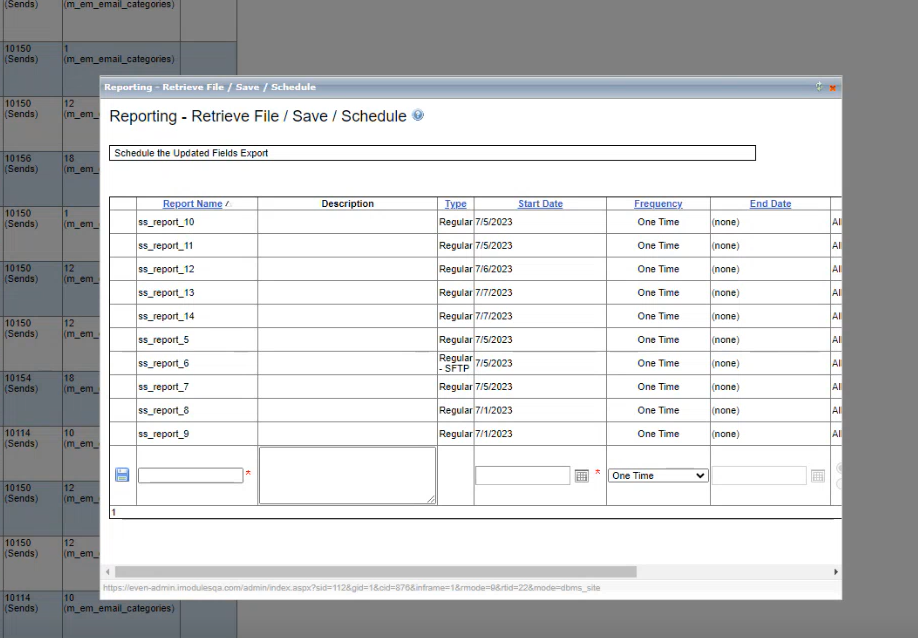
Added the report scheduling feature to the Site Statistics data export. When the report is scheduled email notifications can be sent to assigned recipients.
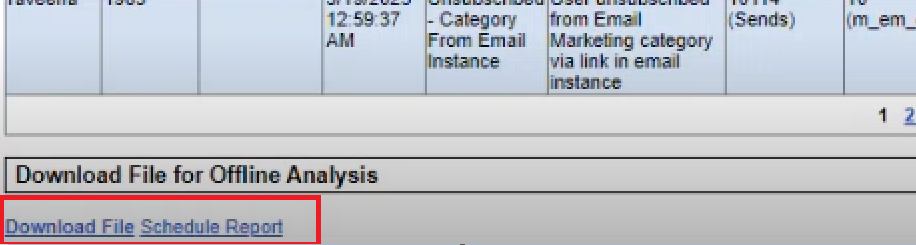
On the Members/ Statistics - Select Report page, users can click the schedule report link at the end of the generated report. The Reporting - Retrieve File/ Save / Schedule window opens, where the users can schedule the report.
Note: Users can download the report file without scheduling by clicking the Download File for Offline Analysis link at the end of the report.
 |
The Reporting - Retrieve File/ Save / Schedule Window
 |
Form Fields
The option to set a role to a "Commerce List" is now available. This will allow specific form content or steps to be displayed on a form based on a value that users have selected.
Resolution
Functional Area | Reference | Description |
Foundation | 213542 227617 228793 | When the activity name was edited on an event page using the pencil icon and saved the changes, the name was not updated in the activity listing and the updated name did not reflect on the member confirmation email. Now, the updated name will show in the activity listing, and the member confirmation email will display the updated activity name. |
Foundation | 208555 | When a sub-community name or setting was updated, the updates took approximately 30 minutes to reflect. Updates made to the sub-community name or setting are now immediately reflected after saving. |
Foundation | 226297 | On the newer iPhones, the directory's search tool, the Custom Searchable Directory under the Directory, did not return results when a curved apostrophe was used. Now, the directory searches work for the names with curved apostrophes on all phones and in all browsers. ` |
Giving | 197190 | Venmo payment option was disabled due to technical issues related to PayPal integration. Now, Venmo can be set up with PayPal using the digital wallet configuration. |
Encompass Release Notes: June, 2023
Please note the product releases for the environments are scheduled as follows:U.S. = 20th June, Tuesday Evening | Canadian = 20th June, Tuesday Evening
| Australia = 21st June, Wednesday Morning
Product Enhancements
Foundation
The report will help in managing admin access.

On the Assign Administrators page, administrators can click the System Admin Access Report button and export a report having the following information in the columns:
Member ID
Constituent ID
First Name
Email ID
Role Name
Date Added
Last Logged
Group ID
Group Name
Giving
Enabled the Double the Donation Enhancements:
Matching gift plugin to appear on confirmation page
A matching gift plugin, which allows donors to potentially double their donations by having their contributions matched by organizations. The plugin will be displayed on the confirmation page.
Public API key - customize messaging when a donor selects a company name.
A public API key will be added to the donation system. This API key is used to integrate with external systems or services. Enables display of customized messages when a donor selects a company name. This customization could include tailored messages or specific instructions related to matching gifts or any other relevant information.
Note: This updated functionality is ONLY for clients who have the 3rd-party integration with Double the Donation Gift Matching functionality added.
Resolution
Functional Area | Reference | Description |
Foundation | 204926 | After making edits to the submission, certain tokens in emails were not replaced with their corresponding values. Instead of displaying the expected values, the emails only showed the token names. The system is updated to ensure the accurate display of values corresponding to all tokens. |
Foundation | NA | Accessibility When the screen size was changed to smaller (mobile) screens, the content in the Account Registration table, Calendar, and Image rotator content block was not adjusted to fit the smaller screen; as a result, some of the content was not visible. Corrected the code and now the content adjusts automatically according to the size of the screen. |
Foundation | 218664 | When two documents were added to a member confirmation page, the second link did not display correctly in the email. |
Giving | NA | Accessibility When multiple breakpoints were added to a map and the legend was enabled, the legend overlapped with the map. |
Encompass Maintenance: Data Security Update
Please note the Encompass Maintenance window for the U.S., Canada, and Australia is scheduled as follows:
Canada = 8th June, Thursday Morning 11 AM- 1 PM EST | U.S. = 8th June, Thursday Morning, 11 AM- 1 PM EST |Australia = 9th June, Friday Morning 1- 3 AM AEST
Maintenance Notice
All the U.S., Canadian, and Australian environments are scheduled for maintenance during the 2 hours window for a data security update.
Encompass, Hotfix - May 22nd 2023
Please note the product releases for the environments are scheduled as follows:
U.S. = 22nd May, Monday Morning | Canada = 22nd May, Monday Morning|Australia = 22nd May Monday Evening
Functional Area | Reference | Description |
Email Marketing | 235157 | Resolved the issue related to applying styles to dynamic news and events (dynamic content) and previewing them in the email editor, preview email, and sent email. |
Encompass Release Notes: May, 2023
Please note the product releases for the environments are scheduled as follows:U.S. = 15th May, Monday Evening | Canadian = 15th May, Monday Evening
| Australia = 16th May, Tuesday Morning
Product Enhancements
Form Fields
Enabled the Commerce Amount Field.
The option to set a role to a "Commerce Amount Field" is now available. This will allow specific form content or steps to be displayed on a form based on a value that users have entered.
Giving
Updates:
Encompass support can now disable the recurring payment notifications so that only “twice a year” and “annual” recurring payment options will be required. Please contact support if you would like to make monthly and quarterly recurring payment notifications optional. Changes were also made to the default text to better fit the optional scenario of the recurring payment changes.
On the billing form disabled the editable field under the Notification option where the users could enter the number of days for the email notification to be sent prior to billing. According to Master Card recurring payment standards, the email notification will be sent 7 days prior to the billing by default.
On the Giving form, a check box for the notifications to be sent is set and is selected by default and the donors are provided with the option to uncheck the box.
On the billing form reworded the field name Email address to notify/remind to Email address used for notification.
Considered WCAG accessibility requirements for the changes made.
Giving
GTE (General Transaction Export) reports can now be generated from the top-level (GID=1) to include reconciliation data for all sub-communities. This enhancement enables users to obtain a comprehensive view of transaction data across multiple sub-communities, which can facilitate more efficient tracking and reconciliation of financial data.
The GTE report options for GID=1 are:
Main community (including regular sub-communities).
Main community and all sealed sub-communities.
Exclude certain communities (selected by using arrows to move them to the right).
Main community and selected sealed sub-communities (multiple selections can be made using CTRL or shift key) Additional communities can also be included by using arrows to move them to the right.
Giving
The Venmo feature was a planned addition for this release, but unfortunately, it did not function as expected. Our development team is actively working on resolving the technical issues encountered, and we are committed to implementing the Venmo feature in a future release.
Resolution
Functional Area | Reference | Description |
Giving | NA | Corrected an error that occurred with both DW Stripe and PayPal payment gateways enabled in an event where a promo code was used. |
Giving | NA | Corrected the issue with the promo code display when DW Stripe was used as a secondary payment gateway while using Gpay. |
Giving | NA | Corrected an email confirmation issue that applied commerce item detail from the initial transaction that is not part of the recurring payment. |
Giving | NA | Corrected a scenario where event form submissions that had been adjusted off continued to populate on data maps. |
Giving | NA | Updated how the billing information was aligned on form submissions. |
Foundation | NA | Corrected the scenario where deleted activities were still showing up in the check-in app. |
Foundation | 218784 | Corrected an issue where the content was not displaying properly when event lists were set on a single page and a content filter was applied. |
Foundation | 231365 | Corrected a scenario that occurs when a change was made to a form. The confirmation that was being sent was continuing to send the original form submission details and not reflecting the updates made. |
Foundation | NA | WCAG compliance: Error page (WSOD) content was not viewable when resized to width of 320 CSS px / height of 256 CSS px. |
Encompass Release Notes: April, 2023
Please note the product releases for the environments are scheduled as follows:
U.S. = 17 April, Monday Evening | Canadian = 17 April, Monday Evening
| Australia = 18th April, Tuesday Morning
Product Enhancements
Form Fields
Institutions can associate a role with the Commerce Item Field and collect additional information, such as the Company Name and Description, from registrants who have purchased a specified quantity of items.
Click here for instructions on how to add a Role-based Option for the Commerce Item Field
Note: The role-based option functionality is currently not available for the "Commerce Amount" and "Commerce Dropdown" fields, but this is planned for a future release.
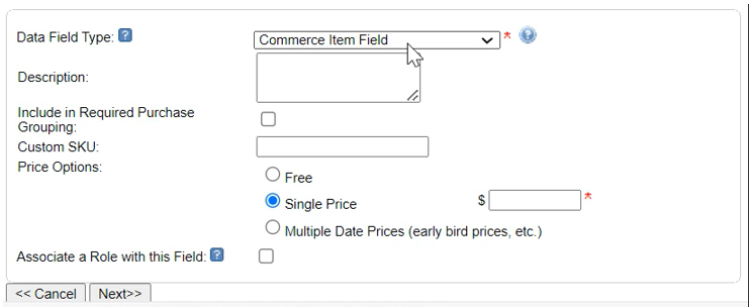 |
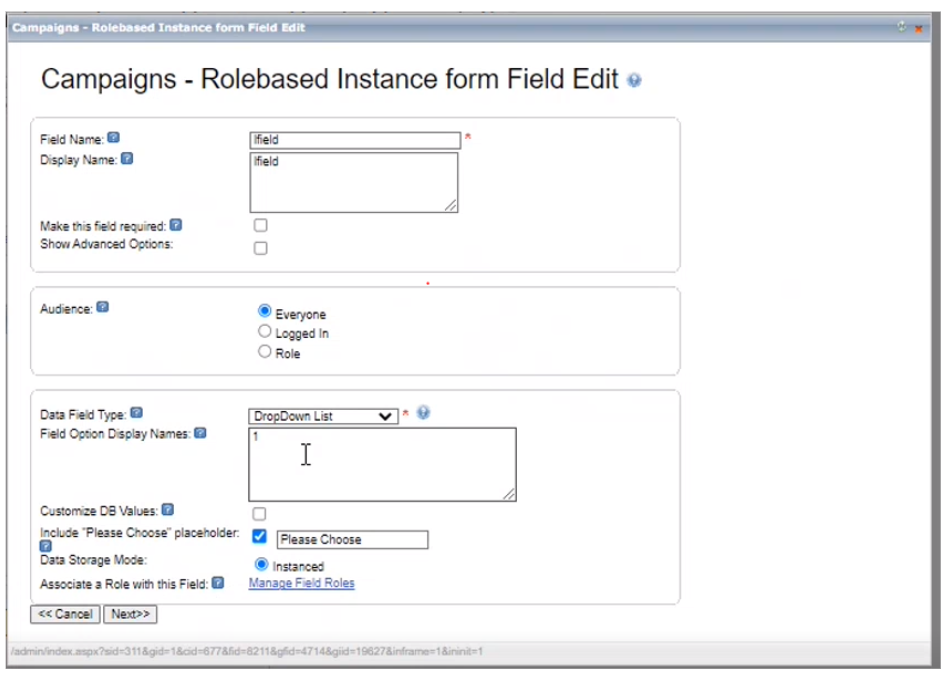
Enabled role-based option for the Non-commerce Instance fields and reusable Instance fields. Admins can add or edit an instance field to select the option Associate a Role with this Field.
Note: The functionality is similar to the 'Added role-based option for the Commerce Item Field in Forms' enhancement.
 |
Foundation
When there is no activity for 10 minutes, a warning message will be displayed to alert the user:
"Your session is about to expire. Would you like to Stay Connected or Log Out Now?"
If the user selects "Stay Connected", as some users may need more time to complete their tasks or may not want to lose their progress, the session continues, and the warning message disappears.
If the user selects "Log Out Now", the session immediately logs out without having to wait for the session to expire, and the user will be redirected to the login page.
If the user does not respond to the warning message, the session will be automatically closed out after 15 minutes.
Resolution
Functional Area | Reference | Description |
Foundation | 173110 | On Twitter, when the users tweeted the pages with meta images, the images were not showing in the tweeted pages. Updated the system to ensure that meta images upload to social media platforms when the pages with meta images are shared, posted, or tweeted. Note: The images must comply with social media platform requirements. |
Foundation | NA | When an email ID is shared by non-members and a transaction is completed, the transaction data is merged with the existing matching email ID records. If that transaction is done by a different individual than existing in the records, the individual who has done the transaction is not identified. Updated the system to capture individual non-member transaction data. The system can be set to match the first name and email ID with the existing records. If the record is not existing, a new record will be created and managed to capture the future transaction data. Now, US, Canadian, and Australian users can use this feature. Note: The USA and Australian users should contact Encompass support to enable this feature. Note: This feature is available by default in Canada from this release. |
Foundation | 218835 | During the execution of the web service API request, the access was denied even after using the correct credentials. The following error occurred: An unhandled exception occurred during the execution of the current Web request. Now, when the correct credentials are used the error does not occur. |
Foundation | NA | The system is updated to validate links in the Emails with token URL values in the Email Marketing database. This will restrict editing token URLs or adding malicious links. The links that are not validated will be redirected to a warning page. |
Foundation | NA | The users were unable to set up Single Sign On (SSO) using Active Directory Federation Services (ADFS) or Azure AD (Active Directory). Enabled the system for setting up SSO using ADFS and Azure AD. |
Foundation | NA | The modal windows when opened were fixated on the top of the screen and the users were not able to move them to a different location on the screen. Now, the modal windows are not fixated and can be moved across the screen. |
Giving | 226337 | When the promo codes were applied during the transactions through Stripe, a WSOD error occurred instead of redirecting to the Stripe page, and in some instances, a partial or improper transaction summary was reflected. Now, users can apply the promo codes, view the summary, and complete the transactions successfully. Note: The transaction summary shows the following details:
|
Giving | 221781 | When the Campaign Progress Indicator (CPI) was set to the donor goal, the token [AmountRaised] was reflecting the donor count instead of the dollar amount raised to date. Now, when the token [AmountRaised] is used, the dollar amount is reflected regardless of the set CPI goal type. |
Giving | 221683 | The format of the values displayed for the token [DonationTotal]( Total donation amount to date) varied depending on the CPI goal type. Now, the format of the values is consistent regardless of the CPI goal type. |
Giving | NA | When JPY (Japanese Yen) currency code was used to make a payment of less than 1 USD in value through the Stripe Payment Gateway, WSOD occurred. Note: Payments made using any currency should at least equal 1 USD in value. Added a notification stating that the amount entered should be equal to or greater than 1 USD. The transaction is processed only when the appropriate amount is entered. |
Giving | 204925 | Transactions on the ambassador challenge were showing different values on the Admin and front views. Updated the system to reflect the current and accurate values on both sides. |
Giving | NA | On the Add/Edit Designation window, when a name was entered in the Name field, the same text was getting automatically updated in the External Database Value field upon moving the cursor from the Name field. Similarly, when the text was entered in the External Database Value field, the same was getting updated in the Name field. |
Giving | NA | When a member record was updated without adding value in the Donation Amount and Designation fields and selected the scheduled payment option, the WSOD occurred. |
Giving | NA | On the Leaderboard when the Rank column was configured to reflect the ranking based on Percentage to Goal values, the ranking values were incorrect. Corrected the ranking based on Percentage to Goal and confirmed that the ranking based on Dollars and Participation is also in the right order. |
Giving | NA | When campaign Data was Purged, the scoreboard data was not getting deleted from the Maps. Ensured that the system deletes the Scoreboard data from the maps when the campaign data is purged. |
Giving | 159422 | In the CSS styling option code instructions, the periods were incorrectly placed before the h2 and h3. 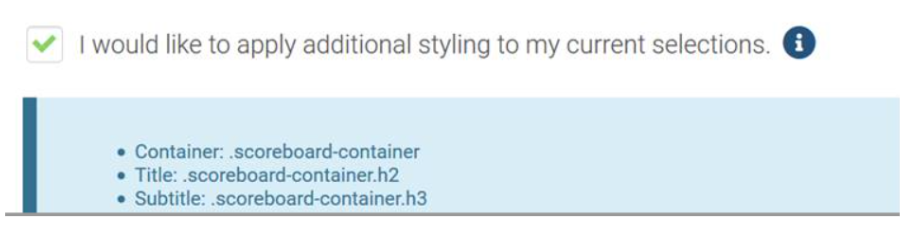 |
Giving | NA | On the scoreboard maps when configuring the breakpoints there was no validation or intimation to the users even when the breakpoints were overlapping. 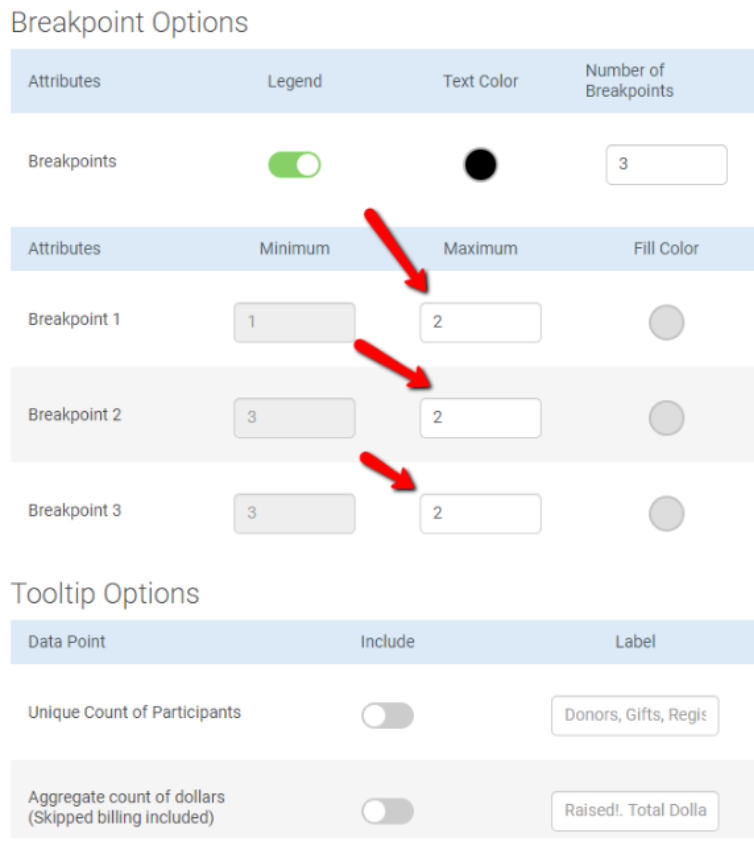 Now, a validation message is displayed stating that the user should enter a unique value for each breakpoint for the configuration to be saved. |
Encompass, Hotfix - March 21st 2023 (65.0.1)
Please note the product releases for the environments are scheduled as follows:
Canada = 21st March, Monday Morning | U.S. = 21st March, Monday Morning|Australia = 22nd March Tuesday Morning
Functional Area | Reference | Description |
Giving | 230723 | The PayPal transaction data of the PayPal payments that were processed through Stripe and PayPal integration was not sent to Encompass. This caused transaction omissions in the Encompass reports, and the confirmation emails for these transactions were not triggered. Found that the transactions that were processed directly with Encompass (not via Stripe) were reflected in the reports, and the confirmation emails were duly sent. Updated Encompass to accept PayPal transaction details back from PayPal that were processed through Stripe. |
Encompass, Hotfix - March 21st 2023 (65.0.1)
Please note the product releases for the environments are scheduled as follows:
Canada = 21st March, Monday Morning | U.S. = 21st March, Monday Morning|Australia = 22nd March Tuesday Morning
Functional Area | Reference | Description |
Giving | 230723 | The PayPal transaction data of the PayPal payments that were processed through Stripe and PayPal integration was not sent to Encompass. This caused transaction omissions in the Encompass reports, and the confirmation emails for these transactions were not triggered. Found that the transactions that were processed directly with Encompass (not via Stripe) were reflected in the reports, and the confirmation emails were duly sent. Updated Encompass to accept PayPal transaction details back from PayPal that were processed through Stripe. |
Encompass Release Notes: 9th March, 2023
Please note the product releases for the environments are scheduled as follows:
U.S. = 9th March, Thursday Evening | Canadian = 9th March, Thursday Evening
| Australia = 10th March Friday Morning
Email Marketing
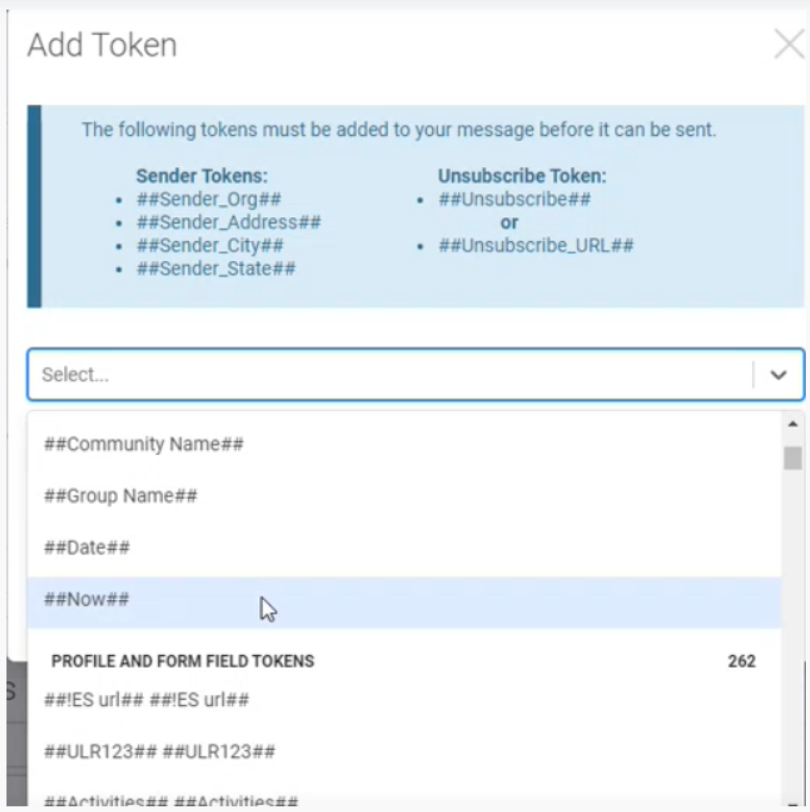
Added Multiselect Feature to Add Token Dropdown
Users can now select multiple tokens at the same time from the Token Manager's Add Token dropdown.
The dropdown behavior: When a listed token is clicked, the token is highlighted. The users can continue clicking on the multiple tokens as required to select. Clicking the selected (highlighted) token will unselect the token.
 |
Email Marketing
Access Tokens Directly from the Subject and Pre-Header fields
On the Details page, by clicking the newly added Insert Tokens button, the users can access the token manager directly from the Subject and Pre-Header fields. This feature is available for all campaign types: General, Segmented, and A/B.
The Insert Token button is clickable only when the cursor is placed inside the fields to ensure that the tokens are inserted in the right fields. Note that the Insert Token button is highlighted when the cursor is placed inside the field.
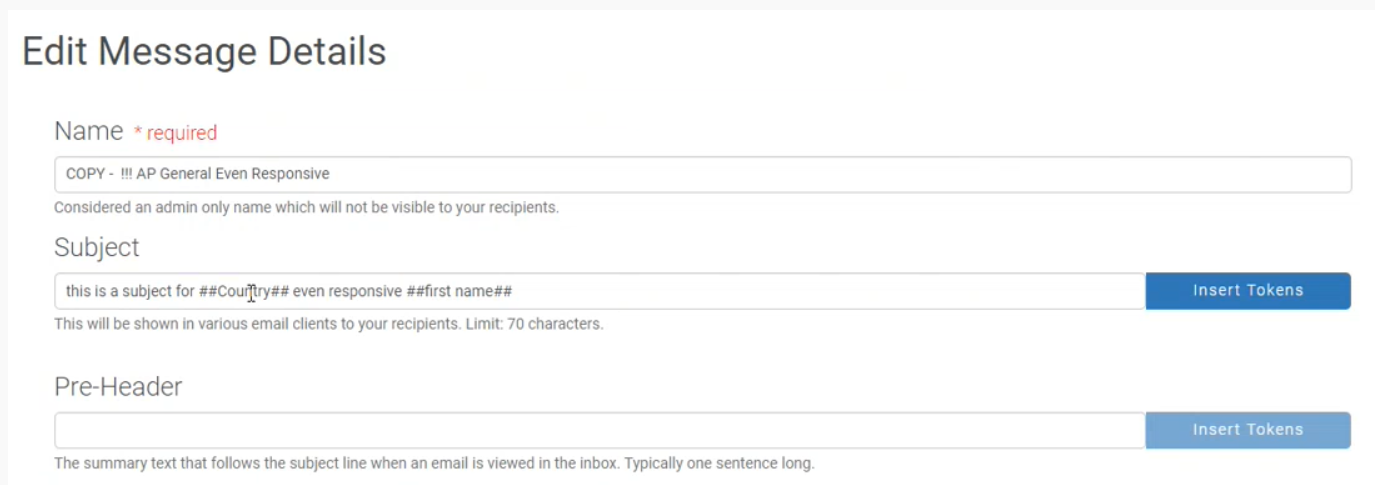
Add or Remove
To insert tokens in the fields, place the cursor inside the field and click the Insert Tokens button. The Add Token modal opens. Click once to insert the required token from the dropdown list; the token is inserted where the cursor is placed.
Note: Users can add multiple tokens and insert the tokens in the middle of the text.
To remove the inserted tokens, click the inserted token in the dropdown menu or click the close mark on the inserted token in the field. After the tokens are inserted and the Add Token modal is closed, the tokens can be selected and deleted as text in the fields.
Foundation
Added the Form Field CSS Class field to Add New Field's advanced options
Users can now add the CSS class information in the Form Field CSS Class field while creating a new field. This enhancement will increase the efficiency of building forms as the users are not required to return to the build after the field is created and update the CSS class information in properties.
Registrant Manage Category Options
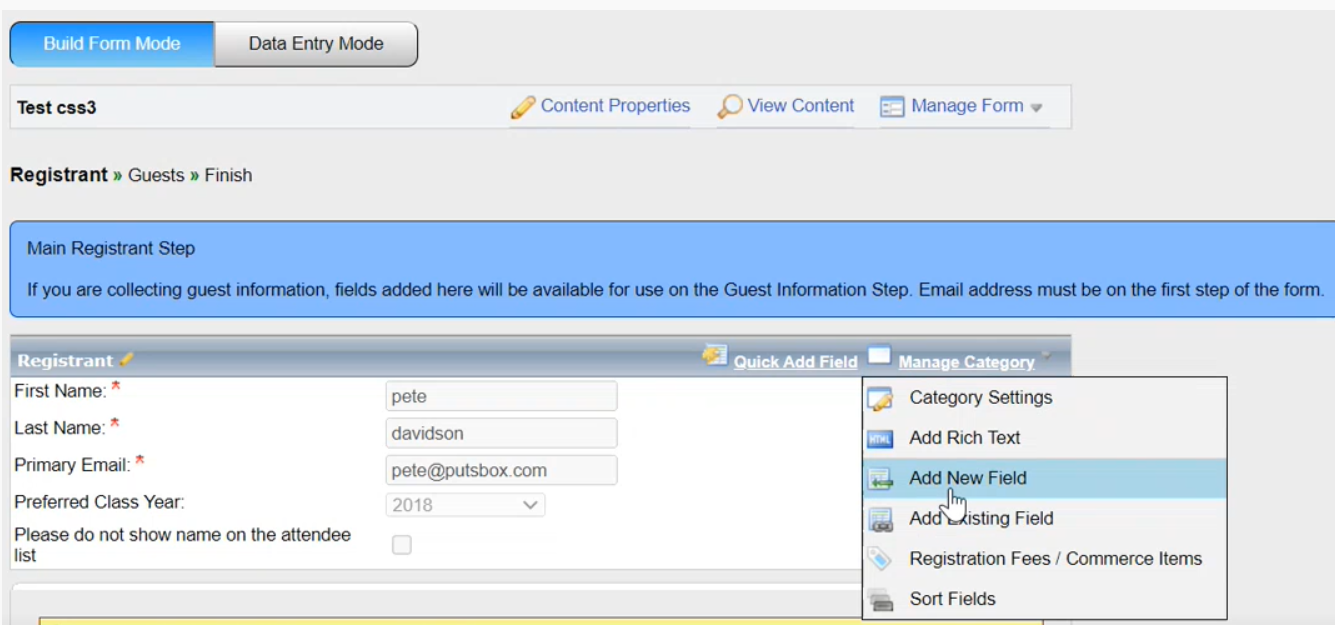 |
Click the Show Advanced Options check box in the Add New field window to view the advanced options and access the Form Field CSS Class field.
Add New Field Advance Options:
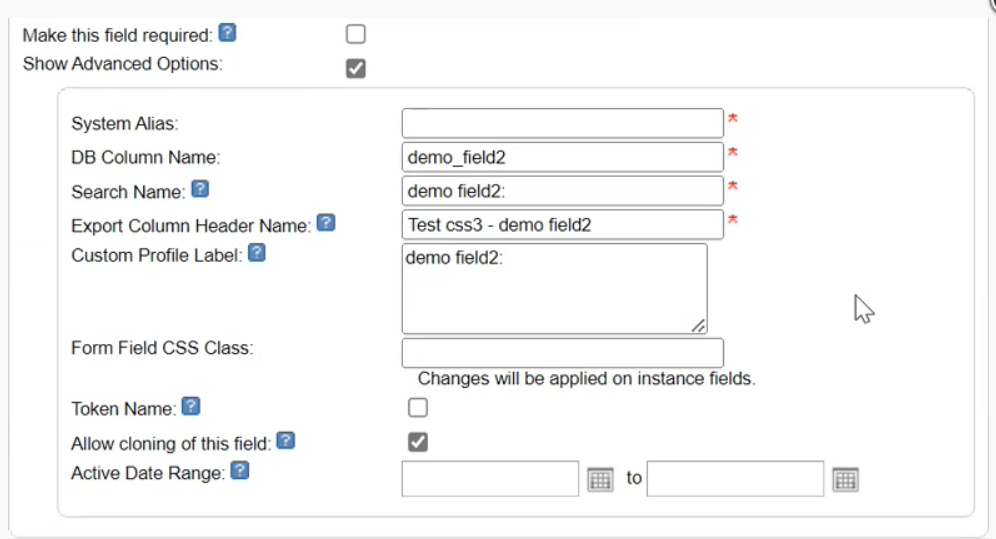 |
Foundation
Admin Dashboard Visual Enhancements
Made the following visual changes:
Enhanced the background color tone to improve clarity.
Updated the spacing between closed accordions and menus on the dashboard page.
Provided flexible width to dropdown title boxes to accommodate titles of different lengths.
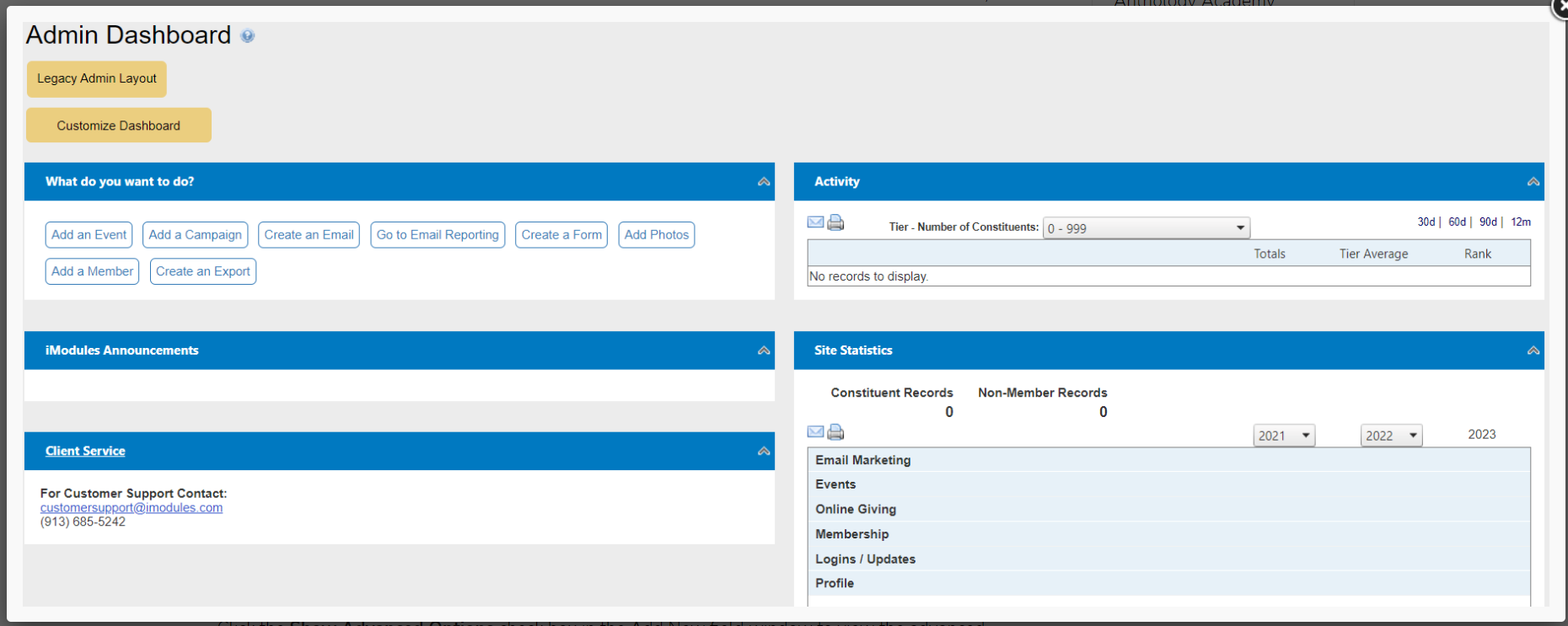 |
Foundation
Option for Administrators to switch between Legacy and New Admin Dashboard Layout
Administrators can switch between the legacy and new screen layouts using the toggle button. When the toggle button is clicked the button shows the transitioning message 'switching layout' and then the opted layout will appear.
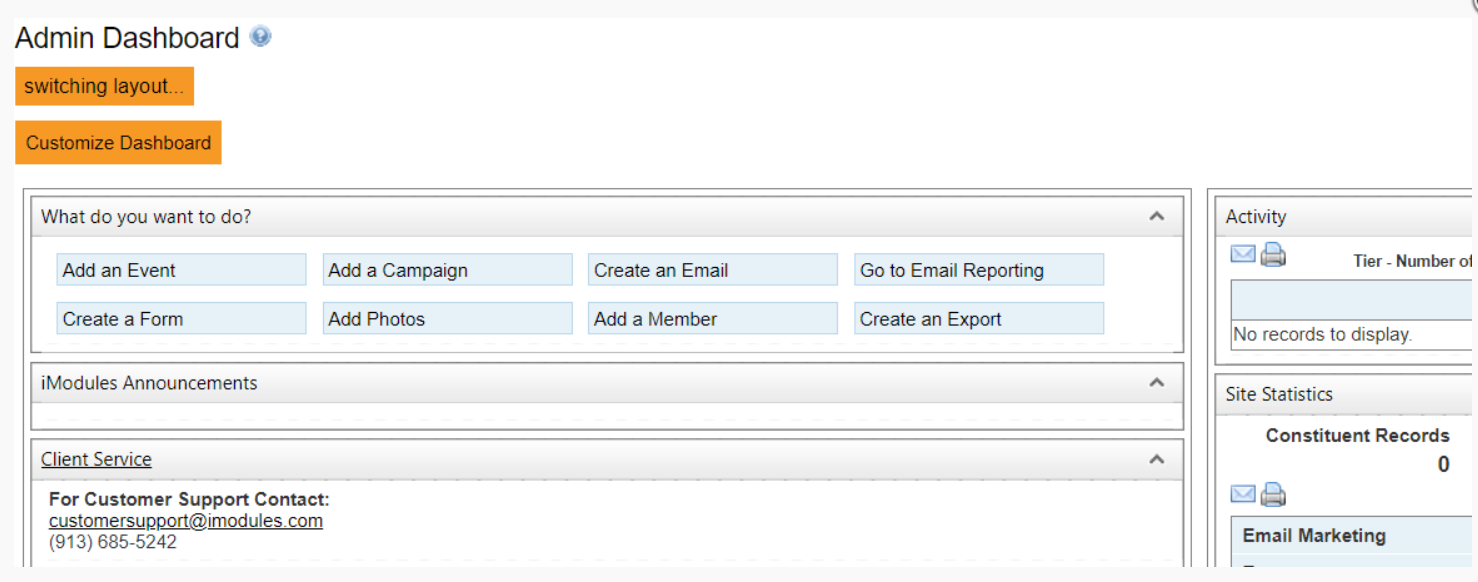 |
The opted Admin Dashboard Layout
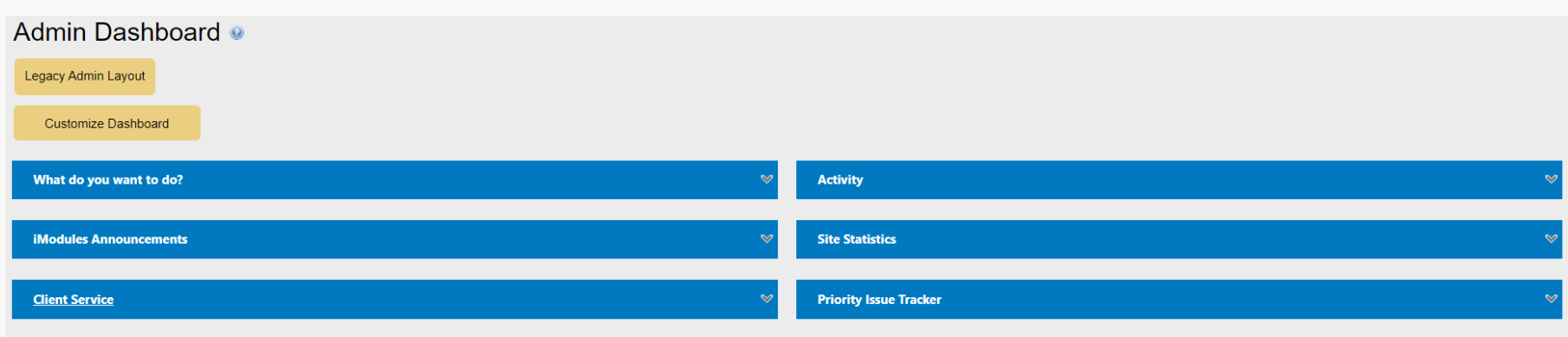 |
Resolution
Functional Area | Reference | Description | |
Events | 183566 | The iCal link was not opening in the Chrome browser. The users had to right-click and download the file to open it in Chrome. Now, users can click and open the iCal link in all browsers. | |
Events | 218835 | The records without successful billing transactions on the event forms were showing in the ICP (Identity Check Point) grid to merge. Now, the records are shown on ICP to merge only when the billing transactions are completed on the forms. | |
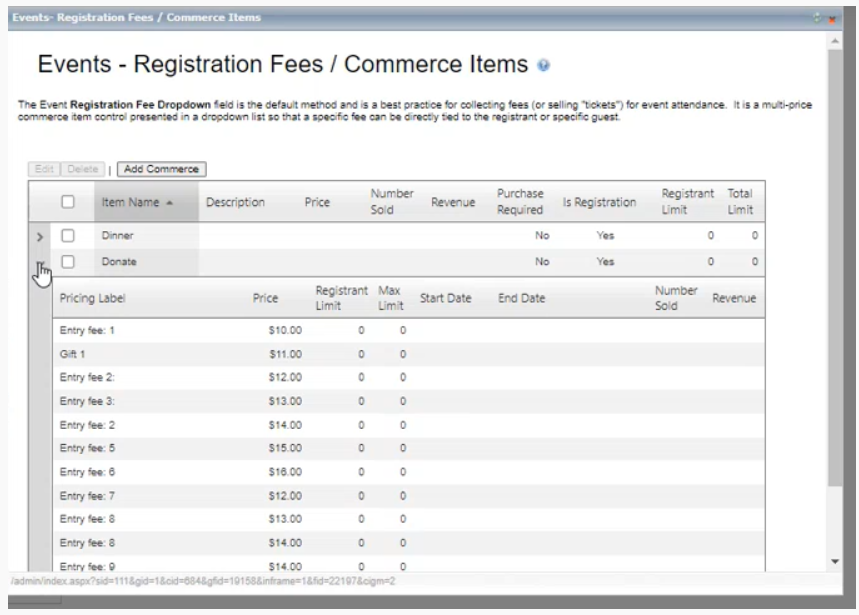
Events | 2277733 | Error occurred when expanding the Fees/Commerce Items' accordions on the Events Registration Fees/ Commerce window. Now, the accordions expand and display the fees/commerce items.
| |
Foundation | 206305 | Admins even with required admin rights were unable to add PCB (Patternized Content Block) articles. Now, all the admins with the required admin rights can add the PCB articles. | |
Giving | 226337 | In billing transaction reports for the Pay Pal transactions asterisks were displayed in the place of the billing email address. Enabled the system to reflect the billing email address. | |
Giving | NA | Puerto Rico geolocation was not displayed on the Leaderboard map. Now, the Puerto Rico geolocation and submissions are displayed on the US Leaderboard map. | |
Giving | NA | When setting the number of breakpoints on the map configuration screen, the field was not accepting manually entered positive numbers after the negative number was entered. Updated the system and confirmed, in all the maps, that the field now accepts positive numbers after a negative number is entered. | |
Giving | NA | Updated the system to display data storage mode options for all the fields on the Add Field screen. 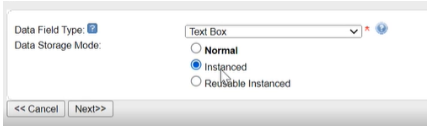 Note: These options were displayed only during the field creation. | |
Email Marketing | 228735 | During the email send process, batches of up to 1000 contacts were marked as ‘Rejected Batch’ in the Exception Report. This was due to the system not excluding the records without email IDs. This has been corrected, and these records will be marked as No Email Address. |
Encompass, Hotfix - February 13th, 2023 (64.9.2)
Canada = 13th February, Monday Morning | U.S. = 13th February, Monday Morning|Australia = 14th February Tuesday Morning
Functional Area | Reference | Description |
Foundation | NA | Following the visual updates made to the Admin and Dashboard User Interface in the last release, added an option to switch to the old view. Users can contact support to revert to the old view. |
Giving | 227722 | On a Donation form, when a user selected 3 or more designations along with the option ‘Display Designation Percentage Fields' and the form property setting set to active, an error occurred, and the form was not progressing. Updated the system to ensure that the users can select any number of available designations along with the Display Percentage Fields option without any issues. |
Email Marketing | 228059 | In the last release, a feature was added to exclude deleted sub-community constituents from a CSV of IDs containing the deleted IDs during send. This was to ensure that only the intended audience receive the emails. This did not work as expected. The exceptions list was including the IDs of the intended audience. Therefore, we are rolling back this change. Note: Please ensure that the CSV of IDs includes only the IDs of the intended audience. |
Encompass Release Notes: January 30, 2023
Please note the product releases for the environments are scheduled as follows:
U.S. = 30th January, Monday Evening | Canadian = 30th January, Monday Evening
| Australia = 31st January Tuesday Morning
Foundation
Google Analytics 4 (GA4)
Implemented the new Google Analytics 4 (GA4) integration with Encompass keeping the earlier Universal Analytics (GA3) version functioning as usual.
Note: Google is discontinuing the GA3 version by July 2023. We recommend transitioning from GA3 to GA4 before the stated date.
Contact Encompass support for integration assistance.
Foundation
New Look to Admin Dashboard, Content Navigation Buttons, and Dropdown Lists
Enhanced the visual appeal of the Admin Dashboard:
Composed the entire page with the right spacing between the menus and sections.
Changed the color to a darker blue in contrast with a grey background.
Updated rectangular menu borders to rounded borders.

Updated the style of the content page navigation buttons and readjusted the spacing in the content navigation menu lists.
Email Marketing
Delete and Restore Functionality
Added delete and restore functionality for campaign drafts. On the Drafts tab, when a draft is deleted from the Gear menu, the system moves the draft to the newly added Deleted Drafts tab.
In the Deleted Drafts tab, the users can restore or permanently delete the drafts using the Gear menu options, Restore and Delete.
 |
The same options are also available in the More Optionsmenu. To restore or delete multiple drafts at once, users can select the checkboxes and click Restore or Delete in the More Options menu.
Note: The More Options menu is enabled when at least 1 draft is selected.
A draft is permanently deleted when it is deleted from the Deleted drafts tab or deleted using the More Options menu. The system displays a warning pop-up to confirm the deletion of the draft.
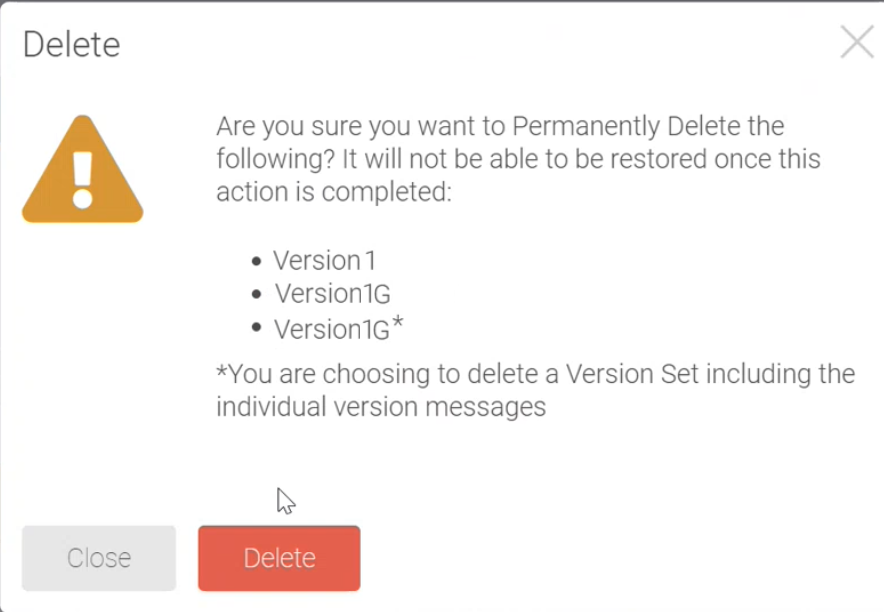 |
When the Restore option is clicked, the system displays a confirmation pop-up. Upon confirmation, the draft is moved back to the Drafts tab.
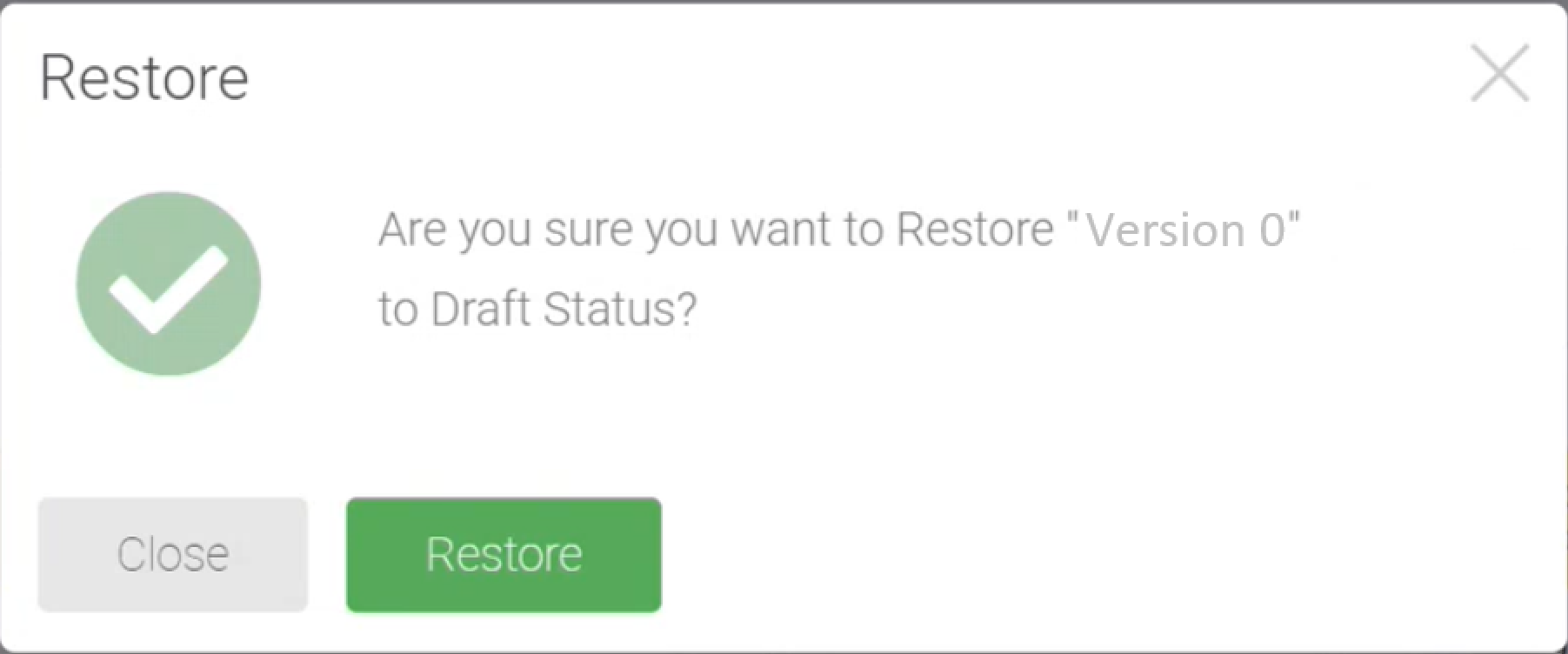 |
Email Marketing
Enhanced the Add Token Dropdown Menu
In Token Manager, the Add Token dropdown menu is enhanced. This enhancement enables the users to directly access all the available profile and form field tokens from the template or HTML editor.
Note: The users can also copy the tokens going to profiles and forms.
Each profile and form field token is displayed with the field and form name in alphabetic order.
 |
Note: There are two groups of tokens in the Add Token dropdown menu, the EmailSystem Tokens, and the newly added Profile and Form Field Tokens.
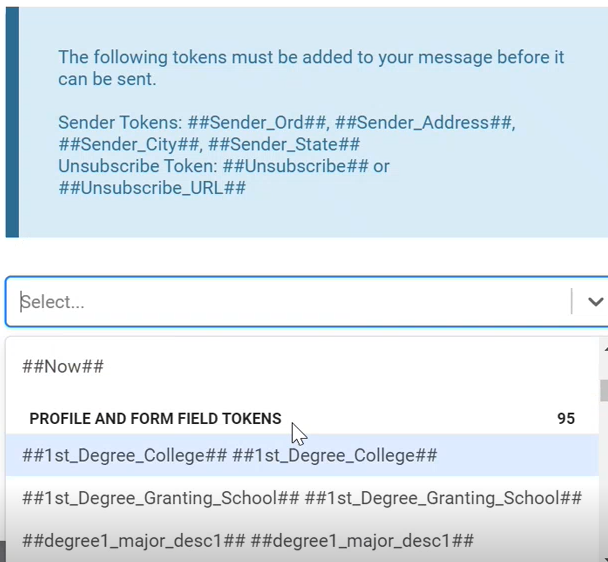 |
Resolution
Functional Area | Reference | Description | |
Email Marketing | NA | When a draft was deleted using the Gear menu (soft delete) option in the Drafts tab, the users were unable to delete the associated sender. This was because the associated draft was not permanently removed from the system, and the users could not find the associated draft as the draft was deleted from the tab. Now, the system has the Deleted Drafts tab where the soft deleted drafts are stored. The users can find the associated draft in the Deleted Draft tab, delete the associated draft, and then delete the sender from the Sender Identities page. | |
Giving | NA | On the Giving page, the system was displaying the sum of all the donations by a member instead of the latest donation amount made by the member. This was due to the Donor Roll data being captured based on the member ID and not based on the transactions. The system is updated to capture the donor roll data based on the transactions. Now on the Giving page, the default displayed amount is a member's latest transaction (donation). Users can view the amount of each donation, filter the amount by the designations, and export the donor roll data. | |
Giving | NA | In compliance with the previously announced Mastercard standards for recurring payments notification, we have made the following changes:
| |
Giving | 197723 | On the Manage Account page, the Resend Confirmation Email button used by the admins for triggering a confirmation email on request from the donors (members or registered guests) was not working. Now, the admins can resend the confirmation email on request. Note: The donors receive the confirmation email upon completing a donation by default. | |
Giving | 218783 | On the Membership form in the scheduled payments settings, the number of days for the reminder and notification email address fields were not displayed. Updated the system to display the fields:  | |
Giving | 221998 | The option Upcoming Auto-renewal charge reminder email should only appear in the Membership forms but was appearing on the donation forms as well. Removed the option from the Donation forms and confirmed that the option is available in the Membership forms. | |
Giving | NA | When configuring the settings using the Update from Template option in the Donor Roll, Leaderboard, and Affiliation modules, selecting a template from the Template dropdown is required. The validation for this selection was not taking place, and the users were able to go to the next page without selecting a template. Now, when a template is not selected, the message ‘select a template’ is displayed and users cannot go to the next page without selecting a template. 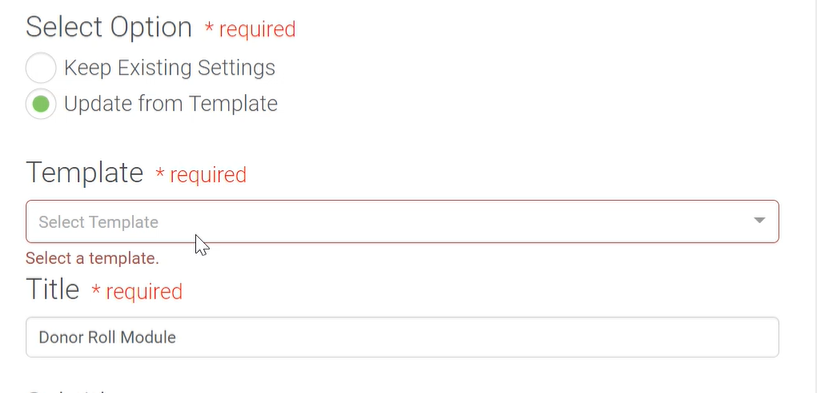 | |
Giving | 222297 | An error occurred updating credit card information when the form was set to Stripe using the API gateway option having earlier settings mapped with auth.net. The recurring gateway settings were getting mapped back to auth.net. Now, Admins can update the payment information for the payment gateway as per the current settings. | |
Giving | 211472 | The donor roll data was not displayed when the custom data point filter was applied. The system was set to filter the data by form or campaign IDs (module IDs). Updated the system to filter the data by member IDs. Now, the donor roll data display according to the applied custom data point filter. | |
Giving | 223633 | On the Designation report, the designation percentages were incorrectly displayed as either 0% or 100%. The reflected amounts were correct. Now, the percentages display accurately corresponding to the amount. | |
Giving | 210512 | The pdf receipts for the transaction made through Touchnet t-link showed $0.00 for any amount transacted. Note: The confirmation e-mail and transaction summary on the Encompass page showed the amount correctly. Now, the exact amount of the transaction made through the Touchnet t-link is reflected on the pdf receipts. | |
Giving | 207800 | The system email footer was not present in the confirmation emails of the subsequent, perpetual, or scheduled transactions. Now, the email footer is present for all the transactions. | |
Giving | 159776 | When hovered over the Scoreboard World map, the gifts that originated from the United Arab Emirates were not populated. | |
Giving | 217418 | The token [ReceiptURL] was not getting linked to the PDF receipt on CA sites. | |
Foundation | When designation filters were applied to GTE (Giving Transaction Export) On-Demand or scheduled reports, the filters were not retained after the initial run. Corrected the issue to ensure that the filters remain as set until the new changes to the filters are applied. | ||
Foundation | NA | Submission counts in the form home pages and reports were not accurate. Even incomplete forms were included in the total counts. The counts are corrected by removing incomplete non-member records. Updated the system to count only the completed forms. | |
Foundation | In compliance with the StateRamp guidelines ensured that the password field is not displayed. Even during the member data import, the password field is made unavailable. 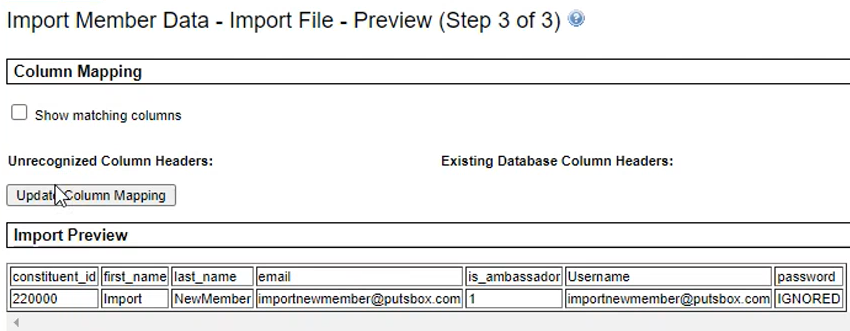 | ||
Foundation | NA | Updated the system to incorporate WCAG elements according to ARIA attributes. | |
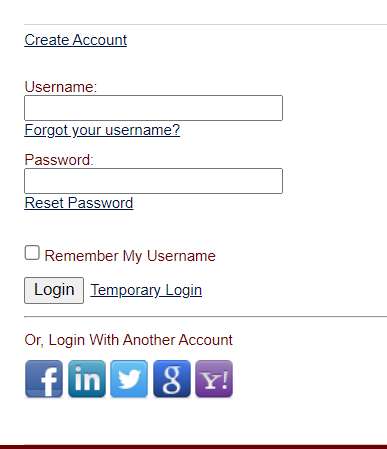
Foundation | 189465, 197805 | Users were unable to connect to the Encompass site with Facebook credentials. When users clicked the Facebook login option, an error message occurred. Now, users can connect using all the social login options: Facebook, LinkedIn, Twitter, Google, and Yahoo.
Note: When using the Login with Another Account options the first time, link the preferred social media account to Encompass:
| |
Foundation | 203550 | Users were unable to navigate through the content archive after the 1st page. When the > button was clicked WSOD occurred. | |
Foundation | 216702 | Amount field was removed from an Event form. Added the amount field. To prevent the commerce fields from being deleted, disabled the option to delete the field. Added the following message: 'You cannot edit or remove the commerce field of a giving form.' | |
Events | NA | When guests filled out an event form with a primary registrant and selected the resend confirmation email option, the confirmation emails were sent only to guests. Now, the confirmation email is sent to the guests and primary registrant. 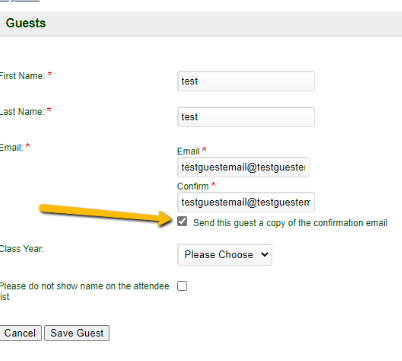 |