2021 - Product Releases
Release Notes: Hotfix - December 21, 2021
Please note the product releases for the environments are scheduled as follows:Australian = 22nd December, Wednesday Morning | Canadian = 21st December, Tuesday Evening
| U.S. = 21st December, Tuesday Evening
__________________________________________________________________________________________
Resolution
Online Giving
This hotfix will roll back the December 13, 2021 hotfix, which disabled the Venmo payment option and revert the changes made in the HEPdata Portal column Aux1 and Aux2 values.
The Venmo hotfix introduced an impact on the performance of Digital Wallets. The Venmo option will be visible to constituents who have Venmo enabled; however, users cannot continue the payment. Constituents should select PayPal instead of Venmo within PayPal to complete the transaction successfully. The full resolution will be addressed in an upcoming release.
Release Notes: Hotfix - December 13, 2021
Please note the product releases for the environments are scheduled as follows:Australian = 14th December, Tuesday Morning | Canadian = 13th December, Monday Evening
| U.S. = 13th December, Monday Evening
-----------------------------------------------------------------------------------------------------------
Resolution
Online Giving
Temporarily disabling the Venmo payment option through PayPal as users were unable to continue the payment. Disabling Venmo is a temporary fix and Venmo payment options will be returned with the permanent fix in the upcoming release.
Product Enhancements
Online Giving
In HEPdata Portal the column Aux1 and Aux2 values are swapped as below:
Previous | Current |
Aux1: “Campaign name | Aux1: “Transaction ID” |
Aux2: “Transaction ID” | Aux2: “Campaign name” |
Release Notes: Hotfix - November 11, 2021
Please note the product releases for the environments are scheduled as follows:Australian = 12th November, Friday Morning | Canadian = 11th November, Thursday Evening
| U.S. = 11th November, Thursday Evening
-----------------------------------------------------------------------------------------------------------
Resolution
Resolved an issue of email status showing as Failed in the history grid for Segmented Campaign when users were trying to send emails with multiple versions containing similar contacts.
Release Notes: Hotfix - November 08, 2021
Please note the product releases for the environments are scheduled as follows:Australian = 09th November, Tuesday Morning | Canadian = 08th November, Monday Evening
| U.S. = 08th November, Monday Evening
-----------------------------------------------------------------------------------------------------------
Resolution
General Encompass
Resolved an issue of intermittent timeouts in Encompass application.
Release Notes: Hotfix - October 28, 2021
Please note the product releases for the environments are scheduled as follows:Australian = 29th October, Friday Morning | Canadian = 28th October, Thursday Evening
| U.S. = 28th October, Thursday Evening
-----------------------------------------------------------------------------------------------------------
Resolution
To assist with troubleshooting delays in email sending, we have introduced additional logging for messages as they are processed through the system.
Release Notes: Hotfix - October 20, 2021
Please note the product releases for the environments are scheduled as follows:Australian = 21st October, Thursday Morning | Canadian = 20th October, Wednesday Evening
| U.S. = 20th October, Wednesday Evening
-----------------------------------------------------------------------------------------------------------
Resolution
Resolved an issue causing an error to be logged that is believed to be causing some hung/delayed messages in email sending.
Only for AU - Resolved an issue of the Email template editor cutting off the Template Settings menu options.
Release Notes: Hotfix - October 07, 2021
Please note the product releases for the environments are scheduled as follows:Australian = 08th October, Friday Morning | Canadian = 07th October Thursday Evening | U.S. = 07th October Thursday Evening
Resolution
General Encompass
Constituents were experiencing an increase in a WSOD (httpstatus:500) error on the final page of the giving form.
Improved verbiage has been introduced on the error page to help constituents who may encounter this error when donating.
Enhancement was made in error handling to reduce the number of occurrences of this error.
Release Notes: 63.5.0 - 04th Oct, 2021
Please note the product releases for the environments are scheduled as follows:
Australian = 05th October, Tuesday Morning | Canadian = 04th October, Monday Evening
| U.S. = 04th October, Monday Evening
Product Enhancements
Ambassador Challenge
Whenever the Donations are made for Multiple Designations challenges. The Donated amount gets reflected across the Scoreboard Challenges.
Whenever the Donations are made for Multiple Designations challenges, The Donated amount gets reflected across the Initiative Scorecards.
General Encompass
Resolutions
Resolved an issue of WCAG (Web Content Accessibility Guidelines) error suggestions were not being announced when filling out any forms.
Resolved an issue of "Enable Scheduled Payment" and "Enable Perpetual Payment" options not appearing in form content properties when the form is linked with TouchNet T-Link.
Release Notes: Hotfix - September 23, 2021
Please note the product releases for the environments are scheduled as follows:Canadian = Thursday Evening | U.S. = Thursday Evening
Resolution
General Encompass
Downgraded the Redis Cache manager version from 2.2.4 to 1.1.2.
Release Notes: Hotfix - September 21, 2021
Please note the product releases for the environments are scheduled as follows:Canadian = Tuesday Evening | U.S. = Tuesday Evening
Resolution
Resolved the below issues by downgrading the Rabbit MQ Client version from 6.2.2 to V5.2.1.
Emails stuck in the queue.
Automatic restarting of delivery consumers multiple times.
Release Notes: Hotfix - September 16, 2021
Please note the product releases for the environments are scheduled as follows:Canadian = Thursday Evening | U.S. = Thursday Evening
Resolution
Added a new validation message when the users upload Email List (Merge Fields) with:
Special characters in the column header (ONLY allowable valid characters are Letters, Numbers, Spaces, Dashes, and Underscores.
Members
Added a new validation message when the user adds a Token Name in the Edit Member/New Member module when:
Special characters in the token name (ONLY allowable valid characters are Letters, Numbers, Spaces, Dashes, and Underscores.
Release Notes: Hotfix - September 14, 2021
Please note the product releases for the environments are scheduled as follows: Australian = Wednesday Morning | Canadian = Tuesday Evening | U.S. = Tuesday Evening
Resolution
Resolved an issue of the Email template editor cutting off the Template Settings menu options.
Now, a validation message will appear when the TouchNet API server is not available.
Product Enhancements
Added a new validation message when the users upload Email List (Merge Fields) with:
Special characters (apart from Underscore (_) and Space) in the column header.
More than 100 characters in the column header.
The Save button is now disabled if you upload an invalid Email List (Merge Fields).
Members
Added a new validation message when the user adds a Token Name in the Edit Member/New Member module when:
Special characters (apart from Underscore (_) and Spaces) in the Token Name.
If the Token Name length is more than 100 characters, the token will truncate to 100 characters.
Release Notes: 63.4.0
Please note the product releases for the environments are scheduled as follows:
Australian = 31st Aug, Tuesday Morning | Canadian = 13th Sep, Monday Evening | U.S. = 13th Sep, Monday Evening
Product Enhancements
Ambassador Challenge
This feature helps you to identify the donation amount raised for a specific Designation across all the Initiatives. When a donation is made to a Designation-based Challenge, the donated amount is reflected in all the Challenges provided the same Designations are used and the Start Date and the End Date range are met.
Digital Wallet
When Deleting a Digital Wallet PayPal Payment Gateway account, a new warning message now gets displayed.
The system is now going to ask for deletion confirmation twice. First, when you click Delete, a browser validation pop-up message gets displayed.
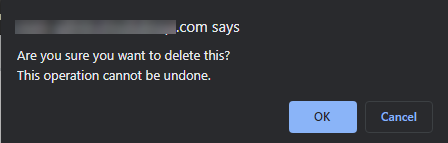
On confirming OK, a final Warning pop-up message gets displayed.
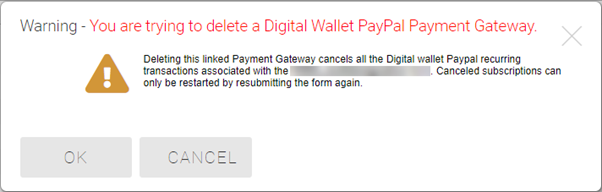
This warning pop-up is going to appear when you are trying to delete Digital Wallet PayPal ONLY (both Primary and secondary Gateways).
Clicking the OK button deletes the associated PayPal Payment Gateway account, and cancels all the existing active Digital Wallet PayPal recurring transactions for the respective form.
Canceled PayPal recurring transactions cannot be restarted. To restart, Admin needs to create the same Gateway account again with the same configuration of Primary and Secondary Gateway and the donor needs to resubmit the donation form again.
A Token with a length of greater than 30 and contains special characters (apart from space and underscore) is considered as BAD TOKEN. BAD TOKEN does not hold any value and it will be displayed as a string value. If an email is sent with BAD TOKEN, the value of the Token will not be delivered, and the end-user will see the token value as a string.
Added on 07th Sep 2021 - Added a new validation message when the users upload Email List (Merge Fields) with:
Special characters (apart from Underscore (_) and Space) in the column header.
More than 100 characters in the column header.
Added on 07th Sep 2021 - The Save button is now disabled if you upload an invalid Email List (Merge Fields).
Members (Added on 07th Sep 2021)
Added a new validation message when the user adds a Token Name in the Edit Member/New Member module when:
Special characters (apart from Underscore (_) and Spaces) in the Token Name.
If the Token Name length is more than 100 characters, the token will truncate to 100 characters.
General Encompass (Modified on 07th Sep 2021)
Several verbiages are changed in Ambassador Challenge, Create Initiative, Create Challenge, and View Stats pages.
In the HEP Data Portal, now you can see the transactions with Transaction ID in the Aux2 column.
Please note:The Redis Client version upgrade has been removed from this release. As we were finalizing the release we identified the need for some additional testing. This will be included in a future release.
Resolutions
Resolved issue for Email List (Merge Fields) feature, when a token value is numeric (with spaces) and inserted from a merge list, the system will truncate the spaces and send the email.
Resolved the issue of error messages appearing when sending email previews if the email contains URLs and hyperlinks with "?" or "/" at the end.
The commerce form report now shows billing email and phone number values as blank when no values are present in Stripe (Primary or Secondary).
Added on 07th Sep 2021 - Resolved an issue of the Email template editor cutting off the Template Settings menu options.
Release Notes: Hotfix - August 25, 2021
Please note the product releases for the environments are scheduled as follows: Australian = Thursday Morning | Canadian = Wednesday Evening | U.S. = Wednesday Evening
Resolution
Online Giving
Resolved an issue of WSOD when users were trying to make Perpetual and Scheduled payments through TouchNet T-Link-based Payment Gateways.
Release Notes: Hotfix - August 16, 2021
Please note the product releases for the environments are scheduled as follows: Australian = Tuesday Morning | Canadian = Monday Evening | U.S. = Monday Evening
Defect
Online Giving
Resolve an issue (Digital Wallet Stripe as a Primary Gateway) when users are not charged for guest fees if a different fee item is selected.
Resolve an issue when membership is purchased through Stripe (Digital Wallet Stripe as Secondary Gateway) and charged the users twice.
Release Notes: Hotfix - August 9, 2021
Please note the product releases for the environments are scheduled as follows: Australian = Tuesday Morning | Canadian = Monday Evening | U.S. = Monday Evening
Defect
Online Giving
Resolved the issue of recurring transactions not getting updated in the reconciliation report.
Release Notes: Hotfix - August 4, 2021
Please note the product releases for the environments are scheduled as follows:
Australian = Thursday Morning | Canadian = Wednesday Evening | U.S. = Wednesday Evening
Defects
Online Giving
Resolved the issue of, few existing donations forms mapped to existing PayPal payment gateways were giving an error while submitting the last step of the form.
Resolved the issue of, unable to make live Digital Wallet PayPal transactions on the Production Environment.
Release Notes: July 26, 2021
Please note the product releases are scheduled as followed for each environment: Australian = Monday morning | Canadian = Monday evening | U.S. = Monday evening
Product Enhancements
Online Giving
If you are looking for easier and more modern ways to let your constituents pay through Encompass while leveraging new connection methods that are both PCI and SCA compliant, then Digital Wallet is the answer.
All Digital Wallet offerings now live under this new "Digital Wallet" Gateway. Currently, this includes 2 merchants; PayPal and Stripe.
Digital Wallet PayPal provides constituents the ability to pay using their PayPal or Venmo accounts.
Digital Wallet Stripe provides constituents the ability to pay using Apple Pay, Google Pay, and payment methods attached to the browser's autofill options (in Chrome and Edge).
NOTE: All current Stripe Checkout customers will be migrated and have to re-connect their Stripe account using the new “Digital Wallet” gateway and the “Connect to Stripe” button. You need Admin rights for this task.
To successfully implement Digital Wallet, both Encompass and Customers have certain tasks to perform. On the day of release:
Encompass team runs the script to successfully merge legacy Stripe Checkout with Digital Wallet.
Encompass team (Customer Support) adds the URI link https://XYZ/iDBMS/StripeConnectWebhook.aspx, where XYZ is the University base URL that needs to be added in order to connect the Digital Wallet Stripe account for the production URL.
Note: Stripe only support HTTPS.
After a successful merger, Stripe Checkout gets replaced with Digital Wallet in the Gateway Account dropdown.
Existing customers using Stripe Checkout have to go to the Gold Key Menu > Manage Payment Gateway > Accounts and find the existing Stripe Checkout gateways.
Click Edit. This opens up the Create a Payment Gateway Account you can see the Payment Gateway is already changed to Digital Wallet.
Click Enable Stripe, and click Save. Save closes the window.
Note: Saving the Payment Gateway before connecting to Stripe is MANDATORY.
Find the same Digital Wallet Payment Gateway Account Name from the list and click Edit at the top right of the Payment Gateway Accounts configuration tab.
Click Connect with Stripe to connect with your respective Stripe account. This opens up the Stripe page.
After a successful connection, you are redirected back to Encompass. You see the Connected message next to the Connect with Stripe.
Click Save, now, you are successfully migrated to the new Digital Wallet.
For more details refer to Configuring Digital Wallet as a Payment Gateway in Encompass.
Learn more about Digital Wallets here.
Scoreboards - Ambassador Challenges
Ambassador Challenge brings you an all-new option to view Initiative progress and track the progress in a new way. Admins and Ambassadors can access the View Stats option by clicking on the ellipsis in the top right of the initiative card.
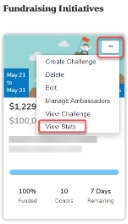
View Stats page provides you the below details:
Challenges progress bar.
Challenge completion status.
Affiliation Totals.
Top donations.
An Initiative overall progress bar.
Daily and Total count of gifts across all Challenges.
Social web source breakdown across all Challenges.
Sort option for Challenge chart.
Account information on the Ambassador Challenges page now gives you the ability to add and view the Ambassador's profile information. Under the Account tab you can:
Upload Photo – The Ambassador can upload a photo for their profile.
Name – This is the Ambassador’s name gets auto-populated from the Members record within Encompass. This is a non-editable field and can not be edited in the Account tab.
Preferred Name – This is the Ambassador's preferred name and is optional. Ambassadors can modify this field. The Ambassador Scoreboard Module shows the Preferred Name if the field is populated.
Class Year - This is the Ambassador’s Class Year and gets auto-populated from the Members record in Encompass. This is a non-editable field and can not be edited in the Account tab.
Degree - This is the Ambassador’s educational Degree and this gets auto-populated from the Members record in Encompass. This is a non-editable field and can not be edited in the Account tab.
Embed Video - Ambassadors can embed a video by pasting a Facebook, YouTube, or Vimeo link. Embedding a video is optional.
Bio – Ambassadors can write their Bio.
Learn More about Ambassador Challenges: Admin Stats here.
If the ambassador creates a challenge, the ambassador's name appears next to the Challenge name as a link to their Profile.
If the admin enters a name in the "On Behalf of" field, and "anonymous" is NOT selected, this name appears in the scoreboards module.
If the challenge is designation-based, the admin now can select or deselect all designations from the list.
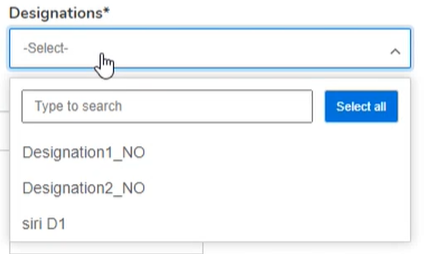
Admins can now allow Ambassadors to create their own challenges.
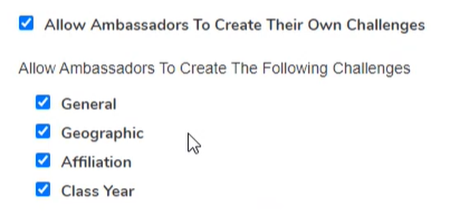
If an admin has Super Admin or Ambassador Management Admin rights the Settings tab is now visible.

This will allow the admin to set up the following:
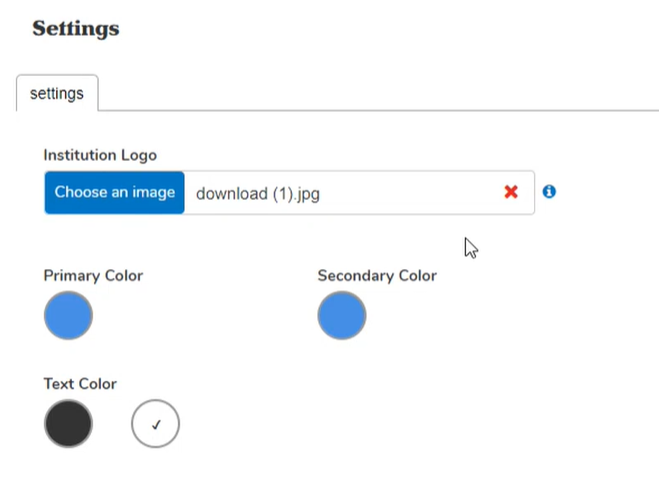
Upload a Logo - the image should be 1MB or under and be in JPG, JPEG, PNG, or GIF format.
Set a color scheme
Primary Color - sets the color for all buttons that are currently blue.
Secondary Color - sets the color for all progress bars.
Select Text Color.
Note: Changes made to the Settings page do not reflect anywhere within Ambassador Challenges. Further development on this page is in progress and you will get additional features in the upcoming release.
General Encompass
Defects
Resolved an issue where the 'Send an Email' option on the community profile was hidden when the member's last name included an apostrophe.
Resolved an issue where Event Date with Timezone token was not displaying timezone in the confirmation email.
Resolved an issue with reconciliation reports where the transactions that happen late in the day get were not getting picked up correctly.
Corrected scenario when Events with Donations include an optional Double the Donation gift match option and the donation is null, the transaction is not sent to DtD for processing.
Resolved an issue with the ICP Grid where data entered into profile review merge fields was not being saved properly.
Resolved an issue where the billing phone number for the following reports was not displaying accurately.
Donations - GTE report
Membership reports
Events reports
Resolved an issue when clicking pay with a card (in Firefox), the user was not directed to the TouchNet T-link site for payment.
Resolved an issue where GPay/Pay now was not disabled in the form when multiple designation fields were not provided.
Ambassador Challenges - Resolved an issue where Super Admins did not have the Advanced Admin rights by default.
Resolved an issue where the is_email_valid field was not capturing system updates in the data change history.
Resolved the issue where selecting the help icon "i" presented an error message. It will now redirect to support.imodules.com.
Directory - resolved an issue where only the first 100 directory results are loading.
CPI - Fixed an issue where the CPI goal value would still be present even if the goal type changes.
Resolved Privacy Issue for Email Address not hiding in directory search results when the user chooses to hide It.
Release Notes: May 17, 2021
Please note that product releases are scheduled as followed by environment:Australian = Monday morning | Canadian = Monday Evening | U.S. = Monday Evening
Product Enhancements
Email Marketing
A/B Testing Campaigns
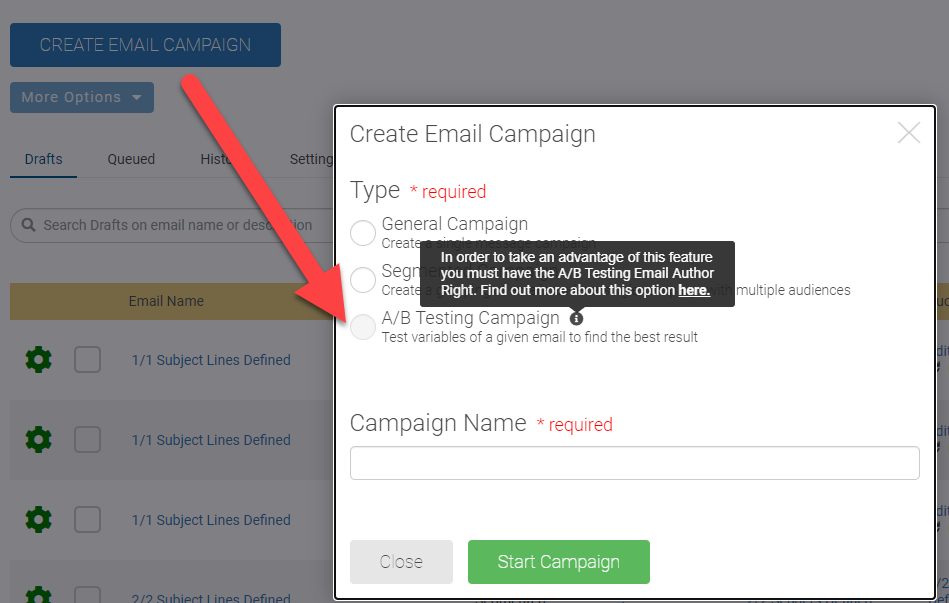
If you are an Admin with the Advanced HTML Email Author and the Email A/B Testing Author rights you will now be able to create HTML content when building your A/B Testing Campaign.
You must have the following administrative rights for this option to be available.
Email Author or Communications
Advanced HTML Email Author
Email A/B Testing Author
We added a little reminder that the A/B Testing Campaign feature is available if you have the "A/B Testing Email author Right". This administrative right added to the Email Author or Communications administrative right will allow the individual to create an A/B Testing Campaign.
Segmented Campaigns
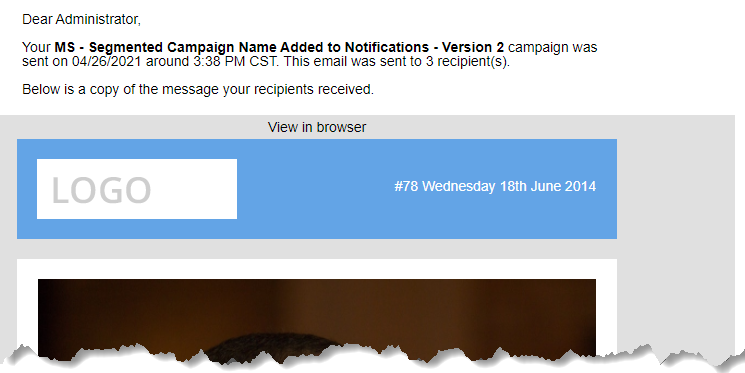
Your email notifications will now display the segmented campaign name with the version name when emails have been completed sending or failed to send.
Online Giving
Scoreboards - Ambassador Challenges
Admins now have the ability to add an "Initiative Goal" and track how their overall initiative is doing (above and beyond their challenges). The amount entered on the initiative setup form is displayed on the initiative card, and the progress bar fills in to display $'s raised or donor count to goal, across all forms within the initiative.
 |
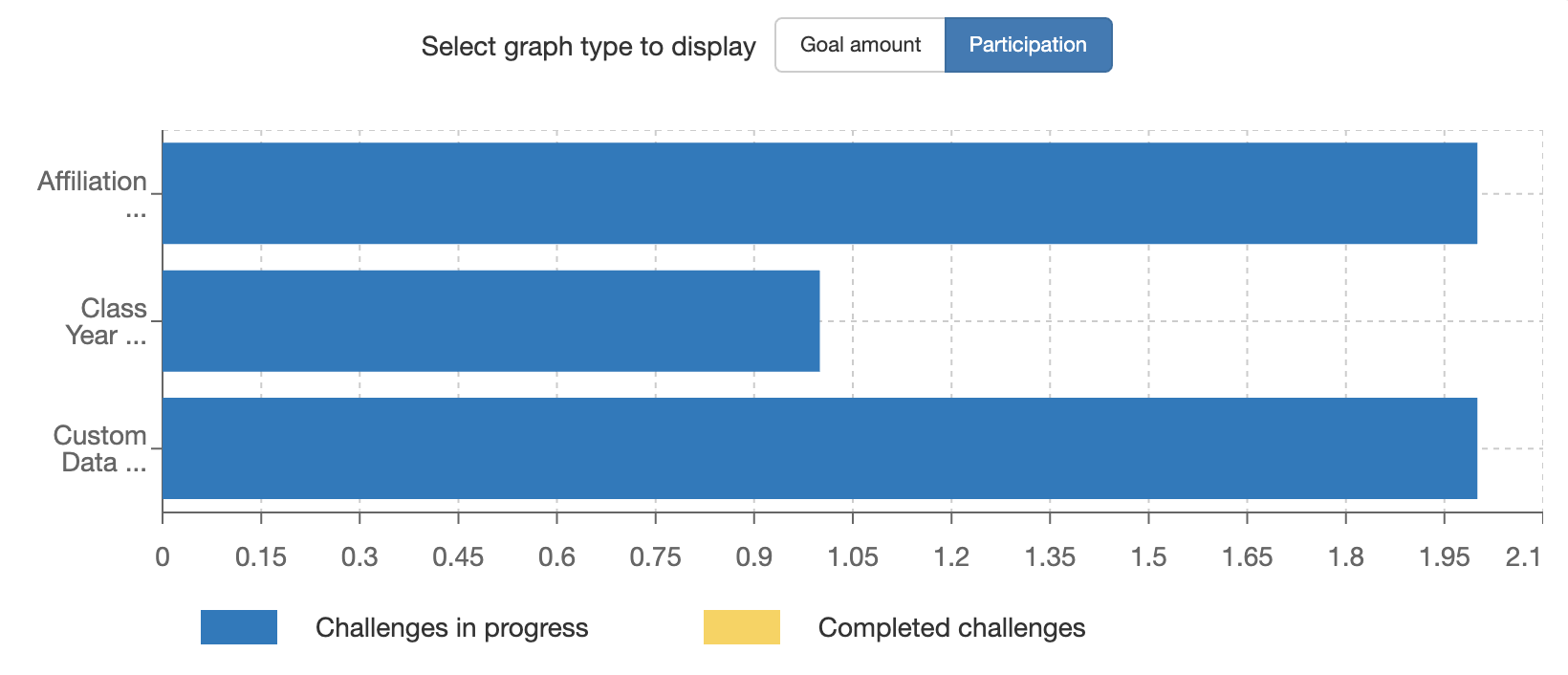
A new stats page has been added to the admin portal to offer admins a better look into how their initiatives are doing. For May, we have implemented 3 stats. Firstly, a graph which breaks down all challenges within an initiative. Admins are able to quickly switch between $ and participation based challenges.
 |
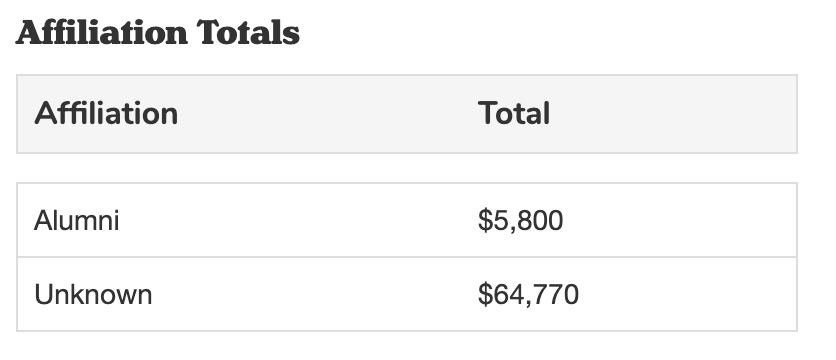
Secondly, we have a breakdown of donations by affiliation type. This uses the Scoreboards Affiliation field. If a donor doesn't enter a value here, then their gift will be marked as an "Unknown" affiliation type.
 |
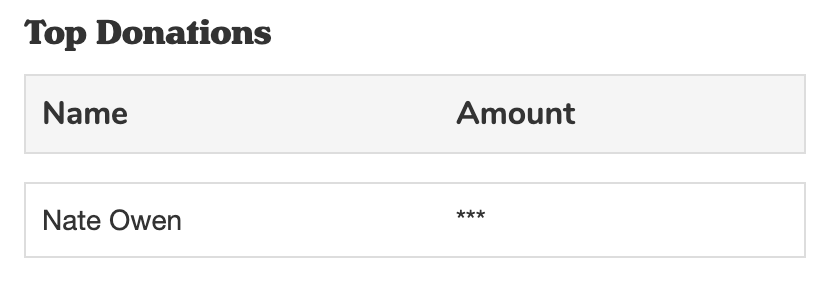
Lastly, we have added a list of Top Donors. This section will display the donors who donated the largest amount across all challenges. For this section of the stats page, Admins will need an additional admin right (Advanced Ambassador Challenges Admin) in order to see the $ amount. If this right is not applied to a user, then they will see the list of names, but not the $ amount attached to them.
 |
For better visibility into the status of challenges within an initiative we have added 2 labels. When a challenge has ended, a red "Ended" label will appear above the "Remaining" countdown. Additionally, a green "Achieved" label will appear above the goal amount, when the goal has been reached.
 |
The challenge countdown has been made more granular, to offer a better view into how much time is left on a challenge. Now, when the challenge is in its last day the countdown changes to hours, and when it's in its last hour it changes to minutes.
 |
General Encompass
Updates have been made to align with the April 26th announcement regarding the Anthology product renaming and branding. These updates include replacing the iModules logo with the new Anthology Encompass logo and updating verbiage throughout the site. These updates will continue over the next several releases.
Defects
General Encompass
Resolved issue where Greek letters and other special characters and emojis were not displaying correctly in reporting or the web service API
Updated the way field data is handled in the ICP grid for non-member merge process so submitted values would not be blanked out
Fixed an issue when hitting enter on the directory search would open a LinkedIn Window instead of kicking off a search.
Release Notes: April 19, 2021
Please note that product releases are scheduled as followed by environment:Australian = Monday morning | Canadian = Monday Evening | U.S. = Monday Evening
Product Enhancements
Online Giving
Scoreboards
The newest member of the Scoreboards family is finally here!! Now, for the first time you will be able to flag engaged constituents to be your ambassadors and provide them with a platform to champion your Give Day efforts through peer to peer fundraising, as well as provide them with the ability to create custom challenges in areas of interest to them.
Admin View - Landing Page
Ambassador View - Challenge Breakdown
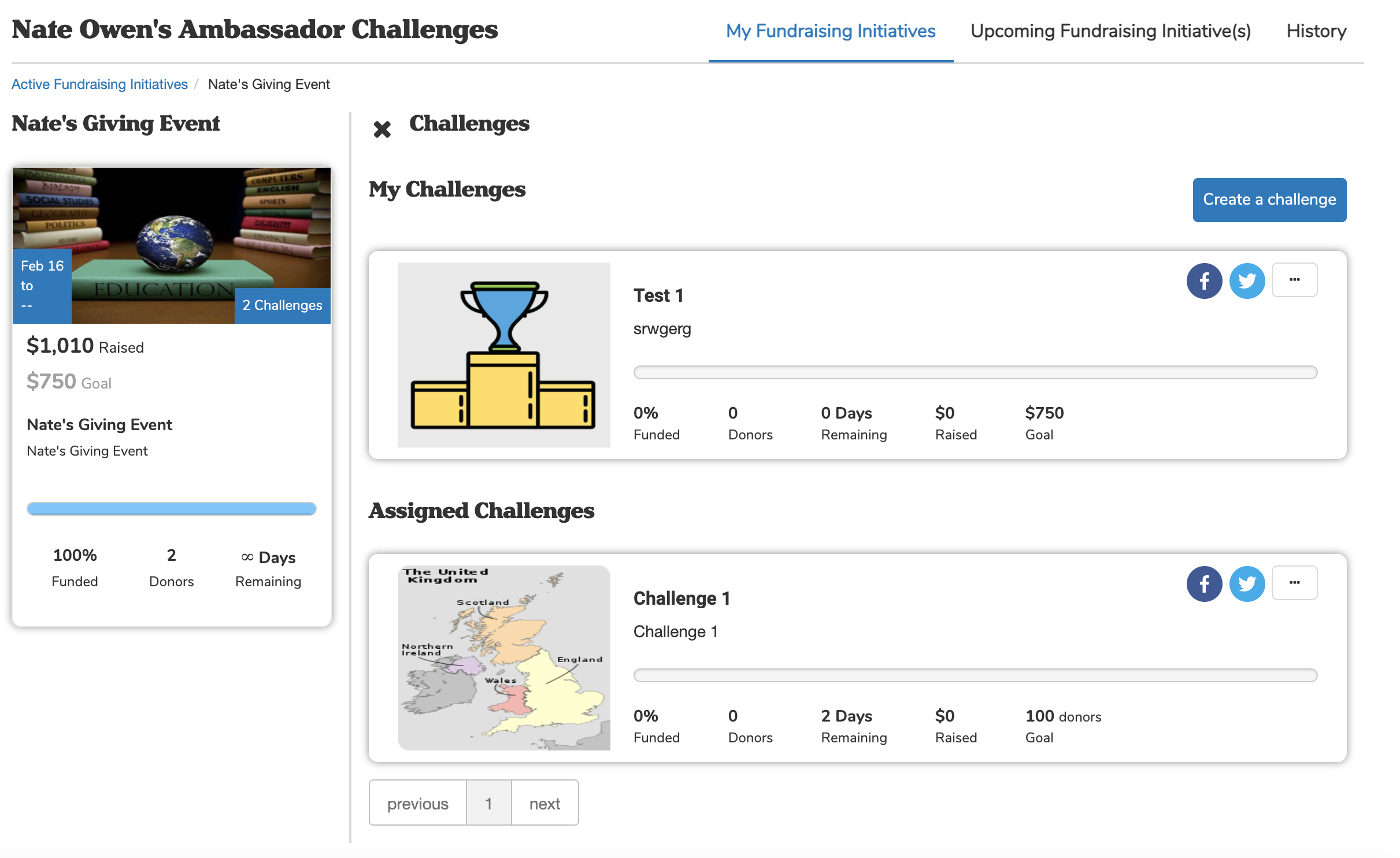
This module is included as part of the Scoreboards package, and will be available to all Scoreboards customers after the April deployment.
Giving Forms
With the April release comes a feature for streamlining the creation of designations within Encompass.
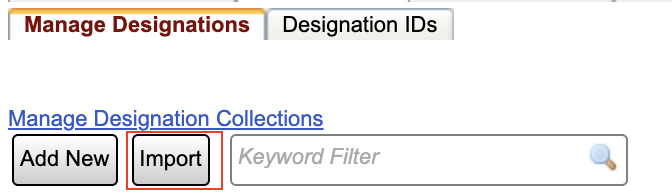 |
A new "Import" option is now available on the Manage Designations page, which allows users to import up to 500 designations at a time by simply adding the designations to a .csv file and dragging and dropping that file into the Import page.
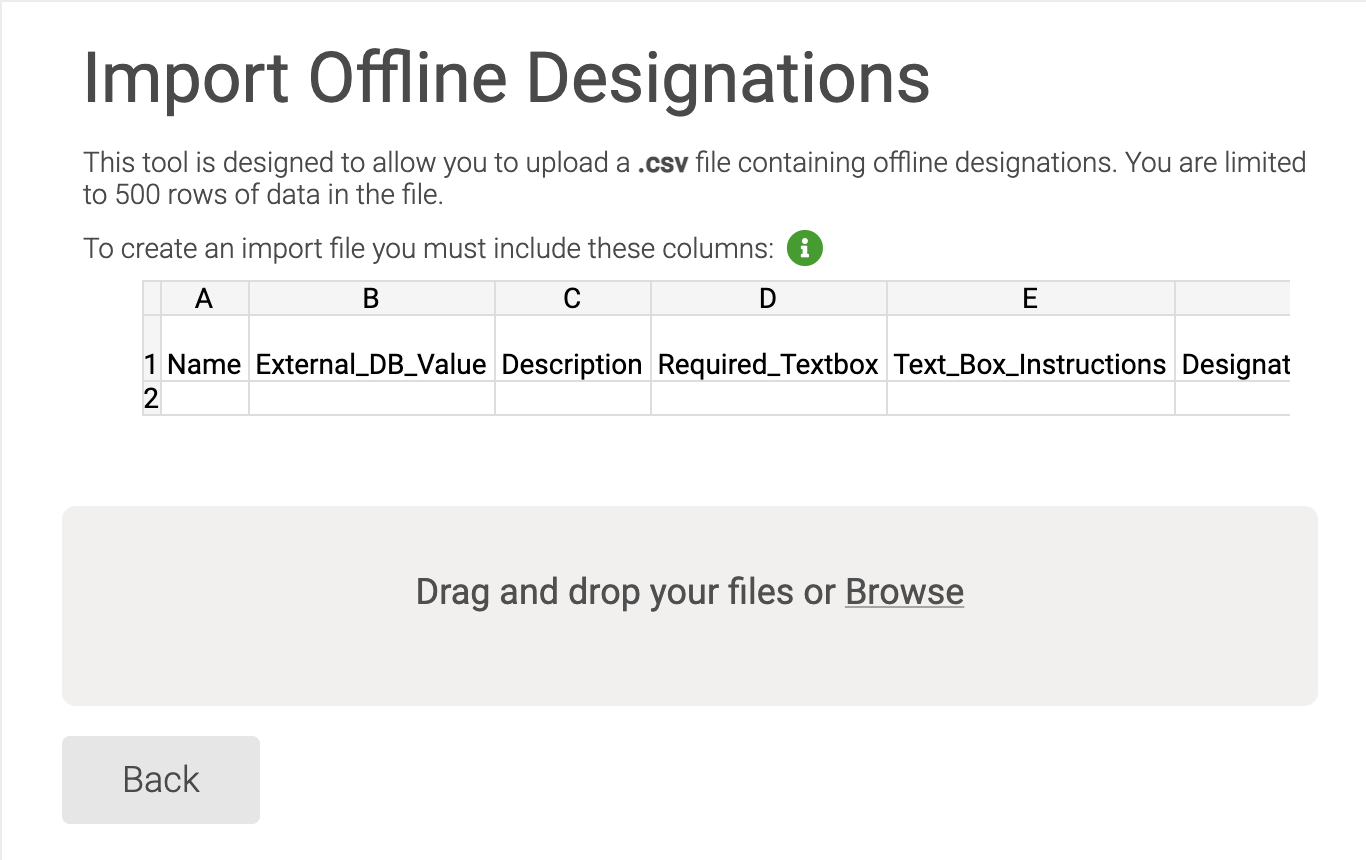
Upon selecting "Import" you will be taken to the import page which will provide you with a list of all fields needed for the import; including all general designation fields, as well as an up to date list of all designation IDs currently in use. The only required elements are the Name and External_DB_Value, allowing you to add as much or as little information as needed.
 |
Email Marketing
Email Home
The system will now prevent an email to be released if it is within five minutes or less of the scheduled future send time. This allows the system time to process the email and provides an extra measure for a successful email send.
The following message will appear in the lower right hand corner if, upon release, the above criteria is met. "Please choose a scheduled date/time in the future greater than 5 minutes from now or send immediately."
Events
For Events with Activities, admins now have the ability to check registrants into an event without updating any activity counts providing a total unique event attendees count.
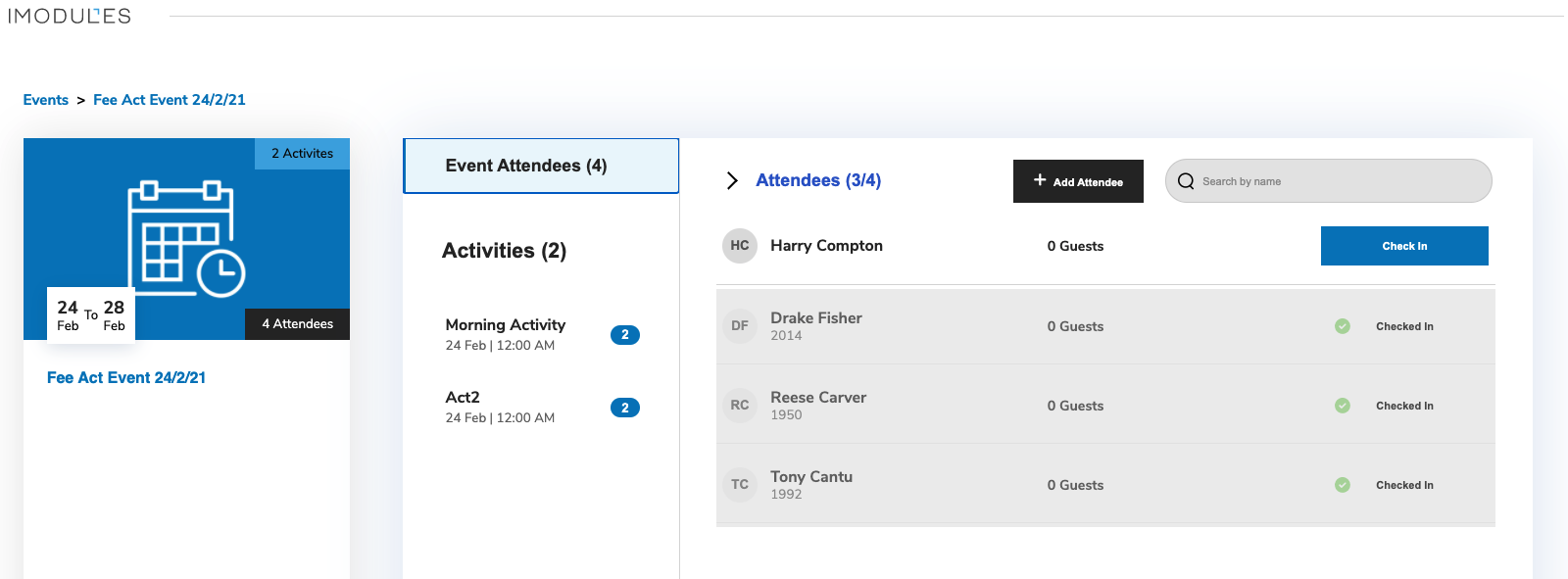
This will provide admins with a unique count of event attendees who have registered or walked up to an event even if they did not check into a specific activity.
SFTP Import
With the April release we will be adding an additional process time to our current import schedule. The Automated Import (SFTP) app currently runs at 5:25am and 7:25am CST. This picks up files and drops them into the import queue. Due to an increase in files, we will be adding an additional process time of 4:25am CST.
Defects
Email Marketing
Resolved an issue where the Grid View Sunset Message was still displaying for some customers.
Links - Fixed an issue if there is a space after a link, the email system did not provide an error. (Note: There is a future request to have the system automatically remove the space.)
Email Preview - Fixed an issue where the "From" address in the Email Preview modal was populating the "Reply To" address instead of the "From" address.
Segmented Campaign - Fixed an issue where the exception report for one version in a segmented campaign from the History page was displaying exceptions for all versions in the campaign.
Dynamic Content News Articles - Fixed an issue where dynamic content stopped pulling news articles set to publish and archive on the current date.
Dynamic Content Events - Fixed an issue where inactive and archived events are pulled into dynamic content.
Dynamic Content Events - Fixed an issue where event feeds did not pull the number of items specified when they existed for that listing type.
Scoreboards
Resolved an issue where any existing styling on a page was being over-ridden when a scoreboards module was being added to that page.
Events
Events within the Attendee Check-in will now open with a smart or curvy apostrophe in the name.
General Encompass
Updated redirect cookie rules to help resolve a "Too Many Redirects" error.
Resolved an issue where users were unable to login using the Google connect integration
Updated RSS module to resolve issue where valid urls were not being supported.
Fixed issue with [Amount Paid to Date] token showing incorrect amount in confirmation emails.
Release Notes: Hotfix - April 12, 2021
Please note that product releases are scheduled as followed by environment: Australian = Monday morning | Canadian = Monday Evening | U.S. = Monday Evening
Defects
Encompass - Email Reporting
Resolved an issue where metrics did not match when reporting was accessed from Email Home > History Page vs. directly from Email Reporting. (Note: Historical data will be updated at a later time.)
Release Notes: Hotfix - April 5, 2021
Please note that product releases are scheduled as followed by environment: Australian = Monday morning | Canadian = Monday Evening | U.S. = Monday Evening
Defects
General Encompass: Forms
Resolved an issue with incomplete form submissions and errors when attempting to submit a form.
Release Notes: March 21, 2021
Please note that product releases are scheduled as followed by environment: Australian = Friday 19th, Morning | Canadian = Sunday Evening | U.S. = Sunday Evening
Product Enhancements
Online Giving
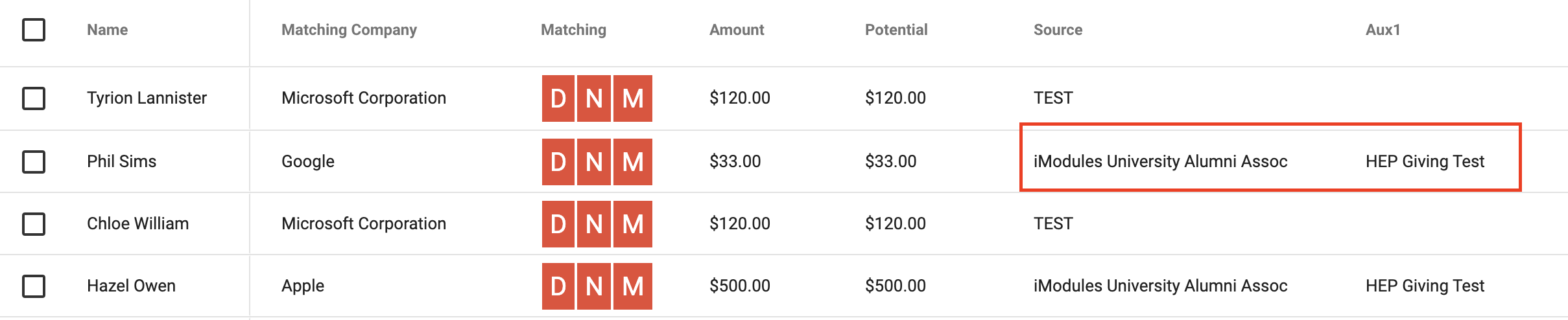
Updates have been made to the HEP e-Match Portal integration which will aid in customers understanding where transactions come from in Encompass to speed up reconciliation between the two applications. The "Source" field in HEP will now display the name of the sub-community from which the transaction took place, and the AUX 1 field will display the name of the form that was used.
An additional upgrade has been made to the company field which reduces the time it takes to populate a list of companies when a user starts to type.
Email Marketing
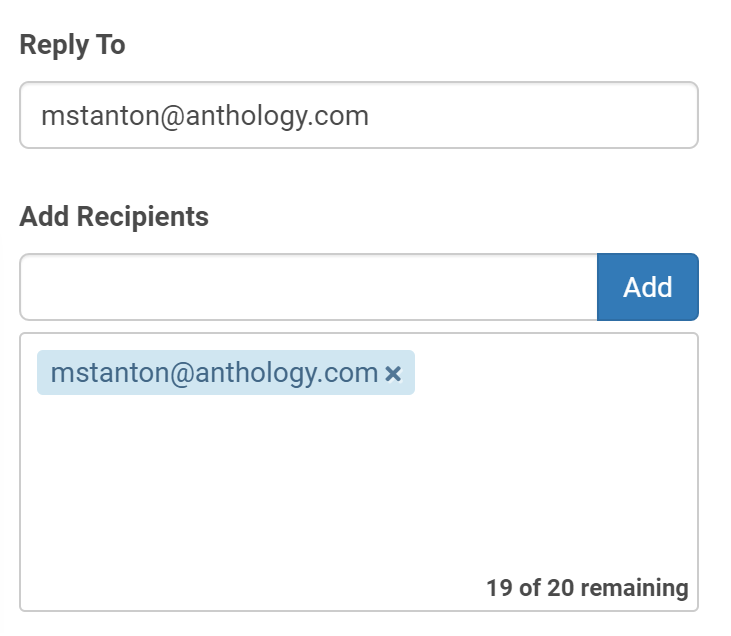
The 'Reply To' and 'Add "Recipients' will now automatically populate the admins email address.
 |
Defects
General Encompass
Resolved an issue where special characters were not being encoded properly within API and GTE reports
Online Giving
Resolved an issue where Apostrophes in a billing name were being changed to ' and causing errors in Cybersource.
Fixed an issue where currency that does not use decimals is having additional 00 added, and sending an incorrect payment amount to gateways.
Fixed an issue where PayPal would throw an error when trying to transact in JPY.
Email Marketing
Fixed an issue where the audience resolution would intermittently fail causing emails to be stuck in send.
Fixed an issue where some links are not properly encoded/decoded in preview and sent emails.
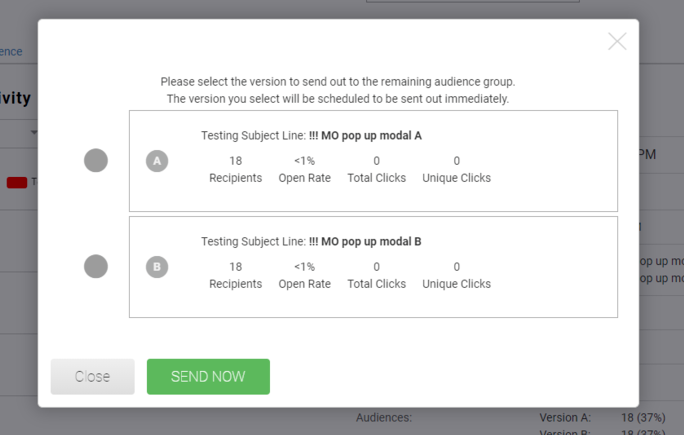
A/B Testing Campaign - Fixed an issue when Manually Select winner was chosen, before any opens occurred, the Open Rate displayed <1%.
Sender Identity - Fixed an issue where the sender identity could be deleted if it was 'In Use'.
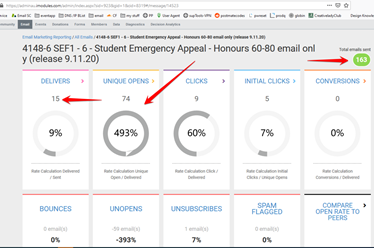
Email Reporting - Fixed an issue where metrics displayed incorrectly.
Example:
Release Notes: Hotfix - February 23, 2021
Please note that product releases are scheduled as followed by environment: Australian = Tuesday morning | Canadian = Tuesday Evening | U.S. = Tuesday Evening
Defects
Scoreboards
Resolved an issue where styling within a scoreboards module was not being restricted to that individual module, and instead was impacting the rest of the page. Now, any styling changes made to a scoreboards module stay within that module.
Release Notes: February 16, 2021
Please note that product releases are scheduled as followed by environment: Australian = Tuesday morning | Canadian = Tuesday Evening | U.S. = Tuesday Evening
Product Enhancements
Encompass Decision Analytics
The following enhancements are now available for the portal:
Tool-tips added to dimension scores to provide staff further clarification on how to measure those values. An example can be found here:
"Letter grades range from a high score of A+ to a low score of D-. Plus and minus indicators are used to allow enough differentiation when comparing segments of a population. A segment with no engagement will show a zero value rather than a letter grade."
NOTE: Dimension scores will now be aggregated scores based off constituent that live in that community and is relevant to that actions taken in that specific community (aka GID).
Giving Dimension will now include the below metrics for each enabled site and aggregate data that is relevant to that community and constituents actions (aka GID).
Most Popular Appeal Code value will be based on the highest aggregated amount given to a donation form, within the scoring time frame, and the populations selected with the above filters on the portal.
Total Gift Amount sums all donation amounts made on a donation form, within the scoring time frame, and the populations selected with the above filters on the portal.
Popular Day to Give provides day value (in your site's timezone) that is most popular within the scoring time frame, and the populations selected with the above filters on the portal.
Event Dimension will now include the below metrics for each enabled site and aggregate data that is relevant to that community and constituents actions (aka GID).
Events with Donation Dollars Raised sums money donated through an event form with this configuration within the scoring time frame, and the populations selected with the above filters on the portal.
Average Number in Party sums registration party (registrant and guests) averaged over all party counts within the scoring time frame, and the populations selected with the above filters on the portal.
Popular Day to Register looks at the most popular day based of submission date (in your site's timezone) within the scoring time frame, and the populations selected with the above filters on the portal.
Membership Dimension will now include the below metrics for each enabled site and aggregate data that is relevant to that community and constituents actions (aka GID).
Total Current Memberships sums Memberships that are in a current status within the scoring time frame, and the populations selected with the above filters on the portal.
Expires in 30 days sums records that have memberships that expire in 30 days within the scoring time frame, and the populations selected with the above filters on the portal.
Most Common Membership Level where count of current Membership Levels, that return highest membership level within the scoring time frame, and the populations selected with the above filters on the portal.
Online Usage Dimension will now include the below metrics for each enabled site and aggregate data that is relevant to that community and constituents actions (aka GID).
Total Number of Prepops sums total number of constituent prepop authentications within the scoring time frame, and the populations selected with the above filters on the portal.
Total Form Submissions includes a sum of all successful form submissions within the scoring time frame, and the populations selected with the above filters on the portal.
Profile Updates includes a sum of all successful profile field updates made within the scoring time frame, and the populations selected with the above filters on the portal.
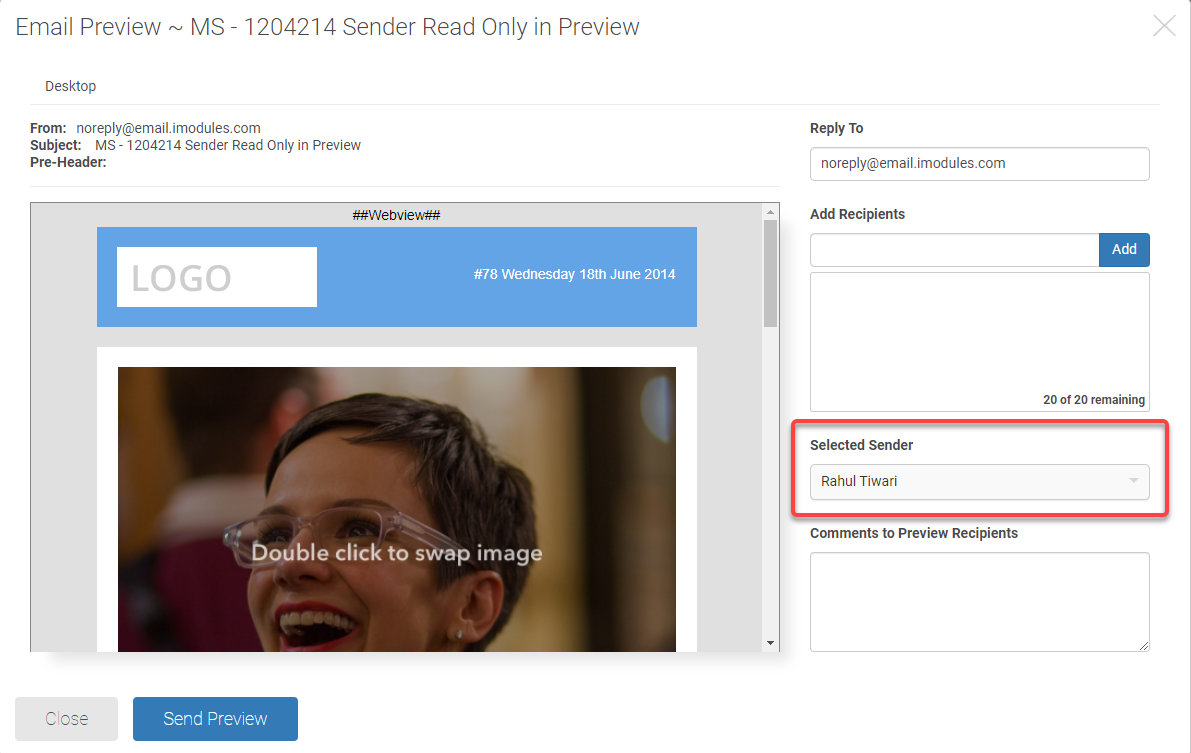
The Sender field in the Email Preview modal is now read only regardless if the sender is populated in message details or not.
 |
Defects
Email Marketing/Reporting
Email Preview - Fixed an issue where the preview was not displaying in a desktop view (1247988)
A/B Testing Campaign
Fixed an issue where the winning version sent was blank (1239104, 1253705)
Fixed an issue when exporting a report, the email name column did not include the email name (1225072)
Fixed an issue where addresses added to the Notification Email would duplicate (1217696)
Email Reporting - Fixed an issue where the exports from the drilldowns for segmented campaigns stops at 1,000 (1234041)
Fixed if & is included in a link, the system will now automatically correct and will not error on preview or break in the released version of the email (1216509)
Release Notes: January 19, 2021
Please note that product releases are scheduled as followed by environment: Australian = Tuesday morning | Canadian = Wednesday Evening (1/20/21) | U.S. = Wednesday Evening (1/20/21)
Product Enhancements
Email Marketing
The following features are now available for A/B Testing Campaigns.
Copy an A/B Testing Campaign from the More Options Menu and the Gear Icon
View Template from the Content Page in the workflow
Navigation Buttons added to Email Editor Page
Convert HTML general campaign to an A/B testing Campaign
Admins are now able to view and/or send an email preview from the Drafts, Queued, and History tabs as well as from email reporting with our new preview modal. Send Preview in Email Editor will also take on this new look.
Note: This Preview is approximate. Please use Send Preview to view the actual email in the email client(s) of your choice.
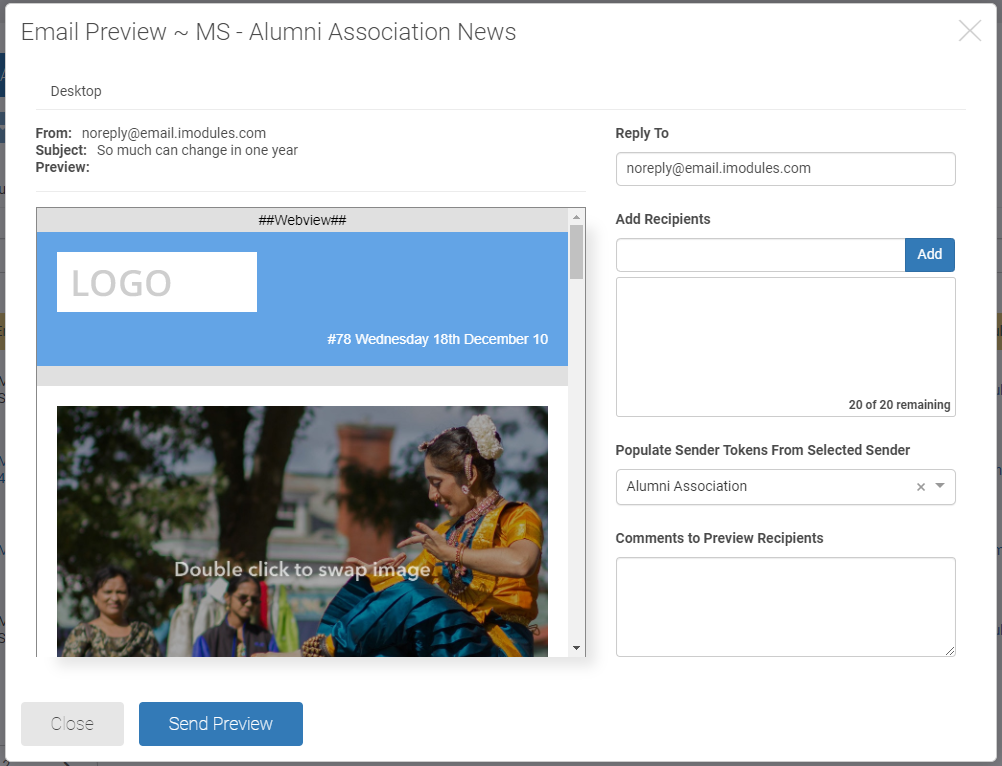
This is the first step into providing an efficient process to help you test and evaluate your design before you send to your recipients. Look for future enhancements as we continue to build on this exciting new feature.
Available for all campaign types: General, Segmented and A/B Testing Campaigns
Email Editor - Preview will now be found under the "More Options" menu
Reporting (individual message level only)
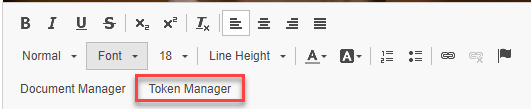
A new option is now available when editing email content called Token Manager. There will be several iterations of this new feature. Round one will give you access to Token Manager in the Email and Template Editors with the following Email System Tokens.
 |
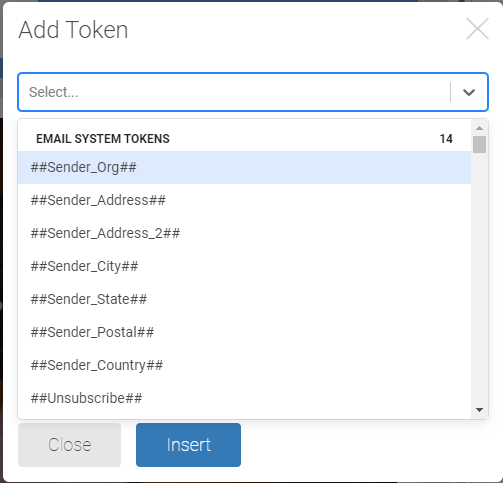 |
List of Email System Tokens
##Sender_Org##
##Sender_Address##
##Sender_Address_2##
##Sender_City##
##Sender_State##
##Sender_Postal##
##Sender_Country##
##Unsubscribe##
##Unsubscribe_URL##
##Webview##
##Community Name##
##Group Name##
##Date##
##Now##
Look for future enhancements such as availability in the HTML editor, additional tokens and more.
Rates within email reporting that are more than 0% but less than 1% will no longer show as 0%. Admins will now see <1% in situations where there are metrics but the rate is not above 1%.
Defects
Email Marketing/Reporting
Updated the recipient reporting detail to display emails as far back as January 2018. (ENC-41296, ADO-1203718)
Fixed an issue where Dynamic Content stopped pulling news articles set to publish and archive on the same date. (ADO-1226852)
Fixed an issue in the Reporting Campaign Details section for an A/B Testing Campaign where the label for Winner was inconsistent. (ENC-41658, ADO-1204076)
Fixed an issue with Segmented Campaigns where the campaign moved back to the drafts page instead of remaining on the queued page. (ADO-1234632, ADO-1234632)
Fixed an issue where the Sender test variable for an A/B Testing Campaign was always sending version A regardless if version B was the winner. (ADO-1242179, 1224647, 1245345, 1224651, 1231709)
Editor Fixes
Fixed an issue where bulleted lists displayed incorrectly in Outlook (ADO 1250994, 1250999, 1251229, 1251233, 1250995, 1250998, 1251230)
Fixed an issue where fluid on mobile setting for buttons should control button display on mobile devices (ADO 1201351/ENC-38847)
Fixed an issue where certain characters in mail to link subject lines do not render correctly (ADO 1203709)
Fixed an issue where the font settings in the text element for bulleted lists did not display in Outlook correctly (ADO 1201307/ENC-38801)
General Encompass
Members who have values within a directory search field that contain pipes will now return correctly when the field was searched. (1224219)
Resolved an issue within the Event Check-in App where attendees are being checked in but the check in app does not reflect this update but they do show as checked in on the reporting tool. (1224648)