2018 - Product Releases
Release Notes - 26 December 2018
Please note that product releases are scheduled as followed by environment:
Canadian = Wednesday evening | Australian = Wednesday morning | U.S. = Wednesday evening
Product Enhancements
Scoreboards
Donor Roll Offline Donation Import
Have money coming through by cash/check and want to display on Donor Roll? Schools can display offline donations within Donor Roll by importing a csv with the list of donor name, donation amount, and date. (ENC-35232)
Maps Offline Donation Import
Display offline donations within Maps by importing a csv with the list of constituent identifier, geo location, amount, and date added. (ENC-35211)
Release Notes: 18 & 21 December 2018
Please note that product releases are scheduled as followed by environment:
Canadian = Monday evening | Australian = Tuesday morning | U.S. = Tuesday evening
Defect Corrections
Email Marketing
Resolved case-sensitive issues with Lists that prevented emails from successfully sending. (ENC-36389)
Will no longer allow Email Lists to be uploaded with duplicate email addresses. Combined lists with duplicates will be allowed and will be found in the exception report. Any email you send out will only be sent to an email address one time. (ENC-36434)
Will no longer allow admins to pull an email back to drafts from the queued tab while it is in the process of sending. (ENC-36190)
Additional logging and research around this issue has lead to fixes being deployed in this release as well as scheduled for our upcoming January/February release that accounts for all currently known stuck-in-Queued scenarios.
Release Notes - 10 December 2018
Please note that product releases are scheduled as followed by environment:
Canadian = Monday evening | Australian = Tuesday morning | U.S. = Tuesday evening
Product Enhancements
Email Home
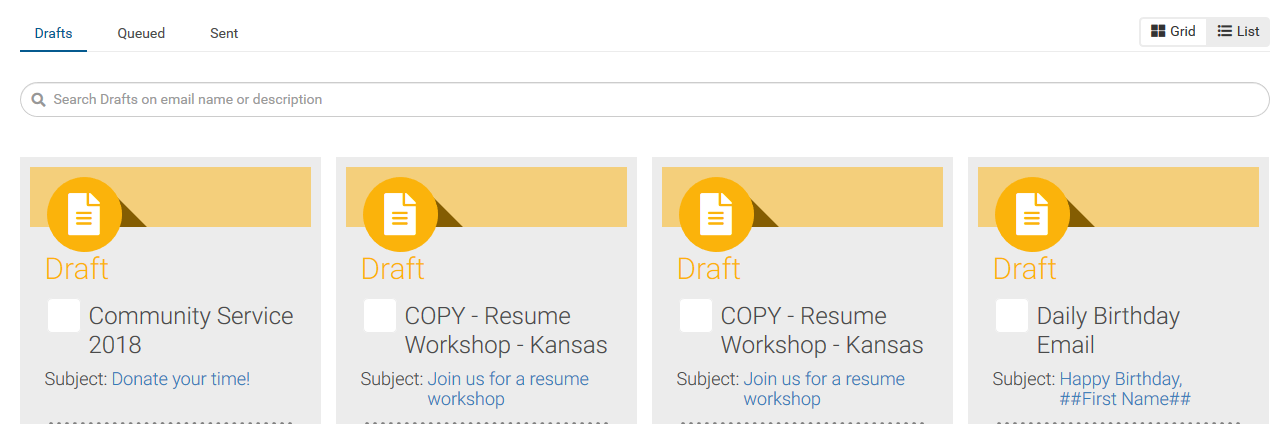
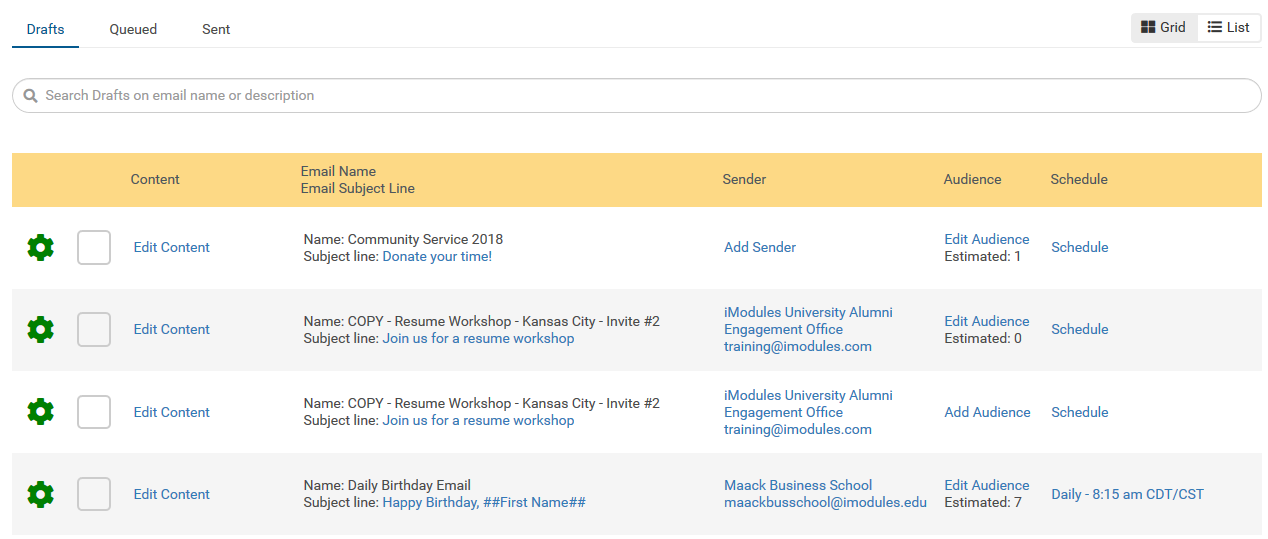
Email home now has an additional view option of List View. List View provides the same information as the Grid View with the email cards.
Grid View:
 |
List View:
 |
Email Lists with Merge Fields
A great add to Lists and Segments with the ability to now upload a list of emails with additional merge fields. This means you can still personalize this audience type to not only include First and Last Names but also support a whole myriad of scenarios from specific ask amounts per email address to a custom message from your President for every person in the file. No longer do your staff import data into your online database when you can simply upload a file that contains those necessary elements. We cannot wait to see what kind of powerful messages you all build with this new functionality!
Email Reporting
MID joins Email Reporting Drill-downs
With the addition of Email Lists we know not all constituents you email will have a Constituent ID. Due to this we wanted to be sure you knew exactly which member records are opening, clicking, registering for an event, and even making a gift. Dare we say unsubscribe too... well it is a shame if they do but you can find this unique record information out as well. Happy reporting!!
Scoreboards
Leaderboard Challenges
A different angle of gamification in Leaderboards. After admins enter a set amount of bonus funds, they then can choose which distribution method -- Preset Ranking or Relative Percentage. Here is another way you can entice donors to give more. (ENC-35195)
Relative Percentage - Bonus funds are distributed across all designations/Custom Data Point field values based on the highest percentage of participation or dollars.
Preset Ranking - Bonus funds are allocated to specific ranks based on the total participation or dollars.
Defect Corrections
Community Content
Corrects an issue where admin notifications for community content approvals were not sent in the Australian environment. (ENC-35357)
Data Management
Corrects an issue where admin notifications for successful imports were not sent in the Australian environment. (ENC-34800)
Events
Corrects an issue where tools on the HTML Editor menu bar were not functioning in Firefox. (ENC-35429)
Online Giving
Corrects an issue where selected designation names were not being read appropriately by screen readers. This is a WCAG related change. (ENC-32042)
Corrects a rare issue where the user is erroneously instructed to retry their transaction even though the system knows the payment transaction was successful. (ENC-35545)
Platform
Corrects an issue where an admin session times out when trying to delete custom URLs within Link Builder. (ENC-35503)
Corrects an issue where upcoming charge reminders were not being sent to those listed as carbon copied recipients. This issue was limited to the Australian and Canadian environments. (ENC-35454)
Release Notes - 28 November 2018
Product Enhancements
Scoreboards
Rank numbers, dollar signs, and percentage signs are now customizable with .scoreboard-container in Advanced CSS. (ENC-36055)
Defect Corrections
Online Giving
Corrects an issue where an error occurs upon submission for giving forms that do not require making a donation. (ENC-35564)
Release Notes - 12 November 2018
Please note that product releases are scheduled as followed by environment:
Canadian = Monday evening | Australian = Tuesday morning | U.S. = Tuesday evening
Product Enhancements
Email Marketing
Your email will be auto-populated for both reply to and recipients when sending previews from Email Home. You can replace with other emails if desired.
You will now be able to upload a list of email addresses, first name and last name. This will be added in the Lists and Segments home and can be combined with other audience types like CSV of IDs and Segments. You will use your system tokens for First Name and Last Name to personalize the email.
NOTE: We have not forgotten about temporary token support and how awesome it will make your email. Stay tuned for this update and happy list making!
Recipient Drill-Down View: Provides the ability to drill down by recipient to see overall metrics and email history (currently 275 day history).
Scoreboards
You will now be able to use custom fields in Leaderboards – from free and commerce Events and Membership Forms. (ENC-33223)
Defect Corrections
Email Marketing
Ensure that only one email is delivered to an email address particularly when two member records share that same address. (ENC-35634)
When duplicate custom URLs are found within the email (i.e. custom link - http://www.overlanduniversity/reunion is tied two unique pgids in the site) we will use the first links destination and override the second. (ENC-35739)
Subscription Categories should no longer be blank when creating an email or in Email Reporting (ENC-34365)
Unique Clicks that reporting (NaN%) on reporting have been changed to Initial Clicks and will properly report this value on deployed emails. (ENC-33016)
Events
Corrects an issue where the back button on Event Detail pages was not keyboard accessible. This is also a WCAG compliance change. (ENC-33326)
Corrects an issue where the defined time zone was not being honored for determining when a registration button should be available on an Event Detail page. (ENC-31192)
Corrects an issue where event with donation reporting was not accurately reflecting totals when one or more guests with commerce registered for an event and the primary registrant contributed a donation. (ENC-35318)
Online Giving
Corrects an issue where contributions collected through an event with donation form not accurately reflecting in Campaign Progress Indicators. More specifically, this was occurring on event with donation forms that also had additional commerce items, and a user registered for an event, gave a donation, but did not purchase the optional commerce items. (ENC-35092)
Platform
Corrects an issue where admins who attempt to modify export fields for a saved or scheduled report encounter an error. (ENC-34444)
Corrects an issue where when changing a template for a particular page, Link Builder did not recognize existing custom URL's within Link Builder. The logic was adjusted so that the custom URL properties will still be recognized regardless of which template was assigned to the page when originally created. (ENC-3517
Release Notes - 15, 16, and 17 October 2018
Please note that product releases are scheduled as followed by environment:
Canadian = Monday evening | Australian = Tuesday morning | U.S. = Tuesday evening
UPDATED NOTE 10/18: The items in the October 17 Email Marketing release were deployed to Australian-hosted clients October 18. All other clients will receive the items October 22-23.
Product Enhancements
Platform
ENC-34016 The Token List dropdown in the Review and Finish page configuration for each form type now has the refreshed user interface, and is now consistently located on the content editor menu bar. Please see the Refreshed Token List & Editor Window - Confirmation Emails section of the 13 August Release Notes for more information.
ENC-33372 There are now additional tokens available for Review Pages, Finish Pages, and Confirmation Emails. These are more granular tokens for data that are already included in the larger Form Data and Form No Blanks tokens. Please see the Enhanced Tokens (Oct 2018) page under the Admin Life Help Topic category for more information.
ENC-34004 Users with the Super Admins or Notification Manager admin rights now have a new view available referred to as Notification Token Manager. Token Manager can be used to change the static text, formatting, and inner tokens for event and commerce related tokens. Please see the Notification Token Manager (Oct 2018) page for more information.
ENC-33358 Users with the Super Admins or Notification Manager admin rights now have a new view available referred to as Notification Template Manager. Notification Template Manager can be used to create templates that align with specific Member and Admin Confirmation Email needs. Once published, these templates are available for selection within the Confirmation Email configuration. Please see the Notification Template Manager (Oct 2018 - Beta Only) page for more information.
Note: The beta Notification Template Manager is available by default to Early Adopter Program clients. Clients who are interested in learning more about Notification Template Manager and having it turned on for their site should contact iModules Application Support.
Scoreboards
Free RSVP Events will display in the Map's Available Forms list and guests count as a part of participation count.
Parent/Child designation support in Leaderboards
Schools that want to have donations grouped under a certain initiative can now utilize Parent/Child designations.
Appeal Code support in Leaderboards
Schools who want to measure how effective a given leaderboard is in donations may use Appeal Code for tracking.
New Email - Releasing October 15th and 16th
Save Event Attendee List as Segment replicates "send to email marketing" as a quick way to collect event or activity registrants into a segment for sending.
New Email - Releasing October 22nd and 23rd for US and CA
Email details load full page (no longer in a modal) for easier viewing and navigation between fields
Override "from name" in email marketing
Up to this point, the from name has been set by the sender identity. It is now possible to swap out the from name in email details.
When an email with a modified "from name" is reused from drafts or sent, the default sender setting IS NOT restored.
Search Email Home: On drafts, released, and sent tabs filter visible messages by email name or description.
Email Calendar:
Email calendar for new email in the following views: month, week, day, and agenda.
Ability to view by current sub-community or all communities
Defect Corrections
Data
ENC-30264 Corrects an issue related to sites that use both Identity Check Point enabled, and Identity Checkpoint disabled forms. Prior to this correction, if a user completed a form that had Identity Checkpoint disabled, and then completed a form that had Identity Checkpoint enabled, then the Identity Checkpoint matched submission would not display in the Identity Checkpoint Merge Grid. Instead, to be merged with the constituent record, it had to go through the manual non-member merge import process.
Going forward Identity Checkpoint matched members will always display in the Identity Checkpoint Merge Grid for review instead of requiring admins to complete the Import Non-Member Merge File process.
For more information, see the Import Non-Member Merge File and Identity Checkpoint - Merge Member Grid Support Center pages.
Email Marketing
ENC-35515 Images in Emails for Full Site SSL clients are broken in Microsoft Outlook. This fix will address emails in a Draft or New state. Emails sent prior to the fix scheduled for the 17th will not be resolved with this push.
Events
ENC-33633 The attendee list dropdown on activity driven events now has an associated label so that the name of the dropdown is announced to screen reader users. This is a WCAG compliance change.
ENC-29334 Corrects an issue where the events displayed on an event listing display the incorrect month's events when a user changes the month using the calendar control. This issue only occurred under certain rare user flow scenarios.
ENC-34287 Corrects an issue were certain adjustment workflows would cause an error to be thrown when an admin tries to generate an Audit/Transactional Report.
ENC-30667 Corrects an issue where the Registration is erroneously unavailable after certain form properties are modified and saved. This was caused by the event location timezone not being honored appropriately.
ENC-28152 Corrects an issue where events with limits displays an error when a registration with guests is edited. This was caused by the limit count not being adjusted for guest removals before attempting to add other registrants. Editing registration will now account for the number of registrants to be removed before determining if the number of registrants to add will surpass the defined limit.
Giving
ENC-32025 the Perpetual Payment Options inputs now appropriately uses ARIA tagging to convey the status and purpose of the inputs to assistive technology users. This is a WCAG compliance change.
Membership
ENC-34103 The promo code query string parameter (&pc=XXXXX) now functions appropriately regardless if the promo code field is listed before, or after, the Membership Level selection field. Previously, the promo code query string parameter would not appropriately apply to the form if the promo code field was listed before the Membership Level field.
For more information, see the Promotion Codes - Memberships, and Populating Promotion Codes via a URL Customization Support Center pages.
ENC-33401 & ENC-34252 Corrects an issue where a user who is not logged in (ie, non-member), purchases a membership, and then their membership is not reflected after the merge process takes place.
Platform
ENC-33286 & ENC-32088 Corrects an issue where a malicious actor could either submit a page load request without knowledge or approval of the user, or redirect the user to a fraudulent domain.
ENC-34769 Corrects an issue where special characters were not rendering appropriately in the browser tab labeling.
Email Marketing Release Notes - 18 September 2018
Defect Corrections
Assign Audience / List and Segment Management
ENC-34923: Segment is released for deletion after associated messages are released.
ENC-34764: Audience can be saved when combining multiple types: segments and CSV of IDs.
Home
ENC-34888: Ensure send exceptions are consistently represented in export files.
ENC-34363: Show an error message to administrators with only email author rights as to why they cannot release an email.
ENC-34377 If an admin starts an email draft while viewing the queued or sent tab, they will be redirected to drafts upon save
ENC-35022 Validate email address syntax.
Reporting
ENC-34372 Make sure form custom URL link names show up in reporting.
Sending
ENC-35023: Prevent tokens from expanding subject and pre-header beyond character limits.
ENC-35082: Ensure automated out of office replies are directed to the “reply to” address not the sender address.
Release Notes - 10 September 2018
Please note that product releases are scheduled as followed by environment:
Canadian = Monday evening | Australian = Tuesday morning | U.S. = Tuesday evening
Product Enhancements
Platform
ENC-34016 The Token List dropdown in the Review and Finish page configuration for each form type now has the refreshed user interface, and is now consistently located on the content editor menu bar. Please see the Refreshed Token List & Editor Window - Confirmation Emails section of the 13 August Release Notes for more information.
Defect Corrections
Data
ENC-30264 Corrects an issue related to sites that use both Identity Check Point enabled, andIdentity Checkpoint disabled forms. Prior to this correction, if a user completed a form that had Identity Checkpoint disabled, and then completed a form that had Identity Checkpoint enabled, then the Identity Checkpoint matched submission would not display in the Identity Checkpoint Merge Grid. Instead, to be merged with the constituent record, it had to go through the manual non-member merge import process.
Going forward Identity Checkpoint matched members will always display in the Identity Checkpoint Merge Grid for review instead of requiring admins to complete the Import Non-Member Merge File process.
For more information, see the Import Non-Member Merge File and Identity Checkpoint - Merge Member Grid Support Center pages.
ENC-33178 Form submissions completed as a result of a recipient clicking on a form link contained in an email now appropriately reflect in Email Reporting Conversion Tracking.
ENC-34949 Ability to view drill-down data in Email Reporting has been increased from 180 days to 275 days.
ENC-34948 The current limit when exporting a csv in email reporting has increased from 100 to 1,000.
Membership
ENC-34103 The promo code query string parameter (&pc=XXXXX) now functions appropriately regardless if the promo code field is listed before, or after, the Membership Level selection field. Previously, the promo code query string parameter would not appropriately apply to the form if the promo code field was listed before the Membership Level field.
For more information, see the Promotion Codes - Memberships, and Populating Promotion Codes via a URL Customization Support Center pages.
Email Marketing Release Notes - 6 September 2018
Originally slated for September 5, this beta release was delayed due to upstream outages with Microsoft's Azure Cloud environment in the U.S.
Email Marketing Product Information (Beta)
Recurring Scheduling
Reuse from Drafts
Improved UI within Email Home
Cleaner animation indicates card creation, card sorting and alert message appearance
Sent emails sort on sent date date descending
Instruction text reminds users that cell A1 in CSV of Id files must be a header
Email Marketing Issue Resolution
Legacy
Warning alert is displayed to administrators trying to clear bounce or spam reports if the action cannot be completed as expected
Beta
ENC-34363 ensures in browser previews load/display properly
ENC-34282 all buttons in email editor except exit/cancel save draft content
ENC-34936 is a retroactive correction that prevents the word "delete" from displaying in the browser tab for "trouble viewing / webview" pages included within sent emails
ENC-34953 ensures replies to email marketing messages are sent to the designated "reply to" address not the sender "from" display email
ENC-34925 corrects issue where deployed email displayed event time in UTC and not the date-time of the event. Additional work is needed to update this in dynamic content UI (email creation workflow).
ENC-34851 makes sure saved segments honor data viewer query exclusions
ENC-34897 corrects an issue where recipients could not be properly assigned on send because of conflicts with deleted records
Email Marketing Release Notes - 27 August 2018
Email Marketing Product Information (Beta)
August 28, 2018 is the first day that emails can be deployed through the new workflow
Backwards compatible support for the Trouble Viewing Link token has been added
The "Social Follow" and "Social Share" menu options within email marketing has been deactivated while we work to address reported issues. Social follow modules in the body of templates or emails will not disappear but new social modules will not be able to be added.
Email Marketing Issue Resolution (Beta)
Within the email content, Dynamic Content Event date times match the timezone selected for the event in the CMS.
Release Notes - 22 August 2018
Email Marketing Product Information (Beta)
User Interface
Improve spacing and navigation between fields on the email details window.
Improve alignment of cards with different text lengths in email home
Show both hour and minute on card for scheduled emails
Update default sort order
Drafts and Queued messages sort alphabetically by name, then reverse chronologically by creation date
Sent messages sort reverse chronologically by send date, then alphabetically by name
Release Notes - 13 August, 2018
Please note that product releases are scheduled as followed by environment:
Canadian = Monday evening | Australian = Monday morning | U.S. = Monday evening
Product Enhancements
Platform
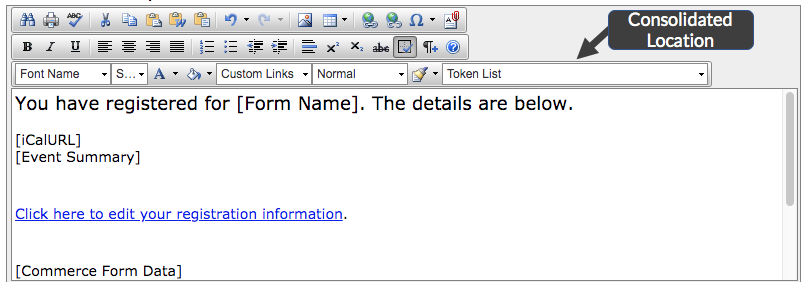
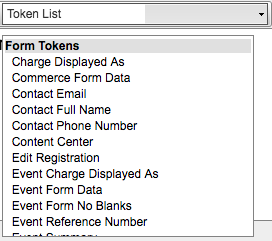
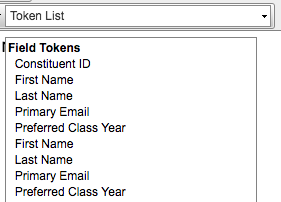
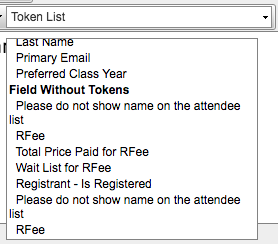
ENC-34016 Users will now see a refreshed token selector when using the content editor within Member and Admin Confirmation Email configuration. These enhancements will make it easier to edit confirmation emails, as well as easier to view and select tokens for inclusion into content. These enhancements will be expanded to other editor areas in subsequent releases.
This refreshed token selector has the following changes:
The editor area now fills the full width of the window
Token Selector now displays in one consolidated location on the editor toolbar
Displayed tokens are those that are available based on the respective form type, to include form and system tokens
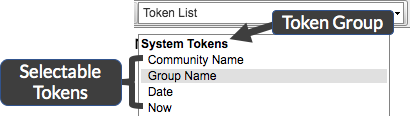
Tokens are grouped by type
The selector groups tokens into the following categories:
System Tokens - tokens that represent values defined for the system such as the community name, or current time
Form Tokens - tokens that represent values defined for the form, such as the form name
Field Tokens - tokens that represent fields associated to the respective form, and have a token defined
Tokens without Fields - listing of fields that are associated to the respective form, but to not have a token defined
 |
Profile
ENC-33133 The sidebar navigation items on the My Profile view are now tagged a header 2 items so that assistive technology users can more easily navigate the controls and views.
New Email Marketing
New admin right: Email Template and Style Manager introduced. With this administrative right, the admin will be able to create, modify and delete templates and dynamic content styles used within email marketing.
Sender Identity, system and member tokens will populate within previews. For previews, member tokens are based on the "envoy" who deploys the preview. For email sending member tokens populate from the recipient's record.
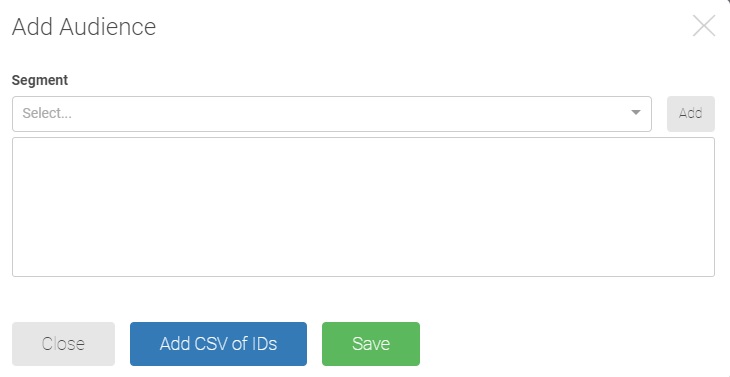
On draft emails, segments can now be searched for and selected under the "Add Audience" window shown below.
Issue Resolutions
Events
ENC-23431 Resolves an issue where double clicking the "Create" button on the first event configuration screen creates duplicate events.
ENC-33132 Resolves a rare issue where redirects involving SAML authentication breaks edit registration link.
ENC-13773 Resolves an issue where selecting the browser back button to register for the same event for the same email does not notify the user of an existing registration under that email.
ENC-25868 Resolves an issue where registering for an event without logging in, and then launching the same registration form from a pre-populate link and completing the registration creates duplicate registrations rather than notifying the user of the existing registration.
ENC-23598 Resolves a rare issue where a constituent who is already registered for an event can register a second time for the same event by navigating between the home page and registration page multiple times.
ENC-14077 Resolves an issue where a constituent who is already registered can navigate outside of the Resend Confirmation popup dialogue and reactivate the Next button to progress through the form to perform a second registration under the same email.
Giving
ENC-12386 Resolves an issue where only the first 5000 rows of designation reports were being included in the export.
Release Notes - July 23, 2018
Please note that product releases are scheduled as followed by environment:
Canadian = Monday evening | Australian = Monday morning | U.S. = Monday evening
Product Functionality
New Email Marketing
List Management
CSV of IDs, the first of three ways of defining an audience for an email, will become available.
Lists and Segments
New stand alone administrative right: List and Segment Manager grants access to a new area within email marketing
New and existing data viewer queries can be saved as segments for use in new email marketing
Release Notes - July 16, 2018
Please note that product releases are scheduled as followed by environment:
Canadian = Monday evening | Australian = Tuesday morning | U.S. = Tuesday evening |
Beta Template Editor / New Email Editor = Monday Morning
Product Functionality
Platform: ENC-32645 When using PayPal admin are now able to set the default currency to a currency other than USD.
PayPal for all commerce forms is now available!! To find more about setup and general FAQ, please click here.
Issue Resolution
Community Content
Networking Groups: ENC-33185 Admin is able to make a group member an owner when added to the group via a Data Viewer query.
Data Management
Member Merge: ENC-32815 Form sessions that do not have user progression after ten minutes no longer receive timeout modal.
Online Giving
Online Giving: ENC-31904 Accessibility features have been updated for the designations popup window.
Online Giving: ENC-31905 Alt Text for expandable/collapsible icons have been updated to include "Expand to view funds for <designation name" and "Collapse funds for <designation name"
Release Notes - June 27, 2018
Please note that product releases are scheduled as followed by environment:
All Environments = Wednesday evening
Product Functionality
Beta Email Home
With the introduction of Email Home, all site administrators with email marketing access will have the opportunity to explore the new email creation workflow. At this time, draft messages can be created but not released. Written Documentation is available for all aspects of draft creation.
Active features with this release:
Features to Become Available in July:
Add Audience
Features to Become Available in August:
Releasing / Sending Emails
Additional audience types
Release Notes -June 18, 2018
Please note that product releases are scheduled as followed by environment:
Canadian = Monday evening | Australian = Tuesday morning | U.S. = Tuesday evening |
Beta Template Editor / New Email Editor = Monday Morning
Product Functionality
Beta Template Editor / New Email Editor
Improved experience while dragging or rearranging components within in email. Controls are less sensitive and do a better job to snapping above or below existing elements.
The social media element now supports more sites. Bold items are new.
Facebook
Twitter
LinkedIn
Google+
Instagram
Pinterest
Youtube
Snapchat
Flickr
Vimeo
eCommerce: Pay with PayPal is a new merchant option for all commerce forms.
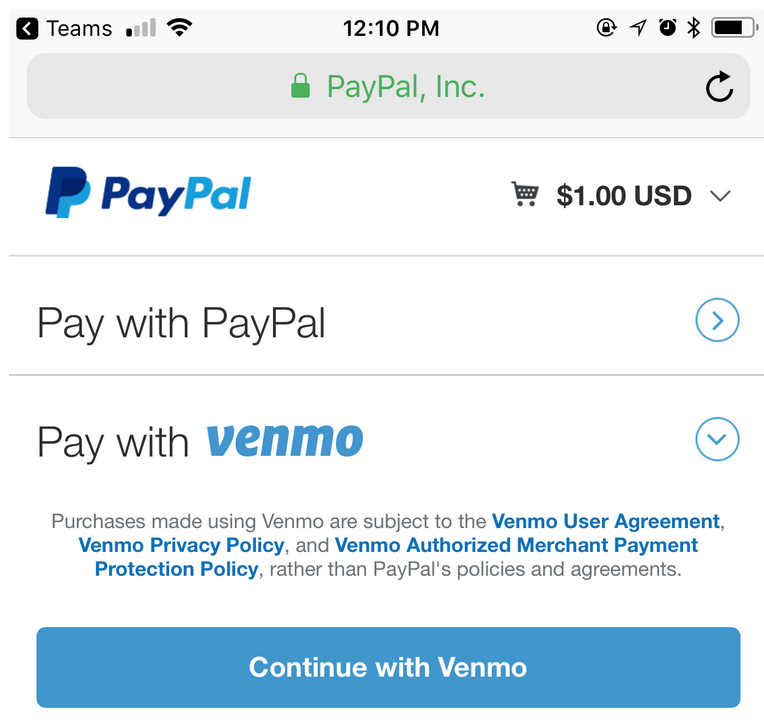
75% of consumers want to pay faster! Which is why we are thrilled to announce our new eCommerce partner, PayPal. Aiming to arm clients with more modern ways of payments for their constituents, PayPal offers One-Touch (aka One-Click Gifts) and recurring/perpetual transactions to be facilitated. In addition, Venmo will also be supported as a payment method through the PayPal flow for one-time gifts. PayPal can be configured as a primary or secondary gateway on your commerce forms. Set as a secondary means you can continue to use your primary gateway in conjunction with offering PayPal and your constituents can choose their preferred payment method when making a gift.
 |
How do you get started?
PayPal is a new gateway option that can be configured as a secondary gateway for donations. In order to do so you must have a merchant account your organization has already established at:
https://www.paypal.com/us/webapps/mpp/express-checkout
Do we also need to have a Venmo account in order to support Venmo payments?
Your organization will not need a Venmo account in order to accept payment as a wallet option with Venmo through PayPal. More about this can be found here:
https://www.paypal.com/us/smarthelp/article/venmo-payments-faq3445 How do I get access to have PayPal enabled on my site?
At this time we are enabling PayPal on a site by site basis. Look forward to a future release where this will be made available for all sites and all commerce forms.
If your organization is interested in exploring PayPal more, please contact your account rep.
If you are ready to turn on in your site, please contact App Support.
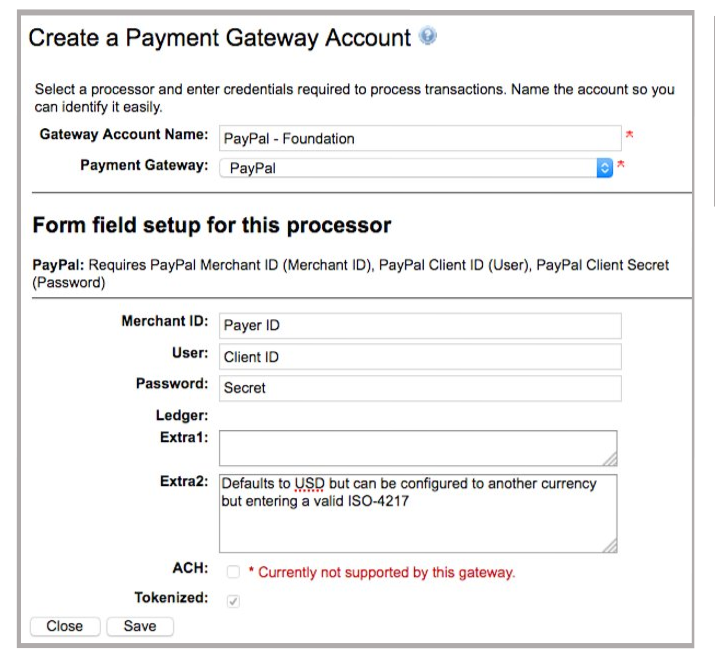
Where can I set up my PayPal account?Once enable in your site, the PayPal gateway account can be setup and accessed via in the Accounts tab of the Manage Payment Gateway's page in Encompass.
PayPal will provide Payer ID, Client ID and Secret which will be used in the setup in Manage Payment Gateways -> Accounts.
 |
Where do I get the required config for setting up my merchant account?
PayPal Merchant ID (Merchant ID)
Log in to your Merchant Account at https://www.paypal.com
Click on the cog wheel → Profile and settings → Look for Merchant account ID under the About the business section
PayPal Client ID (User) & PayPal Client Secret (Password)
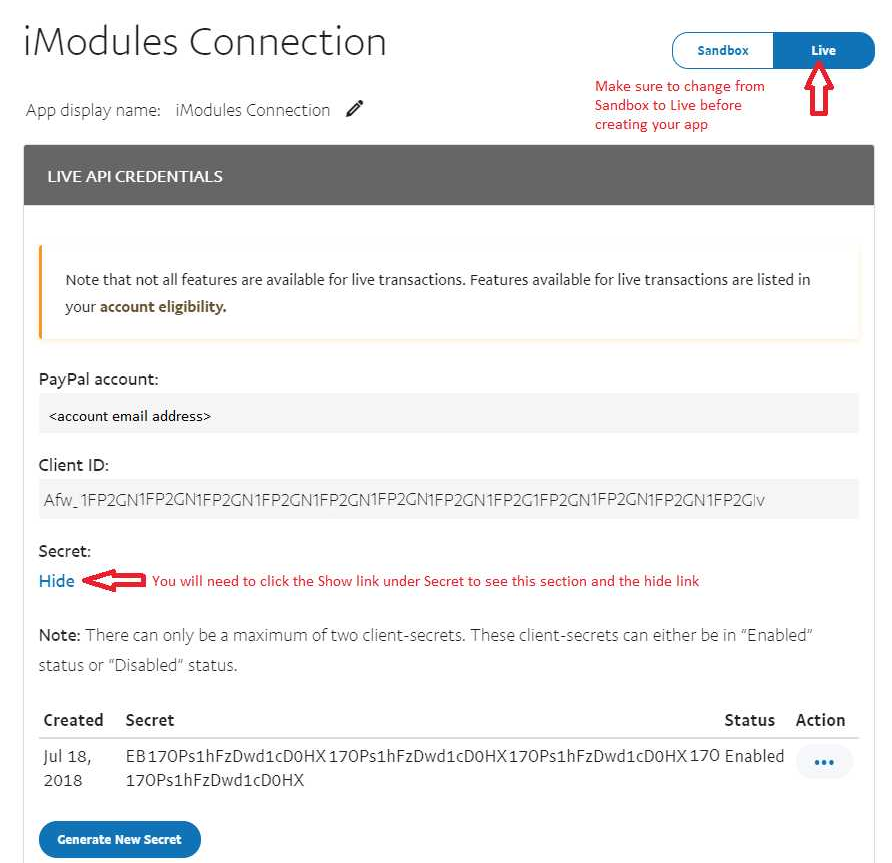
Go to https://developer.paypal.com/ , click on the upper right icon with your name and access Dashboard → My Apps & Credentials → scroll down to REST API apps and click Create App
When creating the app, you can name it whatever you'd like. If the Sandbox account is not prepopulated then back out and go back into Create App. Sometimes it can take a while to update.
Once you've created the app you will see the Client and the Secret. These are the values you use in the merchant config (along with the merchant account id from above).
Make sure to change the option in the top right from Sandbox to Live before downloading your credentials.
 |
Which Admins will have access to set up the merchant account?
Payment Gateway Admin
What are some optional configuration options?
Currency is defaulted to USD but can be configured to another currency but entering a valid ISO-4217 code in the Extra 2 field. You will need to set the currency in your merchant account before it will accept transactions.
Please note that the currency must also be enabled in the PayPal account.
Log in to your Merchant Account at https://paypal.com
Click on the cog wheel → My Money → Look for Currency Management → Click Add a currency.
Will PayPal work on Events with Donations?
At this time, PayPal will not work on Events with Donations.
What kind of PayPal account is supported?
PayPal offer two kinds of accounts: Personal and Business.
Personal accounts are ideal if you shop online or if you want to send and receive money from friends and family.
Business accounts have all the features of Personal accounts plus additional services for online merchants
Note: This is not a replacement for the PayPal Payflow Pro payment gateway we currently support and would be a separate integration. How will this work when PayPal is configured to be my secondary gateway?
PayPal as Secondary - The last step of the form will have a "Pay with Card" button AND a PayPal branded button.
Pay with Card - Proceeds to either billing step or Hosted Processor site
Checkout with PayPal - Proceeds to PayPal website
Can this be used to replace PayPal buttons we have on content pages on our site?
No, this is not supported at this time.
Will PayPal support scheduled and perpetual gifts?
This uses a slightly different API (reference transactions) that allows iModules to bill the constituent's PayPal account on a recurring basis after the initial transaction.
The billing agreement is outlined for constituent to review before approving the transaction.
Billing Agreement token format:
ScheduledPayment = "[Today's Payment] now and [Recurring Amount] [Recurring Frequency] for [Count of Remaining Payments] payments totaling [Total Donation]"
Perpetual = "[Today's Payment] now and [Recurring Amount] [Recurring Frequency]"
Optional Suffix will be appended to the end of the above text strings if a commerce item was selected in the form = "(plus [Total of Commerce Items] now)"
Where can I update the default email body for PayPal messages?Updating on form by form basis will still be supported. If you would like to change what has been defaulted, Support can update global verbiage tokens:[RecurringBillingFailedChargeNotificationPayPal_EmailBody] will update PayPal failure message for all forms in all GIDs
[RecurringBillingUpcomingChargeReminderPayPal_EmailBody] will update PayPal upcoming charge reminder message for all forms in all GIDs
How will we know which transactions in the reconciliation file were done via PayPal versus our Primary Gateway?
Authorization Code found in reporting will start with PAY. For reconciling transactions, you will use PayPal Transaction ID AND Customer Trans Number.
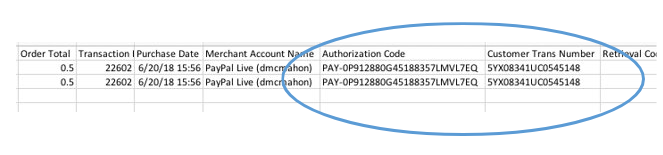
PLEASE NOTE - With PayPal enabled for your site, a new column (Merchant Account Name) is added to the left of Authorization Code. This will introduce a potential breaking change for the Giving Transaction Export and the Event Reconciliation with Adjustments Export.
Will billing information will pass back from PayPal?
Billing information will automatically write to reporting and display on the finish page/confirmation email for the owner of the merchant account (i.e. Purdue Alumni Association) needs to contact their rep at PayPal and ask to have that feature enabled on their merchant account. This in turn would present a message to the donor when checking out confirming that PayPal is authorized to send their billing information back to the requester.
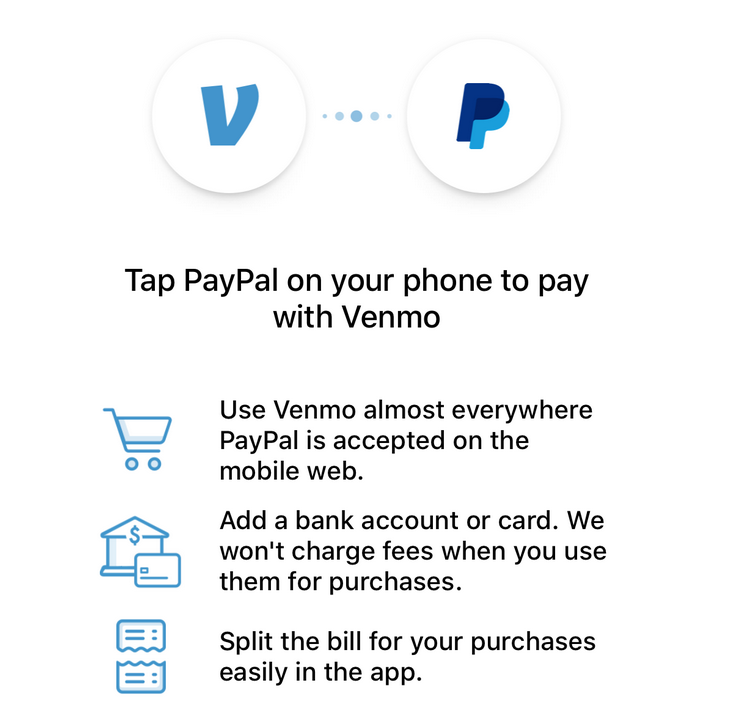
How can constituents set up "Pay with Venmo" to work with PayPal?Please keep in mind that in order to see the option to pay with Venmo, you will need to have Venmo currently installed on your phone, be checking out with an eligible PayPal merchant, and not have configured PayPal OneTouch.
To opt in and purchase with Venmo, tap on the icon in the upper left corner of the app, then tap on Settings. In Settings, there’s the Buying section. To use Venmo to pay during checkout, tap Enable Mobile Web Purchase’ or Connect Browsers.
 |
On November 14, 2017 we updated our protocol communication standards upgraded to TLS 1.2
Transport Layer Security (TLS) is a cryptography protocol that ensures private, secure communications over an internet browser connection. Beginning June 17, 2018, iModules will no longer accept WEB and API connections using TLS 1.0 protocol. Click here for more information regarding this update.
Issue Resolution
ENC-32715 ensures all opt-outs are correctly identified as either category specific or community opt outs within email marketing reporting.
ENC-31907 Categories on forms now appropriately announce their state to screen reader users and are keyboard accessible
ENC-31650 The Download as PDF image to download an event's attendee list now has appropriate alternative text
ENC-31643 The attendee list search field now has a label appropriately associated to it
ENC-31906 Collapsable designation groups within the designations popup now appropriately communicate their state as expanded or collapsed to screen reader users
ENC-31105 The side navigation on the Profile view is now keyboard accessible
ENC-31649 The attendee list no longer has hidden empty headers that can cause confusion to screen reader users
ENC-32596 The title of the designations popup modal is now an header 2 instead of a header 1
ENC-31097 The Profile Image Upload field now has an associate label for screen readers
Release Notes - May 21 & 22, 2018
Please note that product releases are scheduled as followed by environment: Canadian = Monday evening | Australian = Tuesday morning | U.S. = Tuesday evening
Issue Resolution
Events with Giving
ENC-32149 Resolves an issue where a donation category without designations that is added to an event have designations erroneously re-enabled after editing the event name.
Membership
ENC-32083 Resolves a rare issue where Membership related roles were not appropriately inherited by the member record after the member merge process.
Giving
ENC-31431 The gif file supporting the "closing" processing spinner on Giving forms now has appropriate alternative text.
ENC-31430 The gif file supporting the "reloading" processing spinner on Giving forms now has appropriate alternative text.
Identity Check Point
ENC-24872 Resolves an issue where Identity Check Point displays records of deceased members for matching.
Forms
ENC-14926 Resolves an issue where a deleted record erroneously displays within the submissions grid.
Email Marketing
ENC-32606 fixes issues where emails marked as valid were not getting set to valid in all cases.
Email Marketing Release - May 15, 2018
Email Reporting
Product Functionality
Expanded Click Tracking Metrics
Total clicks is the sum of every click each recipient makes on any link within an email.
Unique click counts the first time that a recipient visits a specific link, but not any subsequent clicks of that link from the same message.
Initial click is the basis for a message's click to open rate. It counts only the first hyperlink which an individual recipient clicks.
You can view total, initial and unique clicks counts by message, by hyperlink, or by recipient.
Issue Resolution
ENC-32713 prevents duplicate delivery notifications from skewing delivery rate to be higher than send rate.
ENC-32850 improves accuracy of real-time metric processing so the UI more closely reflects results pulled from the Email Metric API.
Beta Template Editor and Dynamic Content Style Manager
Important: This release does not include any breaking changes that would require clients to rebuild or modify templates.
Product Functionality
Within Dynamic Content Style Manager it is now possible to set all hyperlinks to show or hide hyperlink underlining.
Issue Resolution
ENC-32356 improves the text, image and between item spacing for all news, event and RSS layouts
ENC-32326 corrects the Date Box - Title - Text - Button Layout so that it accurately applies border and background styles based on saved style.
ENC-32324 resolves an issue whereby the close button could not be reached when the browser window was smaller than the modal window.
Beta Email Release - April 17, 2018
We will be releasing small patches each Tuesday in the lead up to the Email Marketing transition April 30, 2018.
Product Functionality
Email Reporting
ENC-32577 extends the availability of the Drill Down Report from 90 to 180 days.
Issue Resolution
Email Reporting
ENC-32476 resolved spacing issues that caused the conversions drill down grid to extend beyond the frame of the window.
ENC-32568 ensures that email category names with special characters do not prevent the reporting dashboard from filtering successfully.
Beta Email Release - April 10, 2018
Issue Resolution
We will be releasing small patches each Tuesday in the lead up to the Email Marketing transition on April 30, 2018.
ENC-32472 prevents null (not populated) recipient class years from showing as zero.
ENC-32438 repairs a filtering issue that caused some recurring emails to be excluded from the recently deployed emails list and export.
ENC-32407 removes text and arrow overlapping on the email detail view call out titles visible in Safari
ENC-32289 ensures click drill down export contains all clicks not just visible page.
ENC-32192 prevents conversion tracking from overwriting recipient details.
ENC-32171 stops 0% click rates from showing as NaN%
ENC-32193 corrects issue where click drill downs were showing no records when clicks were recorded.
ENC-32065 fixes open rate calculation difference between dashboard and detail report.
Product Functionality
ENC-32000 updates help bar destination urls.
Release Notes - April 2018
Please note that product releases are scheduled as followed by environment: Beta Email Template Editor = Tuesday Morning All EnvironmentsEvents and Commerce = Tuesday evening Email Reporting = Friday Evening
April 9, 2018 - Product Functionality
Beta Email Template Editor
Choose to show between 1 and 25 articles.
Sort Chronologically or Reverse Chronologically.
Choose one or all content types.
If no articles match your selected criteria, Lorem Ipsum placeholders will be added to your template.
Events
Event forms utilizing registration limits will now have more consistent form load times and form submission times even as the event approaches the total registration limit.
Commerce
Forms containing commerce items utilizing limits will now have more consistent form load times and form submission times even as the commerce items approach the total commerce item limit.
April 16, 2018 - Issue Resolution
Full-Site SSL Information Gold Key Page
ENC-31381 Resolves issue where some clients were not able to view the Full-Site SSL Information page in the Gold Key area of Encompass. This page displays a list of configured domains for the site, and if a SSL certificate is recommended. Please see the Full-Site SSL Overview Support Center page for more information about converting to Full-Site SSL.
April 23, 2018 - Product Functionality
New Email Marketing
Sender Identities is the next feature being introduces as a part of New Email Marketing. The senders administrators create today will be used as a part of the email sending workflow that launches in August 2018.
Sender Identities allow administrators to create consistent, uniform identities which designate the following email attributes:
From Name
From Email
Sender tokens
Sender tokens facilitate CAN-SPAM compliance and include:
##Sender_Org## (Required)
##Sender_Address## (Required)
##Sender_Address_2##
##Sender_City## (Required)
##Sender_State## (Required)
##Sender_Postal##
##Sender_Country##
Administrators can choose have sender tokens populate in preview emails sent from Beta Template Editor.
Learn how to create Sender Identities in Email Marketing
Learn how to use Sender Tokens in Email Marketing
Membership Forms
Membership forms now allow for steps, categories, and fields to be role based off of the membership level selected at the beginning of the form session.
Role names assigned to membership levels can now be edited after creation
Admin view for creating membership forms allows users to toggle between Build Form and Data Entry Modes
Profile Forms
A new field, "GDPR Status" has been added to all profile forms under the "Admin Only" tab. This field contains three values: "Unknown", "Applicable" and "Not Applicable". The field will be defaulted to "Unknown" for all members.
If the ‘GDPR_Status” field does not automatically generate within Encompass, you may have changed the name of your “Admin Only Information” category. Please submit a ticket to the Support Center as the iModules team will need to manually add the field and the role to your catalog.
Please see the GDPR (General Data Protection Regulation) Support Center page for more information about this new field and other GDPR related articles.
April 23, 2018 - Issue Resolution
Commerce Item Limits
ENC-31992 For Commerce Forms that are accessed from the Forms module, Commerce Item Fields no longer have a Registrant Limit field as this is not a supported workflow.
First Time Login
ENC-31948 and ENC-31856 Resolves a rare issue where First Time Login displays an error message when used on certain templates configurations.
Login
ENC-27574 Resolves an issue where LDAP authentication fails but Encompass login succeeds, and the user is not returned to the appropriate URL after login is completed.
Web Services
ENC-31893 Resolves an issue where tokens are not being returned correctly for certain records by the ValidateConsitutuentID web service query.
Online Giving
ENC-27827 Resolves an issue where a giving form URL with &bledit and &dids URL customizations where not functioning properly in certain workflows. When these customizations are used, and if the designations specified by &dids are not part of the form configuration, then the customizations are removed if the user selects the back button on the form or browser. See The Power of URL Customizations Support Center page for more information.
Membership
ENC-30395 Resolves an issue where Membership confirmation emails were displaying the incorrect expiration date.
April 30, 2018 - Product Functionality
Email Reporting
Beta email reporting will become the production / primary record of email metrics.
The change will be reflected with an update to the blue administrative navigation.
Starting May 1, no new data will be written to legacy reporting even if new opens, clicks or conversions take place. Legacy Reporting will be available in the navigation for those who wish to reference historic data.
April 30, 2018 - Issue Resolution
Groups
ENC-32819 Resolves an issue where Group pages result in a system error upon page load.
Forms
ENC-32839 Resolves a rare issue where forms with the Email Forwarding field cause a system error when the user tries to navigate to the next step.
Beta Email Release - March 30, 2018
Product Functionality
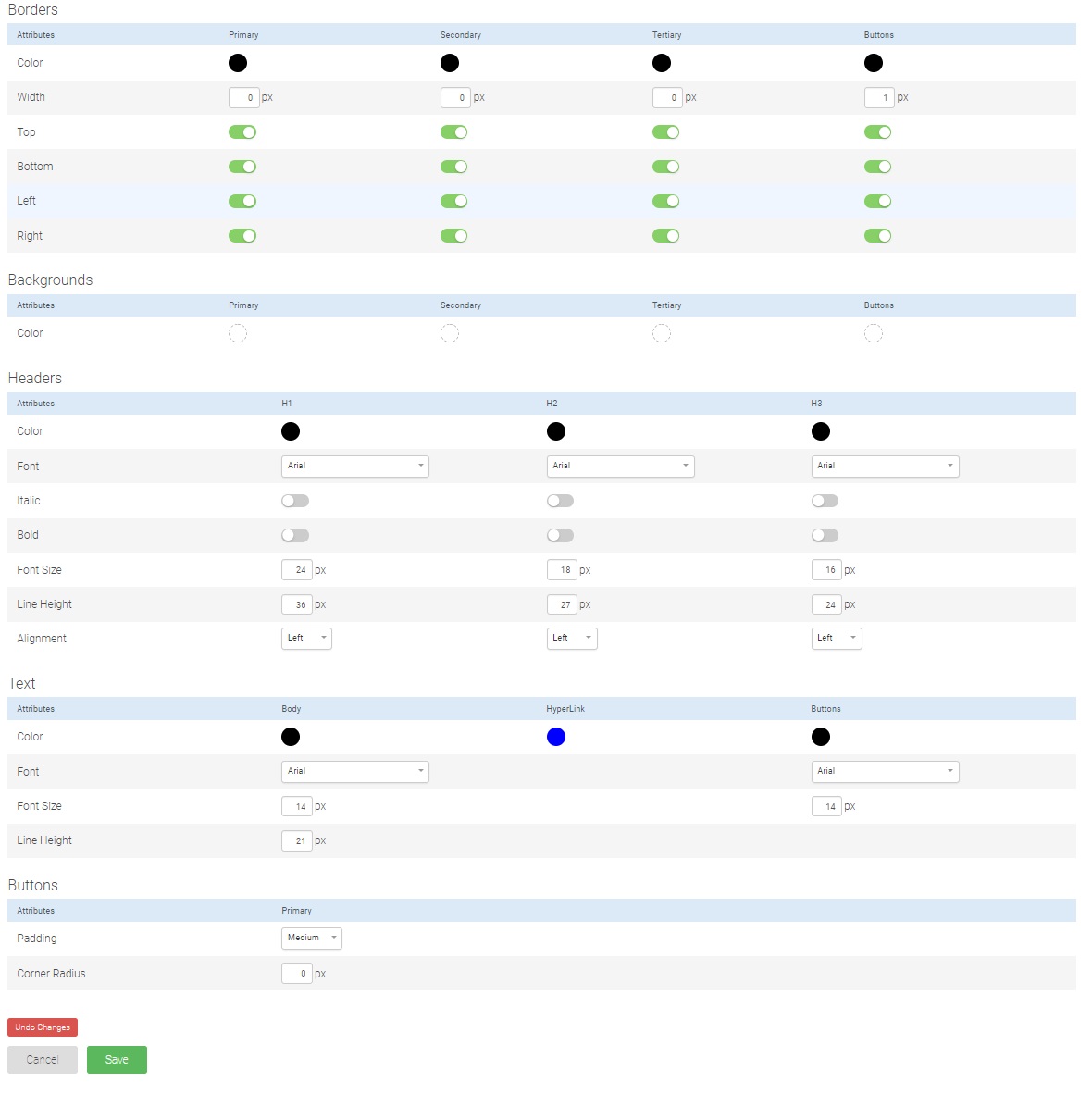
Based on client feedback, the email team prioritized a sequence of "dynamic content style manager" features for expedited release and immediate use within the Beta Template Editor. The new style controls are described by the list and screenshot below.
Dynamic Content Style Manager
Border Sides Control
Select which border sides are shown and hid after setting a border width.
Headline Alignment Control
Chose to center, left, or right align H1, H2 and H3 elements.
Line Height Control for Headline and Body Text
Traditionally referred to as leading, line height sets the distance between the baselines of sequential lines of text.
Release Notes - March 26 - 27, 2018
Please note that product releases are scheduled as followed by environment: Canadian = Monday evening | Australian = Tuesday morning | U.S. = Tuesday evening
Product Functionality
Web Accessibility
The 59.5 Encompass release contains a large number of changes related to iModules' ongoing initiative to provide a constituent experience that is compliant with WCAG 2.0 Level AA guidelines, and more accessible in general. These changes will be particularly beneficial to the following audiences:
Users who navigate and interact with Encompass using a keyboard only
Users who navigate and interact with Encompass using assistive technologies such as a screen reader, text reader, head pointer, or switch
Users with color related visual impairments
Below you will find all web accessibility changes in 59.5 by module or component.
The following changes apply to standard forms, and form the driven modules: Events, Campaigns, and Membership.
The page title now includes the step name for multi-step forms
Form progress indicators or breadcrumbs can now indicate the current step and finish step appropriately, and now provide support to assistive technology users
Beta Email Marketing Reporting
 With the introduction of "Recently Deployed Emails" on the dashboard, the export table button triggered a download of the 5 visible results. With this release, the button has been changed to "Export Results." The Export Results button will create a csv file with metrics from the last 100 messages that fit the dashboard filter.
Issue Resolution
Beta Email Reporting
ENC-31624 Restores missing class year for recipient drill down reports
ENC-31741 Keeps legend from overlapping with the dashboard opens by device graph
ENC-31510 Removes click tracking on unsubscribe links to prevent those clicks from influencing click rate
ENC-31531 Community Content email links will now appear in drill down reports
Product Sunset
iModules will end support for Version 1 of the Email Metric API on March 30, 2018.
Release Notes - March 6, 2018
Google reCaptcha Upgrade
Overview
We’ve all experienced it before: an application doesn’t like something about an attempt to log in or complete a form, and to ensure we’re not a robot shows us a Google reCaptcha control asking us to enter the garbled text shown. Even with the clearest of vision it can often be difficult to correctly interpret the text to enter, leading to a frustrating experience.
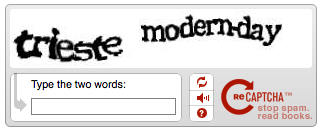
If you sympathize with this statement we have good news for you: Encompass will be upgraded from Google reCaptcha version one to version two on Tuesday, March 6th, 2018, at 8:00PM CST. This change will occur at the same time for all clients (US, CA, and AU).
A Better User Experience
Rather than being prompted to enter the words presented as is seen in example of reCaptcha version one above, most users will merely be asked to select the checkbox to attest that they are not a robot.
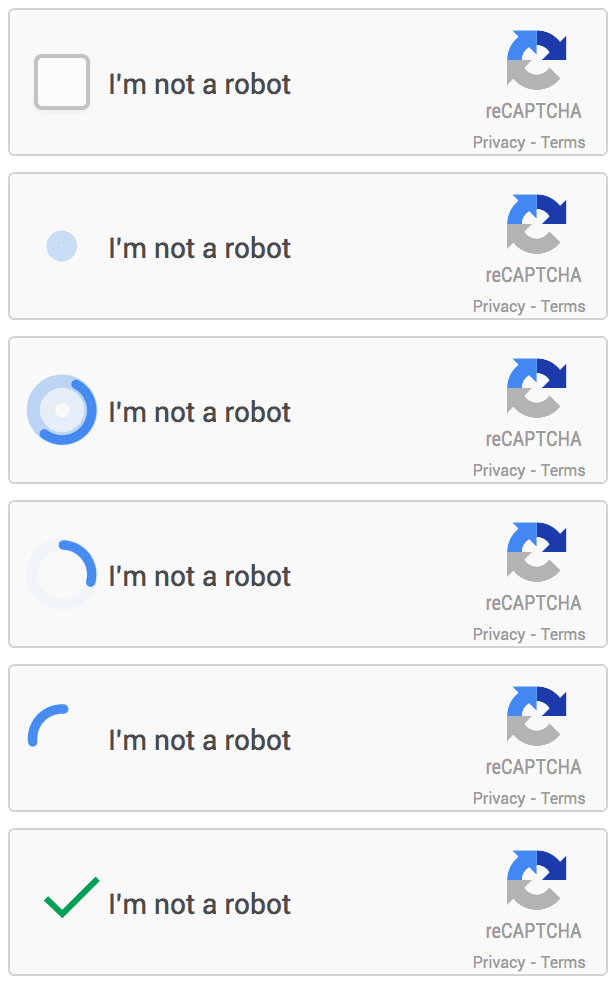 |
Depending on the credentials entered and the user behavior leading up to the checkbox being selected, they may also be prompted to select from a group of images all of those that feature a particular characteristic, such as all of those that have a car or place where someone would live.
The new reCaptcha is also a win for those who have a disability that impacts their computer use. Not only will users be challenged less often under the new reCaptcha, but the new reCaptcha provides support for keyboard navigation and most assistive technologies
How may your site be impacted?
For those clients that have implemented a custom login view, you will want to verify that new reCaptcha control does affect your login page’s layout and styling. During the development effort to implement the new reCaptcha every attempt was made to ensure that the new control did not impact any client login pages, regardless if a standard or custom view was implemented. However, given the number of permutations there may be for a custom login page, it will be important to verify that your login page appears as expected on the morning of March 6th.
How do you test?
To test that the new control has not impacted your custom login, go to the login page for your site and attempt to enter an invalid username/password combination. You should be presented with the “I’m not a robot” checkbox. When this checkbox appears, assure that your custom layout or design displays appropriately.
If you have any questions or see issues with your login view after the change, please contact Application Support at applicationsupport@imodules.com or call 913-685-5242.
Release Notes - February 26, 2018
Please note that product releases are scheduled as followed by environment: Canadian = Monday evening | Australian = Tuesday morning | U.S. = Tuesday evening | Beta Template Editor All Environments = Wednesday morning
Product Functionality
Web Accessibility
The 59.4 Encompass release contains a large number of changes related to iModules' ongoing initiative to provide a constituent experience that is compliant with WCAG 2.0 Level AA guidelines, and more accessible in general. These changes will be particularly beneficial to the following audiences:
Users who navigate and interact with Encompass using a keyboard only
Users who navigate and interact with Encompass using assistive technologies such as a screen reader, text reader, head pointer, or switch
Users with color related visual impairments
Below you will find all web accessibility changes in 59.4 by module or component.
When a constituent user flow includes a visual presentation of a success, notification, or failure message, the message blocks now receive an attribution of alert for its role so it is communicated to assistive technology users
The following changes apply to standard forms, and form the driven modules: Events, Campaigns, and Membership.
Standard and stylized radio groups fields can now receive focus
Thumbnails for news items can now have associated alt text
View, Content, and Archive filter options on news listings now have associated labels
Thumbnails for campaigns can now have associated alt text
Thumbnails for events can now have associated alt text
View, Content, and Archive filter options on news listings now have associated labels
Form fields now have associated input labels
Icons for 3rd party login services now have appropriate alt text
If Username or Password retrieval is disabled, it is no longer accessible to screen readers
Form fields now have associated input labels
Loading spinner for search results now has appropriate alt text
Table display of posting details now has role = presentation defined
Carrot icon for sort order now has appropriate alt text
Thumbnail photos for classified postings now have associated alt text
Member Photos table now have a role of presentation
Folder images now have blank alternative text because the image is not communicating additional content or context that would not otherwise be available to a non-sighted user
Table display of job posting details now has role = presentation defined
Carrot icon for sort order now has appropriate alt text
Thumbnail photos for job postings now have associated alt text
Beta Template Editor
Choose to show between 1 and 25 events
Sort Chronologically or Reverse Chronologically
Choose one or all content types
If no events match your selected criteria, Lorem Ipsum placeholders will be added to your template.
Known Issue: If an event has been associated with multiple calendar types, the feed will show duplicate events. This will be fixed with the next release.
Issue Resolution
Image Manager
ENC-30271 PNG images that do not have a background are no longer erroneously given a black background after upload to image manager.
Membership Management
ENC-5727 HTML tags present in Membership campaign name does not show up in the name of its membership role name or display text.
Schedules
ENC-28071 Restores visibility to schedule management pop up.
Release Notes - January 29, 2018
Please note that product releases are scheduled as followed by environment: Canadian = Monday afternoon | Australian = Monday Afternoon | U.S. = Monday Afternoon
Product Functionality
Beta Email Reporting
For administrators who want to quickly view or compare the last five messages in a series
The 5 most recent email marketing messages are displayed with summary metrics
The messages shown change based on which category and date filters are applied
Clicking export table downloads a csv of the visible metrics
Percents are included in unique export columns
For administrators who want to know which constituents clicked on a given email marketing hyperlink
Access the report by clicking the link name from the click drill down report
The feature is not available at this time for emails that include community content
Beta Template Editor
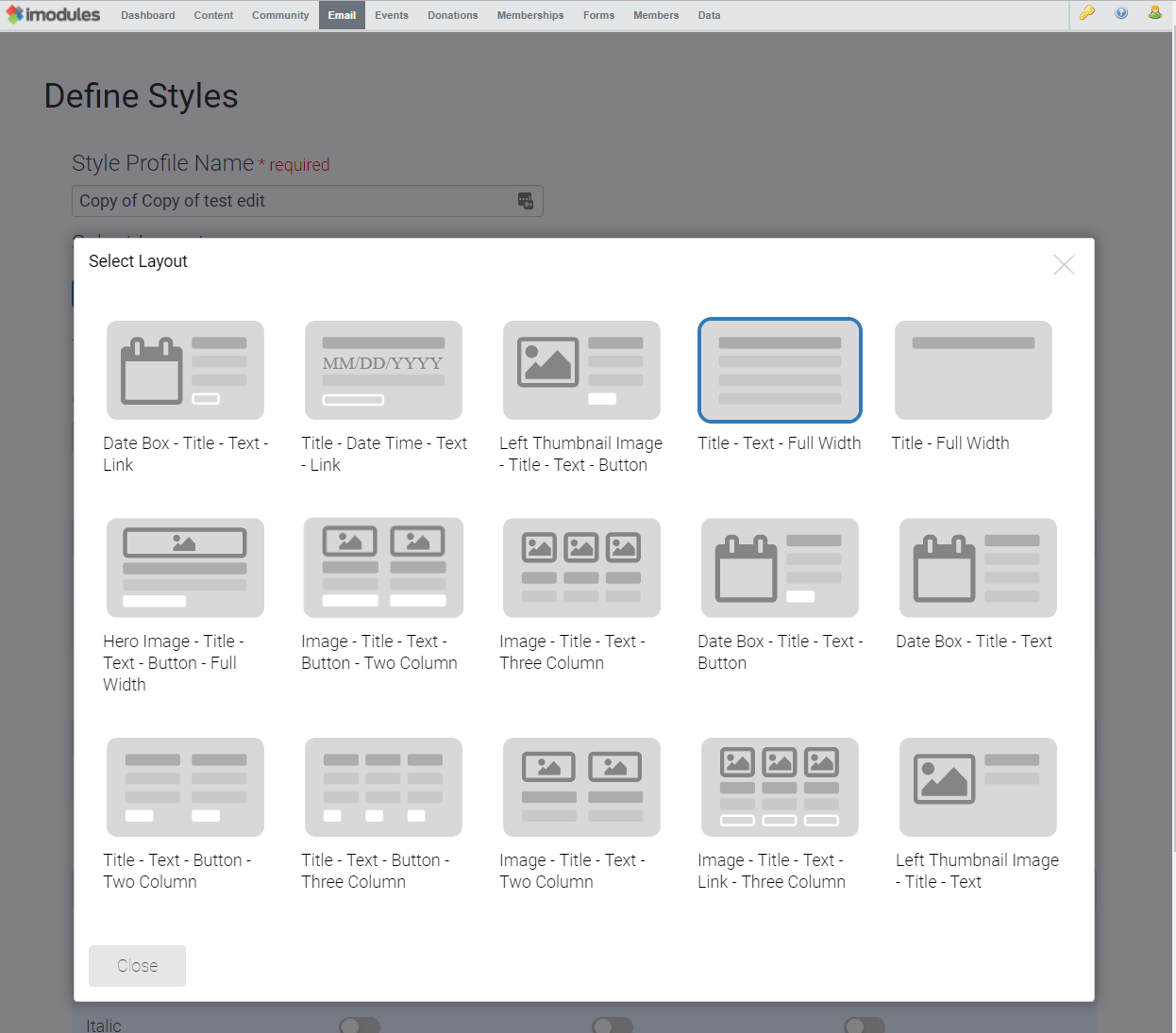
Improved Dynamic Content Style Manager UI
More available layouts including two and three column options for news
 |
Issue Resolution
ENC-31365 (FORMS): Collapsable categories with customized styling now function properly.
ENC-31411 (GMAIL INTEGRATION): Users no longer receive application error when utilizing gmail integration to create new gmail accounts.
Release Notes - January 24-25, 2018
Issue Resolution
ENC-31364 (EVENTS): Activity driven events with both fee driven and non-fee driven activities, with the event designated as a template, now appropriately send confirmation emails.
ENC-31357 (EVENT REPORTING): Events/Campaigns Reporting Admin and Events/Campaigns Data Entry Admin can now use the Find Member record feature.
Release Notes - January 22-23, 2018
Please note that product releases are scheduled as followed by environment: Canadian = Monday evening | Australian = Tuesday morning | U.S. = Tuesday evening
Product Functionality
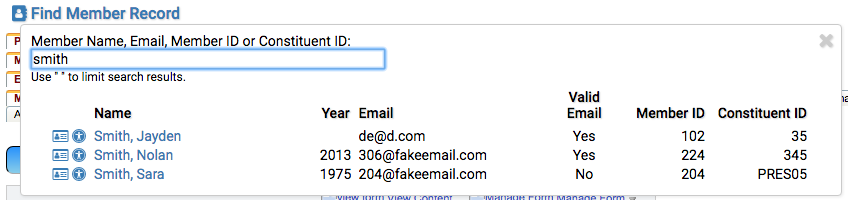
Improved Member Search
Finding constituent and non-member records is faster and easier with improved member search. Results return faster and present matching records as you type. Administrators can search by the iModules primary key (Member ID) in addition to the previously available Constituent ID, Email Address and Member Name.
Web Accessibility
The 59.3 Encompass release contains a large number of changes related to iModules' ongoing initiative to provide a constituent experience that is compliant with WCAG 2.0 Level AA guidelines. These changes will be particularly beneficial to the following audiences:
Users who navigate and interact with Encompass using a keyboard only
Users who navigate and interact with Encompass using assistive technologies such as a screen reader, text reader, head pointer, or switch
Users with color related visual impairments
Below you will find all web accessibility changes in 59.3 by module or component.
Form fields now have associated input labels
Fields marked as required now have associated aria-required attribute
Form fields now have associated input labels
Elements that are displayed as tabular data now have appropriate caption and table header tags
Fields marked as required now have associated aria-required attribute
Accordion components now have associated aria-expanded attribute
Duplicate id attributes have been removed
Scheduled payments table elements now have appropriate role attribute to indicate presentation rather than tabular data
Designations using advanced display mode now has appropriate tab order
Verbiage for Add to Calendar icons on Event Listings now have appropriate alt text
Event Center pages now have the event name appended to the page title
Event Registration form fields now have associated input labels
Fields marked as required now have associated aria-required attribute
Form fields now have associated input labels
User is now prevented from tabbing out of the modal without making a selection
Form fields now have associated input labels
Elements that are displayed as tabular data now have appropriate caption and table header tags
Fields marked as required now have associated aria-required attribute
Most form fields now have associated input labels
Elements that are displayed as tabular data now have appropriate caption and table header tags
Fields marked as required now have associated aria-required attribute
Form fields now have associated input labels
Elements that are displayed as tabular data now have appropriate caption and table header tags
Fields marked as required now have associated aria-required attribute
Accordion components now have associated aria-expanded attribute
Unnecessary title attributes have now been removed
Issue Resolution
Administrative Rights
ENC-30456 - Resolved an issue preventing CRM Admins from accessing the Notes and Communications tabs in the Profile Forms Home section.
Events
ENC-23932 - Resolved an issue causing iCal files to not display the entire event description when imported into calendar applications.
Non-Member Record Merge
ENC-17023 - Resolved an issue causing non-member records to not be displayed in the identity checkpoint grid when certain fields were added for review.