2017 - Product Releases
Release Notes - December 18, 2017
Please note that product releases are scheduled as followed by environment:
Canadian = Monday afternoon | Australian = Monday afternoon| U.S. = Monday afternoon
Beta Email Reporting
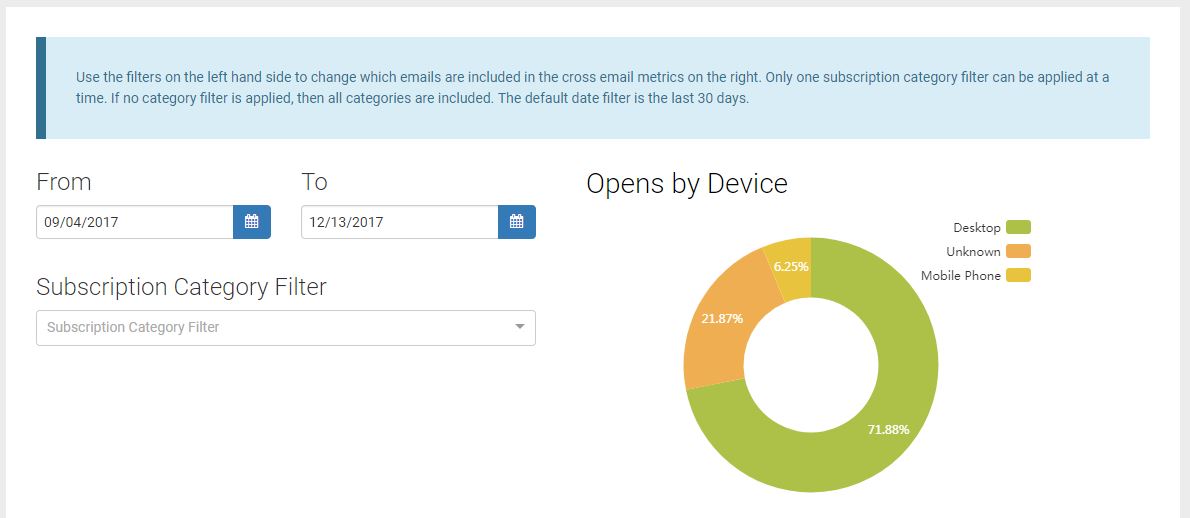
Cross Email Opens by Device
The dashboard now features an Opens By Device graph
The graph updates based on the date and subscription filters applied
When no emails fit the filter criteria, an icon replaces the visualization
 |
Beta Template Editor
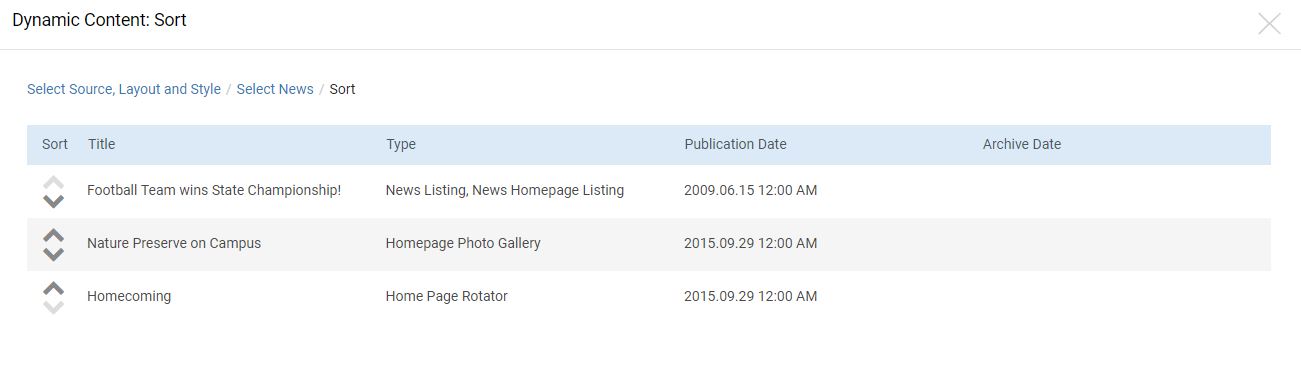
Dynamic Content Sorting
Administrators can now control the listing order for specific dynamic news articles or events
The sort step is not required and only activates when more than one item is selected
A maximum of 25 articles or events can be selected for inclusion in an email marketing message
 |
Issue Resolution
ENC-30953 Improved performance of V2 Email Metric API Recipients call to address reported time outs.
Release Notes - December 11 & 12, 2017
Please note that product releases are scheduled as followed by environment: Canadian = Monday evening | Australian = Tuesday morning | U.S. = Tuesday evening
Issue Resolution
Profile Forms
ENC-30059 - Resolved an issue causing profile forms to refresh the last step instead of submit and exit to the Finish Page. In order to resolve the issue the "Finish Page" option will no longer be available in Form Exit options on profile forms. If a profile form had this configured it will automatically be changed to the default option "Community Homepage." Alternatively, form exit options can be changed by the admin to another option prior to the December 11, 2017 release and those forms would no longer be affected.
ENC-2217 - Removed an unnecessary "Search Job Postings" button from the job posting results page.
ENC-13683 - Improved error reporting for the Gmail integration to list out the reason an email address can't be added. The error types are now "This name already exists", "Reserved name", and "General error".
ENC-28305 - Resolved an issue causing username and password fields to not display when shibboleth login was configured as an option.
ENC-29160 - Resolved an issue for users in time zones UTC+2:00 or higher that caused newly created events start date to default to the incorrect time zone.
ENC-30048 - Resolved an issue causing the save button to submit populated form data and exit the form.
ENC-30192 - Resolved an issue causing login lookup to display an error page because an encrypted field had been set as the first login lookup result field.
ENC-30482 - Change all reconciliation reports to include any privacy protected records that submitted relevant forms.
ENC-30250 - Enabled new distributed caching system for campaign progress indicators to prevent values from randomly increasing and decreasing on each page load.
Release Notes - November 20, 2017
Please note that product releases are scheduled as followed by environment: Canadian = Monday afternoon | Australian = Monday afternoon| U.S. = Monday afternoon
Beta Email Product Functionality
Pagination has been added to the Template and Dynamic Content Style lists.
Dynamic Content Styles have a green circle to indicate the style is "in use." Administrators cannot delete or re-assign layouts for styles "in use."
Lock icons indicate if a Dynamic Content Style is editable.
Dynamic Content Styles can now be deleted.
Release Notes - November 14, 2017
Please note that product releases are scheduled as followed by environment: Canadian = Monday evening | Australian = Tuesday morning | U.S. = Tuesday evening
Product Functionality
Protocol communication standards upgraded to TLS 1.2
Transport Layer Security (TLS) is a cryptography protocol that ensures private, secure communications over an internet browser connection.
What this change means for merchant providers:
To comply with the latest industry standards surrounding merchant-secure communications, iModules has discontinued support for TLS 1.0 and 1.1 encryption protocol. This means that we have eliminated support for certain older and less-secure forms of TLS, and will respond only to those using TLS 1.2. These changes require clients to ensure that their computing environments are compatible with TLS 1.2, and may require users to upgrade or configure their browsers.
The current industry standard version is TLS 1.2. It has been determined that TLS 1.0 has significant enough vulnerabilities that the PCI Standards Council, along with other security bodies, have decreed that web providers remove support for TLS 1.0 by June 2018.
TLS 1.2 support status by web browser:
Browser | Version | TLS 1.2 Protocol |
62 | Yes | |
61 | Yes | |
60 | Yes | |
56 | Yes | |
55 | Yes | |
54 | Yes | |
11 | Yes | |
10 | Disabled by default | |
9 | No | |
15 | Yes | |
11 | Yes | |
10 | Yes |
For more information about TLS/SSL support history, review the "Web Browsers" section of the Wikipedia article "Transport Layer Security". Don't see your browser listed? Feel free to check your browser's TLS compatibility using SSLLabs.com.
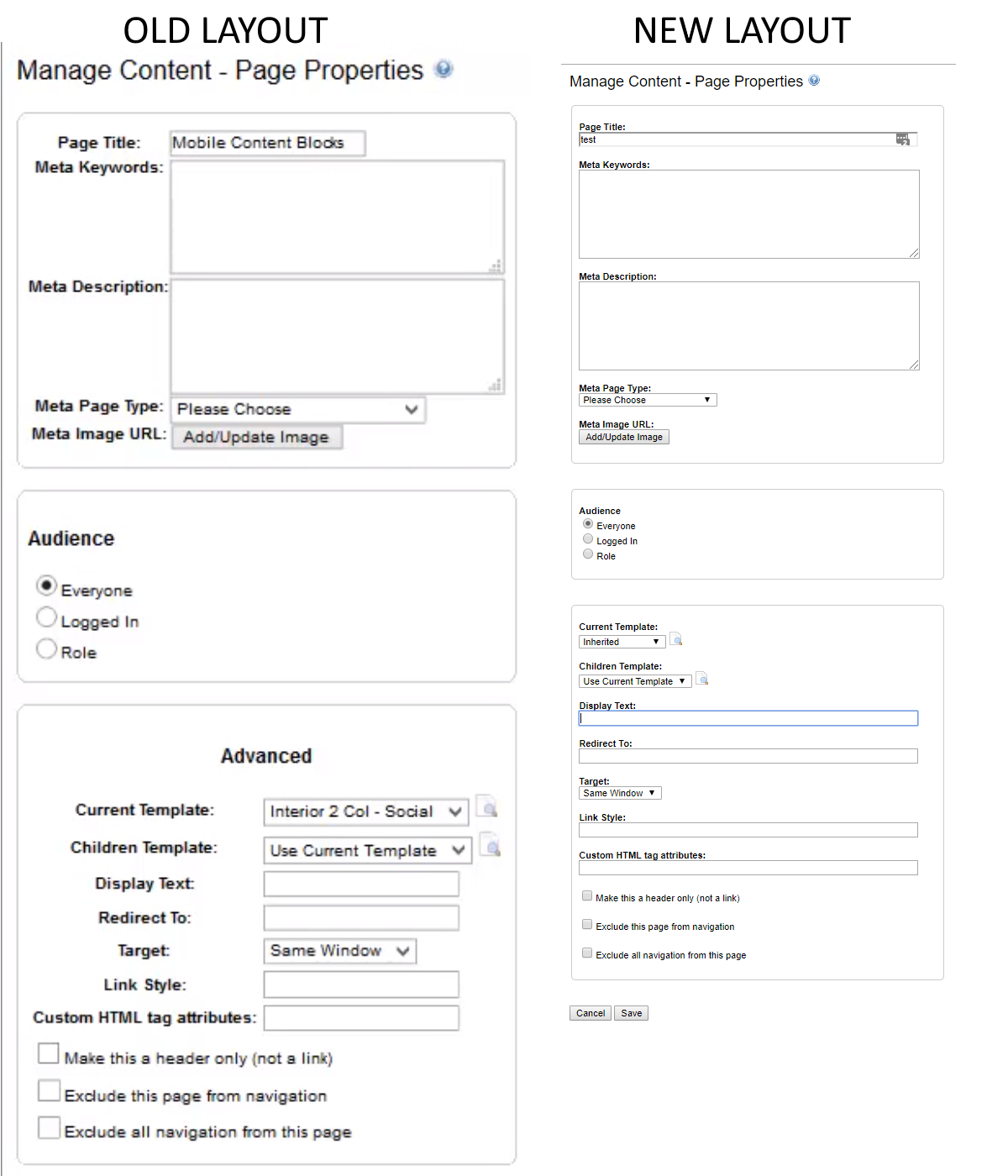
Page Properties Visual Update
Page properties that is accessed by selecting the "Page Properties" or while modifying a page in the site map window, received a slight visual update. This new layout allows for longer text boxes to improve the visibility of long values being entered into those text boxes.
 |
Issue Resolution
Administrator Dashboard
ENC-29943
Authentication
ENC-26890 restores ability for constituents to authenticate with Google and Yahoo credentials via iModules Connect integration.
ENC-29910 ensures links sent out with a administrator's MUID can never authenticate users to an admin record if they are clicked before the session expires.
Confirmation Emails
ENC-26433 corrects an issue with scheduled payment forms not generating confirmation emails when commerce dropdown fields are in use.
Donation Forms
ENC-29968 ensures that minimum payment thresholds are respected when perpetual payments are enabled.
Email Forwarding
ENC-11729 adds validation on submission to prevent inclusion of a domain in the username field.
Events
ENC-20621 adds time zone to the iCal file generated by the events module
Release Notes - October 30 and 31, 2017
Please note that product releases are scheduled as followed by environment: Canadian = Monday evening | Australian = Tuesday morning | U.S. = Tuesday evening
Beta Email Template Editor: Style Manager will be Monday evening for all environments. Dynamic Content will be Tuesday for all environments.
Table of Contents
Product Functionality
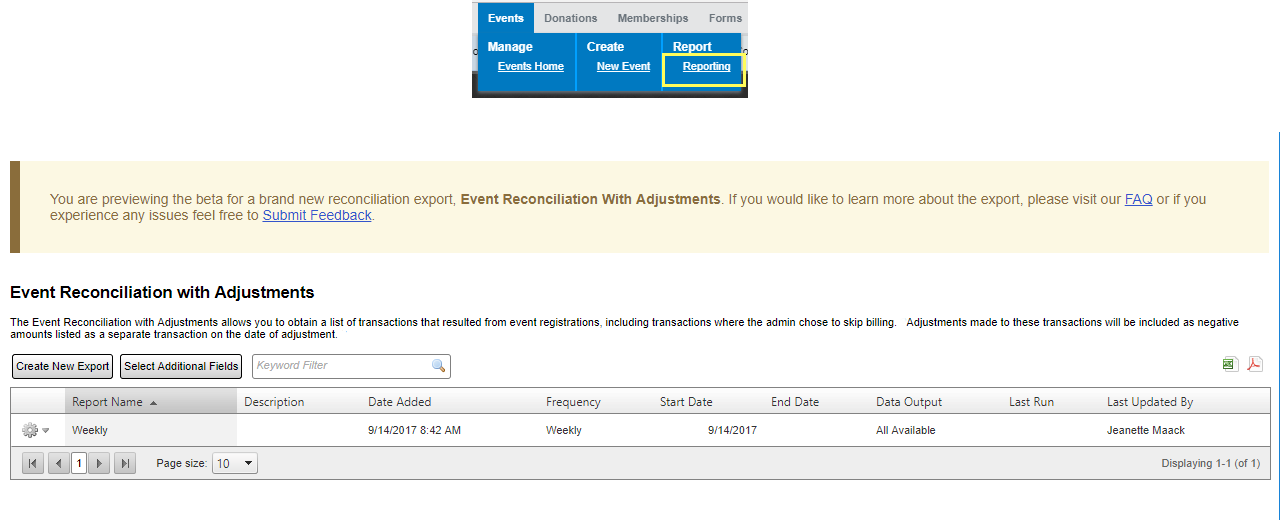
Event Reconciliation with Adjustments *BETA-testing (1 - 2 Months)
The completely new report includes all adjustments (full and partial) and offline transactions (aka admin skipped billing) which were previously not available in reconciliation reporting. Administrators access the new workflow through a new grid located below the current event reconciliation report.
Where can I access additional information about this product and/or submit feedback?An additional page listing known issues and product functionality can be found here on our FAQ. If you would like to provide feedback on this product you may access the form here.
Where can I access this new export?
Select "Reporting" in the Events menu and scroll to the bottom of the page below the original Event Reconciliation Report grid. There is a completely new grid for Event Reconciliation with Adjustments.
 |
How will this export work?
A new Event reconciliation report will be present below the current Event Reconciliation Report grid that will display a new table and option for the setup wizard. The wizard will allow for additional configurations including: date filtering by date or community, scheduling, notification emails and SFTP file retrieval if this option is enabled on your site.
Will this export allow custom fields to be added?
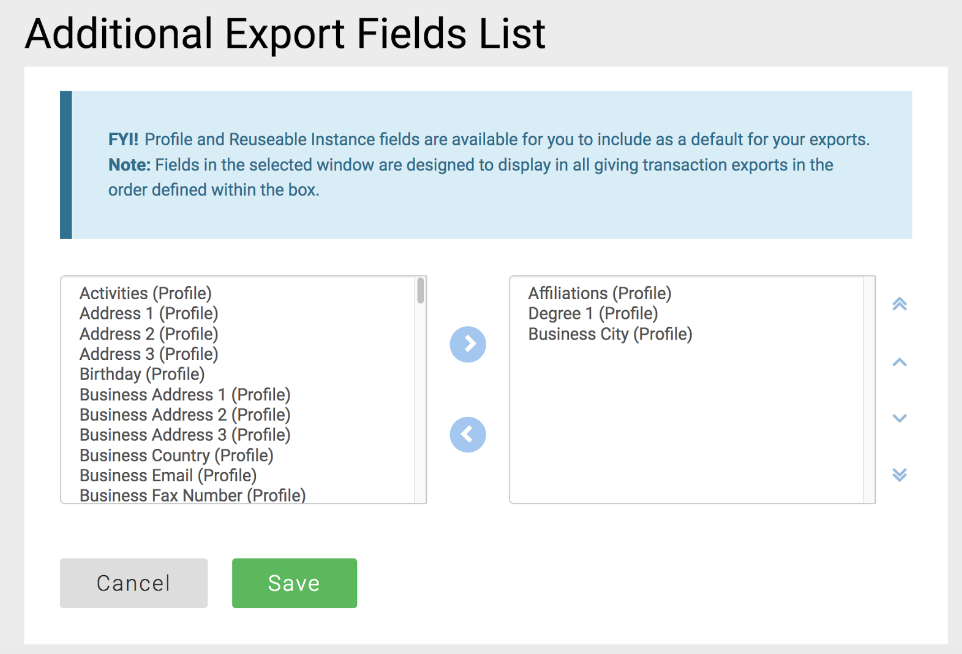
Additional Export Field list option will allow admins to add both Profile and Re-usable Instance fields to their export. Once the configuration of fields has been selected, this will establish a standard for all Event Reconciliation with Adjustments to include these fields. This can be a unique configuration per GID, not per export within the same GID.
 |
Will Adjustments and Offline Transactions display in this export?
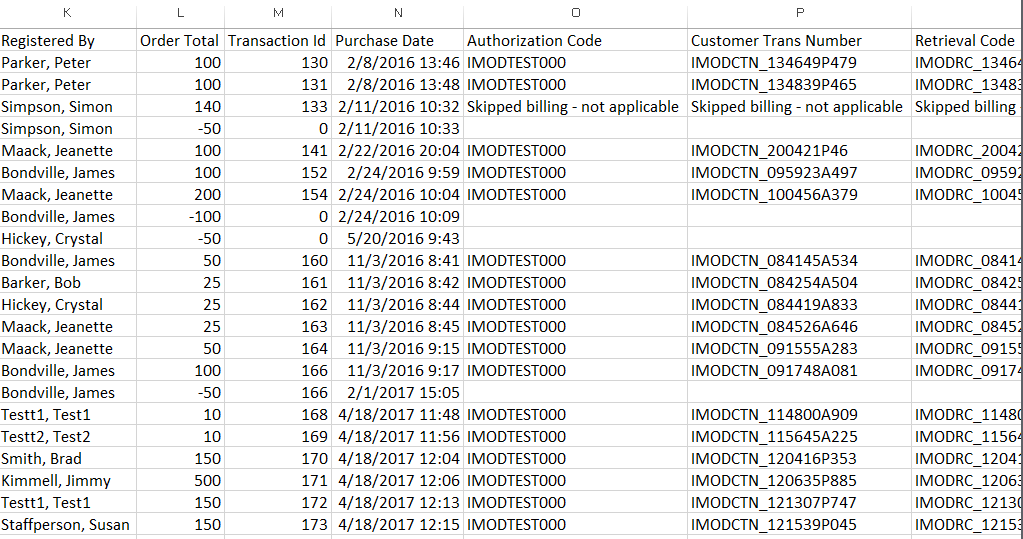
This export will pull in registration transactions across all events for the date range defined. It will include offline transactions (aka Admin Skipped Billing) and all adjustments (full or partial) for event registrations will be included in a new row and include their parent transaction's ID.
Sample Report:
 |
Will fields marked as "Allow export of this field: = false" be exportable in this export?
Fields marked at GID=1 to not allow exporting will not be accessible in this recon regardless of admin type.
Membership Forms Use New Form Renderer
Membership form type now has the separate “Form Building” and “Data Entry” modes in the Encompass UI.
On-Demand Request to Update Credit Card
This feature provides an on demand ability to send a user an email requesting they update their credit card information. Currently the user credit card system will only allow members to receive a notification to update their cards a few days in advance, however if the member wants to update in advance of receiving the notification - the admin is forced to take the update over the phone which often times does not keep organizations PCI compliant.
What admins have access to Send Request to Update Payment Information link?
Recurring Payment Admin
Super Admin
Where will this link be available?
You will access the Gold Key --> Recurring Payments and find the link as gear option on 'Active' Scheduled and Perpetual Payments and, if applicable, Membership Auto Renewals.
NOTE:
Credit card status does not impact availability of this link.
Link will not be available on the 'Inactive' grid.
Where can I configure the message for the email notification?
On both Giving and Membership forms you will access Manage Form --> Recurring Billing Emails. There will be an option for On Demand Credit Card Request.
There you will be able to configure From Name, From Email, additional Admins who should receive a copy of this email, Subject, and Email Body. The email body has global/default message that can be overridden on a per form basis.
Will I be notified if my the email was successful or not?
Yes, we will visually report success/failure of the on-demand send attempt to the admin.
What are the supported tokens for the email body?
|
|
Will the 'Last Emailed Date' update if an email notification is sent on-demand?
The Last Emailed Date will record the last touch point with that member, regardless if the email was sent by the system or on-demand.
If the same member record has both a row in the Auto Renewal grid and Scheduled Payments grid, can the credit card be updated once to accurately reflect in both?
No, the credit card would need to be updated for each of the form submissions. In the example above, the admin would need to send a notification for both, and the member would need to update their card twice.
Beta Email Template Editor - Dynamic Content and Dynamic Content Style Manager
It is now possible to add three types of dynamic content to beta templates: news (select specific items), events (select specific items) and RSS. These dynamic content areas are formatted by saving styles in the Dynamic Content Style Manager which must be created before adding the content to a template. Learn how to Add Dynamic Content.
Issue Resolution
ENC-29755 (GIVING): There is known issue with our Campaign Admin right that is unfortunately preventing access to the new giving transaction export. Once addressed the following admins will have access to this export:
Super Admin
Campaign Admin
Campaign Reporting Admin
ENC-29241 (MEMBERSHIP): The last emailed date on the membership auto-renewal grid will now be appropriately updated when a user gets an email about an expiring credit card.
ENC-23981 (Profile): Member email addresses that contain more than 10 characters in the TLD (Top Level Domain) were not supported. Now email addresses can contain up to 15 characters in the TLD.
ENC-27758 (Giving): Designations that were selected in the designations pop-up were not displaying a check mark when selected.
ENC-29580 (Forms): Forms with a query string hyperlink in a rich text field were actually using the full admin URL, preventing non-admin users from accessing the hyperlink.
ENC-29591 (Forms): Form fields were allowed to change to Volunteer Management Agent type, which was causing an error during form submission.
ENC-29645 (Directory): Directories were displaying a generic error if the Advanced Search fields had not been configured. Now an informative error is displayed instructing the user to configure the Advanced Search field before a directory module can be added to a page.
ENC-29704 (Forms): When the user selected the Cancel button in the ICP popup the "Please Wait..." message was displaying on the form in place of the Cancel, Next and Submit buttons preventing the user from proceeding in the form.
ENC-23981 (Email Marketing): The email system now acknowledges addresses with extra long suffixes as valid. For example: bob.longlastname@123.extralongsuffix
Release Notes - October 17, 2017
Issue Resolution
ENC-30145 resolves an issue where clients using Shibboleth for single-sign on capabilities where receiving a page not found message after logging into the Encompass backend.
Release Notes - October 16, 2017
Product Functionality
Full-Site SSL
iModules is pleased to announce that with the October 16th release, we will be able to provide your institution with the option to update your entire iModules-hosted website to full-site SSL. Each URL that is not a redirect needs a secure certificate, which iModules will procure on your behalf. One security certificate is provided at no additional charge. If you need additional secure certificates, there will be a charge.
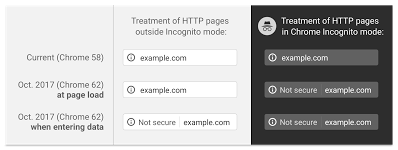
Beyond providing a secure end-to-end client experience, this enhancement will address future changes that are expected with predominant browsers in the market. With the October release of Chrome 62, Google will roll out phase II of their project to move to a more secure web. Users of Chrome 62 and later will receive the following Not Secure indicator in the URL when an input field is selected and the page is hosted over HTTP rather than HTTPS:
The primary contact designated for your institution will receive an email communication the week of the 16th with specific instructions each organization will need to take in order to opt-in and start the process to convert to full-site SSL. Coinciding with the code release on the 16th will be a new section of the Releases and Maintenance area of the Support Center. This new Full-Site SSL section will contain links to information related to pricing, implementation instructions, and FAQs.
Release Notes - October 12, 2017
ENC-30073 - Resolved an issue causing forms with forced navigation AND form exit to display an error on submission.
ENC-30058 - Resolved an issue causing forms with "Allow user to edit data after submission" disabled to not be submitted and display an error "You are not allowed to edit the data on this form once it has been submitted" despite the form not being completed.
ENC-30076 - Resolved an issue causing profile forms to display an error page after submission.
Release Notes - October 9, 2017
ENC-29242
Resolved an issue causing profile forms to not redirect to the specified exit URL.
Resolved an issue causing non-commerce forms to not display the final step or send confirmation emails when the form was completed by the admin in Data Entry mode.
Resolved an issue with Identity Checkpoint causing forms to not advance to the next step in the form.
Release Notes - September 28, 2017
Issue Resolution
ENC-29900 - A misconfiguration with display options inadvertently presented a link that allowed admins to the "Send Request to Update Payment Information" on-demand. While enabled, admins who clicked the new link sent an email (given a valid billing email address) to the respective constituent prompting them to update their credit card information. Cards updated via this process would update as expected for the respective record/transaction commitment.
NOTE: We have removed the option so that we can further refine additional features and expected behaviors of this new process. Look for this to make a proper reappearance in upcoming releases.
ENC-29906 - A number of settings were not applied in order to display some of the items listed in our September 25th release notes. This would have impacted functionality in following areas, that should now be resolved:
Constituent Management View
Generic and Commerce Forms New Renderer
Release Notes - September 27, 2017
Please note that product releases are scheduled as followed by environment: Canadian = Tuesday morning | Australian = Tuesday morning | U.S. = Tuesday morning
New Functionality
Beta Email Reporting
Exports in Beta Email Reporting give administrators the ability to store and distribute performance metrics.
Clicking the camera icon on the grey footer downloads a PNG file to your computer that is a scaled snapshot of the reporting content page you are viewing. The PNG is great for printing, sharing as is, or cropping for inclusion in reports.
Clicking the blue "Export Table" button on any drill down report will download a CSV file to your computer. Columns and values represent all data in the results grid. The export includes limiting values to any search terms applied. Recipient details (name, constituent ID, class year) will be present in the CSV if the data is available in the results grid.
For more information, refer to the Beta Email Reporting Exports Frequently Asked Questions.
Release Notes - September 25 & 26, 2017
Please note that product releases are scheduled as followed by environment: Canadian = Monday evening | Australian = Tuesday morning | U.S. = Tuesday evening
Table of Contents
Product Functionality
Constituent Management View
Constituent Management View offers an improved search feature that makes it easy to find member and non-member records based on first name, last name, email address, or unique ID. The unified point of entry streamlines the process for taking actions on behalf of a constituent within Encompass.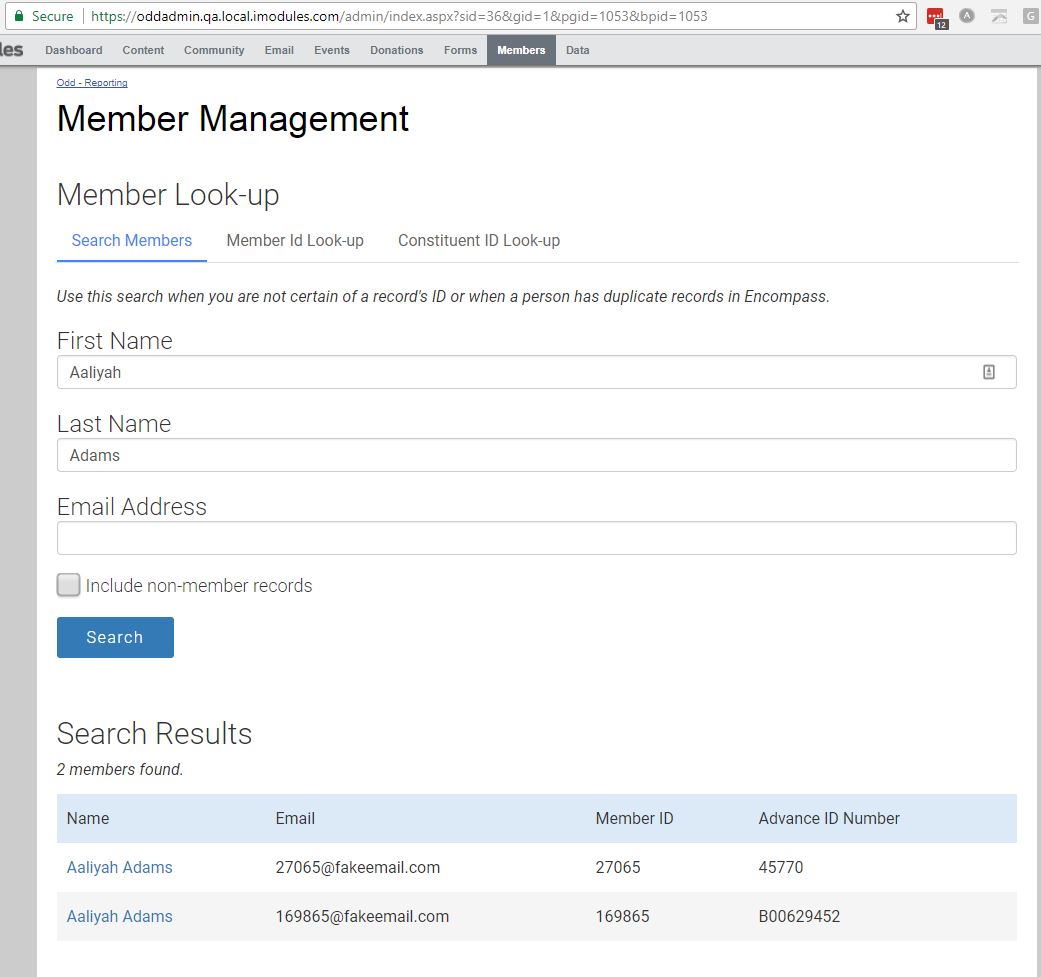
Search Members Tab: search for record by First Name, Last Name, OR Email Address
Member ID Look-up Tab: search for record by iModules Member ID
Account ID Look-up: search for record using offline DB primary key
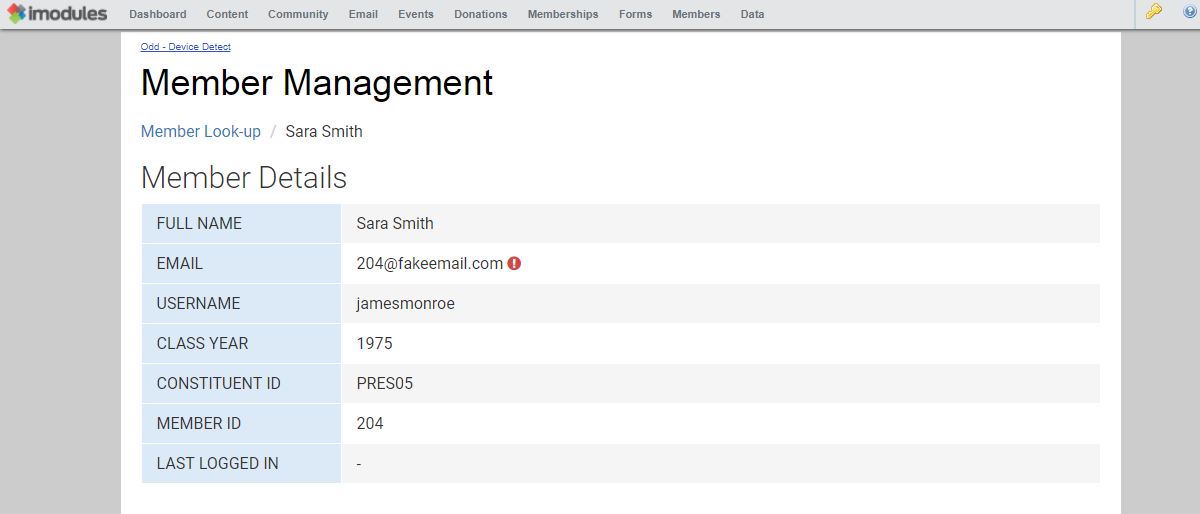
Summarizes key field values including for the last login and iModules primary key for a given record.
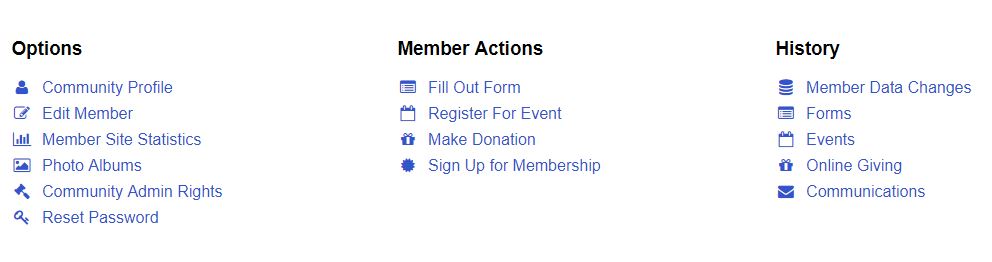
Links in the Options, Member Actions and History areas quickly direct you to disparate sections of Encompass while maintaining the connection to the selected record.
Handy icons indicate whether an email address is valid or invalid.


A new Member Look-up option has been added under Members in Blue Navigation
At a minimum, an authenticated user must have "Member Admin" rights to use the tool.
Menu options are visible on the summary page based on assigned administrative rights
Does the tool return non members?
Yes
Does the tool return privacy protected members
Yes, but only to super admins and protected record admins.
Is the existing member search going away?
No
Does the Last Logged in Date update with pre-population from email?
No
Disable Fields in Form Building Mode
It will no longer be possible for an administrator to enter values into field inputs for forms in Form Building Mode. Fields can still be added, removed, configured, and sorted.
Email Marketing Custom List - Button Added to Selection Grid
The addition of a "use selected" button reduces the number of clicks required to associate or remove multiple list selections to an email.
Generic and Commerce Forms Use New Form Renderer
These form types now have the separate “Form Building” and “Data Entry” modes in the Encompass UI.
Identity Checkpoint
Added an expand all option to the merge grid to allow admins to open all records visible - determined via the page size (10, 20, 50).
 |
Mobile Apps - App Publishing Event Configuration
Pulishing an event to mobile apps is now configurable to Event Admin users of Event App Manager (EAM). This enhancement is beneficial to those who would like to control which, if any, of the two mobile apps an event would populate.
What are the configuration options available?
Each event can be configured to display in the Event App only, Event Check-In only, both apps, or neither app.
What are the steps to configure the event?
From the Events view, select the hyperlinked event name or the gear icon from the respective row to launch the Edit Event view
From the Edit Event view, select the appropriate check boxes that correspond to the apps which the event should display
Are the changes instantaneous?
Yes, the event should be added or removed from the respective apps anytime the user causes a refresh after the change is made in EAM
Issue Resolutions
Directory
ENC-24279 resolved a problem where static directory search results were not rendering on initial page load.
Ecommerce
ENC-29312 fixed incorrect verbiage on expired credit card emails.
ENC-29281 ensures the form type is passed through to the Beanstream payment gateway.
Email Marketing and Form Reporting
ENC-29390 and ENC-29167 corrected 524 time out errors triggered on large exports to csv from email marketing and form reporting.
Email Marketing
ENC-29417 fixes an issue where emails with invalid syntax (for example missing a period)were added to the exclusion report but never invalidated. Clients may see an uptick in their invalid email count that does not correspond to recorded bounces.
ENC-29417 ensures that spam reported emails are no longer marked as invalid.
Release Notes - September 20, 2017
Alert
Due to unforeseen complications with this release, it was rolled back on 9/21 as communicated via the iModules status page incident. http://status.imodules.com/incidents/291hnfvqf81f
Issue Resolution
Caching
On July 31, 2017 the release of caching improvements caused a degradation in performance and was promptly reversed. Since then, we've identified and resolved the issue with Site ID caching that caused the negative impact on performance. With the September 20 release, we will re-activate the caching improvements attempted in July.
Release Notes - September 14 & 15, 2017
Please note that product releases are scheduled as followed by environment: Canadian = Thursday evening | Australian = Friday morning | U.S. = Thursday evening
Issue Resolution
ENC-29754 resolves an issue with database connection errors. The issue was most often noticed when tokens intermittently failed to populate in email marketing or emails failed validation because of a mis-configured / duplicate system token field. (ENC-29747).
Release Notes - September 11 & 12, 2017
Please note that product releases are scheduled as followed by environment: Canadian = Monday evening | Australian = Tuesday morning | U.S. = Tuesday evening
Product Functionality
Donations: Giving Transaction Export *BETA-testing
This export is for clients who would like to have both the gift and designation details of a transaction consolidated into one export. This export type will be available across all GIDs and is designed to only combine all giving form transaction data within a specific GID.
Where can I access additional information about this product and/or submit feedback?An additional page listing known issues and product functionality can be found here on our FAQ. If you would like to provide feedback on this product you may access the form here.
Where can I access this new export?
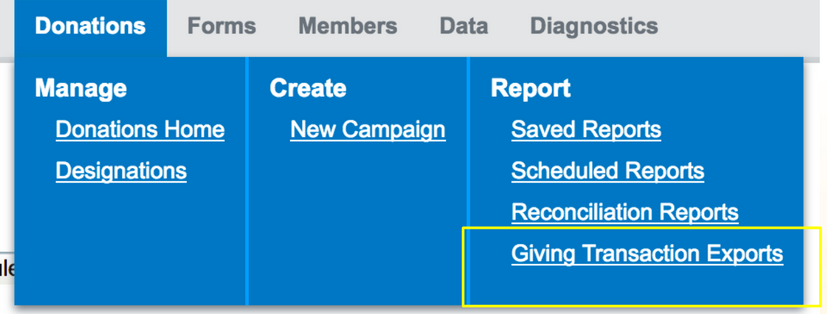
A new menu item will display under the admin option of Donations --> Report. You can also access a new tab under Reconciliation Reports from the admin tab interface.
 |
How will this export work?
A new recon exporting option will be present below the current reconciliation tab that will launch a new table and option for the setup wizard. The wizard will allow for additional configurations including: date filtering, scheduling, notification emails and SFTP file retrieval if this option is enabled on your site.
Will this export allow custom fields to be added?
Additional Export Field list option will allow admins to add both Profile and Re-usable Instance fields to their export. Once the configuration of fields has been selected, this will establish a standard for all giving transaction exports to include these fields. This can be a unique configuration per GID, not per export within the same GID.
|
Will Adjustments and Offline Transactions display in this export?
This export will pull in giving transactions across multiple campaigns for the date range defined. By design it will not include offline transactions for reconciliation purposes and because adjustments for giving are extremely rare and commonly keyed into a client's offline database when they occur, adjustments will not display in the file.
Will fields marked as "Allow export of this field: = false" be exportable in this export?
Fields marked at GID=1 to not allow exporting will not be accessible in this recon regardless of admin type.
Why does the donation amount repeat on the designation rows for that transaction?
The donation amount repeats on each respective row to provide the total amount available for selected designations. If a client would like to sort on this field for a specific transaction ID, they will know the amount drafted today 'Order Total', amount available for allocation for all designations 'Donation Amount', and amount allocated to each designation 'Designation Allocation'.
 |
If recurring transaction, you would expect to see amount drafted today 'Order Total', total gift amount that is available for allocation for all designations 'Donation Amount', and current collected amount allocated to each designation 'Designation Allocation':
 |
What column layout can we expect for this export?
Commerce Identifiers (unique per client)
Community Name
Community ID
Campaign Name
Campaign ID
Constituent ID
Member ID
First Name
Last Name
Reuseable and additional Profile Fields (Defined by client - unique per GID)
Order Total
Transaction ID
Purchase Date
Authorization Code
Customer Trans Number
Retrieval Code
Appeal Code
Donation Amount
Designation Name
Designation ID
Designation Allocation
Designation Percent
Designation Instructions aka Filled In Value
Billing Name
Credit Card Type
Billing Email
Billing Phone
Billing Street 1
Billing Street 2
Billing City
Billing State
Billing Zip
Billing Country
Scheduled Payments Active
Payment Frequency
Total Scheduled Amount
Next Payment Date
Payments Remaining
Payment Type
Amount to Date
First Payment Date
Original Trans ID
Event Name
Event ID
Designation Identifiers (unique per client)
What are supported special characters for Designation and Commerce Identifiers names/column headers?
forward slash
back slash
underscore
pound
hyphen
space
period
alphanumeric
apostrophe
ampersand
open/close parenthesis
comma, colon, semi colon
question mark
Any characters used for naming purposes outside of this list runs the potential risk of creating errors in SQL to successfully export data.
Issue Resolution
Events
ENC-29064 - Resolved issue where cloned events did not have full attendee list functionality. The fix ensures the attendee list is reachable from both admin and attendee's list button on the event. Admin can also edit columns on attendee list.
Events with Donations
ENC-20601 - Resolved issue where admins who submitted event registrations with a donation and skipped billing were prompted with a message the gift was not successful.
Release Notes - August 9, 2017
Issue Resolution
Email Marketing
ENC-29267 Resolves an intermittent issue where one or more batches (emails are sent in groups of 1,000) would fail authentication and not successfully send. With this fix, batches with authentication failures will retry for 5 minutes. In this way, brief connectivity issues will not result in send failures.
Forms
ENC-29333 Resolves an issue where errors were displaying on profile forms that contained CEEB values.
Release Notes - August 2, 2017
Issue Resolutions
ENC-29302 - Resolved an issue where forms with audience set to "Logged In" weren't prompting log in and displaying a blank content block.
Performance Resolution
Disabled new distributed caching system due to observed slowness after 7/31/2017 update.
Release Notes - August 1, 2017
Issue Resolutions
ENC-29280 - Resolved an issue causing pages load times to increase significantly due to caching changes released on 7/31/2017.
Release Notes - July 31, 2017
Product Functionality
Campaigns
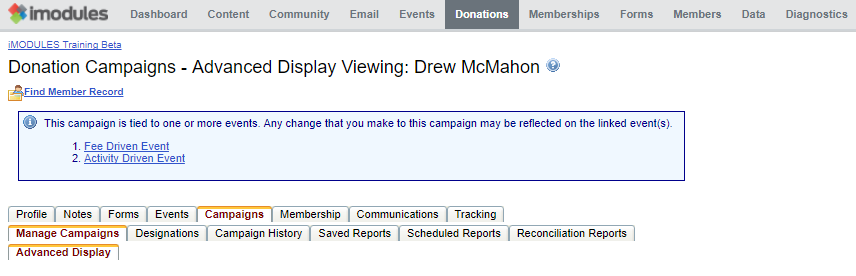
Viewing campaigns that are tied to events now displays a new prompt, as shown below.
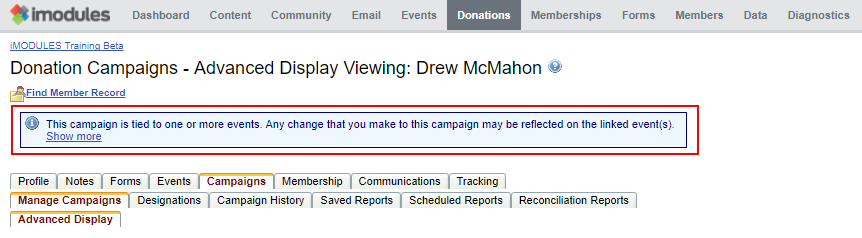
Clicking the "Show More" link will display the full list of links to each event that utilizes the selected campaign, as shown below. Selecting a link in the list will navigate to the event's form.
iFraming Encompass Content
As part of our continued commitment to security, and an important part of our PCI compliance, effective with the July 31 Product release, we will no longer be able to allow iFraming of Encompass-served pages to external sites.
iFrames are a convenient tool to show external content within a frame on a webpage; however, this functionality allows for malicious behavior. As a result, we will no longer allow iFraming of Encompass-served pages. You can read more on our "From the Desk of the CTO."
If you have questions as to whether this affects your or not, please contact Application Support.
Issue Resolution
Web Services
ENC-28962 - Resolved an issue where a member with multiple event registrations was causing errors in GetMembersChanged web service.
Profile
ENC-28923 - Resolved an issue causing edits to College information to not be saved in Profile Forms.
ENC-28721 - Resolved an issue where profile forms were not honoring the SSL setting.
ENC-28256 - Resolved an issue causing member counts to not be displayed in the sub-communities grid.
Donations
ENC-28792 - Resolved an issue where clicking Save on Review/Finish pages of Donation forms wasn't exiting the form.
Confirmation Emails
ENC-28739 - Resolved an issue causing documents in confirmation emails to be unavailable for download.
ENC-26463 - Resolved an issue causing admin confirmation emails tied to recurring payments to be sent even if the admin had deactivated the email.
Events
ENC-28700 - Resolved an issue where Event Reporting Admins could not access Event Reconciliation Reports
ENC-28010 - Resolved an issue where the remove guest icon wasn't being displayed to non-admin users.
ENC-26168 - Resolved an issue where the continue button on pre-populate forms was not immediately responding to the admin's click.
ENC-20854 - Resolved an issue where roles weren't being applied to the next step in an event registration.
Schedules
ENC-27793 - Resolved an issue causing code to be displayed above schedule content blocks.
CMS
ENC-29022 - Fixed scenarios where the user site map module listed pages or groupings of parent/child pages twice.
Membership
ENC-28681 - Verified that class names are not duplicating when logged in or on various membership campaign configs.
Class Notes
ENC-28591 - Resolved the issue with the back button periodically not working on class notes pages.
Release Notes - July 17, 2017
Product Functionality
Advanced HTML Email Editor Workflow
The Advanced HTML workflow in email marketing was designed for clients who have the expertise necessary to generate html for email and do not want that code modified or altered in any way before send. The new workflow is superior to the Telerik Editor that re-writes and re-formats html in ways that are not email client friendly. The enhancement eliminates the Telerik email editor and the wrapping of provided html in a table. A unique text only version is also defined as a part of the workflow.
Are tokens supported?
Yes
Is role based content supported?
No
Is community or dynamic content supported?
No
How does an editor include an unsubscribe link?Use the case-sensitive token of ##Unsubscribe## or #UnsubscribeURL##. The Unsubscribe token is replaced with the word "Unsubscribe" hyperlinked with a url that facilitates opt-out for the email's selected category. DO NOT place the Unsubscribe token within an a href tag. The Unsubscribe URL token is replaced with the url that facilitates opt out for the email's selected category. Unsubscribe URL is the recommended token for the text-only version.
How do I include a trouble viewing link?
By using the case-sensitive value of ##TroubleViewingLink## within a hyperlink tag (for html) and the stand alone token for text. The trouble viewing link is unnecessary within the text-only version.
Is recurring email sending supported?
No, only send immediately and scheduled one-time options are available.
Are clicks and opens tracked on the plain text / text only version?
Opens cannot be tracked independently of clicks in the text only version. Clicks are only tracked if you write out the complete url starting with http or https. Do not punctuate your url unless you want that character included in the hyperlink
How does an administrator get access to the new workflow?
A user must be assigned to the "Advanced HTML Email Author" right to gain access to the workflow. In order to release an email, the advanced author must also be either a super admin or communication admin. Administrators without the advanced right will not have access to the build content step of emails created in the new work flow.
Why isn't my customized plain text version being displayed?
Text version handling differs by email client. Some versions of outlook create their own text version from the html. Thunderbird is an app that displays a clean toggle between html and text versions.
My email does not look like I wanted, can an iModules staff member help fix it?
Advanced HTML sending interface is intended for use by individuals with extensive experience coding emails from scratch or by those who are copying code produced by an external application. The editor will deploy the code exactly as it is entered and replace unsubscribe and trouble viewing link tokens. As a result, Application Support and iModules design staff will not troubleshoot or recommend changes to improve emails deployed using the Advanced HTML workflow.
Opens by Device in Beta Email Reporting
Opens by device helps administrators who want to understand device share for their audience and adjust email marketing techniques accordingly. Up and to this point, user agent string information was only available through the Email Metric API.
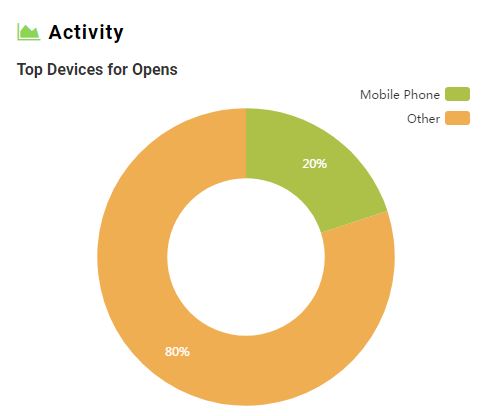
Where can I find Opens by Device?
Look for a new graph in the bottom right "Activity" quadrant of the email detail view.
What will the graph show?
The graph shows the top four (4) device types. Device types include Mobile Phone, Mobile Device, Tablet, Desktop, Other
What devices cannot be identified and why?
Google mail app does not pass a user agent string so it can't be classified.
DonorForce Code Removal
Please Note: Institutions identified as potentially being affected by this item have been notified.
During the July 17 Product Release, iModules will be deleting unnecessary code from the Encompass system tied to a product we no longer offer or support (DonorForce). When DonorForce was initially enabled on a client's site, it automatically added a column into all commerce reports; this column will now be removed. Clients who have been identified as having DonorForce enabled in the past and also have automation configured for commerce reports could potentially experience an error after the July 17 Product Release. We recommend that clients update any necessary processes before the July 17 Product Release.
Release Notes - June 22, 2017
Performance Resolution
ENC-29017 - Made further improvements to admin pages caching to decrease load times.
Enabled new distributed caching for URLs, Verbiage, and Groups.
Release Notes - June 21, 2017
Issue Resolutions
Donations
ENC-28983 - Scheduled designation files delivered via SFTP for both campaign and recon will now properly generate when data is available.
Data
ENC-29000 - Create new query button in data viewer will now continue into data viewer wizard.
Release Notes - June 20, 2017
Issue Resolutions
Member Merge
ENC-28926 - Fixed an issue with non-member record fields getting change dates set to NULL during the merge process.
Performance
ENC-28990 - Fixed an issue causing admin pages to load slowly due to lack of admin page caching.
Forms
ENC-28884 - Ensure that profile forms with forced navigation will load with new form rendering system.
Release Notes - June 19, 2017
Product Functionality
Product Functionality
Donations: Required Field Based off Designation Choice
This new tech creates a dynamic workflow where clients can now require additional information based on a specific designation selection versus a static field where they hope to encourage donors fill out when they select that same designation.
How do I set this up on a designation?
A new checkbox that allows "Include a required text box for this designation" can be found in the 'Designations - Add / Edit Designation' config window. Once enabled on the designation, client can configure a label for the field to display on the form when a donor selects an applicable fund to support. The additional field will always be required once enabled and there is not a way to remove the required element. Can be set up on multiple designations - not just "other".
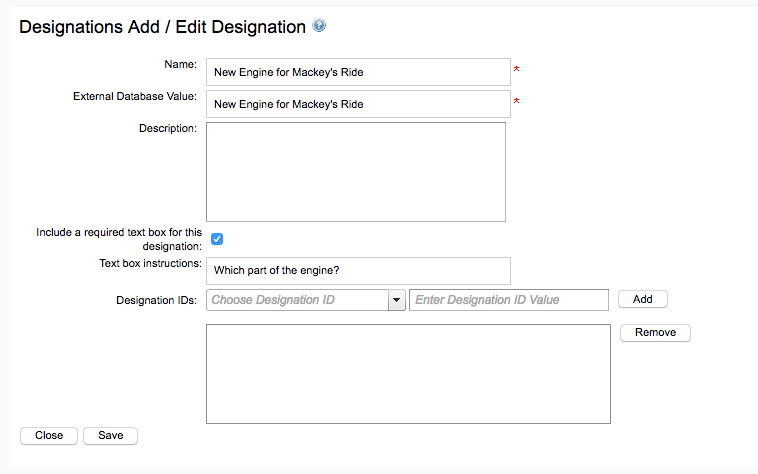 |
Which Designation configurations are supported?
You must use Advanced Display Mode and have the popup window enabled. If you are only using radio buttons, it won't work.
What is the character limit set at for this field?
The limit of this field is set to 100 characters. This is on both what the constituent can enter as a value and what the admin can enter for the prompt.
Will this be supported when passing various giving parameters in the URL (&dids, &amount, &bledit, &pdids)?
Designation will still be supported within current giving parameter behavior. As an example, if I reference the dids ID in the url, the designation will uniquely display as long as it lives in the module window as seen below. The additional field will now display as well.
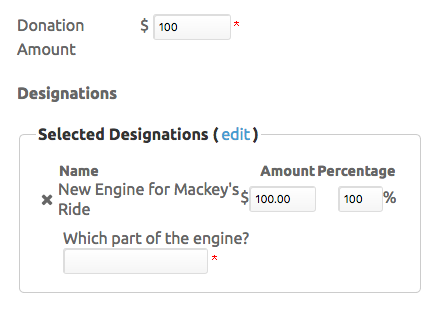 |
Will this field be available for exports?
Yes, the new column should be available via exporting/reporting in:
Designations Export (Campaign) - Could possibly introduce a breaking change if a client has designation identifiers and an automated process established to sync data to their back-end db.
Designations Export (Reconciliation) - Could possibly introduce a breaking change if a client has designation identifiers and an automated process established to sync data to their back-end db.
Web Services - should not be a breaking change as clients have to turn this on for each applicable designation and consider the change once implemented.
Will this field be available via data viewer?
No, this will behave like designations where you will not be able to individually target this field type in DV.
Can iModules import into this field when inserting mass numbers of designations for clients?
Yes, data can import designations via a script that inserts designations and designation id values into a temp table, then moves those values to the appropriate tables. The new check box (True/False) as well as Label field should be importable via this same process.
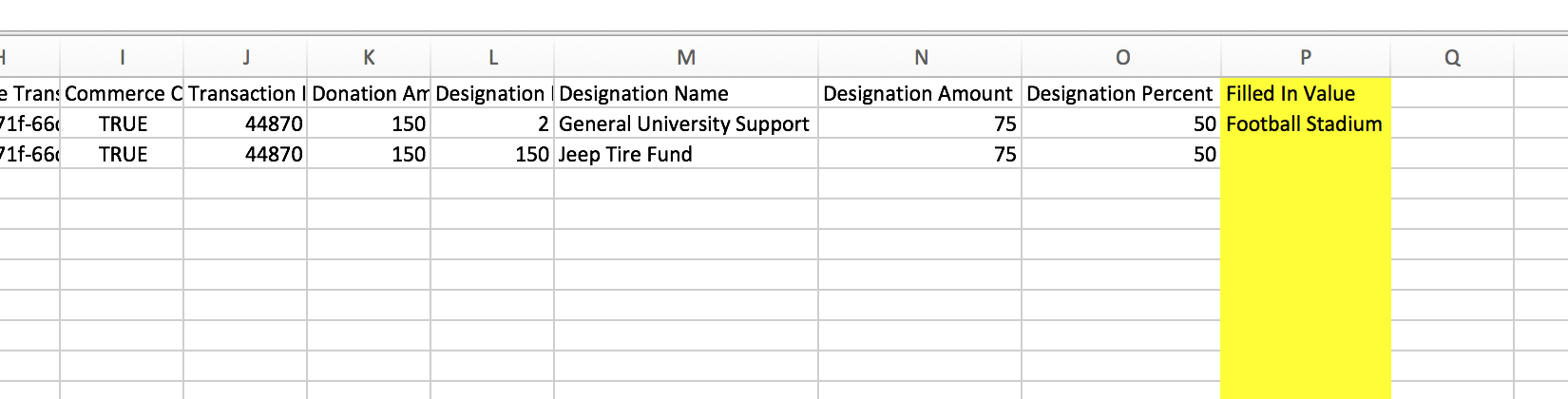
Is the column header for this field configurable per site?
Yes, currently the default is "Filled In Value" which can be changed per site. This change can be made when you add a verbiage entry for [ExportV2ASCX_Des_DesignationInstructions]. This will override the default value in their site catalog.
 |
Login Enhancements
Changed encryption of passwords to BCRYPT to improve security of passwords.
Default Profile View Limit Enabled
As of 6/19/2017, iModules has implemented a limit to the number of directory searches a member can perform to 150 per single member record in a 24 hour period. This value can be changed within your site, at any time by accessing the Community -> Profile View Limit admin menu. This setting is configurable on a community by community basis as well. If your site has previously set a Profile View Limit, that limit has not been changed.
*Please note that at this time, the statistics around this feature are limited to what is available in the Member Site Statistics feature in your site.
Donations and Profile Using New Form Renderer
Donations and Profile forms now have the separate “Form Building” and “Data Entry” modes in the Encompass UI.
To make changes to the configuration of the form, the admin selects Form Building mode.
The form cannot be submitted in Form Building Mode which ensures the submission grid is "clean" when the form is ready to launch.
For entering data on behalf of a constituent, admins should use the Data Entry Mode.
Campaign Data Entry Admin
What is a Campaigns Data Entry Admin?
New admin role created for purpose of operating within Campaigns system but only interacting with data entry tasks. Admin is able to interact with campaign module functionality but will not have overall campaign admin access.
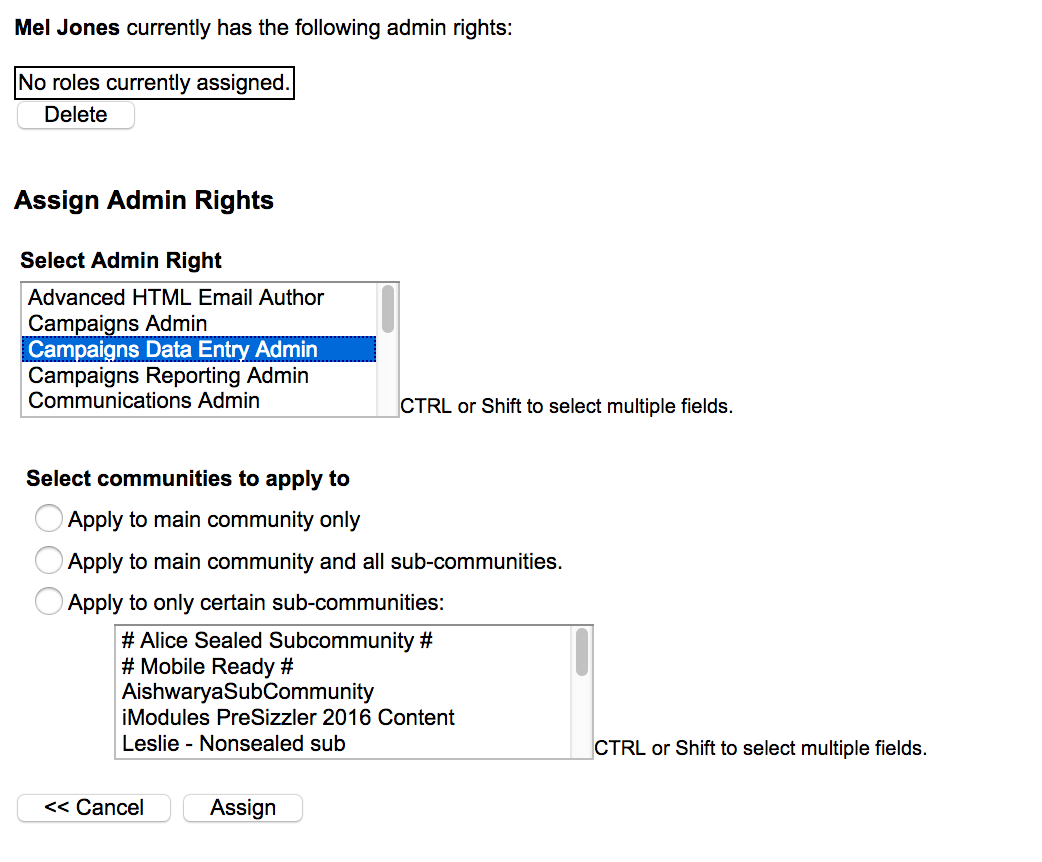
Where do I assign the administrative option for this?
You will access the Gold Key --> Administrators and assign the right same as you would for any Community admins. You will have to same community options you may assign as well.
 |
What is the purpose of the Campaigns Data Entry Admin?
To provide a level of admin access that only allows for gifts to be processed without allowing access to greater Campaign admin/super admin functionality.
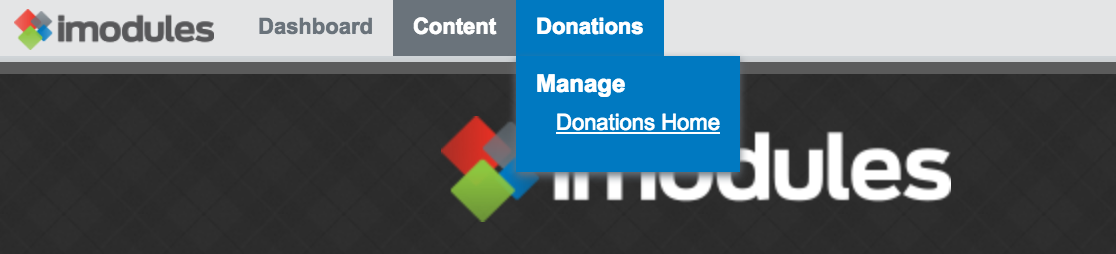
What menu options are available in the nav for this administrative right?
The admin will be able to view and access widgets on the dashboard. Content will be available so the admin can return to the CMS side of the site. Donations and sub menu Donations Home will be accessible as well.
 |
Once logged in, what administrative options are available in the Manage Campaigns tab?
Most traditional campaign administrative options have been removed from this right including: Ability to 'Add New Campaign', Designation, Campaign History, Saved, Scheduled and Reconciliation Report tabs, as well as the table icons which allow an admin to Edit, Delete, Export, Import, View Submissions and the ability to Enable/Disable a specific form.
New admin right will allow a table view of available campaigns and it's respective details (including dates, amount given to date and # of contributions and donors). Admin will also hae the ability to drill down into a specific campaign to view the form.
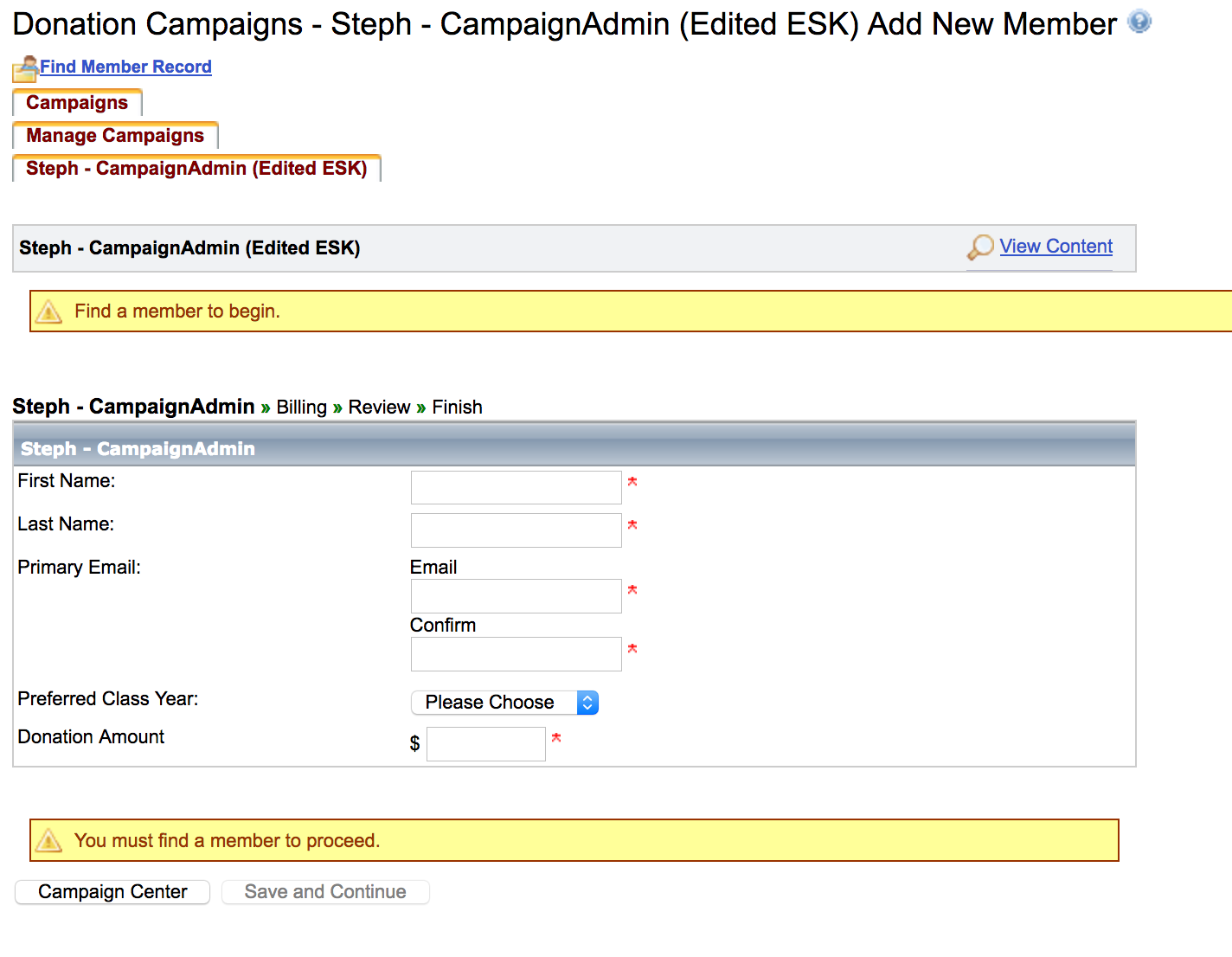
What options are available for this admin on a giving form?
When the form initially loads, we will provide a message that indicates you must "Find a member to begin.". Until a record has been selected the form will be disabled and the admin will be unable to submit the steps. You must find an existing record to begin filling out the form and will not be able to create a new record with this right. Both non-member and member records can be accessed by this admin in your site. Field and manage form options have been disabled as well.
 |
Can this admin skipped required fields on the form?
Yes, this admin can skip fields found on the form regardless of the requirement to a user.
Will this admin be able to submit transactions on the constituent side?
While we do provide access to the campaign details via the 'View Content' button, we do not allow this admin to submit registrations on the constituent side. To prevent this we have disabled form navigation buttons. Appending the URL with a constituents MID will render the admin's information as the intended purpose of this right is to key in gift transactions on the administrative side.
Can this admin adjust registrations or resend confirmation emails?
No, this admin will not have access to the Campaign History or Submission pages. Campaign and Super Admin can make these changes for previoius submissions.
Issue Resolutions
Directory
ENC-24720 resolves an issue where "Send an Email" in Directory was not opening an email window.
E-Commerce
ENC-28296 corrects an issue where adjusted commerce drop-down items were still being displayed as selected when revisiting a form.
Email Marketing Reporting
ENC-16844 ensures the EM Reporting grid totals respect category filter after browsing across results pages.
Events
ENC-27637 corrects an issue where confirmation emails were failing to send to members after completion of an event form.
ENC-28610 ensures that event registrants whose roles has been modified aren't automatically removed from role-based activities while revisiting the event registration form.
ENC-28062 prevents layout edit mode from capturing the green background color after admins edit the layout
Profile
ENC-28690 resolves issue where configuration settings on profile fields weren't being saved/applied.
Reporting
ENC-28421 resolves an issue with reports that caused a failure during download due to columns being named "ID."
ENC-28383 resolves an issue where scheduled report email links weren't automatically downloading reports for event reporting admins.
ENC-28387 corrects an issue where Event Reporting Admins were unable to run saved Optimized Event Reports.
TransactionEmails
ENC-17939 ensures that form steps that weren't completed or displayed to users aren't included in the confirmation email.
CMS - News, Events, Campaign Modules
ENC-13059 Enabling cms filters for these modules will no longer break in mobile. We have removed tables and added a setting for the listing tht controls the wrapping HTML to make them mobile friendly.
Release Notes: June 6, 2017
Issue Resolutions
Commerce
ENC-28769 Touchnet Hosted transactions now redirect correctly on completion for clients using branded SSL.
Web Services
ENC-26913 - Email Metric API v1 times out for requests that return greater than 10 MB of data. The issue is resolved with the introduction of Email Metric API v2. Both v1 and v2 are supported in production. Details on the v2 changes are detailed in the Email Metric API documentation.
Release Notes - June 5, 2017
Began merging clean up for non-member records related to ENC-20303.
Release Notes - June 1, 2017
ENC 28693 - Fixed missing commerce adjustments on Event Audit Reports for Form-Driven and RSVP events.
Release Notes - May 16, 2017
Issue Resolution
Performance
ENC-28567 Increased responsiveness of 404 handling to reduce slow and perpetual loading on certain site pages and admin tools.
Release Notes - May 15, 2017
Product Functionality
Class Notes UI Update
Revamped design to support mobile ready templates, update of user interface and improved integration with Profile Page system. One functional change is that the default / home view of Class Notes now displays a reverse chronological listing of Class Notes, instead of first requiring users to conduct a search.
Events Data Entry Admin
New admin role created for purpose of operating within Events system but only interacting with data entry tasks. Admin is able to interact with event module functionality but will not have overall event admin access.
Where do I assign the administrative option for this?
You will access the Gold Key --> Administrators and assign the right same as you would for any Community admins. You will have to same community options you may assign as well. 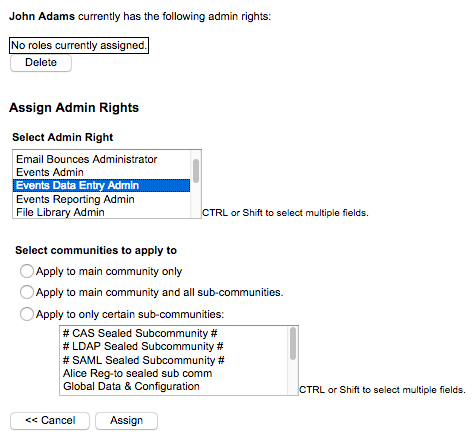
What menu options are available in the nav for this administrative right?
The admin will be able to view and access widgets on the dashboard. Content will be available so the admin can return to the CMS side of the site. Events and sub menu Events Home will be accessible as well.
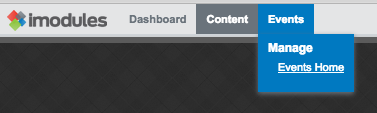
Once logged in, what administrative options are available in the Manage Events tab?
Most traditional event administrative options have been removed from this right including: Ability to 'Create New Event', Event History and Reports tabs, and the gear icon which contains options to Edit, View the Attendees List, Review Commerce Fees or Reports, Adjustments, Deactivate and Delete Event.
New admin right can access the search filter to look for a specific event or clink a link to an event found in the grid.
What options are available for this admin on the registration form?
When the form initially loads, we will provide a message that indicates you must "Find a member to begin.". Until a record has been selected the form will be disabled and the admin will be unable to submit the steps. You must find an existing record to begin registration for the event and will not be able to create a new record with this right. Guest records will be new non-member records; however, the main registrant must be tied to an existing record in your site. Field and manage form options have been disabled as well.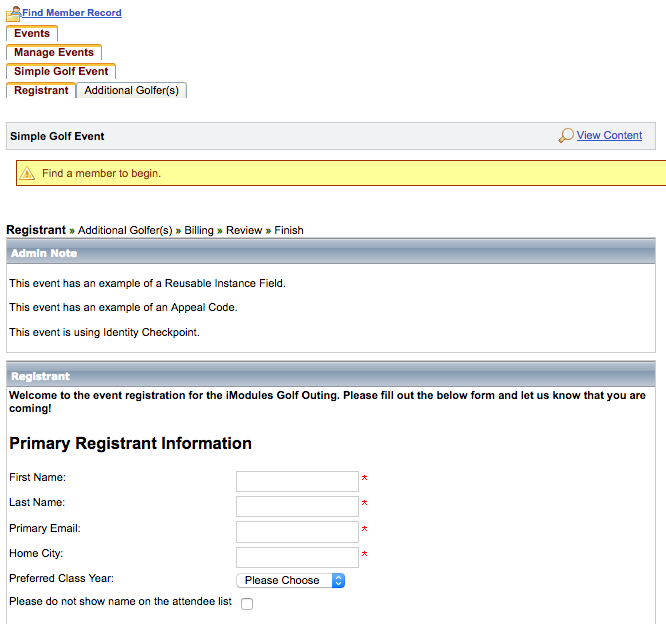
Can this admin skip required fields on the form?
Yes, this admin can skip fields found on the registration form regardless of their requirement to a user.
Will this admin be able to submit registrations on the constituent side?
While we do provide access to the event details and registration options via the 'View Content' button, we do not allow this admin to submit registrations on the constituent side. To prevent this we have disabled form navigation buttons. Appending the URL with a MID will render the admins information as the intended purpose of this right is to key in registrations on the administrative side.
Can Data Entry Admin register for all event types?
Yes, this admin can RSVP registrant and guest(s) respectively as well as key in credit card information on the billing step.
Can this admin adjust registrations or resend confirmation emails?
No, this admin will not have access to the Event History or Submission pages. Event and Super Admin can make these changes for registrants.
Cross Email Metrics: Beta Email Marketing Reporting
For clients who want to understand email performance across messages over a given time range or for a specific category.
How is this an improvement?
This ability does not exist anywhere in Encompass
To do this currently clients are exporting multiple files from legacy reporting and using a tool like Excel to aggregate metrics across emails
A fly out nag allows users to easily transition between available reports.
FAQ
What is the default date range?
Last 30 days (including today)
How many email subscription categories can I filter by at one time?
One
What happens if I change the name of an email category?
For reporting purposes, an email will stay with the name of the category it had at the time of send.
Why median not average (mean)?
Both median and mean are measures of central tendency. Median is a better choice because open and click rate data is likely to have outlier values from emails that went to significantly different list sizes.
Import Non-Member Merge File - Bypass Member Merge Checks
A site settings that allows admins to queue multiple non-member records to be merged into a single constituent record using a single Non-Member Merge File.
Issue Resolutions
Commerce
ENC-27594 corrects an issue where billing information updates for recurring membership transactions were not saving properly.
ENC-27831 restores the passing of ##GroupName## in the comment2 field for Paypal processed transactions.
ENC-28287 ensures clients using P2PE with Cybersource can successfully update billing information for recurring payments
Email Marketing
ENC-27834 restores admin access to recurring email schedule for reused emails.
ENC-28402 When an email scheduled for specific dates is returned to draft state and re-released (without a change to the schedule), only future dates will be considered for deployment scheduling. If all selected dates are in the past, the email will move immediately to history.
Events
ENC-25511 resolved a variety of scenarios where editing an existing registration would cause a WSOD.
Giving
ENC-21760 prevents a designation id string from rendering designations for a GID other than the GID where the form is hosted.
Profile
ENC-28470 prevents users from viewing hidden members' profile by adjusting the url query string.
ENC-22723 ensures that when a sub-community is accessed via a profile link that the correct domain for the GID is visible in the URL bar.
Reporting
ENC-21512 resolved field name conflicts that caused scheduled exports to fail. Commerce Form ID, Event ID, Campaign ID, Membership Campaign ID are no longer acceptable names for Commerce Identifier fields.
Sitemap
ENC-28303 resolves a javascript exception some users encountered while zooming in with browser controls while viewing the sitemap.
Transaction Emails
ENC-28197 fixes issue with member and admin confirmation emails not rendering properly in Outlook.
Release Notes - May 9, 2017
Issue Resolutions
Profile
On the constituent facing profile, the email address was visible for members who had set the field to "hidden." (ENC-25450)
Release Notes - April 17, 2017
Product Functionality
Performance Optimizations - Currently Available
Several enhancements targeting an increase in performance have been placed into production. Included in these enhancements:
Admin dashboard improvements - Optimization of queries behind Admin Dashboard widgets have been implemented, resulting in large performance gains. Functionality of some widgets has been adjusted to be more reflective of their original intent.
Placing content blocks in CMS editor - Improved speed of placing content blocks while using page-editing CMS.
Optimized content query - Enhanced load times of more robust modules featuring listing and archive capabilities.
Giving & Membership: Query String for Payment Types
Now clients can append a new URL parameter to support various payment types on both Giving and Membership forms. This added functionality is also extremely beneficial for clients who use this with email campaigns, and targeted recurring giving campaigns. Simply appending &paymenttype=
For Giving:
nowonly (hiding recurring and perpetual)
scheduled
scheduledonly (hiding give now and recurring if available)
perpetual
perpetualonly (hiding give now and scheduled if available)
For Membership (on applicable levels):
scheduled
scheduledonly
What happens if a payment option is not configured on the form and used in the query string? (i.e. perpetual is not enabled and is used in the URL as &paymenttype=perpetual or &paymenttype=perpetualonly)
When used on forms that do not have the supported payment method, form should load as it normally would showing all applicable payment options and ignore the URL parameter.
Is &paymenttype= case sensitive?
Yes, in order for this to properly work you will need to use in the URL as seen on this page.
Will scheduled payments be available on all membership levels even if the level does not have it enabled?
&paymenttype=scheduled and &paymenttype=scheduledonly automatically render scheduled payments control only on applicable membership levels. A difference you will see on these levels is that "I would like to make scheduled payments..." checkbox is editable with &paymenttype=scheduled and not editable with &paymenttype=scheduledonly. Both options default the scheduled payments box to open and will become grayed out when a level is selected that does not have scheduled payments configured.
Where will the URL not be persisted?
The appended url does not persist-
From Event, Giving or Membership Center (aka landing pages): http://www.odd-responsivepub.imodules.com/s/1732/index.aspx?sid=53&gid=1&pgid=710&content_id=468
i.e. http://www.odd-responsivepub.imodules.com/s/1732/index.aspx?sid=53&gid=1&pgid=710&content_id=468&paymenttype=xxx = won't work
If form has custom url: http://www.odd-responsivepub.imodules.com/customnew&paymenttype=xxx = won't work
Will this remain in the URL if using prep-pop?
Yes, you can use this URL parameter on your pre-populate links and the new tech will be supported.
Sunset Task Manager
Historically, the adoption of Task Manager has been very low among our client base. By removing this functionality from the tool, we have eliminated additional complexities associated with Task Manager's interactions with the rest of the platform. Clients who have tasks created will be notified of those details before they are removed from the system. On April 18th, you will no longer see this tab or any task references in data viewer.
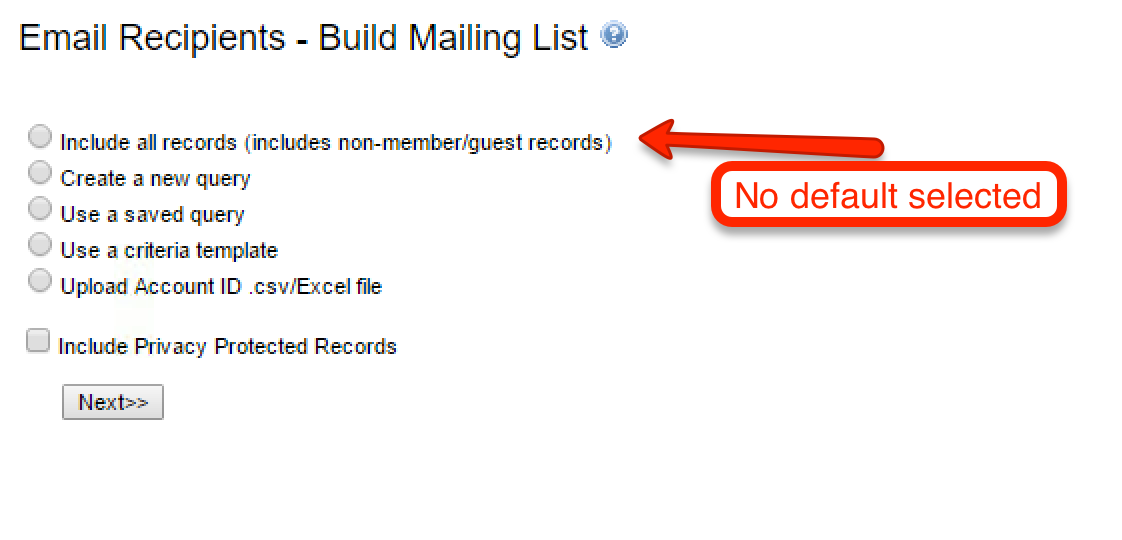
Data Viewer No longer Auto-selects Everyone by Default
Data Viewer will not have a radio option selected by default. The change prevents administrators from unintentionally including every database record in a query.
 |
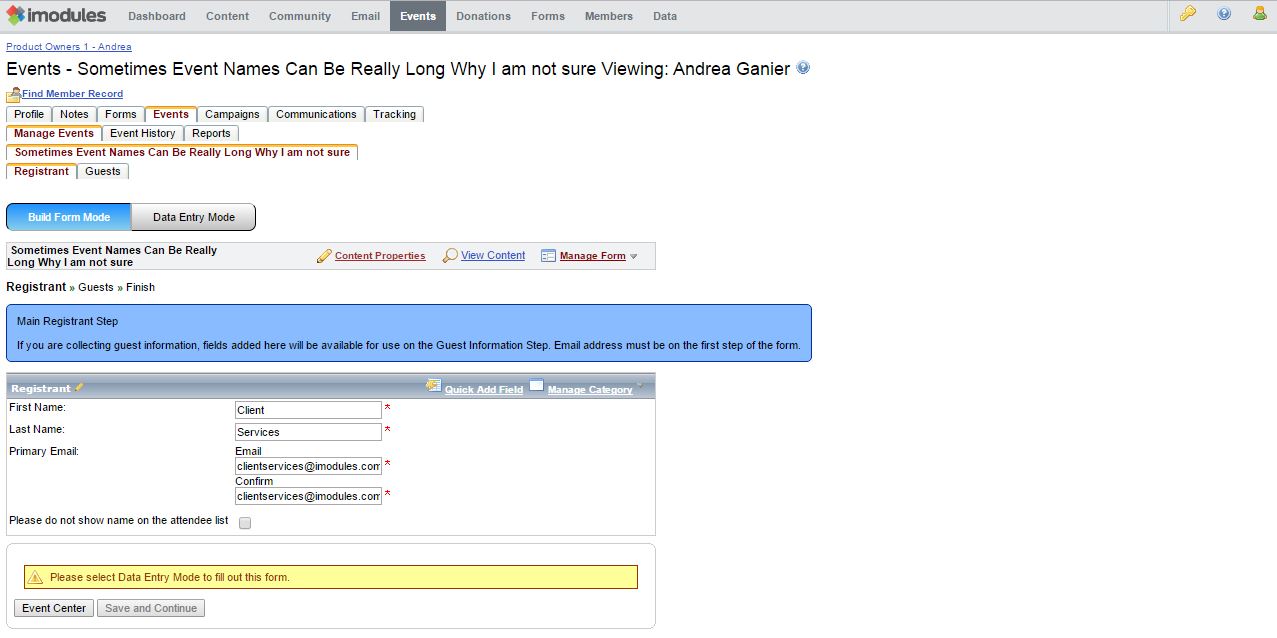
More Helpful Tab and Page Titles
To improve the user experience, we've the revised the text of breadcrumb navigation and tab titles across the administrative tool set.
Before
 |
After
 |
Defect Corrections
The following issues have been resolved
Administrative Dashboard
ENC-1782 ensures iModules articles drop off the dashboard when the display date range has ended.
Administrative Rights
ENC-27919 addresses inability of credentialed administrators to edit event listings.
Authentication
ENC-26334 corrects issue preventing constituents from authenticating with yahoo credentials.
CMS
ENC-27484 resolves an issue with hyperlinking that caused class notes and job posting module links in emails to direct to the homepage instead of the intended destination.
ENC-27405 addresses issue with hyperlinking that caused event module hyperlinks to white screen instead of directing to the event details
ENC-27817 ensures that individuals who attempt to visit deactivated event forms, donation forms, membership forms are redirected to detail page content instead of a blank page.
Email (Field Tokens)
ENC-22445 restores population of the preferred first name field token for upcoming charge emails sent to constituents in advance of recurring transaction processing.
ENC-23160 ensures the first name token in member support emails is replaced with the first name value not the community name value.
Events
ENC-25181 removes the legacy event guest name column from being visible on attendee lists.
Online Giving
ENC-21760 prevents the "bledit" query string parameter from loading designations belonging to a different sub-community than where the form is hosted.
Reporting
ENC-26953 corrects designation report date filter to utilize the same date time stamp as the donations report (transaction date vs. designation selection date). The issue was encountered on transactions where the form was started, abandoned and then completed on a separate calendar day from start.
ENC-27363, ENC-27761, and ENC-27762 ensure that incomplete submissions are included in and export when an administrator selects the incomplete submission checkbox.
ENC-24997 solves an issue where reusable instances fields would not return on reconciliation reports if the transaction date was not included as an export field.
Security
ENC-27600 re-enforces strong password requirements for administrators who only have content editing rights (CMS Admin).
ENC-27689 removes support for legacy encryption methods for passwords created over five years ago that have not been modified since.
Release Notes - April 10, 2017
Product Functionality
Reporting-only Admin Rights
As part of a series of usability enhancements, reporting-only admin rights will be able to be assigned to admins starting on April 10th. These rights will be for reporting in Giving/Campaigns, Events, Forms, and Membership.
Campaigns Reporting Admin will see the following options in the Donations menu:
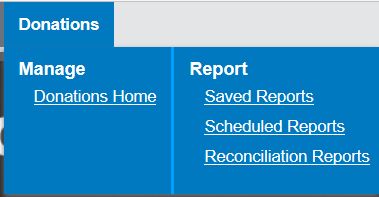 |
From the admin view, this admin will see the campaigns with the reporting icon as well as the tabs to access Saved and Scheduled Reports as well as Reconciliation Reports.
 |
Events Reporting Admin will see the following options in the Events menu:
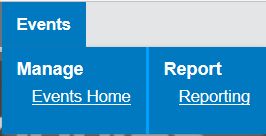 |
From the admin view, this admin will see the events with the reporting option in the gear menu as well as the Reports tab.
 |
Forms Reporting Admin will see the following options in the Forms menu:
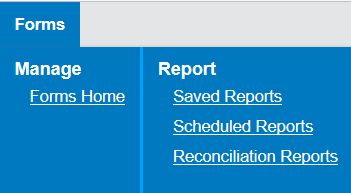 |
From the admin view, this admin will see the forms with the reporting icon as well as the tabs to access Saved and Scheduled Reports as well as Reconciliation Reports.
 |
Membership Reporting Admin will see the following options in the Forms menu:
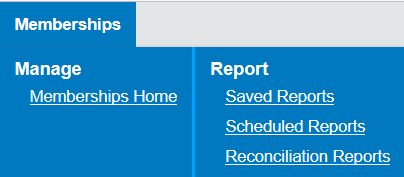 |
From the admin view, this admin will see the membership forms with the reporting icon as well as the tabs to access Saved and Scheduled Reports as well as Reconciliation Reports.
 |
Release Notes - March 13, 2017
Defect Corrections
The following issues have been resolved
ADMINISTRATIVE RIGHTS
ENC-27105 removes the modify query icon from the reporting workflow for administrators who do not have adequate permissions to change queries. Previously, clicking modify query led some administrators to an error screen.
CONTENT MANAGEMENT
ENC-27216 fixes broken URLs in situations where an admin built hyperlinking on a form via a rich text block. fixes the issue.
EMAIL MARKETING REPORTING
ENC-22326 restored functionality to "view content" links in email reporting.
EVENTS
ENC-27111 resolved white screen error found when a user attempts to edit a guest's registration from a confirmation email hyperlink.
FIRST TIME LOGIN
ENC-27161 fixes an issue where non-member records and/or deleted records were showing up in first time login searches.
Point to Point Encryption (P2PE)
ENC-27104 ensures P2PE can be used with thenew scheduled payments UI
REPORTING
ENC-2191 prevents administrators from being directed to an outdated reporting UI when modifying or creating a reconciliation report.
ENC-27112
With ENC-14905, clients should expect to see the row in reporting that match the date range during which a user elected to start the form.
Note: 'Date Added" can be problematic to export results on as it tends to record the date where the record is first added to the table. For reconciliation reports, we recommend choosing range based on transaction date.
NOTE: Two follow-up tickets cover two scenarios that remain problematic in spite of the defect resolution:
*A way for admins to target authenticated users who did not complete the form (Events, Membership and Giving) ENC-27023
*Including form completed dates to accurately export and derive metrics off of the export. (Membership and Giving) ENC-27024
Release Notes - February 27, 2017
Product Functionality
Event Audit/Transactional Report
A completely revamped new audit detail export of all the registrant activity that displays edits, adjustments, and additions behind each primary and guest registration will be available February 27, 2017.
Where can I access the Audit/Transactional Export?
From Events --> Reports you can access the 'Create New Export' button under the Optimized Report heading. From the new window you can select an additional Custom Event Data Export type called Audit/Transactional Export once the flag[EnableAuditEventExport] has been enabled.
Will I be able to Configure Data by defining an Export Type (i.e. Specific Activities, Main Event, Event data with all related activities...)
This export type by design will pull all event data with all related activities (if applicable) and categories. Report will also be supplied with canned fields at the beginning of file: Const ID, Member ID, First Name, Last Name, Action Date, Registration Count, Registered By, Order Total, Email Address.
What is the Action Date column and what does it track?
Action Date will date stamp when the action for that row occurred. If a constituent registers on 1/3/16 and later changes their registration on 1/4/16, each row will give you the details that occurred on those respective dates. This feature is great for admins who want to track when an influx of registrations came in or if multiple people canceled on a certain date - admins can tie it back to what may have triggered the action.
Will this report show the user/admin who adjusted/submitted a registration?
This report is designed to show you any user (constituent, admin) who submitted or changed an existing registration; however, this feature is only meant to track things moving forward from when the flag is enabled. Pulling a report today will not have data populated in the new "Updated By" column.
 |
What column can I use to group submissions together?
If an admin adjusts a record, the 'registered by' column will be blank for that row as it does not apply in that scenario. For grouping purposes, admins can use the 'Submission ID' column for a unique ID that groups all registrations/edits that were done for that party.
What is the purpose of the Submission History ID?
The 'Submission History ID' column's intended purpose is to provide the same ID for records submitted together while registering. This can allow for easy grouping as well as provide great metrics on when people may have registered for certain things since date stamps are provided for each action. Each new submission will have contain a shared ID value for that party.
What is the purpose of the Adjustment ID?
Adjustment ID column will display a unique ID for each adjustment for admins who want to mark off line by line, or is a great way to report progress that they have processed adjustment ID 1614-1700, for example.
What happens to the export output when I merge a guest/non-member record with their constituent record?
This row will now contain a value for Constituent ID (Client's Primary Key) and member ID will change but their registration details will remain the same.
Can I add additional member fields or change the sort order of them in my export?
If you would like the field to be available on your export, you will need to add those respective fields to the event form. Once added (in Admin or Constituent facing categories) it will then be available in your export. Field order is determined and follows the order in which they display on your form... from start to finish.
When applying a date filter on when users submitted the form, which rows should I expect to see?
The export will provide any rows with the action date that met your date range criteria regardless if the row is a registration, adjustment, etc. If the row reported has an associated (debit or credit), it will pull in that row in this file in order to properly reconcile despite being out of the date range you indicated. Below we applied a date range of 11/16 through 11/18:
|
(Even though Omar registered on 11/17 and canceled on 2/8, both transactions will display for Audit purposes so you never have to chase down when associated rows may have occurred.)
Release Notes - February 13, 2017
Defect Corrections
The following issues have been resolved
BETA TEMPLATE EDITOR
The beta template editor image library is sub-community specific instead of always referencing the image library of the parent sub-community (GID 1). ENC-26828
CONTENT MANAGEMENT
Within the sitemap, administrators can no longer select "Page exists in all communities" for the [STARTPAGE] AND [HOMEPAGE] because doing so can break authentication for sub-communities. ENC-25405
Restored visibility to the pencil edit icon for legacy html content blocks when not in a roll over state. ENC-19917
DATA MANAGEMENT
When a constituent updates a previously invalidated email, that profile change is included in "updated record" exports. ENC-26299
DIRECTORY SEARCH
Checkbox and drop down fields now show the display value instead of the database value. ENC-24977
Directory search results display populated values to un-authenticated visitors instead of token placeholders. ENC-26896
E COMMERCE
For clients using the PayPal Payflow Pro gateway, the Encompass customer transaction number field is now populated with the PPRef value from Paypal. ENC-26643
Withdrew a subset of ENC-25894 that caused white screens in intermittent error scenarios. ENC-26798. ENC-25894 corrected recurring billing failures for some membership and giving form transactions.
EVENTS
When the authenticated user is not an administrator, a confirmation email is always sent. The fix resolves a unique use case where a registrant uses multiple browser sessions to complete an event form and the system failed to send a confirmation email. ENC-25557
Restored the ability to toggle to data entry mode for sites whose homepages don't support cookies ENC-26618.
EVENT REPORTING
Scheduled exports show the correct start and end dates regardless of a local computer specific timezone setting or the site's timezone setting. ENC-14194
GIVING
Prior to this fix, failure to select a default gateway for a site prevented the creation of specific form types for which a default gateway had been selected ENC-26701. Administrators will not be able to add scheduled or perpetual payments functionality to Campaigns and Membership forms without a payment gateway enabled. Follow up work will be required to improve error handling in scenarios where transactions are submitted against a form with no payment gateway configured.
P2PE
Corrected issue that prevented administrators using P2PE with Cybersource SOAP gateway from updating constituent credit cards ENC-26934
PERFORMANCE
Improved query processing time by an average of fifty milliseconds per profile update action. ENC-26699
Improved speed for import processing by optimizing member field history creation. ENC-2674
SOCIAL MEDIA INTEGRATION
Open graph images and descriptions populate from pages on any template type, not just "social" templates. ENC-9837
Release Notes - January 31, 2017
Product Functionality
Scheduled Payment UI Change
If the scheduled payments option is enabled on your giving or membership forms, you are most likely used to constituents having to indicate their total payment breakdown less one. We understand this can cause confusion among various users and have incorporated a new flow for this option that allows a more intuitive and user friendly breakdown of their gift/membership to your organization.
On January 31, 2017 the scheduled payment option (not perpetual) will change to allow a constituent to indicate the total number of payments they intend to break their payment into. As seen in the giving screenshot below a donor will receive a clear breakdown of payments remaining as well as the amount that is due today.
Check out our friends at Fordham University who are one of the first adopters on this new UI change!
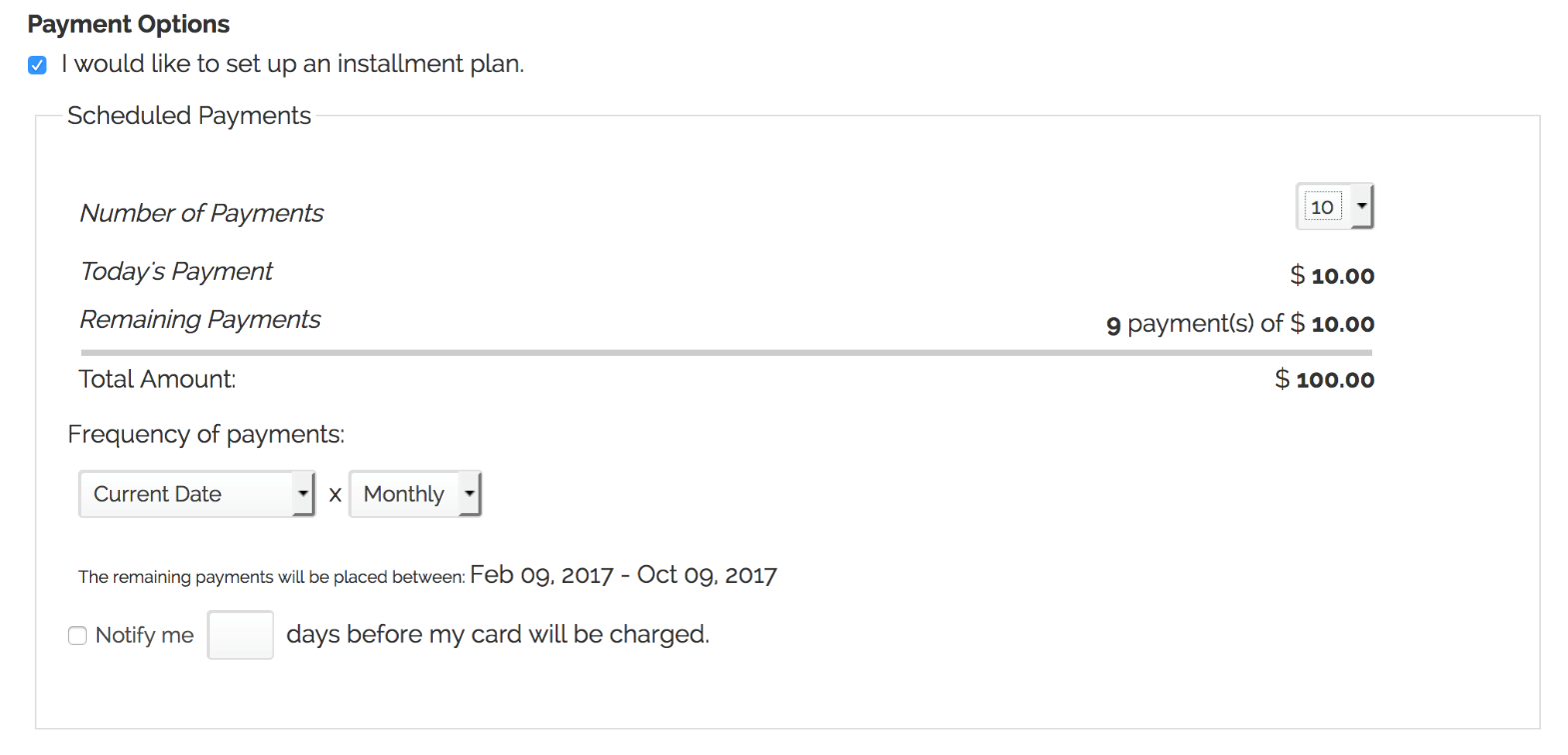 |
As well as our friends at Purdue who are using a new UI flow on their membership forms.
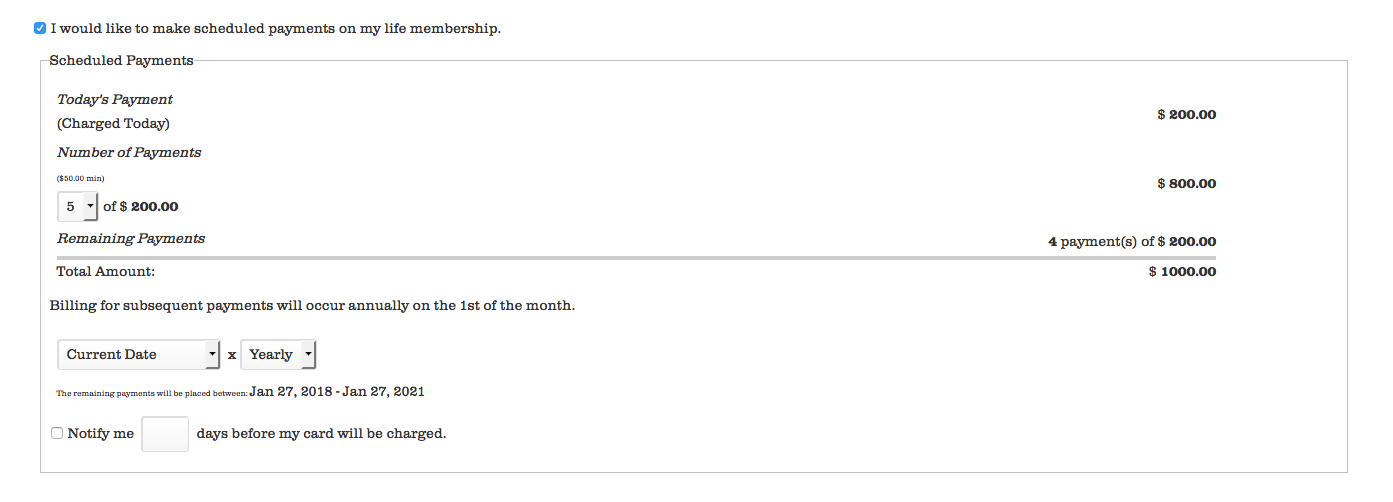 |
NOTE: On January 31st the UI will change for all Giving and Membership instances of scheduled payments site wide. This change will still function as expected for clients who have a defined first payment of X set up for these forms or use Promo codes for Membership. Also, if you have current styling on your form you should not experience any disruption with the design on your form.
Checkbox Export Ignores Custom Values
Effective January 31, 2017, the export will now respect the field setting through which a client specifies the desired export value (can be 0/1, true/false, or yes/no). Currently there may be some clients who expect the ignored format that currently display as True/False. Organizations with scripts that process scheduled exports should address their process of correcting these incorrect values or enlist in support from iModules to help remedy prior to the January 31st launch of this item. This defect can be further referenced with ticket ENC-25033.
Release Notes - January 4, 2017
Defect Corrections
The following issues have been resolved
BETA TEMPLATE EDITOR
Email Authors can see and use the Beta Template Editor. ENC-26661
BROWSER COMPATIBILITY
Resolved JavaScript errors that caused display issues for Internet Explorer 10 and below. ENC-26510
CAMPAIGNS
Campaign Admins will again receive Recurring Billing Payment Failure emails. ENC-26607
MEMBER MERGE
Resolved foreign key errors which caused member merges (initiated through imports or web service calls) to have inaccurate time stamp and attribution. ENC-26001
EVENTS
Restored auto updating of the events grid. ENC-26308
Form and display audience will automatically be re-set to "everyone" and "allow unregistered users to access form" when ICP is enabled. ENC-26440
PERFORMANCE
Re-wrote SQL statements to improve execution speed and site performance. ENC-26699
Reduced the request size associated with loading designations on a giving form. ENC-26581
Incremental improvement to the efficiency of role queries on forms. ENC-26605