2019 - Product Releases
Release Notes: December 9, 2019
Please note that product releases are scheduled as followed by environment: Australian = Tuesday morning | Canadian = Tuesday evening | U.S. = Tuesday evening
Product Enhancements
Encompass Decision Analytics
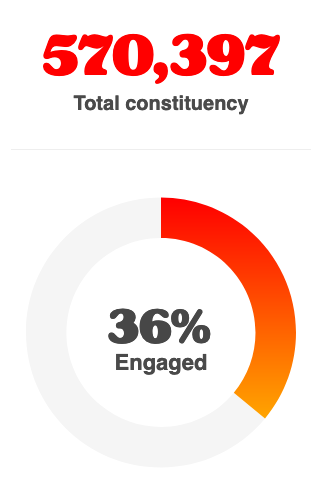
Welcome a new addition to the Encompass family! For the first time you will be able to see how constituents are engaging across all facets of the platform. For enterprise sites, we will be calculating all GID activity within that GID.... this means you can measure sub activity! Located in the main nav and available to Super Admins under Decision Analytics. Now let's get down to the fun stuff!
Total engagement % is the cat's meow.
 |
In addition to overall calculations, we will be scoring various engagement dimensions (Events, Giving, Membership, and Online Usage) from July 1, 2018 through June 30, 2019. We have not forgotten about Email which we know is a BIG contributor to your metrics. Never fear... Email will be added early in Q1 to both the dimension and overall engagement.
The Engagement Metrics Dashboard enables you and your staff to gain greater insights in certain segments via the class year drop down which also includes an option to score engagement across All Records (including non-members) and Missing Class Year Value records. Be sure to dive into those class year records where you may already have a gut feeling on how engaged these constituents are.
aaaaannd that is the cat's pajamas.
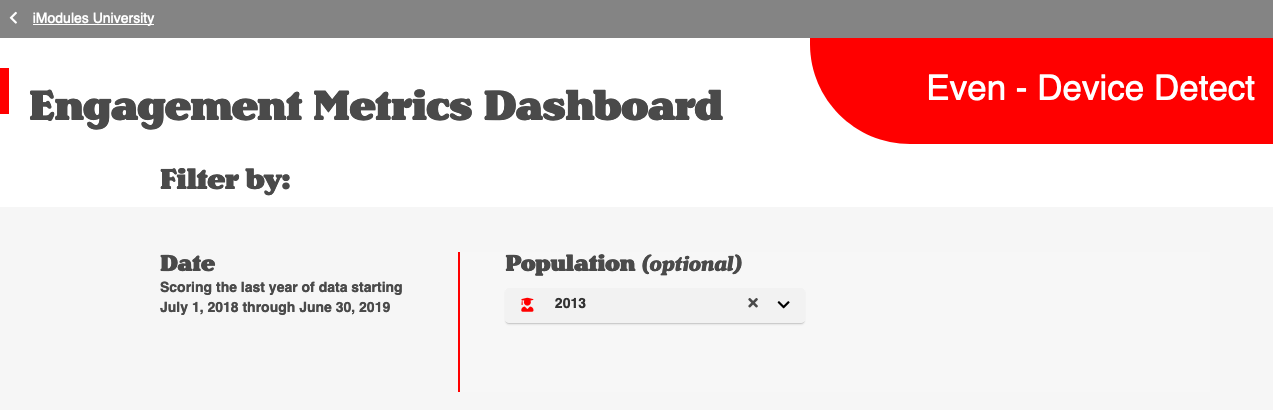
These scores are calculated based off the existing population engaged versus not engaged. The following dimensions are tracking these actions.
Emails: Email engagement is calculated based off of opens during the specified time frame. (Joining the dashboard in early Q1)
Events: Event engagement is calculated off of registrations made during the specified time frame. If registration for the record is changed to false, they will no longer be counted as engaged.
Giving: Giving engagement is calculated based off of gifts made during the specified time frame.
Membership: Membership engagement is calculated based off of any "current" memberships during the specified time frame.
Online Usage: Online engagement is calculated based off logins, pre-pop, and profile updates made during the specified time frame. Please note, we will be adding general form submissions to this calculation in an upcoming release.
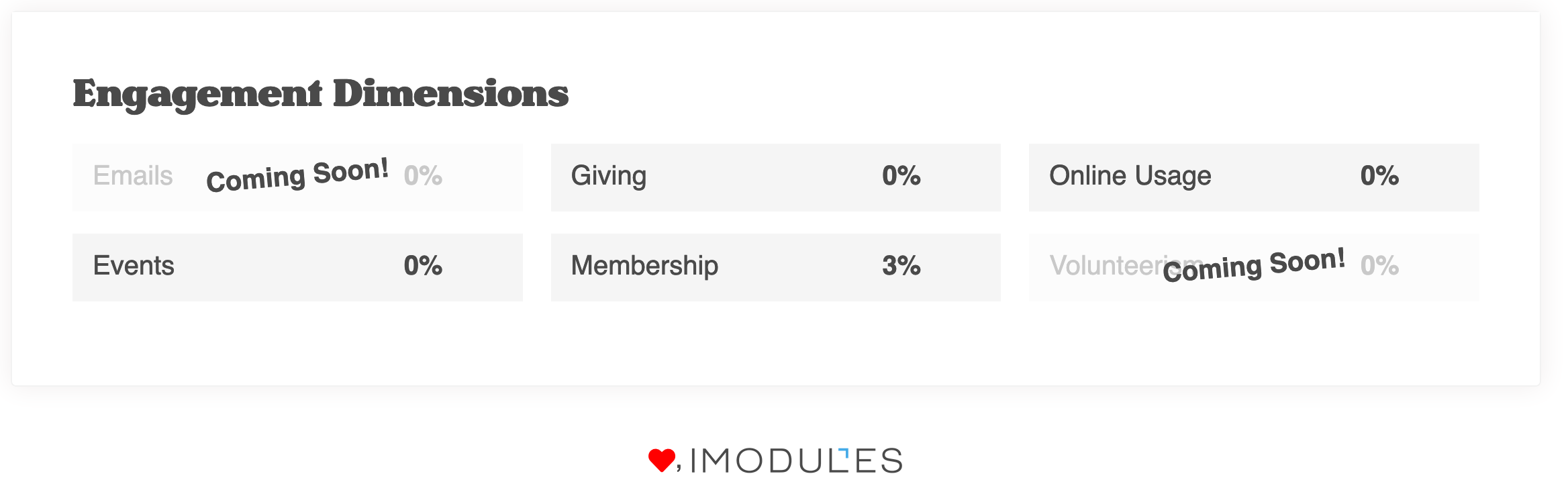
NOTE: We have excluded admin records for the following Dimensions - Events, Giving, Membership, and Online Usage.
We're excited to see how you use the Engagement Metrics Dashboard! annnd GO!
Email Reporting
Email data will be available for 550 days (18 months). This includes the results on the All Email page and drilldown metrics. A dynamic date has also been added allowing users to easily see the earliest date available in reporting. This will display in the blue help box at the top. 
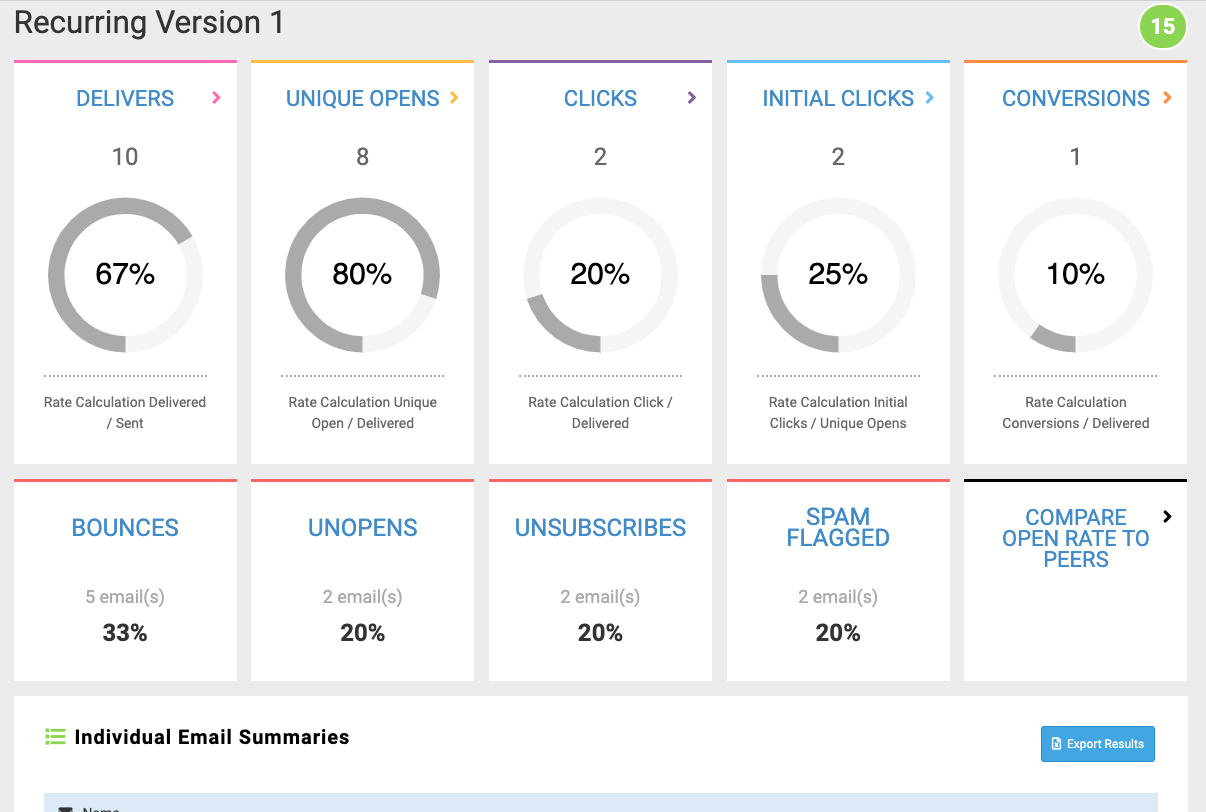
Segmented campaigns with recurring sends are now rolled up by version to allow you to see the total performance of those versions within the campaign. A rollup of all versions will display at the campaign performance page
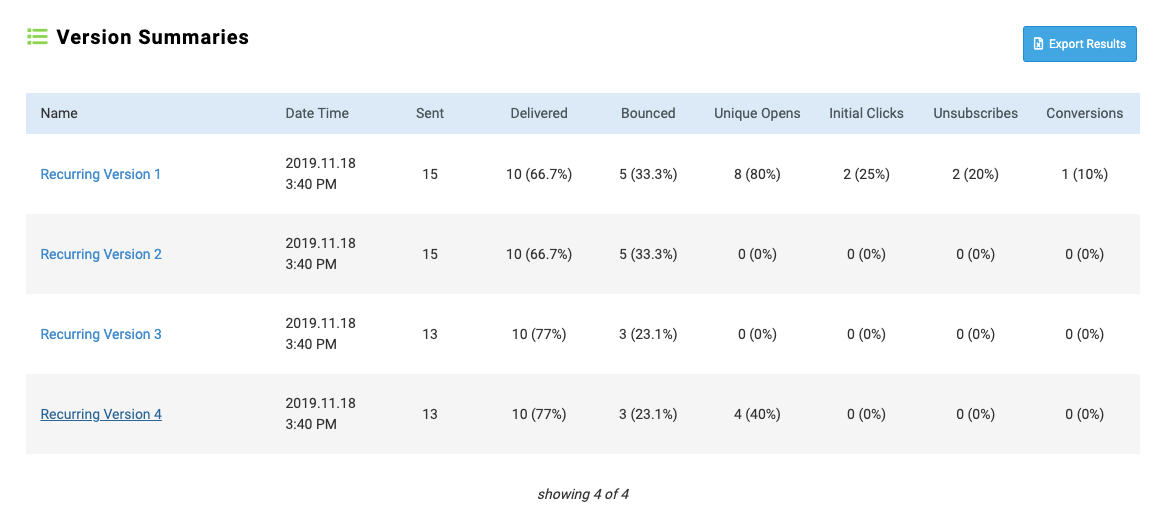 |
A new rollup page showing the metrics for each individual send of the version is now available by clicking on the version under the Version Summaries table.
 |
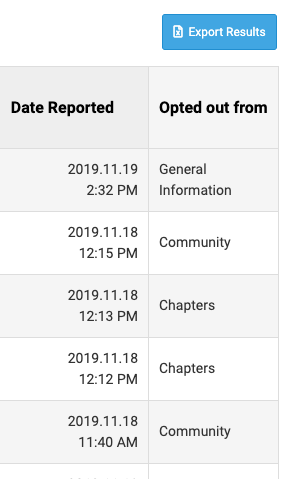
To help make it easier to view the unsubscribe action taken by a recipient, we have consolidated the Opt-Out Type and Category columns into one "Opted Out Of" column. This should make it easier to see whether a recipient opted out of the community or out of a specific category.
Email Marketing
 |
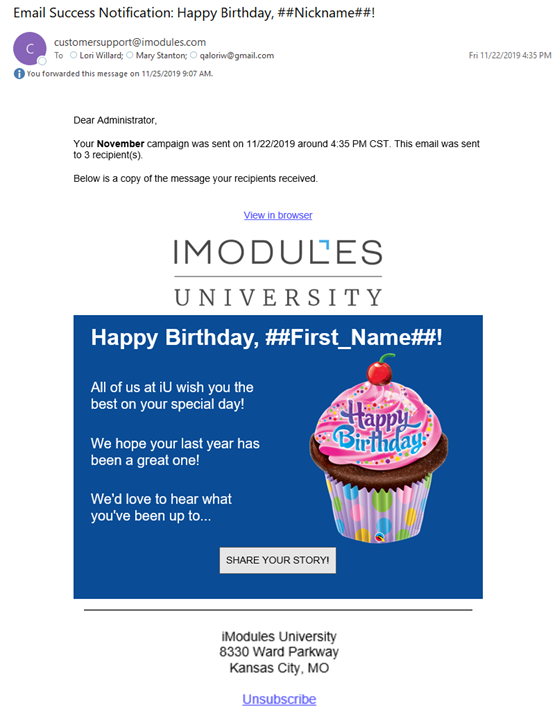
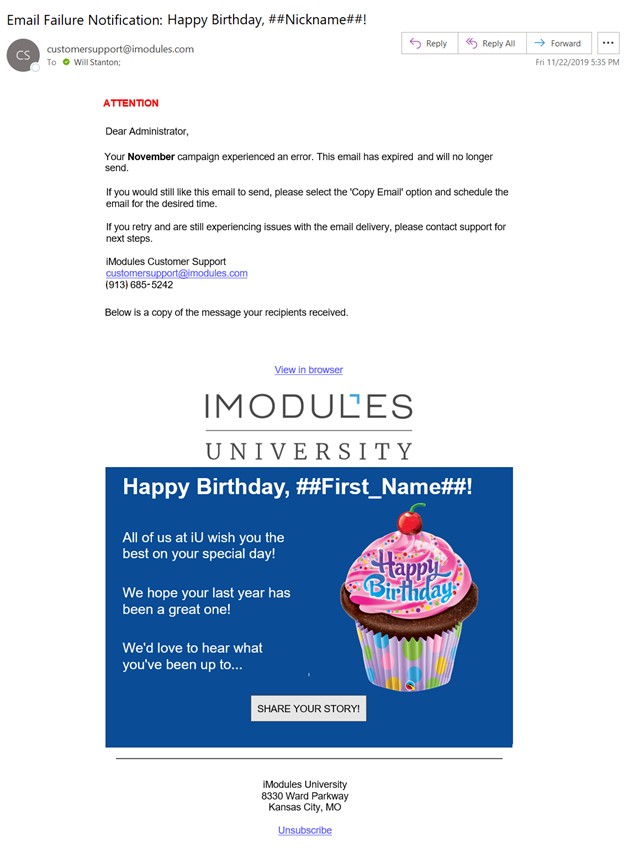
The Notification Email option allows you to have specific email addresses receive a notification email on the successful or unsuccessful send of an email marketing communication. This is available at the global level for the community. Note: The ability to identify per message will be available in a future release.
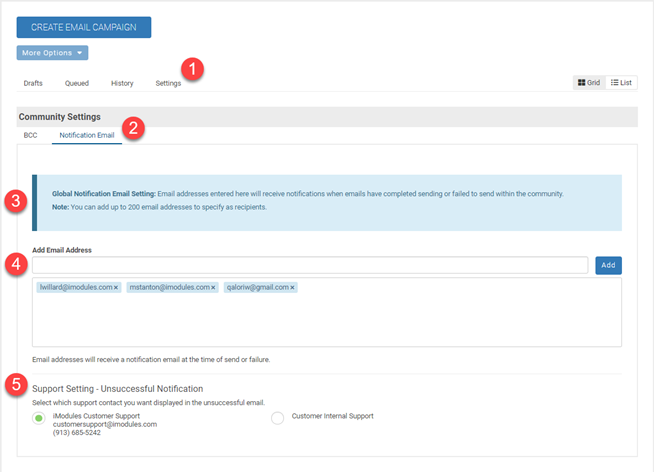
In order to set up this feature, go to Email Home > Settings Tab > Notification Email Tab.
Email addresses entered here will receive notifications when emails have completed sending or failed to send within the community.
You can add up to 200 email addresses to specify as recipients.
You add multiple emails at one time if they are separated by commas.
Support Setting - when the notification email is sent due to an unsuccessful send, you can set the support contact you want to include in your email.
Successful Email Notification
Unsuccessful Email Notification
Document Manager is now available in the Email and Template Editors. You can find this feature on the Text Editor tool bar.
In order to insert a link to a document
Place your cursor in the text element where you would like to insert the link (Do not highlight text)
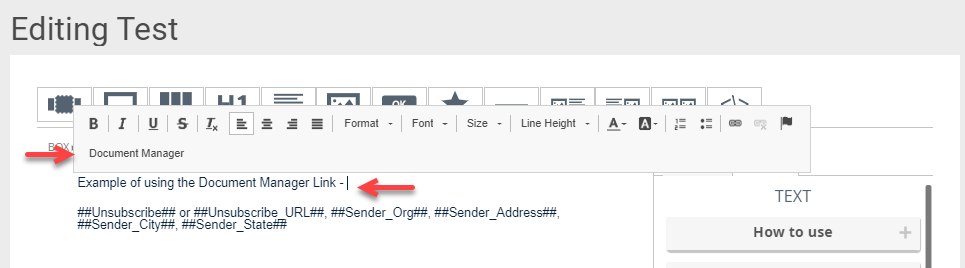
Select Document Manager
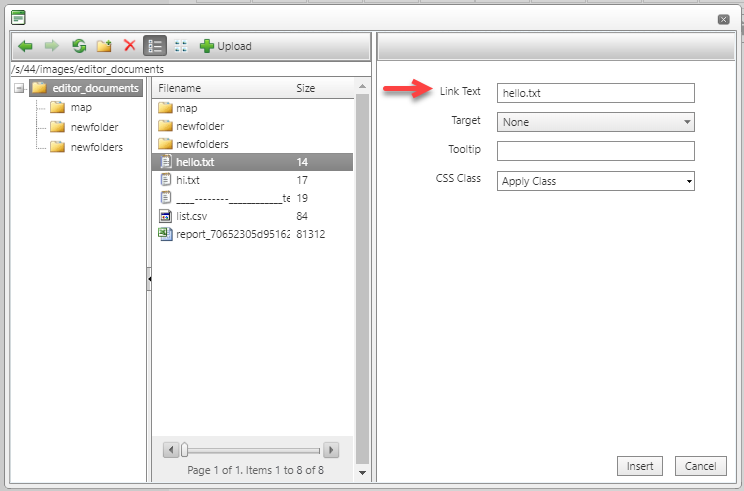
Select the file you wish to link (Note: The filename will display as the link name)
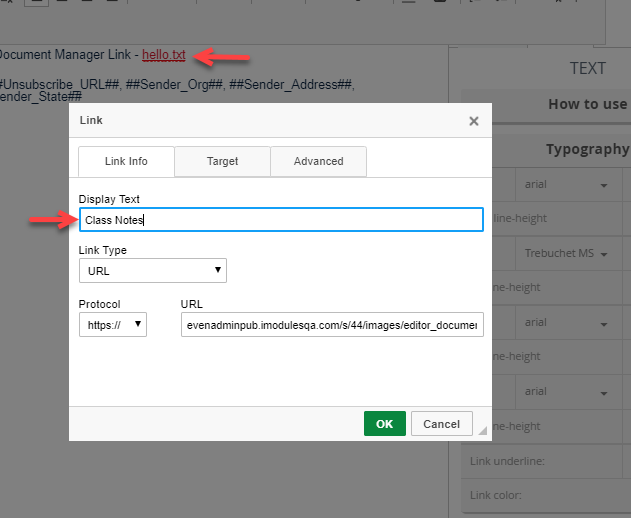
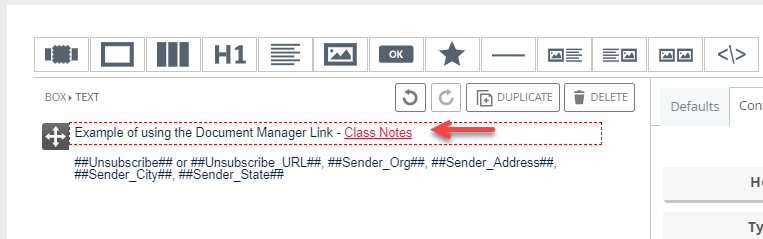
To rename the link:
Type the new name in the "Link Text" in the document manager or
If you selected insert you can right click on the link and select "Edit Link"
Encompass
Adjusted the css on the profile page so that the colors are within the specified contrast range for WCAG (4.5:1)
Added validators to show error messages at the field level and not just aggregate at the top of a page.
New designation view created to comply with WCAG standards:
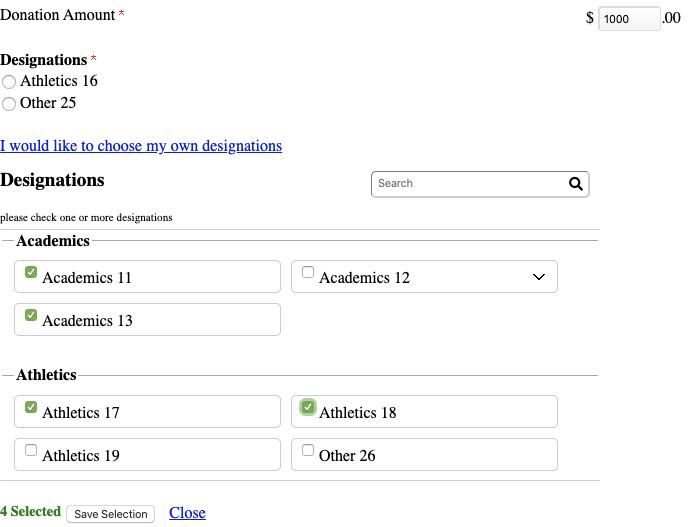 |
Designations no longer appear in a pop-up modal
"View All funds" option is now a link as opposed to a radio button
Designations open at bottom of section, not in pop-up modal
All other behavior remains the same as before
Please note if you wish to switch to this new Designations view then please reach out to your CSM to get more information.
If you would like to receive a copy of our VPAT document then please reach out to your CSM and one can be provided.
Scoreboards
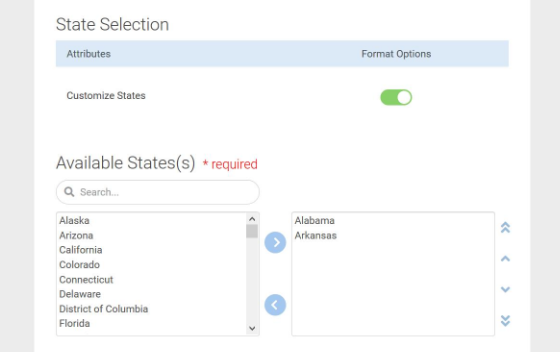
Improvement for the map where you can select specific states to display versus the entire country. Have fun challenging different states to a friendly competition to get filled in by all of your constituents.
Great for customers who predominately have constituents living in certain states of the country. This change is for the US Map.
Defects
Email Marketing
Fixed the issue where updating email details should not change already sent emails. (ENC-37467)
Fixed the issue where Hyperlinks with the special characters of #, / and [ ] were being URL encoded. (ENC-35996)
Fixed the issue where hitting enter when renaming a segmented campaign adds <br> tag. (ENC-35996)
Email Reporting
Updated Cross Email Metric rate calculations to display as a total percent vs. displaying average percentages. (ENC-38817)
Updated recently deployed export with missing columns (ENC-38692).
Fixed an issue with the Screenshot Camera icon where it wasn't capturing images. Note: This technology is not compatible with Internet Explorer or Microsoft Edge. (ENC-38673)
Encompass
Fixed an issue where hitting enter on any step of a billing form would disable buttons. You will now see a page reload THEN it will advance to the next step or submit transaction depending where you are at on the form. (ENC-38800)
Release Notes: November 4, 2019
Please note that product releases are scheduled as followed by environment: Australian = Tuesday morning | Canadian = Tuesday evening | U.S. = Tuesday evening
Product Enhancements
Email Reporting
We are now calculating unique unsubscribes to show a more accurate unsubscribe rate for campaigns. This new metric will provide the total unsubscribes by unique recipient and email id. The unsubscribe rate for each message will now use the unique unsubscribes metric to calculate as well. Note: On the All Negative Outcomes Unsubscribe a recipient could be counted twice in the unique count if they unsubscribed from multiple emails.
We have removed the Tags and Derived Category fields from the email details within reporting. These fields did not have data tied to them at the present time. We have also renamed the unsubscribe category field to subscription category to align with the rest of email reporting.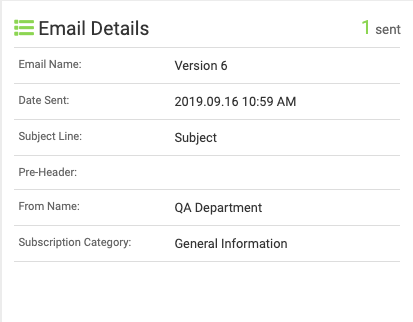
Email Marketing
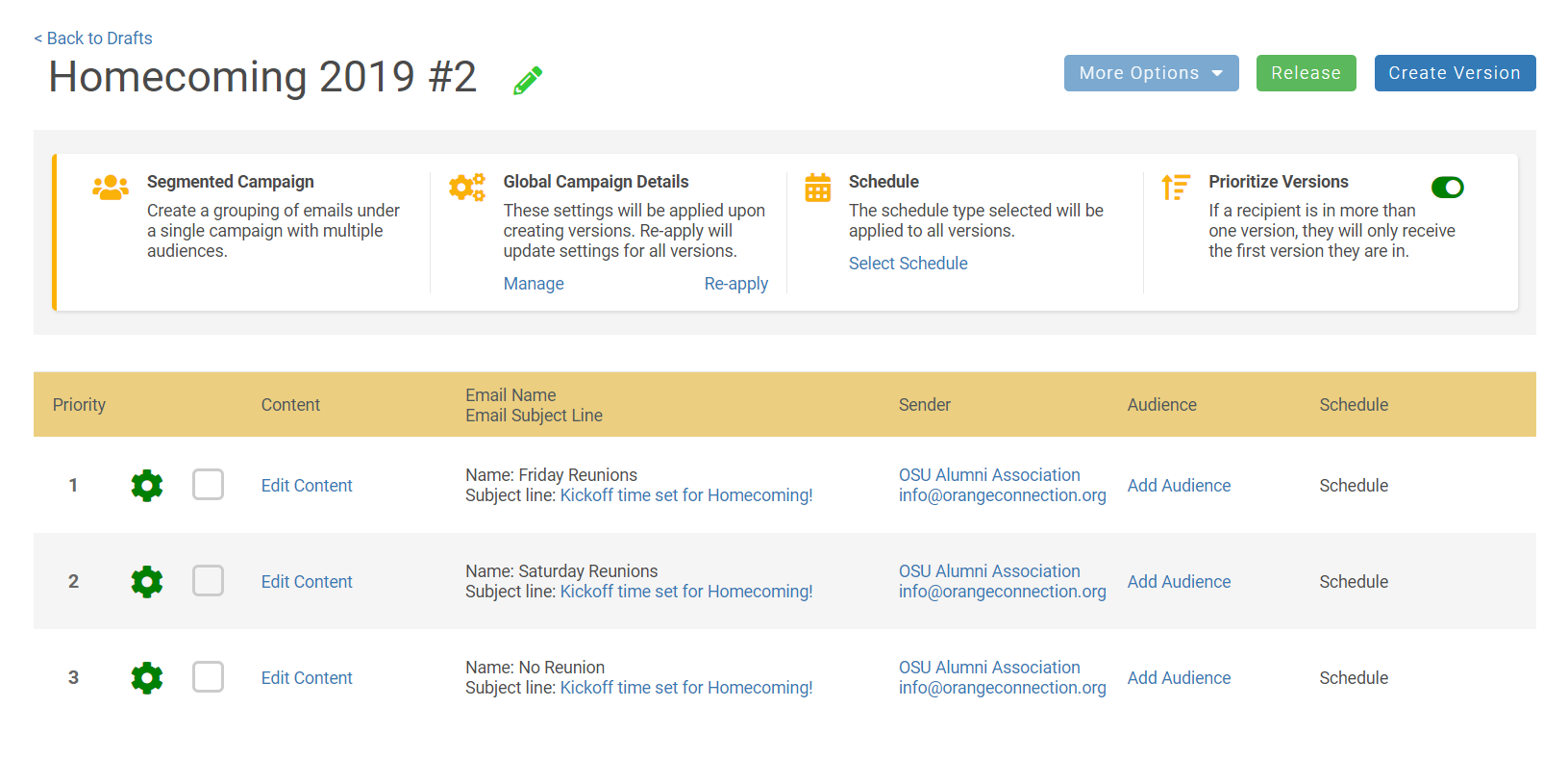
Segmented email campaigns empower you with the tools to increase engagement with your alumni an supporters by building communications that are customized to target specific audiences.
Segmented emails allow you to quickly create various versions of an email within the same campaign. this allows you to change different variables in each version, like audience, content, or subject lines, to personalize the constituent experience and encourage continued engagement. Plus, all communications within the respective campaign will rollup into the same report.
To learn more about this exciting new enhancement to email click here to check out our training sessions available to you and your staff https://clients.imodules.com/segmentedcampaigns
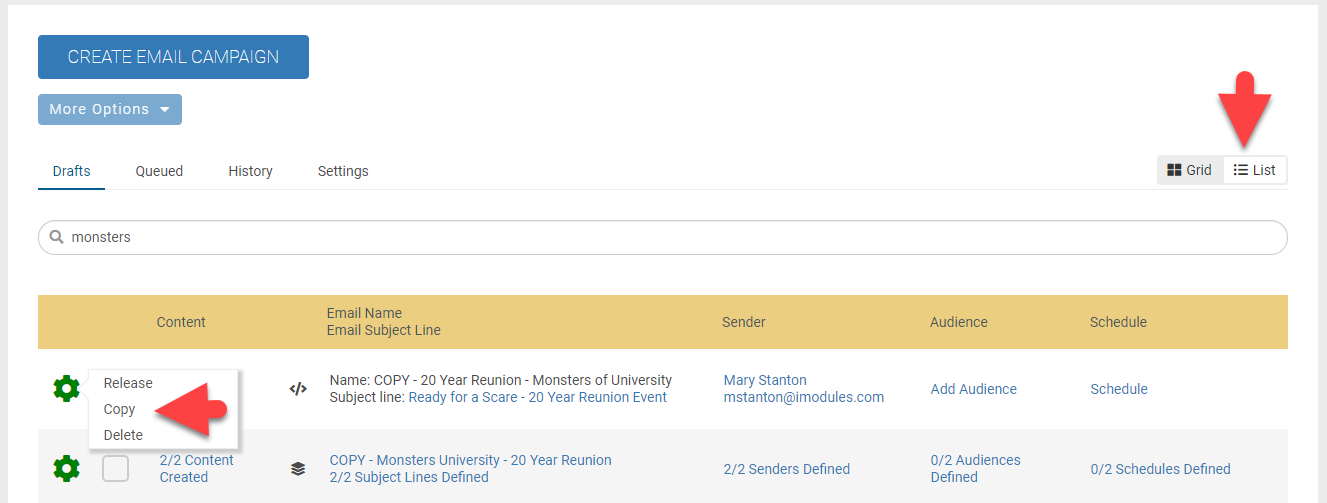
You can now copy an email campaign directly from the gear icon without selecting the More Options menu. This option is available while viewing your drafts in List View from Email Home.
Encompass
Moved required field asterisk after the labels on all billing pages, including scheduled and perpetual payment labels
Added the ability to tab to and hit enter on step name to open/close the accordion within a profile
Added Alt-text (album name) to photo album image
Added alt-text (image name) on images within an album
Added aria-role="alert" to the warning message elements within the new designation modal. This allows screen readers to be made aware that there is an error when the combination of a designation percentage does not equal 100%.
Scoreboards
Improvement for the map where you can select specific states to display versus the entire country. Have fun challenging different states to a friendly competition to get filled in by all of your constituents.
Great for customers who predominately have constituents living in certain states of the country. This change is for the US Map.
Defects
Encompass
Fixed an issue where scheduled reports would cause errors when an email was not entered into the FromEmail field. Defaulted FromEmail to not be blank when editing a scheduled report from on demand to scheduled (ENC-18797)
Release Notes - Hot Fixes - October 16, 2019
Please note that product releases are scheduled as followed by environment: Australian = Wednesday morning | Canadian = Wednesday evening | U.S. = Wednesday evening
Defects
Email Marketing
Email Editor - Resolved the issue where email buttons were not triggering pre-populate on events upon release. (ENC-38706)
Tokenized URLs - URLs pulled in by tokens will once again include all query string parameters when hyperlinked. (ENC-38705)
BCC - Resolved the issue where a BCC copy of an email was not always being sent. (ENC-38683)
Previews - Resolved an issue where in some cases previews were not being sent or receiving error messages. (ENC-38479)
Performance - Implemented additional performance optimization for email.
Release Notes: October 1, 2019
Please note that product releases are scheduled as followed by environment: Australian = Tuesday morning | Canadian = Tuesday evening | U.S. = Tuesday evening
Product Enhancements
Email Reporting
Easily find your recipients in the All Recipients table by searching First Name, Last Name, Email Address AND now by Constituent or Member ID. Woot woot! This should help immensely when trying to find specific member and non-member records.
NOTE: In order to improve performance and search capabilities of this grid you must type in a minimum of two characters before your search will be conducted. Also, all non alpha numeric characters will being converted to spaces unless they are recognized as part of an email address or URL (i.e. gmail.com).
At last more than five emails will display under the Recently Deployed section. Now ALL emails within the selected date range will be available with the latest 10 showing by default and users will be able to page through additional emails 10 at a time. Very cool add to reporting and thank you all for your feedback around this!
Clicks on a tokenized URL within a message will now be tracked. When admins view click activity for a campaign that includes a tokenized URL, those actions will display as a "Tokenized URL" in the Link Name and the URL column will show the full url string.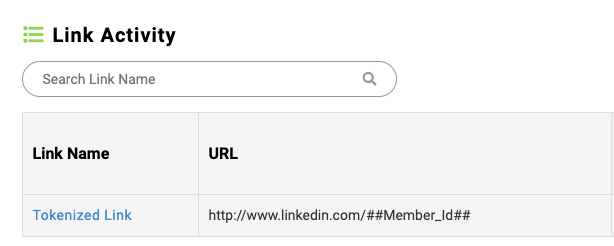
Access email metrics quicker and easier using the hyperlinks found on the Email History tab. Now admins are able to jump directly to a messages send metrics by clicking on the email name, jump to the roll up of a campaign by clicking on the campaign name hyperlink or view the recipients list by clicking on the Actual Recipient hyperlink. All three links will take admins directly to the desired metrics reducing the need to search for the campaign within Email Reporting.
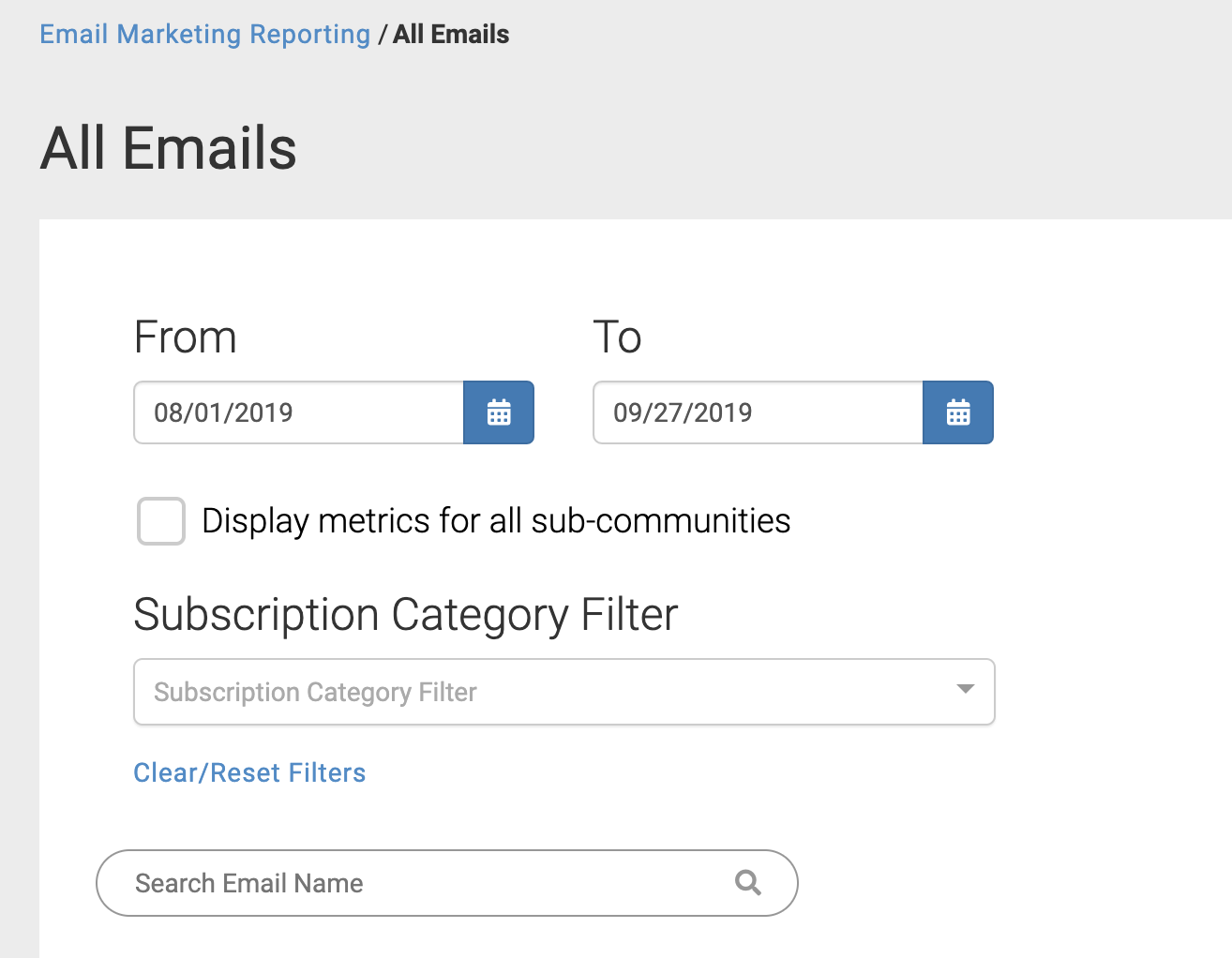
Finding a recent email campaign just became a little easier with the addition of the date range and subscription category filters and search to the all email list. Admins are now able to narrow down the email list based on a date range, the subscription category or by searching the email name. Admins at the GID 1 level will also have the option to display emails for all sub-communities in the list.
 |
Encompass
Job posting - Details page tables now have attribute = presentation
Message board - Search field now has an associated label
Classifieds - Sort by control now has appropriate alt text
Classifieds - Details page tables now have attribute = presentation
Member Photo - Details page tables now have attribute = presentation
Networking Groups - Search field now has an associated label
Networking Groups - Edit Event Start/End times now has an associated label
Profile - Link that controls profile accordion now appropriately labelled
Added ARIA labels to continue/close buttons on designations pop-up
Added a tab index to the cancel link in the designations grid
In the Profile, we added the ability to tab and hit enter on step names to open/close widgets successfully.
Image rotator content modules now have a start/stop button
Defects
Email Marketing
Resolved an issue where View in Browser link would present a very pesky object moved error. (ENC-35756)
Encompass
Fixed an issue where registrations were showing duplicates when someone edits their submission. (ENC-38193)
Updates made to connect to LinkedIn's new API. Due to the low adoption rate of the DataPull, this functionality has been removed this from the API. Moving forward, oAuth functionality will be re-established using the new API, so users can still use their LinkedIn accounts to log into Encompass, however data changes within your LinkedIn profile will not sync over to your Encompass profile. (ENC-38063)
Placeholder images are now resolved in all of the email templates where last edited = Email Team. Enjoy beautiful images of people, puppies and places and since we took a gamble and serve them up from another source, be sure to tell us if this was a bad, bad, baaaaad idea! (ENC-37185)
Release Notes - September 3, 2019
Please note that product releases are scheduled as followed by environment: Australian = Tuesday morning | Canadian = Tuesday evening | U.S. = Tuesday evening
Product Enhancements
Email Reporting
Enjoy your new statistics in Email Reporting Home. We have removed all median metrics and replaced them with new metric groups - Volume statistics (Unique Campaign Count, Total Emails Sent, Unique Recipients, Total Recipients), Email Averages (Delivery Rate, Open Rate, Click to Open Rate, Conversion Rate) and Negative Outcomes (Bounces, Spam Reports, Unopens, Unsubscribes) - which should provide a clearer picture of how your email marketing efforts are performing.
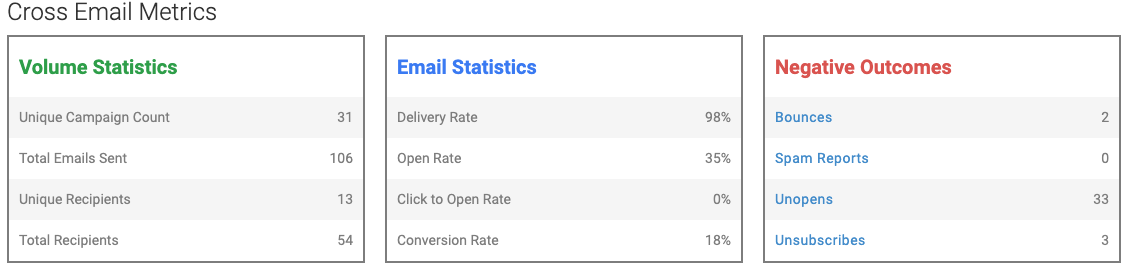
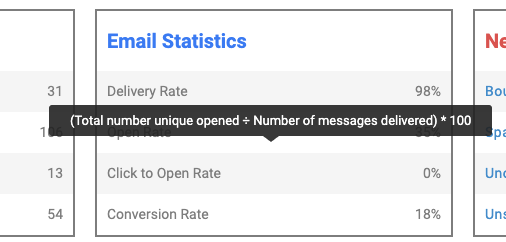
To see how the cross email metrics are calculated, simply hover over any one of the metrics and a tooltip will display with more information.
 |
A new negative outcomes section added as part of the Cross Email Metrics showing total bounces, spam reports, unopens and unsubscribes for a specified time period. The headings are hyperlinked to a negative outcomes page that will provide additional details for:
A new bounce report list was created on the negative outcomes showing a combined list of all bounces for the community. The list will display constituent name, email address, constituent id, member id, email name, bounce date, bounce type (Blocked or Bounce) and bounce reason. You can filter the list by bounce date and subscription category and search the list by email address, email name and constituent name
A new spam report list was created showing a combined list of all spam reports across the community. The list will display constituent name, email address, constituent id, member id, email name, and date reported. You can filter the list by date and subscription category and search the list by email address, email name and constituent name
A new unopened list was created showing a combined list of all unopened emails across the community. The list will display constituent name, email address, constituent id, member id, and email name. You are able to filter the list by date and subscription category and search the list by email address, email name and constituent name
A new unsubscribe list was created showing a combined list of all unsubscribes across the community. The list will display constituent name, email address, constituent id, member id, email name, date reported, opt-out type and category. You can filter the list by date and subscription category and search the list by email address, email name and constituent name
Member ID and Constituent ID columns have been added to the all recipient table. You will be able to search by email and constituent name. Additional search and filter updates for this list are coming in a future fall release.
Email Marketing
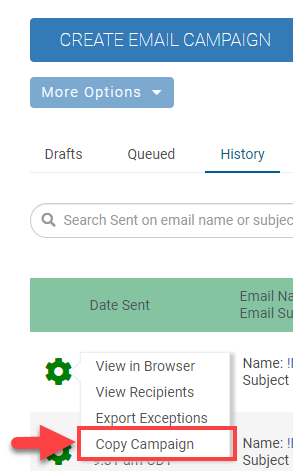
The "Copy/Reuse" option on the History Page gear icon has been renamed to "Copy Campaign.
 |
Do you ever have to search for an email after you edited the content? Search no longer. Once you exit Email Editor you will be returned to the drafts page displaying only the email you were editing. To return to the full list simply select the "Show all Drafts" button or "Drafts" link.
To see the updated workflow, watch this video.
Encompass
Updated the billing form to now require the CVV code for all initial and one-time transactions for CashNet and Payflow Pro Gateways. This code will be sent as part of all initial and one-time transactions. This security enhancement has been made with the aim of reducing fraudulent credit card transactions through our customers sites.
Note: Due to PCI compliance these codes are not stored within the database, and therefore all recurring transactions will be sent without a CVV code. Because of this, customers should not configure gateways to require the CVV code to process transactions. If this is required, only initial gift payments would process. Subsequent gift installments would fail because the CVV code wouldn’t be present. This would also be true for membership auto-renewals and perpetual gifts.
If any institutions currently collect credit card details on a paper form, please note that the CVV code will also need to be added as a required element (if not already), as this will now be needed to complete transactions.
Moved the required field asterisk inside the label of all fields. The required asterisk will no longer show up on the field control like before.
Removed the black X from modal popups (advance designations popup and gift matching popups)
Added legend to radio button and to campaign levels. The legend for the radio button series should be the label of the field. The legend for the campaign levels is "Levels"
Tables on forms now have role="presentation" attribute added to them
Added <legend> of "Designation Options" around the field set of designation radio button options
Added fieldset and legend around checkbox series options.
The title text of "Search Criteria" on the Job Search page is now set to h2, instead of just bold.
The title text of "Search Criteria" on the Class Notes page is now set to h2, instead of just bold.
If focus is on a field on the form, hitting enter will trigger appropriate onclick trigger event based on what buttons they have configured for the form (Save, Save & Continue , Submit etc). This fixed an issue where previously the mobile menu was being launched when users hit enter while an input field has focus.
Added aria-checked attribute to checkbox lists and checkboxes
Added WAI- Aria around Date Time picker.
Defects
Email Marketing
Say goodbye to the SendGrid tracking token! Do not worry... it is still there but hopefully you don't see a preview of it in your communications anymore. (ENC-37145)
Fixed an issue where the email address in Sender IDs did not allow for upper case letters and it would throw a 'Sender Email Address is invalid' error message. (ENC-38020)
Email Reporting
Fixed an issue with the back button not letting users go back more than one screen. (ENC-37069)
Fixed an issue where some email categories were returning 'file not found' errors when running the opt out report. (ENC-37972)
Encompass
Fixed an issue where running the membership recon report at GID1 and including all subs columns for the membership level, status, exp date, status, is auto renew, purchase price are blank. (ENC-37181)
Fixed an issue where "State/Province" was displaying as part of an address even when the selection was "Not in Regions Listed". If "Not in Regions Listed" is selected now, state/province is left blank. (ENC-35951)
Release Notes - August 19, 2019
Welcome New Fonts to the Email Editor
We are happy to announce the addition of the following fonts to the email editor:
Roboto
Open Sans
Oswald
Segoe (Regular and Semi-bold)
Nunito Sans
Raleway
Spectral
Montserrat
Lora
Google Sans
With the addition of these fonts we hope to allow your email designers to be more creative with their communications; however, we want to set proper expectations with using such web fonts for email.
What is a web font?
There are two different types of fonts available to email designers for their emails—web safe fonts and web fonts.
Web safe fontsArial, Times New Roman, or Georgia are examples of web safe fonts. These fonts are considered safe as they are likely to be installed on the vast majority of computers.
Web fontsExamples of web font would be Roboto or Oswald. Web fonts allow designers to use custom fonts that aren’t available as part of the default fonts for computers. These fonts will not need to be installed and where supported will get called up and loaded into the message.
Email Marketing and Web Fonts
Web fonts are not globally supported across all email clients and will use predefined fallback fonts when not available. Below are email clients where one, some, or all of the new web fonts are supported:
Apple Mail
Google Android (Google Sans and Roboto Only)
iOS Mail
Outlook for Mac
Samsung Mail (Android 8.0)
Supported Fonts Across Email Clients as of August 23, 2019 | |||||
Email Client | Google Sans | Lora | Montserrat | Nunito Sans | Open Sans |
Apple Mail | X | X | X | X | X |
Google Android | X | ||||
iOS Mail | X | X | X | X | X |
Outlook for Mac | X | X | X | X | |
Samsung Mail (Android 8.0) TBD | X | ||||
Email Client | Oswald | Raleway | Roboto | Segoe | Spectral |
Apple Mail | X | X | X | X | X |
Google Android | X | ||||
iOS Mail | X | X | X | X | X |
Outlook for Mac | X | X | X | X | |
Samsung Mail (Android 8.0) | X |
While this may not look like much, according to Litmus Email Client Market Share, many of these are in the top 10.
NOTE: If you are really concerned about custom fonts not displaying in various email clients, you can use Roboto and hit close to 90% support of the top 10 email clients. As of April 2018, two popular web fonts were added to Gmail so while other web fonts may not be supported, Roboto and Google Sans will render in Gmail.
Release Notes - August 5, 2019
Please note that product releases are scheduled as followed by environment: Australian = Monday morning | Canadian = Monday evening | U.S. = Monday evening
Product Enhancements
Email Marketing
With 75 votes and over 170 insights submitted we have brought the ability to BCC your staff and friends on email communications you send out. Including both an option to receive a BCC on release of an email as well as when the communication officially sends.
Each GID can have it's own series of emails that receive BCC on those communications. You can find this new Setting option on Email Home where you can easily manage these recipients.
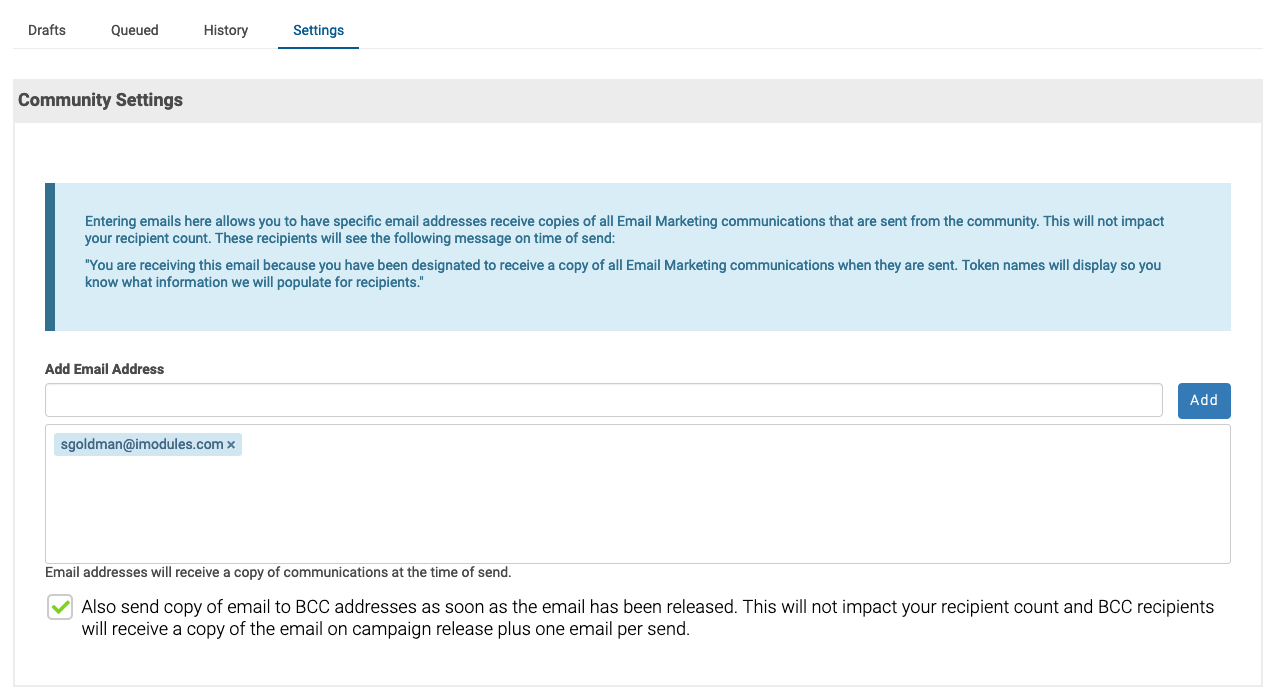
For BCC recipients a message will display at the top of the email indicating they have been designated to receive copies on release or send. Below is an example of this message:

NOTE: For sites that already had BCC recipients established, we have scripted in those same recipients for the new BCC option. This includes all GIDs in your site and we were so happy to help with this lift. Enjoy!
Email Reporting
Bounces no longer count in unopened metrics nor will these records display in the drill down. How can your constituents choose to not open these emails if they never received the email communication?
Now at GID=1 you can apply the "Display metrics for all sub-communities" checkbox to view all communications regardless of the community it was sent from. These metrics will reflect on the Opens by Device, Cross Email Metrics and allow export of these communications within the specified date range. We have also added a GID column to the end of the export where you can easily determine which sub-community the emails were sent from. Enjoy this new power at GID=1 and all the time you save by not having to pull this export in each community.
Scoreboards
We are pleased to welcome Designations to Donor Roll. Designations will automatically be brought in to display for each donor. You can customize this verbiage (i.e. Sabrina Goldman donated $50 to Athletics). Supporting multiple designations will render on their own row for each donor. We hope that you enjoy this new addition and stay tuned for followup work that will add this opt in for designations to the form. This option will not be enabled on existing donor rolls but admins can quickly change this by going into the settings.
Encompass
Yes, you read that correctly...with this release you now have the ability to regenerate confirmation emails that fail to send successfully the first time. This functionality has been added in the form of a new option in the cog on the submissions grid.
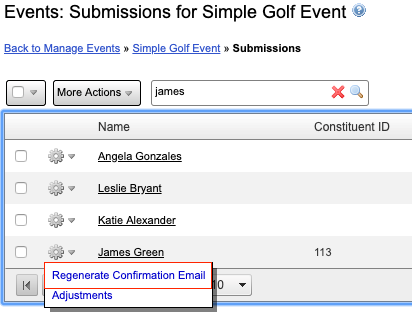
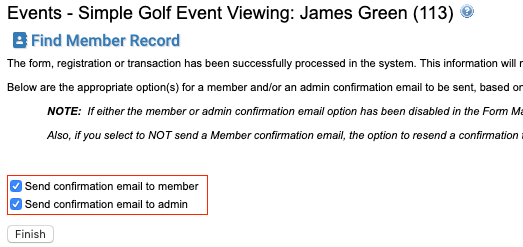
Selecting this will take you to the Final page of the submission. Here you can check the "Send confirmation Email to..." boxes and "Finish". New confirmation emails will be sent out immediately. It's as simple as that!
Over the following months we will be wrapping up our WCAG 2.0 Compliance items. With this release the following items were addressed:
Added "Remove" header to advanced designations.
Added text to legend in advanced designation Radio Button fieldset
For Class Notes, wrapped a fieldset around the date posted fields on the class notes search and added a legend.
For job postings and classifieds, "Date Posted" is marked as a legend in a fieldset, with the first text field labeled “From”
Added aria-current attribute to the currently selected navigation tab in class notes
Added alt text to profile/directory photo
Added aria-current attribute to the current page selected in the NEW directory
In Profile, step/category title now appears before the edit button for the step/category
Added javascript to add aria-checked attribute to radio button options
Defects
Email Marketing
Event feeds will now use the event start date when listed in chronological order. We were previously using the event's display date which was a big nope, nope, nope. (ENC-37592)
Our news feed recently fell in love with Lorem Ipsum and despite what articles your admins set to display for news, it would not let go of Lorem Ipsum. We recently resolved this and now your news is free to see other articles and will display the correct content. (ENC-37641)
Bye bye deferred and don't come back! The bounce report will now exclude deferred rows so that your admins can pull useful metrics without manipulating the file. (ENC-37280)
Encompass
Fixed an issue where opt out from member to member emails was opting out the sender as opposed to the recipient. (ENC-35692)
Updated iCal to recognize Australian Central Standard Time (UTC+09:30) correctly. (ENC-33078)
Fixed an issue where password reset links were sometimes using incorrect first and last names when an email was linked to multiple member records. (ENC-23138)
When adding images to the recurring billing emails, we are now resolving image paths to use the appropriate domain, which generates the image correctly upon opening. (ENC-20755)
Addressed an issue where special characters were not displaying for designations and designation descriptions in the modal window when hovering over the name. (ENC-30666)
Issue has been fixed where admins and users were unable to add values to a date field when editing a user's submission with guests. (ENC-38104)
Commerce Error Resolution
Additional logging was added around Payflow Pro timeout responses to more accurately display commerce errors. (ENC-38062)
Release Notes - July 8, 2019
Please note that product releases are scheduled as followed by environment: Australian = Monday morning | Canadian = Monday evening | U.S. = Monday evening
Product Enhancements
Email Marketing
Include comments for your staff who need to review or proof any communication you or your staff are sending.
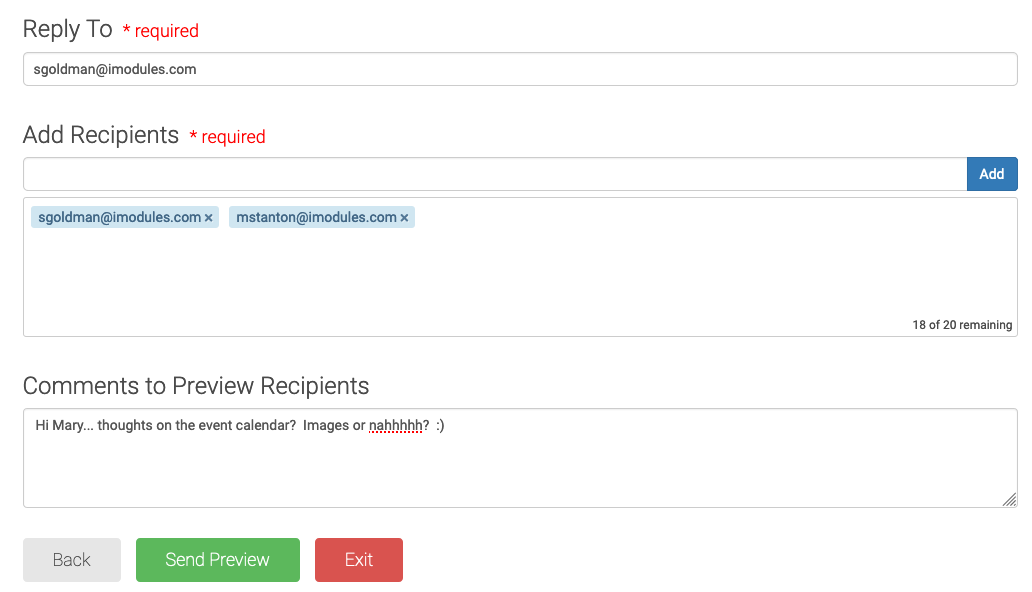 |
Certainly a welcomed addition to Email Marketing and look for this addition when sending a preview from Template Editor as well!
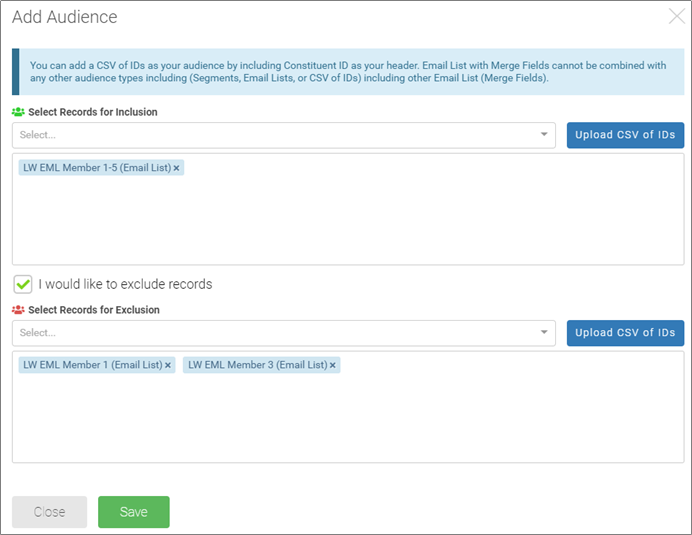
Add Audience
When selecting an audience (segment or list) in the drop down, the audience is instantly added (WHAT!)
‘Add’ button has been removed
‘Upload CSV of IDs’ button moved next to the audience record drop down
Exclusions
Narrow your audience by excluding or suppressing a specific subset of constituents from your recipient list.
Exclusion Audience Type Section will appear upon selecting the check box “I would like to exclude records”
Excludes all members with the email addresses in the list or segment when the email sends
Estimated Audience Count: At this time the estimated audience will only include audience inclusions; NOT exclusions
You cannot add the same audience to the Inclusion window AND the Exclusion window
The following are valid exclusions:
Segments
Email Lists
CSV of IDS
The following is NOT a valid exclusion:
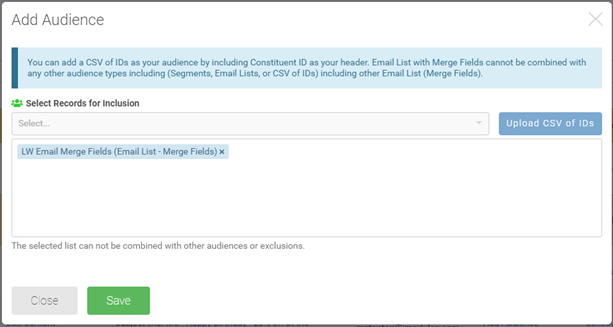
Email Lists with Merge Fields
The exclusion list will not be available. In order to exclude recipients, you will need to remove them from the list.
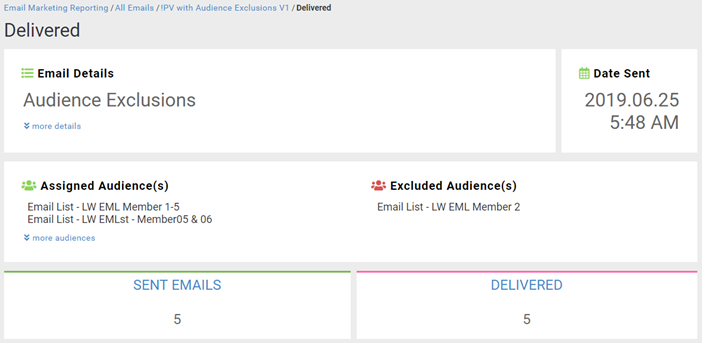
In addition to the recently added Assigned Audience(s) your admins can now see Excluded Audience(s) displaying which lists/segments were used to build an audience.
Encompass
When activated, this new page can be found by hovering over the Gold Key icon in the top right of the application. It will provide Admins with detailed information regarding failed Commerce transactions, as well as a way of extracting that information from the system to provide to your payment gateway for quicker error resolution on their side.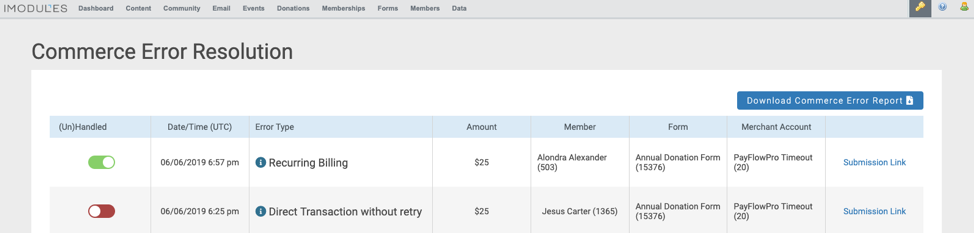
Note: At this time, the Admin Error Resolution Page is only available to our customers who use Payflow Pro as their payment gateway.
A new support page has been added for this feature, and more detailed information can be found here.
Scoreboards
In addition to creating gradient maps, customers now have the ability to create Breakpoint Maps. These provide customers with more flexibility when creating the maps they need. Whereas gradient maps choose the color gradient based off of the scale you decide to use, the Breakpoint map provides the admin with full control over where to add breakpoints and the color that each group should represent on the map (example below).
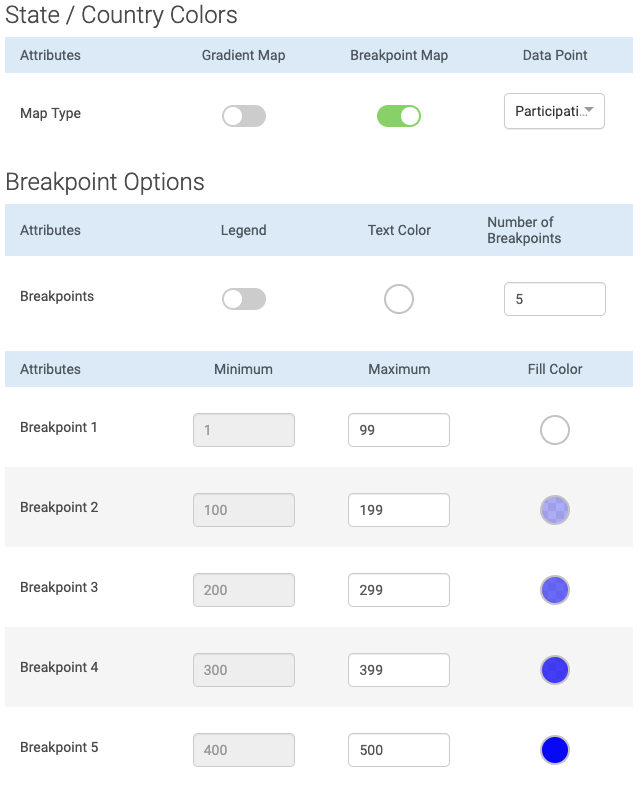
Customers can use this to either create their own custom gradient, or to create a map using their own school colors. The addition of a Legend also allows end users to easily understand what each color represents.
Defects
Email Marketing
##Full Name## system token has been designed to concatenate values from your First and Last Name fields and if you happen to create your own field using this token, we will prefer the computed field over that. (ENC-37768)
Provided additional validation around the format of a Sender Identities From Email Address value. (ENC-37619)
Scoreboards
Issue has been fixed where gradient maps displayed no visible color for low numbers when using donor count. This update more accurately displays different gradients within a map. This is now done by selecting a gradient scale within the configuration (see below). The scale ranges from 3 to 100 depending on how many gradients you would like to see. (ENC-37046)
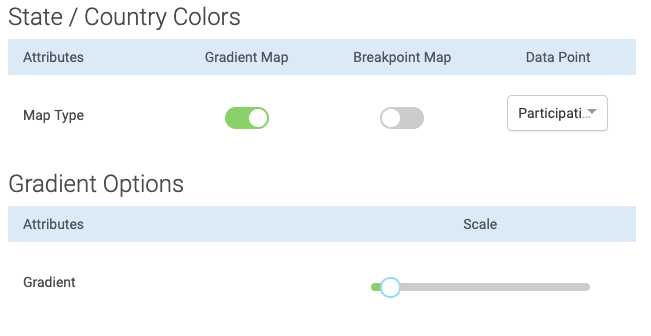
Encompass
New error message will display when there are an unequal amount of custom database values for each display option. Also, if any white space exists after the custom db values, the code should now ignore this and let the user move to the next step. (ENC-37651)
Release Notes - 3 June 2019
Please note that product releases are scheduled as followed by environment: Australian = Monday morning | Canadian = Monday evening | U.S. = Monday evening
Product Enhancements
Email Marketing
To improve email deliverability we will generate a text version of emails built in the drag and drop editor. This should help with emails being sent to spam folders since those type of messages do not typically contain a text version. Text will not need to be provided by your admins for these types of emails as this will be auto-generated on send and any recurring emails you have already established will also have it's respective text version accompanying these emails.
Info and success messages found through various parts of email marketing will fade away after being visible for three seconds. Alerts will remain on the page for your admin to acknowledge but to free up some real estate, we have enabled toast notifications to display at the bottom right of your screen.
Email Marketing Reporting
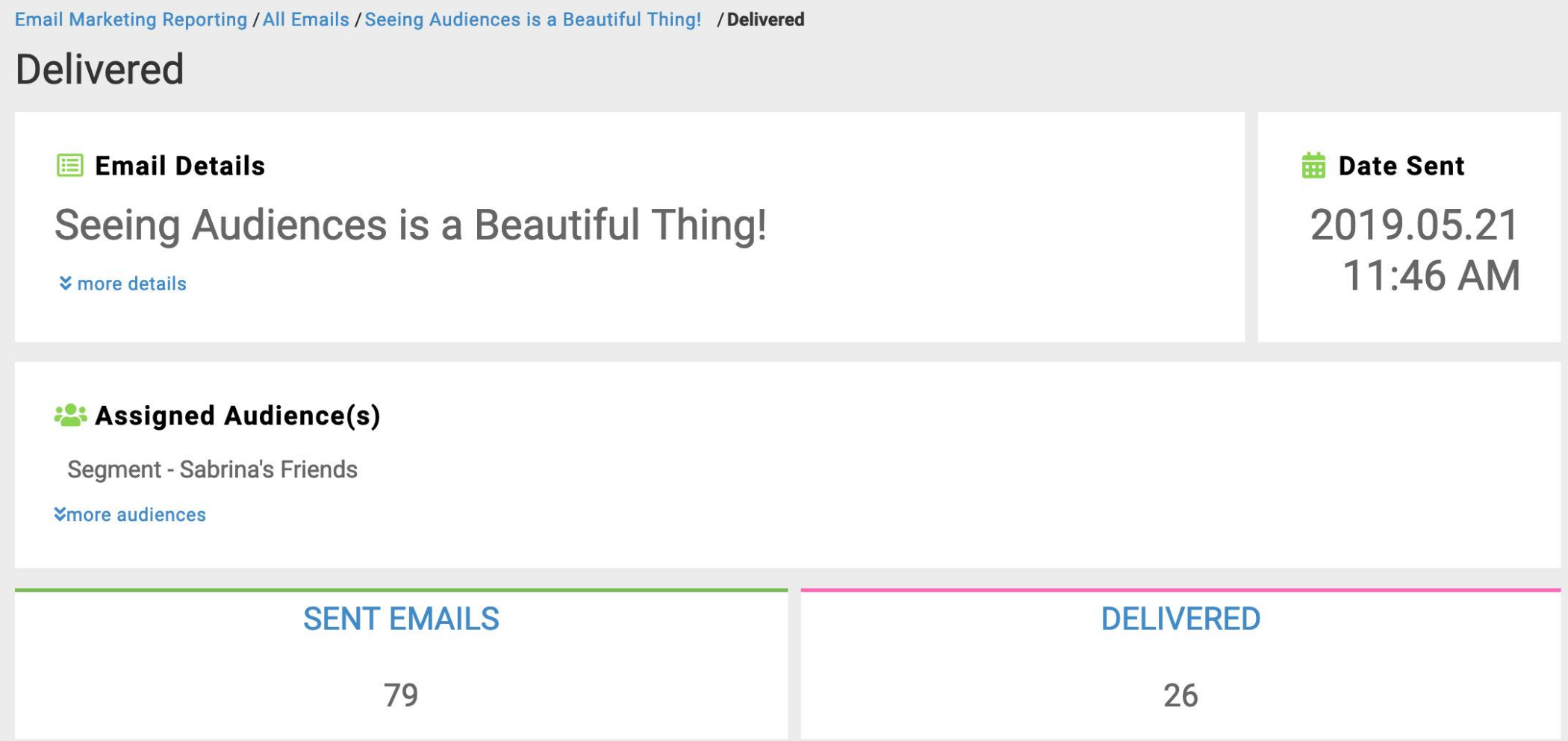
Very exciting add to reporting as your admins can now see which lists/segments were used to build an audience. The Assigned Audience(s) will be available in all drill down views.
 |
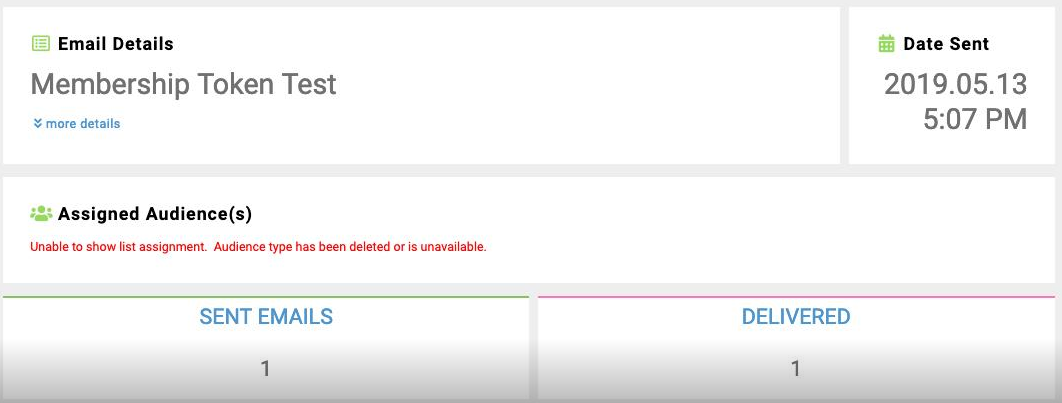
As for populating Audience Assignment on previous sends, we will be back populating this data for all emails unless the Email List or Segment has been deleted from your site. In the event that it has, you will see the below message in reporting.
 |
Email Reporting
Ability to view drill-down data in Email Reporting has been increased from 400 days to 460 days.
Defects
Email Marketing
##Full Name## system token has been resolved and will work in email communications. (ENC-36808)
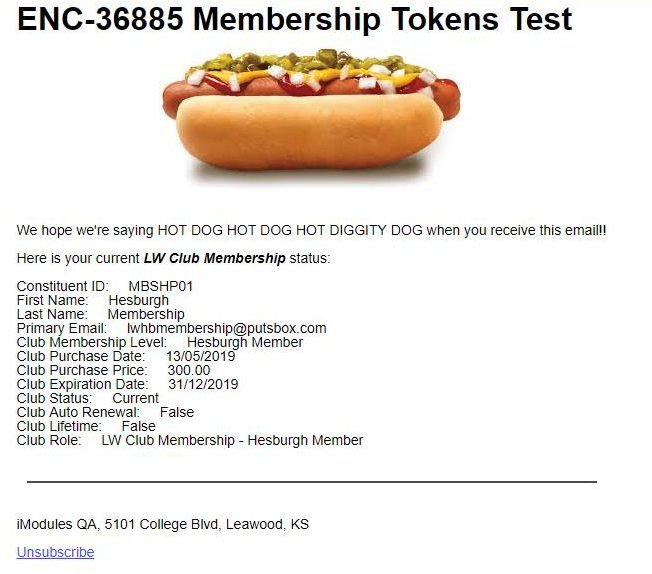
Membership tokens are also supported in new email marketing. (ENC-36885)
 |
Addressed an issue where Email Name is n/a. Past emails in this state cannot be resolved; however, going forward we will include the email_name for which the category unsubscribe occurred. Keep in mind n/a will still display if constituents opted out from their profile versus an email. (ENC-35282)
Encompass
Addressed an issue where Super Admins were able to access an "iModules Only" step on the constituent profile form, which should only be visible to coders and client services. (ENC-37626)
Addressed an issue where values that were being populated by constituents in a dropdown field on a giving form, were not being populated correctly in the confirmation email. (ENC-35737)
Corrected an issue where promo codes were being stripped from the URL (and not auto-populating) when the promo code was not asked for in the first step. Now, the URL keeps the promo code throughout the form - from first page to billing page. (ENC-35193)
Corrected an issue where negative values could display for an affiliation when no submissions were made with that value. (ENC-37143)
Corrected an issue where the Manage articles modal would show an infinite spinner when a value is not entered for the column. A null check has been added to allow changes to custom fields. (ENC-37014)
Resolved an issue where PCB article sorting was being adjusted after editing and saving of each article. Articles were being forced to be first in the sort order after a save event, requiring resorting of that item each time. (ENC-32012)
Addressed an issue where duplicates of transactions and designations were occurring if the timeframe for the query included both a failure and a success for a recurring payment. (ENC-36552)
Hotfix - 22, May 2019
Please note that product releases are scheduled as followed by environment: Australian = Wednesday morning | Canadian = Wednesday evening | U.S. = Wednesday evening
Product Enhancements
Email Marketing
Introduced performance improvement for email home.
Release Notes - 6 May 2019
Please note that product releases are scheduled as followed by environment: Australian = Monday morning | Canadian = Monday evening | U.S. = Monday evening
Product Enhancements
Email Marketing
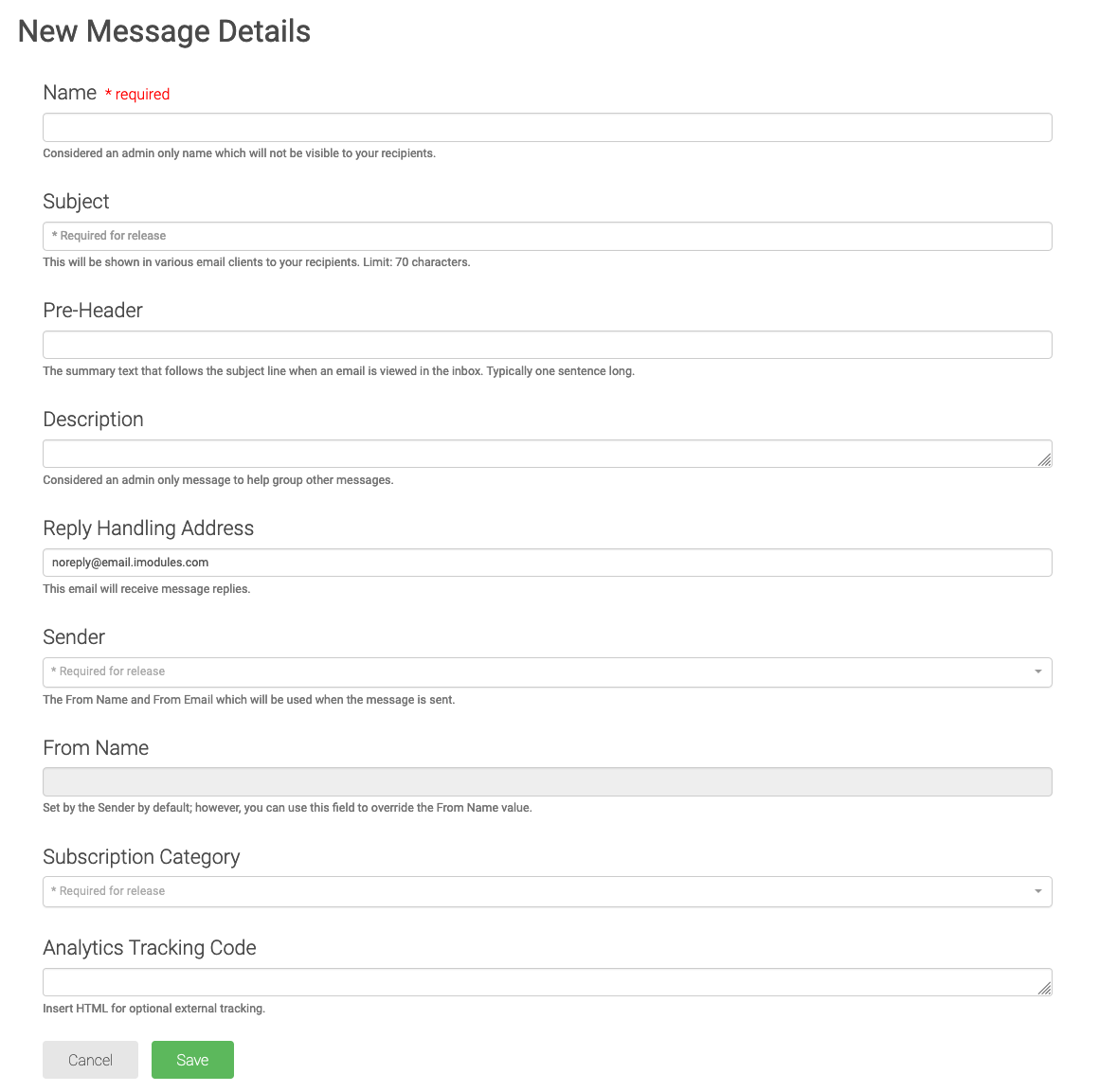
Refreshed the New Message Details to help give your new admins some direction on decisions they are making when filling out this page. Includes a new * Required for release for fields that don't need values to start an email but will need something when you plan to send it.
 |
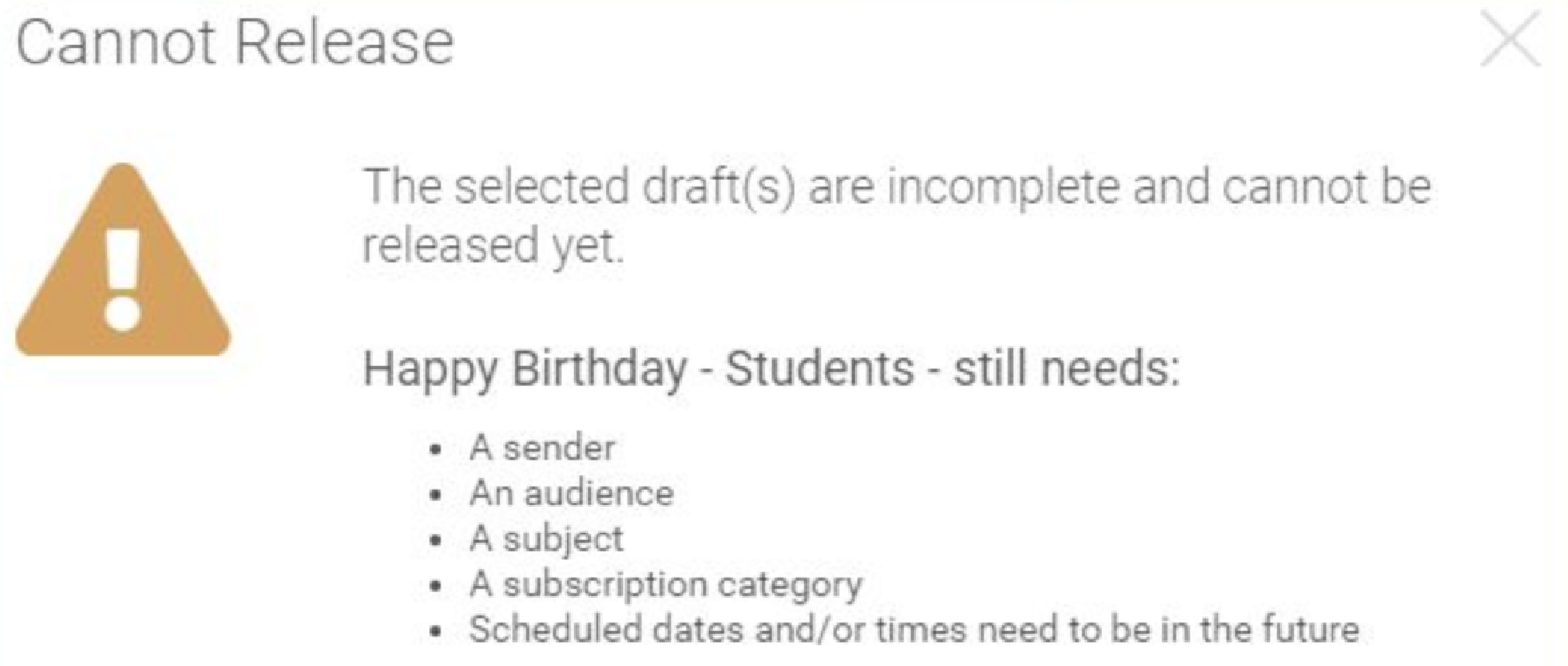
Release button will now always be active; however, if you have an email that is missing any required message details we will tell you which email is the offender and why it cannot be released.
 |
It is time for spring cleaning in Sender Identities and we are happy to report that your admins will be able to remove outdated or no longer relevant Sender Identities. If you copy/reuse an email that has a deleted Sender, we will not copy over those details for Sender or From Name.
Introduced some checks and balances here to help validate file uploads so that you can find out what may be wrong with your file on assignment versus after an email is sent. To summarize these awesome improvements:
Ensure that your file has only one header.
On file upload, we will perform a match on your constituent IDs and provide a correct count of valid constituent IDs out of invalid constituent IDs.
Invalid files will display as red during the assignment and you will be notified that we were unable to match any records to IDs in your file.
Email Marketing Reporting
Enjoy seeing how all of your recurring emails performed together. Explore different drill-downs and discover your recipients last activity or in other views what they may have done with this email of all time.
New columns have been added give our customers greater insight into all the drill down metrics and their percentages associated to an email campaign. The highlighted sections below are the new columns that have been added to help identify additional drill down metrics you would not have been able to previously export.
emailName
subjectLine
sentCount
scheduledDateTimestamp
delivered
deliveredPercent
bounced
bouncedPercent
opens
opensPercent
uniqueOpens
uniqueOpensPercent
clicks
clicksPercent
uniqueClicks
uniqueClicksPercent
initialClicks
initialClicksPercent
conversions
conversionsPercent
unsubscribes
unsubscribesPercent
spamReport
spamReportPercent
Encompass
Upgrades have been made to our commerce processing system to reduce the number of transaction timeouts and fatal errors. A new Admin "Error Resolution" page is now available for Early Adopters, which will highlight any fatal errors which occur during a Payflow Pro Gateway transaction, allowing the admin to take any action as needed to resolve the issue. This "Error Resolution" page will only be available to customers using Payflow Pro as a payment Gateway.
Recurring Payments will be disabled (without the ability to re-enable them) on a per-row basis if they meet the following criteria:
Last Updated is more than 18 month past and credit card is expired
User cancels their PayPal billing agreement
When pulling gift information through the Web Services API, all PayPal transactions are now populated with the Credit Card type value "UNK". This is to allow for better integration with other CRM systems.
For users integrating with Ellucian through the connector, please reach out to your Ellucian contact and work with them to add a new value in tms_credit_card to account for this change.
Defects
Email Marketing
Reduced the likelihood of a recurring email sending 2x in one day when pulled back to drafts.
Addressed niche scenarios where successful sends were appearing as stuck-in-Queued.
Hotfix- 16 April 2019
Please note that product releases are scheduled as followed by environment: Australian = Tuesday morning | Canadian = Tuesday evening | U.S. = Tuesday evening
Product Enhancements
Email Marketing
Introduced some checks and balances here to help validate file uploads so that you can find out what may be wrong with your file on assignment versus after an email is sent. To summarize these awesome improvements:
Ensure that your file has only one header.
On file upload, we will perform a match on your constituent IDs and provide a correct count of valid constituent IDs out of invalid constituent IDs.
Invalid files will display as red during the assignment and you will be notified that we were unable to match any records to IDs in your file.
It is time for spring cleaning in Sender Identities and we are happy to report that your admins will be able to remove outdated or no longer relevant Sender Identities. If you copy/reuse an email that has a deleted Sender, we will not copy over those details for Sender or From Name.
Defects
Email Marketing
Further enforced the rules when selecting from multiple constituent records with the same email address.
The rules that are followed by the Email Marketing system are implemented in the following order of preference when dealing with multiple constituent records with the same email address:
1. If there is only one record that is a constituent, that record is used.
2. If there are multiple records that are constituents and only one has a Constituent ID, that record is used. This will eliminate the non-member account for the email address.
3. If there are multiple records that are constituents and have Constituent IDs and only one has both First and Last Name, that record is used. This will prevent the scenario of multiple dummy Constituent IDs from legacy imports. NOTE: This is not applicable if all records have a blank Last Name and some have a First Name, for example. No preference would be given to those records with a First Name.
If needed, there are optional 4th and 5th criteria to narrow down to the final sending email address:
4. If there are multiple records that are constituents, have Constituent IDs, and have First and Last Names, the most recently updated record is used.
5. Lowest / Oldest Member ID (internal iModules system ID) is the final tie-breaker. The lowest Member ID (internal iModules system ID) was selected because that is most likely the original account for the constituent, since it is most likely the one that was originally imported / added to the online community.
* If there are multiple records that are constituents, have Constituent IDs, have First and Last Names, and have the same last updated date, the lowest Member ID is used.
* If there are multiple records that are constituents, have Constituent IDs, and have First and Last Names, the lowest Member ID is used.
Encompass
ENC-37381: When registering for Events with Activity-Driven Forms, constituents that receive the "Registration for at least one activity is required to proceed" error, are now able to select any activity for the missing registrant and complete the registration successfully.
Release Notes - 1 April 2019
Please note that product releases are scheduled as followed by environment: Australian = Monday morning | Canadian = Monday evening | U.S. = Monday evening
Product Enhancements
Payment Gateways
We are working to make our form submission and commerce processing system even more reliable. Though, in frequent, users occasionally run into issue when submitting forms in the Encompass platform. Some examples of these issues might be an improperly configured form or a time-out when trying to process a transaction. We are working diligently to further reduce the likelihood of these types of issues occurring.
Defects
Scoreboards
Event revenue and adjustments should now match reconciliation reports with map regions. (ENC-36307)
Release Notes - 29 March 2019
Hotfix release for all environments.
Defect CorrectionsScoreboardsLeaderboardsENC-36900: What a pesky bug that showed back up where participation percentage showed a decimal on mobile. Resolved this by displaying the percentage values the same way as they display on desktop.
ENC-37101: Leaderboard field values (designations, custom fields, and groupings) will now display in alphabetic order prior to the start date of the campaign. This means when these fields have 0 participants and/or $0 dollars raised, this list will display alphabetically. Once the participation or money starts rolling in get ready for the board to order things properly.
Release Notes - 26 March 2019
Hotfix release for all environments.
Defect Corrections and we sprinkled in a nice to have too!
Email Marketing
ENC-36973: Introduced a safety net to catch emails that deliver 504 content to some recipients. Upon release of an email, if we are unable to successfully build the content and run the risk of presenting a 504 to your constituents, the email will fail to queue and be left on Email Home. An error message will be presented to your admins indicating this failure and they may attempt to release the email again.
ENC-37041: Redundant status messages are a huge bummer despite us loving to know that we have done something successful over and over.
This is fine.
This is fine.
This is fine.
No more! Duplicate status messages have been cleaned up to only display to you once. Enjoy the extra real estate you now have to build the most beautiful emails.
Release Notes - 14 March 2019
Hotfix release for all environments.
Defect Corrections and Follow-up Work
Email Marketing
Email reporting delivered and bounced counts are zero. ENC-37009
Email Marketing reporting metrics > 100% ENC-37040
The discrepancy in email metrics experienced by a select number of customers has been resolved and all metrics are being captured as of 5:00 p.m. Central 3/14/2019.
After further investigation of inaccurate or missing email reporting metrics, we have discovered additional inaccuracies for a select number of customers. iModules has identified that emails sent during March 6th through March 14th may have experienced inaccurate metrics across email reporting.
Please note that emails impacted by these issues, during this time-frame, still have incomplete reporting metrics.
Our technical teams are currently researching what is feasible for us to back populate and resolve for impacted emails. Please be patient as we work through our options, as we want to provide the most transparent and accurate representation of your metrics.
Stay tuned for an update in the following week on where we are at in this process.
Release Notes - 5 March 2019
Please note that product releases are scheduled as followed by environment:
Canadian = Tuesday evening | Australian = Wednesday morning | U.S. = Wednesday evening
Product Enhancements
Email Reporting
Recurring emails will now have a summary page in email reporting. This will provide additional reporting on the recurring campaign in addition to the individual email metrics.
NOTE: The drill-down summary reports are not available for this view at this time. This will be coming soon in a future release.
Defect Corrections
Email Marketing
Event Listing and Event Homepage Listing types will pull into sealed subs for Dynamic Content (ENC-35733)
Implemented various updates to improve performance and load times found in email marketing.
Viewing emails with robust content on a mobile device can often times trigger parts of that email to be truncated, hiding the remaining content (including the tracking action) behind a "Read More" button or link. To help address this, we have introduced the tracking action to now be at the beginning of the email regardless of the content to assist with more accurate open metrics for your institution.
Communications and Email Reporting Admins will now have access to the exception report found on the History tab. (ENC-35468)
In an attempt to address the
ReplyTo@imod.com On Behalf of From Name <fromemail@imod.com>
we have changed this to your sender header so the reply to address isn't displayed this way in Outlook. This will also change the Out of Office reply behavior as we will now send to the From email, which is expected behavior according to Outlook. (ENC-36370)
Giving
Resolved an issue where some constituents were able to skip over the required textbox when making a gift. (ENC-35789)
Resolved an issue where values entered in the required textbox were not saved. (ENC-33661)
Improved the flow where multiple designations that have required designation textboxes will now only require the donor to enter text on a designation they have specified an amount for. This will also help address scenarios where donors were not able to advance on the form with &BLEDIT was used. (ENC-35278)
Scoreboards
Event revenue and adjustments should now match reconciliation reports with map regions. (ENC-36307)
Resolved maps to properly show Puerto Rico when that region is selected via Home State field. (ENC-35665)
Release Notes - 28 February 2019
Please note that product releases are scheduled as followed by environment:
Australian = Thursday morning | Canadian = Thursday evening | U.S. = Thursday evening
Product Sunset
Legacy Email
If an admin clicks on certain aspects of Legacy Email they will be rerouted to a new landing page indicating that this page is no longer available. Examples of buttons being rerouted are: Express Email, Custom One-Time, Custom Recurring, and Advanced HTML.
Admins will no longer be able to reuse or delete emails in Legacy Email.
Release Notes - 4 February 2019
Please note that product releases are scheduled as followed by environment:
Canadian = Monday evening | Australian = Tuesday morning | U.S. = Tuesday evening
Product Sunsets
Legacy Email
A new message will appear in Legacy Email Home reminding admins that you will no longer be able to send emails through the Legacy System following February 28th at 7:00 P.M. CST.
The Email Menu will be updated so the New Email links are now primary on the left side of the menu. Legacy links will still be available under a Legacy Column on the right side of the menu.

Flagged Words
The Flagged Words feature of the Encompass platform will be sunset with the 4 February 2019 release. This feature compared form and community content submissions against a list of disallowed words for admin review. Flagged Words is being sunset due to low adoption and to improve the admin experience.
Security Updates
Platform
Improved security for form submissions to prevent automated sniffers/bots from submitting forms. (ENC-33286)
Improved security for link handling. The system will now ensure that URLs saved in content do not allow for the constituent to be returned to a URL with unauthorized domain after the constituent authenticates. (ENC-33285)
Product Enhancements
Email Marketing
A new feature that Advanced HTML Admins will have access to. The feature will allow you the ability to clone an email made in the drag-and-drop editor to create a new HTML version of this email. This will allow the ability to use the drag-and-drop editor for the main portions of your design and then create an HTML copy for other tweaks that your team might need.
Note: This will create a new copy of the email. Any changes made to either email instance going forward will not update the other instance.
Email Sent is now the History tab! This grid will also have a new Status column that will provide updates on emails you and your staff send. Want to check and see if the email was successful or is still processing to send? This is the perfect column that allows you to get near-real time updates of your sends with tool-tips that inform you about each step in the process.
Scoreboards
The Rugby Club wants to set a goal of $5,000 and see how their donations are tracking? Now they can. Schools have the ability to set a Goal for a given designation in Leaderboard based on dollars or participation. (ENC-35735)
PayPal
Schools that have a billing agreement and account directly with PayPal can setup Merchant Initiated Billing in the Payment Gateway. When a constituent logs into their PayPal account to review charges they will then see the school's branding for recurring charges. (ENC-35964)
Defect Corrections
Commerce
Resolved an issue where credit status icons were no longer displaying for recurring payments. (ENC-36408)
Email Marketing
Clients who have computed first name, last name or email fields will now be able to use the new audience types - Email Lists and Email Lists (Merge Fields). Happy list making! (ENC-36247)
Events
We will now pull the same payment gateway assigned to the event you are cloning from. (ENC-35373)
Scoreboards
Resolved an issue where checkboxes were no longer displaying for Available Form(s). (ENC-36466)
Release Notes - 30 January 2019
Please note that product releases are scheduled as followed by environment:
Hotfix release scheduled for all environments.
Defect Corrections
Email Marketing
Email (Template or HTML)
Will now support [ ] in the body of your email for member tokens. (ENC-36674)
Date time and currency decimal tokens will now pull in the appropriate value in email. (ENC-36036)
Release Notes - 23 January 2019
Please note that product releases are scheduled as followed by environment:
Hotfix Release scheduled tonight for US and CA. AU will be tomorrow morning.
Defect Corrections
Email Marketing
Continue to address and fix all currently known stuck-in-Queued scenarios.
Removed Email Sent column to improve performance on the All Recipient view. (ENC-36607)
Scoreboards
Resolved issue where skipped billing was not populating the map properly. (ENC-35665)
Release Notes - 14 January 2019
Please note that product releases are scheduled as followed by environment:
Australia = Monday 10:00 a.m. CST | CA & Int'l = Tuesday 10:00 p.m. CST | U.S. = Tuesday 10:00 p.m. CST
Sunset Planning
Legacy Email
In Legacy Email, you will no longer be able to schedule emails after February 28, 2019 at 7:00 PM CST.
Product Enhancements
Email Reporting
Ability to view drill-down data in Email Reporting has been increased from 275 days to 400 days.
An additional recipients view of all recipients is now available in the left navigation. In this view you will also be able to search for a specific recipient to retrieve their drill-down information. This will follow the same time range of all drill-down data for email reporting. The current range is the past 400 days.
Email category has now been added to the export report on the Email Reporting Dashboard.
Scoreboards
The Rugby Club wants to set a goal of $5,000 and see how their donations are tracking? Now they can. Schools have the ability to set a Goal for a given designation in Leaderboard based on dollars or participation. (ENC-35735)
Defect Corrections
Commerce/Payment Gateways
Using appeal codes on PayPal transactions will persist through steps in the URL as well as during the transactions. In turn, this will display in reporting. (ENC-35724)
Events
Corrects an issue where activities listed at the end of a step were not having their respective activity instructions displayed to the admin or constituent views of an event form. (ENC-35980)
Email Marketing
Additional logging and research around this issue has lead to fixes being deployed in this release that accounts for all currently known stuck-in-Queued scenarios.
Reporting
Resolved an issues where reconciliation reports would render a blank screen. (ENC-35439)
Resolved delivery issues where scheduled reports were not sending at the frequency requested. (ENC-35560)
Remedied an issue where selecting specific activities or categories in event reporting was not selecting the appropriate fields.(ENC-35573)
Standardized the data type of the commerce instance identifier fields to reduce unnecessary resources in reading and writing the values. This allows for quicker response times in queries relating to commerce (e.g. reconciliation reports, GTE, web service transaction queries, etc.)