2024 Release Notes
Illuminate October 2024 Release
Continuous Delivery | Release to Production 23 October 2024
Illuminate, Updated Features
Data Q&A available in Canada & Sydney
In addition to being available in the EU and US, Data Q&A is now available for clients hosted in the Canada and Sydney regions. We’re adding support for more regions in the future. Using Data Q&A, viewers can ask questions based on available topics and receive an answer in the form of a dashboard. The dashboard has multiple visualizations, as well as a text-based summary generated by AI.
Note
Data Q&A is not currently available to viewers with restricted access to data. Only institutions that have adopted Institutional Authentication and opted in to Data Q&A in Settings can use Data Q&A.
New Global Settings
The Global Settings page now includes a control for session timeout. Clients can select a timeout between 15 minutes and 8 hours. It also includes an institutional email field. We recommend that clients populate this email with the most appropriate address to receive notifications of system outages, planned maintenance windows, and other important information.
Native authentication password rotation
Although we encourage all clients to use Institutional Authentication for greater security and to unlock additional features, Illuminate native authentication is still supported. Native authentication refers to signing in with an individual Illuminate account. In order to improve security for this method, we are enforcing password rotation every 90 days. Users may update their password at any point by following the “Forgot password” link on the login page.
Illuminate September 2024 Release
Continuous Delivery | Release to Production 5 September 2024
Developer, Security
IP Address Restriction enabled for Snowflake Service Accounts
Coverage: Illuminate Included and Enhanced Reporting Module
Users impacted: Users with developer role in Illuminate and BBDATA_USER_ROLE in Snowflake
Related Topics: IP address restriction for Snowflake service accounts
We are committed to data security for all our clients. Now, institutions can give and restrict access to Snowflake service accounts to specific IP addresses. This reduces the risk of unauthorized access to sensitive data.
With a restricted IP address, users won’t be able to access a Snowflake service account or change a Snowflake account password.
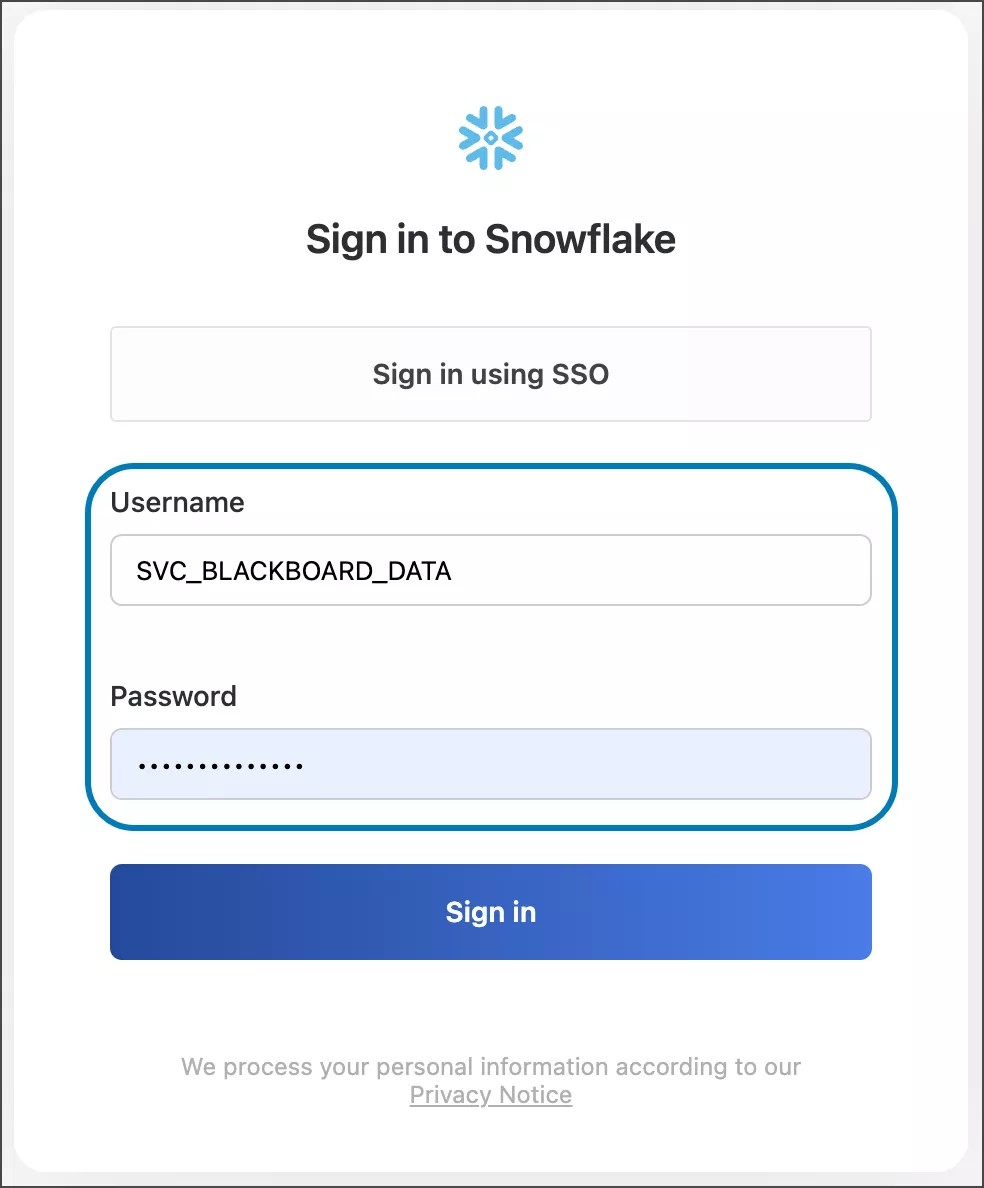
Service accounts are accounts that sign in to Snowflake with a username and password.
Image 1. Service account in the Snowflake sign in page.
You can allow and restrict a specific IP address or range of IP addresses
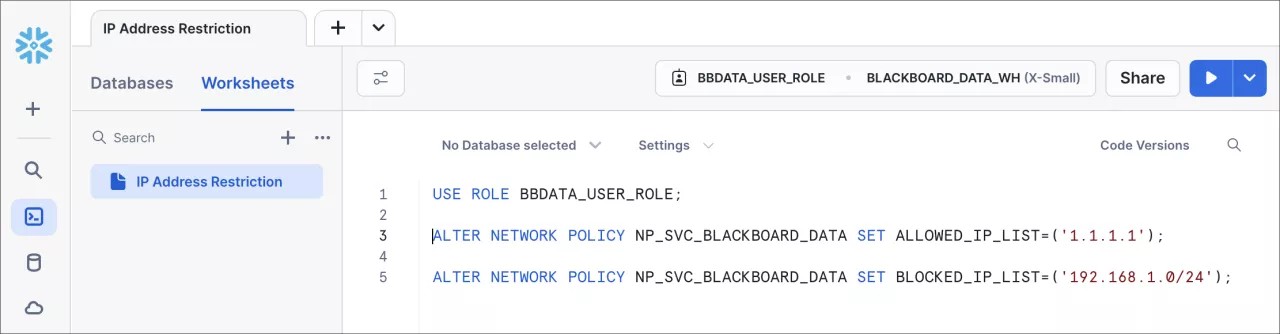
This example query allows a specific IP address (1.1.1.1) and restricts a range of IP addresses from (192.168.1.0 to 192.168.1.255) for a service account called SVC_BLACKBOARD_DATA.
USE ROLE BBDATA_USER_ROLE;
ALTER NETWORK POLICY NP_SVC_BLACKBOARD_DATA set ALLOWED_IP_LIST = ('1.1.1.1');
ALTER NETWORK POLICY NP_SVC_BLACKBOARD_DATA set BLOCKED_IP_LIST = ('192.168.1.0/24');
Image 2: Query in Snowflake to allow a specific IP address and restrict a range of IP addresses.
You can find more examples of IP address restriction on the IP address restriction help page.
Illuminate July 2024 Release
Continuous Delivery | Release to Production 24 July 2024
Reporting, Updated Features
AI Design Assistant Adoption Report
Previously available only to clients opting into the Illuminate Preview program, this report is now generally available to all clients. It reports on usage of the AI Design Assistant in Blackboard Ultra over time, by institutional hierarchy node, course, and instructor.
Data Q&A
Previously only available as part of the Illuminate Enhanced Reporting upgrade, Data Q&A is now available as a feature of Illuminate. Data Q&A is included at no additional cost for clients hosted in the US and EU regions, with further regional support to follow. Using Data Q&A, you can ask a question based on available topics and receive an answer in the form of a dashboard with multiple visualizations, as well as a text-based summary generated by AI from the visualizations.
Note
Data Q&A is not currently available to Viewers with restricted access to data, which will follow in an update to the topic, and is only available to institutions that have adopted Institutional Authentication.
Improvements to reports:
Student Performance and Grade – This report has been updated to improve visual and filtering consistency.
Learning Platform Adoption – The 4-level Institutional Hierarchy filters have been added to all tabs except the Originality Tool Adoption tab.
Collaboration Session Activity Report – This report now supports role-based access.
Learning Tools Adoption Report – This report now supports role-based access.
LMS Trends Report – This report, which is available to advisors within Anthology Reach, now has printing enabled.
Data model improvements:
A new canonical sub-model has been deployed for CRM use cases, based on data available in Anthology Reach.
Note
This sub-model is not yet populated and is deployed in order to generate feedback and prioritization of future expansion. We are working towards data ingestion for Reach clients and will share progress in a future release.
Illuminate Developer Canonical Data Model changes
Continuous Delivery | Release to Production 24 July 2024
Developer, CDM Changes, Data Dictionary
Date (YYYY-MM-DD) | Status | Entry | Source | Description |
|---|---|---|---|---|
2024-06-21 | Added | Anthology Reach | A new canonical sub-model for CRM data, to be populated with data from Anthology Reach CRM in a later release. |
Blackboard Data Developer Canonical Data Model changes
Continuous Delivery | Release to Production 24 July 2024
Developer, CDM Changes, Data Dictionary
Date (YYYY-MM-DD) | Status | Entry | Source | Description |
|---|---|---|---|---|
2024-06-21 | Added | Anthology Reach | A new canonical sub-model for CRM data, to be populated with data from Anthology Reach CRM in a later release. |
Illuminate April 2024 Release
Continuous Delivery | Release to Production 30 April 2024
Reporting, Updated Features
Improvements to our Home Page for a consistent and better user experience.
Role-Based Access is now available for clients using Institutional Authentication with SAML as their identity provider. This feature allows access to compartmentalized reports, enabling administrators to give users the permissions to log into reporting and access data only from the nodes they are associated with.
Now, administrators can assign roles and permissions to allow or restrict user access to specific reporting areas.
Tip
Find out more about Role-Based Access and Roles and Permissions
In Custom Reports , a feature of the Illuminate Enhanced Reporting premium upgrade, Authors can now easily create visualizations through simple drag-and-drop actions, selecting metrics from pre-built datasets already connected in their instances. This eliminates the requirement for SQL skills.
Pre-built datasets included are:
Person Course Summary
Learning Filters All Roles
RLS Filters
Additionally, Authors can now choose to cache data and refresh it based on their preferred schedule. They can also upload flat files like CSVs or Excel spreadsheets, enabling seamless incorporation of external data into Enhanced Reporting.
Other improvements and bug fixes:
In Learning :
In the Social and Collaborative Engagement Report we solved an issue with the Institutional Hierarchy Levels and the Tool type filters. In the Virtual Engagement tab, we also fixed an issue with the x-axis of the stacked bar for the student distribution by participation in Collaborate sessions. Those values are now correctly sorted.
The Student Summary Report now supports Role Based Access.
In Leading :
In the Learning Platform Adoption Report , we fixed the filters for the ‘What institution roles access LMS sessions?’ visualization and implemented several performance improvements.
The Course Administration Report now supports Role Based Access.
Illuminate Developer Canonical Data Model changes
Continuous Delivery | Release to Production 30 April 2024
Developer, CDM Changes, Data Dictionary
Date (YYYY-MM-DD) | Status | Entry | Source | Description |
|---|---|---|---|---|
2024-04-17 | Added | LEARN. AI_STATE | A new column in the CDM_LMS-COURSE_ITEM table with an indicator that defines the AI Design Assistant use. The PERSON_ID field needs to be populated with the ID of the user who accepted the AI-generated content |
Illuminate March 2024 Release
Continuous Delivery | Release to Production 26 March 2024
Reporting, Updated Features
One new report in the Leading area:
To provide a better understanding of how tools are being used and adopted in the Institution, we have improved the Learning Tools Activity and Use report.
The Learning Tools Adoption Report now includes key information on tools usage, identifies which courses and Institutional Hierarchy Nodes use specific tools, and allows for easy comparisons of tools usage across different timeframes.
The report has two tabs:
Overview
Comparison
Find out more about the Learning Tools Adoption Report .
For institutions with Anthology Student, new SIS filters and attributes were incorporated into the Student Performance and Grades and the Social and Collaborative Engagement reports:
Course Modality
Grade Level
Program
Course Retake
Primary Instructor
Tip
A distinct indicator (🔹) identifies data sourced from the Student Information System (SIS) allowing institutions without SIS data to recognize why certain elements are not populated. The overall functionality of the report remains unchanged.
Illuminate Developer Canonical Data Model changes
Continuous Delivery | Release to Production 26 March 2024
Developer, CDM Changes, Data Dictionary
Date (YYYY-MM-DD) | Status | Entry | Source | Description |
|---|---|---|---|---|
2024-02-27 | Changed | LEARN.GRADE | The logic was updated, ensuring that all calculated grades are now available in the Canonical Data Model. |
Illuminate February 2024 Release
Continuous Delivery | Release to Production 21 February 2024
Reporting, Updated Features
Illuminate has a new URL: https://illuminate.blackboard.com/. Users can still access Illuminate using the previous URL.
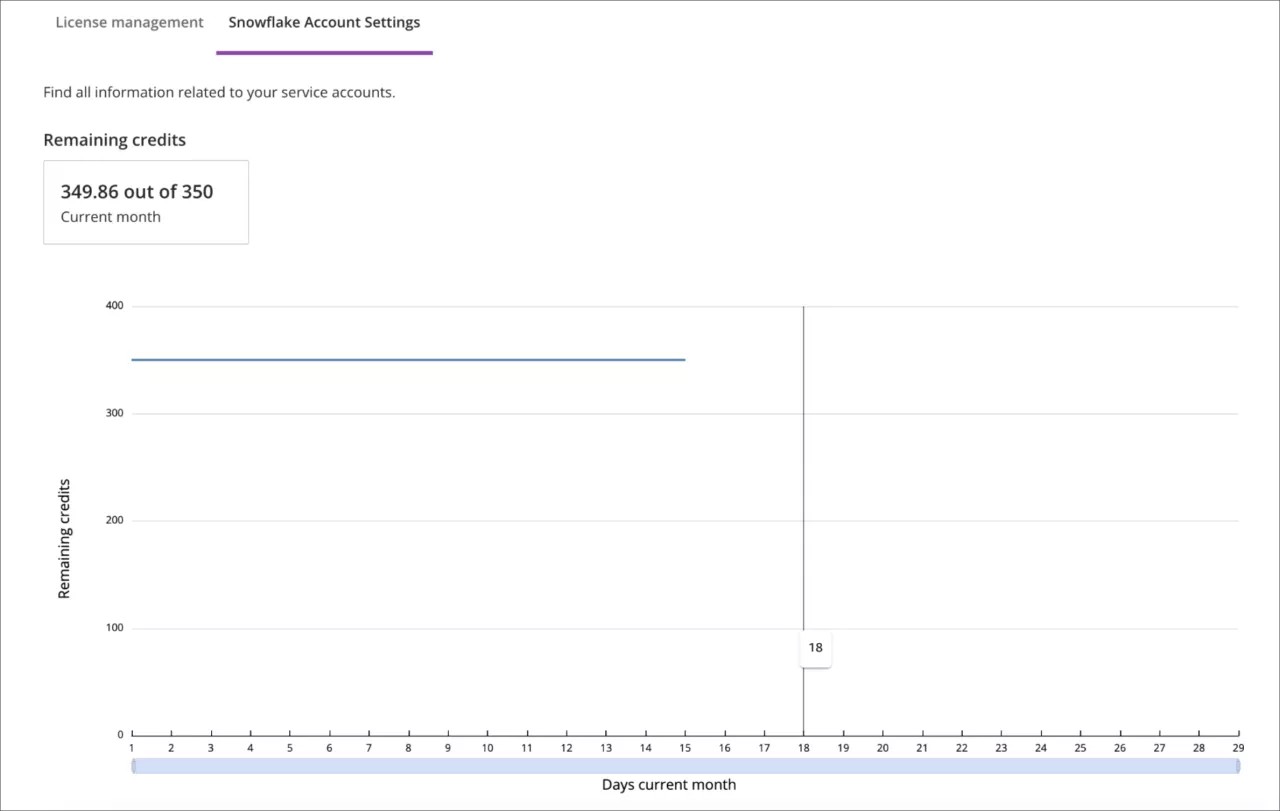
In Settings, under the Snowflake Account Settings tab, a credit burndown chart is now available for better control of the institution's monthly credit usage.
Other improvements and bug fixes:
In Learning, in the Student Summary Report: We fixed an issue with the Course ID value. It now appears in the Course summary Report for consistency between reports. Additionally, in the Activity Log Tab, we are now filtering out “Root” and “Interactive” elements from the item column.
In Teaching, in the Instructional Practice Report: We resolved an issue with the filter controls of the Virtual Classroom Engagement Tab and updated the Collaborate Session calculations for consistency within the report.
In Leading, in the Course Administration Report: We addressed an issue related to the percentage of new updated items. Previously, it filtered out any items created before the course creation date, resulting in always showing a 100% percentage and an artificially low item count. This issue was solved by modifying the logic behind the course item count to consider items created or modified after the course creation time, thus removing the template items.
In Leading, in the Learning Platform Adoption Report: The LMS Activity Tab now includes 4 levels of Institutional Hierarchy, allowing Institutions to set their own context and zoom in on the data they need.
In Custom Reports, Authors can enjoy a better user experience with an improved frame and expand/collapse actions.
Illuminate Reporting January 2024 Release
Continuous Delivery | Release to Production 24 January 2024
New Features, Updated Features
In Teaching, the Course Summary Report is now supported for Role Based Access for clients with Institutional Authentication using Blackboard Learn as the identity provider.
In Custom Reports, Authors can now seamlessly share dashboards with report viewers within their institution.
Tip
More about Role Based Access
Illuminate Developer Canonical Data Model changes
Continuous Delivery | Release to Production 24 January 2024
Developer, CDM Changes, Data Dictionary
Date (YYYY-MM-DD) | Status | Entry | Source | Description |
|---|---|---|---|---|
2024-01-19 | Added | LEARN.USERS.JOB_TITLE | A new column in the CDM_LMS_PERSON table with the job of the person was added. | |
2024-01-19 | Added | LEARN.USERS.DEPARTMENT | A new column in the CDM_LMS_PERSON table with the department the person is part of was added. | |
2024-01-19 | Added | LEARN.USERS.COMPANY | A new column in the CDM_LMS_PERSON table with the company the person is part of was added. | |
2023-12-21 | Added | DATA_SRC_BATCHUID | DATA_SOURCE | A new element to the stage attribute of the PERSON and COURSE tables was added to include the BATCH_UID from the DATA_SOURCE table. |