Import Data to Data Management
Data Management supports manual and automated imports for data transfers.
The following checklists provide an overview of the resources and skills required to complete data transfers for each method.
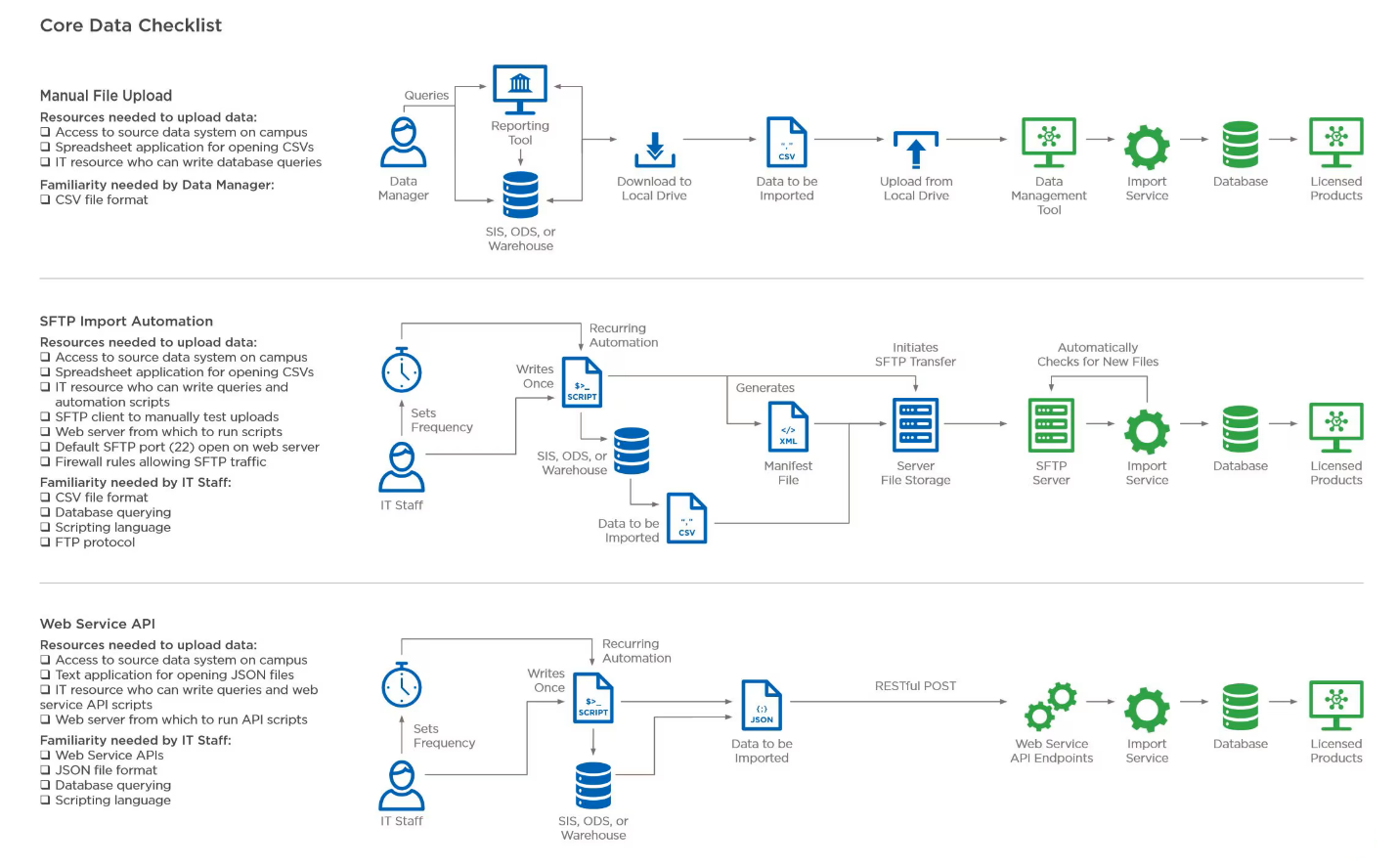 |
sFTP File Transfers (recommended)
sFTP File Transfers are our recommended method of transferring data.
This data transfer method allows institutions to send large data sets to the platform by saving CSV "flat" files containing data for Accounts and Courses into a Blackboard Institutional Effectiveness hosted directory via a sFTP connection. Evaluate will use Accounts and Course data. The institution must provide the data in the file format indicated by Blackboard Institutional Effectiveness along with a manifest file (.done file) which indicates to the platform that the data file is complete and ready to be imported. Once the data and manifest files are saved to the directory, the platform processes the file and incorporates the information into its data set. Any errors are displayed via a web interface accessible by the Campus Data Manager.
Resources needed to upload data
Access to source data system on campus
Spreadsheet application for opening CSVs
IT resource who can write queries and automation scripts
SFTP client to manually test uploads
Web server from which to run scripts
Default SFTP port (22) open on web server
Firewall rules allowing SFTP traffic
Familiarity needed by IT staff
CSV file format
Database querying
Scripting language
FTP protocol
Web service and API endpoints
A more advanced method, requiring proficient campus IT professionals, which allows both bulk and individual field loading of data to the platform via secure, scheduled transactions over the internet. Each data type endpoint offers the ability to create, retrieve, and update the data. This additional, fine-toothed control of each data type offers institutions ultimate flexibility in the delivery and management of Data Management in the platform.
Refer to the Data Management API documentation for more information.
Resources needed to upload data
Access to source data system on campus
Text application for opening JSON files
IT resource who can write queries and web service API scripts
Web server from which to run API scripts
Familiarity needed by IT staff
Web service APIs
JSON file format
Database querying
Scripting language
Manual file uploads
This method requires a user to import the data via a web interface (Data Management site). This method is the most limited in terms of flexibility and is not considered best practice when the more robust options are possible.
There are considerations and conversations to have on campus before moving forward, Including:
Is the campus expecting to use an SSO? The Data Management site only matches with one form of ID. This could be the persons' ID or campus email address.
What are the Organizational Units for the institution? What is your Institutional Hierarchy?
This will impact how reports are disseminated and who will have permission to view any reports.
Does your hierarchy reflect how your data should be aggregated?
What are your Academic Terms? Are they standard for all courses or are there variables? Terms should reflect the time periods where the data is collected.
Consider users that need access to the system for information or have reporting needs. Privileges within the system can be made to the discrete user.
These decisions will influence what is included as data is imported into the system.
Resources needed to upload data
Access to source data system on campus
Spreadsheet application for opening CSVs
IT resource who can write database queries
Familiarity needed by Data Manager
CSV file format