Data Integration Concepts
Import order
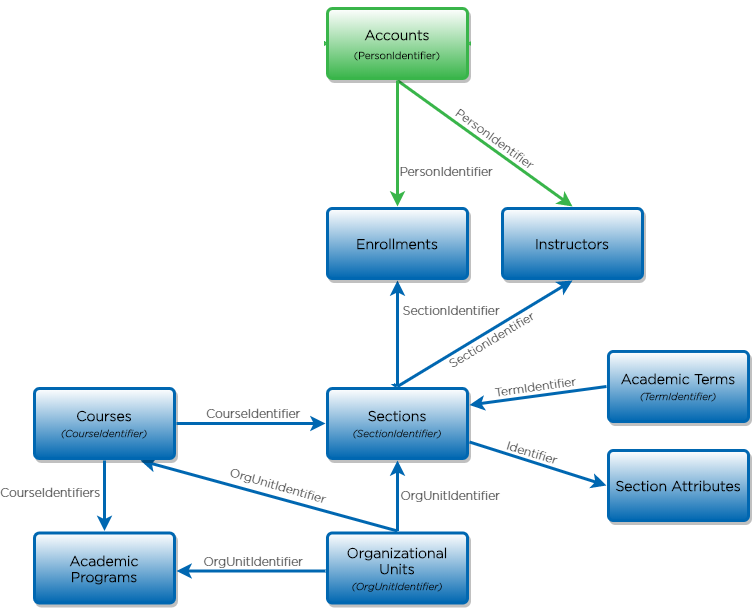
Because of the nature of these relationships and the way they build connections, files must be imported in a specific order. Importing out of order can lead to errors and import failures. If, for example, you load Enrollments before Sections, the system attempts to connect students to sections that do not yet exist, and the file fails. The correct order is detailed below. Note that not all files are required, and the files needed for your implementation should be discussed with your consultant during onboarding.
00 Accounts
01 Organizational Units
02 Academic Terms
03 Courses
04 Sections
05 Section Attributes
06 Instructors
07 Enrollments
08 Remove Instructors
09 Academic Programs
Record updates
Most files accepted by Blackboard Institutional Effectiveness products import by adding new records and updating existing records. However, some files are strictly additive and only add new records without updating existing records. Others take a “rip and replace” approach, in which existing records are completely rewritten. In this situation, any data points from the existing record that are not present in the new file are lost. When building data files, you must consider how the files are loaded on import to ensure completeness and accuracy over time.
Enumerated values
There are some fields throughout the data files that are enumerated. The Data Management Dictionary defines the fields that only accept enumerated values. After reviewing these fields, your team must decide how your campus will translate your SIS values to these values. Identify how each of these data points are expressed in your SIS data and build case statements into the script to populate the field with the correct string.
Duplicates
Each file has a unique identifier field (defined in the Data Management Dictionary). Records with duplicated unique identifiers error on import. Often these duplicates are caused by multiple distinct records in the SIS and logic needs to be added to the script to only join unique records. This may require more in-depth analysis to differentiate the records and determine which to select.
Nulls
Blackboard Institutional Effectiveness products do accept blank values for non-required fields. Scripts should be written to leave the field empty instead of populating with a NULL value. If a required field is left blank, it will create an error on import.
Term Logic
Your institution must decide when to begin and end loading data for each term. Prior to beginning to implement, the institution should make a holistic decision about when to send data for a given term based on the products you are using. Once that decision is made, term logic for each individual file should be decided. Whether you need data as soon as web registration begins or at the start of the term, the goal is to ensure that data for the correct terms is always pulled at the correct time. This can be accomplished by building logic into the scripts that compares the current date against the tables that define academic term and web registration dates; doing this allows the script to automatically extract the data for only the relevant terms. It is important to note that at certain points in the academic year, more than one term of data may need to be sent. When no data should be imported, an empty file with headers should be created, which the Data Management system ignores on import. This enables the automation to be scheduled to run every night.