Institutional Authentication
Institutional Authentication is a single sign-on service for Blackboard Illuminate that provides seamless authentication between Blackboard LMS and Illuminate. This gives an increased level of security and control over the Illuminate Account authentication methods and additional features in Illuminate.
Institutional authentication also enabled you to grant access to Illuminate to users managed in Blackboard LMS or SAML.
Note
To begin using Institutional Authentication at no extra cost, submit a support ticket to request access.
Types of Authentication in Illuminate
Illuminate has two authentication types:
Native Authentication: The previous default authentication method for Illuminate. Users sign in with a username and password. User creation and management must be requested through a support ticket. All native users have full access to the platform.
Institutional Authentication: The newest and recommended authentication method for Illuminate. This method uses your institution’s existing authentication system. Institutional Authentication uses your existing usernames and passwords.
Important
If your institution still uses Native Authentication, we recommend transitioning to Institutional Authentication.
Institutional Authentication provides you with greater control over who can access Illuminate, and what they can see. Institutional Authentication uses your existing usernames and passwords, and your existing name directory or identity provider, as well as authentication groups and/or system roles in Blackboard LMS to drive access to Illuminate Developer and Reporting.
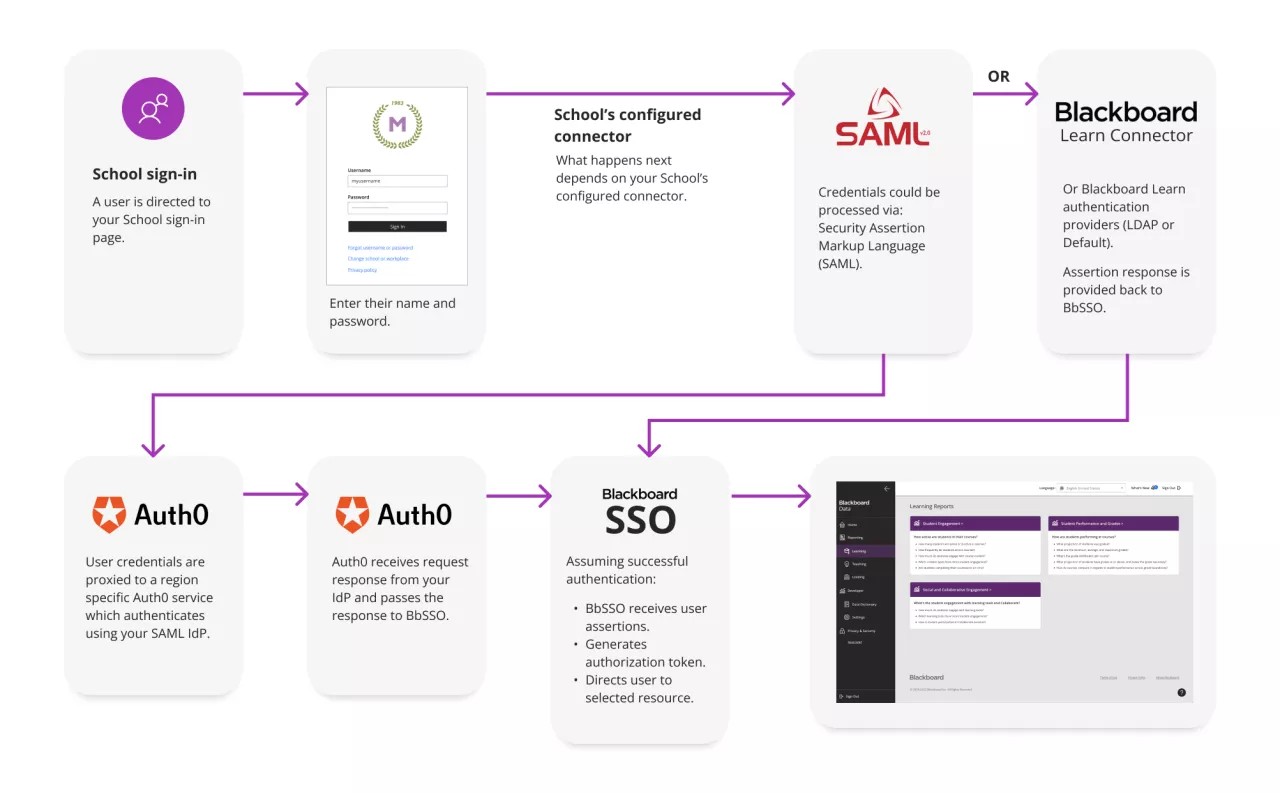
Institutional Authentication supports two authentication providers or connectors:
Our SAML Connector: Any SAML-based identification provider (SAML IdP: Shibboleth, ADFS, and others.)
SAML Connectors always use your web-based credential page as provided by you or your SAML IdP.
The SAML Connector requires the use of SAML groups to control who has access to Illuminate Reporting and Developer.
Our Blackboard Connector: For those who use LDAP or the Blackboard LMS Default Authentication Provider.
Blackboard LMS Connectors always use a campus branded sign-in page.
The Blackboard LMS Connector uses the password stored in Blackboard LMS for a user, which usually doesn’t exist if you’re using single sign-on into Blackboard LMS, so this approach may add to the administrative load for the system administrator who would have to set and manage passwords on users’ behalf.
A combination of our SAML and Blackboard LMS Connector.
Blackboard’s recommended authentication path is based on SAML. This is because the information and security for web application authentication as provided by SAML exceeds that provided by the older LDAP and Blackboard LMS default authentication providers.
Campuses who are not using SAML as their identity provider should consider doing so to see the full security benefits of Institutional Authentication.
Additionally, campuses who currently separate their users between their SAML identity provider and Blackboard LMS-only accounts will need to reconsider their Blackboard LMS-only user management.
Setting Up Institutional Authentication
To request Institutional Authentication setup, submit a support ticket requesting Institutional Authentication for Illuminate. A support representative will contact you to guide you through the adoption process.
The setup process can be significantly sped up if you're able to provide in your initial request:
Confirmation of which identity provider you will use (SAML with groups or BlackboardConnector).
The contact details of an authentication expert at your institution.
Frequently asked questions
No. Institutional Authentication uses your institution’s single sign-on for accessing Illuminate, but does not replace it.
No. Institutional Authentication is designed to be as transparent to users as possible while adhering to industry best practices. While users will see some redirection upon their initial login, they will use the same usernames and passwords as they do now.
Yes. Any issues with Institutional Authentication sign-in and related product access may be addressed by filing a support ticket via Blackboard Global Support.
Note
Note that username and password assistance is provided by your campus or, provided you have a contract, by Blackboard Student Services.
Institutional Authentication is built on a tech stack based on security industry best of breed solutions and practices which are also implemented by many well-known vendors: Okta™, Microsoft 365™, Azure™, and Amazon™ to name just a few.
Additionally, by not exposing name directories to external applications on the internet or requiring external application specific usernames and passwords we are creating a more secure authentication environment for you and your faculty, students, and staff.
Tip
Example of Blackboard LMS Single Sign-On (BbSSO) workflow.
Yes, to comply with security and legal requirements, your Illuminate session times out after 15 minutes. However, this will not log you out of other SSO-connected applications.
In addition to understanding how your users accounts are managed in Blackboard LMS, Institutional Authentication adoption requires an understanding of your name directory or identity provider systems. At a minimum, the following staff should be engaged in completing the questionnaire and be available for testing connectors.
Blackboard LMS Connector: your Blackboard LMS Administrator.
SAML: your Blackboard LMS Administrator and your institution’s SAML administrator or security officer.
Your Blackboard LMS Administrator needs to turn on the Institutional Authentication process and future logins through Blackboard LMS will be handled via Institutional Authentication.
Note
Clients using SAML will be asked to complete a short survey and be guided through the adoption process by Blackboard staff. Once Blackboard has configured your SAML connection in Institutional Authentication you will need to update your IdP configuration with the information we will provide. After this step is completed, the process of testing the connection can continue. Upon completion, the Blackboard LMS Administrators will need to turn on the Institutional Authentication process and future logins through Blackboard LMS will be handled via Institutional Authentication.
If you are not using SAML and are using the Blackboard LMS Connector, the process from request to use may take as little as two business days from start to finish. In most cases, this change may be near immediate and dependent only on turning on the feature in Blackboard LMS.
If you are using SAML, the process will take longer due to the complexities of SAML configuration and testing. This time varies greatly from case to case. A minimum expectation should be on the order of seven to ten days from start to finish.
No. Institutional Authentication will not affect the service account, as it is not configured to use any single sign-on method. Service account credentials are managed on the Settings page by those with appropriate access.
Key benefits of Institutional Authentication
Enhanced Security: Illuminate access is protected by your Blackboard LMS or SAML security rules.
Role-Based Access: Customize user permissions so users can focus only on the areas, reports, and data relevant to them.
Easier User Management: With Single Sign-On (SSO) user management is easier in general. Your users just need to remember a set of credentials. Or if users leave your institution, you can revoke their access from a single platform without needing to update multiple places.