Calculation Setup
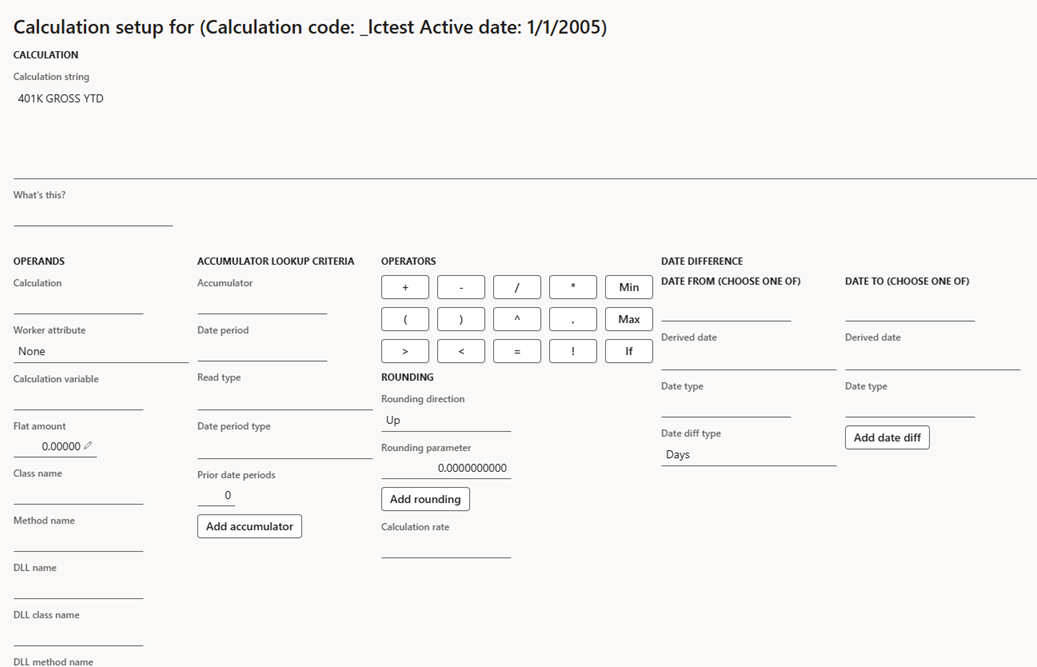
Accessed from:
- Setup > Tables > Calculations > Calculations > calculation > Rule tab > Edit
Description
This form is where you define the Calculation string (or Calculation result) for a single calculation. The string defines what type of value is returned to the function that uses the calculation.
The calculation string must follow strict syntax rules. The form contains functions to test and validate your calculation string.
If you copy the name of an object from the calculation string and paste it into the What's this? field, Anthology Payroll will attempt to provide you with more information about it. For example, if you copy the name of an accumulator in the string and paste it into the field, the form displays information such as the accumulator type and unit.
Fields
| Section | Field | Description |
|---|---|---|
| Calculation | Calculation string | Formula that defines the calculation's value. All operands, accumulators, operators, etc., are added to this field. This field is validated when selecting the Validate button. |
| Operands | Calculation | Add another calculation's result as an operand. The referenced calculation is then calculated as part of this calculation. A calculation should not reference itself, nor should two different calculations reference each other to prevent infinite loops. |
| Worker attribute |
Add a worker's attribute as an operand:
|
|
| Calculation variable | Add a calculation variable as an operand | |
| Flat amount | Add an explicit flat amount as an operand. Alternatively, type directly into the Calculation string. | |
| Class name | Add a Dynamics application program interface (API) class as an operand. Must be selected with a Method name. | |
| Method name | Add a Dynamics API method as an operand. Must be selected with a Class name. | |
| DLL name | Add a custom dynamic link library (DLL) as an operand. Must be selected with DLL class name and DLL method name. | |
| DLL class name | Add a custom DLL class as an operand. Must be selected with DLL name and DLL method name. | |
| DLL method name | Add a custom DLL method as an operand. Must be selected with DLL name and DLL class name. | |
| Date difference | Date | Select an explicit calendar date for Date from or Date to |
| Derived date |
Select one of the following system-derived dates for Date from or Date to:
|
|
| Date type | Select a user-defined date type for Date from or Date to | |
| Date diff type |
Derived value between the two dates to use in the calculation:
|
|
| Accumulator lookup criteria | Accumulator | Select an accumulator to use as an operand |
| Date period | Specify a date period to override the accumulator's default. Select Add accumulator to add the override. | |
| Read type | Specify a read type to override the accumulator's default. Select Add accumulator to add the override. | |
| Date period type | Specify a date period type to override the accumulator's default. Select Add accumulator to add the override. | |
| Prior date periods | Number of past date periods the accumulator can retrieve data from, if the accumulator is allowed to view prior periods. Select Add accumulator to insert the value into the accumulator lookup function. | |
| Operators | + | Add |
| - | Subtract | |
| / | Divide | |
| * | Multiply | |
| Min | Select the lesser of two inputs | |
| ( ) | Parentheses for order of operations | |
| ^ | Exponent | |
| , | Comma separator used in other operations to demarcate parameters and operands | |
| Max | Select the greater of two inputs | |
| > | Greater than inequality operator | |
| < | Less than inequality operator | |
| = | Equal to inequality operator | |
| ! | Not inequality operator. Must be used with =. | |
| If | Conditional operation. Selects one of two values depending on the results of a condition clause. Syntax is: IIF(condition, value when condition is true, value when condition is false). | |
| Rounding | Rounding direction |
Type of rounding to apply to an input:
|
|
Rounding parameter |
Nearest amount the rounding operation rounds to. A parameter of 0 enforces no rounding, while a parameter of 1 rounds to the nearest integer. Parameter can be any decimal value up to 10 decimal places. |
|
| Rate | Calculation rate | Specify a calculation rate to apply the result of the Calculation string to a rate table. The result from the rate table is then returned as the calculation's final result. |
| Calculation setup | Validate | Perform syntax validation on the Calculation string. If the string has invalid syntax, a pop-up alert appears. |
| Test | Open the Calculation test dialog to allow you to provide test inputs to the operands of your Calculation string to test the calculation. Also validates the string before opening the dialog. |
|
| Save | Save your changes to the Calculation string |
|
| Close | Close the form. Does not automatically save changes to the Calculation string. |
