Pay Groups
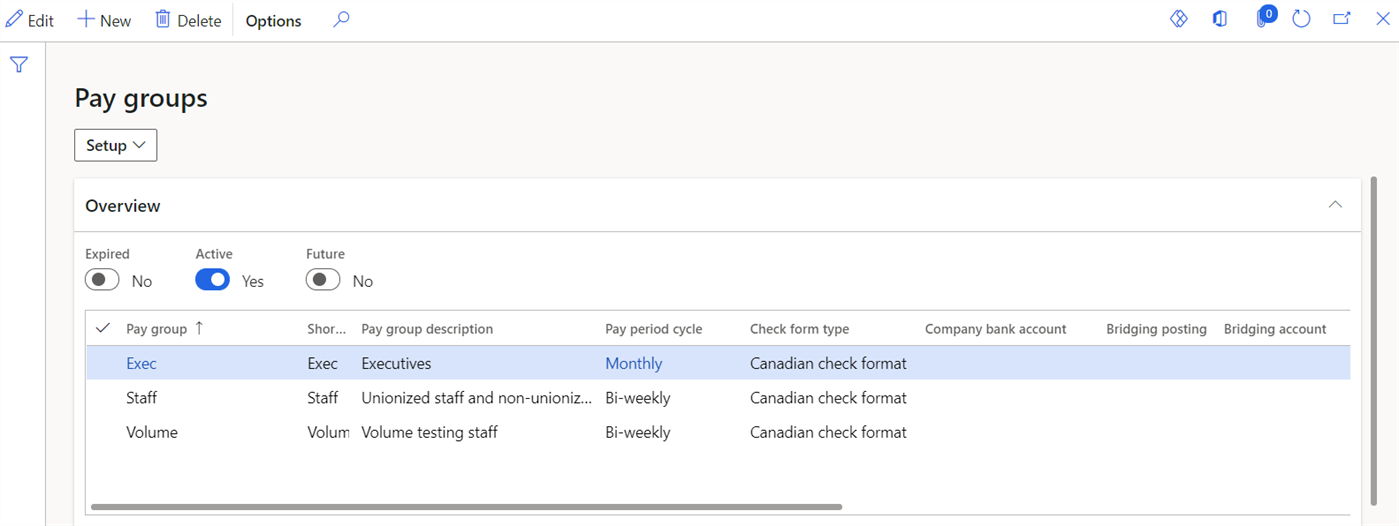
Accessed from:
- Setup > Tables > Payroll > Pay groups
Description
This form contains all the pay groups defined for the current company. All workers must belong to at least one pay group to be processed for pay. Workers are assigned a pay group through their position on the Worker positions form.
Links
| Button | Link |
|---|---|
| Setup | Pay group accumulators |
Fields
| Field | Description |
|---|---|
| Pay group | Name of the pay group |
| Short code | 5-character identifier. Defaults to the first five characters of the name. |
| Pay group description | Long description of the pay group |
| Pay period cycle | Frequency of pay for the pay group. One full iteration is how often workers in this group are paid. |
| Check form type | Language-based format for printed paychecks |
| Company bank account | Default financial institution for paying out transactions in this pay group. Selectable options are defined in the Cash and bank management module. |
| Bridging posting | Yes to allow bridging accounts for transaction postings. No, otherwise. |
| Bridging account | The account for bridging posting in Accounts payable or Accounts receivable. When set, all transactions are posted to this account for review prior to being posted to their intended accounts. This field is enabled when Bridging posting is set to Yes. This account can be overridden at the payment level. |
| Currency | Default currency type of transactions for this pay group. Selectable options are defined in the General ledger module. |
| Future entry periods | Maximum number of future pay periods where time and earnings can be entered for this pay group. Manual payments may also be processed for these future pay periods. |
| Multi-state tax processing | Option for processing in multiple jurisdictions for the same pay group. US localization only. |
| Go live date | Date used in payroll implementation |
| Number of work days per week used in legacy payroll | Option used in payroll implementation |
| Active date | First date the record is in effect |
| Expiry date | Last date the record is in effect |
