Payment Methods
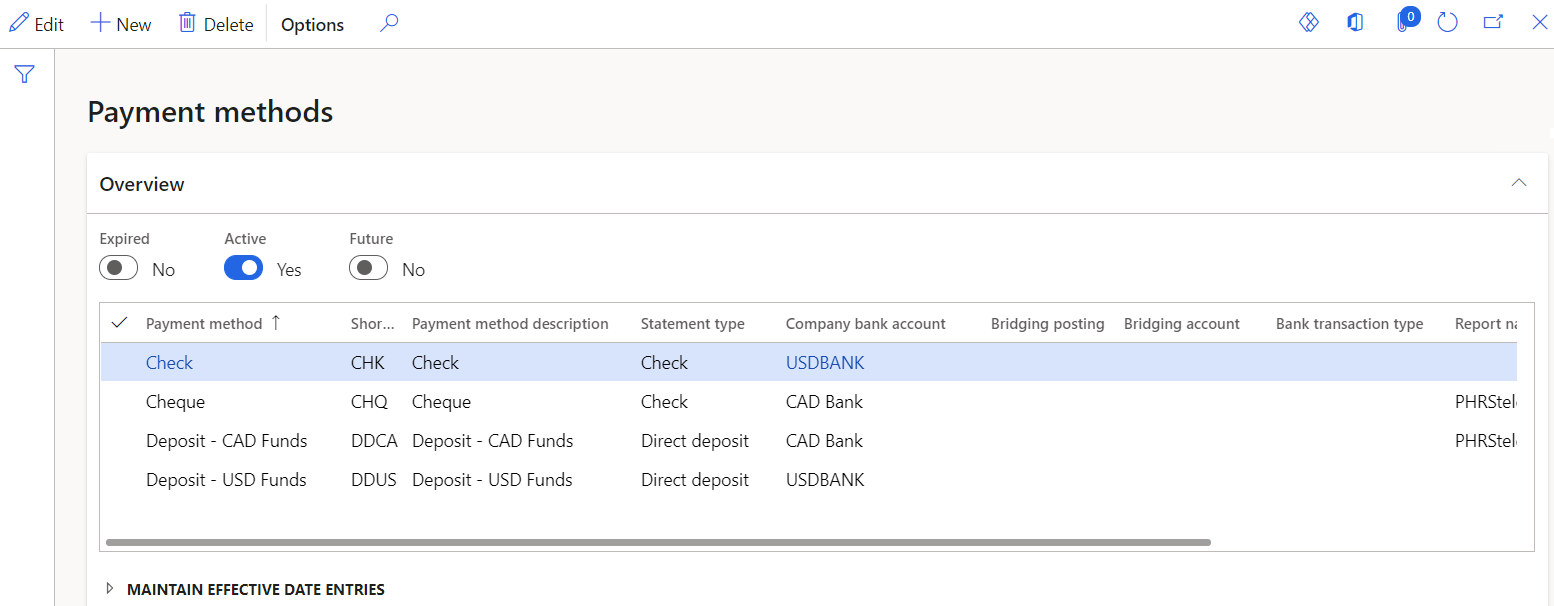
Accessed from:
- Setup > Tables > Payments > Payment methods
Description
Payment methods define default bank accounts or report formats for check and direct deposit methods.
You must have at least one payment method for checks and one for direct deposits if your company pays workers using one or both methods.
Fields
| Field | Description |
|---|---|
| Payment method | Name of the payment method |
| Short code | 5-character identifier. Defaults to the first five characters of the name. |
| Payment method description | Long description of the payment method |
| Statement type | Check or Direct deposit |
| Company bank account | Default bank account used for all payments of this method. Bank accounts are defined in the Cash and bank management module. |
| Bridging posting | Yes to indicate that payments using this payment methods are to be posted to a bridging account in the General ledger module. All transactions posted to a bridging account can then be reviewed prior to posting to their actual accounts. No, to indicate bridging accounts are not used. |
| Bridging account | Bridging account to post all payments using this payment method to if Bridging posting is set to Yes. |
| Bank transaction type | Type of bank transaction |
| Report name | Default report format (check layout) for payment reports of this method |
| Active date | First date the record is in effect |
| Expiry date | Last date the record is in effect |
