Generated Earnings Enrollments
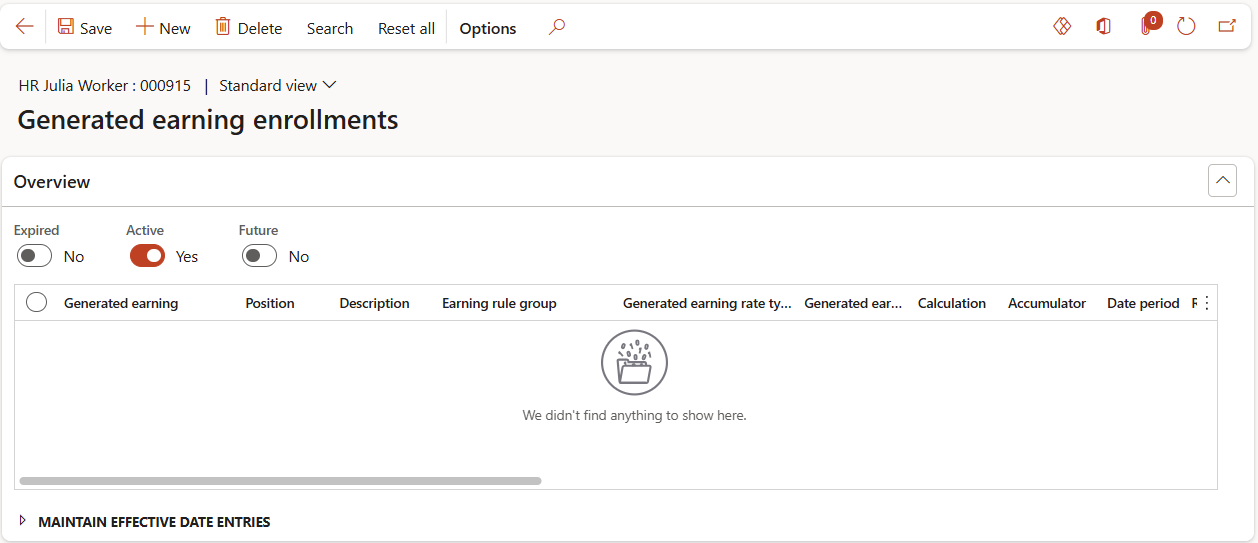
Accessed from:
- Common > Anthology Payroll workers list > worker > AthPay Profile tab > Update Earnings and Benefit/deductions section > Generated Earnings Enrollments
Description
This form allows you to enroll workers in specific generated earnings. The worker's enrollment determines how the generated earning is calculated for that particular worker.
Additional Tabs
| Tab | Tab Functions |
|---|---|
| Fast entry | Add/remove multiple generated earning enrollments for multiple workers or positions |
Fields
| Field | Description |
|---|---|
| Generated earning | Name of the worker's generated earning |
| Position | Worker's position to which the generated earning applies |
| Description | Long description of the worker's position. Read-only. |
| Earning rule group | Worker's earning rule group for their position |
| Generated earning rate type | Amount for amount-based earnings. Hours for hours-based earnings. |
| Generated earning rate | Multiplier rate or flat amount of the generated earning. Hours-based earnings are multiplied by this rate and amount-based earnings use this rate as the flat amount. This rate overrides the rate configured on the Generated earnings form. |
| Calculation | Calculated amount of the generated earning. A calculation overrides the Generated earning rate and any calculation on the Generated earnings form. |
| Earning | Earning code to be generated. This code appears on the worker's pay statement. |
| Minimum amount | Minimum amount for the worker to be paid each time this earning is generated. Overrides any defaults set on the earning. |
| Maximum amount | Maximum amount for the worker to be paid each time this earning is generated. Overrides defaults set on the earning. |
| Percentage | Percentage multiplier against the Calculation, if the worker is only to receive a portion of the calculated amount. Default is 100%. |
| Use FTE | Yes to apply the worker's full-time equivalency value to give only a portion of the generated earning. No, otherwise. |
| Accumulator | Accumulator reference to use in calculating the generated earning amount. Used with Generated earning rate. |
| Date period | Time period of the accumulator. Can be used as accumulator filter criteria. |
| Read type | Full amount or Incremental amount. Can be used as accumulator filter criteria. |
| Date period type | Date the accumulator updates its value. Can be used as accumulator filter criteria. |
| Prior date periods | Number of additional, past Date periods the accumulator retains its value for. Read-only. |
| Active date | First date the record is in effect |
| Expiry date | Last date the record is in effect |
| Source run type | Method the generated earning was created. Read-only. |
