How To Strip Formatting in Narratives
What: How to strip span formatting in narratives
Why: Sometimes users fail to use Paste as Plain Text when copying data from external sources. This can cause inconsistent font, font sizes, and font colors
Who on Campus: Users with ‘Contributor’ access to the narrative
Where is this located: Requirement > Options > Edit Item
How to Strip Span Formatting: (In the Edit Mode of your narrative)
1. Highlight the text with incorrect formatting
2. Click the down-arrow just to the right of the paintbrush icon in the text editor toolbar
3. Select Strip Span Elements
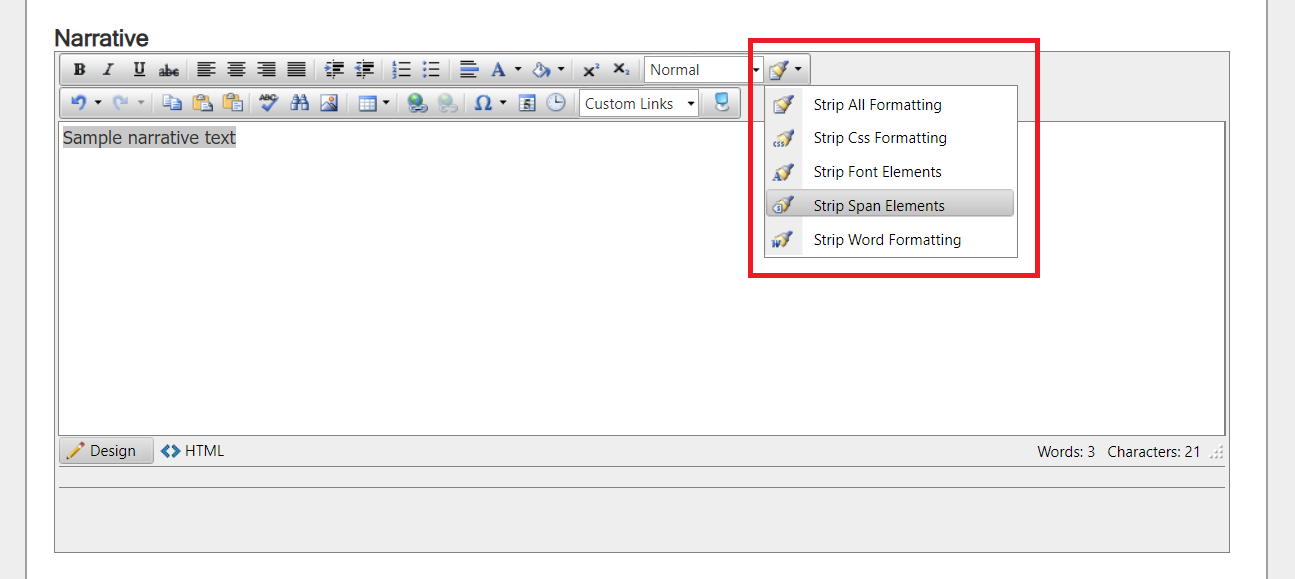 |
The system will strip the unwanted html characters.
4. Click Save to apply the changes
*Note you must only highlight text that does not include tables to use this function.
Paste content in plain text to eliminate the need to strip formatting from copied content.