Integrate External Document Status Records
The following flows are enabled to integrate Document records from Anthology Student to records of the External Document Status entity in Anthology Reach:
-
CNS-CNE Documents - External Document Status_Pull Based (Engage) – By default, this flow is set to run every 15 minutes and “pulls” Document records in batches of 100.
-
CNS-CNE Documents - External Document Status_Create/Update (Engage) – This flow is called from the above flow and creates and updates External Document Status records in Anthology Reach.
-
CNS-CNE Documents - External Document Status_Delete (Engage) – When a Document record is deleted in Anthology Student, this flow is triggered to also delete the equivalent External Document Status record in Anthology Reach.
In Anthology Reach, External Document Status records are:
-
Created when Document records are created in Anthology Student
-
Updated when corresponding Document records are updated in Anthology Student. For instance, the status of the records is updated from Required to Requested - Not Received, Requested - Required, Approved By Advisor, and so on.
Updates to External Document Status records will take place after Document records are initially imported manually or using an integration solution. This enables syncing to occur later in Anthology Reach as Document records are created or updated in Anthology Student.
Create or Update External Document Status Records
-
Import Document records from Anthology Student to Anthology Reach.
-
On the Default Configuration page, set a value in the External Document SIS Last Integration Time field.
Updates to External Document Status records will occur at 15-minute intervals in Anthology Reach.
Notes:
-
Mappings of fields of the Document entity in Anthology Student to the External Document Status record in Anthology Reach are available in integration mapping records. Administrators can add records or edit the current records to manage the integration in their scenario.
-
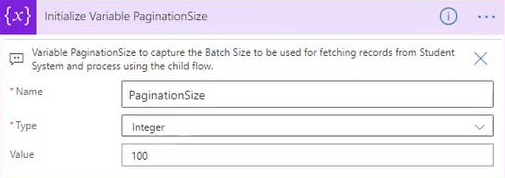
In the CNS-CNE Documents - External Document Status_Pull Based (Engage) flow, records will be “pulled” in batches of 100 until the record count in the source system is less than 10, after which records will not be “pulled” in the current cycle. “Pulling” will resume on the next run of the flow after 15 minutes to integrate the remaining records and any new records created during the interval.
-
The default batch size of 100 records can be changed in the following step in the CNS-CNE Documents - External Document Status_Pull Based (Engage) flow:
-
Integration errors will be logged in the Additional Details field in the integration log record that’s created for every run of the CNS-CNE Documents - External Document Status_Pull Based (Engage) flow.
-
Integrated External Student Status records will be displayed in reverse chronological order (default) in:
-
The contact (Student Progress > Enrollments > External Document Status tab).
-
The Enrollments grid (Recruitment > Enrollments > External Document Status tab).
-
